10 Best Invoicing Software for Consultants in 2026: Complete Comparison Guide
Discover the 10 best invoicing software for consultants in 2026. Compare FreshBooks, QuickBooks, Wave, Zoho Invoice & more. Find the perfect tool for time tracking, expense management, and professional billing.
Here’s a stat that might surprise you: the average consultant spends 4.5 hours per week on administrative tasks—with invoicing eating up the biggest chunk of that time. That’s nearly 25% of a standard work week spent chasing payments, formatting invoices, and reconciling expenses instead of doing billable work.
If you’re billing by the hour (and most consultants are), every minute spent on invoicing is money left on the table. The right invoicing software doesn’t just save time—it captures revenue you’d otherwise miss, speeds up payment collection, and makes you look more professional to clients.
What Is Consultant Invoicing Software?
Consultant invoicing software is a specialized tool designed to handle the unique billing needs of independent consultants and consulting firms. Unlike generic accounting software, these platforms understand that consultants bill by the hour, work on multiple projects simultaneously, and need to track time against specific clients.
The best solutions combine time tracking, expense management, project management, and invoicing into one seamless workflow. They let you capture billable hours as you work, automatically generate professional invoices, and give clients multiple ways to pay.
Why the Right Invoicing Software Matters for Consultants
Honestly, most consultants underestimate how much revenue they lose to poor invoicing practices. Here’s what the data shows:
- 30% of invoices are paid late when sent manually vs. 15% with automated systems
- Consultants using integrated time tracking bill 11% more hours on average
- Professional, branded invoices get paid 40% faster than plain text or spreadsheet invoices
- The average small business spends 120 hours per year on invoicing-related tasks
Beyond the numbers, there’s the professional image factor. Clients expect consultants to have their billing act together. Sending a hastily formatted Word document or Excel spreadsheet doesn’t exactly scream “premium expertise.”
Must-Have Features for Consultant Invoicing Software
Before diving into the specific tools, let’s establish what separates good invoicing software from great invoicing software for consultants:
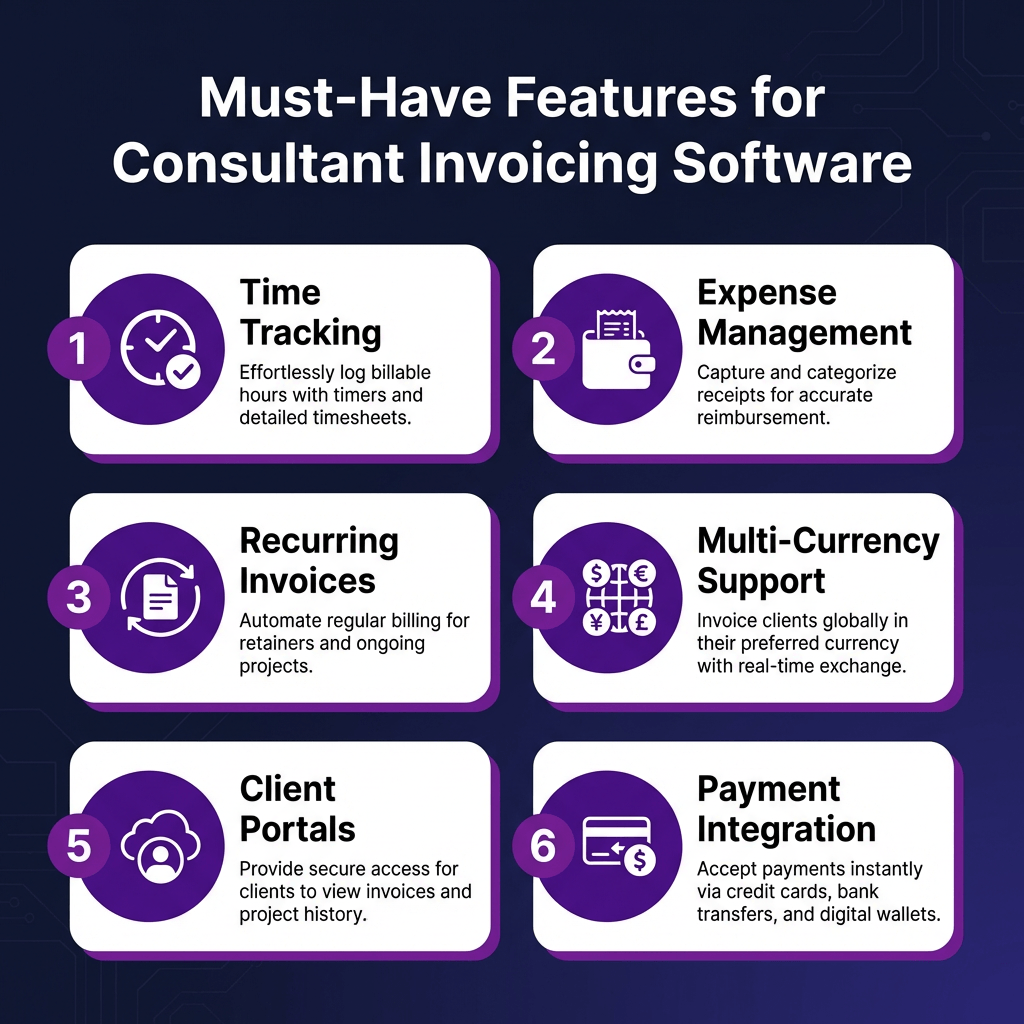
1. Time Tracking Integration
This is non-negotiable. If you’re billing hourly, your invoicing software needs to track time and convert it to billable hours automatically. Manual entry is where hours get lost.
2. Expense Management
Travel, meals, software subscriptions—consultants rack up reimbursable expenses. Your software should capture these, attach receipts, and add them to invoices seamlessly.
3. Recurring Invoices
Retainer agreements are the holy grail of consulting. Set up automatic monthly invoices and never think about it again.
4. Multi-Currency Support
If you work with international clients (and more consultants do every year), you need software that handles currency conversion and displays amounts in your client’s local currency.
5. Client Portals
Let clients view invoices, pay online, and download receipts without emailing you. It saves time and looks professional.
6. Payment Integration
The easier you make it to pay, the faster you get paid. Look for integrations with credit cards, ACH, PayPal, and Stripe.
The 10 Best Invoicing Software for Consultants in 2026
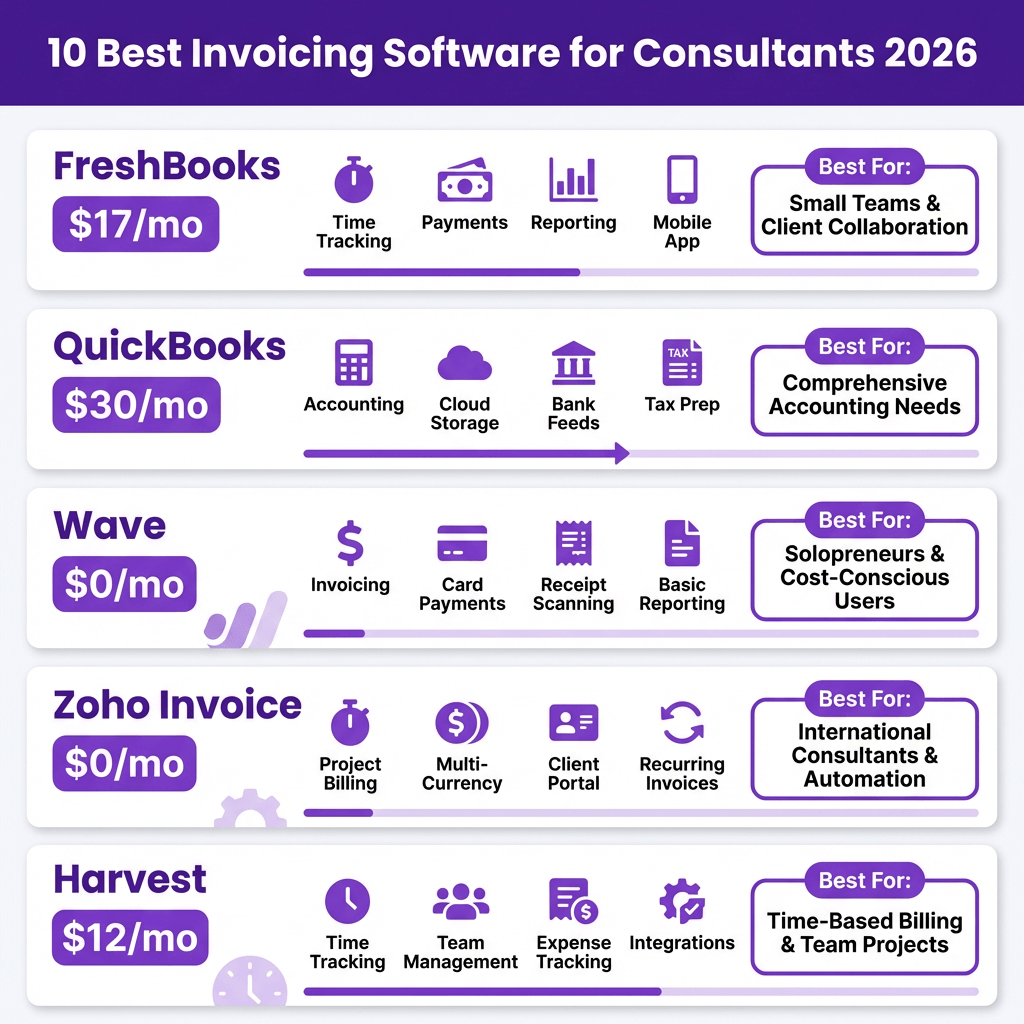
After testing dozens of platforms and analyzing real user reviews, here are the top 10 invoicing solutions for consultants in 2026:
1. FreshBooks — Best Overall for Consultants
FreshBooks has been the consultant favorite for years, and it keeps getting better. The platform was literally built for service professionals who bill by the hour.
Key Features:
- Automatic time tracking with desktop and mobile apps
- Expense tracking with receipt photo capture
- Recurring invoices and automatic payment reminders
- Project profitability tracking
- Client retainers and credit management
- 160+ currency support
Pricing: Lite plan starts at $17/month for up to 5 clients. Plus plan at $30/month adds unlimited clients and proposals. Premium at $55/month includes project profitability tracking.
Best For: Solo consultants and small firms who want an all-in-one solution with excellent time tracking.
2. QuickBooks Online — Best for Accounting Integration
QuickBooks is the 800-pound gorilla of small business accounting, and its invoicing capabilities are solid. If you need full bookkeeping alongside invoicing, this is your pick.
Key Features:
- Full double-entry accounting
- Time tracking via QuickBooks Time (separate subscription)
- Expense tracking and receipt capture
- Automatic sales tax calculation
- 1099 contractor management
- Robust reporting and analytics
Pricing: Simple Start at $30/month. Essentials at $60/month adds bill management and time tracking. Plus at $90/month includes project profitability and inventory.
Best For: Consultants who want invoicing integrated with comprehensive accounting and tax preparation.
3. Wave — Best Free Option
Wave offers surprisingly robust invoicing for exactly $0. It’s ad-supported, but the ads are unobtrusive and the features are genuinely useful.
Key Features:
- Unlimited invoicing and estimates
- Recurring invoices
- Automatic payment reminders
- Basic accounting and reporting
- Receipt scanning via mobile app
- Credit card and bank payment processing (paid feature)
Pricing: Free for invoicing, accounting, and receipts. Payment processing at 2.9% + $0.60 per transaction. Payroll starts at $40/month.
Best For: New consultants and freelancers who need professional invoicing without the monthly cost.
4. Zoho Invoice — Best for Zoho Ecosystem Users
Zoho Invoice is completely free and surprisingly full-featured. If you’re already using other Zoho products (CRM, Projects, Books), the integration is seamless.
Key Features:
- Unlimited invoices and customers
- Time tracking and expense management
- Multi-currency support
- Client portal for self-service
- Automatic payment reminders
- Integration with Zoho CRM and 40+ other apps
Pricing: Completely free. Yes, really.
Best For: Budget-conscious consultants who want premium features without the premium price.
5. Harvest — Best Time Tracking + Invoicing Combo
Harvest started as a time tracking tool and evolved into a full invoicing platform. If accurate time tracking is your top priority, Harvest is hard to beat.
Key Features:
- Excellent time tracking with desktop, mobile, and browser apps
- Visual reports showing where time goes
- Expense tracking with receipt uploads
- Project budget tracking and alerts
- Team scheduling and capacity planning
- Integration with 50+ tools including Asana, Trello, and Slack
Pricing: Free for 1 user and 2 projects. Pro at $12/user/month adds unlimited projects, clients, and integrations.
Best For: Consultants who prioritize accurate time tracking and project budgeting.
6. Bonsai — Best for Freelancers and Agencies
Bonsai is built specifically for freelancers and creative agencies. It goes beyond invoicing to include contracts, proposals, and client management.
Key Features:
- Integrated contracts and e-signatures
- Proposal creation with acceptance tracking
- Time tracking and expense management
- Automatic invoice generation from time entries
- Client CRM with project history
- Global payment support
Pricing: Starter at $17/month. Professional at $32/month adds white-labeling and subcontractor management. Business at $52/month includes multiple team members.
Best For: Freelancers who want contracts, proposals, and invoicing in one platform.
7. HoneyBook — Best for Creative Consultants
HoneyBook focuses on the client experience with beautiful, branded proposals and invoices. It’s popular among creative consultants, photographers, and designers.
Key Features:
- Branded client portals
- Online proposals and contracts
- Automated workflows and reminders
- Payment scheduling and autopay
- Project pipeline management
- Mobile app for on-the-go access
Pricing: Starter at $19/month. Essentials at $39/month adds advanced automation. Premium at $79/month includes unlimited team members.
Best For: Creative consultants who want a polished, branded client experience.
8. Xero — Best for International Consultants
Xero is a full-featured accounting platform with strong invoicing capabilities. It’s particularly popular outside the US, with excellent multi-currency support.
Key Features:
- Unlimited users on all plans
- Multi-currency accounting
- Inventory tracking
- Project tracking and profitability
- Expense claims and receipt capture
- 700+ app integrations
Pricing: Early at $15/month (limited to 20 invoices). Growing at $42/month adds unlimited invoices and bills. Established at $78/month includes multi-currency and project tracking.
Best For: International consultants who need robust multi-currency support and full accounting.
9. Paymo — Best for Project-Centric Consultants
Paymo combines project management, time tracking, and invoicing in one platform. If you manage complex projects with multiple phases, Paymo’s structure is ideal.
Key Features:
- Project management with Gantt charts
- Task scheduling and resource management
- Time tracking with desktop and mobile apps
- Expense tracking and budgeting
- Client portal with project visibility
- Team collaboration tools
Pricing: Starter at $5.95/user/month. Small Office at $11.95/user/month adds unlimited clients and projects. Business at $24.95/user/month includes Gantt charts and priority support.
Best For: Consultants who need project management integrated with invoicing.
10. Bill4Time — Best for Legal and Professional Consultants
Bill4Time was built for lawyers but works well for any consultant who needs detailed time tracking and trust accounting. It’s more specialized but very powerful.
Key Features:
- Detailed time tracking with multiple timers
- Trust accounting and retainer management
- Expense tracking with markup capabilities
- Custom invoice templates
- A/R aging reports
- Conflict checking
Pricing: Time & Billing at $27/user/month. Legal Pro at $47/user/month adds trust accounting and LEDES billing. Legal Enterprise at $67/user/month includes advanced security.
Best For: Professional consultants who need trust accounting and detailed billing records.
Consultant Invoicing Software Comparison Table
| Software | Starting Price | Time Tracking | Best For |
|---|---|---|---|
| FreshBooks | $17/mo | Built-in | All-around consulting |
| QuickBooks | $30/mo | Add-on | Full accounting |
| Wave | Free | Basic | Budget-conscious |
| Zoho Invoice | Free | Built-in | Zoho ecosystem |
| Harvest | Free/$12 | Excellent | Time-focused |
| Bonsai | $17/mo | Built-in | Freelancers |
| HoneyBook | $19/mo | Basic | Creative pros |
| Xero | $15/mo | Add-on | International |
| Paymo | $5.95/mo | Built-in | Project-centric |
| Bill4Time | $27/mo | Advanced | Legal/professional |
How to Choose the Right Invoicing Software for Your Consulting Business
With so many options, how do you pick? Here’s my decision framework:
Step 1: Define Your Must-Haves
Make a list of non-negotiable features. For most consultants, that’s time tracking, expense management, and recurring invoices. If you work internationally, add multi-currency support.
Step 2: Consider Your Budget
Free options like Wave and Zoho Invoice are genuinely viable. But if you’re billing $100+/hour, saving $20/month isn’t worth using a tool that costs you an hour of billable time through inefficiency.
Step 3: Test the Workflow
Most platforms offer free trials. Test the full workflow: track time, create an invoice, send it, and record a payment. If any step feels clunky, keep looking.
Step 4: Check Integrations
If you use project management tools (Asana, Trello, Monday), make sure your invoicing software integrates. Time tracking that syncs with your task list is a huge time-saver.
Red Flags to Avoid
In my experience, here are the warning signs that an invoicing platform isn’t right for consultants:
- No time tracking: If you bill hourly, this is a dealbreaker
- Limited client management: You need to track multiple projects per client
- No mobile app: You’ll want to track time and check invoice status on the go
- Hidden fees: Watch for charges per invoice or per client on “free” plans
- Poor payment integration: If clients can’t pay online easily, you’ll wait longer for checks
FAQ: Consultant Invoicing Software
What’s the best free invoicing software for consultants?
Wave and Zoho Invoice are both excellent free options. Wave offers more accounting features, while Zoho Invoice has better time tracking. For pure invoicing without accounting needs, Zoho Invoice edges ahead.
Do I need separate time tracking software?
Not necessarily. FreshBooks, Harvest, and Zoho Invoice all include solid time tracking. However, if you need advanced features like automatic time capture or detailed productivity analytics, dedicated tools like Toggl Track or Clockify might be worth the extra cost.
How much should I spend on invoicing software?
As a rule of thumb, your invoicing software should cost less than 1% of your monthly revenue. If you’re billing $10,000/month, spending up to $100 on software that saves you time and captures more billable hours is a smart investment.
Can I accept international payments?
Yes. All the platforms on this list support international payments through integrations with Stripe, PayPal, or direct bank transfers. FreshBooks, Xero, and QuickBooks have the best multi-currency support for consultants with global clients.
What’s the difference between invoicing software and accounting software?
Invoicing software focuses on creating and sending bills, tracking payments, and basic expense management. Accounting software includes full bookkeeping—chart of accounts, general ledger, financial statements, and tax preparation. QuickBooks and Xero are accounting software with invoicing features. FreshBooks and Zoho Invoice are invoicing software with some accounting features.
Final Thoughts: Invest in Your Billing Process
Here’s the truth most consultants learn the hard way: your billing process is part of your product. A smooth, professional invoicing experience builds client confidence. A clunky, error-prone process damages it.
The right invoicing software pays for itself many times over. It captures billable hours you’d otherwise forget. It gets you paid faster. It frees up mental energy for actual consulting work.
My recommendation? Start with FreshBooks if you want the best all-around solution. Try Wave or Zoho Invoice if budget is tight. Go with QuickBooks if you need full accounting integration.
Whatever you choose, stop using spreadsheets. Your time is worth more than that.
Sources
- BigTime – Time Tracking and Billing Software for Consultants
- Bill4Time – Time Tracking & Billing Software for Consultants
- Knack – Best Time Tracking Software for Consultants
- Sage – Choosing Consultant Time Tracking Software
- Forbes Advisor – Best Invoicing and Billing Software
- Research.com – Best Invoicing Software For Consultants
Ready to streamline your payments? Sign up for Fungies.io and handle your digital product sales with automated tax compliance, global payments, and a simple 5% + $0.50 fee structure.