10 Best Payment Gateway APIs for Developers in 2026: Complete Comparison
Compare the 10 best payment gateway APIs for developers in 2026. Detailed comparison of Stripe, Fungies, Adyen, Paddle, FastSpring, and more with real pricing, features, and use cases. Find the right payment API for your SaaS.
Here’s a stat that’ll make you rethink your payment stack: developers spend an average of 67 hours integrating payment systems into their SaaS products, and that’s before handling the tax compliance nightmare that comes with global sales. I’ve watched too many indie hackers burn weeks on payment infrastructure when they should’ve been building product.
The right payment gateway API doesn’t just process cards — it determines how fast you can launch, how much you’ll pay in hidden fees, and whether you’ll need to hire a tax lawyer when you get your first international customer. In 2026, the landscape has shifted dramatically. New players have emerged, pricing models have evolved, and what worked for your last project might be the wrong choice today.
What Is a Payment Gateway API?
A payment gateway API is the technical interface that lets your application accept payments programmatically. Think of it as the bridge between your checkout flow and the financial networks that actually move money. When a customer enters their card details, the API encrypts that data, routes it through payment processors, and returns a success or failure response — all in under two seconds.
But modern payment APIs do far more than card processing. They handle subscription billing, usage-based metering, tax calculation, fraud detection, and multi-currency support. The best ones offer comprehensive webhooks for real-time event notifications, sandbox environments for testing, and SDKs that make integration feel almost plug-and-play.
Here’s the distinction most developers miss: a payment gateway API (like Stripe) is different from a Merchant of Record API (like Fungies or Paddle). The former processes payments but leaves you responsible for tax compliance. The latter assumes legal liability for transactions, handling VAT, sales tax, and regulatory requirements on your behalf. If you’re selling globally, this distinction can save you thousands in accounting fees and countless compliance headaches.
Why Choosing the Right Payment API Matters in 2026
Payment processing fees might seem like a minor line item, but they compound aggressively as you scale. A SaaS business doing $50K MRR could pay anywhere from $1,500 to $3,500 monthly in processing fees depending on their provider — a $24,000 annual difference. And that’s before factoring in the hidden costs that don’t show up in pricing tables.
The real pain points I’ve seen developers struggle with:
- Tax compliance complexity: Selling to customers in the EU, UK, or US means navigating VAT, GST, and sales tax regulations. Get it wrong and you’re facing penalties.
- International payment methods: European customers want SEPA. Indians prefer UPI. Brazilians use Pix. Your API needs to support local methods or you’ll lose conversions.
- Subscription billing edge cases: Prorations, upgrades, downgrades, failed payment retries, and dunning management — building this yourself takes months.
- Webhook reliability: When payments fail or subscriptions churn, you need real-time notifications you can trust. Some APIs have better webhook delivery than others.
In 2026, with AI-powered fraud detection becoming standard and real-time payment methods gaining traction, your choice of payment infrastructure directly impacts your conversion rates and churn. The providers below represent the best options for different use cases, based on real developer feedback, pricing transparency, and feature depth.
The 10 Best Payment Gateway APIs for Developers in 2026
1. Stripe — Best Overall for Developer Experience
Stripe remains the gold standard for developer-friendly payment APIs. Their documentation is genuinely exceptional — clear, comprehensive, and filled with working code examples in every major language. If you’re building a SaaS and want to get payments running in a day, Stripe is still the fastest path.
Key Features:
- 135+ supported currencies and extensive local payment method support
- Stripe Billing for subscription management with usage-based pricing
- Stripe Tax for automatic tax calculation (though you handle remittance)
- Stripe Connect for marketplace and platform payments
- Comprehensive webhooks and excellent API reliability (99.99% uptime)
- Rich ecosystem of third-party integrations
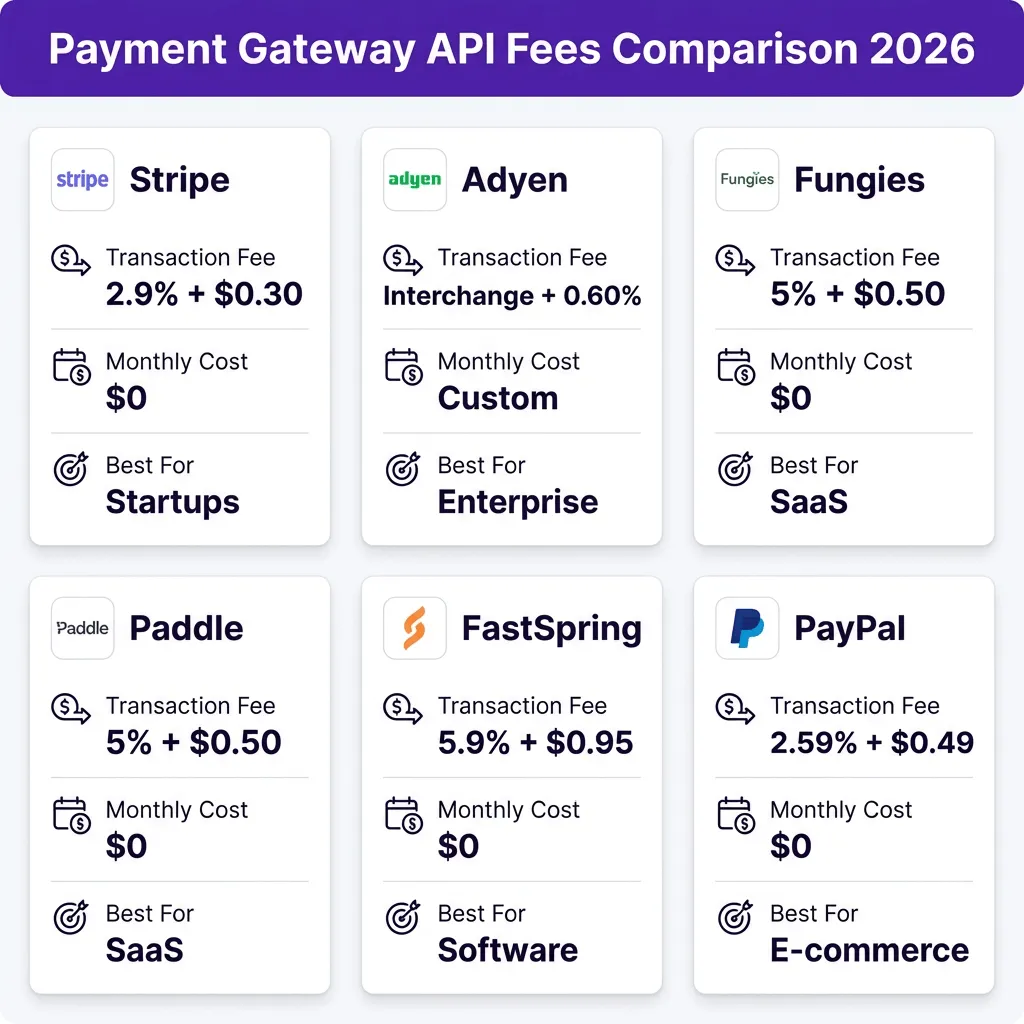
Pricing: 2.9% + $0.30 per transaction for online cards. International cards add 1%. Currency conversion adds another 1%. Billing add-on is 0.7% of recurring revenue. Tax calculation is 0.5% of transaction volume.
Best For: Startups and scale-ups that want maximum flexibility and have the resources to handle tax compliance internally.
2. Fungies.io — Best Merchant of Record for SaaS
Fungies has carved out a strong position as the developer-friendly Merchant of Record specifically built for SaaS and digital products. Unlike Stripe, Fungies assumes full legal liability for transactions — meaning they handle global tax compliance, VAT collection, and regulatory requirements so you don’t have to.
Key Features:
- True Merchant of Record status — they handle tax compliance in 100+ countries
- Simple REST API with comprehensive webhooks
- Built-in subscription management with proration and dunning
- Embedded checkout that matches your branding
- No-code options for non-technical founders
- 50+ payment methods including local options like BLIK, iDEAL, and Pix
Pricing: 5% + $0.50 per transaction. No monthly fees. No hidden charges. All tax compliance included.
Best For: Indie SaaS founders and digital product sellers who want global compliance without the complexity.
3. Adyen — Best for Enterprise Global Scale
Adyen is the platform behind Uber, Microsoft, and Netflix. They built their infrastructure for massive scale, offering direct connections to card networks that improve authorization rates and reduce fees at high volume. If you’re processing $100M+ annually, Adyen’s interchange-plus pricing becomes highly competitive.
Key Features:
- Unified commerce platform — online, in-app, and in-store in one API
- Direct card network relationships for better authorization rates
- RevenueAccelerate uses AI to optimize payment routing
- Comprehensive risk management and fraud detection
- Support for 250+ payment methods globally
- Real-time account updater to reduce expired card failures
Pricing: Interchange plus 0.60% + €0.13 for Visa/Mastercard. Custom pricing for enterprise. No standard public rates — you negotiate based on volume.
Best For: Large enterprises and high-volume businesses that need global reach and can negotiate favorable rates.
4. Paddle — Best for B2C SaaS
Paddle has been serving SaaS companies for about a decade and offers a complete Merchant of Record solution. They handle payments, subscriptions, tax compliance, and fraud protection in one platform. Their recent acquisition of ProfitWell adds strong subscription analytics to the mix.
Key Features:
- Full Merchant of Record with global tax compliance
- Flexible subscription billing supporting “any billing model”
- Built-in fraud protection and chargeback management
- ProfitWell Metrics for subscription analytics
- Automated invoicing for B2B sales (additional cost)
- 17 supported languages and 30+ currencies
Pricing: 5% + $0.50 per transaction for core features. Invoicing is an additional charge. Custom pricing for enterprise.
Best For: B2C SaaS companies that want comprehensive MoR features with strong subscription analytics.
5. FastSpring — Best for Software and Digital Goods
FastSpring has specialized in software and digital product sales for 20 years. They understand the unique needs of downloadable software, offering features like license key generation and automatic file delivery alongside their payment processing.
Key Features:
- Merchant of Record with tax compliance in 55+ countries
- Multiple payment gateways for improved authorization rates
- Built-in affiliate marketing platform
- Advanced fraud protection via Sift partnership
- Custom tax codes for unique product types
- B2B digital invoicing and interactive quotes
Pricing: 5.9% + $0.95 per transaction. Volume discounts available. Custom pricing for enterprise.
Best For: Software companies and digital product sellers who need license management and global compliance.
6. PayPal — Best for Consumer Trust
PayPal’s biggest advantage isn’t technical — it’s trust. Consumers recognize the brand and feel secure using it. PayPal checkout can increase conversion rates by 5-10% for certain demographics, particularly older consumers and international buyers.
Key Features:
- Massive consumer recognition and trust
- PayPal Credit and Pay in 4 (BNPL) options
- Express checkout that skips entering card details
- Strong buyer protection policies
- Support for 100+ currencies
- Easy integration with existing PayPal business accounts
Pricing: 2.59% + $0.49 per transaction for online payments. International fees add 1.5%. Currency conversion adds 3-4%.
Best For: E-commerce businesses and consumer-facing products where trust and brand recognition matter.
7. Square — Best for Omnichannel Businesses
Square started with in-person payments and built their online platform to match. If you sell both in-person and online, Square offers the most seamless omnichannel experience. Their developer APIs have improved significantly and now compete with Stripe for simplicity.
Key Features:
- Unified online and in-person payments
- Free POS software and affordable hardware
- Developer-friendly APIs with good documentation
- Instant transfers to linked bank accounts
- Built-in inventory management for retail
- Competitive rates for card-present transactions
Pricing: 2.9% + $0.30 for online payments. 2.6% + $0.10 for in-person. Custom pricing for high volume.
Best For: Retailers and businesses selling both online and in physical locations.
8. Braintree — Best for PayPal Integration
Braintree is PayPal’s developer-focused platform, offering more flexibility than standard PayPal integration. It supports PayPal, Venmo, and card payments through a single integration, making it ideal if PayPal is a significant portion of your payment mix.
Key Features:
- Single integration for cards, PayPal, and Venmo
- Drop-in UI for quick implementation
- Advanced fraud protection via Kount
- Recurring billing with vaulting
- 2-day payout schedule (faster than PayPal)
- Good international support with 130+ currencies
Pricing: 2.59% + $0.49 per transaction. No monthly fees. Custom pricing for enterprise.
Best For: Businesses that want PayPal/Venmo alongside card payments in a single integration.
9. Mollie — Best for European Businesses
Mollie has become the go-to payment provider for European startups. They offer transparent pricing, excellent local payment method support (including iDEAL, Bancontact, and Giropay), and a developer experience that rivals Stripe.
Key Features:
- Excellent European payment method coverage
- Transparent, no-surprise pricing
- Quick onboarding with minimal paperwork
- Strong Shopify and WooCommerce integrations
- Recurring payments via Mollie Subscriptions
- Dutch customer support (and English, German, French)
Pricing: 1.8% + €0.30 for European cards. 2.8% + €0.30 for international cards. No monthly fees.
Best For: European startups and businesses targeting EU customers primarily.
10. GoCardless — Best for Recurring Bank Payments
GoCardless specializes in direct debit payments (ACH, SEPA, Bacs) for recurring billing. If you’re running a B2B SaaS with high transaction values, bank debits can save you significant fees compared to card processing.
Key Features:
- Specialized in direct debit / bank transfer payments
- SEPA, Bacs, ACH, and Autogiro support
- 70% lower fees than cards for recurring payments
- Automatic retry logic for failed payments
- Real-time payment status tracking
- Strong API with good webhook support
Pricing: 1% + $0.25 per transaction (capped at $2.50). No monthly fees for standard plan.
Best For: B2B SaaS and subscription businesses with high transaction values where card fees hurt margins.
Payment Gateway API Comparison Table
| Provider | Best For | Transaction Fee | Monthly Cost | Merchant of Record |
|---|---|---|---|---|
| Stripe | Developer experience | 2.9% + $0.30 | $0 | No |
| Fungies | SaaS & digital products | 5% + $0.50 | $0 | Yes |
| Adyen | Enterprise scale | Interchange + 0.60% | Custom | No |
| Paddle | B2C SaaS | 5% + $0.50 | $0 | Yes |
| FastSpring | Software & digital goods | 5.9% + $0.95 | $0 | Yes |
| PayPal | Consumer trust | 2.59% + $0.49 | $0 | No |
| Square | Omnichannel | 2.9% + $0.30 | $0 | No |
| Braintree | PayPal integration | 2.59% + $0.49 | $0 | No |
| Mollie | European businesses | 1.8% + €0.30 | $0 | No |
| GoCardless | Recurring bank payments | 1% + $0.25 | $0 | No |
Hidden Costs to Watch For
The headline rate is rarely what you actually pay. Here are the fees that catch developers off guard:
- International fees: Most providers add 1-1.5% for non-domestic cards. If 30% of your customers are international, this adds up fast.
- Currency conversion: Converting foreign currencies to your home currency typically costs 1-2%. Some providers hide this in the exchange rate rather than charging it separately.
- Subscription billing add-ons: Stripe charges 0.7% of recurring revenue for their Billing product. On $50K MRR, that’s $350/month.
- Tax calculation services: Stripe Tax is 0.5% of transaction volume. Again, on significant volume this isn’t trivial.
- Chargeback fees: Expect $15-25 per dispute, even if you win. High-risk businesses see more disputes.
- Compliance costs: If you’re not using a Merchant of Record, factor in tax registration fees ($5K-15K per country), accounting costs, and potential penalties.
When I model total cost of ownership for a SaaS doing $1M ARR with global customers, the gap between Stripe (with all add-ons) and a Merchant of Record like Fungies narrows significantly. Sometimes the “more expensive” per-transaction option is actually cheaper when you factor in compliance costs.
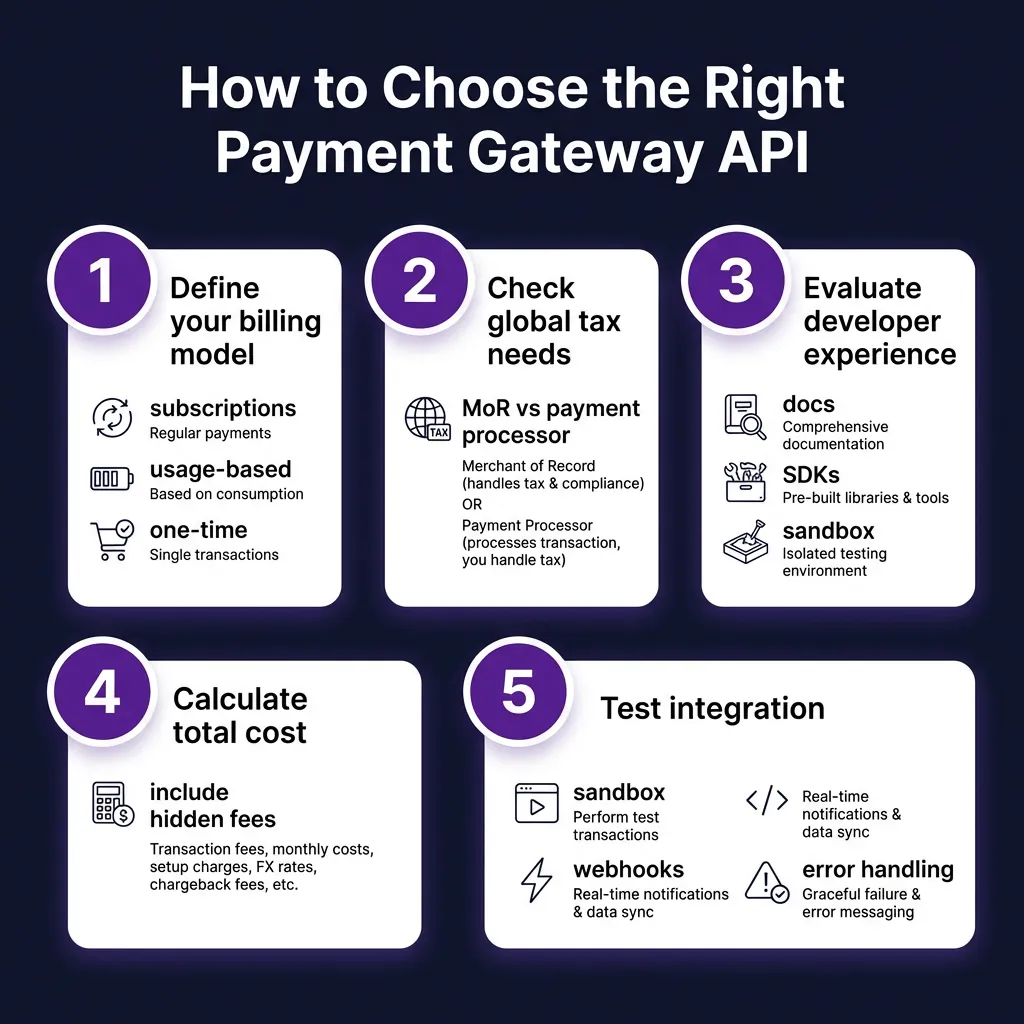
How to Choose the Right Payment Gateway API
After reviewing hundreds of payment integrations, here’s my decision framework:
Step 1: Define your billing model. Are you selling one-time digital products, monthly subscriptions, or usage-based API access? Not all providers handle complex billing equally. Stripe and Fungies have the most flexible subscription APIs.
Step 2: Assess your global tax exposure. If more than 20% of your revenue comes from international customers, a Merchant of Record will likely save you money and headaches. The compliance burden scales with your global reach.
Step 3: Evaluate developer experience. Check the documentation quality, SDK availability for your stack, and sandbox environment. Stripe and Fungies have the best developer experience in my testing.
Step 4: Calculate true total cost. Don’t just compare transaction fees. Model out your expected volume, international percentage, and add-on requirements. Include compliance costs if you’re not using an MoR.
Step 5: Test the integration. Every provider offers a sandbox. Build a proof-of-concept with your specific use case before committing. Test webhook delivery, error handling, and edge cases like failed payments.
FAQ: Payment Gateway APIs for Developers
Which payment gateway API has the best documentation?
Stripe consistently ranks highest for documentation quality, with clear examples, interactive API references, and comprehensive guides. Fungies and Mollie also offer excellent documentation that rivals Stripe. Adyen’s docs are thorough but more complex given their enterprise focus.
What’s the difference between a payment gateway and a Merchant of Record?
A payment gateway (like Stripe) processes transactions but you remain the legal merchant. You’re responsible for tax compliance, fraud liability, and chargebacks. A Merchant of Record (like Fungies or Paddle) assumes legal responsibility for transactions, handling tax collection, remittance, and compliance on your behalf. MoRs charge higher per-transaction fees but eliminate compliance costs and risks.
Which payment API is cheapest for startups?
For low volume (under $10K/month), Stripe’s 2.9% + $0.30 is competitive. However, if you’re selling internationally, factor in the 1% international fee and compliance costs. Mollie offers lower European rates (1.8% + €0.30) if your customers are primarily EU-based. GoCardless is cheapest for recurring bank payments at 1% + $0.25.
Can I use multiple payment providers?
Yes, many businesses use a hybrid approach. Common patterns include: Stripe for US/domestic transactions (simpler tax) and an MoR like Fungies for international sales; or Stripe for cards and GoCardless for bank debits. Just ensure your architecture can handle multiple webhook sources and reconcile transactions across providers.
How long does payment gateway integration take?
A basic integration with Stripe or Fungies can be done in a day. A complete implementation with subscriptions, webhooks, error handling, and testing typically takes 1-2 weeks for an experienced developer. Complex billing models or custom checkout flows can extend this to 3-4 weeks.
Conclusion: Pick the Right Tool for Your Stage
There’s no universal “best” payment gateway API — it depends on your business model, customer geography, and technical resources. For most SaaS startups in 2026, I’d recommend:
- Pre-revenue/MVP stage: Stripe for speed and flexibility.
- SaaS with global ambitions: Fungies for compliance handling without enterprise complexity.
- High-volume B2C: Paddle for comprehensive MoR features.
- Enterprise scale: Adyen for best-in-class authorization rates and global reach.
- European focus: Mollie for local payment methods and transparent pricing.
The most expensive mistake isn’t choosing the “wrong” provider — it’s spending months building custom billing infrastructure when you should be talking to customers. Pick a provider that fits your current needs, integrate quickly, and focus on growth. You can always migrate later when you have the revenue to justify the engineering effort.
Ready to get started? Create your Fungies account and launch your payment integration in under an hour with built-in global compliance.
Sources
- Stripe Pricing — Official Stripe pricing page
- FastSpring: Stripe vs Paddle Comparison — Detailed feature comparison
- NerdWallet: Adyen vs Stripe — Fee comparison analysis
- SwipeSum: Guide to Stripe Fees 2025 — Comprehensive fee breakdown
- Creem: Best Merchant of Record for SaaS 2026 — MoR platform analysis
- Cleverbridge: Top MoR Providers 2026 — Enterprise MoR comparison
- UniBee: Paddle vs FastSpring — SaaS billing comparison