10 Best Payment Methods for SaaS in 2026: Complete Comparison
Discover the 10 best payment methods for SaaS in 2026. Compare credit cards, ACH, digital wallets, virtual cards, BNPL, and more. Find the right mix to reduce fees, boost conversions, and scale your SaaS globally.
Here’s a number that should wake you up: 1 in 5 U.S. customers abandons their cart if checkout takes too long. In the SaaS world, that’s not just lost revenue—it’s lost lifetime value. When someone bails on a $50/month subscription because your payment flow felt clunky, you’re not losing $50. You’re losing $600+ over a year.
The payment method you choose directly impacts conversion rates, churn, and your bottom line. Yet most SaaS founders default to “just add Stripe” without thinking through whether credit cards are actually the best fit for their customers, their transaction sizes, or their global ambitions.
I’ve spent years analyzing payment data across dozens of SaaS platforms. The truth? There’s no single “best” payment method. The winners use a strategic mix tailored to their audience. In this guide, I’ll break down the 10 best payment methods for SaaS in 2026—complete with real fee data, use cases, and honest pros and cons.
What Are SaaS Payment Methods?
A SaaS payment method is any system that enables your business to collect recurring or one-time payments from customers. This includes traditional options like credit cards, bank-based methods like ACH and wire transfers, digital wallets, and emerging alternatives like cryptocurrency.
Unlike e-commerce businesses that focus on one-time transactions, SaaS companies need payment infrastructure that handles:
- Recurring subscription billing
- Usage-based or metered billing
- International payments across multiple currencies
- Automatic retries for failed payments
- Tax compliance across jurisdictions
The right payment method—or combination of methods—can reduce your processing costs by 50% or more while improving conversion rates.
Why Your Payment Method Choice Matters
Here’s what the data tells us about payment method impact:
- Digital wallets now account for 37% of online payment value in the US and are projected to exceed 50% by 2027
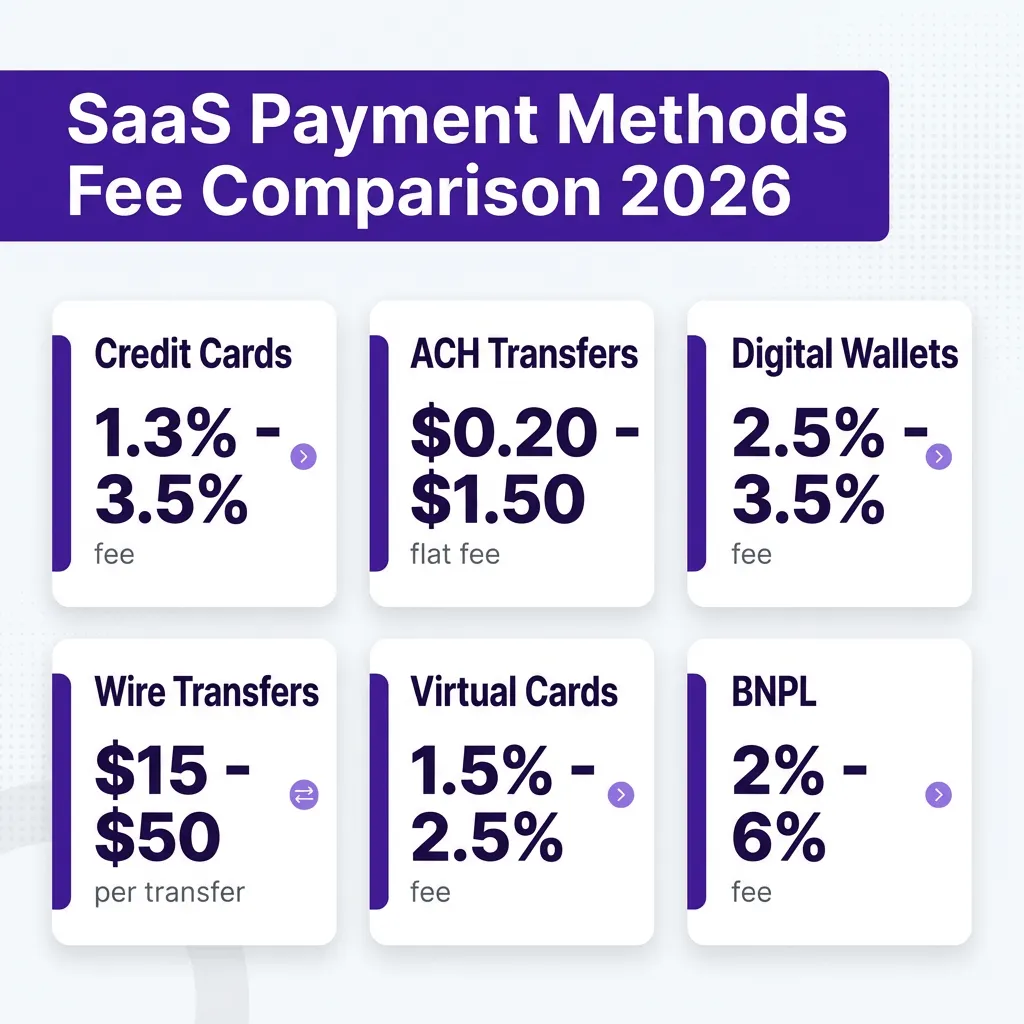
- ACH payments cost 60-80% less than credit cards—a flat $0.20-$1.50 vs. 1.3%-3.5% per transaction
- Adding BNPL can increase average order value by 20-30%, though at higher merchant fees (2-6%)
- 1 in 5 customers abandon carts when checkout is slow or their preferred method isn’t available
Your payment stack isn’t just a cost center. It’s a growth lever. Choose wrong, and you’re bleeding money on fees and lost conversions. Choose right, and you unlock global markets while keeping more of every dollar.
10 Best Payment Methods for SaaS Compared
1. Credit and Debit Cards
Credit and debit cards remain the backbone of SaaS payments. Visa, Mastercard, and American Express are universally recognized and trusted by customers worldwide.
How it works: Customers enter card details at checkout. The processor routes data to the issuing bank for approval. Funds typically settle in 1-3 business days.
Best for: B2C SaaS, low-to-mid ticket sizes ($10-$500/month), global customer bases
Fees: 1.3% – 3.5% per transaction + $0.10-$0.30
Pros:
- Universal customer familiarity and trust
- Instant payment confirmation
- Excellent recurring billing support via tokenization
- Built-in fraud protection and chargeback handling
Cons:
- Higher fees than bank transfer methods
- PCI compliance requirements
- Chargeback risk (customers can dispute charges)
- International cards often incur additional fees
2. ACH Bank Transfers
ACH (Automated Clearing House) moves money directly between bank accounts. It’s the workhorse of B2B payments and high-value transactions.
How it works: Customers authorize direct bank transfers using routing and account numbers. Funds clear in 1-3 business days.
Best for: B2B SaaS, high-ticket subscriptions ($500+/month), enterprise customers
Fees: $0.20 – $1.50 flat fee per transaction
Pros:
- 60-80% lower fees than credit cards
- No chargebacks (bank transfers are final)
- Higher transaction limits
- Ideal for large recurring payments
Cons:
- Slower settlement (1-3 days vs. instant)
- More friction for customers (routing numbers, verification)
- Return risk for insufficient funds
- Lower consumer familiarity
3. Digital Wallets (Apple Pay, Google Pay, PayPal)
Digital wallets store payment credentials securely and enable one-tap checkout. They’re growing fast—wallets now represent 37% of US online payment value.
How it works: Customers authenticate via fingerprint, Face ID, or PIN. The wallet sends tokenized payment data—merchants never see raw card numbers.
Best for: Mobile-first SaaS, B2C products, reducing cart abandonment
Fees: 2.5% – 3.5% per transaction
Pros:
- One-tap checkout reduces friction significantly
- Higher conversion rates on mobile
- Enhanced security via tokenization
- No card data stored on your servers
Cons:
- Slightly higher fees than direct card processing
- Requires integration with each wallet provider
- Customer adoption varies by region
4. Wire Transfers
Wire transfers move funds directly between banks, typically used for large B2B transactions or international payments.
How it works: Customers initiate transfers through their bank using your account details. Domestic wires settle same-day; international wires take 1-5 days.
Best for: Enterprise SaaS, annual contracts, international B2B sales
Fees: $15 – $50 per transfer (often split between sender and receiver)
Pros:
- Very high transaction limits
- Immediate finality (no chargebacks)
- Preferred by finance teams for large purchases
- Works globally
Cons:
- High per-transaction fees
- Manual process for customers
- Slow settlement for international transfers
- Not suitable for small recurring payments
5. Virtual Cards
Virtual cards are digital-only card numbers generated for specific transactions or vendors. They’re gaining traction in B2B for controlled spending.
How it works: Customers generate single-use or merchant-locked card numbers through their corporate card provider. You process them like regular cards.
Best for: B2B SaaS, enterprise customers with procurement controls
Fees: 1.5% – 2.5% per transaction
Pros:
- Lower fraud risk (single-use numbers)
- Preferred by corporate finance teams
- Standard card processing infrastructure
- Easy expense categorization for buyers
Cons:
- Limited to customers with corporate card programs
- Can complicate recurring billing if cards expire
- Still subject to standard card fees
6. Buy Now, Pay Later (BNPL)
BNPL services like Klarna and Affirm let customers split purchases into installments, often interest-free.
How it works: Customers select BNPL at checkout, get instant approval, and pay in installments. You receive full payment upfront from the BNPL provider.
Best for: Higher-ticket SaaS, annual plans, price-sensitive customers
Fees: 2% – 6% per transaction
Pros:
- Increases average order value by 20-30%
- Converts price-sensitive buyers
- You get paid immediately (provider takes risk)
- Appeals to younger demographics
Cons:
- Highest merchant fees of standard methods
- Not suitable for low-ticket subscriptions
- Customer debt concerns
- Complex dispute handling
7. Cryptocurrency
Cryptocurrency payments appeal to tech-forward customers and enable borderless transactions without banking intermediaries.
How it works: Customers pay from crypto wallets. You can hold crypto or auto-convert to fiat via payment processors.
Best for: Crypto-native SaaS, global audiences, tech-forward customers
Fees: 0.5% – 1% (network fees) + processor markup
Pros:
- Fast global settlement (minutes vs. days)
- No chargebacks
- Appeals to crypto community
- Lower fees than cards for large transfers
Cons:
- Price volatility risk
- Limited mainstream adoption
- Regulatory complexity
- Tax reporting complications
8. SEPA Direct Debit (Europe)
SEPA enables direct bank transfers across 36 European countries. It’s the European equivalent of ACH.
How it works: Customers authorize recurring debits from their bank account. Funds settle in 2-5 business days.
Best for: European SaaS customers, recurring subscriptions in EUR
Fees: €0.20 – €0.50 per transaction
Pros:
- Low fees compared to cards
- Trusted across Europe
- Excellent for recurring billing
- No chargebacks (dispute process instead)
Cons:
- Europe-only
- Longer settlement times
- Mandate requirements for authorization
- Return risk
9. Local Payment Methods (iDEAL, Bancontact, etc.)
Local payment methods dominate in specific countries. iDEAL in the Netherlands, Bancontact in Belgium, and similar systems are often preferred over cards.
How it works: Customers redirect to their bank’s interface to authorize payments. Funds settle through local banking networks.
Best for: Country-specific expansion, Netherlands, Belgium, Germany
Fees: 0.5% – 2% per transaction
Pros:
- Highest trust in local markets
- Often lower fees than international cards
- Better conversion rates locally
- No chargebacks
Cons:
- Requires separate integrations per method
- Country-specific only
- More complex reconciliation
10. Merchant of Record (MoR) Platforms
MoR platforms like Fungies handle payments, tax compliance, and global infrastructure as a complete solution.
How it works: The MoR becomes the legal seller, handling payments, tax collection, and compliance. You receive payouts minus fees.
Best for: Global SaaS, teams without payment engineering resources, tax compliance needs
Fees: 5% – 10% per transaction (all-inclusive)
Pros:
- All payment methods in one integration
- Automatic tax compliance (VAT, sales tax)
- No PCI compliance burden
- Global coverage out of the box
- Fraud protection included
Cons:
- Higher headline fees (but often lower total cost when factoring in compliance)
- Less control over checkout experience
- Payout timing (typically weekly or monthly)
Payment Method Comparison Table
| Method | Fees | Settlement | Best For | Chargeback Risk |
|---|---|---|---|---|
| Credit Cards | 1.3% – 3.5% | 1-3 days | B2C, global | High |
| ACH | $0.20 – $1.50 | 1-3 days | B2B, high-ticket | None |
| Digital Wallets | 2.5% – 3.5% | Instant | Mobile, B2C | Medium |
| Wire Transfers | $15 – $50 | Same day – 5 days | Enterprise | None |
| Virtual Cards | 1.5% – 2.5% | 1-3 days | Corporate | Medium |
| BNPL | 2% – 6% | Instant | High-ticket | Low |
| Cryptocurrency | 0.5% – 1% | Minutes | Crypto-native | None |
| SEPA | €0.20 – €0.50 | 2-5 days | Europe | None |
| Local Methods | 0.5% – 2% | 1-3 days | Local markets | None |
| MoR Platform | 5% – 10% | Weekly/Monthly | Global, compliance | None |
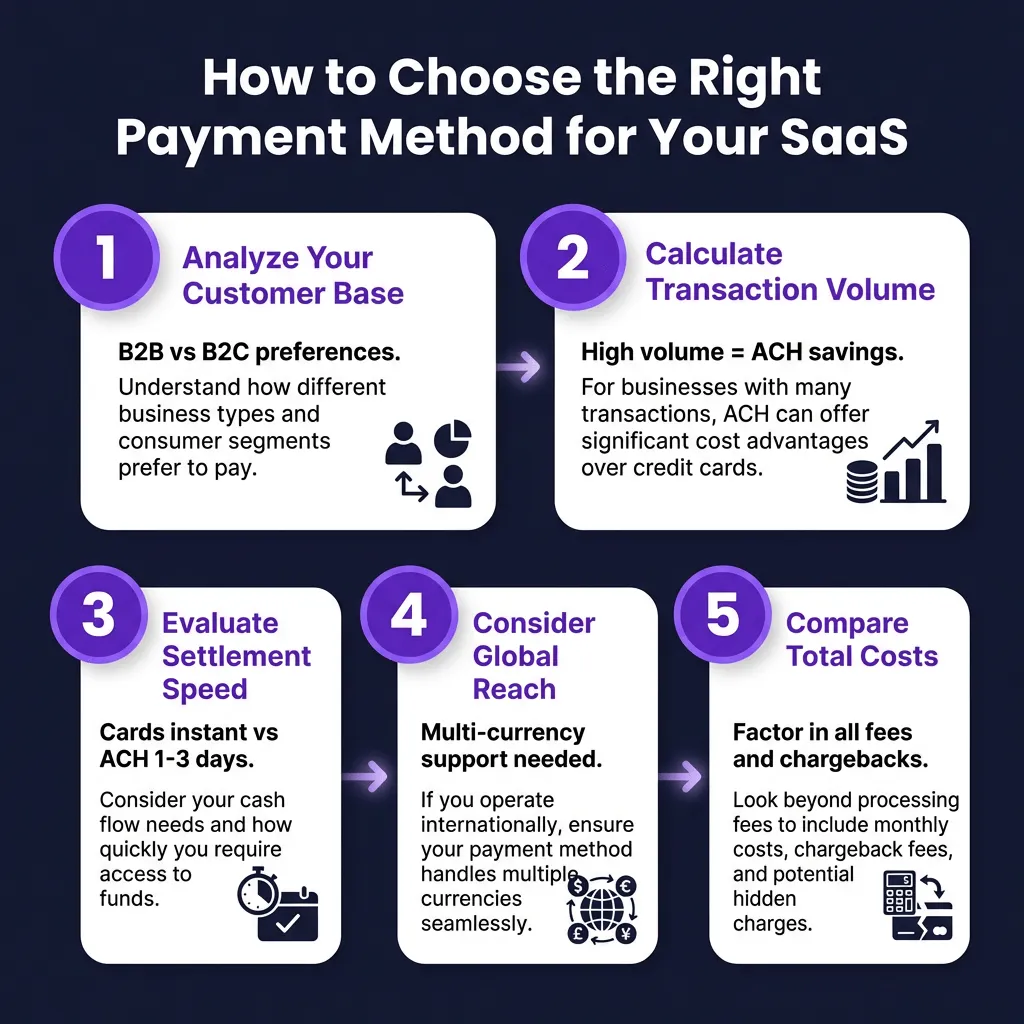
How to Choose the Right Payment Mix for Your SaaS
Here’s my framework for selecting payment methods:
1. Analyze Your Customer Base
B2B customers often prefer ACH, wires, or virtual cards. B2C customers expect cards and digital wallets. Enterprise customers may require specific procurement-friendly methods.
2. Calculate Your Transaction Profile
High-volume, low-ticket SaaS benefits from card optimization. Low-volume, high-ticket SaaS should prioritize ACH for cost savings. A SaaS with $100 average transaction volume processing 1,000 payments monthly pays $2,500-$3,500 in card fees vs. $200-$1,500 in ACH fees.
3. Evaluate Settlement Speed Needs
If cash flow is critical, prioritize instant-settlement methods like cards and digital wallets. If you can wait 1-3 days, ACH and bank transfers save significant money.
4. Consider Global Requirements
Selling globally? You’ll need multi-currency support and local payment methods. European customers expect SEPA. Dutch customers prefer iDEAL. Asian markets favor wallets like Alipay.
5. Factor in Compliance Burden
PCI compliance, tax collection, and fraud prevention add hidden costs. MoR platforms bundle these but charge higher fees. Calculate total cost of ownership, not just processing fees.
FAQ
What’s the cheapest payment method for SaaS?
ACH bank transfers are typically cheapest at $0.20-$1.50 per transaction vs. 1.3%-3.5% for cards. For a $500 monthly subscription, that’s $0.50 vs. $15+ in card fees. However, ACH has higher friction and slower settlement.
Should SaaS companies accept multiple payment methods?
Yes. Data shows that offering 2-3 relevant payment methods can increase conversion by 12-20%. The key is relevance—offer cards and wallets for B2C, add ACH for B2B, and include local methods for international expansion.
Are digital wallets worth the higher fees?
For mobile-first SaaS, absolutely. Digital wallets reduce checkout friction significantly, especially on mobile devices. The conversion rate improvement often justifies the slightly higher fees.
When should I use a Merchant of Record?
Consider an MoR if you’re selling globally and don’t have resources for tax compliance, if you want to offer multiple local payment methods without engineering overhead, or if PCI compliance is a concern. The 5-10% fee is often lower than total cost of building equivalent infrastructure.
How do I handle failed payments?
Implement automatic retry logic for failed cards (retry 3-5 times over 2 weeks), offer backup payment methods, and use dunning management tools. ACH has lower failure rates than cards but requires different retry strategies.
Conclusion
There’s no universal “best” payment method for SaaS. The right choice depends on your customers, transaction sizes, geographic reach, and internal resources.
My recommendation: Start with credit cards and one digital wallet (Apple Pay or Google Pay) for universal coverage. Add ACH if you have B2B customers or high-ticket plans. Expand to local payment methods as you enter new markets. And consider an MoR platform if global tax compliance feels overwhelming.
The companies winning in 2026 treat payments as a strategic advantage—not an afterthought. They test, measure, and optimize their payment mix just like they optimize their product.
Ready to simplify your SaaS payments? Get started with Fungies and accept cards, ACH, digital wallets, and 20+ local payment methods—with automatic global tax compliance built in.
Sources
- Baymard Institute – Cart Abandonment Rate Statistics
- CNBC – Digital Wallets Overtake Cash and Cards
- Dodo Payments – Best Payment Methods for SaaS
- TechnologyAdvice – ACH Payment Processing Guide
- Bankcard International Group – ACH vs Credit Card Processing
- Forward – ACH vs Card Payments for SaaS
- Airwallex – B2B Payment Industry Trends 2026