How to Add an Embedded Checkout to Your SaaS Without a Redirect (2026 Guide)
Seven out of ten people who click your “Buy Now” button don’t complete the purchase. That’s not a product problem. That’s a checkout problem. The biggest single cause? You’re redirecting them off your page to pay. That redirect breaks context, kills trust, and loses you money every single day. In 2026, there’s no excuse for
Seven out of ten people who click your “Buy Now” button don’t complete the purchase. That’s not a product problem. That’s a checkout problem.
The biggest single cause? You’re redirecting them off your page to pay. That redirect breaks context, kills trust, and loses you money every single day. In 2026, there’s no excuse for it — embedded checkout is easier to implement than ever, and the conversion data is clear.
This guide walks you through what embedded checkout actually is, how it compares to the alternatives, and exactly how to add it to your SaaS without a line of backend code (if you’re using a Merchant of Record like Fungies.io).
What “Embedded Checkout” Actually Means
Three checkout types get conflated constantly. Let’s be precise:
- Hosted checkout (redirect): You send the user to a payment page on your provider’s domain. Stripe Checkout is the classic example. The user leaves your page, pays, and gets redirected back.
- Overlay checkout (popup/modal): A payment form appears as a modal or popup over your existing page. The user stays on your domain visually, even though the form is served from a secure iframe.
- Embedded checkout (inline): The payment form is built directly into your page — in your layout, below your pricing section, inside your app’s upgrade flow. No popup, no redirect, no context switch.
All three can maintain PCI SAQ A compliance (meaning card data goes directly to the provider, not through your server). The difference is purely about user experience and brand control.
When developers say “I want checkout without a redirect” — they usually want either overlay or embedded. Both work. The choice depends on your specific UX needs.
Why Redirects Kill Conversions (The Data)
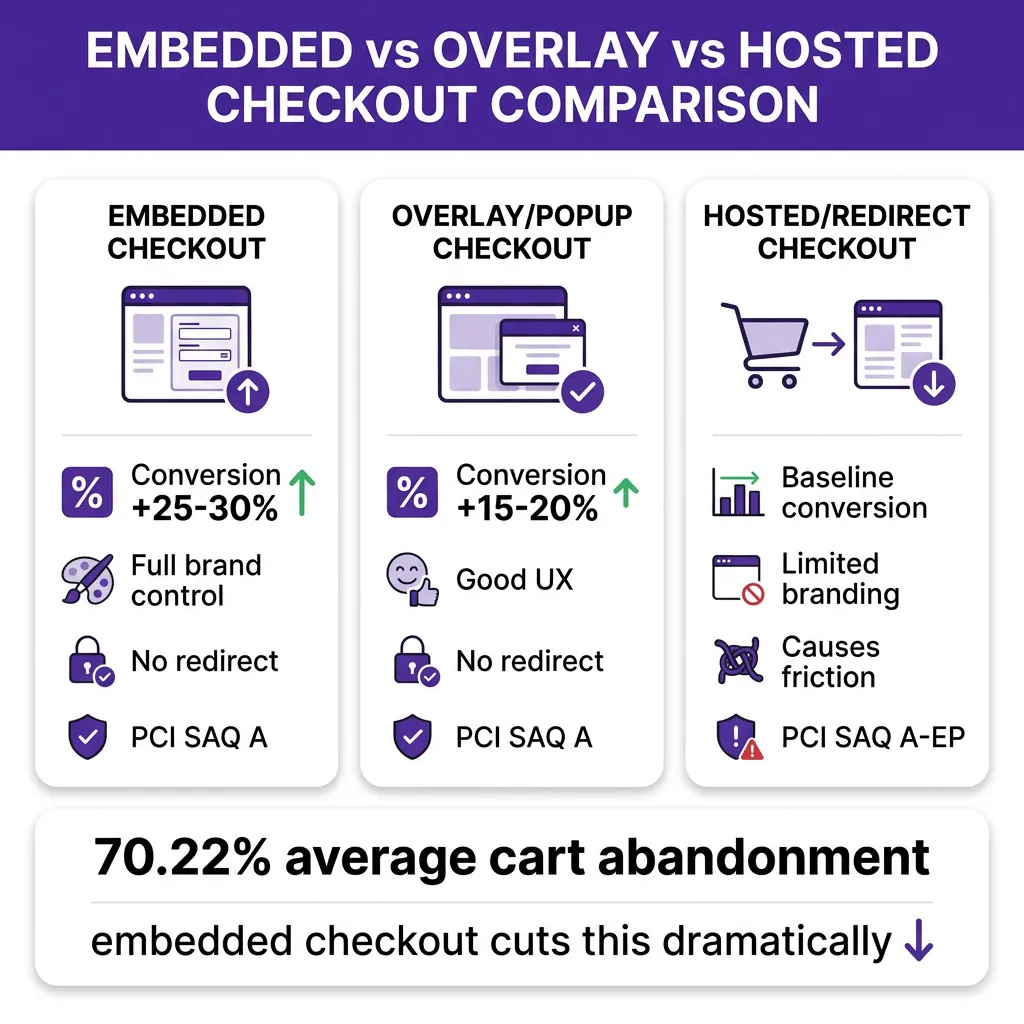
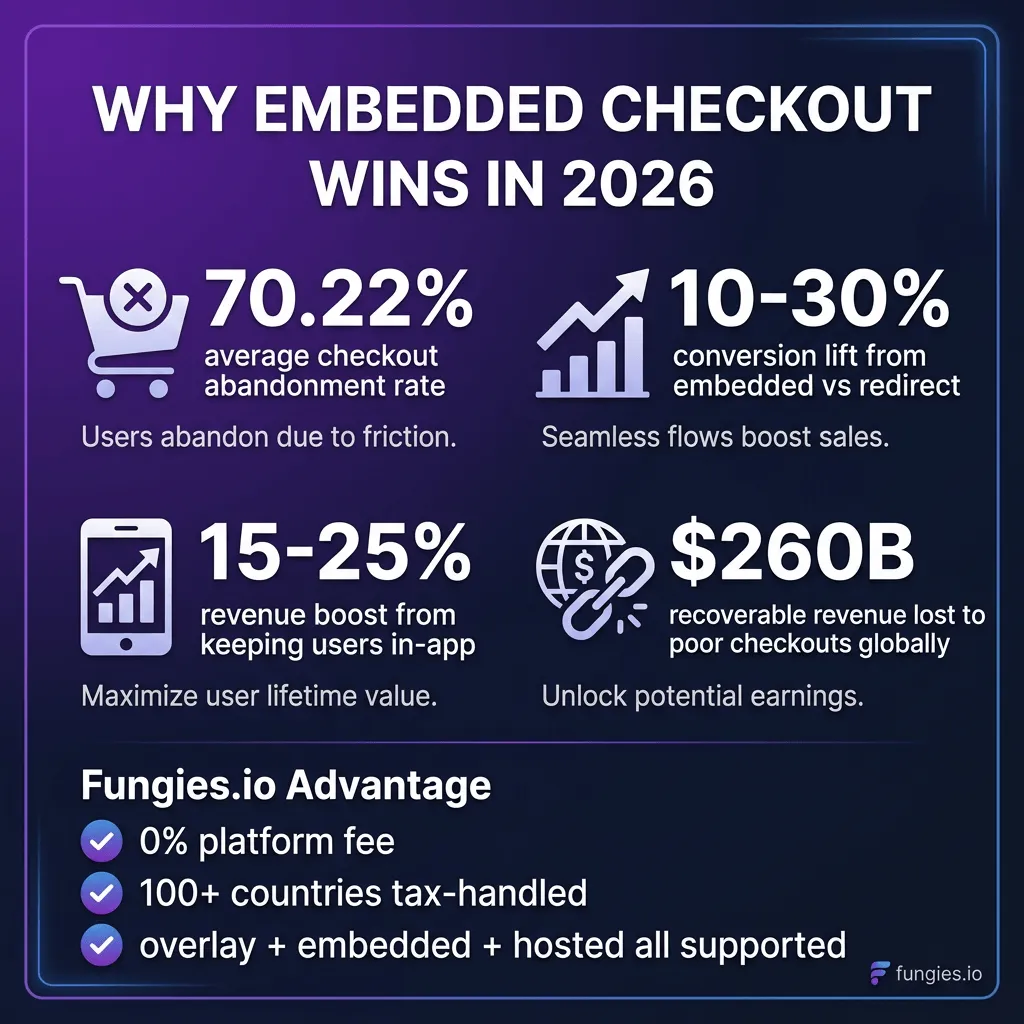
The global cart abandonment rate sits at 70.22% in 2026, according to Baymard Institute’s analysis of 50+ studies. That’s seven out of ten potential buyers walking away. Not all of that is checkout-related — but a meaningful chunk is.
Baymard estimates $260 billion in lost orders in the US and EU alone are recoverable through better checkout design. Paddle’s own data shows that keeping users in-context (same domain, no redirect) delivers a 10–30% lift in checkout conversion depending on product category.
The mechanism is straightforward: every time you redirect, you introduce three friction points:
- Trust gap. The buyer sees a different domain. Even if it’s Stripe or Paddle, some users hesitate. “Is this legit? Did I click the wrong thing?”
- Context loss. Whatever context you built on your pricing page — testimonials, feature comparisons, FAQs — disappears. The buyer makes the final purchase decision in a sterile provider-branded environment.
- Mobile exit. On mobile, redirects cause browsers to feel like new pages. Mobile abandonment is 85.65% according to Digital Web Solutions — significantly higher than desktop, partly because mobile navigation feels more disruptive.
The fix is not complicated. Keep the checkout on your page.
Embedded vs Overlay: Which Should You Use?
| Factor | Embedded (Inline) | Overlay (Popup/Modal) | Hosted (Redirect) |
|---|---|---|---|
| Conversion impact | +25–30% vs redirect | +15–20% vs redirect | Baseline |
| User stays on domain | ✅ Yes | ✅ Yes (modal) | ❌ No |
| Brand control | Full | Partial | Limited |
| Implementation time | 30 min (copy-paste) | 15 min (copy-paste) | 5 min (link) |
| PCI compliance scope | SAQ A (low scope) | SAQ A (low scope) | SAQ A-EP |
| Mobile UX | Excellent | Good | Disruptive |
| Works inside app | ✅ Yes | ✅ Yes | ❌ Breaks flow |
| Bank redirect methods (EU) | Varies by provider | Varies by provider | ✅ Full support |
Here’s the practical breakdown:
- Use embedded if you want checkout fully integrated into your pricing page or app’s upgrade modal. Best for long-form landing pages where context should surround the payment form.
- Use overlay if you want the fastest implementation and your users are triggering checkout from a button click. It’s the sweet spot of conversion improvement with minimal dev work.
- Keep hosted redirect if you need European bank redirect methods (iDEAL, Bancontact, etc.) — the iframe-based approaches can’t support redirecting to banking apps mid-checkout. Fungies.io actually recommends hosted checkout specifically for European bank redirects for this reason.
How to Add Embedded Checkout with Fungies.io (No Backend Code)
If you’re using Fungies.io as your Merchant of Record, adding an embedded checkout is a copy-paste operation. Here’s exactly how it works:
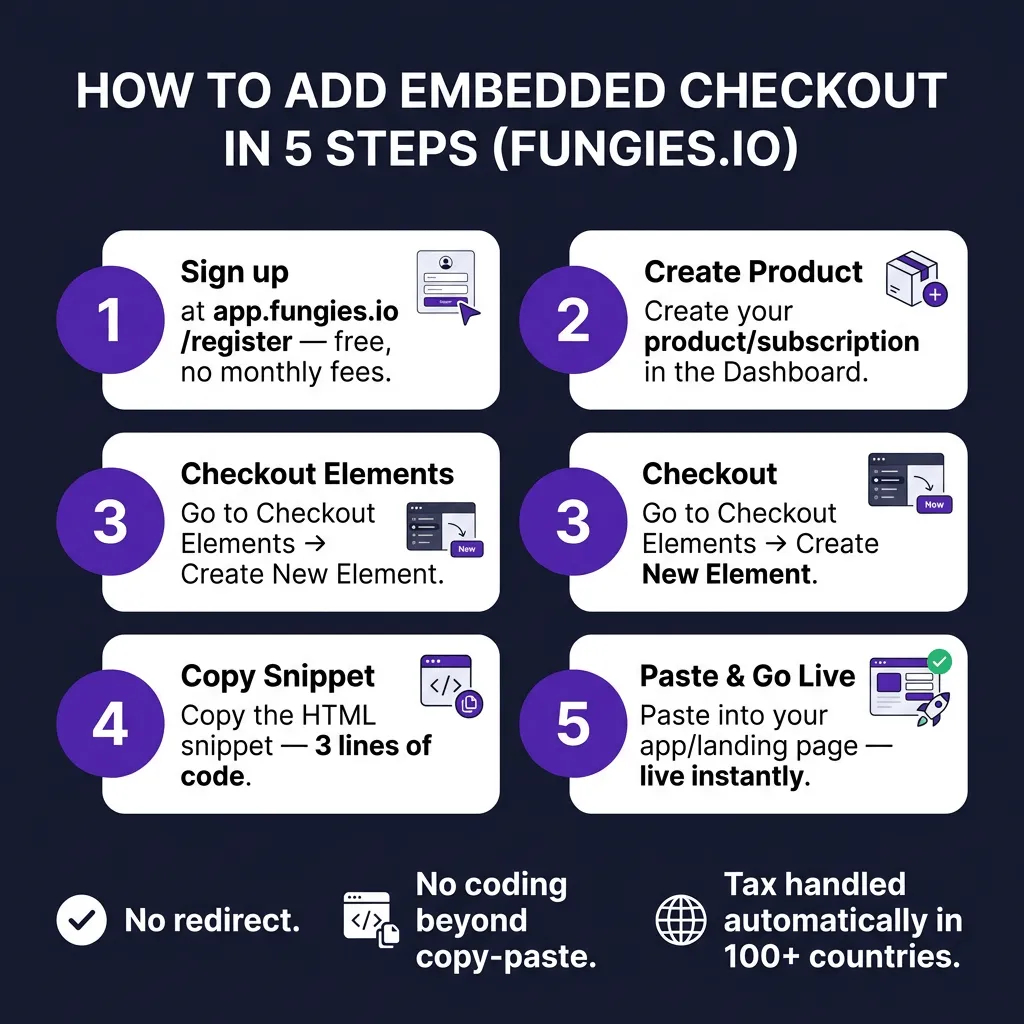
Step 1: Create your product
Log in to app.fungies.io. Under Subscriptions or One-Time Products, create the product you want to sell. Set your price, billing interval (if subscription), and currency.
Step 2: Navigate to Checkout Elements
In the left sidebar, find “Checkout Elements”. This is where Fungies manages all embedded checkout configurations.
Step 3: Create a new element
Click “Create New”. Select the product(s) you want to include in this checkout. You can customize the primary button color and background to match your brand.
Step 4: Copy the HTML snippet
Fungies generates a 3-line HTML snippet. It looks something like this:
<script src="https://checkout.fungies.io/embed.js"></script>
<div id="fungies-checkout" data-element-id="YOUR_ELEMENT_ID"></div>
<script>FungiesCheckout.init();</script>
That’s it. No API key in the frontend. No webhook setup required to show the form. The JavaScript handles everything.
Step 5: Paste it into your page
Drop the snippet anywhere in your HTML — pricing page, in-app upgrade section, landing page. The checkout form renders where you place the div.
Tax calculation, currency localization, and compliance handling all happen automatically. Fungies.io is a Merchant of Record, which means they handle VAT/GST in 100+ countries. You don’t write any tax logic.
How Paddle Does Embedded Checkout (And the Trade-offs)
Paddle offers two no-redirect options: inline checkout and overlay checkout, both powered by Paddle.js.
Paddle overlay checkout
<script src="https://cdn.paddle.com/paddle/v2/paddle.js"></script>
<script>
Paddle.Initialize({ token: "YOUR_CLIENT_TOKEN" });

function openCheckout() {
  Paddle.Checkout.open({
    items: [{ priceId: "pri_01...", quantity: 1 }]
  });
}
</script>
<button onclick="openCheckout()">Buy Now</button>
Paddle inline checkout
<div id="checkout-container"></div>
<script>
Paddle.Checkout.open({
  settings: { displayMode: "inline", frameTarget: "checkout-container" },
  items: [{ priceId: "pri_01...", quantity: 1 }]
});
</script>
Paddle’s inline checkout is powerful and well-documented. The trade-offs compared to Fungies:
- Paddle charges 5% + $0.50 per transaction (Starter) or custom rates at higher volumes
- Requires a client-side token setup and environment switching (sandbox/live)
- More configuration flexibility, but more code to manage
How Dodo Payments Approaches Embedded Checkout
Dodo Payments positions itself specifically around embedded payments for SaaS in 2026. Their argument: the companies still redirecting customers to a third-party checkout page are “the ones losing conversion to competitors.”
Their embedded payments implementation is similar in concept — a JavaScript SDK that renders a payment form in your page. They emphasize the architectural distinction between:
- Embedded checkout (keep your customer in-app)
- Payment facilitation (let your customers accept payments — very different compliance scope)
Dodo’s primary differentiator is their focus on SaaS platforms that want to embed payments for their end users, not just for their own checkout. That’s a more complex use case than most indie SaaS founders need.
Checkout Comparison by Provider
| Provider | Embedded Checkout | Overlay/Popup | Hosted Redirect | Platform Fee | MoR (Tax Handled) |
|---|---|---|---|---|---|
| Fungies.io | ✅ Yes (Checkout Elements) | ✅ Yes (Overlay) | ✅ Yes | 0% | ✅ 100+ countries |
| Paddle | ✅ Yes (Inline) | ✅ Yes (Overlay) | ✅ Yes | 5% + $0.50 | ✅ Global |
| Dodo Payments | ✅ Yes (SDK) | ✅ Yes | ✅ Yes | 2.9% + $0.30 | ✅ Global |
| Lemon Squeezy | ✅ Yes (overlay-style) | ✅ Yes | ✅ Yes | 5% + $0.50 | ✅ Global |
| Whop | Limited | ✅ Yes | ✅ Yes | 3% | ✅ Global |
| Stripe Checkout | ✅ Yes (Payment Element) | ❌ No | ✅ Yes | 2.9% + $0.30 | ❌ You handle tax |
| Gumroad | ✅ Yes (embed code) | ✅ Yes (overlay) | ✅ Yes | 10% | ✅ Global |
Common Mistakes When Adding Embedded Checkout
1. Not testing on mobile
Most embedded checkout issues surface on mobile. The iframe needs to be responsive. Test your embedded form on iOS Safari and Android Chrome specifically — these environments handle iframes differently than desktop Chrome.
2. Placing checkout below the fold without a CTA
If you embed checkout halfway down a long page, most visitors never scroll to it. Always include a sticky “Buy Now” button or anchor link that scrolls to the embedded form. The form should feel discoverable, not buried.
3. Ignoring EU bank redirect methods
If you have significant European traffic, check whether your embedded checkout supports local payment methods like iDEAL (Netherlands), Bancontact (Belgium), or Sofort (Germany). These methods require redirects to banking apps — which means they can’t fully work in an iframe. Fungies.io recommends their Hosted Checkout specifically for these cases.
4. Using raw card forms (don’t)
Some developers, especially those already using Stripe, consider building a fully custom card form with the Stripe Elements API. This gives you maximum control but pulls you into PCI SAQ D — the most complex compliance tier. Unless you have a specific requirement that can’t be met by iframe-based approaches, avoid this. The conversion benefit doesn’t justify the compliance overhead.
5. Skipping the success/failure state handling
After payment succeeds, your embedded form should redirect to a success page or trigger an in-app state change. Most providers offer JavaScript events for this (e.g., checkout.completed). Don’t leave the user staring at a “payment successful” message inside an iframe on your pricing page — take them to their account or a thank you page.
Key Takeaways
- Redirecting users to pay costs you 10–30% of conversions. The fix is embedded or overlay checkout, and it takes less than 30 minutes with the right provider.
- Embedded checkout keeps the full context intact. Your testimonials, pricing comparison, and trust signals stay visible while the user pays.
- Overlay is faster to implement; embedded is better for conversion. If you’re optimizing for launch speed, go overlay. If you’re optimizing for conversion, go embedded inline.
- Merchant of Record platforms (Fungies, Paddle, Dodo) handle tax automatically. You get embedded checkout AND global tax compliance in one integration — no Stripe Tax, no TaxJar.
- Keep hosted redirect for European bank payment methods. iDEAL, Bancontact, Sofort require browser redirects that iframes can’t handle. It’s the one remaining legitimate use case for redirect-based checkout.
FAQ
Is embedded checkout PCI compliant?
Yes, when using a hosted iframe from a PCI-certified provider. Card data goes directly to the provider’s servers — your page never touches it. This keeps you in PCI SAQ A scope, the lowest compliance tier. You don’t need a security audit or penetration test to maintain compliance.
Does embedded checkout work for subscriptions?
Yes. Providers like Fungies.io, Paddle, and Lemon Squeezy all support subscription billing through their embedded checkout. The customer enters their card once, and recurring billing is handled automatically by the provider. Upgrade/downgrade flows can also be embedded.
What’s the difference between embedded checkout and a payment link?
A payment link is a URL that takes the user to a hosted checkout page on the provider’s domain. It’s the simplest option but forces a redirect. Embedded checkout brings the payment form to your page. Payment links are great for email campaigns and invoices; embedded checkout is right for your pricing page and in-app upgrade flows.
Can I add embedded checkout to a React or Next.js app?
Yes. Most provider SDKs work as JavaScript that runs in any framework. Fungies.io’s embed is plain HTML/JS, so you can drop it into a dangerouslySetInnerHTML wrapper or use a useEffect to initialize it. Paddle has official React wrappers (@paddle/paddle-js). Stripe has a fully React-native Stripe Elements SDK. Pick the one that matches your stack.
Conclusion
Embedded checkout isn’t a nice-to-have in 2026. It’s the default. Every redirect you force on a buyer is a conversion you’re betting against. The implementation takes under 30 minutes if you’re using a modern MoR platform.
Fungies.io offers embedded checkout, overlay checkout, and hosted checkout — all with 0% platform fee and automatic tax compliance in 100+ countries. If you’re building or scaling a SaaS and tired of Paddle’s 5% cut, it’s worth a look.
References
- Baymard Institute — Cart Abandonment Rate Research
- Paddle — SaaS Conversion Rate Optimization Data
- Paddle Developer Docs — Overlay Checkout
- Paddle Developer Docs — Inline Checkout
- Fungies.io Help — Embedded Checkout
- Fungies.io Help — Overlay Checkout
- Dodo Payments — Inline vs Hosted Checkout Guide
- Dodo Payments — Embedded Payments for SaaS 2026
- PCI DSS Guide — Hosted Checkout vs Embedded Payments