How to Calculate Payment Processing Fees: The Complete Guide for Digital Sellers in 2026
Learn exactly how to calculate payment processing fees for digital products. Compare real costs across Gumroad, Stripe, PayPal, Fungies & more. Includes hidden fees, TCO formulas, and break-even analysis for 2026.
Selling digital products online should be simple. You create something valuable, set a price, and collect payments. But then you see your first payout and wonder: where did 15% of my revenue go?
I’ve spent years running paid acquisition campaigns for SaaS and digital product businesses. One pattern I see constantly — founders underestimate their true payment processing costs by 30-50%. They look at the advertised rate, do quick mental math, and move on. Then they’re surprised when their actual take-home is significantly lower.
This guide will show you exactly how to calculate payment processing fees, what hidden costs to watch for, and how to choose the right payment setup for your digital product business.
What Are Payment Processing Fees?
Payment processing fees are the costs you pay to accept credit cards, digital wallets, and other payment methods online. Every time a customer buys your ebook, course, or software subscription, multiple parties take a small cut.
Here’s the thing most sellers don’t realize: “payment processing fee” is actually a bundle of several different charges. Understanding each component helps you calculate your true costs and spot opportunities to save.
The Three Components of Every Processing Fee
Every credit card transaction involves three distinct fees:
1. Interchange Fees (70-80% of total cost)
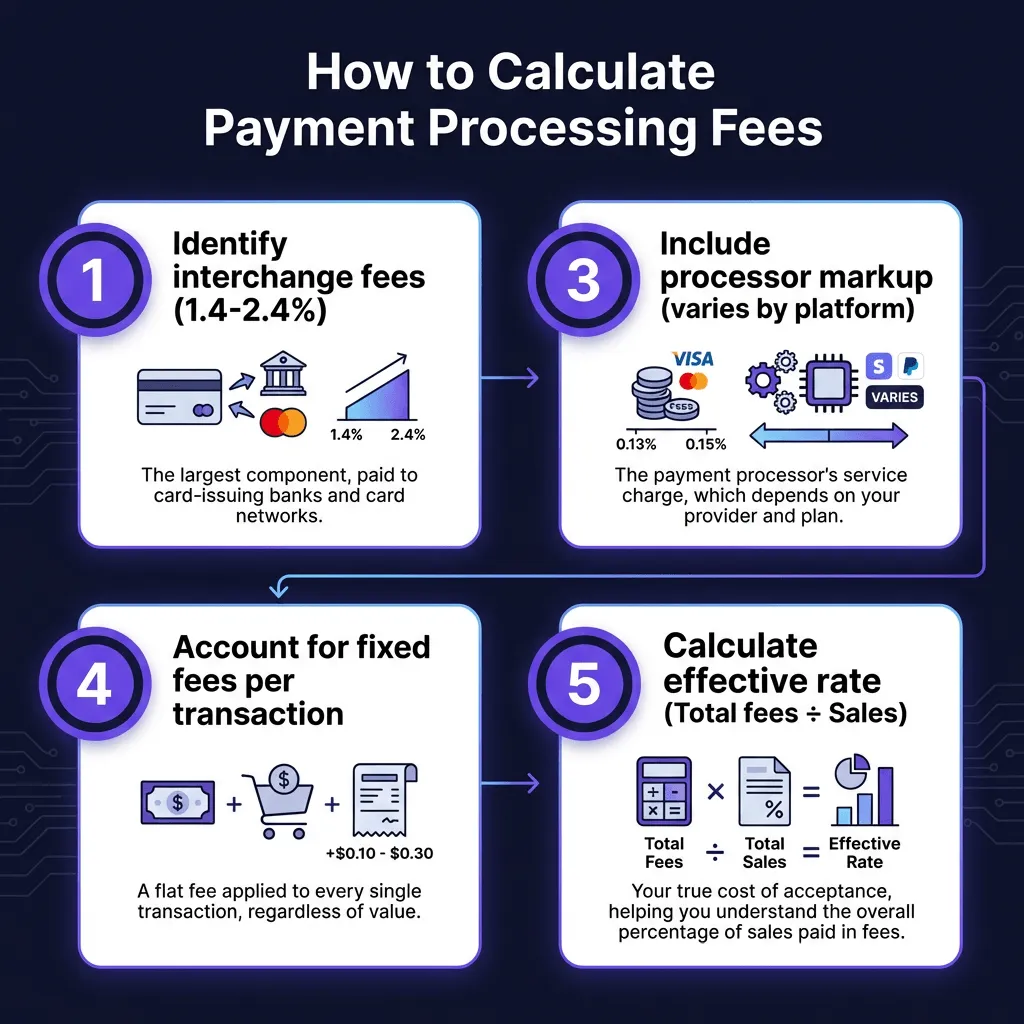
Interchange fees go to the card-issuing bank — the bank that gave your customer their credit card. Visa and Mastercard set these rates, and they’re non-negotiable. They typically range from 1.4% to 2.4% plus a small fixed fee per transaction.
Key factors that affect interchange rates:
- Card type (debit cards cost less than credit cards)
- Card network (Visa, Mastercard, Amex have different rates)
- Transaction method (in-person costs less than online)
- Your industry (digital goods often pay higher rates due to fraud risk)
2. Assessment Fees (5-10% of total cost)
Assessment fees go directly to the card networks (Visa, Mastercard, etc.). These are smaller, usually 0.13% to 0.15% of the transaction amount. Like interchange, you can’t negotiate these.
3. Processor Markup (10-25% of total cost)
This is where payment processors, platforms, and merchant account providers make their money. This is also where you have the most room to negotiate or shop around. Markups vary wildly:
- Stripe: 2.9% + $0.30 per transaction
- PayPal: 2.99% + $0.49 per transaction
- Square: 2.9% + $0.30 for online payments
- Fungies: 5% + $0.50 per transaction (includes MoR services)
How to Calculate Your Payment Processing Fees
Now let’s get practical. Here’s the exact formula to calculate what you’ll actually pay.
The Basic Formula
Total Fee = (Transaction Amount × Percentage Fee) + Fixed Fee
For example, on a $50 sale with Stripe (2.9% + $0.30):
- Percentage component: $50 × 0.029 = $1.45
- Fixed component: $0.30
- Total fee: $1.75
- You receive: $48.25
Calculating Your Effective Rate
The effective rate shows your true cost as a percentage of sales. This is the number that actually matters for your business.
Effective Rate = (Total Fees Paid ÷ Total Sales) × 100
Here’s why this matters: a platform advertising “10% fees” might actually cost you 20% once you factor in payment processing, fixed fees, and other charges.
Real-World Examples by Platform
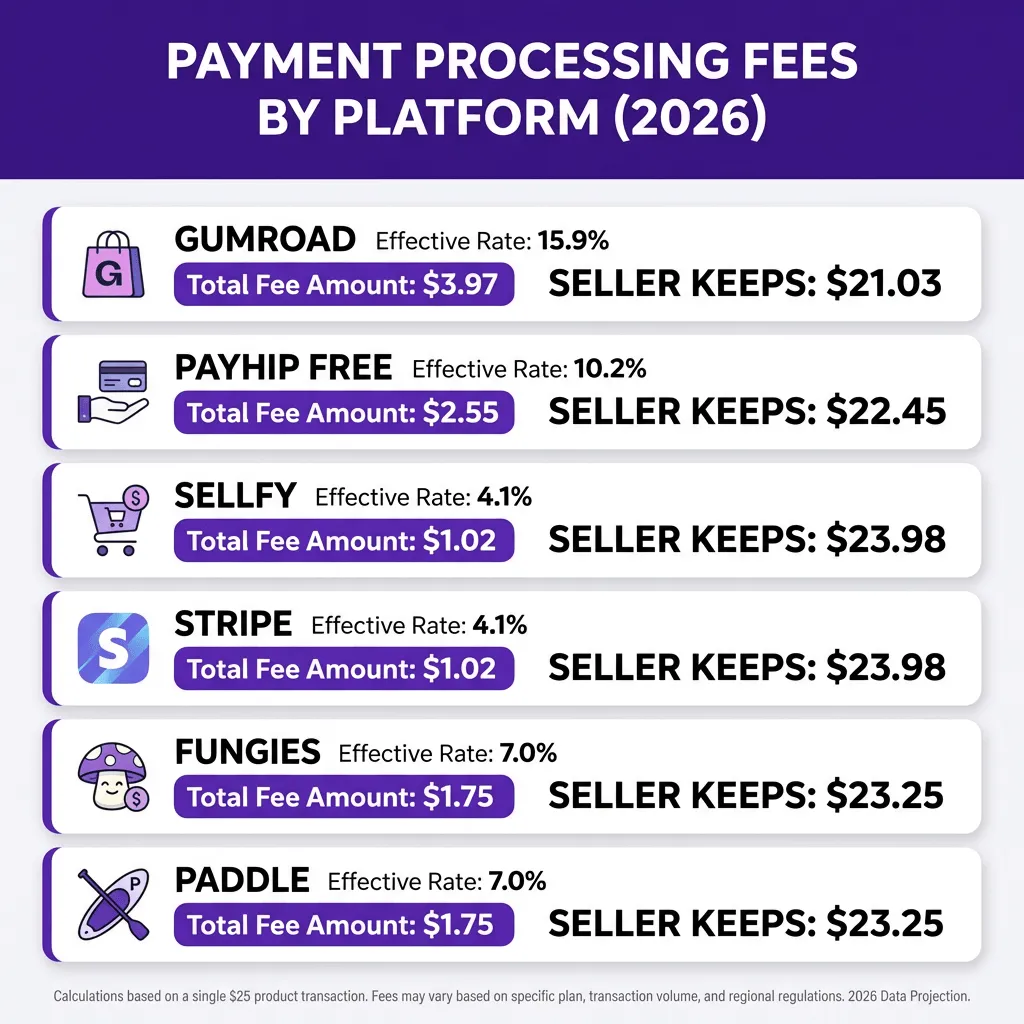
Let me break down the actual costs for a $25 digital product across popular platforms:
| Platform | Platform Fee | Processing Fee | Total Fee | You Keep | Effective Rate |
|---|---|---|---|---|---|
| Gumroad | 10% + $0.50 | 2.9% + $0.30 | $3.98 | $21.02 | 15.9% |
| Payhip (Free) | 5% | 2.9% + $0.30 | $2.55 | $22.45 | 10.2% |
| Sellfy ($29/mo) | $0 | 2.9% + $0.30 | $1.03 | $23.97 | 4.1% |
| Stripe | $0 | 2.9% + $0.30 | $1.03 | $23.97 | 4.1% |
| Fungies | 5% + $0.50 | Included | $1.75 | $23.25 | 7.0% |
| Paddle | 5% + $0.50 | Included | $1.75 | $23.25 | 7.0% |
Notice something important? The platform with the lowest advertised rate (Gumroad at 10%) actually has one of the highest effective rates. Meanwhile, platforms like Fungies and Paddle that include processing in their flat fee often work out cheaper for mid-priced products.
Hidden Fees That Destroy Your Margins
The headline rate is never the full story. Here are the hidden costs that catch digital sellers off guard:
1. Monthly Subscription Fees
Some platforms charge monthly fees regardless of your sales volume:
- Sellfy Starter: $29/month
- Podia Mover: $39/month
- Shopify Basic: $39/month
At low volumes, these fixed costs can make your effective rate skyrocket. A $29/month plan with $100 in monthly sales adds 29% to your effective rate before any transaction fees.
2. Currency Conversion Fees
Selling internationally? Expect to pay 1-3% on currency conversion. Some platforms hide this in the exchange rate; others charge it explicitly. If you’re selling to European customers from the US, this can add significant costs.
3. Chargeback Fees
When a customer disputes a charge, you pay:
- The refunded amount
- A chargeback fee ($15-$25 typically)
- Non-refundable processing fees
For a $50 sale, a chargeback can cost you $65+ total. Digital products have higher chargeback rates than physical goods because there’s no shipping proof.
4. Payout and Withdrawal Fees
How you get your money matters:
- PayPal withdrawals: 2% in some regions
- Instant payouts: 3% with some platforms
- Wire transfers: $15-$50 per transfer
- Currency conversion on payout: Another 1-3%
5. Platform-Specific “Gotchas”
Gumroad Discover: Sales through Gumroad’s marketplace cost 30% instead of 10%. If customers find you through search on Gumroad, you pay triple the platform fee.
Refund Processing: Most platforms don’t refund their fees when you issue a refund. On a $100 refund, you might lose $13+ in non-refundable fees.
Inactive Account Fees: Some merchant accounts charge monthly fees if you don’t process enough transactions.
Calculating Total Cost of Ownership
To make an apples-to-apples comparison between platforms, calculate your Total Cost of Ownership (TCO) over a year.
The TCO Formula for Digital Sellers
Annual TCO = (Monthly Platform Fee × 12)
           + (Annual Sales × Effective Transaction Rate)
           + (Number of Chargebacks × Average Chargeback Cost)
           + (International Sales × Currency Conversion Cost)
           + (Number of Payouts × Payout Fee)
Example: $2,000/Month in Sales
Let’s say you sell digital products generating $2,000/month ($24,000/year) with an average transaction of $30.
Option A: Gumroad (10% + $0.50 + processing)
- Platform fees: $24,000 × 10% = $2,400
- Fixed fees: 800 transactions × $0.50 = $400
- Processing fees: $24,000 × 2.9% + (800 × $0.30) = $696 + $240 = $936
- Annual TCO: $3,736 (15.6% effective rate)
Option B: Sellfy Starter ($29/month, 0% platform fee)
- Monthly fees: $29 × 12 = $348
- Processing fees: $24,000 × 2.9% + (800 × $0.30) = $936
- Annual TCO: $1,284 (5.4% effective rate)
Option C: Fungies (5% + $0.50, processing included)
- Platform fees: $24,000 × 5% = $1,200
- Fixed fees: 800 × $0.50 = $400
- Processing: $0 (included)
- Annual TCO: $1,600 (6.7% effective rate)
At this volume, Sellfy saves you $2,452/year compared to Gumroad. Fungies saves you $2,136/year while also handling tax compliance as your Merchant of Record.
How Product Price Affects Your Effective Rate
Here’s something counterintuitive: cheaper products often have higher effective rates due to fixed fees.
The $5 Product Problem
On a $5 sale with Gumroad:
- Platform fee: $0.50 (10%) + $0.50 fixed = $1.00
- Processing: $0.15 (2.9%) + $0.30 fixed = $0.45
- Total: $1.45
- Effective rate: 29%
That same product on Fungies:
- Platform fee: $0.25 (5%) + $0.50 fixed = $0.75
- Processing: Included
- Total: $0.75
- Effective rate: 15%
The fixed fees ($0.50 + $0.30 = $0.80 on Gumroad) consume 16% of a $5 sale before any percentage fees apply.
Break-Even Analysis by Price Point
| Product Price | Gumroad Effective Rate | Fungies Effective Rate | Stripe Effective Rate |
|---|---|---|---|
| $5 | 29.0% | 15.0% | 8.9% |
| $10 | 20.9% | 10.0% | 5.9% |
| $25 | 16.1% | 7.0% | 4.1% |
| $50 | 14.5% | 6.0% | 3.5% |
| $100 | 13.7% | 5.5% | 3.2% |
If you sell low-priced products ($10 or less), platforms with lower fixed fees or included processing become much more attractive.
Reducing Your Payment Processing Costs
Now that you know how to calculate fees, here are practical ways to reduce them:
1. Negotiate Based on Volume
Once you’re processing $50,000+/month, you can negotiate with processors. Stripe, for example, offers custom pricing for high-volume merchants. You won’t get this advertised — you have to ask.
2. Minimize Chargebacks
Digital products are prone to chargebacks. Reduce them by:
- Clear product descriptions (no surprises)
- Immediate delivery (customers get what they paid for instantly)
- Excellent customer support (solve issues before they become disputes)
- Clear refund policies (make it easier to get a refund than file a chargeback)
3. Choose the Right Platform for Your Volume
Under $500/month: Gumroad or Payhip Free make sense despite higher rates. The $0 monthly fee keeps your fixed costs low while you validate your product.
$500-$5,000/month: This is the transition zone. Fungies, Paddle, or Payhip Plus often work out cheaper than free platforms once you factor in the lower transaction rates.
Over $5,000/month: A subscription-based platform (Sellfy, Podia) or direct Stripe integration typically wins. The monthly fee becomes negligible compared to transaction savings.
4. Consider Merchant of Record Services
If you sell globally, tax compliance costs can dwarf processing fees. A Merchant of Record (MoR) like Fungies or Paddle handles:
- VAT collection and remittance (EU, UK)
- Sales tax compliance (US states)
- Chargeback management
- Currency conversion
Yes, you pay 5%+ per transaction. But compare that to the cost of:
- Tax compliance software ($100-300/month)
- Accountant fees for international filings
- Chargeback management tools
- Multiple currency accounts
For many sellers, the all-in simplicity saves money overall.
FAQ: Payment Processing Fees for Digital Sellers
What’s the cheapest way to accept payments for digital products?
It depends on your volume. Under $500/month, Gumroad or Payhip Free are cheapest due to no monthly fees. Over $1,000/month, platforms like Sellfy or Fungies typically win. Over $10,000/month, direct Stripe integration with your own tax solution is usually most cost-effective.
Are payment processing fees tax deductible?
Yes, payment processing fees are generally tax deductible as business expenses. Keep detailed records of all fees paid. If you use a Merchant of Record, they handle tax collection but the processing fees remain deductible.
Why are digital product processing fees higher than physical goods?
Digital products carry higher fraud risk — there’s no shipping address to verify, and delivery is instant. This increases chargeback rates, so processors charge more. Additionally, digital products often trigger higher interchange categories.
Can I pass processing fees to customers?
Some jurisdictions allow credit card surcharging, but it’s complex. You must disclose the surcharge clearly, cap it at your actual cost (typically 4% max), follow state-specific regulations, and never surcharge debit cards. For most digital product sellers, it’s easier to build fees into your pricing rather than add a surcharge at checkout.
How do I calculate my break-even price?
Use this formula: Break-Even Price = (Cost to Create + Desired Profit) ÷ (1 - Effective Rate)
If your product costs $10 to create, you want $10 profit, and your effective rate is 15%: ($10 + $10) ÷ (1 - 0.15) = $20 ÷ 0.85 = $23.53. Round up to $24.99 to cover fees and hit your profit target.
What’s the difference between Stripe and a Merchant of Record?
Stripe is a payment processor — they handle the transaction but you’re responsible for tax compliance, chargebacks, and fraud. A Merchant of Record (like Fungies or Paddle) becomes the legal seller of record, handling taxes, compliance, and liability. You pay more per transaction (typically 5% vs 2.9%) but get significantly less administrative burden.
Conclusion: Make the Right Choice for Your Business
Calculating payment processing fees isn’t just about finding the lowest rate. It’s about understanding your total cost of ownership at your specific sales volume.
Here’s my recommendation based on what I’ve seen work:
Just starting out ($0-$500/month): Use Gumroad or Payhip Free. The $0 monthly cost lets you validate your product without commitment.
Growing steadily ($500-$5,000/month): Switch to Fungies or Paddle. The 5% + $0.50 rate includes processing and tax compliance — often cheaper than separate tools once you factor in the hidden costs.
Established business ($5,000+/month): Consider Sellfy, Podia, or direct Stripe integration. The monthly fee becomes insignificant compared to transaction savings at scale.
Remember: the platform with the lowest advertised rate rarely has the lowest total cost. Run the numbers for your specific situation before committing.
Want to see how much you could save? Create a free Fungies account and use our fee calculator to compare your current setup against our all-in pricing.
Sources
- CheckThat.ai Gumroad Pricing Analysis 2026: https://checkthat.ai/brands/gumroad/pricing
- Payment Processing Fees Guide 2025: https://blog.ottu.com/posts/payment-processing-fees-what-e-commerce-businesses-must-know-in-2025
- Credit Card Processing Fees 2025: https://www.swipesum.com/insights/ultimate-guide-to-credit-card-processing-fees-2024
- Understanding Interchange Fees 2025: https://paymentnerds.com/blog/what-are-interchange-fees-and-why-do-they-matter/
- Premier Payments Processing Guide 2025: https://premierpaymentsonline.com/credit-card-processing-fees/
- NerdWallet Credit Card Processing Fees 2026: https://www.nerdwallet.com/business/software/learn/credit-card-processing-fees