Multi-Currency Payment Processing for B2B SaaS: The Complete 2026 Guide
Complete guide to multi-currency payment processing for B2B SaaS. Learn 3 approaches, implementation steps, and common mistakes to avoid.
Expanding your B2B SaaS into international markets isn’t just about translating your website — it’s about getting paid. And here’s the reality: 76% of B2B buyers prefer to pay in their local currency, yet most SaaS companies still force customers through USD-only checkout flows. That’s leaving money on the table.
In this guide, I’ll break down everything you need to know about multi-currency payment processing for B2B SaaS: why it matters, how to implement it, and which approach fits your growth stage. No fluff — just actionable insights from running payments infrastructure at scale.
Why Multi-Currency Payments Matter for B2B SaaS
Let me be direct: if you’re selling enterprise software and only accepting USD, you’re probably losing deals. Not because your product is bad, but because procurement teams hate currency risk.
Here’s what happens when you don’t offer local currency pricing:
- FX volatility hits your customers’ budgets. A €10,000 annual contract can swing ±15% depending on EUR/USD rates. Finance teams hate unpredictable expenses.
- Your prices look arbitrary. €8,947.32 looks calculated. €9,000 looks rounded. Psychology matters in B2B sales.
- You compete at a disadvantage. Local competitors price in familiar terms. You’re the “foreign vendor” with confusing costs.
- Payment friction kills conversions. International wire transfers cost $15-50 and take 3-5 days. Local methods settle instantly.
The data backs this up. SaaS companies that implement local currency pricing see 12-18% higher conversion rates in international markets, according to payment processor data from 2025.
Three Approaches to Multi-Currency Processing
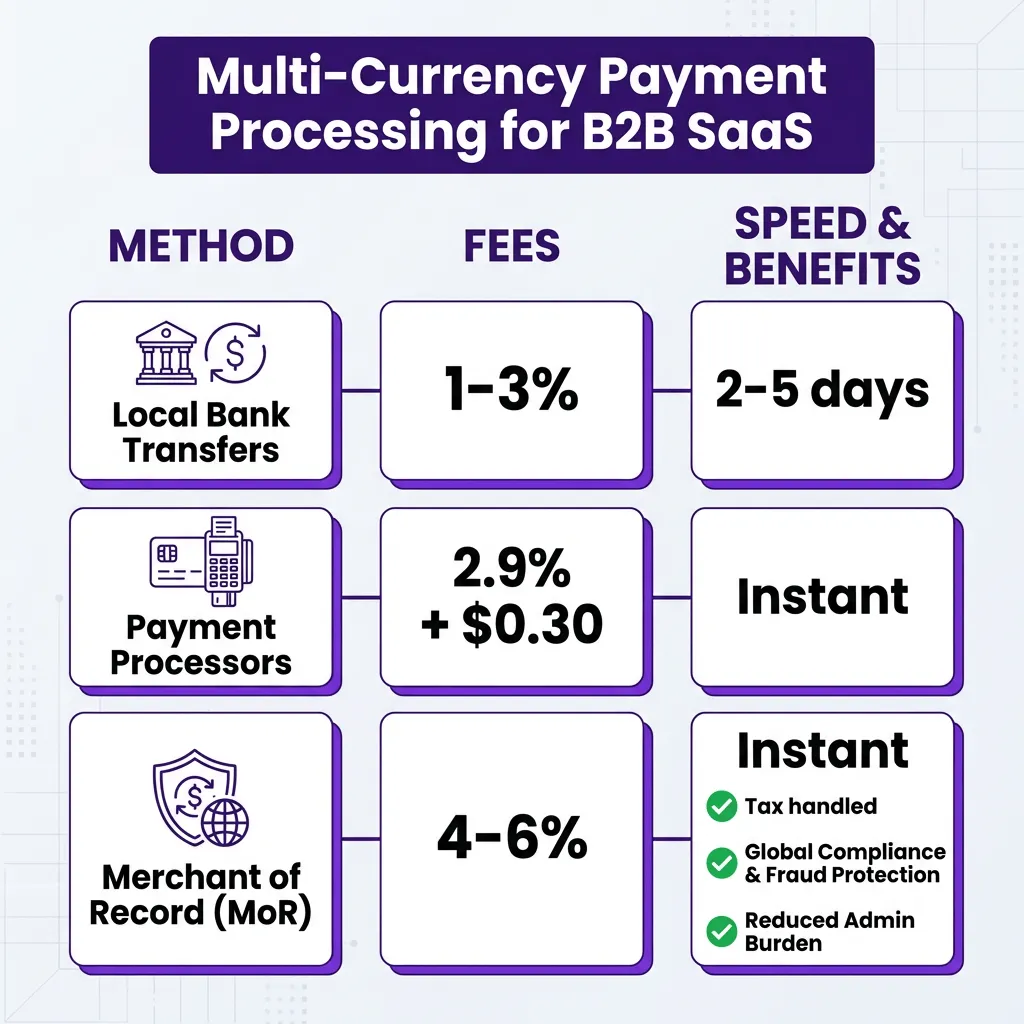
Not all multi-currency solutions are created equal. Here’s how the three main approaches stack up:
1. Local Bank Transfers (The DIY Approach)
Open local bank accounts in each target market. Receive transfers in EUR, GBP, JPY, etc. Convert to your home currency through a forex provider.
Pros: Lowest processing fees (1-3%), full control over FX timing
Cons: Requires legal entity in each country, complex tax compliance, manual reconciliation nightmare
Best for: Enterprise SaaS with $10M+ ARR and dedicated finance operations
2. Payment Processors (The Middle Ground)
Use Stripe, Adyen, or PayPal to accept multiple currencies. They handle conversion and deposit to your account.
Pros: Easy setup, instant activation, handles 135+ currencies
Cons: You’re still liable for tax compliance, FX margins (1-2% hidden), no local payment methods
Best for: Growth-stage SaaS ($1M-$10M ARR) testing international markets
3. Merchant of Record (The Full Solution)
A Merchant of Record (MoR) like Fungies becomes the legal seller of record. They handle payments, tax compliance, and regulatory requirements in each market.
Pros: Zero tax liability, local payment methods (SEPA, Bacs, Alipay), automatic compliance, simplified accounting
Cons: Higher transaction fees (4-6%), less control over branding
Best for: SaaS companies prioritizing speed-to-market and compliance simplicity
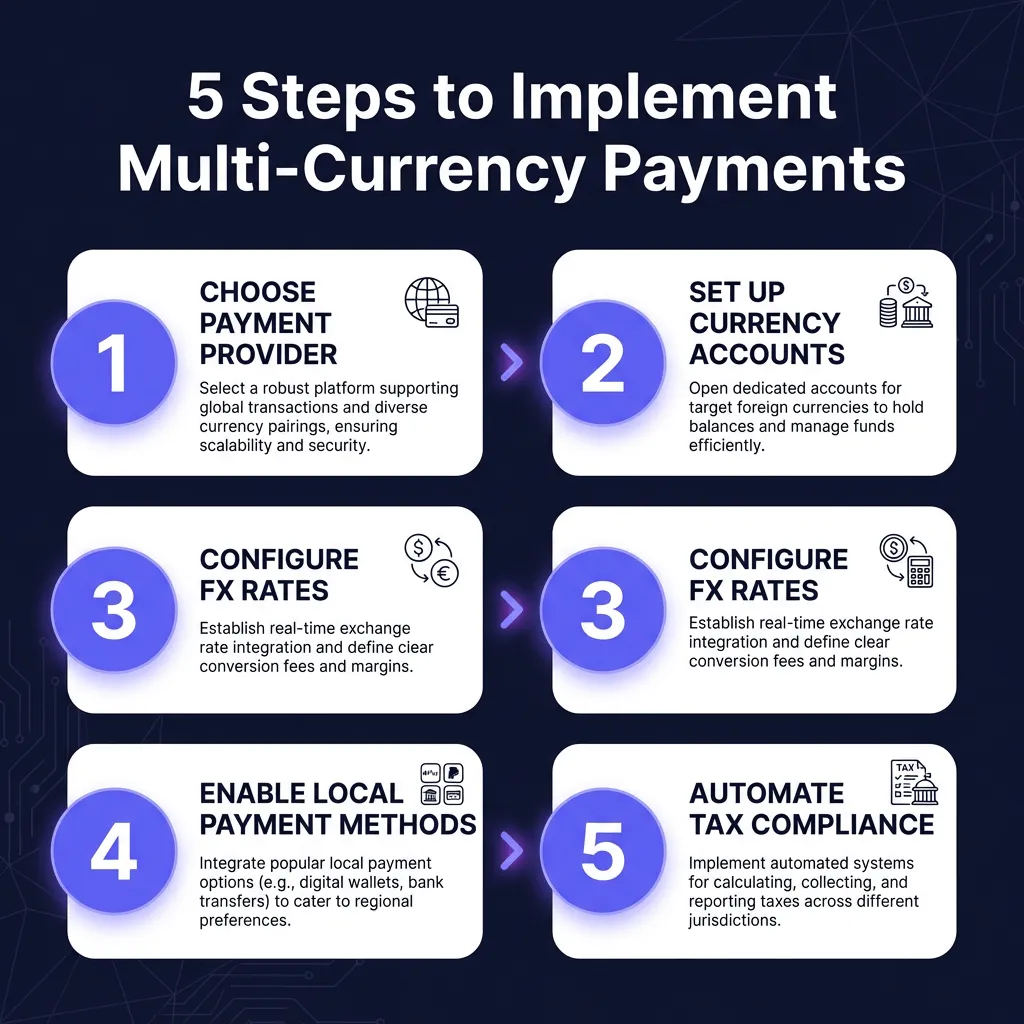
How to Implement Multi-Currency Payments: The 5-Step Framework
Based on implementations I’ve seen across dozens of B2B SaaS companies, here’s the practical roadmap:
Step 1: Choose Your Payment Architecture
Don’t over-engineer early. If you’re under $1M ARR, start with a payment processor that supports multi-currency (Stripe, Paddle). Above $5M ARR, evaluate whether a Merchant of Record reduces your compliance burden enough to justify the fee premium.
Key decision factors:
- How many countries are you selling into?
- Do you have in-house tax expertise?
- What’s your risk tolerance for compliance violations?
- How important are local payment methods (SEPA, Bacs, etc.)?
Step 2: Set Up Currency Accounts
If using a payment processor, enable multi-currency support and configure settlement accounts. Most platforms let you hold balances in EUR, GBP, CAD, AUD, and JPY.
Pro tip: Don’t auto-convert everything to USD. Maintain balances in currencies where you have significant customer concentration. This lets you pay international contractors and AWS bills without double conversion.
Step 3: Configure FX Rate Handling
You have two options for pricing:
- Static pricing: Set fixed local prices (€99/month, £89/month). Absorb FX fluctuations as a cost of business. Better for customer experience.
- Dynamic pricing: Prices float with exchange rates ($99 = €92 today, €89 tomorrow). Better for margin protection, worse for predictability.
Most B2B SaaS companies use static pricing for annual contracts and dynamic for monthly. The key is consistency — don’t change prices mid-contract.
Step 4: Enable Local Payment Methods
Credit cards aren’t universal. In Europe, SEPA Direct Debit handles 20% of B2B transactions. In the Netherlands, iDEAL dominates. In Germany, many businesses prefer bank transfer over cards.
Priority payment methods by region:
- Europe: SEPA Direct Debit, SEPA Credit Transfer, iDEAL (Netherlands), Bancontact (Belgium)
- UK: Bacs Direct Debit, Faster Payments
- APAC: Alipay (China), PayPay (Japan), bank transfers (everywhere)
- LatAm: Pix (Brazil), Oxxo (Mexico), PSE (Colombia)
Step 5: Automate Tax Compliance
This is where most companies get burned. Selling digital products internationally triggers VAT/GST obligations in 100+ countries. The rules are complex and change constantly.
If you’re using a standard payment processor, you need to:
- Register for VAT in the EU (OSS scheme helps)
- Track US sales tax nexus (economic nexus thresholds vary by state)
- File returns monthly or quarterly
- Maintain audit trails for 7+ years
Or, use a Merchant of Record and they handle all of this. For most SaaS companies under $50M ARR, the MoR fee is cheaper than building in-house tax compliance.
Ready to Accept Global Payments?
Fungies.io handles multi-currency payments, automatic tax compliance, and 50+ local payment methods — all as your Merchant of Record.
No credit card required • Setup in minutes
Common Implementation Mistakes (And How to Avoid Them)
I’ve seen these errors cost companies hundreds of thousands in lost revenue and compliance penalties:
Mistake 1: Ignoring FX Risk
If you price in EUR but settle in USD, a 10% currency swing directly impacts your margins. Hedge major currency exposures or maintain natural hedges by paying international costs from EUR balances.
Mistake 2: Hard-Coding Exchange Rates
Don’t update prices manually. Use real-time FX APIs (XE, OANDA) or your payment processor’s built-in conversion. Stale rates create arbitrage opportunities and angry customers.
Mistake 3: Forgetting About Refunds
Refunding a €1000 charge at a different exchange rate than the original transaction creates accounting nightmares. Your payment system should track original transaction rates and refund at the same rate.
Mistake 4: Neglecting Local Regulations
India requires local entity registration for certain payment flows. Brazil mandates Pix availability. China has strict forex controls. Research before you launch, not after you get blocked.
FAQ: Multi-Currency Payment Processing
What’s the cheapest way to accept multi-currency payments?
For low volume (<$100K/month), payment processors like Stripe charge 2.9% + $0.30 with no monthly fees. At higher volumes, Merchant of Record models (4-6%) often become cheaper when you factor in tax compliance costs and reduced churn from local payment methods.
Do I need a local entity in each country?
Not if you use a Merchant of Record. The MoR acts as the legal seller, handling tax registration and compliance. If you use a standard payment processor, you may need to register for VAT in countries where you exceed economic nexus thresholds.
How do I handle FX rate fluctuations?
Most B2B SaaS companies use static pricing (fixed local prices) and absorb FX fluctuations as a cost of doing business. Annual contracts lock in rates for 12 months. For large enterprise deals, consider hedging major currency exposures through forex instruments.
Which currencies should I prioritize?
Start with EUR (European markets), GBP (UK), CAD (Canada), AUD (Australia), and JPY (Japan). These five cover 80% of international B2B SaaS revenue. Add CHF, SEK, and local APAC currencies as you expand.
What’s the difference between multi-currency and multi-currency pricing?
Multi-currency means you can accept payments in different currencies. Multi-currency pricing means you display and charge different amounts based on the customer’s location. The latter requires more sophisticated checkout logic but delivers better conversion rates.
Conclusion: Start Simple, Scale Smart
Multi-currency payment processing isn’t just a nice-to-have for B2B SaaS — it’s a competitive necessity. The companies that nail international payments expand faster, retain customers longer, and command higher valuations.
My recommendation: Start with a payment processor that supports your top 5 target currencies. Validate international demand. Once you’re processing $500K+ annually in a region, evaluate whether a Merchant of Record simplifies your operations enough to justify the premium.
The worst decision is paralysis. Pick an approach, implement it, and optimize based on real data. Your international customers are waiting — make it easy for them to pay you.
Ready to Accept Global Payments?
Fungies.io handles multi-currency payments, automatic tax compliance, and 50+ local payment methods — all as your Merchant of Record.
No credit card required • Setup in minutes