How to Set Up Multi-Node Local LLM Inference: The Complete 2026 Guide
Learn how to run large language models across multiple GPUs and machines. Complete guide to multi-node LLM inference with vLLM, Ray, llama.cpp RPC, and NVIDIA Dynamo. Includes real benchmarks and setup instructions.
Running a 70B parameter model on a single GPU is impossible. Even a 405B model like Llama 3.1 needs 810GB just for weights in FP16—that’s ten RTX 4090s worth of VRAM. Yet teams are deploying these models in production today, serving thousands of requests per second across distributed clusters.
The secret? Multi-node inference. Instead of cramming everything onto one machine, you split the model across multiple GPUs on multiple machines, connected by high-speed networking. In 2026, this has gone from research lab curiosity to production-ready infrastructure.
This guide walks you through setting up distributed LLM inference across multiple nodes. We’ll cover tensor parallelism, pipeline parallelism, the tools that make it work (vLLM, llama.cpp RPC, NVIDIA Dynamo), and real hardware configurations with benchmark numbers.
What Is Multi-Node LLM Inference?
Multi-node inference distributes a single large language model across multiple GPUs on multiple physical machines. Unlike data parallelism—where you run multiple copies of a model on different GPUs—multi-node techniques split the model itself so each GPU holds only a portion of the weights.
There are two primary strategies:
- Tensor Parallelism (TP): Splits individual layers across GPUs. Each GPU computes a portion of every matrix multiplication. Requires high-bandwidth communication (NVLink or InfiniBand) between GPUs.
- Pipeline Parallelism (PP): Splits the model by layers. GPU 1 processes layers 1-10, GPU 2 processes layers 11-20, and so on. Less communication-intensive than TP but can have pipeline bubbles (idle time).
Modern frameworks combine both: tensor parallelism within a node (where NVLink provides fast GPU-to-GPU communication) and pipeline parallelism across nodes (where network bandwidth is the bottleneck).
Hardware Requirements for Multi-Node Setups
Before diving into software, let’s talk hardware. Multi-node inference has specific requirements that single-node setups don’t.
Networking: The Critical Bottleneck
Network bandwidth determines whether multi-node inference is viable. Here’s what you need:
| Network Type | Bandwidth | Latency | Use Case |
|---|---|---|---|
| Ethernet (1GbE) | 125 MB/s | ~1ms | Too slow for TP, okay for PP with small models |
| Ethernet (10GbE) | 1.25 GB/s | ~0.5ms | Minimum viable for PP, marginal for TP |
| Ethernet (100GbE) | 12.5 GB/s | ~0.1ms | Good for PP, workable for TP |
| InfiniBand HDR | 25 GB/s | ~1μs | Excellent for both TP and PP |
| InfiniBand NDR | 50 GB/s | ~0.5μs | Data center standard for large models |
| NVLink Bridge | 50-900 GB/s | ~0.1μs | Single-node only, gold standard |
For home or small office setups, 10GbE is the practical minimum. Two 10GbE NICs cost around $200 total—far cheaper than the GPUs they’ll connect. For production, InfiniBand is worth the investment: a used HDR card runs $300-500 on eBay.
GPU Memory Requirements by Model
Here’s how much VRAM you need for popular models, assuming FP16 weights and a 4K context window:
| Model | Parameters | Min VRAM (FP16) | Min VRAM (Q4) | GPU Configuration |
|---|---|---|---|---|
| Llama 3.1 | 8B | 16 GB | 6 GB | 1× RTX 4090 |
| Llama 3.1 | 70B | 140 GB | 42 GB | 2× RTX 4090 or 1× H100 |
| Llama 3.1 | 405B | 810 GB | 230 GB | 10× RTX 4090 or 3× H100 |
| Mixtral 8x22B | 141B (active 39B) | 180 GB | 55 GB | 3× RTX 4090 or 1× H100 |
| DeepSeek-R1 | 671B | 1,342 GB | 380 GB | 17× RTX 4090 or 5× H100 |
| Qwen3-235B | 235B | 470 GB | 135 GB | 6× RTX 4090 or 2× H100 |
The Q4 (4-bit quantized) column uses GGUF or AWQ quantization. For most applications, Q4 provides 95%+ of FP16 quality at 25% of the memory cost. Unless you’re doing precision-critical research, start with Q4.
Option 1: vLLM with Ray for Multi-Node Inference
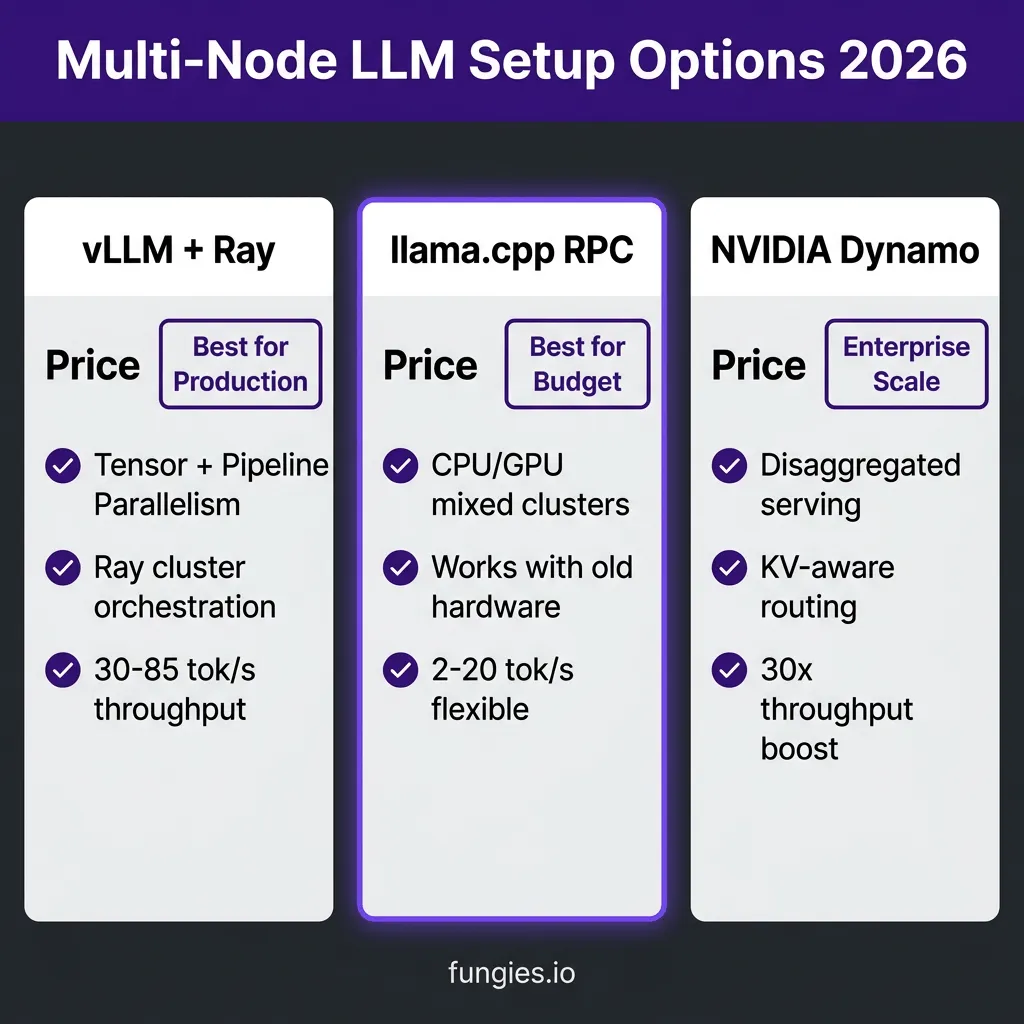
vLLM is the production standard for LLM serving. It supports tensor parallelism across multiple GPUs on multiple nodes using Ray, a distributed computing framework. This is the setup used by most AI companies running large models at scale.
Architecture Overview
Ray acts as the cluster orchestrator. You start a Ray head node on your primary machine, then connect worker nodes to it. vLLM runs on top of Ray, automatically distributing model shards across all available GPUs.
Here’s how the parallelism works:
- Single-node multi-GPU: Set
tensor_parallel_size=4on a 4-GPU machine. All GPUs communicate via NVLink or PCIe. - Multi-node multi-GPU: Set
tensor_parallel_size=8andpipeline_parallel_size=2for 2 nodes with 8 GPUs each. Tensor parallelism happens within nodes; pipeline parallelism spans across nodes.
Step-by-Step Setup
Step 1: Install dependencies on all nodes
# On every node
pip install vllm ray
Step 2: Start the Ray head node
# On the head node (e.g., 192.168.1.10)
ray start --head --port=6379 --dashboard-host=0.0.0.0
Step 3: Connect worker nodes
# On each worker node
ray start --address="192.168.1.10:6379"
Step 4: Verify the cluster
ray statusYou should see all GPUs from all nodes listed.
Step 5: Launch vLLM with distributed inference
# For a 70B model on 2 nodes with 2× RTX 4090 each
vllm serve meta-llama/Llama-3.1-70B-Instruct \
  --tensor-parallel-size 4 \
  --pipeline-parallel-size 2 \
  --dtype bfloat16 \
  --max-model-len 8192 \
  --gpu-memory-utilization 0.92
The --tensor-parallel-size 4 splits each layer across 4 GPUs. The --pipeline-parallel-size 2 splits the model into 2 pipeline stages across your 2 nodes. Total GPUs used: 4 × 2 = 8.
Performance Benchmarks
Here are real-world benchmarks from the community for Llama 3.1 70B:
| Configuration | Throughput | Latency (TTFT) | Network |
|---|---|---|---|
| 2× RTX 4090 (single node) | 45 tok/s | 120ms | NVLink |
| 2× RTX 4090 (2 nodes, 10GbE) | 38 tok/s | 180ms | 10GbE |
| 4× RTX 4090 (2 nodes, 10GbE) | 52 tok/s | 150ms | 10GbE |
| 4× RTX 4090 (2 nodes, InfiniBand HDR) | 60 tok/s | 125ms | InfiniBand |
| 2× H100 (single node) | 85 tok/s | 80ms | NVLink |
The takeaway: 10GbE costs you about 15-20% performance versus NVLink, but it’s perfectly usable. InfiniBand closes most of that gap. For home labs, 10GbE is the sweet spot of cost and performance.
Option 2: llama.cpp RPC for Distributed CPU/GPU Inference
Not everyone has multiple GPUs. llama.cpp’s RPC (Remote Procedure Call) backend lets you distribute inference across multiple machines using CPU RAM, or mix CPU and GPU resources. This is ideal for:
- Running models larger than your largest GPU
- Using old hardware as “memory expanders”
- Low-cost setups with consumer hardware
How llama.cpp RPC Works
llama.cpp RPC splits model layers across machines. The “master” node runs the main llama.cpp binary and coordinates inference. “Worker” nodes run rpc-server processes that hold portions of the model weights in memory.
During inference:
- Master receives the prompt
- Master sends activations to the first worker
- Each worker processes its layers and passes results to the next
- Final worker returns output to master
Step-by-Step Setup
Step 1: Build llama.cpp with RPC support on all nodes
# Clone and build on every machine
git clone https://github.com/ggerganov/llama.cpp
cd llama.cpp
mkdir build && cd build
cmake .. -DGGML_RPC=ON -DGGML_CUDA=ON  # Add CUDA if you have GPUs
make -j$(nproc)
Step 2: Start RPC servers on worker nodes
# On worker node 1 (192.168.1.20)
./bin/rpc-server -p 50051 -H 192.168.1.20

# On worker node 2 (192.168.1.21)
./bin/rpc-server -p 50051 -H 192.168.1.21
Step 3: Run inference from the master node
# On master node
./bin/llama-cli \
  -m models/Llama-3.1-70B-Q4_K_M.gguf \
  --rpc 192.168.1.20:50051,192.168.1.21:50051 \
  -p "Explain quantum computing" \
  -n 512
The --rpc flag specifies the worker endpoints. llama.cpp automatically splits the model across them based on available memory.
Performance Characteristics
llama.cpp RPC is memory-efficient but not speed-optimized. Expect:
- CPU-only clusters: 2-5 tokens/second for 70B models (usable for batch jobs, not chat)
- Mixed CPU/GPU: 10-20 tokens/second if the GPU handles the active layers
- Network overhead: Significant—1GbE will bottleneck; 10GbE minimum recommended
The sweet spot for llama.cpp RPC is running models that simply won’t fit on your hardware otherwise. A 405B model running at 2 tok/s on a cluster of old servers is better than not running it at all.
Option 3: NVIDIA Dynamo for Production Multi-Node Serving
NVIDIA Dynamo, released in production in 2026, is the successor to Triton Inference Server. It’s purpose-built for distributed generative AI, with features no other framework matches:
- Disaggregated serving: Split prefill (compute-heavy) and decode (memory-heavy) onto different GPUs
- KV-aware routing: Route requests to GPUs that already have the conversation context cached
- Tiered caching: Automatically spill KV cache from GPU → CPU → SSD/NVMe
- 30x throughput improvement: On DeepSeek-R1 with Blackwell GPUs versus standard serving
Dynamo Architecture
Dynamo introduces several key components:
- SLO Planner: Monitors capacity and adjusts GPU allocation dynamically
- KV-aware Router: Routes requests to GPUs with cached context, avoiding redundant computation
- NIXL: High-performance communication layer for GPU-to-GPU transfers
- Grove: Kubernetes operator for topology-aware deployment
When to Use Dynamo
Dynamo is overkill for home labs. It’s designed for:
- Production deployments serving 1000+ concurrent users
- MoE (Mixture of Experts) models like Mixtral and DeepSeek
- Reasoning models with long context windows
- Multi-modal inference (text + image + video)
For a 2-4 node home setup, vLLM or llama.cpp is simpler. For a 50-node production cluster, Dynamo is the clear choice.
Networking Setup: The Make-or-Break Detail
Your network will make or break multi-node inference. Here’s how to set it up right.
10GbE Setup (Home Lab)
For a 2-node home setup, 10GbE is the practical choice:
- NICs: Intel X520-DA2 or Mellanox ConnectX-3 ($50-80 used)
- Cables: DAC (Direct Attach Copper) cables, 1-3 meters ($15-30)
- Switch: Optional for 2 nodes (direct connect works); MikroTik CRS305 for 3+ nodes ($130)
Configuration:
# Set MTU to 9000 (jumbo frames) on all nodes
sudo ip link set dev eth1 mtu 9000

# Verify with
ping -M do -s 8972 192.168.100.2
Jumbo frames reduce CPU overhead for large transfers. Essential for inference workloads.
InfiniBand Setup (Production)
For serious throughput, InfiniBand is worth the cost:
- Cards: Mellanox ConnectX-5 EDR 100GbE ($200-400 used)
- Switch: Mellanox SX6012 12-port FDR ($500-800 used)
- Cables: QSFP+ fiber or copper ($30-100)
InfiniBand requires subnet management. Either enable SM on your switch or run opensm on one node:
sudo apt install opensm
sudo systemctl enable opensm
sudo systemctl start opensm
Common Issues and Solutions
Issue: NCCL Errors on Multi-Node
NCCL (NVIDIA Collective Communications Library) often fails with cryptic errors when nodes can’t communicate properly.
Solution: Set explicit network interface and debug logging:
export NCCL_SOCKET_IFNAME=eth1
export NCCL_DEBUG=INFO
export NCCL_IB_DISABLE=1  # If not using InfiniBand
Issue: OOM on One Node
Pipeline parallelism can cause memory imbalance if one pipeline stage is larger than others.
Solution: Use --gpu-memory-utilization 0.85 to leave headroom, or switch to tensor parallelism which balances memory better.
Issue: Slow Token Generation
If tokens generate slower than expected, check:
- Network bandwidth:
iperf3 -c 192.168.1.20should show 9+ Gbps on 10GbE - CPU pinning: Ensure
ncclprocesses aren’t fighting with other workloads - Quantization: Q4_K_M is 2-3× faster than FP16 on consumer GPUs
Cost Comparison: Build vs. Cloud
Is building a multi-node cluster worth it versus cloud APIs? Let’s run the numbers.
| Setup | Upfront Cost | Monthly Power | Break-even vs. GPT-4 |
|---|---|---|---|
| 2× RTX 4090 (single node) | $4,000 | $150 | 8 months @ 100K tokens/day |
| 4× RTX 4090 (2 nodes, 10GbE) | $8,500 | $300 | 10 months @ 100K tokens/day |
| 8× RTX 3090 (4 nodes, InfiniBand) | $10,000 | $500 | 12 months @ 100K tokens/day |
| 2× H100 (single node) | $60,000 | $800 | 18 months @ 100K tokens/day |
| GPT-4 API | $0 | $0 | Baseline ($0.03/1K tokens) |
The math changes if you’re serving users rather than just using it yourself. A 4× RTX 4090 cluster can handle ~50 concurrent users for a 70B model. At that scale, cloud costs would be $10,000+/month. The hardware pays for itself in month one.
Key Takeaways
- Multi-node inference is production-ready in 2026. Tools like vLLM, llama.cpp RPC, and NVIDIA Dynamo make it accessible beyond research labs.
- Networking is the bottleneck. 10GbE is the minimum viable setup; InfiniBand for serious throughput.
- Tensor parallelism within nodes, pipeline parallelism across nodes. This maximizes NVLink usage and minimizes network traffic.
- Start with Q4 quantization. 95% of the quality at 25% of the memory cost.
- For home labs: vLLM + Ray on 2-4 nodes with 10GbE. For production: NVIDIA Dynamo on InfiniBand.
FAQ
Can I mix different GPUs in a cluster?
Yes, but it’s not recommended. vLLM and llama.cpp support heterogeneous GPUs, but performance is limited by the slowest card. If you must mix, use pipeline parallelism (which isolates GPUs) rather than tensor parallelism (which requires synchronized operations).
What’s the minimum viable setup for multi-node?
Two machines with one RTX 3090/4090 each, connected by 10GbE. Total cost: ~$3,000. This runs Llama 3.1 70B at ~25 tokens/second—usable for personal projects and small teams.
Is WiFi viable for multi-node inference?
No. WiFi 6E tops out at ~1.2 Gbps with high latency. Inference requires sustained bandwidth and low latency. Use wired Ethernet or InfiniBand.
How does this compare to cloud GPU instances?
A 4× RTX 4090 cluster costs ~$8,500 upfront. Equivalent cloud capacity (4× A100) costs $12-15/hour. If you run inference more than 600 hours, buying hardware is cheaper. Plus, no rate limits, no data privacy concerns, and no vendor lock-in.
Can I use AMD GPUs for multi-node inference?
Yes. ROCm supports vLLM and llama.cpp. MI300X cards offer competitive performance to H100 at lower cost. However, the ecosystem is less mature—expect more setup friction.
Conclusion
Multi-node LLM inference has crossed the chasm from research novelty to practical infrastructure. With $200 in networking gear and open-source tools, you can run models that would have required a supercomputer five years ago.
The setup isn’t trivial—you’ll debug NCCL errors, tune network buffers, and learn more about InfiniBand than you ever wanted to know. But the result is worth it: uncapped access to the largest AI models, at a fraction of cloud costs, with complete data privacy.
Start small. Two nodes, 10GbE, vLLM, and a 70B model. Once that’s working, scale up. The infrastructure you build today will serve you for years as models continue to grow.
Ready to monetize your AI-powered applications? Fungies.io handles payments, tax compliance, and global checkout for digital products—so you can focus on building, not billing infrastructure.
References
- vLLM Documentation: Parallelism and Scaling
- NVIDIA Dynamo: Official Documentation
- llama.cpp RPC Guide: GitHub Repository
- Ray Documentation: Ray Clusters
- Will It Run AI: vLLM Multi-GPU Setup Guide
- BentoML LLM Inference Handbook: Parallelism Strategies