How to Integrate Payment Processing for SaaS: The Complete Developer Guide 2026
Learn how to integrate payment processing for SaaS in 2026. Complete developer guide covering Stripe vs MoR platforms, implementation steps, webhook handling, and avoiding common pitfalls.
Here’s a stat that keeps SaaS founders up at night: 68% of online shopping carts are abandoned before checkout completion. For SaaS companies, that translates to lost trials, failed conversions, and revenue left on the table. The culprit? Often it’s a clunky, confusing payment experience that makes customers second-guess their purchase.
I’ve spent years helping SaaS businesses optimize their payment flows, and I can tell you this: payment processing integration isn’t just about accepting credit cards. It’s about creating a seamless experience that converts visitors into paying customers while keeping your engineering team sane.
What Is Payment Processing Integration for SaaS?
Payment processing integration is the technical connection between your SaaS application and a payment provider that enables you to accept payments from customers. But for SaaS specifically, this goes far beyond simple one-time transactions.
A proper SaaS payment integration handles:
- Recurring billing — charging customers automatically on subscription renewals
- Usage-based metering — tracking API calls, seats, or feature usage for variable billing
- Tax compliance — calculating and remitting VAT, sales tax, and GST globally
- Failed payment recovery — dunning management to reduce involuntary churn
- Multi-currency support — displaying prices and accepting payments in local currencies
- Webhook handling — processing events like successful charges, refunds, and disputes
Honestly, most developers underestimate the complexity involved. You aren’t just adding a “buy now” button. You’re building a financial infrastructure that needs to be secure, compliant, and reliable at scale.
Why Payment Integration Matters More Than Ever in 2026
The SaaS landscape has shifted dramatically. Customers expect instant access, transparent pricing, and frictionless checkout. Meanwhile, regulatory requirements have tightened globally. Here’s what’s driving the urgency:
1. Global Tax Complexity
Selling to customers in the EU? You need VAT compliance. Have US customers? Sales tax rules vary by state. Operating in India? GST registration is mandatory. In 2026, tax authorities worldwide have ramped up enforcement, and the penalties for non-compliance can be severe.
According to recent data, businesses spend an average of 80 hours per year just managing sales tax compliance per jurisdiction. For a SaaS company selling globally, that’s potentially hundreds of hours annually.
2. Rising Customer Expectations
Your customers expect Apple Pay, Google Pay, Buy Now Pay Later options, and local payment methods like iDEAL or SEPA. Limiting checkout to just credit cards means leaving money on the table. Studies show that offering preferred local payment methods can increase conversion rates by up to 30%.
3. The True Cost of Failed Payments
Involuntary churn — when customers want to pay but their card fails — can account for 20-40% of your total churn. Without proper dunning management and payment retry logic, you’re bleeding revenue unnecessarily.
Choosing Your Payment Integration Approach
Before writing any code, you need to decide on your integration strategy. There are three main approaches, each with trade-offs:
Option 1: Payment Processor (Stripe-Style)
Platforms like Stripe, Braintree, and Adyen provide powerful APIs and maximum flexibility. You maintain control over the entire checkout experience, but you’re responsible for tax compliance, fraud prevention, and regulatory requirements.
| Pros | Cons |
|---|---|
| Lowest transaction fees (2.9% + $0.30 typical) | You handle all tax compliance |
| Maximum customization | Must register for VAT/GST in each jurisdiction |
| Best developer documentation | Complex to implement correctly |
| Extensive ecosystem of tools | Ongoing maintenance burden |
Option 2: Merchant of Record (MoR)
Merchant of Record platforms like Fungies.io, Paddle, and FastSpring act as the legal seller. They handle payments, tax compliance, and regulatory requirements on your behalf. You get a simpler integration at the cost of higher fees.
| Pros | Cons |
|---|---|
| Zero tax compliance work | Higher fees (5% + $0.50 typical) |
| Instant global compliance | Less control over checkout UX |
| Built-in fraud protection | Platform owns customer relationship |
| Faster time to market | Limited customization options |
Option 3: Hybrid Approach
Some savvy founders use Stripe for US/domestic transactions (where tax compliance is simpler) and an MoR for international sales. This optimizes costs while minimizing compliance headaches, though it adds integration complexity.
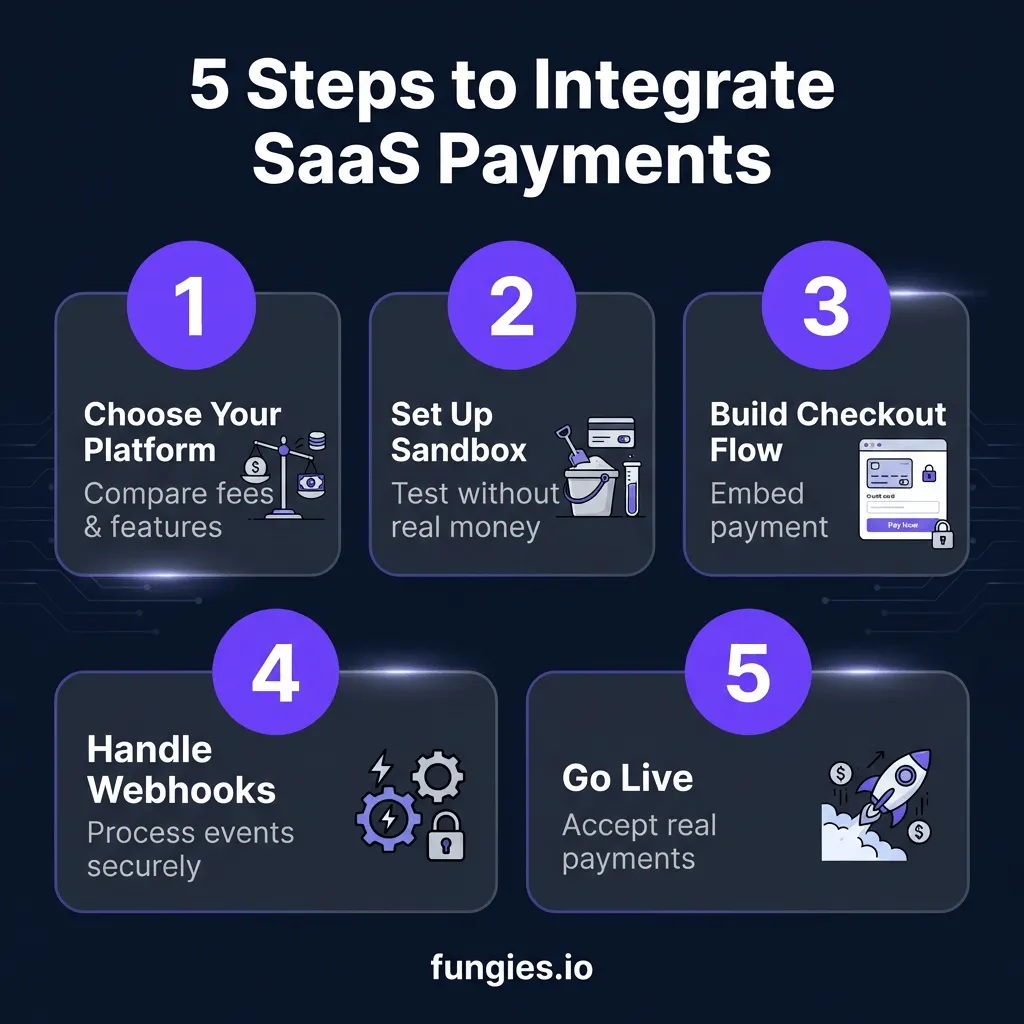
Step-by-Step Payment Integration Guide
Now let’s walk through the actual implementation. I’ll focus on best practices that apply regardless of which provider you choose.
Step 1: Set Up Your Sandbox Environment
Never test with real money. Every reputable payment provider offers a sandbox environment with test card numbers. Here’s what you need to verify:
- Successful payment flows
- Failed payment handling (insufficient funds, expired cards)
- 3D Secure authentication scenarios
- Webhook event processing
- Refund and dispute workflows
Common test card numbers you should know:
Visa success: 4242 4242 4242 4242
Visa with 3DS: 4000 0025 0000 3155
Declined: 4000 0000 0000 0002
Insufficient funds: 4000 0000 0000 9995
Step 2: Build Your Checkout Flow
You have three options for checkout implementation:
Hosted Checkout — Redirect customers to your payment provider’s page. Easiest to implement but least control over branding.
Embedded Checkout — Use pre-built components that live on your site. Good balance of control and simplicity.
Custom Integration — Build everything from scratch using the provider’s API. Maximum control but requires PCI compliance.
For most SaaS companies, I recommend embedded checkout. It gives you enough customization to maintain brand consistency while offloading PCI compliance to your provider.
Step 3: Handle Webhooks Properly
Webhooks are how your payment provider tells your application about events: successful charges, subscription renewals, refunds, and more. Getting webhooks wrong is one of the most common (and costly) integration mistakes.
Here are the non-negotiables:
- Verify webhook signatures — Always validate that webhooks actually came from your provider
- Make endpoints idempotent — The same webhook may be sent multiple times; handle duplicates gracefully
- Return 200 status quickly — Process webhooks asynchronously; don’t block the response
- Log everything — When disputes arise, you’ll need detailed records
Step 4: Implement Subscription Logic
SaaS billing adds complexity beyond one-time payments. You need to handle:
- Trial conversions — Automatically charging when trials end
- Prorated upgrades/downgrades — Fair billing when customers change plans mid-cycle
- Usage metering — Tracking and billing for overages or usage-based pricing
- Tax calculation — Applying correct rates based on customer location
This is where MoR platforms shine — they handle all of this complexity for you. With Stripe, you’ll need to build or buy additional tooling.
Step 5: Test, Monitor, and Optimize
Before going live, run through this checklist:
- ✅ Test all payment methods you plan to support
- ✅ Verify webhook handling with failed and retried events
- ✅ Check mobile responsiveness of checkout flows
- ✅ Validate tax calculations for different regions
- ✅ Test subscription lifecycle (trial, renewal, cancellation)
- ✅ Set up monitoring and alerting for payment failures
Platform Comparison: Real Numbers for 2026
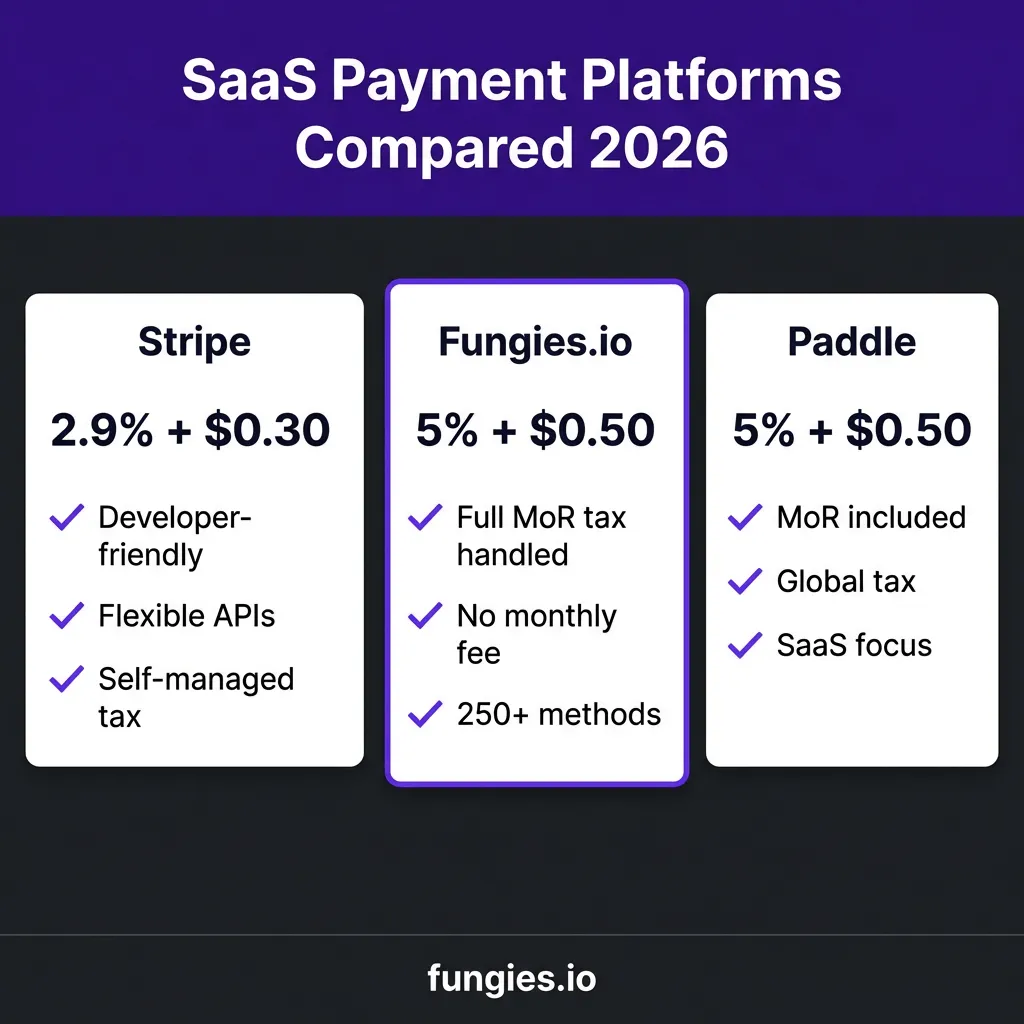
Let’s look at actual costs for a SaaS business doing $50,000 MRR with customers across the US, EU, and Asia:
| Platform | Base Fee | Effective Rate* | Monthly Cost | Tax Handling |
|---|---|---|---|---|
| Stripe | 2.9% + $0.30 | ~4.5% | ~$2,250 | You handle (+$200-500/mo tools) |
| Fungies.io | 5% + $0.50 | 5.5% | ~$2,750 | Included (MoR) |
| Paddle | 5% + $0.50 | 5.5% | ~$2,750 | Included (MoR) |
| FastSpring | 5.9% + $0.95 | ~7% | ~$3,500 | Included (MoR) |
*Effective rate includes currency conversion, international card fees, and typical add-ons
Here’s the thing most comparisons miss: Stripe’s base rate looks cheaper, but once you add Stripe Tax ($0.50 per transaction), currency conversion (1-2%), and the cost of your time managing compliance, the gap narrows significantly. For many SaaS companies under $100k MRR, an MoR actually costs less when you factor in the time savings.
Common Integration Pitfalls (And How to Avoid Them)
I’ve seen the same mistakes repeatedly. Learn from others’ pain:
Pitfall 1: Ignoring Idempotency
Network timeouts happen. If your code retries a failed request, you might create duplicate charges. Always use idempotency keys for payment creation requests.
Pitfall 2: Processing Webhooks Synchronously
Never do heavy processing inside your webhook handler. Return a 200 response immediately, then process the event asynchronously. Slow webhook responses can cause your provider to retry, creating duplicate work.
Pitfall 3: Hardcoding Tax Logic
Tax rules change constantly. Hardcoding rates or rules will bite you. Use a proper tax calculation service or choose an MoR that handles this automatically.
Pitfall 4: Neglecting Failed Payment Recovery
Cards expire. Banks decline legitimate transactions. Without a dunning strategy, you’re losing customers who actually want to stay. Implement retry logic and customer communication for failed payments.
Advanced: Usage-Based Billing Implementation
Usage-based pricing is increasingly popular for AI tools, APIs, and infrastructure SaaS. Here’s how to implement it:
1. Track Usage Reliably
Log every billable event to a durable queue before processing. You don’t want to lose revenue because of a server restart.
2. Aggregate Before Billing
Don’t bill per API call. Aggregate usage over the billing period, then report the total. This reduces transaction fees and simplifies customer understanding.
3. Handle Overages Gracefully
Decide on your overage strategy: hard limits, soft limits with warnings, or automatic tier upgrades. Communicate this clearly to customers.
FAQ: Payment Integration for SaaS
How long does payment integration typically take?
For a basic integration with an MoR like Fungies.io or Paddle, you can be live in 1-2 days. A full Stripe integration with custom checkout, tax handling, and subscription management typically takes 2-4 weeks of engineering time.
Do I need to be PCI compliant?
If you use hosted or embedded checkout solutions, your provider handles PCI compliance. If you build a custom integration that touches raw card data, you’ll need PCI DSS certification — a complex and expensive process that most SaaS companies should avoid.
What’s the best payment platform for a new SaaS startup?
For early-stage SaaS companies without dedicated finance teams, I generally recommend starting with an MoR like Fungies.io. The slightly higher fees are worth the time saved on tax compliance and the faster time to market. You can always migrate to Stripe later when you have the resources to manage compliance in-house.
How do I handle refunds and disputes?
Most platforms provide APIs or dashboards for issuing refunds. For disputes (chargebacks), you’ll need to submit evidence through your provider’s system. MoR platforms often handle dispute management for you, while with Stripe you’re more involved in the process.
Can I switch payment providers later?
Yes, but migration is painful. You’ll need to migrate customer payment methods (if your provider supports exports), update your integration code, and manage the transition period. It’s doable, but plan for 2-4 weeks of engineering work plus potential customer communication about re-entering payment details.
Conclusion: Start Simple, Scale Smart
Payment integration for SaaS doesn’t have to be a nightmare. The key is choosing the right approach for your current stage. If you’re pre-product-market fit, prioritize speed and choose an MoR that handles complexity for you. If you’re scaling past $100k MRR with a dedicated finance team, the cost savings of a direct processor might justify the additional work.
Remember: the best payment integration is the one that lets you focus on building a great product while reliably collecting revenue. Don’t let perfect be the enemy of good — get something working, then optimize as you grow.
Ready to integrate payments for your SaaS? Get started with Fungies.io and launch your payment flow in minutes, not weeks. With full Merchant of Record protection, global tax compliance handled automatically, and no monthly fees, you can focus on what matters: building your product.