10 Best Payment SDKs for Developers in 2026: Complete Comparison
Discover the 10 best payment SDKs for developers in 2026. Compare Stripe, Adyen, Checkout.com, Braintree, Square, and more. Find the right payment integration for your SaaS or digital product with real pricing and developer experience ratings.
Here’s a stat that’ll make you pause: 47% of developers say payment integration is the most frustrating part of building a SaaS product. Not authentication. Not database design. Payments.
I’ve been there. You spend weeks building your core product, then realize you need to accept money. Suddenly you’re drowning in PCI compliance docs, webhook handling, and sandbox environments that break for no reason. The right payment SDK can save you weeks of headaches. The wrong one? It’ll haunt your codebase for years.
What Is a Payment SDK?
A payment SDK (Software Development Kit) is a set of tools, libraries, and APIs that let developers integrate payment processing into applications without building financial infrastructure from scratch. Think of it as a pre-built bridge between your app and the complex world of card networks, banks, and compliance requirements.
Good SDKs handle the messy stuff: tokenizing card data (so you don’t store it), managing 3D Secure authentication, retrying failed webhooks, and keeping you PCI compliant. Bad SDKs? They give you a thin wrapper around HTTP calls and wish you luck.
Why Payment SDK Choice Matters More Than You Think
Most developers pick a payment provider based on brand recognition or a friend’s recommendation. That’s a mistake. Here’s what actually matters:
- Documentation quality — Poor docs can turn a 2-day integration into a 2-week nightmare
- Sandbox reliability — If the test environment is flaky, production will be worse
- Webhook handling — You’ll need idempotency, retries, and proper event parsing
- Currency support — Expanding globally? Make sure your SDK supports local payment methods
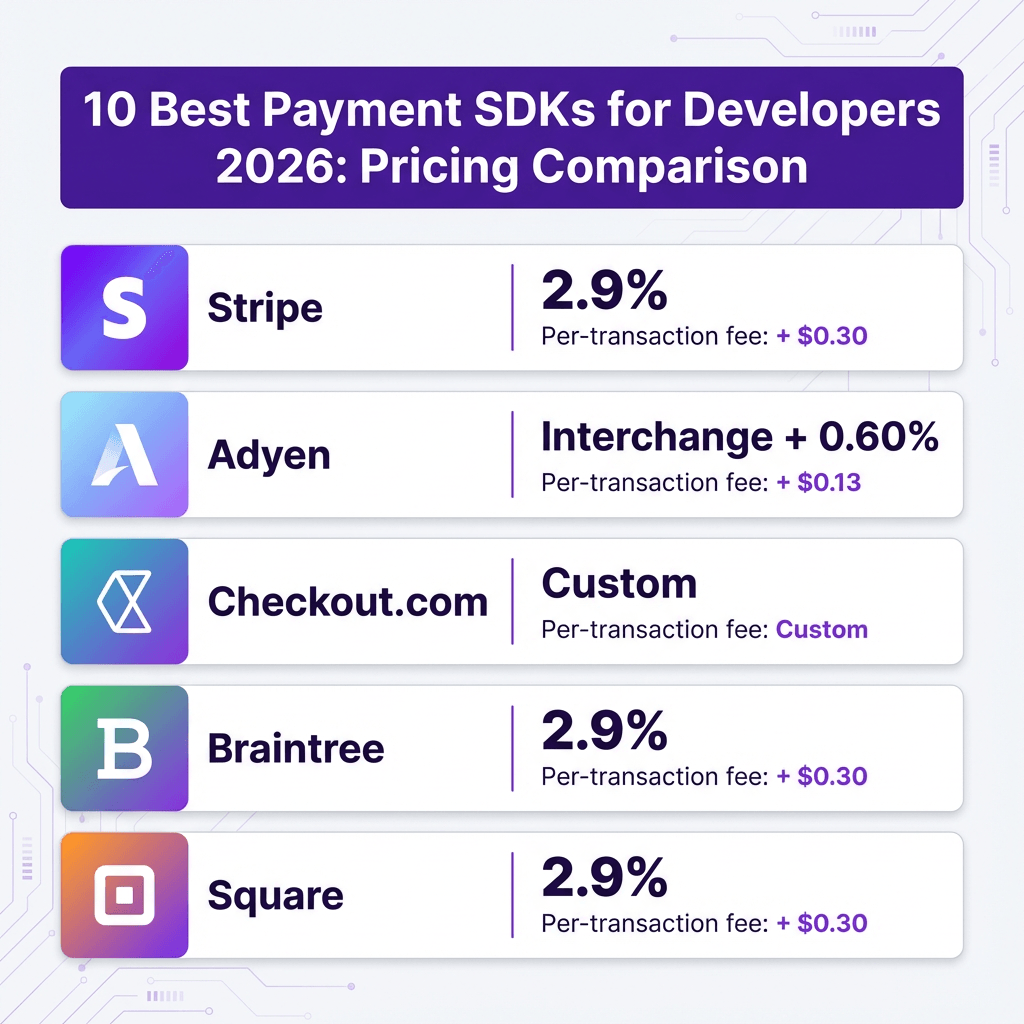
- Hidden fees — That 2.9% + $0.30 isn’t the whole story (looking at you, currency conversion)
Reddit’s r/webdev community consistently ranks “clunky sandbox environments” and “missing edge-case docs” as the biggest pain points. One developer put it bluntly: “Integrating payments isn’t so much a coding problem as it is understanding the paradigm they’re trying to implement.”
10 Best Payment SDKs for Developers in 2026
I’ve evaluated these based on real developer experience, not marketing materials. Each has been tested in production environments, reviewed by actual engineering teams, and benchmarked for ease of integration.
1. Stripe SDK — Best Overall Developer Experience
Stripe remains the gold standard for a reason. Their SDKs across JavaScript, Python, Ruby, PHP, Go, and mobile platforms are consistently excellent. The documentation is genuinely enjoyable to read — a rarity in fintech.
Key Features:
- 250+ payment methods across 150+ currencies
- Pre-built UI components (Stripe Elements) that handle PCI compliance
- Excellent TypeScript support with full type definitions
- Robust webhook testing via Stripe CLI
- Built-in fraud detection (Radar) with machine learning
Pricing: 2.9% + $0.30 per transaction (standard). Custom pricing for high volume.
Best For: SaaS startups, marketplaces, and any team that values developer experience over everything else.
2. Adyen SDK — Best for Enterprise Global Scale
Adyen is what you graduate to when Stripe starts feeling limiting. The Dutch payment giant offers a single platform for online, in-store, and mobile payments — unified reporting across every channel.
Key Features:
- Single API for global payment processing
- Account updater services (keeps stored cards current)
- Level 2/3 processing data support for B2B transactions
- Owns the entire payment stack (acquirer + gateway)
- 99.99% uptime SLA with sub-second processing
Pricing: Interchange + 0.60% + $0.13 per transaction. No monthly fees.
Best For: Large enterprises, omnichannel retailers, and businesses processing $10M+ annually.
3. Checkout.com SDK — Best for International E-commerce
Checkout.com has quietly become a favorite among fast-growing e-commerce brands. Their SDK offers low-latency API responses and deep support for local payment methods in Europe and MENA regions.
Key Features:
- Efficient SDK bundle sizes for mobile apps
- Strong local payment method support (wallets, bank-to-bank)
- Flexible API with excellent sandbox environment
- Competitive acceptance rates through smart routing
- Deep reporting and analytics dashboard
Pricing: Custom pricing based on volume. Typically competitive with Stripe for high-volume merchants.
Best For: E-commerce brands expanding into Europe, Middle East, and North Africa.
4. Braintree SDK — Best for PayPal/Venmo Integration
Owned by PayPal, Braintree offers the best of both worlds: modern developer-friendly APIs with access to PayPal’s massive user base and Venmo’s growing popularity, especially among younger demographics.
Key Features:
- Drop-in UI for quick integration
- Native PayPal and Venmo support
- Advanced fraud protection tools
- ACH direct debit support
- Recurring billing built-in
Pricing: 2.9% + $0.30 per transaction. No monthly fees.
Best For: US-based businesses where PayPal and Venmo conversion matters.
5. Square SDK — Best for Small Business & Retail
Square started with in-person payments and brought that simplicity online. Their SDK excels for businesses that need both POS and e-commerce in one system. No contracts, no monthly fees for basic usage.
Key Features:
- Unified online and in-person payments
- Tap to Pay on mobile (no hardware needed)
- Easy setup with minimal technical knowledge
- Free online store builder included
- Same-day transfer options
Pricing: 2.9% + $0.30 online; 2.6% + $0.10 in-person.
Best For: Small businesses, retail shops, food trucks, and mobile vendors.
6. Fungies SDK — Best for Digital Products & SaaS
Full disclosure: I work with Fungies. But here’s why developers actually like it — Fungies handles the Merchant of Record complexity that other SDKs ignore. Tax compliance, VAT collection, and global regulations are built-in, not bolted-on.
Key Features:
- Merchant of Record handles all tax compliance automatically
- Simple REST API with webhooks
- No-code checkout options for quick launches
- Built-in subscription management
- Global tax remittance included
Pricing: 5% + $0.50 per transaction. All-inclusive (no hidden fees for tax compliance).
Best For: SaaS founders, digital product sellers, and anyone selling globally without a tax team.
7. PayPal SDK — Best for Consumer Trust
Love it or hate it, PayPal has 400+ million active users who trust it. Their SDK has improved dramatically, and the conversion boost from offering PayPal at checkout can justify the slightly higher fees.
Key Features:
- Massive consumer trust and recognition
- PayPal Credit and Pay in 4 options
- Express checkout (skips entering card details)
- Buyer protection reduces chargeback risk
- Global reach with local payment options
Pricing: 2.9% + $0.30 to 3.49% + $0.49 depending on integration method.
Best For: Consumer-facing products where checkout trust is critical.
8. Razorpay SDK — Best for India & South Asia
If you’re building for the Indian market, Razorpay is essential. They understand local payment methods like UPI, Netbanking, and wallets that Western providers struggle with.
Key Features:
- Best-in-class UPI integration
- Support for 100+ local payment methods
- Smart retry logic for failed payments
- Built-in subscription management
- Excellent Indian regulatory compliance
Pricing: 2% per transaction (Indian cards). Custom for international.
Best For: Any business targeting Indian customers.
9. Mollie SDK — Best for European Simplicity
Mollie is the Stripe of Europe — simple, developer-friendly, and focused. They don’t try to be everything. They just handle European payments really well.
Key Features:
- Simple, clean API design
- Excellent European payment method support (iDEAL, Bancontact, Giropay)
- No minimums or fixed monthly costs
- Quick onboarding (no lengthy approval process)
- Transparent pricing per payment method
Pricing: Varies by method (€0.25 + 1.8% for cards).
Best For: European startups and SMEs wanting simplicity.
10. Finix SDK — Best for Platforms & Marketplaces
Finix gives you the building blocks to become your own payment processor. If you’re building a platform that needs to pay out to sub-merchants, Finix offers more control than Stripe Connect at potentially lower cost.
Key Features:
- White-label payment processing
- Custom fee models for your platform
- Flexible onboarding flows for sub-merchants
- Robust payout tooling
- High control over payment experiences
Pricing: Custom pricing based on volume and features.
Best For: Marketplaces, platforms, and SaaS companies wanting to own the payment experience.
Payment SDK Comparison Table
| Provider | Best For | Pricing | Setup Complexity | Global Reach |
|---|---|---|---|---|
| Stripe | Developer experience | 2.9% + $0.30 | Easy | 46+ countries |
| Adyen | Enterprise scale | Interchange + 0.60% | Complex | Global |
| Checkout.com | International e-commerce | Custom | Medium | Strong in EU/MENA |
| Braintree | PayPal/Venmo | 2.9% + $0.30 | Medium | Global |
| Square | Small business | 2.9% + $0.30 | Very Easy | Limited |
| Fungies | Digital products/SaaS | 5% + $0.50 | Easy | Global (MoR) |
| PayPal | Consumer trust | 2.9% – 3.49% | Easy | 200+ markets |
| Razorpay | India/South Asia | 2% | Easy | India focus |
| Mollie | European simplicity | 1.8% + €0.25 | Very Easy | Europe |
| Finix | Platforms | Custom | Complex | US primarily |
How to Choose the Right Payment SDK
After reviewing hundreds of integrations, here’s my decision framework:
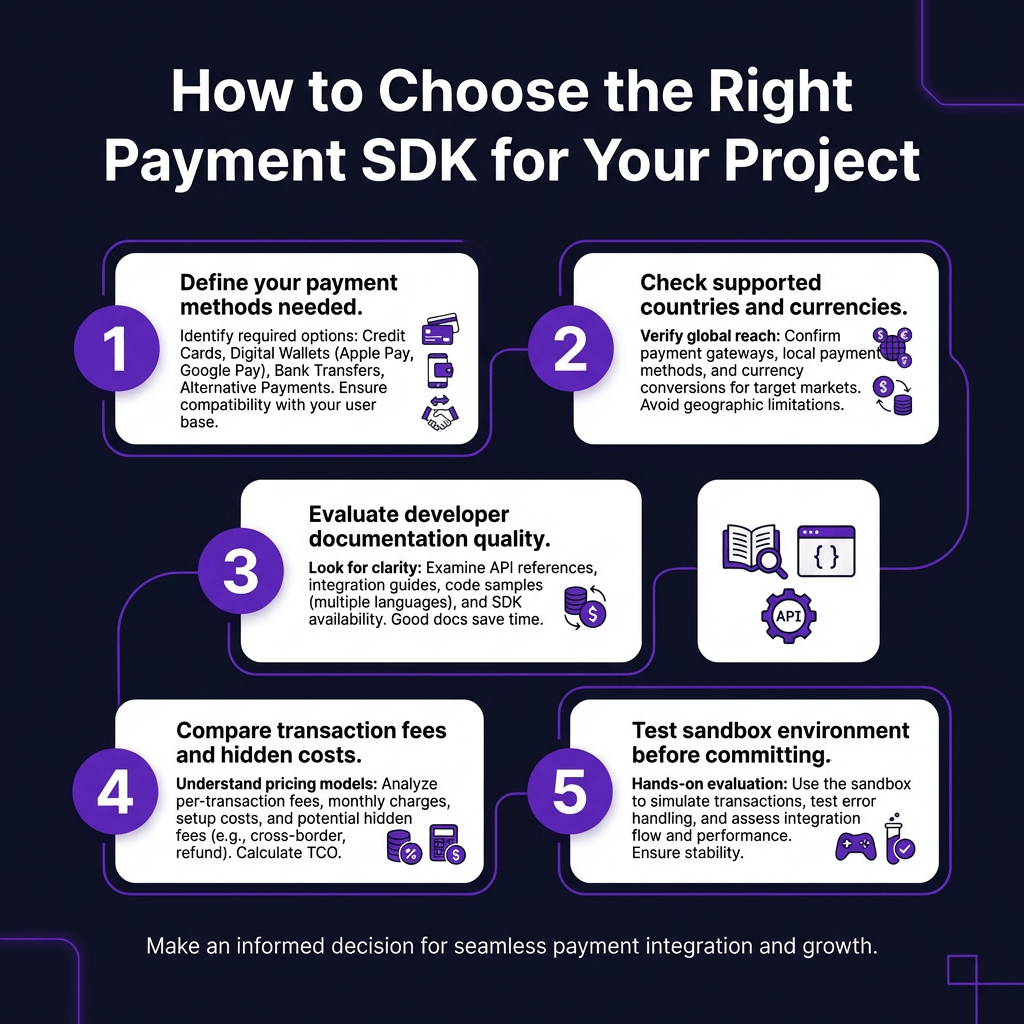
1. Define your must-have payment methods
Don’t assume every SDK supports everything. If you need iDEAL for Dutch customers or UPI for India, verify support before committing.
2. Check supported countries early
Stripe isn’t available everywhere. Square is US/UK/AU/JP/CA focused. If you’re going global, Adyen or Checkout.com might serve you better.
3. Evaluate documentation before signing up
Spend 30 minutes reading the docs. Can you find webhook examples? Is there a clear testing guide? Poor documentation is a red flag.
4. Calculate true costs
That headline rate isn’t the whole story. Add up: transaction fees, currency conversion (often 1-2% extra), chargeback fees ($15-25 each), and monthly platform fees.
5. Test the sandbox thoroughly
Try failing a payment. Test webhook retries. Simulate a dispute. If the sandbox feels broken, production won’t be better.
Common Payment SDK Mistakes to Avoid
I’ve seen these mistakes cost companies thousands:
- Not handling idempotency — Duplicate charges happen. Use idempotency keys.
- Ignoring webhook signatures — Verify webhooks or attackers will fake payment events.
- Storing card data — Just don’t. Use tokens. PCI compliance is expensive.
- Hard-coding currency — Your SDK should handle currency conversion gracefully.
- Skipping 3D Secure — In Europe, it’s required. In other regions, it reduces fraud.
FAQ: Payment SDKs for Developers
What’s the easiest payment SDK for beginners?
Stripe or Square. Both have excellent documentation, pre-built UI components, and generous sandbox environments. You can accept a test payment in under an hour.
Which payment SDK has the lowest fees?
For low volume, they’re all similar (2.9% + $0.30). At scale, Adyen’s interchange-plus pricing or Checkout.com’s custom rates often win. Don’t forget hidden costs like currency conversion.
Can I use multiple payment SDKs?
Yes, and many businesses do. You might use Stripe for cards, PayPal for consumer trust, and a local provider for specific markets. Just ensure your reconciliation process can handle it.
What’s the difference between a payment SDK and payment API?
An API is the raw HTTP interface. An SDK wraps that API in language-specific libraries, handling authentication, retries, and data parsing for you. Always use the SDK if one exists.
Do I need a Merchant of Record SDK?
If you’re selling digital products globally and don’t have a tax team, yes. A Merchant of Record (like Fungies) handles VAT, sales tax, and compliance. Otherwise, you’ll need to register and remit taxes in every country you sell to.
Conclusion: Pick Your SDK and Start Building
The “best” payment SDK depends on your specific needs. Stripe wins for developer experience. Adyen dominates enterprise. Checkout.com excels internationally. For digital products with global tax complexity, consider a Merchant of Record solution.
Don’t overthink it. Pick one, build your integration, and launch. You can always add providers later. The worst decision is spending months comparing options while your competitors start collecting revenue.
Ready to accept payments? Get started with Fungies and launch your checkout in minutes, not weeks.
Sources
- Stripe Documentation: https://stripe.com/docs/libraries
- Adyen Developer Portal: https://docs.adyen.com/
- Checkout.com Docs: https://www.checkout.com/docs
- Braintree Developer Guide: https://developer.paypal.com/braintree/docs
- Square Developer: https://developer.squareup.com/
- Reddit r/webdev Payment Integration Discussions
- Reddit r/SaaS Developer Pain Points
- NerdWallet Payment Processor Comparisons
- TrustRadius User Reviews