10 Best Revenue Recognition Software for SaaS in 2026: Complete Comparison Guide
Discover the top 10 revenue recognition software for SaaS companies in 2026. Compare features, pricing, and ASC 606 compliance. Find the perfect solution for subscription billing, usage-based models, and complex contracts.
Here’s a stat that should keep every SaaS CFO awake at night: 70% of spreadsheets contain errors. When you’re managing millions in deferred revenue across complex subscription contracts, a single formula mistake can throw off your entire financial statement. I’ve seen it happen.
Revenue recognition isn’t just an accounting headache—it’s the foundation of your financial reporting. Get it wrong, and you’re looking at failed audits, regulatory penalties, and strategic decisions based on flawed data. Get it right, and you gain real-time visibility into your true growth trajectory.
What Is Revenue Recognition Software?
Revenue recognition software automates how you record income under standardized accounting rules—specifically ASC 606 (US GAAP) and IFRS 15 (global standard). Instead of recognizing revenue when cash hits your bank account, these tools track when you actually deliver the service.
Here’s why that matters for SaaS: when a customer pays $12,000 for an annual subscription upfront, you can’t count all that as revenue in month one. You earn it at $1,000 per month as you deliver the service. Revenue recognition software automates this calculation across thousands of contracts, ensuring your financials reflect reality.
Why SaaS Companies Need Specialized Revenue Recognition Tools
Traditional accounting software wasn’t built for the subscription economy. Modern SaaS businesses juggle:
- Multiple pricing models – subscriptions, usage-based, one-time fees, hybrid
- Mid-cycle changes – upgrades, downgrades, cancellations, prorations
- Multi-element contracts – bundled services, implementation, support
- Global complexity – multi-currency, varying tax regulations
- Deferred revenue tracking – liabilities that convert to recognized revenue over time
Over a third of finance leaders say revenue recognition is the hardest process to scale. Spreadsheets break under this complexity. You need purpose-built software.
The 10 Best Revenue Recognition Software for SaaS in 2026
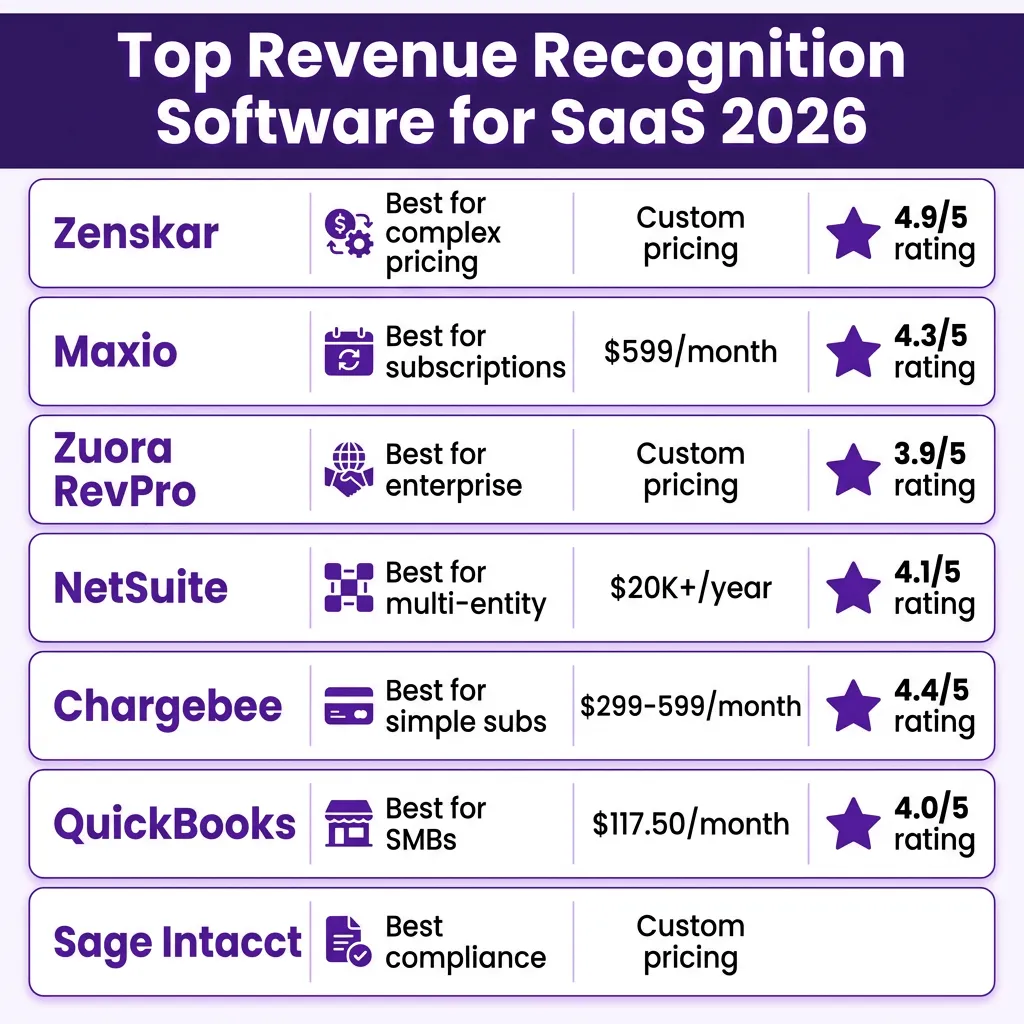
1. Zenskar – Best for Complex Pricing Models
Zenskar takes a fundamentally different approach with its decoupled architecture that separates billing from revenue recognition. This matters because most tools tie these together, forcing you to recognize revenue on the same schedule you bill customers. Zenskar lets you bill annually but recognize monthly—or any combination your contracts require.
Key Features:
- Independent revenue and billing cycle management
- Handles subscriptions, usage-based, milestones, and hybrid contracts
- 100+ native integrations with ERPs and CRMs
- Automated ASC 606/IFRS 15 compliance with complete audit trails
- Multi-book and multi-entity revenue recognition under single login
Pricing: Custom pricing based on complexity and scale. Free sandbox available.
Best For: B2B SaaS companies with complex, bespoke contracts and hybrid pricing models.
2. Maxio – Best for Subscription-First Businesses
Following the merger of Chargify and SaaSOptics, Maxio offers unified billing and revenue recognition specifically built for recurring revenue businesses. It’s particularly strong for SaaS companies with straightforward subscription models who want deep analytics.
Key Features:
- Subscription-based cohort analysis (MRR, ARR, churn, expansion)
- Automatic proration for partial months and billing periods
- Pre-built revenue recognition and deferral reports
- Strong NetSuite integration
- ASC 606/IFRS 15 automation built-in
Pricing: Starts at $599/month for basic features. Advanced features require custom quote.
Best For: B2B SaaS companies with one-time and recurring subscriptions, basic usage-based pricing.
3. Zuora RevPro – Best for Enterprise SaaS
Zuora has been the billing system of choice for enterprise SaaS with high-volume transactions and stringent security protocols. RevPro is their dedicated revenue recognition module, and it’s one of the most robust on the market—if you have the resources to implement it.
Key Features:
- Configurable revenue recognition rules with multi-book accounting
- Advanced contract modification handling
- 60+ pre-built reports for revenue waterfalls and SOX compliance
- Role-based access controls with detailed permission management
- Pre-built connectors for NetSuite, Workday, and SAP
Pricing: Custom enterprise pricing (typically $50K+/year).
Best For: Enterprise businesses with high-volume transactions and complex compliance requirements.
4. NetSuite – Best for Multi-Entity Operations
Oracle NetSuite’s Revenue Recognition module integrates with their broader ERP platform. If you’re already in the NetSuite ecosystem, this is the logical choice. It handles multi-subsidiary, multi-currency operations better than most standalone tools.
Key Features:
- Multi-subsidiary and multi-currency revenue consolidation
- Automated revenue schedules for subscriptions, projects, usage-based
- Contract modifications automatically reflected in schedules
- Role-based access controls
- Real-time dashboards for bookings to billings
Pricing: Starts at $20,000/year for starter edition. Revenue recognition module adds $599-$1,699/month.
Best For: Growing companies with multiple subsidiaries or global operations already using NetSuite ERP.
5. Chargebee RevRec – Best for Simple Subscription Businesses
Chargebee started as a subscription billing platform and added revenue recognition capabilities through their RevRec module. It handles standard subscription scenarios well but requires manual workarounds for complex contracts.
Key Features:
- Automated ASC 606-compliant revenue recognition and deferral
- Built-in SSP (standalone selling price) libraries
- Real-time deferred and recognized revenue tracking
- Adapts to subscription changes, cancellations, renewals
- Strong B2C subscription management
Pricing: Rise plan at $299/month (up to $600K revenue), Scale at $599/month (up to $1.2M revenue). Enterprise custom.
Best For: Small to mid-size businesses with straightforward subscription billing needs.
6. Sage Intacct – Best for Compliance-Heavy Businesses
Sage Intacct automates revenue recognition with detailed audit controls and financial reporting. It’s especially suitable for companies preparing for external investment, IPO, or regulatory scrutiny.
Key Features:
- Multi-entity and multi-currency revenue management
- Flexible revenue recognition rules for milestone and performance-based contracts
- Built-in audit logs with automated exception alerts
- Custom reporting templates for regulatory and investor needs
- Role-based access and workflow approvals
Pricing: Custom pricing based on modules and users.
Best For: Companies preparing for audit, investment, or IPO with complex compliance requirements.
7. QuickBooks Online Advanced – Best for Small Businesses
QuickBooks Online Advanced adds revenue recognition for teams already using the QuickBooks ecosystem. It’s limited compared to dedicated RevRec platforms but works for simple subscription scenarios.
Key Features:
- Built-in revenue scheduling and deferral tracking
- Automated recognition tied to delivery milestones or dates
- Integration with core QuickBooks accounting
- Income and deferred revenue reports for month-end close
- Simple setup for basic revenue recognition
Pricing: Advanced plan starts at $117.50/month (includes 25 users).
Best For: Small businesses with simple subscription models already using QuickBooks.
8. Stripe Revenue Recognition – Best for Developer-First Teams
While most know Stripe for payments, their revenue recognition capabilities are powerful for businesses with unique billing models. It’s developer-friendly and allows embedding revenue rules directly into your product.
Key Features:
- Native integration with Stripe payments and billing
- Handles usage-based pricing, custom contracts, complex scenarios
- Developer-friendly APIs
- Automated revenue recognition tied to Stripe transactions
- Real-time revenue reports and forecasting
Pricing: Included with Stripe Billing (0.5% on recurring payments) or custom for enterprise.
Best For: Technical teams who want maximum control over billing logic and don’t mind managing tax compliance separately.
9. Recurly – Best for Subscription Management Focus
Recurly specializes in subscription management, and their revenue recognition features are tailored to the unique challenges of recurring revenue businesses. It excels at handling tricky situations like failed payments and mid-cycle changes.
Key Features:
- Specialized tools for subscription revenue recognition
- Handles failed payments, subscription pauses, mid-cycle changes
- Revenue recognition automation for complex subscription scenarios
- Integration with major payment gateways
- Subscription analytics and cohort reporting
Pricing: Custom pricing based on transaction volume.
Best For: Businesses that rely heavily on recurring revenue and need specialized subscription management.
10. Leapfin – Best AI-Driven Automation
Leapfin uses AI and machine learning to automate revenue recognition and reconciliation for high-volume transactions. It’s designed for enterprises processing thousands of complex contracts monthly.
Key Features:
- AI-driven recognition for multi-element and variable contracts
- Automated anomaly detection for revenue and reconciliation errors
- Real-time revenue forecasting using machine learning
- Unified transaction data flows across systems
- Customizable AI alerts and dashboards
Pricing: Enterprise pricing based on transaction volume.
Best For: Large enterprises with high transaction volumes needing AI-powered automation.
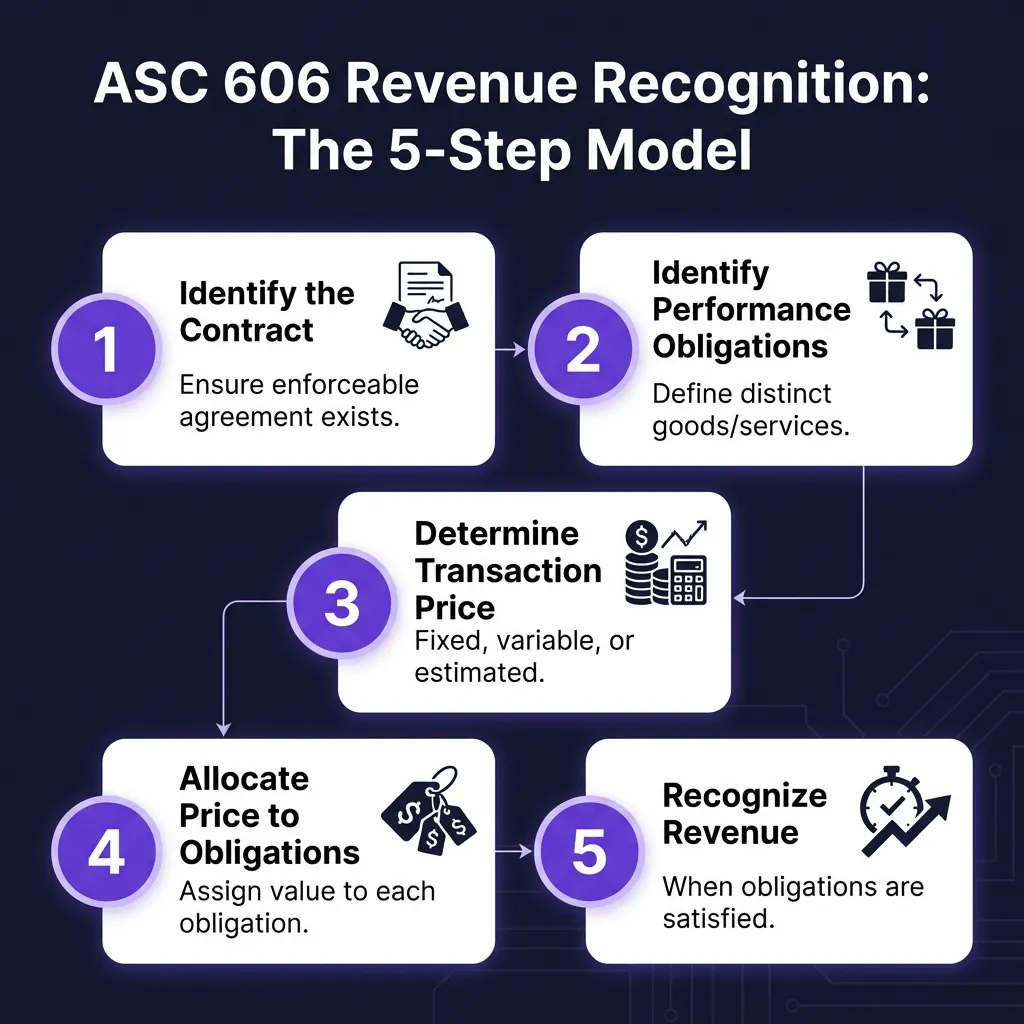
Understanding ASC 606: The 5-Step Revenue Recognition Model
Every software on this list promises ASC 606 compliance. But what does that actually mean? Here’s the five-step model every SaaS company must follow:
Step 1: Identify the Contract
Ensure an enforceable agreement exists with commercial substance. Both parties must be committed to performing their obligations, and payment terms must be identifiable.
Step 2: Identify Performance Obligations
Define distinct goods or services promised in the contract. For SaaS, this often includes software access, implementation services, premium support, and training—each potentially a separate obligation.
Step 3: Determine the Transaction Price
Calculate the total consideration you expect to receive. This includes fixed fees, variable consideration (usage-based charges), and any discounts or price concessions.
Step 4: Allocate the Transaction Price
Assign value to each performance obligation based on standalone selling prices. If you bundle software ($100/month) with implementation ($1,000 one-time), you must allocate the total contract value proportionally.
Step 5: Recognize Revenue
Recognize revenue when (or as) performance obligations are satisfied. For SaaS subscriptions, this typically means recognizing revenue over time as the service is delivered.
Feature Comparison Table
| Platform | Best For | Starting Price | Usage-Based | Multi-Entity | G2 Rating |
|---|---|---|---|---|---|
| Zenskar | Complex pricing | Custom | ✓ Native | ✓ | 4.9/5 |
| Maxio | Subscriptions | $599/mo | Limited | Limited | 4.3/5 |
| Zuora RevPro | Enterprise | Custom | Dev required | ✓ | 3.9/5 |
| NetSuite | Multi-entity | $20K+/yr | Manual | ✓ | 4.1/5 |
| Chargebee | Simple subs | $299/mo | Dev required | Limited | 4.4/5 |
| Sage Intacct | Compliance | Custom | ✓ | ✓ | 4.5/5 |
| QuickBooks | Small business | $117.50/mo | Manual | ✗ | 4.0/5 |
| Stripe | Developers | 0.5% | ✓ Native | ✓ | 4.4/5 |
| Recurly | Subscriptions | Custom | Limited | Limited | 4.3/5 |
| Leapfin | Enterprise AI | Custom | ✓ | ✓ | 4.6/5 |
How to Choose the Right Revenue Recognition Software
Picking the wrong tool is expensive—not just in dollars, but in time spent migrating later. Here’s my framework for making the right choice:
Assess Your Contract Complexity
Be honest about your pricing model. If you have simple monthly subscriptions, you don’t need Zuora’s enterprise complexity. If you’re handling usage-based + subscription + milestone contracts, QuickBooks won’t cut it.
Evaluate Integration Requirements
Your RevRec software shouldn’t be an island. Map your tech stack: CRM, ERP, payment gateway, tax tools. Ensure native integrations exist for your critical systems. Manual data exports defeat the purpose of automation.
Plan for Scale
What works at $1M ARR often breaks at $10M. Consider not just current transaction volume, but where you’ll be in 2-3 years. Multi-entity support, currency handling, and complex contract capabilities become critical as you grow.
Verify Compliance Features
At minimum, your software must automate ASC 606/IFRS 15 compliance. Look for automated performance obligation creation, audit trails with timestamps, and the ability to generate the five-step analysis for each contract type.
When to Stop Using Spreadsheets
Here’s my rule of thumb: switch to dedicated software when you hit any of these thresholds:
- More than 50 active contracts
- Multiple revenue streams (subscription + usage + one-time)
- Quarterly audit requirements
- $1M+ ARR with growth trajectory
- Any multi-element contracts or complex pricing
With 70% of spreadsheets containing errors, the compliance risk outweighs any cost savings once you reach scale.
FAQ: Revenue Recognition Software
What’s the difference between billing software and revenue recognition software?
Billing software determines when and how much to charge customers. Revenue recognition software determines when you’ve actually earned that revenue for accounting purposes. They’re related but distinct—Zenskar’s decoupled approach treats them separately, while tools like Chargebee tie them together.
How long does implementation typically take?
Simple subscription models: 2-4 weeks. Complex hybrid pricing: 6-10 weeks. Enterprise implementations (Zuora, NetSuite): 3-12 months. Plan for at least one full quarter of parallel runs before going live.
Can I handle revenue recognition in my accounting software?
QuickBooks and similar tools handle basic deferred revenue, but they lack automated performance obligations, variable price estimates, and complex contract handling required by ASC 606. For anything beyond simple subscriptions, you need dedicated RevRec software.
What’s the ROI of revenue recognition software?
Beyond compliance, the ROI comes from faster month-end closes (some teams save 70%+ time), elimination of spreadsheet errors, real-time visibility into deferred revenue, and audit readiness. For growing SaaS companies, the cost of getting revenue recognition wrong far exceeds software costs.
Do I need a developer to implement these tools?
It depends. Zenskar, Maxio, and Chargebee offer no-code implementations for standard use cases. Zuora and complex Stripe implementations typically require engineering resources. Factor this into your total cost of ownership.
Final Thoughts
Revenue recognition isn’t the most exciting part of running a SaaS business, but it’s one of the most important. Your financial statements are the foundation of investor confidence, strategic decisions, and regulatory compliance. Getting this right isn’t optional—it’s essential.
The good news? You don’t have to figure this out alone. The tools on this list have helped thousands of SaaS companies automate compliance, eliminate spreadsheet errors, and gain real-time visibility into their true financial performance.
And if you’re looking for a payment solution that handles the billing side of this equation—with built-in tax compliance and global payment processing—check out Fungies. We handle the complexity so you can focus on growth.