Checkout that lives inside the page, not on top of it
Some purchases should not interrupt anything. Embedded checkout renders the payment form into a container you choose — a pricing panel, an onboarding step, a section of your dashboard — so buying is one more part of the page rather than a modal that covers it.














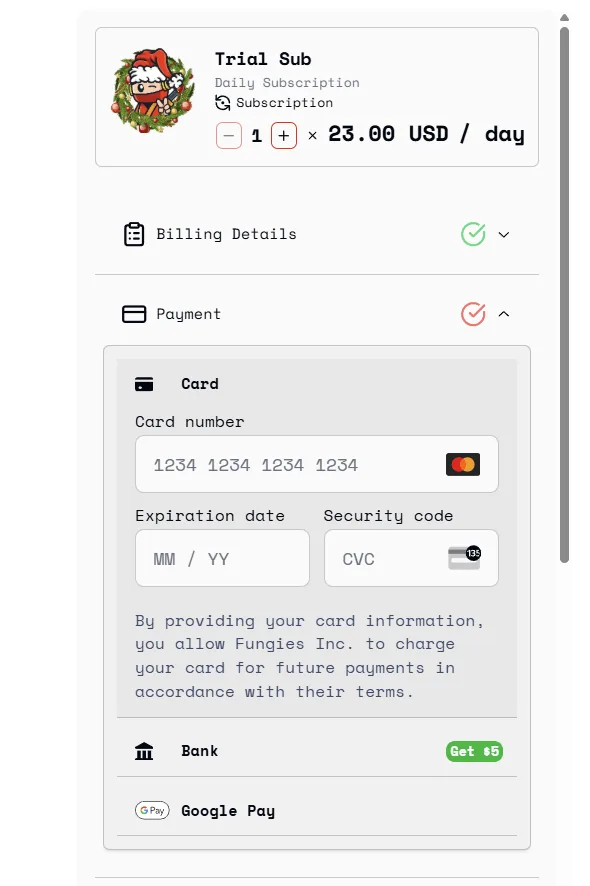
Give it a div and it fills it
Point the SDK at an element ID and the checkout renders inside it. It brings no styles of its own beyond the frame, so the layout around it stays yours to control.
<!-- The container. Size it with your own CSS; the frame fills the width. -->
<div id="checkout-container"></div>

<!-- data-auto-display-checkout renders on load, so this page needs no
     JavaScript of its own. -->
<script
  src="https://cdn.jsdelivr.net/npm/@fungies/fungies-js@latest"
  defer
  data-auto-init
  data-auto-display-checkout
  data-fungies-checkout-url="https://yourstore.fungies.io/checkout-element/abc123"
  data-fungies-mode="embed"
  data-fungies-frame-target="checkout-container"
></script>
Four steps, and the last one is the important one
- 01
Build a checkout element in the dashboard
Pick the products, the fields you want collected and what happens after payment. It gives you a URL. Configure it once and change it later without touching the site that points at it.
- 02
Put a container on the page
An empty div with an ID is the whole requirement. Size it however your layout needs — the frame inside it adapts to the width you give it.
- 03
Load the SDK and name the target
Either a script tag with data-auto-display-checkout, which renders on load with no JavaScript of your own, or a call to Fungies.Checkout.open with mode 'embed' and frameTarget set to your container ID.
- 04
Grant access from the webhook, not the browser
fungies:checkout:complete is for your interface — redirect, refresh the page, show the receipt. Entitlements come from the payment_success webhook, because a tab can be closed and a webhook cannot.
What you can pass in when it renders
- Billing prefill
- Email, first and last name, country, state, city and postcode. Someone signed in to your product should not be retyping what you already store about them.
- Discount codes
- Apply a coupon as the frame renders, so the price inside it matches the offer printed around it.
- Quantity and multiple offers
- Open at three seats instead of one, or pass an array of offer IDs to put a whole bundle through a single embedded frame.
- Custom fields
- Send your own identifiers through the purchase — user ID, workspace, server region, licence seat — and read them back off the order afterwards.
- Render on load, with no code
- data-auto-display-checkout on the script tag draws the checkout as soon as the page does. A static HTML file can carry a working embedded checkout with nothing else in it.
- Programmatic control
- Fungies.Checkout.open and Fungies.Checkout.close let a wizard render the frame at step three and take it away again, without reloading anything.
- Completion events
- fungies:checkout:complete and fungies:checkout:close fire on document, so you can advance a flow, unlock a feature or refresh state the moment payment lands.
- Late-rendered containers
- Fungies.ScanDOM() attaches to anything your framework mounted after first paint, so client-side routing does not quietly break the integration.
Why inline rather than a modal
The page keeps its context
A modal hides what convinced someone to buy. Inline, the plan comparison, the feature list and the price stay visible next to the card field, which is exactly where doubt tends to arrive.
It fits a flow with steps in it
Onboarding, upgrades and seat changes are sequences. An embedded frame is one step in that sequence rather than something that interrupts it, so the progress indicator above it keeps telling the truth.
Card details never touch your code
The frame is an iframe we serve. Payment data is entered inside it and travels straight to us — never through your DOM, your state, your logs, or the compliance scope you would otherwise own.
It improves without you deploying
New payment methods, tax rules and checkout refinements arrive inside the frame. An integration shipped a year ago collects all of them without a line changing on your side.
What sellers say once they have switched
 Vadim Finayev
 “We work with quite a few merchants of record, but none comes close to the support and speed of implementation of Fungies. If you want a payment partner that actually gives you the feeling they want to work with you — rather than leaving you on read for three days or randomly restricting your account — you are in the right place.”
 David Elliott
 “I researched the options and Fungies was the best fit for functionality and customisation within a store builder you can connect to your own domain. Taking a small percentage of sales, instead of charging a subscription for every environment and plugin, is refreshing.”
 Elnura Abdimanap Kyzy
 “The platform is user-friendly, integrates easily with APIs and webhooks, and simplifies managing digital products and subscriptions. We were up and running quickly and support has been responsive throughout. Fungies is clearly tailored to the needs of SaaS businesses.”
 Francisco Magnone Rienzi
 “Fungies has been a great partner — fast setup, competitive pricing, and real humans providing quick answers. They are constantly rolling out new features, and I am excited to see what is next.”
Before you wire it up
Put a checkout inside your pricing page today
Build a checkout element, drop a div where you want it, and take a test payment through it. No monthly fee and no card needed to get that far.