Checkout that opens over your page, not somewhere else
A redirect is the moment a stranger's domain asks your customer for a card number. Overlay checkout opens in a modal on top of the page they are already reading — one HTML attribute, or one call from the SDK — and we remain the Merchant of Record underneath it.














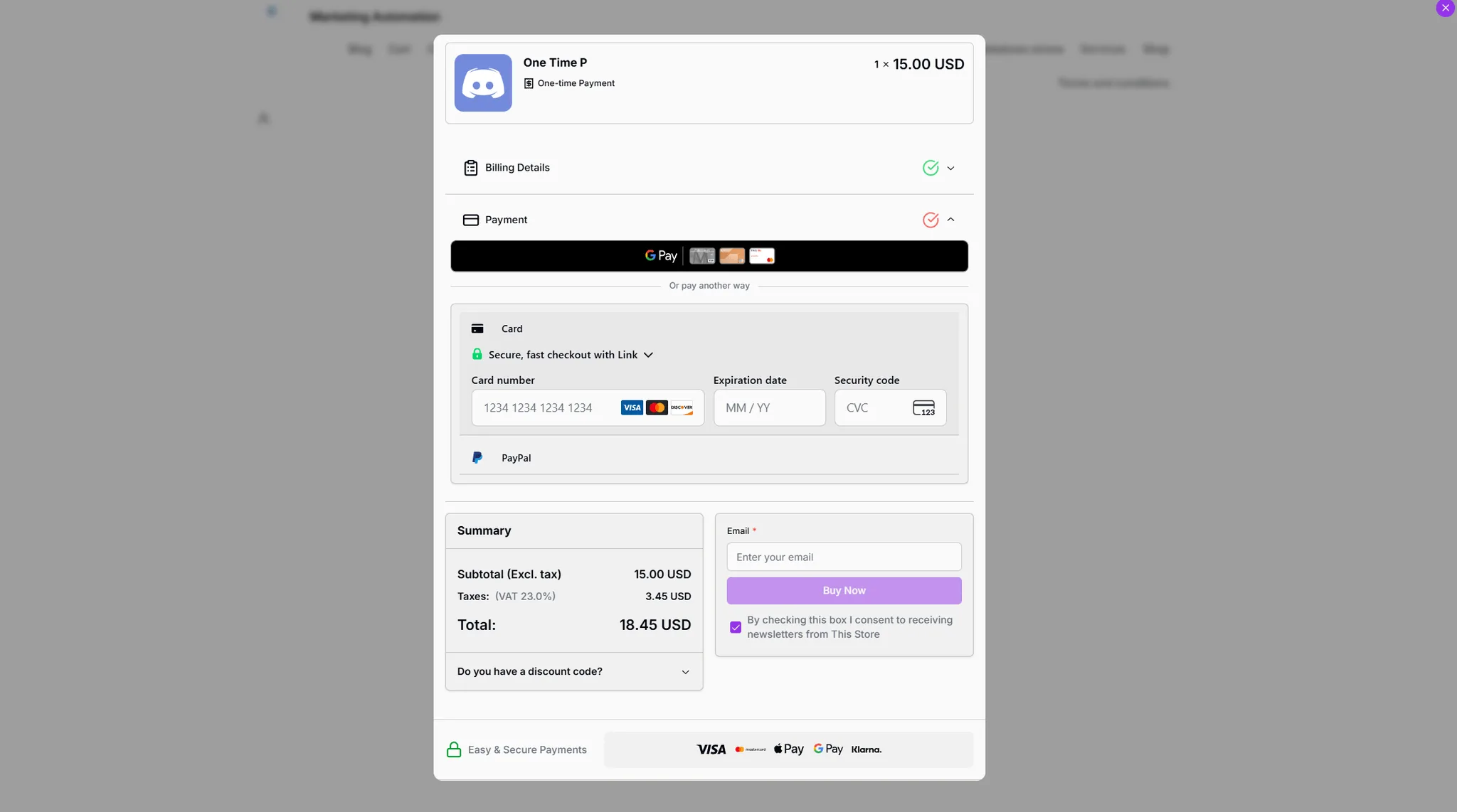
Add it to a page you already have
The SDK loads from a CDN, finds anything carrying a checkout URL, and opens the overlay on click. It adds no styles of its own, so your button stays your button.
<!-- Any clickable element works. The SDK adds no styling of its own. -->
<button
  data-fungies-checkout-url="https://yourstore.fungies.io/checkout-element/abc123"
  data-fungies-mode="overlay"
>
  Buy now — $29
</button>

<script
  src="https://cdn.jsdelivr.net/npm/@fungies/fungies-js@latest"
  defer
  data-auto-init
></script>
What you can pass in when it opens
- Billing prefill
- Email, first and last name, country, state, city and postcode. Someone already signed in to your product should not be retyping what you know.
- Discount codes
- Apply a coupon as the overlay opens, so the price in the modal matches the offer that was on the page behind it.
- Quantity
- Open at three seats rather than one, without modelling a second product to do it.
- Multiple offers
- An array of offer IDs and quantities puts a bundle or a whole cart through a single overlay.
- Custom fields
- Send your own identifiers through the purchase — user ID, server region, licence seat — and read them back off the order afterwards.
- Embed mode
- The same button switches to rendering the checkout inside an element you nominate, if a modal is not the right shape for the page.
- Completion events
- fungies:checkout:complete and fungies:checkout:close fire on document, so you can redirect, refresh entitlements or unwind your own UI.
- Late-rendered buttons
- Fungies.ScanDOM() attaches handlers to anything your framework added after load, so client-side routing does not break the integration.
Why an overlay rather than a redirect
The buyer never leaves your domain
The address bar does not change and your page stays visible behind the modal. Someone who closes it lands back exactly where they were, rather than on a back button and an empty cart.
Your brand carries the trust
Handing a customer to a payment page they have never seen asks them to trust a second company mid-purchase. An overlay borrows the credibility of the page they already chose to be on.
Card details never touch your code
The overlay is an iframe we serve. Payment data is entered inside it and goes straight to us, so it never enters your DOM, your logs, or the part of the system you have to answer for.
It improves without you deploying
New payment methods, tax rules and checkout changes arrive inside the iframe. An integration shipped a year ago keeps collecting them.
What sellers say once they have switched
 Vadim Finayev
 “We work with quite a few merchants of record, but none comes close to the support and speed of implementation of Fungies. If you want a payment partner that actually gives you the feeling they want to work with you — rather than leaving you on read for three days or randomly restricting your account — you are in the right place.”
 David Elliott
 “I researched the options and Fungies was the best fit for functionality and customisation within a store builder you can connect to your own domain. Taking a small percentage of sales, instead of charging a subscription for every environment and plugin, is refreshing.”
 Elnura Abdimanap Kyzy
 “The platform is user-friendly, integrates easily with APIs and webhooks, and simplifies managing digital products and subscriptions. We were up and running quickly and support has been responsive throughout. Fungies is clearly tailored to the needs of SaaS businesses.”
 Francisco Magnone Rienzi
 “Fungies has been a great partner — fast setup, competitive pricing, and real humans providing quick answers. They are constantly rolling out new features, and I am excited to see what is next.”
Before you wire it up
Put a buy button on it this afternoon
Build a checkout element, copy the URL onto a button, and take a test payment through it. No monthly fee and no card needed to reach that point.