10 Essential Tools for Your SaaS Finance Stack in 2026: The Complete Guide
Build the perfect SaaS finance stack with our 2026 guide. Compare 10 essential tools for accounting, billing, analytics, and financial operations. Real pricing, honest reviews, and stage-specific recommendations from pre-revenue to $1M ARR.
Here’s a number that should stop every SaaS founder in their tracks: 47% of SaaS startups fail because they run out of cash — not because their product was bad, but because they couldn’t manage their finances properly.
I’ve seen brilliant products die because the founders couldn’t tell if they were actually profitable. They were looking at Stripe dashboards showing $50K MRR but bleeding cash on customer acquisition, forgotten tax obligations, and manual accounting mistakes.
Your SaaS finance stack isn’t just about bookkeeping. It’s the infrastructure that tells you whether your business is actually healthy or just generating impressive-sounding vanity metrics.
In this guide, I’m breaking down the 10 essential tools every SaaS company needs in their finance stack for 2026 — from pre-revenue startups to Series B scale-ups. These aren’t theoretical picks. These are the tools I’ve seen work in the wild, with real pricing and honest assessments of who each one fits best.
What Is a SaaS Finance Stack?
A SaaS finance stack is the collection of software tools that manage your company’s financial operations — accounting, billing, payments, tax compliance, financial planning, and analytics.
Unlike traditional businesses, SaaS companies have unique financial needs:
- Recurring revenue tracking (MRR, ARR, churn)
- Subscription billing complexity (upgrades, downgrades, proration)
- Revenue recognition compliance (ASC 606/IFRS 15)
- Global tax obligations (VAT, GST, sales tax across multiple jurisdictions)
- Unit economics monitoring (LTV, CAC, payback period)
The right finance stack automates these complexities so you can focus on building product and acquiring customers.
10 Best SaaS Finance Stack Tools for 2026
1. QuickBooks Online — Best Overall Accounting Software
Pricing: $30-$200/month | Free Trial: 30 days
QuickBooks Online remains the gold standard for SaaS accounting in 2026. It’s not perfect, but it’s the most widely supported option — which matters when you need to hire bookkeepers, work with CPAs, or prepare for due diligence.
Key features for SaaS:
- Automated bank feeds and transaction categorization
- Chart of accounts optimized for subscription businesses
- Integration with 750+ apps including Stripe, Chargebee, and Gusto
- Multi-currency support for global SaaS companies
- Custom financial reporting and dashboards
Best for: SaaS companies from $10K to $10M ARR that need reliable, widely-supported accounting software
Honest take: The interface feels dated compared to newer tools, and their customer support can be frustrating. But when your Series A investors ask for financials, every accountant knows QuickBooks. That compatibility is worth the tradeoffs.
2. Xero — Best for International SaaS Companies
Pricing: $15-$78/month | Free Trial: 30 days
Xero has quietly become the favorite for SaaS companies operating internationally. While QuickBooks dominates the US market, Xero’s multi-currency capabilities and global bank connections make it superior for companies with customers worldwide.
Key features for SaaS:
- Unlimited users on all plans (no per-seat pricing)
- Real-time multi-currency conversion
- Global bank feed connections (2,000+ banks)
- Strong integration ecosystem with SaaS tools
- Better VAT/GST handling than QuickBooks
Best for: SaaS companies with significant international revenue or plans to expand globally
Honest take: Xero’s reporting isn’t as robust as QuickBooks for US-specific tax needs. But if you’re selling globally, the multi-currency features save hours of manual reconciliation work every month.
3. Fungies — Best All-in-One Billing & Tax Solution
Pricing: 5% + $0.50 per transaction | Monthly Fee: $0
Fungies solves a genuine pain point that no other tool handles elegantly — the combination of billing, global tax compliance, and Merchant of Record protection without monthly fees.
Key features for SaaS:
- Subscription billing with proration handling
- Global tax compliance (VAT, GST, sales tax) automated
- 250+ payment methods including local options
- Dunning management for failed payments
- No-code checkout and customer portal
Best for: Indie SaaS founders and small teams who want billing and tax compliance handled without engineering overhead
Honest take: If you’re doing under $1M ARR and don’t have a finance team, Fungies eliminates the need to stitch together Stripe + Stripe Tax + Quaderno + a dunning tool. The 5% fee is higher than raw Stripe, but the total cost of ownership is often lower once you factor in tax compliance and engineering time.
4. Stripe Billing — Best for Developer-First Teams
Pricing: 0.5% on recurring payments (on top of Stripe’s 2.9% + $0.30) | Monthly Fee: $0
Stripe Billing is the default choice for technical founders who want complete control over their billing infrastructure. If you have engineering resources and want to customize every aspect of your subscription flow, this is your tool.
Key features for SaaS:
- Flexible subscription models (tiered, usage-based, hybrid)
- Metered billing for consumption-based pricing
- Customer portal for self-service subscription management
- Strong API and webhook system
- Instant payouts with Stripe Treasury
Best for: Technical teams with dedicated engineering resources for billing infrastructure
Honest take: Stripe Billing handles the mechanics of subscriptions well, but you’re still on the hook for tax compliance, dunning management, and revenue recognition. Most teams end up needing 3-4 additional tools, which adds complexity.
5. Chargebee — Best for Complex B2B SaaS Billing
Pricing: $599+/month | Free Trial: Yes
Chargebee is built for B2B SaaS companies with complex billing needs — think annual contracts, custom pricing, usage-based components, and sales-assisted deals. It’s overkill for simple self-serve SaaS, but essential for enterprise sales motions.
Key features for SaaS:
- Quote-to-cash workflow for sales teams
- Advanced revenue recognition (ASC 606 compliant)
- Subscription lifecycle management
- Multi-entity support for global companies
- Deep Salesforce integration
Best for: B2B SaaS companies with $1M+ ARR, sales teams, and complex contract structures
Honest take: Chargebee is expensive and the learning curve is steep. But if you’re managing hundreds of enterprise contracts with custom terms, it’s cheaper than building this functionality in-house.
6. Baremetrics — Best for Subscription Analytics
Pricing: $108-$300/month | Free Trial: 14 days
Baremetrics pulls data from your payment processor and turns it into actionable SaaS metrics. It’s the tool that tells you if your business is actually healthy — not just if you’re collecting payments.
Key features for SaaS:
- Real-time MRR, ARR, and churn calculations
- Cohort analysis and retention curves
- LTV and CAC tracking
- Forecasting and scenario modeling
- Benchmarks against similar SaaS companies
Best for: SaaS companies that want deep visibility into subscription metrics and unit economics
Honest take: The forecasting features are genuinely useful for planning. But the real value is in the daily metrics email — seeing your MRR movements every morning keeps you honest about growth.
7. Gusto — Best for Payroll and HR
Pricing: $40-$80/month base + $6-$16 per employee | Free Trial: No
Gusto has become the default payroll provider for SaaS startups. It’s not the cheapest option, but the combination of payroll, benefits administration, and compliance handling saves significant time.
Key features for SaaS:
- Automated payroll tax filing and compliance
- Employee benefits management (health insurance, 401k)
- Contractor payments (1099 handling)
- Time tracking and PTO management
- Multi-state payroll support
Best for: SaaS companies with 2+ employees who need full-service payroll and benefits
Honest take: Gusto’s pricing adds up as you scale — at 20 employees, you’re looking at $200-400/month. But the alternative is managing payroll taxes yourself or using a more expensive PEO. For most startups, Gusto hits the sweet spot.
8. Brex — Best Corporate Card for SaaS Startups
Pricing: Free | Rewards: 1-3% cashback
Brex reimagined the corporate card for startups. No personal guarantee required, instant virtual cards, and spend management controls that actually work.
Key features for SaaS:
- No personal guarantee or credit check
- Instant virtual cards for online purchases
- Spend limits and approval workflows
- Automatic receipt matching
- Integration with QuickBooks and Xero
Best for: VC-backed SaaS startups and any company wanting to separate business expenses from personal credit
Honest take: Brex’s underwriting model favors funded startups. If you’re bootstrapped with inconsistent revenue, you might get rejected or have a low credit limit. Mercury’s IO card is a solid alternative for bootstrapped founders.
9. Mercury — Best Banking for SaaS Companies
Pricing: Free | APY: 3-5% on savings
Mercury is a tech-forward banking platform built specifically for startups. The combination of checking, savings, and financial tools makes it the default choice for SaaS companies in 2026.
Key features for SaaS:
- No monthly fees or minimum balances
- High-yield savings accounts (3-5% APY)
- Treasury management for idle cash
- Venture debt and credit products
- Automated AP/AR workflows
Best for: SaaS startups and scale-ups wanting modern banking with startup-specific features
Honest take: Mercury isn’t actually a bank — they’re a fintech platform backed by Evolve Bank. The tradeoff is worth it for the features, but keep FDIC insurance limits in mind if you’re holding significant cash.
10. Drivetrain — Best for FP&A and Financial Modeling
Pricing: Custom (typically $500-$2,000/month) | Free Trial: Yes
Drivetrain is financial planning and analysis software built specifically for SaaS companies. It connects to your accounting, billing, and CRM systems to create real-time financial models.
Key features for SaaS:
- Automated financial modeling and forecasting
- Scenario planning and sensitivity analysis
- SaaS metric tracking and benchmarking
- Board-ready financial reports
- Headcount and burn rate planning
Best for: SaaS companies with $5M+ ARR preparing for fundraising or needing sophisticated financial planning
Honest take: Drivetrain is expensive and requires dedicated finance team time. For companies under $5M ARR, a well-built spreadsheet model is probably sufficient. But once you’re raising Series B or managing complex forecasting, Drivetrain saves significant time.
SaaS Finance Stack Comparison Table
| Tool | Category | Pricing | Best For |
|---|---|---|---|
| QuickBooks Online | Accounting | $30-200/mo | Universal compatibility |
| Xero | Accounting | $15-78/mo | International SaaS |
| Fungies | Billing + Tax | 5% + $0.50 | Indie SaaS founders |
| Stripe Billing | Billing | 0.5% + processing | Developer-first teams |
| Chargebee | Billing | $599+/mo | Complex B2B SaaS |
| Baremetrics | Analytics | $108-300/mo | Subscription metrics |
| Gusto | Payroll | $40+/mo + per employee | Full-service payroll |
| Brex | Corporate Card | Free | Startup-friendly cards |
| Mercury | Banking | Free | Modern startup banking |
| Drivetrain | FP&A | Custom | Financial modeling |
How to Build Your SaaS Finance Stack by Stage
Pre-Revenue to $10K MRR
At this stage, keep it simple:
- Accounting: QuickBooks Online ($30/month) or Wave (free)
- Billing: Fungies (5% + $0.50) or Stripe Checkout (2.9% + $0.30)
- Banking: Mercury (free)
- Card: Brex or personal business card
Total monthly cost: ~$30-50 + transaction fees
$10K to $100K MRR
As revenue grows, add dedicated tools:
- Accounting: QuickBooks Online Plus ($90/month)
- Billing: Fungies or Stripe Billing
- Payroll: Gusto ($40/month + per employee)
- Analytics: Baremetrics ($108/month)
- Banking: Mercury with savings
- Card: Brex with team cards
Total monthly cost: ~$250-400 + transaction fees
$100K to $1M MRR
At this scale, you need specialized tools:
- Accounting: QuickBooks Online Advanced ($200/month) with bookkeeper
- Billing: Chargebee ($599+/month) for complex contracts
- Payroll: Gusto or Rippling for larger teams
- Analytics: Baremetrics + custom dashboards
- FP&A: Drivetrain or similar
- Tax: Dedicated tax advisor + automated compliance
Total monthly cost: ~$1,500-3,000 + transaction fees + team costs
Key SaaS Financial Metrics to Track
Your finance stack should give you visibility into these essential metrics:
Revenue Metrics
- MRR (Monthly Recurring Revenue): Total predictable monthly revenue
- ARR (Annual Recurring Revenue): MRR × 12
- Net Revenue Retention: Revenue from existing customers including expansion and churn
- Gross Revenue Retention: Revenue retained from existing customers (without expansion)
Growth Metrics
- New MRR: Revenue from new customers
- Expansion MRR: Revenue from upgrades and add-ons
- Churned MRR: Revenue lost from cancellations
- Net MRR Growth: New + Expansion – Churned – Contraction
Unit Economics
- CAC (Customer Acquisition Cost): Total sales and marketing spend / new customers
- LTV (Lifetime Value): Average revenue per customer × gross margin / churn rate
- LTV:CAC Ratio: Should be 3:1 or higher
- CAC Payback Period: Months to recover acquisition cost from gross margin
2025 Benchmarks for Healthy SaaS
According to OpenView and KBCM survey data:
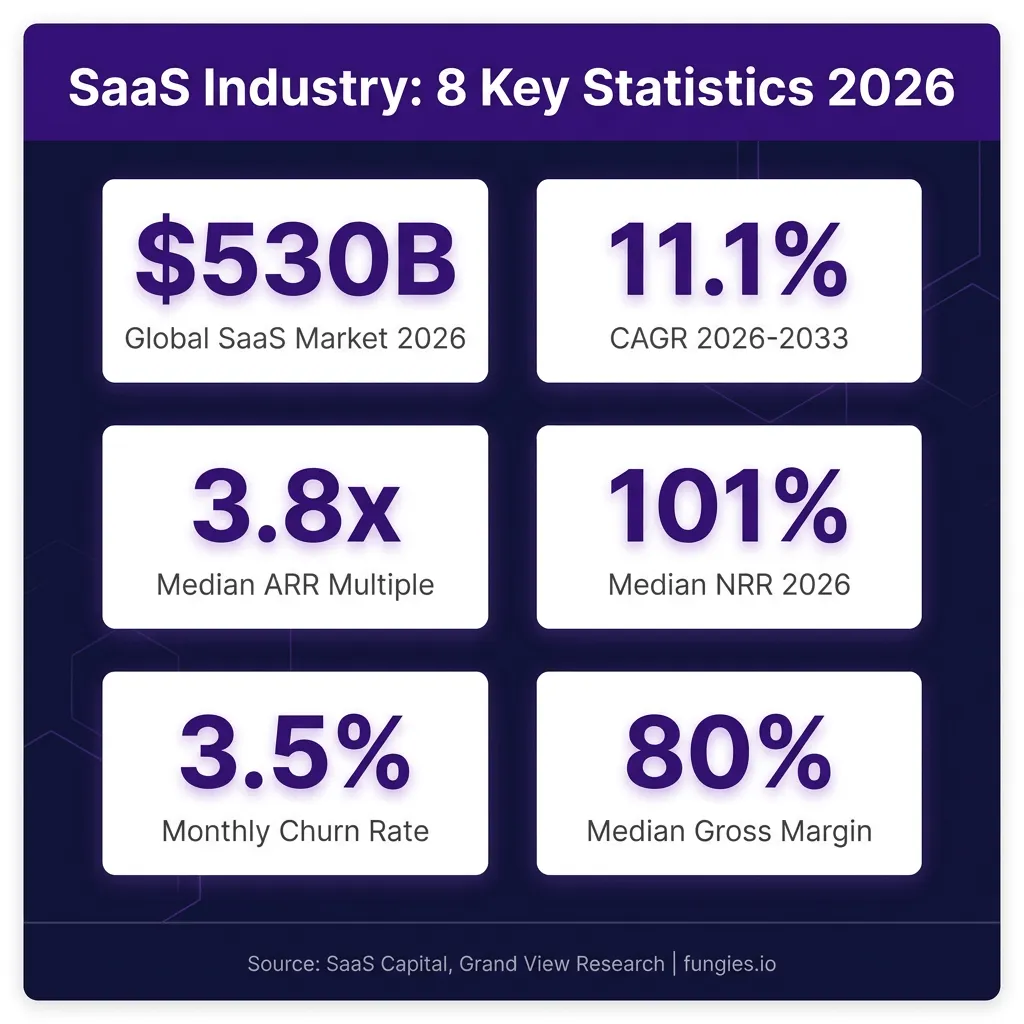
- Gross Margin: 70-80% for software-only SaaS
- Net Revenue Retention: 100-120% for healthy growth
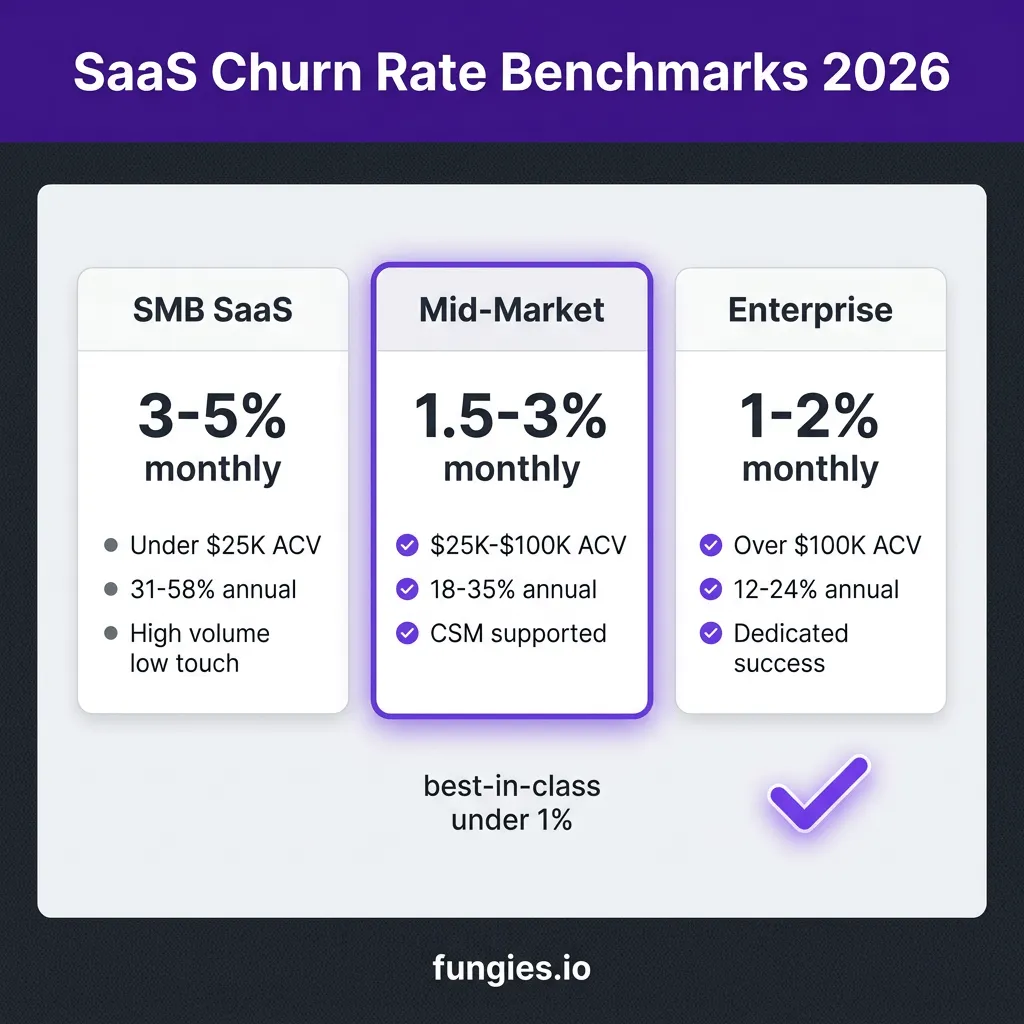
- Logo Churn: 5-10% annually for SMB SaaS, 3-5% for enterprise
- CAC Payback: 12-18 months for efficient SaaS
- Rule of 40: Growth rate + profit margin ≥ 40%
Common SaaS Finance Stack Mistakes
1. Waiting Too Long to Implement Proper Accounting
I’ve seen founders wait until they’re raising a Series A to get their books in order. This creates a nightmare of back-dated transactions, missing receipts, and stressed-out accountants. Start with proper accounting from day one — even if it’s just a simple QuickBooks setup.
2. Choosing Tools That Don’t Integrate
Your billing system needs to talk to your accounting software. Your payroll needs to sync with your expense tracking. Manual data entry between systems is where errors happen. Before adding a new tool, check its integration ecosystem.
3. Ignoring Tax Compliance Until It’s a Problem
Sales tax, VAT, and GST obligations kick in faster than most founders realize. By the time you’re processing $100K/year in a jurisdiction, you probably have tax obligations. Tools like Fungies and TaxJar automate this, but you need to set them up proactively.
4. Optimizing for Cost Instead of Time
Yes, you could manage payroll taxes yourself and save $50/month. But one mistake costs more than a year of Gusto. At every stage, choose tools that save you time — your time is better spent on product and growth.
5. Not Planning for Scale
That spreadsheet model works fine at $10K MRR. At $500K MRR, it’s a liability. Choose tools that can grow with you, even if they’re slightly more expensive at your current stage.
FAQ
What’s the minimum viable finance stack for a new SaaS startup?
For a pre-revenue or early-revenue SaaS: Mercury for banking, QuickBooks Online for accounting, and Fungies or Stripe for billing. This gives you professional financial infrastructure for under $100/month.
When should I hire a bookkeeper vs. doing it myself?
Most founders can handle their own books until $20-30K MRR using tools like QuickBooks Online. Beyond that, the complexity of revenue recognition, multi-currency, and tax compliance usually justifies hiring a part-time bookkeeper ($500-1,500/month).
Do I need a CFO or finance leader?
For companies under $5M ARR, a fractional CFO or experienced bookkeeper is usually sufficient. Full-time CFOs become necessary when you’re raising Series B, managing complex financial operations, or preparing for an exit.
How do I handle revenue recognition for SaaS subscriptions?
SaaS revenue must be recognized over the subscription period, not when payment is received. Annual subscriptions paid upfront create deferred revenue liabilities. Tools like Chargebee and Maxio handle ASC 606-compliant revenue recognition automatically.
What’s the best billing setup for usage-based pricing?
For pure usage-based pricing, consider Orb, Metronome, or Lago. For hybrid models (base subscription + usage), Stripe Billing, Chargebee, or Fungies all support this. The key is having reliable metering infrastructure to track usage accurately.
Should I use a Merchant of Record or handle taxes myself?
If you’re selling globally and don’t have a dedicated tax team, a Merchant of Record (Fungies, Paddle, Lemon Squeezy) is almost always worth the higher transaction fee. The cost of tax compliance mistakes far exceeds the fee difference.
Conclusion: Building Your Finance Stack for Scale
Your SaaS finance stack isn’t just about tracking money — it’s about creating the financial infrastructure that lets you scale confidently. The right tools give you real-time visibility into your business health, automate compliance headaches, and free you to focus on building product and acquiring customers.
Start simple. Add tools as complexity demands them. And never underestimate the value of clean financials — they’re the foundation of every successful funding round, acquisition, and strategic decision.
Ready to simplify your SaaS billing and tax compliance? Get started with Fungies and handle payments, global tax compliance, and subscription management in one platform.
Sources
- OpenView SaaS Benchmarks Report 2025
- KBCM Technology Group SaaS Survey 2025
- SaaS Capital SaaS Financial Metrics Benchmarks
- The SaaS CFO Finance & Ops Tech Stack Report 2025
- Stripe Vertical SaaS Benchmark Report 2025
- Baremetrics SaaS Open Startups Benchmarks
- HubiFi SaaS Financials Guide 2025
- Eagle Rock CFO SaaS Finance Metrics Benchmarks 2026