Here is a stat that might surprise you: 84% of developers now use AI coding tools, and these tools write 41% of all code in 2026. That is not a future prediction — it is happening right now in engineering teams across the globe.
I have been watching this space closely. The shift from “AI as a novelty” to “AI as essential infrastructure” happened faster than most of us expected. Teams that adopted early are shipping features 2-3x faster. Teams that did not are struggling to keep up.
But here is the problem: there are dozens of AI coding tools now. Which ones actually deliver? Which ones are worth your money? I spent the last month testing the top contenders, talking to engineering teams, and analyzing real productivity data. This guide cuts through the hype.
What Are AI Coding Tools and Why Do They Matter?
AI coding tools are software applications that use large language models (LLMs) to assist developers with writing, reviewing, debugging, and refactoring code. They range from simple autocomplete suggestions to full “agentic” systems that can plan, implement, and test entire features.
The impact is measurable. Studies show code quality improves by 3.4% when developers use AI tools. Development velocity increases by 25-40% on average. And perhaps most importantly, developers report higher job satisfaction when tedious boilerplate work is automated.
But not all tools are created equal. Some excel at quick autocomplete. Others handle complex multi-file refactoring. The key is matching the right tool to your specific workflow.
10 Best AI Tools for Developer Productivity in 2026
1. GitHub Copilot — Best for Daily Coding and GitHub Integration
GitHub Copilot remains the industry standard for AI code completion. Built on OpenAI’s Codex model (with support for Claude 3 Sonnet and Gemini 2.5 Pro), it integrates seamlessly into VS Code, JetBrains IDEs, and Neovim.
Key Features:
- Real-time code suggestions as you type
- Whole-line and whole-function completion
- GitHub Copilot Chat for explaining code and suggesting fixes
- Agent Mode for multi-step tasks (new in 2025)
- Next Edit Suggestions for predicting your next change
Pricing: Free tier available (limited), Pro at $10/month, Business at $19/user/month, Enterprise at $39/user/month.
Best for: Developers who want reliable autocomplete and tight GitHub integration without changing their IDE.
2. Cursor — Best for Multi-File Projects and Agentic Coding
Cursor is a VS Code fork rebuilt entirely around AI. It has become the hottest developer tool of 2026, and for good reason. The agentic features let you describe what you want built, and Cursor will plan, write, and test the code across multiple files.
Key Features:
- AI-powered code completion with project-wide context
- Codebase chat — ask questions about your entire repository
- Agent mode for autonomous multi-file edits
- Support for multiple models: GPT-5, Claude 4.5 Sonnet, Gemini 2.5 Pro
- Smart code rewrites and refactoring
Pricing: Free Hobby tier, Pro at $20/month, Business at $40/user/month, Ultra at $200/month for power users.
Best for: Developers working on large codebases who need deep context understanding and agentic capabilities.
3. Claude Code — Best for Complex Refactoring and Architecture
Anthropic’s Claude Code is different. It is not an IDE extension — it is a terminal-based agentic coding tool. You describe what you want, and Claude navigates your entire codebase, makes changes across files, runs tests, and even commits to git.
Key Features:
- Natural language commands for complex tasks
- Deep codebase understanding and navigation
- Multi-file coherent changes
- Built-in testing and validation
- Git integration for commits and PRs
Pricing: Included with Claude Pro at $20/month. API usage costs extra for heavy workloads.
Best for: Senior developers tackling complex refactoring, architectural changes, or tasks that touch many files.
4. Windsurf (formerly Codeium) — Best AI-First IDE Experience
Windsurf has established itself as a leading AI code editor alongside Cursor. Formerly known as Codeium, it offers a purpose-built AI model (SWE-1.5) and deep codebase understanding that feels native to the editing experience.
Key Features:
- Own SWE-1.5 model optimized for coding
- Cascade agent for autonomous development
- Deep context retrieval across your codebase
- Support for 70+ programming languages
- Integration with 40+ IDEs
Pricing: Free tier available, Pro at $20/month, Max at $200/month for heavy usage.
Best for: Solo developers and small teams who want an AI-first development environment with polished UX.
5. Tabnine — Best for Privacy-Focused and Enterprise Teams
Tabnine focuses on providing a personalized, privacy-first AI coding experience. It is the go-to choice for enterprises with strict data security requirements because it offers on-premise deployment options.
Key Features:
- Personalized AI based on your coding patterns
- On-premise deployment option
- Zero data retention policies
- Support for all major IDEs
- Team collaboration features
Pricing: Free tier available, Pro at $12/month, Enterprise with custom pricing.
Best for: Teams with strict security requirements, regulated industries, or those wanting on-premise AI.
6. Amazon CodeWhisperer — Best for AWS Developers
Amazon CodeWhisperer is designed specifically for developers working in the AWS ecosystem. It provides real-time code suggestions with built-in security scanning and deep integration with AWS services.
Key Features:
- Real-time code generation optimized for AWS
- Built-in security vulnerability scanning
- Integration with AWS Toolkit
- Support for multiple languages
- Reference tracking for open-source code
Pricing: Free tier with limited features, Professional at $19/month.
Best for: AWS-centric development teams who want AI assistance tailored to the AWS ecosystem.
7. Sourcegraph Cody — Best for Large Codebases and Enterprise Search
Cody leverages Sourcegraph’s powerful code graph and search capabilities to provide rich, whole-codebase intelligence. It is built for enterprises managing large, complex repositories across multiple teams.
Key Features:
- Code graph-powered context awareness
- Multi-repo search and understanding
- Inline code edits and batch changes
- Documentation and test generation
- Enterprise security: SOC 2, GDPR, SSO
Pricing: Enterprise at $59/user/month with custom pricing for large deployments.
Best for: Large engineering organizations with multi-repo codebases and enterprise security requirements.
8. Replit Ghostwriter — Best for Beginners and Rapid Prototyping
Replit Ghostwriter combines AI-powered coding with a browser-based development environment. It is perfect for learning, rapid prototyping, and teams that want a collaborative coding environment without local setup.
Key Features:
- AI code completion in the browser
- Replit Agent 3 for autonomous development
- One-click deployment
- Real-time collaboration
- 50+ programming languages supported
Pricing: Free tier available, Core at $7/month, Teams at $15/user/month.
Best for: Beginners, educators, and teams wanting a zero-setup collaborative environment.
9. JetBrains AI Assistant — Best for JetBrains IDE Users
For developers committed to JetBrains IDEs (IntelliJ, PyCharm, WebStorm), the built-in AI Assistant provides deep integration without leaving your familiar environment. It understands your project structure and coding patterns natively.
Key Features:
- Native IDE integration
- Project-aware suggestions
- AI-powered code explanation
- Test generation
- Documentation generation
Pricing: Included with JetBrains AI subscription at $10/month.
Best for: Developers who prefer JetBrains IDEs and want native AI integration.
10. Pieces for Developers — Best for Code Snippet Management
Pieces takes a different approach. It is an AI-powered code snippet manager that helps you save, search, and reuse code across your workflow. It integrates with your existing tools to make knowledge sharing seamless.
Key Features:
- AI-powered code snippet management
- Context-aware search
- Integration with VS Code, JetBrains, Chrome
- Team knowledge sharing
- On-device processing for privacy
Pricing: Free tier available, Pro at $12/month, Team at $20/user/month.
Best for: Teams wanting to build a reusable code library and improve knowledge sharing.

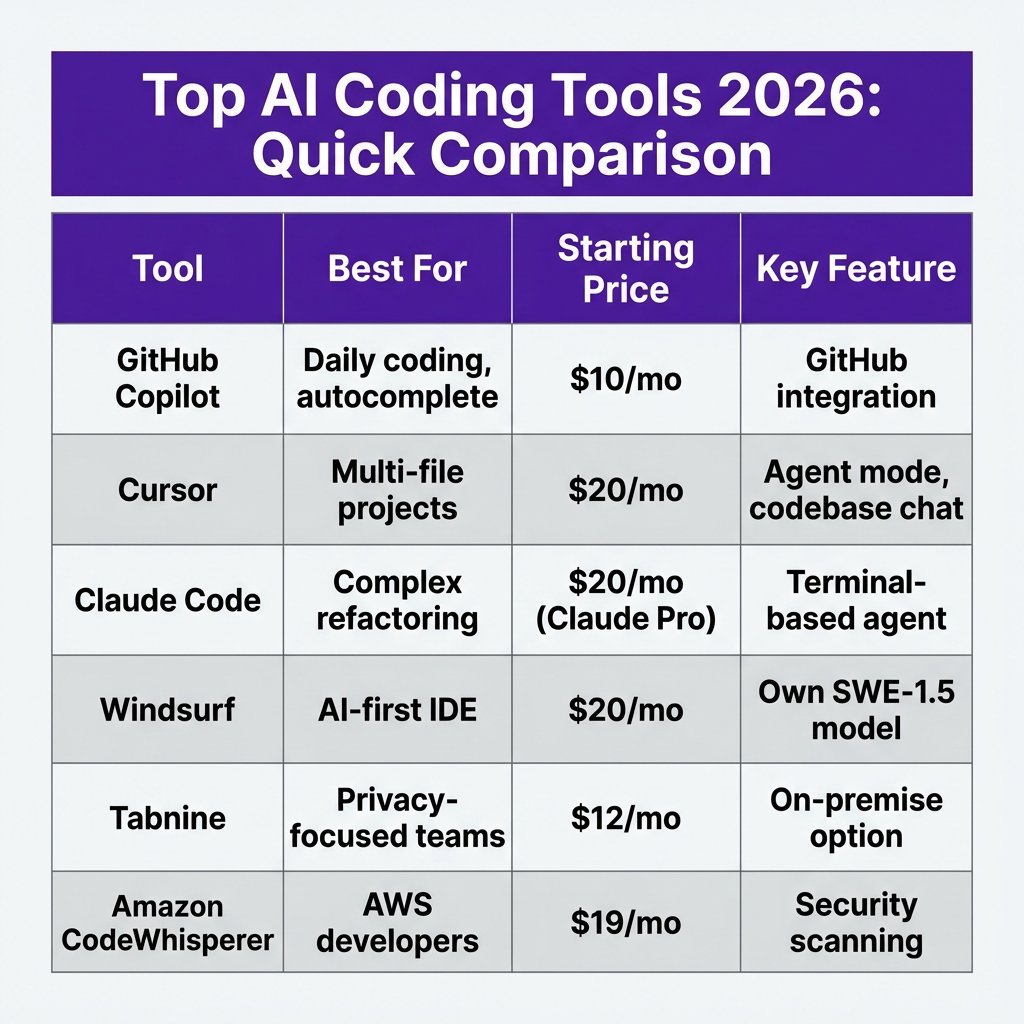
AI Coding Tools Comparison Table
| Tool | Best For | Starting Price | Free Tier |
|---|---|---|---|
| GitHub Copilot | Daily coding, GitHub users | $10/mo | Yes (limited) |
| Cursor | Multi-file projects | $20/mo | Yes |
| Claude Code | Complex refactoring | $20/mo | No |
| Windsurf | AI-first IDE | $20/mo | Yes |
| Tabnine | Privacy-focused teams | $12/mo | Yes |
| Amazon CodeWhisperer | AWS developers | $19/mo | Yes |
| Sourcegraph Cody | Enterprise/large codebases | $59/mo | No |
| Replit Ghostwriter | Beginners, prototyping | $7/mo | Yes |
| JetBrains AI | JetBrains IDE users | $10/mo | No |
| Pieces | Snippet management | $12/mo | Yes |
How to Choose the Right AI Coding Tool
With so many options, how do you pick? Here is my decision framework:
1. Define your workflow. Are you writing new code daily, or spending most of your time refactoring legacy systems? Tools like Copilot excel at daily coding. Claude Code shines for complex architectural changes.
2. Check your IDE. If you are committed to VS Code, Cursor or Copilot are natural fits. JetBrains users should start with the built-in AI Assistant. Terminal warriors will love Claude Code.
3. Evaluate pricing carefully. Free tiers are great for testing, but heavy users will hit limits quickly. Budget $10-20/month for individual use, $40-60/month for professional power users.
4. Test multiple models. Different tools use different underlying models (Claude, GPT, Gemini). Your coding style might work better with one than another. Most tools offer free trials — use them.
5. Start small, then expand. Do not try to adopt every tool at once. Pick one, use it for a month, measure your productivity, then decide whether to add complementary tools.
Frequently Asked Questions
Will AI coding tools replace developers?
No. AI tools augment developers, they do not replace them. The best engineers in 2026 use AI to handle boilerplate and routine tasks, freeing up mental energy for architecture, problem-solving, and creative work. Think of AI as a very smart pair programmer, not a replacement.
Are AI coding tools secure?
Most reputable tools offer strong security. Look for SOC 2 compliance, zero data retention policies, and enterprise SSO options. If you handle sensitive code, consider on-premise solutions like Tabnine Enterprise or self-hosted options.
Can I use multiple AI coding tools together?
Absolutely. Many developers use Copilot for daily autocomplete, Cursor for multi-file refactoring, and Claude Code for complex architectural tasks. The tools complement each other. Just be mindful of subscription costs adding up.
What is the best free AI coding tool?
For a completely free experience, combine Cursor’s free tier with DeepSeek Coder (free). You get AI-powered editing and a capable underlying model without spending a dollar. Replit also offers a generous free tier for beginners.
How much productivity gain can I expect?
Studies show 25-40% velocity improvements on average. However, results vary by task type. Routine coding tasks see the biggest gains (50%+). Complex architectural work sees smaller but still meaningful improvements (15-25%).
Conclusion: Start Using AI Coding Tools Today
The data is clear: AI coding tools are no longer optional for competitive engineering teams. They deliver measurable productivity gains, improve code quality, and let developers focus on high-value work instead of boilerplate.
My recommendation? Start with GitHub Copilot if you want reliable autocomplete and GitHub integration. Upgrade to Cursor if you need agentic features and multi-file context. Add Claude Code for complex refactoring tasks. Most importantly — start somewhere. The developers who adopt AI tools today will have a significant advantage tomorrow.
Building a SaaS product and need a payment solution that handles global tax compliance? Check out Fungies.io — we handle the complexity so you can focus on shipping features.
Sources
- Index.dev — Developer Productivity Statistics 2026
- YUV.ai — AI Coding Assistants Comparison
- SitePoint — AI Coding Tools Comparison 2026
- DigitalOcean — GitHub Copilot vs Cursor Review
- TLDL — AI Coding Tools Compared 2026
- ModelsLab — AI Coding Tool Pricing Analysis
- Larridin — Developer Productivity Benchmarks 2026