# MCP Servers for Developers: The Complete 2026 Guide to Model Context Protocol
## Primary Keyword: MCP servers for developers
## Secondary Keywords: Model Context Protocol tutorial, MCP server setup, AI agent tools, MCP vs API
## Type: GUIDE
## Target Word Count: 3,000-3,500
—
Here’s a number that should get your attention: 5,000+ MCP servers are now available, and every major AI coding tool supports them. Model Context Protocol (MCP) isn’t experimental anymore—it’s the standard way AI agents connect to your tools, databases, and APIs. If you’re building with AI in 2026 and not using MCP, you’re working harder than you need to.
I spent the last month integrating MCP servers into our development workflow at Fungies.io. The results? Our AI agents now deploy code, query databases, and manage infrastructure without custom glue code for every integration. This guide covers everything you need to know about MCP servers: what they are, how they work, which ones to use, and how to build your own.

What Is Model Context Protocol (MCP)?
Model Context Protocol is an open standard created by Anthropic in November 2024. It solves a simple but critical problem: AI agents need to interact with external tools, but every integration used to require custom code.
Before MCP, connecting Claude to your database meant writing a custom wrapper. Connecting it to GitHub meant another wrapper. Each integration was a snowflake—unique, fragile, and time-consuming to maintain.
MCP changes this by providing a standardized protocol. An MCP server exposes tools, resources, and prompts through a unified interface. Any MCP client—Claude Code, Cursor, Windsurf, or VS Code—can connect to any MCP server without modification.
The Core Components
Every MCP server has three core components:
- Tools: Functions the AI can call to perform actions (create a file, query a database, send a message)
- Resources: Data sources the AI can read (files, API responses, database records)
- Prompts: Pre-defined templates that help the AI complete specific tasks
When an AI agent connects to an MCP server, it discovers available tools at runtime. The agent sees what each tool does, what parameters it accepts, and when to use it. This dynamic discovery is what makes MCP powerful—no hardcoded integrations, no brittle API wrappers.
MCP vs REST API: What’s the Difference?
This question comes up constantly: “Why not just use REST APIs?” The answer is that MCP and REST serve different purposes. They work together, not against each other.
| Feature | MCP | REST API |
|---|---|---|
| Primary Use | AI agent orchestration | Service-to-service communication |
| Tool Discovery | Dynamic at runtime | Static (requires documentation) |
| Context Management | Maintains session state | Stateless (each request independent) |
| Integration Complexity | Single protocol for all tools | Custom code per endpoint |
| Best For | AI agents, multi-step workflows | Data fetching, simple operations |
In practice, MCP servers often wrap REST APIs. The MCP server handles the complexity of API authentication, rate limiting, and error handling. The AI agent sees a clean, standardized interface.
Think of it this way: REST APIs are the infrastructure. MCP is the orchestration layer that lets AI agents use that infrastructure intelligently.
How MCP Works: Architecture Deep Dive
Understanding MCP’s architecture helps you make better decisions about when and how to use it. The protocol has three layers:
1. Transport Layer
MCP supports two transport mechanisms:
STDIO (Standard Input/Output): The AI host starts the MCP server as a child process. Communication happens through stdin/stdout. This is the fastest option—latency is approximately 1ms—but limited to local execution.
Streamable HTTP: The MCP server runs as a web service. Clients connect via HTTP with Server-Sent Events (SSE) for real-time updates. Latency ranges from 10-100ms depending on network conditions, but this enables remote deployments and multiple concurrent clients.
| Transport | Latency | Best For | Setup Complexity |
|---|---|---|---|
| STDIO | ~1ms | Local tools, IDE extensions | Simple (executable) |
| Streamable HTTP | 10-100ms | Cloud agents, SaaS platforms | Complex (web server) |
2. Protocol Layer
MCP uses JSON-RPC 2.0 for message exchange. The protocol defines specific message types:
- Initialize: Client and server exchange capabilities and establish the session
- Tool List: Client requests available tools; server responds with tool definitions
- Tool Call: Client requests a tool execution; server performs the action and returns results
- Resource Read: Client requests data from a resource
- Notifications: Async updates from server to client
3. Server Implementation
MCP servers can be built in any language. The official SDKs support TypeScript, Python, and Java. A basic server implements three things:
- Tool definitions (name, description, parameters)
- Tool handlers (the actual code that runs when a tool is called)
- Resource handlers (for data sources)
Here’s a minimal example in Python using the FastMCP library:
from fastmcp import FastMCP

mcp = FastMCP("my-server")

@mcp.tool()
def calculate_sum(a: int, b: int) -> int:
    """Add two numbers together."""
    return a + b

@mcp.resource("config://app")
def get_config() -> str:
    """Return application configuration."""
    return "App configuration data"

if __name__ == "__main__":
    mcp.run()
This server exposes one tool (calculate_sum) and one resource (config://app). Any MCP client can connect and use them immediately.
Top 10 MCP Servers for Developers in 2026
With over 5,000 MCP servers available, choosing the right ones matters. These are the servers I use daily and recommend to other developers:
1. Filesystem MCP Server
What it does: Gives AI agents read/write access to your local filesystem.
Why you need it: This is the foundation of agentic coding. Your AI can read project files, create new ones, and modify existing code. It’s the reference implementation from Anthropic and works with every MCP client.
Install: npx -y @modelcontextprotocol/server-filesystem /path/to/your/project
2. GitHub MCP Server
What it does: Enables AI agents to interact with GitHub repositories, issues, and pull requests.
Why you need it: Create issues, review PRs, search code, and manage releases—all through natural language commands. I use this to triage bug reports and generate release notes.
Install: npx -y @modelcontextprotocol/server-github (requires GITHUB_PERSONAL_ACCESS_TOKEN)
3. PostgreSQL MCP Server
What it does: Lets AI agents query and modify PostgreSQL databases.
Why you need it: Database operations without writing SQL. Ask “What’s our monthly revenue trend?” and the AI queries the database, analyzes results, and presents insights.
Install: Available through multiple community implementations
4. Brave Search MCP Server
What it does: Adds web search capabilities to your AI agent.
Why you need it: Your AI can search the web for current information, API documentation, and troubleshooting guides. Essential for research tasks.
Install: npx -y @modelcontextprotocol/server-brave-search
5. Slack MCP Server
What it does: Enables AI agents to send messages and read channels in Slack.
Why you need it: Automated notifications, daily standup summaries, and incident alerts. Our deployment agent posts to Slack when builds complete.
6. Firecrawl MCP Server
What it does: Converts any website into clean, LLM-ready markdown.
Why you need it: Research competitors, extract documentation, or monitor pricing pages. Strips navigation, ads, and markup so your AI works with actual content.
7. E2B MCP Server
What it does: Provides a secure cloud sandbox for running code.
Why you need it: Your AI can write, run, and test code in an isolated environment. Perfect for prototyping and testing without risking your local machine.
8. MarkItDown MCP Server
What it does: Converts many file formats (PDF, Word, Excel, PowerPoint) to markdown.
Why you need it: Process documents, extract text from PDFs, and analyze spreadsheets. Essential for document-heavy workflows.
9. Google Drive MCP Server
What it does: Lets AI agents read and edit files in Google Drive and Google Sheets.
Why you need it: Access documentation, spreadsheets, and reports stored in Google Workspace. Great for teams already using Google’s ecosystem.
10. Redis MCP Server
What it does: Enables AI agents to interact with Redis databases.
Why you need it: Cache management, session storage operations, and real-time data access. Useful for debugging and monitoring cache performance.
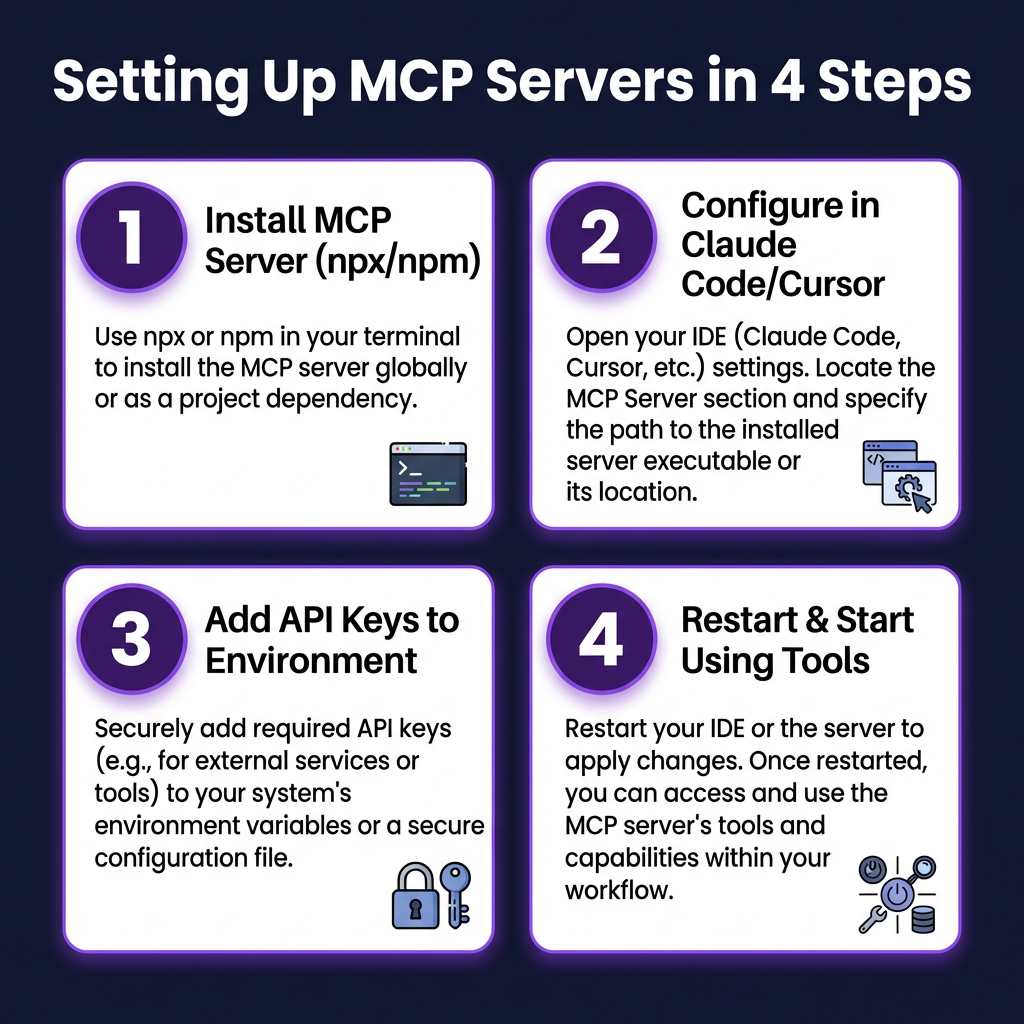
Setting Up MCP Servers: Step-by-Step Guide
Let’s walk through setting up MCP servers in Claude Code, Cursor, and VS Code. The process is similar across clients.
Claude Code Setup
Claude Code uses a JSON configuration file to manage MCP servers. Create or edit ~/.config/claude-code/mcp.json:
{
  "mcpServers": {
    "filesystem": {
      "command": "npx",
      "args": ["-y", "@modelcontextprotocol/server-filesystem", "/home/user/projects"]
    },
    "github": {
      "command": "npx",
      "args": ["-y", "@modelcontextprotocol/server-github"],
      "env": {
        "GITHUB_PERSONAL_ACCESS_TOKEN": "ghp_your_token_here"
      }
    },
    "brave-search": {
      "command": "npx",
      "args": ["-y", "@modelcontextprotocol/server-brave-search"],
      "env": {
        "BRAVE_API_KEY": "your_brave_api_key"
      }
    }
  }
}
Restart Claude Code after editing the configuration. The agent will discover available tools automatically.
Cursor Setup
Cursor has built-in MCP support with a graphical interface:
- Open Cursor Settings (Cmd/Ctrl + ,)
- Navigate to “Tools & MCP”
- Click “Add MCP Server”
- Enter the server name, command, and arguments
- Add environment variables if needed
- Save and enable the server
Important limitation: Cursor currently supports up to 40 tools across all MCP servers combined. If you have many servers installed, you may need to disable some.
VS Code Setup
VS Code with the Claude extension uses the same configuration format as Claude Code. Create .vscode/mcp.json in your project root:
{
  "servers": {
    "my-project-tools": {
      "type": "stdio",
      "command": "node",
      "args": ["./mcp-server.js"]
    }
  }
}
The VS Code extension will automatically detect and connect to these servers when you open the project.
Building Your Own MCP Server
Sometimes you need a custom MCP server for internal tools or proprietary systems. Here’s how to build one.
Prerequisites
- Python 3.10+ or Node.js 18+
- The MCP SDK:
pip install mcpornpm install @modelcontextprotocol/sdk - An idea of what tools your server will expose
Example: A Simple Task Tracker MCP Server
Let’s build a server that manages a simple task list. This demonstrates the core patterns you’ll use in any MCP server.
from mcp.server.fastmcp import FastMCP
import json
import os

mcp = FastMcp("task-tracker")

TASKS_FILE = os.path.expanduser("~/.tasks.json")

def load_tasks():
    if not os.path.exists(TASKS_FILE):
        return []
    with open(TASKS_FILE, 'r') as f:
        return json.load(f)

def save_tasks(tasks):
    with open(TASKS_FILE, 'w') as f:
        json.dump(tasks, f, indent=2)

@mcp.tool()
def add_task(title: str, priority: str = "medium") -> str:
    """Add a new task to the tracker.

    Args:
        title: The task description
        priority: low, medium, or high
    """
    tasks = load_tasks()
    task = {
        "id": len(tasks) + 1,
        "title": title,
        "priority": priority,
        "completed": False
    }
    tasks.append(task)
    save_tasks(tasks)
    return f"Added task #{task['id']}: {title}"

@mcp.tool()
def list_tasks(show_completed: bool = False) -> str:
    """List all tasks.

    Args:
        show_completed: Whether to include completed tasks
    """
    tasks = load_tasks()
    if not show_completed:
        tasks = [t for t in tasks if not t["completed"]]

    if not tasks:
        return "No tasks found."

    result = []
    for task in tasks:
        status = "✓" if task["completed"] else "○"
        result.append(f"{status} #{task['id']} [{task['priority'].upper()}] {task['title']}")

    return "\n".join(result)

@mcp.tool()
def complete_task(task_id: int) -> str:
    """Mark a task as completed.

    Args:
        task_id: The ID of the task to complete
    """
    tasks = load_tasks()
    for task in tasks:
        if task["id"] == task_id:
            task["completed"] = True
            save_tasks(tasks)
            return f"Completed task #{task_id}: {task['title']}"
    return f"Task #{task_id} not found"

if __name__ == "__main__":
    mcp.run()
Save this as task_server.py and run it. Your AI agent can now manage tasks through natural language:
- “Add a high priority task to review the payment integration code”
- “List all my incomplete tasks”
- “Mark task #3 as complete”
Security Best Practices for MCP Servers
MCP servers give AI agents significant power. With great power comes great responsibility—and security risks.
Key Security Concerns
- Tool manifest exposure: Your tool discovery response defines your AI’s attack surface. Don’t expose sensitive operations.
- Prompt injection: Malicious inputs can manipulate agents into calling tools with harmful parameters.
- Session hijacking: Persistent bidirectional connections can be compromised if not properly secured.
- Insufficient audit logging: Without proper logging, you can’t track what actions your AI agents take.
Security Checklist
- ✓ Validate all tool inputs rigorously
- ✓ Use least-privilege principles (only expose necessary tools)
- ✓ Implement rate limiting for expensive operations
- ✓ Log all tool invocations with user context
- ✓ Store API keys and credentials securely (environment variables, not code)
- ✓ Use HTTPS for Streamable HTTP transports
- ✓ Implement authentication for remote MCP servers (OAuth 2.1)
- ✓ Regularly audit which tools your AI agents can access
Real-World Use Cases
Here are specific ways we’re using MCP servers at Fungies.io:
Automated Deployment Pipeline
Our deployment agent combines GitHub, Slack, and AWS MCP servers:
- Developer asks: “Deploy the payment refactor to staging”
- AI queries GitHub for the PR, verifies tests pass
- AI triggers the deployment via AWS tools
- AI posts deployment status to Slack
- AI monitors logs and reports any errors
Customer Support Assistant
Our support team uses an AI assistant with PostgreSQL and Stripe MCP servers:
- Support agent asks: “What was the last charge for [email protected]?”
- AI queries the database for customer ID
- AI queries Stripe for recent charges
- AI presents a summary with refund options
Content Research Workflow
For blog posts like this one, I use Brave Search and Firecrawl MCP servers:
- I ask: “Research the latest MCP server trends for 2026”
- AI searches for recent articles and documentation
- AI extracts content from relevant pages
- AI synthesizes findings into an outline
Key Takeaways
MCP servers represent a fundamental shift in how AI agents interact with tools and data. Here’s what you need to remember:
- MCP is now the standard — With 5,000+ servers and support from every major AI coding tool, MCP has moved from experimental to essential.
- Start with filesystem and GitHub — These two servers provide immediate value for most development workflows.
- Choose the right transport — STDIO for local tools (~1ms latency), Streamable HTTP for cloud deployments.
- Security matters — Audit your tool manifests, validate inputs, and log all AI actions.
- Build custom servers for internal tools — The FastMCP library makes it straightforward to expose your proprietary systems to AI agents.
Frequently Asked Questions
What is the difference between MCP and function calling?
Function calling is a general capability of LLMs to invoke external functions. MCP is a standardized protocol that defines how to expose, discover, and execute those functions. Think of function calling as the capability and MCP as the implementation standard.
Can I use MCP servers with any LLM?
MCP servers work with any AI client that implements the MCP protocol. This includes Claude Code, Cursor, Windsurf, VS Code with Claude extension, and any custom client built with the MCP SDK. The LLM itself doesn’t need to know about MCP—the client handles the protocol.
Are MCP servers free to use?
Many MCP servers are open source and free. However, some servers connect to paid APIs (like Brave Search or certain database services) that require their own subscriptions. The MCP protocol itself is free and open.
How do I debug MCP server issues?
Start by checking the server logs. MCP servers run as separate processes, so they often log to stdout/stderr. Enable verbose logging in your MCP client (Claude Code has a –verbose flag). Test the server independently using the MCP Inspector tool.
What’s the difference between MCP and A2A (Agent-to-Agent) protocol?
MCP connects AI agents to tools and data sources. A2A (developed by Google) connects agents to other agents. They’re complementary—MCP for tool use, A2A for multi-agent collaboration.
Conclusion
MCP servers have fundamentally changed how I work with AI. Instead of writing custom integrations for every tool, I can now connect AI agents to my entire development stack in minutes. The protocol’s rapid adoption—5,000+ servers in just over a year—shows that the developer community recognizes its value.
If you haven’t started using MCP servers yet, start today. Install the filesystem and GitHub servers. Build a simple custom server for an internal tool. Experience what it’s like when your AI assistant can actually do things, not just suggest them.
The future of AI-assisted development isn’t better prompts—it’s better context. MCP is how you provide it.
Ready to build AI-powered workflows for your SaaS? Get started with Fungies.io — the merchant of record platform that handles payments, tax compliance, and checkout so you can focus on building.
References
- Model Context Protocol Official Documentation: https://modelcontextprotocol.io/
- Anthropic MCP Announcement (November 2024): https://www.anthropic.com/news/model-context-protocol
- MCP Transport Future Blog Post: https://blog.modelcontextprotocol.io/posts/2025-12-19-mcp-transport-future/
- Awesome MCP Servers Repository: https://github.com/tolkonepiu/best-of-mcp-servers
- FastMCP Python SDK: https://github.com/modelcontextprotocol/python-sdk
- Loginsoft MCP vs API Guide: https://www.loginsoft.com/post/mcp-vs-api-whats-the-actual-difference-and-when-to-use-each
- NxCode Cursor MCP Guide: https://www.nxcode.io/resources/news/cursor-mcp-servers-complete-guide-2026
- Firecrawl MCP Server: https://www.firecrawl.dev/blog/best-mcp-servers-for-developers