Here’s a stat that should wake you up: 67% of content creators now use AI tools daily, and those who do report saving an average of 12 hours per week. That’s not a typo. Twelve hours.
I’ve been in marketing long enough to remember when “content creation” meant hours hunched over a keyboard or wrestling with Adobe Creative Suite. Today? The landscape has completely transformed. AI isn’t just helping creators work faster—it’s democratizing professional-quality content production for everyone.
What Are AI Content Creation Tools?
AI content creation tools are software applications that use artificial intelligence—specifically large language models (LLMs), computer vision, and generative adversarial networks (GANs)—to assist with creating, editing, and optimizing content.
These aren’t just fancy spell-checkers. Modern AI tools can:
- Generate complete blog posts, scripts, and social media content from brief prompts
- Create photorealistic images and illustrations from text descriptions
- Produce professional video content without cameras or actors
- Edit audio, remove backgrounds, and enhance media automatically
- Optimize content for SEO and specific platforms
Why AI Tools Matter for Creators in 2026
The creator economy hit $250 billion in 2025, and competition has never been fiercer. Standing out requires publishing consistently across multiple platforms—something that’s nearly impossible without help.
Here’s what the data shows:
- Creators using AI tools publish 3.5x more content than those who don’t
- AI-assisted content sees 23% higher engagement rates on average
- 75% of brands now generate the majority of their content through creators
- The average creator saves $2,400/month by using AI instead of hiring freelancers
But here’s the catch: not all AI tools are created equal. Some are genuinely transformative. Others are overpriced wrappers around the same APIs you could access for free.
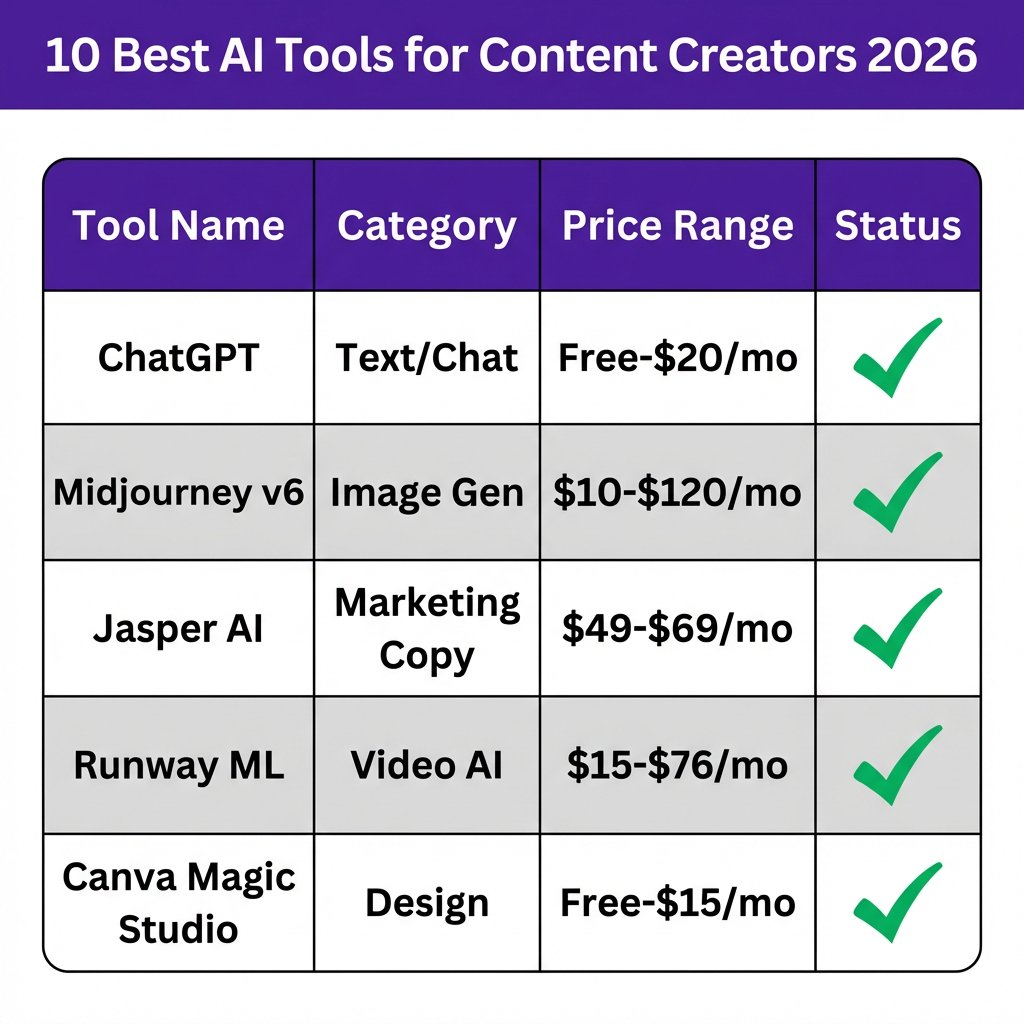
10 Best AI Tools for Content Creators in 2026
After testing dozens of platforms and analyzing real user feedback, these are the AI tools that actually deliver results. I’ve organized them by content type so you can find exactly what you need.
1. ChatGPT (OpenAI) — Best All-Purpose Writing Assistant
ChatGPT remains the undisputed king of AI writing tools. With GPT-4o and the newer reasoning models, it’s capable of everything from blog outlines to complete article drafts, email sequences, and social media calendars.
Key Features:
- Natural conversation interface with memory across sessions
- Custom GPTs for specialized tasks (SEO, copywriting, creative writing)
- Code interpretation and data analysis capabilities
- Image generation with DALL-E 3 integration
- Web browsing for real-time research
Pricing: Free tier available; Plus at $20/month; Pro at $200/month for power users
Best For: Writers, marketers, and anyone needing versatile text generation
2. Claude 3.5 Sonnet (Anthropic) — Best for Long-Form Content
Anthropic’s Claude has quietly become the favorite among serious writers. Its 200K token context window means you can feed it entire reports, books, or codebases for analysis. The writing quality is arguably more natural than ChatGPT’s.
Key Features:
- Massive context window for analyzing long documents
- More nuanced, human-like writing style
- Excellent at following complex instructions
- Strong ethical guardrails (won’t generate harmful content)
- Artifacts feature for creating and editing content side-by-side
Pricing: Free tier; Pro at $20/month; Team at $25/user/month
Best For: Authors, researchers, and technical writers
3. Jasper AI — Best for Marketing Teams
Jasper built its reputation on marketing copy, and it shows. With 100+ AI apps for specific use cases—Facebook ads, product descriptions, email subject lines—it’s designed for teams that need to produce content at scale while maintaining brand consistency.
Key Features:
- Brand voice training for consistent tone across all content
- Surfer SEO integration for optimized content
- Campaign management and content calendars
- Team collaboration features
- API access for enterprise integrations
Pricing: Creator at $49/month; Pro at $69/month; Business (custom)
Best For: Marketing teams, agencies, and e-commerce brands
4. Midjourney v6 — Best AI Image Generator
Midjourney v6 is nothing short of magical. The photorealism, artistic control, and aesthetic quality are unmatched. If you need images that don’t look AI-generated, this is your tool.
Key Features:
- Stunning photorealistic and artistic image generation
- Style reference system for consistent aesthetics
- Character consistency across multiple images
- Advanced prompt understanding
- Active Discord community for inspiration
Pricing: Basic at $10/month; Standard at $30/month; Pro at $60/month; Mega at $120/month
Best For: Designers, artists, and brands needing high-quality visuals
5. DALL-E 3 — Best for Beginners
DALL-E 3’s biggest advantage? It’s included with ChatGPT Plus. The prompt adherence is excellent—if you describe something specific, you’ll get exactly that. The text rendering in images has also improved dramatically.
Key Features:
- Excellent prompt comprehension and accuracy
- Native text generation within images
- Seamless ChatGPT integration
- Multiple style options (vivid vs. natural)
- No separate subscription needed with ChatGPT Plus
Pricing: Included with ChatGPT Plus ($20/month)
Best For: Beginners and those already using ChatGPT
6. Runway ML — Best AI Video Generator
Runway’s Gen-4 models have changed what’s possible with AI video. Character consistency, camera controls, and professional-quality output make it the go-to for creators who need video content without traditional production.
Key Features:
- Text-to-video and image-to-video generation
- Gen-4 Turbo for faster, cheaper generation
- Advanced camera controls (pan, tilt, zoom)
- Green screen and background removal
- Motion brush for selective animation
Pricing: Standard at $15/month; Pro at $35/month; Unlimited at $76/month
Best For: Video creators, marketers, and social media managers
7. Descript — Best for Podcast & Video Editing
Descript’s “edit video like a doc” approach is genuinely revolutionary. You edit the transcript, and the video changes to match. Remove filler words, add captions, and clone your voice—all in one platform.
Key Features:
- Text-based video and audio editing
- AI voice cloning (Overdub)
- Automatic filler word removal
- Studio Sound for audio enhancement
- Screen recording and transcription
Pricing: Free tier; Creator at $12/month; Pro at $24/month
Best For: Podcasters, YouTubers, and course creators
8. Canva Magic Studio — Best for Design
Canva has evolved far beyond simple templates. Magic Studio brings AI image generation, writing assistance, and design automation to the platform 100 million people already use.
Key Features:
- Magic Write for AI-generated copy
- Magic Media for image and video generation
- Magic Edit for object manipulation
- Brand kit management
- Thousands of templates
Pricing: Free tier; Pro at $15/month; Teams at $10/user/month
Best For: Social media managers, small businesses, and non-designers
9. Perplexity AI — Best for Research
Perplexity has replaced Google for many creators. It searches the web in real-time, cites sources, and provides synthesized answers. When you need accurate information fast, this is your tool.
Key Features:
- Real-time web search with source citations
- Conversational follow-up questions
- Focus modes (Academic, Reddit, YouTube)
- Pro search for deeper analysis
- Collections for organizing research
Pricing: Free tier; Pro at $20/month
Best For: Researchers, journalists, and fact-checkers
10. Copy.ai — Best for Short-Form Copy
Copy.ai excels at what its name suggests: copy. Ads, social posts, email subject lines, product descriptions—it generates conversion-focused short-form content faster than anything else.
Key Features:
- 90+ copywriting templates
- Brand voice customization
- Chat interface for iterative refinement
- Workflow automation
- Team collaboration
Pricing: Free tier (2,000 words); Pro at $36/month; Team at $186/month
Best For: Copywriters, e-commerce brands, and social media marketers
AI Tools Comparison Table
| Tool | Best For | Starting Price | Free Tier |
|---|---|---|---|
| ChatGPT | All-purpose writing | Free / $20 | Yes |
| Claude 3.5 | Long-form content | Free / $20 | Yes |
| Jasper AI | Marketing teams | $49/month | No |
| Midjourney v6 | Image generation | $10/month | No |
| DALL-E 3 | Beginners | $20/month* | Limited |
| Runway ML | Video creation | $15/month | Yes |
| Descript | Podcast/video editing | Free / $12 | Yes |
| Canva Magic | Design | Free / $15 | Yes |
| Perplexity | Research | Free / $20 | Yes |
| Copy.ai | Short-form copy | Free / $36 | Yes |
*Included with ChatGPT Plus subscription
How to Choose the Right AI Tools
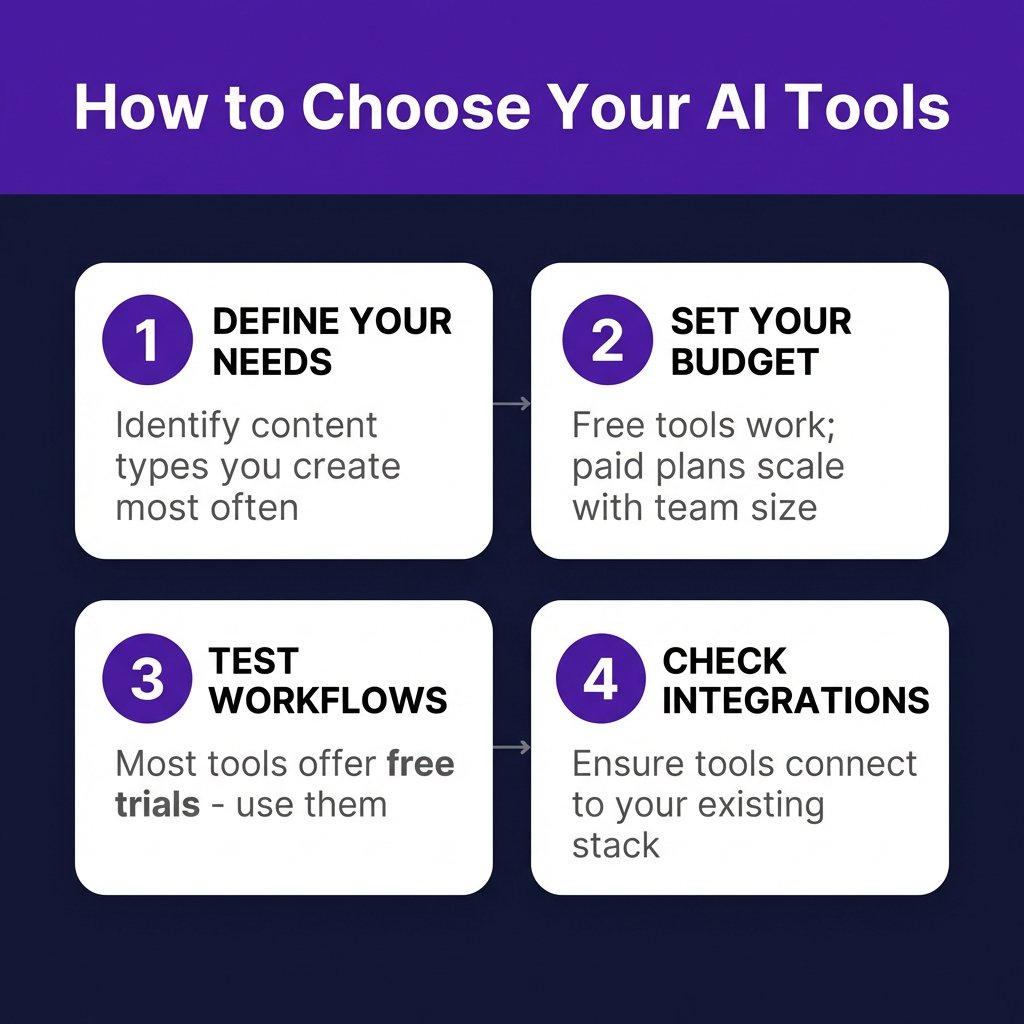
With so many options, where do you start? Here’s my practical framework:
1. Define Your Primary Content Types
Are you primarily writing blog posts? Creating Instagram Reels? Recording podcasts? Different tools excel at different formats. Start with the content you create most often.
2. Set a Realistic Budget
Free tools have come a long way. ChatGPT’s free tier, Canva’s free plan, and Descript’s free tier handle 80% of what most creators need. Only upgrade when you’re hitting limits.
3. Test Before You Commit
Most paid tools offer free trials. Use them. The tool that looks best on paper might not fit your workflow in practice.
4. Check Integration Compatibility
Your AI tools should play nice with your existing stack. If you live in Notion, look for tools with Notion integrations. If you’re a WordPress user, check for publishing plugins.
Frequently Asked Questions
Will AI tools replace human creators?
No. AI is a tool, not a replacement. The creators who thrive are those who use AI to amplify their unique voice and perspective—not those who let AI do all the work. Your taste, judgment, and creativity remain irreplaceable.
Are AI-generated images copyright-safe?
It’s complicated. In the US, purely AI-generated images typically can’t be copyrighted. However, significant human modification and creative direction can create copyrightable works. For commercial use, check each platform’s terms—most grant you full usage rights for generated content.
What’s the best free AI tool for content creation?
ChatGPT’s free tier is the best starting point for most creators. For design, Canva’s free plan is incredibly capable. For video, Runway’s free tier lets you experiment before committing.
How do I make AI content sound more human?
Three tips: First, use specific, detailed prompts rather than generic ones. Second, ask the AI to adopt a specific tone or persona. Third, always edit the output—add personal anecdotes, vary sentence length, and include your own opinions.
Can I use AI tools for client work?
Yes, but disclose it. Most clients don’t care if you use AI—they care about results. Being transparent builds trust. Plus, AI-assisted work often delivers better results faster, which clients love.
Final Thoughts
The AI tools I’ve covered here aren’t just nice-to-have—they’re becoming essential for creators who want to compete. The creators winning in 2026 aren’t necessarily the most talented; they’re the most efficient at leveraging AI to amplify their work.
Start with one tool. Master it. Then add another. Don’t try to adopt everything at once—that’s a recipe for overwhelm.
And remember: AI is a multiplier, not a magic wand. It amplifies your skills, creativity, and work ethic. The best content still comes from humans who care about their audience.
Ready to monetize your content? Fungies.io makes it easy to sell digital products, courses, and subscriptions with built-in global tax compliance. Focus on creating—we’ll handle the payments.