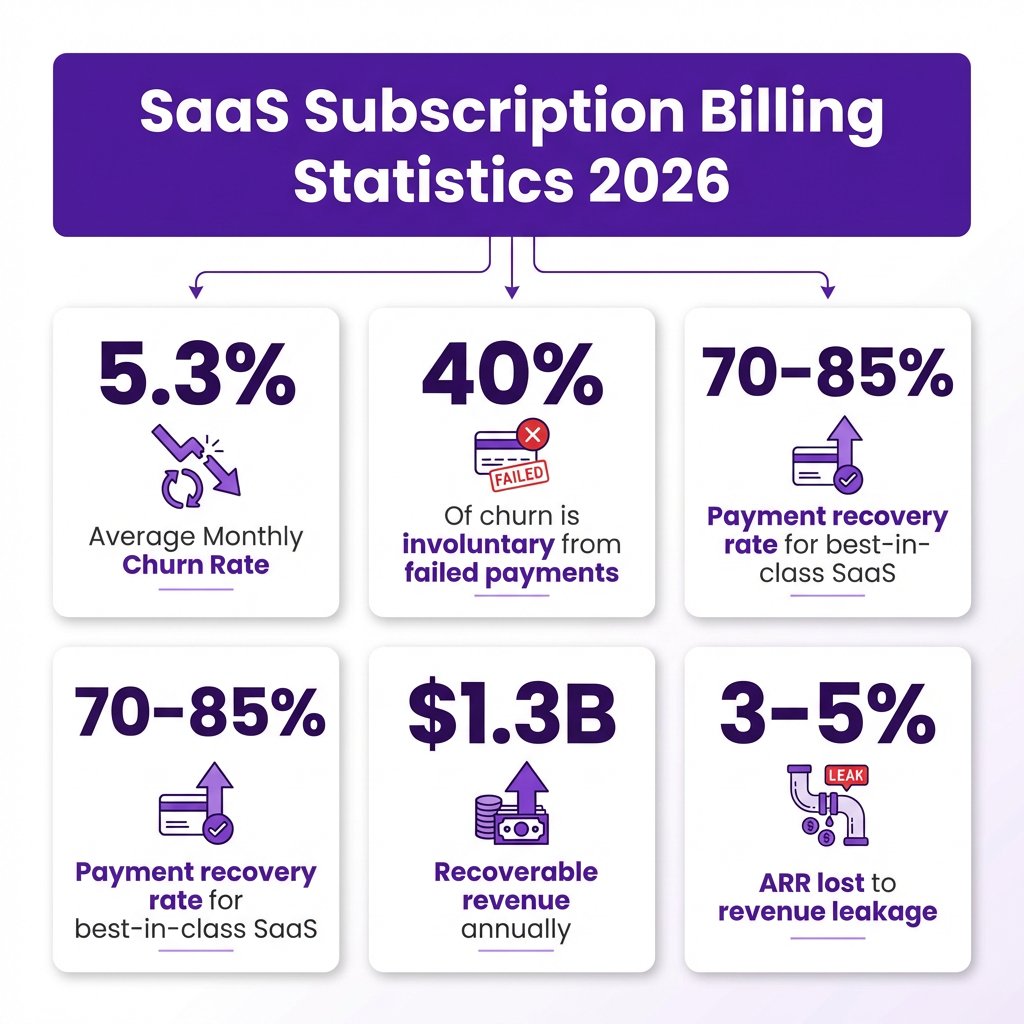
Here’s a sobering statistic: 5.3% of SaaS customers churn every month on average. But here’s what most founders don’t realize—40% of that churn is involuntary. These aren’t customers who decided your product sucks. These are failed credit cards, expired payment methods, and billing hiccups that silently kill your growth.
I’ve seen SaaS companies lose millions in recoverable revenue because their billing implementation was an afterthought. The good news? Getting subscription billing right isn’t rocket science. It just requires understanding the full picture before you write your first line of code.
What Is Subscription Billing (And Why It Matters)
Subscription billing is the automated process of charging customers recurring fees—monthly, annually, or on custom schedules—for ongoing access to your SaaS product. Unlike one-time purchases, subscription billing touches every part of your business: cash flow predictability, revenue recognition, customer retention, and even your ability to raise funding.
Here’s the reality: SaaS companies lose 3-5% of ARR to revenue leakage—the gap between what customers agreed to pay and what actually hits your bank account. This happens through billing errors, missed usage charges, failed payments, and renewal gaps. A solid subscription billing implementation closes these gaps.
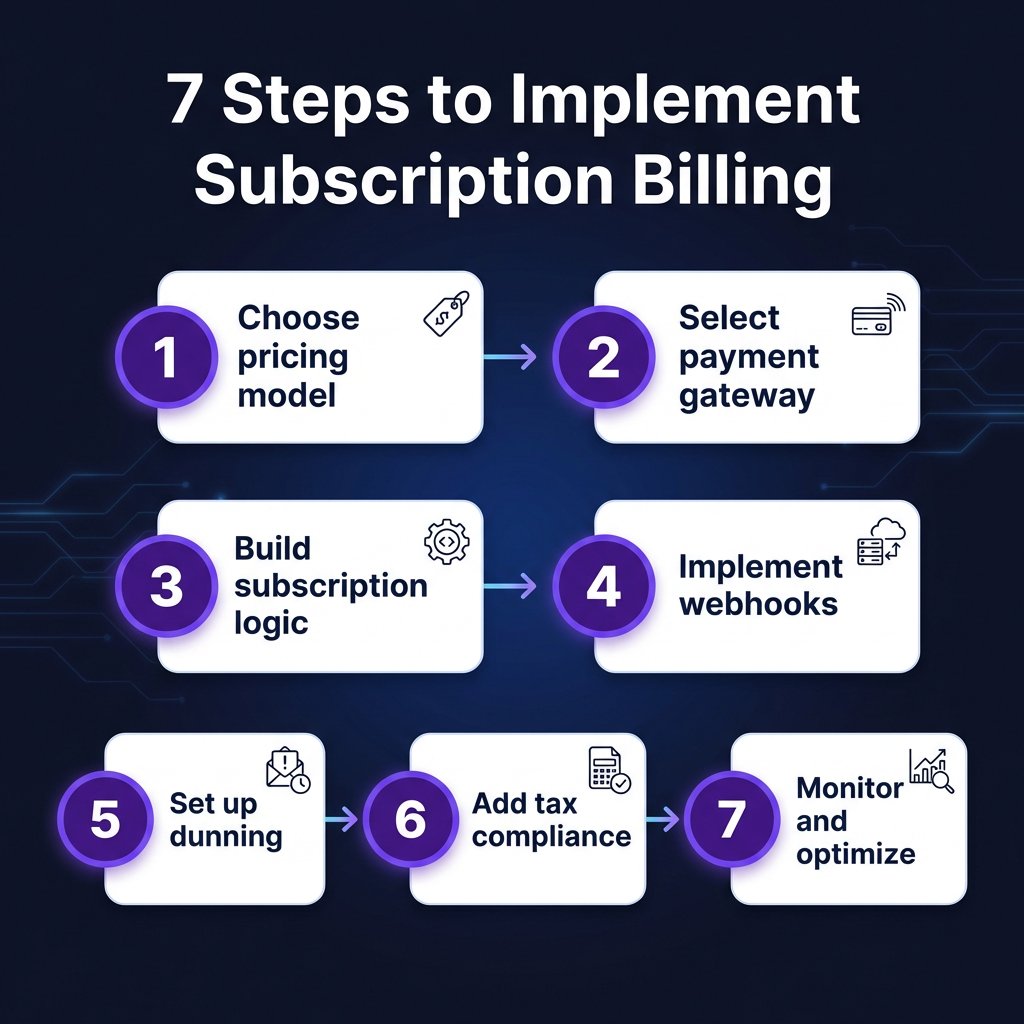
Step 1: Choose Your Pricing Model
Before touching any code, you need to decide how you’ll charge. Your pricing model determines your entire billing architecture.
Flat-Rate Pricing
One price, unlimited access. Simple to implement, easy for customers to understand. Best for products with uniform value delivery. The downside? You’re leaving money on the table from power users while potentially pricing out smaller customers.
Per-User (Seat-Based) Pricing
Charge based on the number of active users. This scales with customer success—when they grow, you grow. Implementation requires tracking user provisioning and deprovisioning. Most B2B SaaS uses this model.
Usage-Based Pricing
Charge for what customers actually consume—API calls, storage, compute, messages sent. This aligns your revenue with customer value but requires robust metering infrastructure. Usage-based models show superior retention compared to flat-rate pricing.
Tiered Pricing
Multiple plans with different feature sets. This captures different customer segments but adds complexity—you’ll need to track feature entitlements and handle upgrades/downgrades with proration.
Step 2: Select Your Payment Gateway
Your payment gateway handles the actual money movement. For SaaS, you need more than just card processing—you need subscription management capabilities.
| Gateway | Transaction Fee | Subscription Features | Best For |
|---|---|---|---|
| Stripe | 2.9% + $0.30 | Excellent | Developer-led startups |
| Paddle | 5% + $0.50 | Full MoR | Global tax compliance |
| Chargebee | 0.5-0.75% on top | Advanced | Enterprise complexity |
| Recurly | 1.25% + $0.10 | Strong | Revenue optimization |
| Fungies | 5% + $0.50 | MoR + Tax | Indie developers |
Honestly, most SaaS startups should start with Stripe. Their APIs are clean, documentation is excellent, and they handle the basics well. But if you’re selling globally and don’t want to think about VAT, GST, or sales tax, a Merchant of Record solution like Paddle or Fungies saves you massive headaches.
Step 3: Build Your Subscription Logic
This is where the rubber meets the road. Your application needs to track subscription states, handle plan changes, and manage access control.
Core Subscription States
Every subscription moves through states: trialing → active → past_due → canceled. Your code needs to handle transitions between these states gracefully. When a payment fails, the subscription typically enters a past_due state with a grace period before cancellation.
Proration Handling
When customers upgrade or downgrade mid-cycle, you need to calculate prorated charges. If a customer upgrades from a $50/month plan to $100/month halfway through the month, they should pay the $25 difference. Most payment gateways handle this calculation, but you need to understand the logic.
Feature Entitlements
Your application needs to check what features each customer can access based on their subscription tier. Don’t hardcode this—store entitlements in your database and check them at runtime. This makes it easier to adjust plans without code changes.
Step 4: Implement Webhooks (Critical)
Webhooks are how your payment gateway tells your application that something happened. Payment succeeded? Webhook. Subscription canceled? Webhook. Invoice created? Webhook.
Here’s what you absolutely must handle:
- invoice.paid — Payment succeeded, grant or maintain access
- invoice.payment_failed — Payment failed, start dunning process
- customer.subscription.deleted — Subscription canceled, revoke access
- customer.subscription.updated — Plan changed, update entitlements
Pro tip: Make your webhook handlers idempotent. Process the same event twice by accident? No problem. Use the event ID to deduplicate.
Step 5: Set Up Dunning Management
Remember that 40% involuntary churn statistic? Dunning management is how you fight it. This is the automated process of retrying failed payments and communicating with customers about billing issues.
Smart Retry Logic
Don’t just retry immediately. Spread retries over several days to catch customers after payday or when they’ve updated their card. A typical schedule: Day 1, Day 3, Day 5, Day 7. Best-in-class SaaS companies achieve 70-85% payment recovery rates with optimized retry strategies.
Customer Communication
Email customers when payments fail. Make it easy to update payment methods. The email should come from your domain, include a direct link to update billing info, and explain what happens if they don’t act.
Card Updater Services
Visa and Mastercard offer services that automatically update expired card details. This alone can prevent 20-30% of payment failures. Most modern payment gateways integrate these automatically.
Step 6: Handle Tax Compliance
If you’re selling globally, tax compliance isn’t optional. Different rules apply depending on where your customers are located:
- EU VAT: Charge VAT based on customer’s location, report via OSS
- US Sales Tax: Nexus-based, varies by state
- UK VAT: Post-Brexit rules apply
- GST (Australia, India, etc.): Location-based rates
You have three options: calculate and remit taxes yourself (complex), use a tax calculation API like TaxJar or Avalara (moderate), or use a Merchant of Record that handles everything (simplest). For most SaaS companies under $10M ARR, a Merchant of Record is the smartest choice.
Step 7: Monitor and Optimize
Your billing system isn’t “set and forget.” You need visibility into key metrics:
Essential Billing Metrics
- Monthly Recurring Revenue (MRR): Your predictable revenue base
- Churn Rate: Target under 5% monthly for healthy SaaS
- Net Revenue Retention: Should exceed 100% for growth
- Payment Failure Rate: Monitor and optimize continuously
- Recovery Rate: Aim for 70%+ on failed payments
Revenue Recognition
If you take annual payments upfront, you can’t recognize all that revenue immediately. You need to defer it over the subscription period. This matters for accounting, taxes, and investor reporting. Most billing platforms integrate with accounting software like QuickBooks or Xero.
Common Implementation Mistakes
I’ve seen these mistakes cost companies hundreds of thousands in lost revenue:
1. Not Handling Webhook Failures
If your webhook endpoint is down, you miss events. Implement retry logic and monitoring. Some companies have accidentally given away free access for months because they missed cancellation webhooks.
2. Hardcoding Plan Features
Don’t check if plan == "pro" throughout your codebase. Use feature flags or entitlement checks. When you inevitably change your pricing, you’ll thank yourself.
3. Ignoring Failed Payments
That 40% involuntary churn number? Most of it is recoverable with proper dunning. Don’t just let failed payments cancel subscriptions automatically.
4. No Self-Service Cancellation
Make it easy for customers to cancel. Yes, really. Forced retention creates negative reviews and chargebacks. Plus, customers who can easily cancel are more likely to resubscribe later.
FAQ: Subscription Billing Implementation
How long does subscription billing implementation take?
For a basic implementation with Stripe: 1-2 weeks. For complex usage-based billing with custom logic: 4-8 weeks. Using a billing platform like Chargebee or Recurly can reduce this to days.
Should I build or buy subscription billing?
Almost always buy. Building billing logic is deceptively complex—proration, tax calculations, dunning, and revenue recognition add up fast. Use a payment gateway or billing platform until you have very specific requirements.
What’s the difference between a payment gateway and a billing platform?
A payment gateway (Stripe, Braintree) handles transactions. A billing platform (Chargebee, Recurly) adds subscription management, invoicing, and revenue operations on top. Many SaaS companies start with a gateway and graduate to a billing platform as they scale.
How do I handle annual vs monthly billing?
Offer both. Annual plans improve cash flow (12 months upfront) and reduce churn. Most SaaS offer a discount (15-20%) for annual commitment. Your billing system should handle both seamlessly.
What about usage-based billing?
Usage-based billing requires metering infrastructure to track consumption. You’ll need to record usage events, aggregate them for billing periods, and handle overages or tiered pricing. This adds complexity but can significantly improve revenue alignment with customer value.
Conclusion: Start Simple, Scale Smart
Subscription billing implementation doesn’t have to be overwhelming. Start with a simple model—flat-rate or per-user pricing using a reliable payment gateway. Get the fundamentals right: webhook handling, dunning, and basic tax compliance.
As you grow, you can add complexity: usage-based components, advanced dunning strategies, and more sophisticated revenue recognition. The key is building on a solid foundation that won’t crumble when you hit scale.
Remember: every dollar of recurring revenue you protect through proper billing implementation is worth significantly more than a new sale. That 40% involuntary churn? It’s recoverable. That 3-5% revenue leakage? It’s preventable. Get your subscription billing right, and you’ve built a foundation for sustainable SaaS growth.
Ready to implement subscription billing for your SaaS? Get started with Fungies and handle payments, tax compliance, and subscription management in one platform.
Sources
- Subscription Statistics 2025 – Marketing LTB
- SaaS Payment Statistics 2025 – The Kaplan Group
- Average Churn Rate by Industry SaaS – Focus Digital
- Revenue Leakage in SaaS – LedgerUp
- Payment Failure and Retry Rates – Monetizely
- How to Set Up SaaS Billing – PayPro Global
- SaaS Billing Best Practices – Orb
\n