85% of developers now use AI coding assistants regularly. That’s not a projection — it’s happening right now. Teams report 40% productivity gains, reduced mental load, and faster shipping cycles. But here’s the problem: choosing the wrong tool for your workflow can cost you hundreds per month in inefficiency and frustration.
This guide compares the three dominant AI coding tools of 2026: Claude Code, Cursor, and GitHub Copilot. Each represents a fundamentally different philosophy about how AI should assist developers. By the end, you’ll know exactly which tool (or combination) fits your workflow, team size, and budget.
What Each Tool Actually Is
Claude Code — Terminal-Native Agent
Claude Code is Anthropic’s agentic coding assistant that lives in your terminal. It’s not an IDE extension — it’s a command-line tool designed for complex, multi-file development tasks.
Key Philosophy: What if AI coding assistance was built for how senior developers actually work?
Claude Code excels at:
- Understanding and modifying large codebases (50,000+ lines)
- Complex refactoring across multiple files
- Terminal-based workflows
- Autonomous task execution with git integration
Pricing:
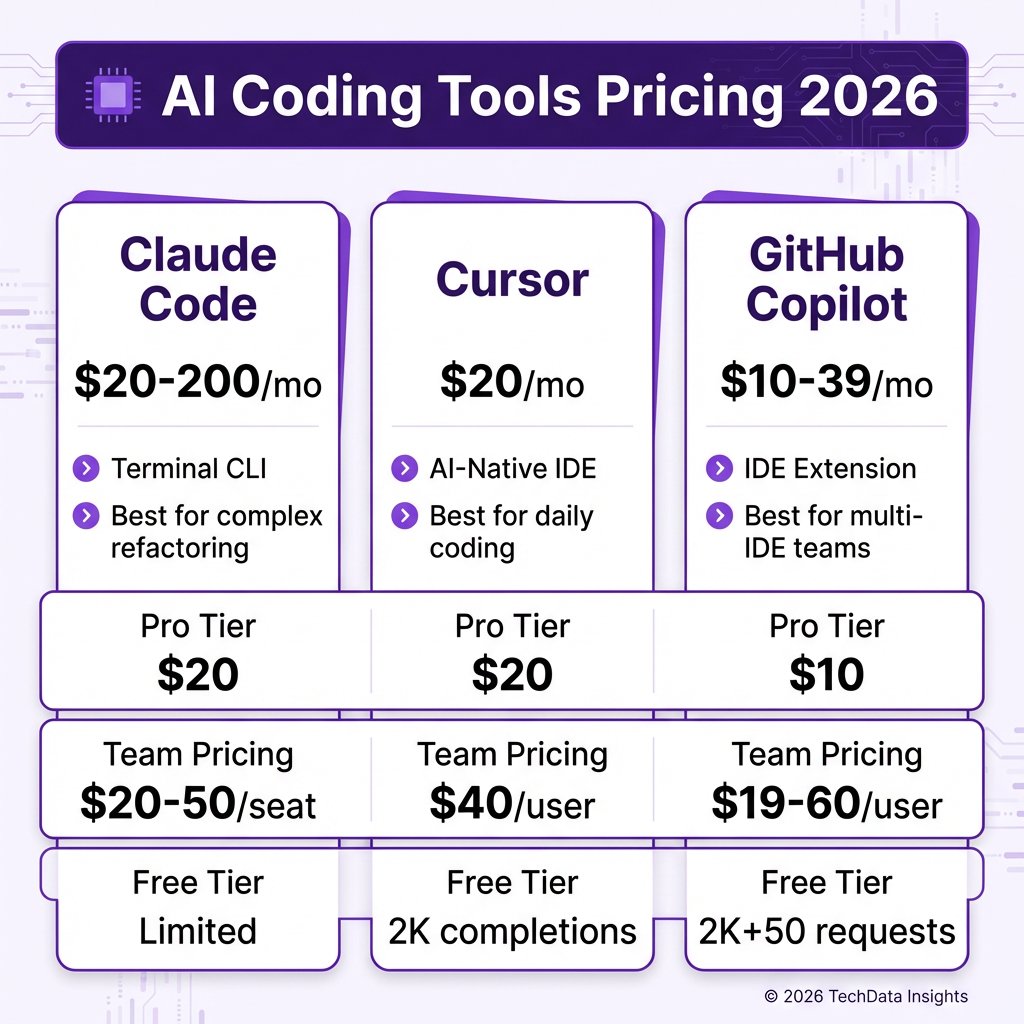
- Pro: $20/month (Sonnet 4.5, ~5 hour usage windows)
- Max: $100-200/month (higher limits, Opus access)
- API: Pay-per-token (Claude Opus 4.6: $5/M input, $25/M output)
Cursor — AI-Native IDE
Cursor is a fork of VS Code rebuilt from the ground up for AI-assisted development. Unlike extensions that bolt AI onto existing editors, Cursor integrates AI into every keystroke.
Key Philosophy: AI should be woven into the entire development experience, not just autocomplete.
Cursor excels at:
- Daily coding with inline AI assistance
- Multi-file editing with composer mode
- Tab-based predictions (predicts your next edit)
- Natural language code generation
Pricing:
- Hobby: Free (2,000 completions/month, limited)
- Pro: $20/month (unlimited completions)
- Business: $40/user/month (team features, shared context)
GitHub Copilot — IDE Extension + Platform Integration
GitHub Copilot started as an autocomplete extension but has evolved into a comprehensive AI coding platform with agent capabilities, code review, and deep GitHub integration.
Key Philosophy: Meet developers where they are — any IDE, any workflow, with GitHub at the center.
Copilot excels at:
- Code completion across multiple IDEs (VS Code, JetBrains, Vim, etc.)
- GitHub-native workflows (PRs, issues, code review)
- Multi-model support (GPT-4, Claude, Gemini)
- Team collaboration features
Pricing:
- Free: $0 (2,000 completions + 50 premium requests)
- Pro: $10/month (unlimited completions + 300 premium requests)
- Pro+: $39/month (1,500 premium requests + all frontier models)
- Business: $19/user/month (team features)
- Enterprise: $39/user/month (1,000 premium requests + advanced security)
Head-to-Head Comparison Table
| Feature | Claude Code | Cursor | GitHub Copilot |
|---|---|---|---|
| Type | Terminal CLI | AI-Native IDE | IDE Extension |
| Best For | Complex refactoring, large codebases | Daily development, full IDE experience | Multi-IDE teams, GitHub workflows |
| Pricing (Individual) | $20-200/month | $20/month | $10-39/month |
| Pricing (Team) | $20-50/seat | $40/user/month | $19-60/user/month |
| Free Tier | Limited | 2,000 completions | 2,000 completions + 50 requests |
| Context Window | 200K tokens | 200K tokens | Varies by model |
| Multi-File Editing | ✅ Native | ✅ Composer mode | ✅ Agent mode |
| Terminal Integration | ✅ Native | ❌ Via terminal panel | ❌ Limited |
| IDE Support | Any (terminal) | Cursor only | VS Code, JetBrains, Vim, etc. |
| Git Integration | ✅ Native | ✅ Built-in | ✅ Deep GitHub integration |
| Model Options | Claude only | Multiple (Claude, GPT, etc.) | Multiple (GPT, Claude, Gemini) |
| Code Review | ❌ | ❌ | ✅ Built-in |
When to Choose Each Tool
Choose Claude Code If…
- You live in the terminal and prefer CLI workflows
- You’re working with large, complex codebases (50K+ lines)
- You need deep reasoning for refactoring and architecture changes
- You want autonomous agent capabilities for multi-step tasks
- You’re comfortable with a steeper learning curve for more power
Real-world use case: A senior engineer at a fintech company uses Claude Code to refactor a 100,000-line legacy codebase. The tool’s ability to understand cross-file dependencies and execute complex changes autonomously saves weeks of manual work.
Choose Cursor If…
- You want AI woven into every aspect of your IDE
- You prefer an all-in-one AI-native development environment
- You value tab-based predictions and inline assistance
- You’re building new applications from scratch (“vibe coding”)
- You want the fastest AI-assisted editing experience
Real-world use case: A startup founder uses Cursor to build an MVP in a weekend. The AI-native interface means they can describe features in natural language and get working code immediately, iterating rapidly without context switching.
Choose GitHub Copilot If…
- Your team uses multiple IDEs (VS Code, JetBrains, Vim, etc.)
- You’re already invested in the GitHub ecosystem
- You want the most cost-effective option ($10/month for individuals)
- You need code review and PR assistance features
- You want model flexibility (switch between GPT, Claude, Gemini)
Real-world use case: A 50-person engineering team at an enterprise company standardizes on Copilot Business. The multi-IDE support means backend developers (IntelliJ) and frontend developers (VS Code) use the same tool, with shared context and governance.
The Hidden Costs Nobody Talks About
Token Overages and Usage Multipliers
All three tools have usage limits that can trigger overages:
Claude Code:
- Pro plan: ~5 hour usage windows (40-80 hours/week estimated)
- Exceeding limits requires Max tier ($100-200/month) or API billing
- API costs: $3-5/M input tokens, $15-25/M output tokens
Cursor:
- Pro plan: “Unlimited” completions (fair use policy applies)
- Heavy users report hitting soft limits
- Business tier required for team features
GitHub Copilot:
- Premium requests are the limiting factor
- Pro: 300/month (sufficient for most individuals)
- Pro+: 1,500/month (power users)
- Enterprise: 1,000/month
The Multi-Tool Reality
Here’s what most experienced developers actually do: use multiple tools.
- Claude Code + Cursor: Use Claude for complex refactoring, Cursor for daily editing
- Copilot + Claude Code: Copilot for completions and GitHub workflows, Claude for agent tasks
- All three: Copilot for daily work, Cursor for new projects, Claude for complex tasks
This “best tool for the job” approach maximizes productivity but increases costs. Budget $50-100/month if you’re serious about AI-assisted development.

Performance Benchmarks: What the Data Says
SWE-Bench Scores (Code Generation Accuracy)
| Tool | Model | SWE-Bench Score |
|---|---|---|
| Claude Code | Opus 4.6 | ~79% |
| Claude Code | Sonnet 4.6 | ~79.6% |
| Cursor | Claude 3.5 | ~75% |
| GitHub Copilot | GPT-4 | ~72% |
| GitHub Copilot | Claude Opus | ~78% |
Developer Productivity Studies
- 40% productivity increase reported by developers using AI coding assistants (2026 industry survey)
- 85% of developers now use AI coding tools regularly
- 2-5x cost increase for heavy users vs. base subscription prices
Feature Deep Dive: What Actually Matters
Agent Capabilities
Claude Code: True agentic execution. Can run terminal commands, edit multiple files, and complete complex multi-step tasks autonomously. Best-in-class for agent workflows.
Cursor: Composer mode enables multi-file editing with natural language. Less autonomous than Claude Code but more integrated into the editing experience.
GitHub Copilot: Agent mode (added 2025) enables multi-step tasks with tool use. Tightly integrated with GitHub workflows but less powerful than Claude Code for complex tasks.
Context Understanding
Claude Code: 200K token context window. Excels at understanding entire codebases and maintaining context across long sessions.
Cursor: 200K token context. Strong codebase understanding with @-mentions for specific files and symbols.
GitHub Copilot: Context varies by model (GPT-4: 128K, Claude: 200K). Good at understanding open files and recent edits.
Pricing Calculator: What Will You Actually Pay?
Individual Developer (Moderate Usage)
| Tool | Monthly Cost | Annual Cost |
|---|---|---|
| Claude Code Pro | $20 | $204 (annual) |
| Cursor Pro | $20 | $192 (annual) |
| GitHub Copilot Pro | $10 | $100 (annual) |
Power User (Heavy Daily Usage)
| Tool | Monthly Cost | Notes |
|---|---|---|
| Claude Code Max | $100-200 | High usage limits |
| Cursor Pro | $20 | Fair use applies |
| GitHub Copilot Pro+ | $39 | 1,500 premium requests |
10-Person Team
| Tool | Monthly Cost | Annual Cost |
|---|---|---|
| Claude Code Team | $200-500 | $2,400-6,000 |
| Cursor Business | $400 | $4,800 |
| GitHub Copilot Business | $190 | $2,280 |
The Verdict: Which Should You Choose?
For Individual Developers
Start with GitHub Copilot Pro ($10/month). It’s the cheapest entry point, works in any IDE, and gives you 300 premium requests — enough for most developers. If you hit limits or want more power, add Claude Code for complex tasks.
Choose Cursor if: You want the best AI-native editing experience and don’t mind switching IDEs.
Choose Claude Code if: You primarily work in the terminal and need the most powerful agent capabilities.
For Teams
Standardize on GitHub Copilot Business ($19/user/month) if your team uses multiple IDEs. The governance features, security controls, and GitHub integration make it the safest enterprise choice.
Choose Cursor Business if your entire team can switch to a single IDE and you want the most integrated AI experience.
Choose Claude Code for specialized roles (senior engineers, architects) who need deep agent capabilities.
The Hybrid Approach (Recommended)
Many experienced developers use a combination:
- GitHub Copilot for daily coding and completions
- Claude Code for complex refactoring and architecture work
- Cursor for new project scaffolding and rapid prototyping
This gives you the best of all worlds for $30-50/month.
FAQ
Which AI coding tool is best for beginners?
GitHub Copilot is the most beginner-friendly. It integrates into familiar IDEs, has the lowest cost ($10/month), and requires no workflow changes. The free tier lets you try before committing.
Can I use these tools for free?
Yes, all three offer free tiers:
- Claude Code: Limited free tier with usage caps
- Cursor: 2,000 completions/month on Hobby plan
- GitHub Copilot: 2,000 completions + 50 premium requests
Do AI coding tools work offline?
No. All three tools require an internet connection to access cloud-based AI models. None offer local/offline functionality.
Will AI coding tools replace developers?
No. These tools augment developers, not replace them. The role is shifting from “writing every line” to “directing AI, reviewing output, and focusing on architecture.” Developers who embrace AI will outperform those who don’t.
Which tool has the best code quality?
Claude Code generally produces the highest quality code for complex tasks (79.6% SWE-bench score). However, all three produce code that requires human review. Never deploy AI-generated code without testing.
Key Takeaways
- GitHub Copilot offers the best value at $10/month with multi-IDE support
- Cursor provides the most integrated AI-native experience for $20/month
- Claude Code delivers the most powerful agent capabilities starting at $20/month
- Most developers will benefit from using multiple tools for different tasks
- Budget $30-100/month for serious AI-assisted development
- All three require human oversight — never blindly trust AI-generated code
The right tool depends on your workflow, team size, and budget. Start with Copilot, experiment with others, and build a stack that works for you.
References
- AI Tools for Developers: 20+ Best Coding Assistants (2026)
- AI Coding Tools Comparison 2026: Claude Code vs Cursor vs Copilot – SitePoint
- Claude Code Pricing in 2026: Every Plan Explained – SSDNodes
- GitHub Copilot 2026: Complete Guide – NxCode
- Cursor Pricing 2026: Plans & Costs – NoCode MBA
- AI Coding Tools Cost Analysis 2026 – SitePoint
- LLM API Pricing Comparison 2026 – PE Collective
Ready to streamline your SaaS payments and checkout? Get started with Fungies.io — the Merchant of Record platform built for developers.