Here’s a number that should get your attention: developers using AI agents with MCP servers report 40-60% faster workflows when interacting with external tools. Not because the AI got smarter—but because it can finally do things instead of just talking about them.
Model Context Protocol (MCP) is the open standard that’s changing how AI agents connect to the world. Released by Anthropic in late 2024, MCP has become the universal language for AI-to-tool communication. As of April 2026, there are over 2,000 MCP servers available on GitHub, covering everything from GitHub and Slack to PostgreSQL and Kubernetes.
This guide will show you exactly what MCP is, why it matters for developers, and how to start using it today.
What Is Model Context Protocol (MCP)?
MCP is an open protocol that standardizes how AI models connect to external data sources, tools, and systems. Think of it as USB-C for AI applications—one universal connector that works everywhere.
Before MCP, integrating AI with external tools meant building custom connectors for every combination. Want Claude to query your database? Write a custom integration. Want it to manage GitHub issues? Another integration. MCP fixes this by creating a universal language for AI-to-tool communication.
“MCP is to AI what LSP (Language Server Protocol) is to code editors.”
— MCP Documentation
Build one MCP server for your data source, and any MCP-compatible AI client can connect. Claude Desktop, Cursor, Windsurf, OpenClaw, and dozens of other tools support MCP out of the box.
Why MCP Matters for Developers in 2026
The shift toward agentic AI is happening fast. According to recent developer surveys, 67% of AI-powered applications now use some form of tool-calling—and MCP is becoming the default standard.
The Problem MCP Solves
- Fragmented integrations: Every AI tool had its own plugin system
- Vendor lock-in: Custom integrations tied you to specific platforms
- Redundant work: Teams rebuilt the same connectors repeatedly
- Context switching: Developers constantly jumped between tools
What MCP Enables
- Universal compatibility: Write once, use with any MCP client
- Open ecosystem: 2,000+ community-built servers available
- Local-first: Run tools on your machine with stdio transport
- Remote access: Connect to cloud services via HTTP/SSE
How MCP Works: The Architecture
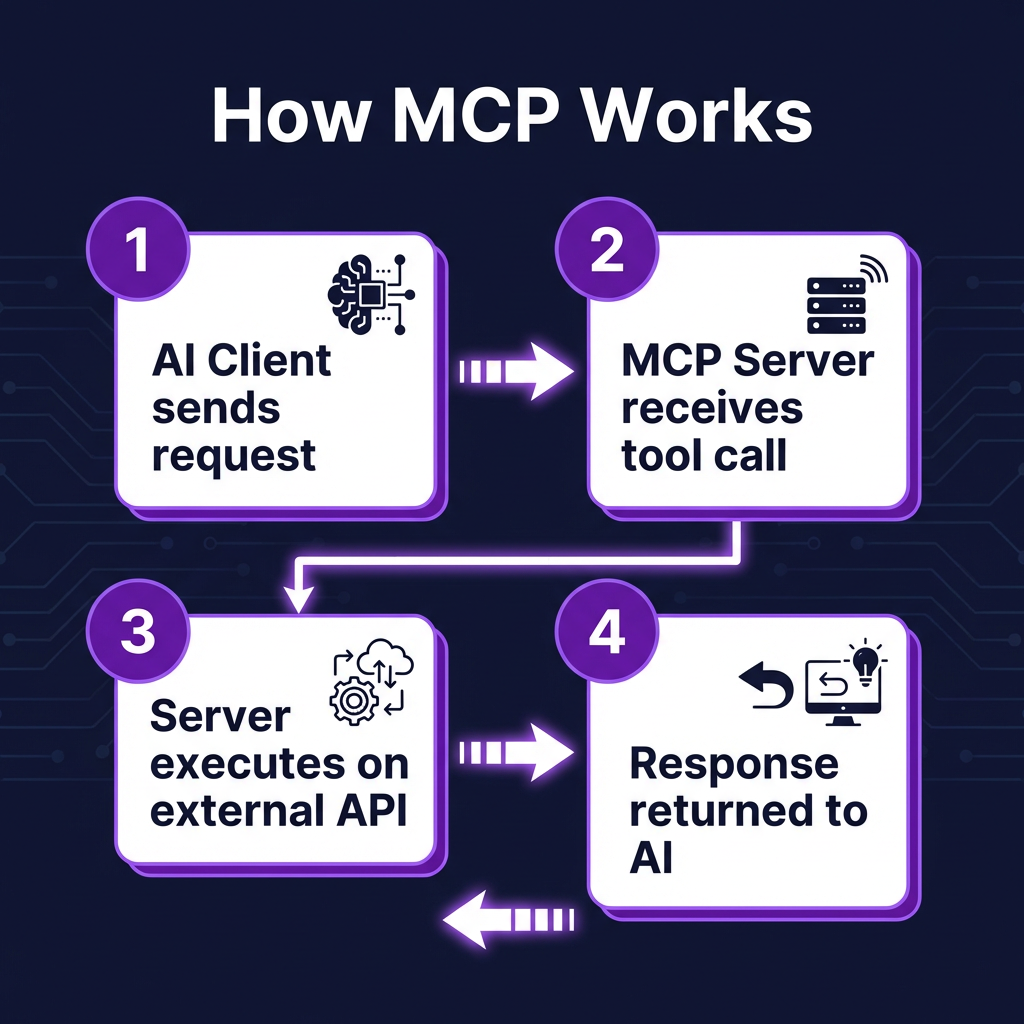
MCP follows a simple client-server model. The AI application acts as the client, and the MCP server exposes tools, resources, and prompts that the AI can access.
Core Components
| Component | Description | Example |
|---|---|---|
| Tools | Functions the AI can call | create_file, query_database |
| Resources | Data sources the AI can read | File contents, API responses |
| Prompts | Reusable prompt templates | Code review template |
| Transports | Communication method | stdio (local), HTTP (remote) |
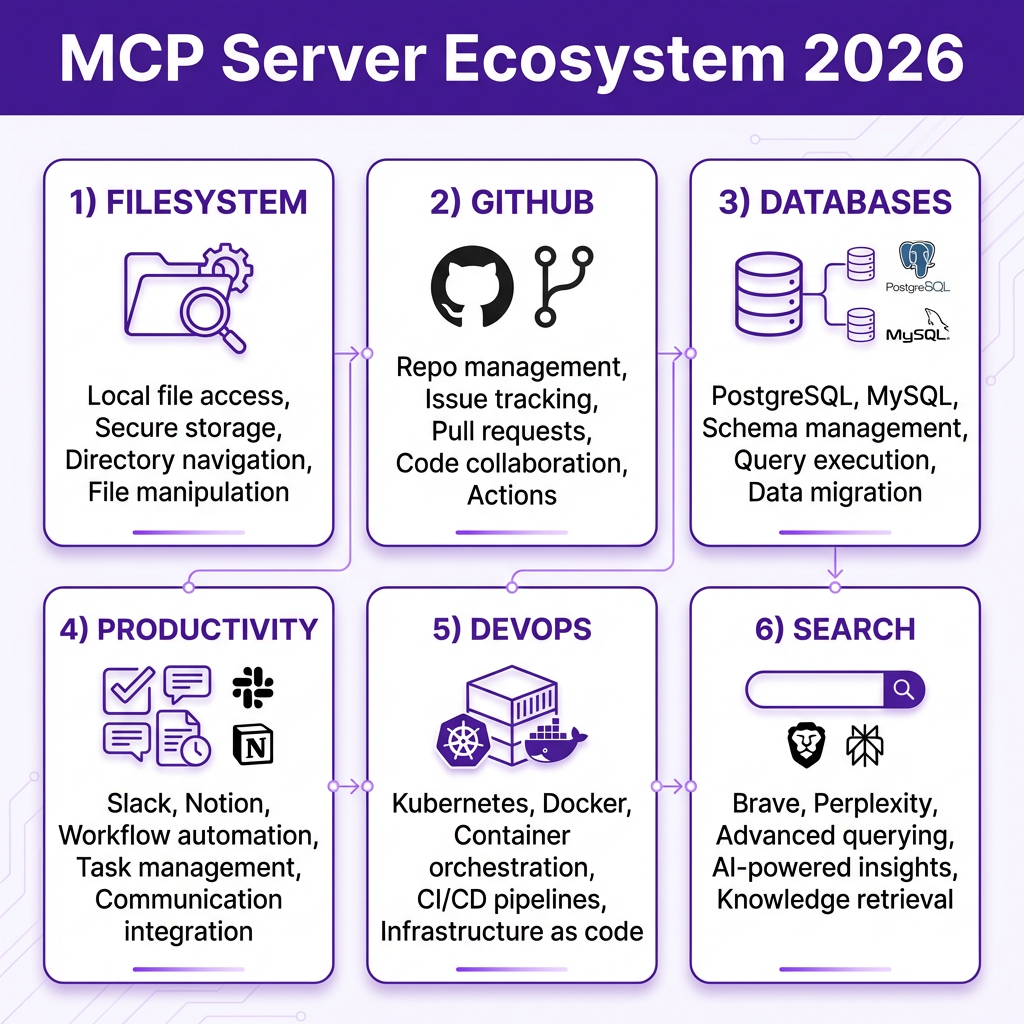
Top MCP Servers by Category (2026)
Based on GitHub stars, community adoption, and real-world testing, here are the most useful MCP servers organized by category.
Development & Code
| Server | Description | GitHub Stars |
|---|---|---|
| GitHub MCP | Manage repos, PRs, issues, workflows | 10,000+ |
| Filesystem MCP | Read/write local directories | 8,500+ |
| Git MCP | Execute git commands via AI | 3,200+ |
| Sentry MCP | Error tracking and debugging | 1,800+ |
Databases
| Server | Description | Best For |
|---|---|---|
| PostgreSQL MCP | Query PostgreSQL with natural language | Production databases |
| SQLite MCP | Local database operations | Development, testing |
| MySQL MCP | MySQL/MariaDB integration | Legacy systems |
| MongoDB MCP | NoSQL document queries | Document stores |
Productivity & Communication
| Server | Description | Use Case |
|---|---|---|
| Slack MCP | Send messages, manage channels | Team notifications |
| Notion MCP | Read/write pages and databases | Documentation |
| Google Workspace MCP | Gmail, Calendar, Drive access | Email automation |
| HubSpot MCP | CRM data and workflows | Sales automation |
DevOps & Infrastructure
| Server | Description | Key Feature |
|---|---|---|
| Kubernetes MCP | Query clusters, deploy manifests | Pod debugging |
| Docker MCP | Container management | Image builds |
| Terraform MCP | Infrastructure state queries | Plan explanations |
| ArgoCD MCP | GitOps workflow management | Deployment sync |
Setting Up Your First MCP Server
Let’s walk through installing and configuring an MCP server with Claude Desktop. We’ll use the Filesystem MCP server as an example—it’s the most popular starting point.
Step 1: Install Claude Desktop
Download Claude Desktop from claude.ai/download. MCP support is built into the desktop app (not the web version).
Step 2: Install the MCP Server
Most MCP servers are distributed via npm or pip. For the Filesystem server:
npm install -g @modelcontextprotocol/server-filesystem
Step 3: Configure Claude Desktop
Edit your Claude Desktop configuration file:
- macOS:
~/Library/Application Support/Claude/claude_desktop_config.json - Windows:
%APPDATA%\Claude\claude_desktop_config.json - Linux:
~/.config/Claude/claude_desktop_config.json
Add your MCP server:
{
  "mcpServers": {
    "filesystem": {
      "command": "npx",
      "args": ["-y", "@modelcontextprotocol/server-filesystem", "/path/to/your/project"]
    }
  }
}
Step 4: Restart and Verify
Restart Claude Desktop. You should see a hammer icon in the input area—this indicates MCP tools are available. Click it to see your connected servers.
Building Your Own MCP Server
If you can’t find an existing server for your use case, building one is straightforward. Anthropic provides official SDKs for TypeScript and Python.
TypeScript Quick Start
import { Server } from "@modelcontextprotocol/sdk/server/index.js";
import { StdioServerTransport } from "@modelcontextprotocol/sdk/server/stdio.js";

const server = new Server({
  name: "my-mcp-server",
  version: "1.0.0"
}, {
  capabilities: { tools: {} }
});

server.setRequestHandler("tools/list", async () => {
  return {
    tools: [{
      name: "hello_world",
      description: "Say hello",
      inputSchema: {
        type: "object",
        properties: {
          name: { type: "string" }
        }
      }
    }]
  };
});

const transport = new StdioServerTransport();
await server.connect(transport);
Python Quick Start
from mcp.server.fastmcp import FastMCP

mcp = FastMCP("my-mcp-server")

@mcp.tool()
def hello_world(name: str) -> str:
    """Say hello to someone"""
    return f"Hello, {name}!"

if __name__ == "__main__":
    mcp.run()
The TypeScript SDK is more verbose but offers full control. The Python FastMCP SDK uses decorators for rapid prototyping.
Real-World Use Cases
Here are practical ways developers are using MCP servers today:
1. AI-Powered Code Reviews
Connect the GitHub MCP server to automatically review pull requests. The AI can fetch the diff, check against your style guide, and post comments—all without leaving your IDE.
2. Database Queries in Natural Language
With the PostgreSQL MCP server, you can ask: “What’s our monthly revenue trend for Q1?” The AI generates the SQL, executes it, and presents formatted results.
3. Automated Incident Response
Combine Sentry, Slack, and GitHub MCP servers. When an error spikes, the AI can create a Slack alert, file a GitHub issue with context, and suggest a fix based on your codebase.
4. Documentation Management
Use the Notion MCP server to keep documentation in sync. The AI can read your code, update API docs, and notify the team in Slack when changes are published.
Key Takeaways
- MCP is the new standard for AI-tool integration—2,000+ servers and growing
- Start with filesystem and GitHub servers for immediate productivity gains
- Build once, use everywhere—your MCP server works with any compatible client
- TypeScript and Python SDKs make custom server development accessible
- Transport flexibility—use stdio for local tools, HTTP for cloud services
Frequently Asked Questions
What is the difference between MCP and a traditional API?
MCP is a protocol for how AI agents discover and call tools. A traditional API requires custom integration code for each AI platform. MCP provides a standard interface—build one server, and any MCP-compatible AI can use it.
Is MCP only for Claude?
No. While Anthropic created MCP, it’s an open protocol. Cursor, Windsurf, OpenClaw, and other AI tools support MCP. The ecosystem is platform-agnostic.
Are MCP servers secure?
MCP servers run with the permissions of the user who launched them. For sensitive operations, use environment variables for credentials, implement proper input validation, and follow the principle of least privilege.
Can I use MCP with cloud AI services?
Yes. MCP supports HTTP/SSE transport for remote servers. This lets you connect desktop AI clients to cloud-hosted tools and databases securely.
Where can I find more MCP servers?
The official MCP servers repository on GitHub is the best starting point. You can also search npm and PyPI for “mcp-server” packages.
Conclusion
MCP is transforming how developers build AI-powered applications. By standardizing tool integration, it removes friction and lets you focus on what matters—building great products.
Start small. Install the filesystem server. Connect your GitHub account. Experience what it’s like when your AI can actually do things. Then expand from there.
The future of AI isn’t just smarter models—it’s models that can work with your existing tools. MCP makes that future possible today.
Ready to build something? Sign up for Fungies and start accepting payments for your AI-powered SaaS products with our no-code checkout.