There are 3.5 billion Chrome users worldwide, and the Chrome Web Store gets roughly 180 million active extension users per month. You’ve built something useful. Now you want to charge for it — and you’re realizing the Chrome Web Store gives you exactly zero payment infrastructure to do that.
Google deprecated its own in-app payments for extensions years ago. Left developers to figure out billing, tax compliance, and license management on their own. If you want real revenue from your extension, you’re on your own — unless you pick the right platform.
This guide covers every monetization model, the real tradeoffs between payment platforms, how to handle global VAT without losing your mind, and a step-by-step implementation path that won’t eat your entire week.
Why Chrome Extensions Are Underrated Money-Makers
Before we get into the how, let’s talk about the why. Chrome extensions have a distribution advantage that most products don’t:
- Zero hosting costs — your extension runs in the browser, not your server
- Built-in discovery — the Chrome Web Store has 2+ billion visits per month
- High-intent users — someone installing a productivity extension is already a qualified lead
- Low competition at the top — most extensions are free; paid ones face far fewer competitors
The revenue ceiling is real but sizeable. Extensions with 10,000+ active users and a freemium model regularly generate $2,000–$10,000/month. Extensions at 100K+ users with the right model hit $10K–$50K/month. One developer on dev.to reported making $4,200/month from a simple productivity extension with 8,000 paying users at $4.99 each.
The hard part isn’t building it. It’s getting the money out.
The 4 Monetization Models (And Which One Fits Your Extension)
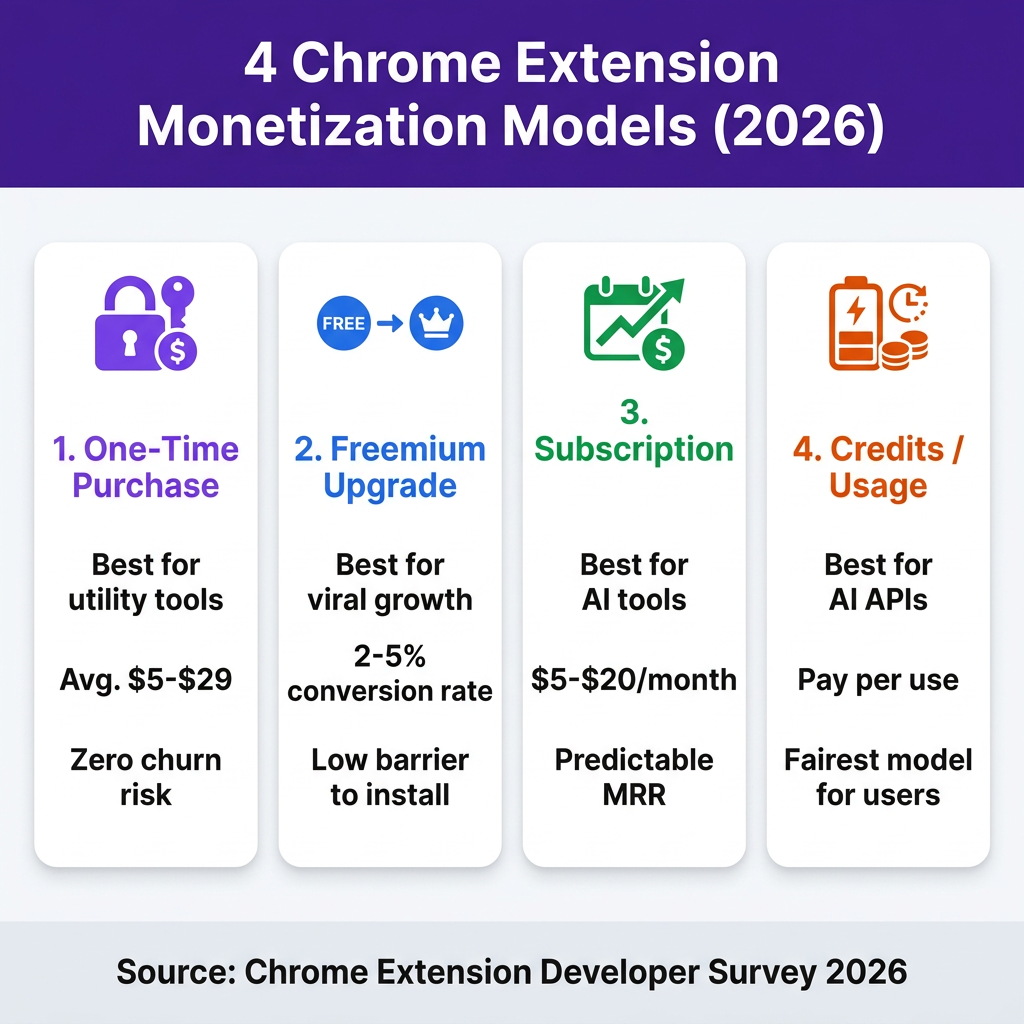
1. One-Time Purchase with License Key
A user pays once, gets a license key, unlocks the full version forever. Simple. Clean. No subscription fatigue.
This works best for:
- Utility tools that run entirely client-side (no server costs)
- Developer productivity tools ($10–$29 sweet spot)
- Extensions with narrow, specific use cases
The downside: no recurring revenue. Every month, you start from zero on new sales. But users love it — especially technical users who hate subscriptions.
Typical price range: $4.99–$29.99 one-time
2. Freemium with Paid Upgrade
Free to install, paid to unlock advanced features. This is the highest-volume model — the free tier drives installs, and a percentage of power users convert to paid.
Industry conversion rates for freemium browser extensions sit around 2–5%. That sounds low, but with 10,000 active users, that’s 200–500 paying customers. At $9.99/month, that’s $2,000–$5,000 MRR from one extension.
The key is gating the right features. Gate things that power users need constantly — not things every user needs to make the tool functional. A screenshot tool might offer unlimited basic screenshots free but require paid upgrade for video recording or cloud sync.
3. Monthly or Annual Subscription
Subscriptions make sense when your extension has ongoing costs (server-side AI processing, API calls, cloud storage) or when it provides continuously evolving value.
AI extensions almost always use this model. If your extension calls OpenAI or Anthropic on every user interaction, you’re paying per request — so you need recurring revenue to stay profitable. An AI writing assistant at $12/month with 500 paying users covers your API costs and then some.
Annual vs monthly: Offering annual billing at a 20% discount typically increases LTV by 40–60% because annual subscribers churn 3x less. Always offer both.
4. Credits and Usage-Based Billing
Users buy a pack of credits and consume them as they use the extension. No flat monthly fee — they pay for what they actually use.
This model is growing fast for AI-powered extensions. Someone using your AI assistant twice a week doesn’t want to pay $15/month. But they’ll happily buy 100 credits for $5 that last them a month.
Usage-based billing requires more infrastructure — you need to track credit consumption server-side — but it often has lower price resistance and higher trial-to-paid conversion.
The Real Problem: Tax Compliance at Scale
Here’s what kills Chrome extension businesses before they reach scale: global VAT and sales tax compliance.
The moment you start selling to customers in the EU, you owe VAT. UK customers: UK VAT. Australian customers: GST. Canadian customers: GST/HST. Each jurisdiction has different thresholds, rates, and filing requirements. Miss one, and you’re looking at back taxes plus penalties.
In the EU alone, digital services VAT rates range from 17% (Luxembourg) to 27% (Hungary). The EU’s One Stop Shop (OSS) simplifies filing, but you still need to register for it, collect the right rate per country, file quarterly, and remit payments in euros.
For a solo developer or small team, this is a part-time job.
The solution is a Merchant of Record (MoR) — a platform that legally becomes the seller of your product in every jurisdiction, handles all tax collection and remittance, and absorbs the compliance liability. You just receive your payout.
Choosing a Payment Platform: What Actually Matters
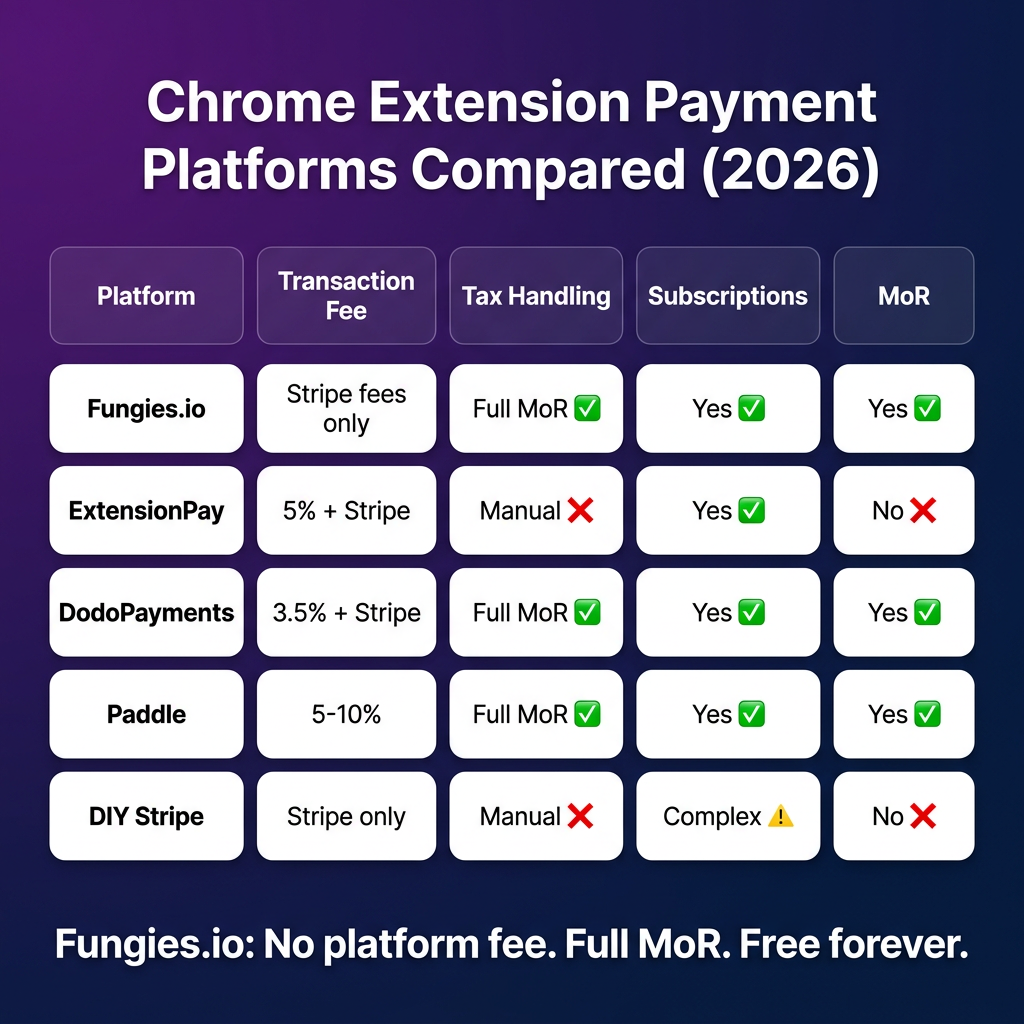
There are five main options for Chrome extension payments. Here’s the honest breakdown:
| Platform | Platform Fee | Global Tax (MoR) | Subscriptions | License Keys | Best For |
|---|---|---|---|---|---|
| Fungies.io | 0% (Stripe fees only) | ✅ Full MoR | ✅ Yes | ✅ Yes | Indie devs, all extension types |
| ExtensionPay | 5% + Stripe fees | ❌ Manual | ✅ Yes | ✅ Yes | Hobby projects, small scale |
| DodoPayments | 3.5% + Stripe | ✅ Full MoR | ✅ Yes | ✅ Yes | AI extensions, high volume |
| Paddle | 5% + $0.50/transaction | ✅ Full MoR | ✅ Yes | ✅ Yes | Established SaaS products |
| DIY Stripe | Stripe fees only | ❌ You handle it | ⚠️ Complex setup | ❌ Build it yourself | Developers with compliance team |
The 5% fee that platforms like ExtensionPay and Paddle charge adds up fast. On $5,000/month in revenue, that’s $250/month — $3,000/year — in platform fees alone, before Stripe’s 2.9% + $0.30 per transaction. Fungies.io charges zero platform fee — you only pay Stripe’s standard processing fee, which means more of every sale stays with you.
How to Set Up Chrome Extension Payments with Fungies.io (Step-by-Step)
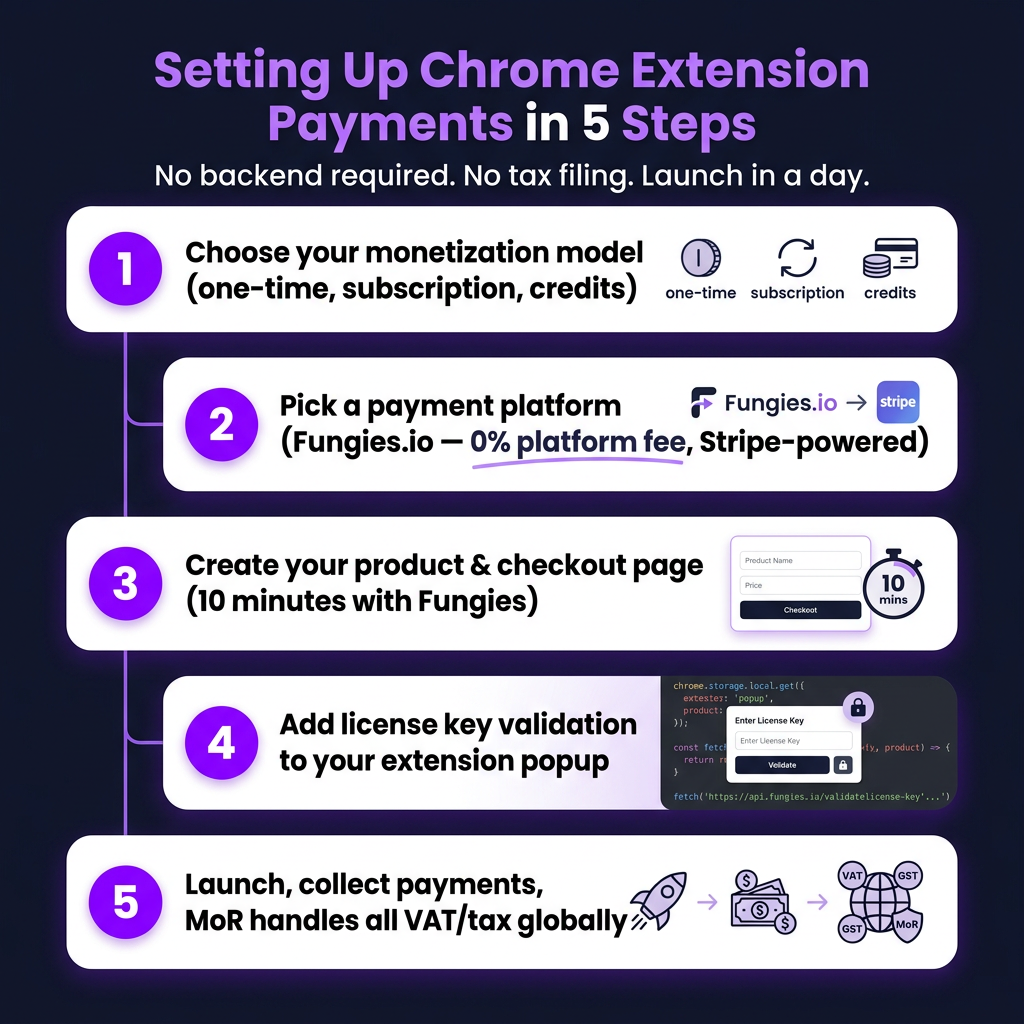
Step 1: Create Your Product in Fungies
Sign up at app.fungies.io/register — no credit card, no monthly fee. Connect your Stripe account (takes 5 minutes).
Create a new product:
- Set your price (one-time or recurring)
- Choose your pricing model (one-time purchase, monthly, annual, or all three)
- Enable license key generation if you need one-time purchase with key delivery
Step 2: Build Your Checkout Page
Fungies generates a hosted checkout page you can link to from your extension’s popup or options page. You can also embed the checkout directly in your landing page. No backend required — Fungies hosts the checkout, handles the payment flow, and sends the customer their receipt and license key.
Step 3: Add the Paywall to Your Extension
In your extension’s popup or options page, add a simple check:
// Check if user has valid license
async function checkLicense(key) {
  const response = await fetch('https://api.fungies.io/v1/licenses/verify', {
    method: 'POST',
    headers: { 'Content-Type': 'application/json' },
    body: JSON.stringify({ license_key: key })
  });
  const data = await response.json();
  return data.valid === true;
}

// On extension load
chrome.storage.local.get(['licenseKey'], async (result) => {
  if (result.licenseKey) {
    const isValid = await checkLicense(result.licenseKey);
    if (isValid) {
      enableProFeatures();
    } else {
      showUpgradePrompt();
    }
  } else {
    showUpgradePrompt();
  }
});
Step 4: Handle the Purchase Flow
When a user clicks “Upgrade” in your extension, open the Fungies checkout URL in a new tab. After payment, Fungies automatically sends the license key to the customer’s email. The user copies the key, pastes it into your extension, and they’re unlocked.
For subscriptions, the flow is the same — but instead of a license key check, you verify against a subscription status endpoint. Fungies handles renewal billing, failed payment retries, and cancellations automatically.
Step 5: Handle Tax Automatically
Because Fungies.io is a Merchant of Record, you don’t do anything here. Fungies collects the right VAT/GST for each customer’s location, remits it to the relevant tax authority, and you receive a clean payout. No quarterly filings, no EU VAT registration, no GST headaches.
Your customers see the tax included in the price or broken out as a line item (configurable). Your payout is net of tax — exactly what you earned.
Gating Features: The Right Way
Most developers gate features incorrectly. They either gate too aggressively (the free version is useless) or too loosely (there’s no reason to upgrade). Here’s the framework that works:
| Feature Type | Gate it? | Reasoning |
|---|---|---|
| Core functionality | No (free) | Users need to understand the value before paying |
| Usage limits (10/day free, unlimited paid) | Yes | Power users hit limits naturally; drives upgrade |
| Advanced features (export, sync, AI) | Yes | Clear value add, easy to justify paying for |
| Productivity multipliers (bulk actions, shortcuts) | Yes | Time-savers are worth paying for |
| Integrations (Notion, Slack, etc.) | Yes | High perceived value, low implementation cost |
The best freemium conversion trigger is hitting a natural limit. If a user screenshots 10 pages in a day, they’ll see “You’ve used 10 of your 10 free screenshots this month. Upgrade for unlimited.” That context — right when they’re actively getting value — converts at 3–5x the rate of a generic upgrade prompt.
Pricing Your Chrome Extension: What the Data Says
Based on data from Chrome extension developers in 2026, here are the pricing ranges that work:
- One-time purchase: $4.99–$19.99 for consumer tools; $19.99–$49.99 for developer/productivity tools
- Monthly subscription: $5–$15/month for most consumer extensions; $15–$49/month for AI-heavy or professional tools
- Annual subscription: Price at 8–10x monthly (offering ~20% discount vs 12x monthly)
- Credits: $5 for 50–100 AI operations; $20 for 500+ operations
One insight worth noting: $9.99/month outperforms $10/month by roughly 12% in conversion, even though it’s only a penny cheaper. Psychological pricing still works. Also, showing annual pricing prominently on your landing page (not just monthly) increases annual plan selection by 15–20%.
If you’re launching for the first time, don’t overthink it. Start at $4.99–$9.99 and raise prices after you have 100 paying customers. It’s easier to raise prices than lower them.
Key Takeaways
- Chrome extensions are a real revenue source — developers with 10K+ users regularly earn $2K–$10K/month with the right model
- Choose your model based on your cost structure: one-time for pure client-side tools, subscription for AI/server-dependent tools, freemium for viral distribution
- Don’t DIY tax compliance — use a Merchant of Record like Fungies.io that handles all VAT, GST, and sales tax globally
- Fungies.io charges 0% platform fee — you keep more of every sale vs. ExtensionPay (5%) or Paddle (5% + $0.50)
- Gate features that power users hit naturally — contextual upgrade prompts at the point of friction convert 3–5x better than generic prompts
FAQ
Do I need a business entity to charge for a Chrome extension?
You don’t need a company in most jurisdictions to accept payments via a Merchant of Record like Fungies.io. The MoR is the legal seller of record — not you. Many solo developers operate as individuals. That said, consult a local tax advisor for your specific situation, especially if you’re in the EU or US.
Can I offer both a free and paid version of the same Chrome extension?
Yes — this is the freemium model and it’s the most common approach. Use Chrome’s storage API to store a license key or subscription token, then check it on each load. Fungies.io handles the payment flow and license delivery; you handle the feature gate in your extension code.
What happens to my customers if I stop maintaining the extension?
For subscription customers, best practice is to notify them 30 days in advance and cancel recurring billing. For one-time purchase customers, the software simply continues working until Chrome updates break compatibility — no ongoing obligation. This is another reason developers often prefer one-time purchases for simple utility tools.
Does Fungies.io work with Firefox or Edge extensions too?
Yes — Fungies.io is a standard web-based checkout, not Chrome-specific. You can use the same product and checkout link for Firefox, Edge, or any browser extension. The payment flow opens in the browser, the license is delivered by email, and the verification API works the same regardless of which browser your extension runs in.
Start Charging for Your Extension Today
You’ve put real work into building something people use. The payment infrastructure shouldn’t be the thing that stops you from monetizing it.
Fungies.io is free to set up, charges no monthly fees, handles all global tax compliance as your Merchant of Record, and takes 0% platform fee. You connect your Stripe account, create your product, and you have a working checkout in under 30 minutes.
Create your free Fungies account and start charging for your extension →
References
- Can You Earn Money Making Chrome Extensions? (2026 Guide) — Right Tail
- How to Monetize a Chrome Extension in 2026 — Dodo Payments
- How to Monetize Chrome Extensions — ExtensionPay
- Monetizing Chrome Extensions with Freemium — Real Numbers — dev.to
- How to Monetize Your Chrome Extension in 2025 (5 Proven Models) — Extension Radar