In mid-2026, running large language models locally has shifted from a weekend project for AI enthusiasts to a legitimate production strategy. With Ollama crossing 174,000 GitHub stars, NVIDIA’s RTX 5090 delivering 213 tokens per second on 8B models, and open-weight models now matching GPT-4-class performance, the tooling ecosystem has matured dramatically.
But here’s the problem: most guides treat “local LLM tools” as a single category. They’re not. A solo developer experimenting with Llama 4 on a laptop needs something completely different from an engineering team serving 10,000 requests per hour.
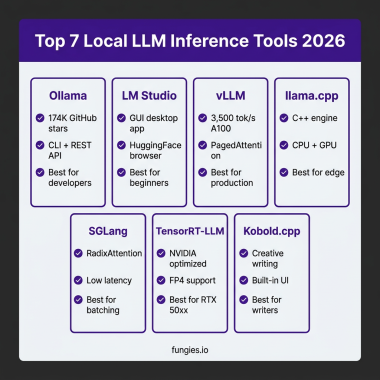
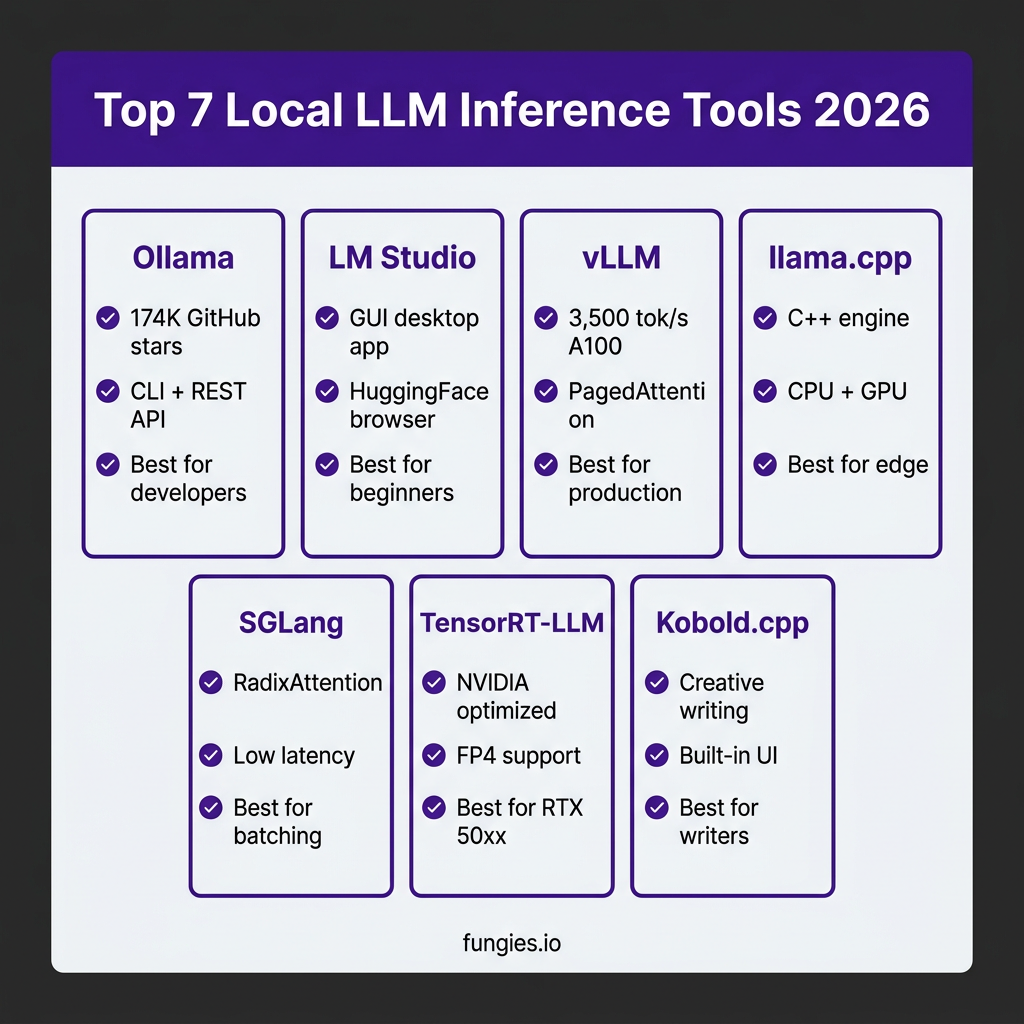
This guide breaks down the 7 best local LLM inference tools in 2026 — ranked by use case, not popularity. You’ll get real benchmark numbers, VRAM requirements, and specific recommendations for your hardware and workload.
Why Local LLM Inference Matters in 2026
Three factors have converged to make local inference genuinely viable:
- Hardware: The RTX 5090’s 32GB GDDR7 and 1,792 GB/s bandwidth handles 70B models at Q4 quantization. Apple’s M5 Max with 192GB unified memory runs Llama 3.3 70B at full precision.
- Models: Open-weight models like Qwen 3.6, DeepSeek V4, and Llama 4 now compete with proprietary APIs on benchmarks while running on consumer hardware.
- Software: Tools like Ollama and vLLM have stabilized after years of rapid iteration. They’re production-ready, not experimental.
The cost math has also shifted. At 10 million tokens per month, a local RTX 5090 setup breaks even against GPT-5.5 in under 6 months — and that’s before counting the privacy benefits and zero rate limits.
The 7 Best Local LLM Inference Tools Ranked
1. Ollama — Best for Developers and Automation
Ollama is the default choice for developers who want a command-line interface and REST API without complexity. It wraps llama.cpp in a clean binary that handles model downloads, quantization, and serving automatically.
Key Features:
- One-command model installation:
ollama run llama4 - REST API at
localhost:11434(OpenAI-compatible) - Modelfile system for custom configurations
- Cross-platform: macOS, Linux, Windows
- Built-in GPU acceleration via CUDA/Metal
Performance: 30-50 tok/s on RTX 4090 (8B model, Q4)
Best For: Developers building AI-powered applications, automation scripts, and API integrations.
2. LM Studio — Best GUI for Non-Technical Users
LM Studio offers the most polished graphical interface for running local LLMs. It bundles a model browser, chat interface, and inference settings into a single desktop application — no terminal required.
Key Features:
- Visual model browser with HuggingFace integration
- ChatGPT-style chat interface with conversation history
- GPU layer sliders for memory control
- Local server mode on
localhost:1234 - Automatic quantization selection
Performance: Identical to Ollama (same llama.cpp backend)
Best For: Users who prefer GUIs, writers, researchers, and anyone avoiding the command line.
3. vLLM — Best for Production Serving
vLLM is a production-grade inference engine designed for high-throughput serving. Its PagedAttention algorithm maximizes GPU utilization, making it the choice for teams running multi-user applications.
Key Features:
- PagedAttention for 3-5x throughput vs standard inference
- Continuous batching of incoming requests
- OpenAI-compatible API server
- Tensor parallelism for multi-GPU setups
- Support for 100+ model architectures
Performance: 3,500 tok/s on A100 80GB (Llama 3.1 70B, batch processing)
Best For: Production APIs, multi-user chatbots, and high-throughput applications.
4. llama.cpp — Best for Custom Implementations
llama.cpp is the C++ inference engine that powers Ollama, LM Studio, and dozens of other tools. Use it directly when you need maximum control, minimal dependencies, or deployment to edge devices.
Key Features:
- Native GGUF format support
- CPU inference (no GPU required)
- Quantization from Q2 to Q8
- Single binary, no dependencies
- Bindings for Python, Go, Rust, and more
Performance: 5-10 tok/s on CPU (8B model), 40-60 tok/s on RTX 4090
Best For: Embedded systems, custom integrations, and maximum portability.
5. SGLang — Best for Low-Latency Batching
SGLang is an inference engine optimized for structured generation and high-concurrency workloads. Its RadixAttention provides efficient prefix caching that reduces time-to-first-token for repeated prompts.
Key Features:
- RadixAttention for prefix caching
- Structured generation (JSON, regex)
- Multi-modal support (text + images)
- Competitive throughput with vLLM
- Native FP4/FP8 on Blackwell GPUs
Performance: Comparable to vLLM on H100 benchmarks
Best For: Applications requiring structured outputs and low-latency batch processing.
6. TensorRT-LLM — Best for NVIDIA Ecosystems
TensorRT-LLM is NVIDIA’s optimized inference engine. It extracts maximum performance from NVIDIA GPUs through kernel fusion, custom attention implementations, and native FP4 support on Blackwell architecture.
Key Features:
- NVIDIA-optimized kernels
- FP4/FP8 quantization on RTX 50-series
- In-flight batching
- Integration with Triton Inference Server
- Multi-GPU tensor parallelism
Performance: Up to 2x faster than vLLM on NVIDIA hardware for supported models
Best For: Teams fully committed to NVIDIA infrastructure requiring maximum performance.
7. Kobold.cpp — Best for Creative Writing
Kobold.cpp is a fork of llama.cpp focused on creative writing and roleplay. It includes a built-in web UI optimized for story generation, with features like memory management, world info, and adventure mode.
Key Features:
- Built-in web UI (no separate frontend needed)
- Memory and context management for long stories
- Adventure mode for interactive fiction
- Compatible with most GGUF models
- Low resource requirements
Best For: Writers, roleplay enthusiasts, and interactive fiction creators.
Performance Comparison: Real Benchmarks
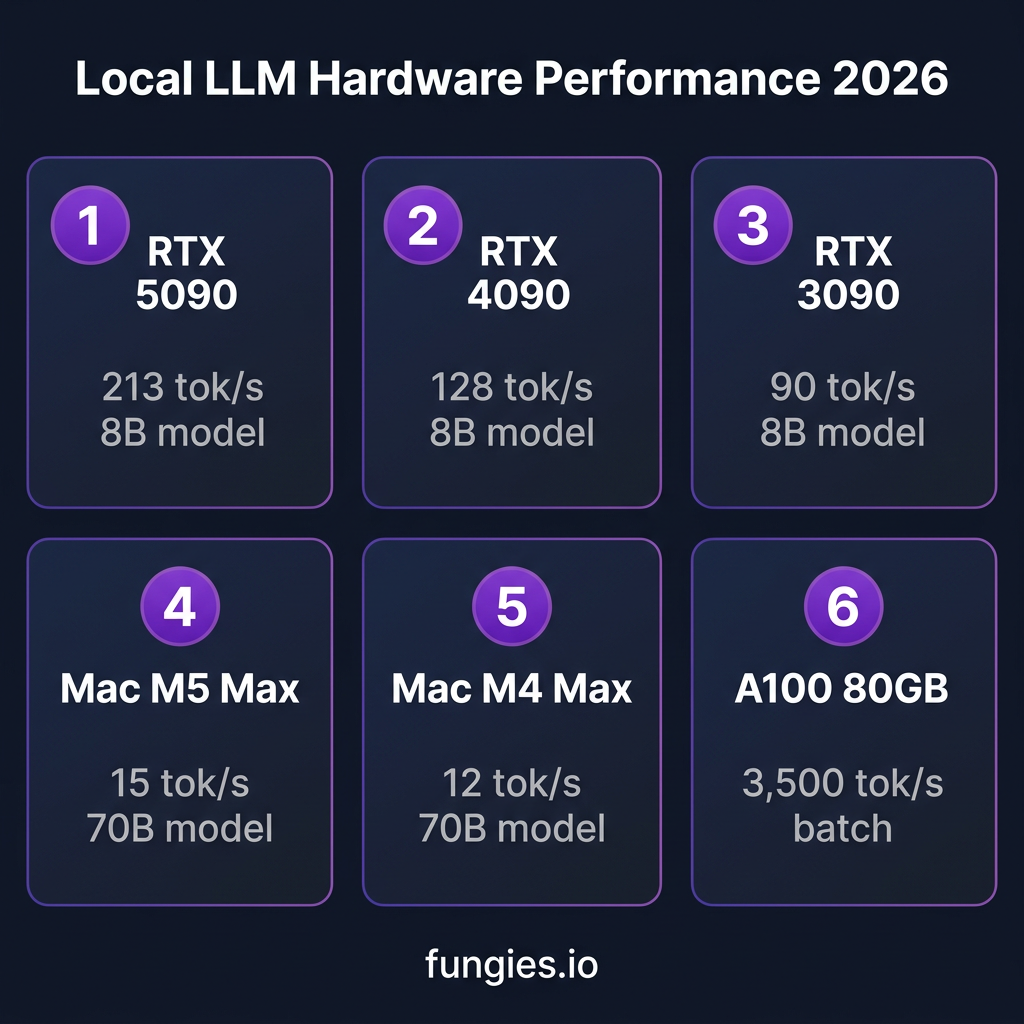
Here are actual throughput numbers measured on common hardware configurations:
| Hardware | Tool | Model (Q4) | Tokens/sec |
|---|---|---|---|
| RTX 5090 (32GB) | vLLM | Llama 3.1 8B | 213 |
| RTX 4090 (24GB) | Ollama | Llama 3.1 8B | 128 |
| RTX 3090 (24GB) | llama.cpp | Llama 3.1 8B | 90 |
| Mac M5 Max (64GB) | MLX | Llama 3.3 70B | 12-15 |
| Mac M4 Max (64GB) | MLX | Llama 3.3 70B | 8-12 |
| A100 80GB | vLLM | Llama 3.1 70B | 3,500* |
VRAM Requirements by Model Size
VRAM (or unified memory on Apple Silicon) is the single constraint that determines what you can run. Here’s the math for Q4_K_M quantization — the sweet spot for quality vs. size:
| Model Size | VRAM Required | Example Models |
|---|---|---|
| 7B | 4-5 GB | Llama 4 Scout, Qwen 3.5 7B |
| 14B | 8-10 GB | Qwen 3.5 14B, Mistral Small 3 |
| 32B | 16-20 GB | Qwen 3.6 32B, DeepSeek V3 |
| 70B | 35-40 GB | Llama 3.3 70B, Mixtral 8x22B |
| 405B | 220+ GB | Llama 3.1 405B (requires multi-GPU) |
Local vs. Cloud: The Cost Breakdown
When does local inference make financial sense? Here’s the 12-month total cost of ownership:
| Usage Tier | Cloud (GPT-5.5) | Local (RTX 5090) | Break-even |
|---|---|---|---|
| Light (100K tokens/mo) | $420/year | $2,199 (hardware) | Never |
| Medium (1M tokens/mo) | $4,200/year | $2,300 (hardware + electricity) | 6 months |
| Heavy (10M tokens/mo) | $42,000/year | $2,500/year | 3 weeks |
The math is clear: light users should stick with APIs. But if you’re processing millions of tokens monthly, local inference pays for itself quickly.
How to Choose the Right Tool
Use this decision framework:
- Single user, learning/experimenting: LM Studio (GUI) or Ollama (CLI)
- Building an application: Ollama for prototyping, vLLM for production
- High-throughput API: vLLM or SGLang
- NVIDIA-only environment: TensorRT-LLM for maximum performance
- Edge/embedded deployment: llama.cpp
- Creative writing: Kobold.cpp
Key Takeaways
- Ollama and LM Studio share the same llama.cpp backend — choose based on whether you prefer CLI or GUI
- vLLM is the production standard for multi-user serving, with 3-5x throughput gains from PagedAttention
- The RTX 5090’s 32GB VRAM handles 70B models at Q4, making it the sweet spot for serious local inference
- Apple Silicon’s unified memory lets Macs run models that exceed any single consumer GPU’s VRAM
- At 10M+ tokens/month, local inference saves 80%+ compared to cloud APIs
FAQ
What’s the difference between Ollama and LM Studio?
Both use llama.cpp under the hood, so performance is identical. Ollama is CLI-first with better automation support. LM Studio is GUI-first with a built-in chat interface. Many developers run Ollama as a background service and use LM Studio for exploration.
Can I run local LLMs without a GPU?
Yes. llama.cpp runs on CPU-only systems, though performance drops significantly (5-10 tok/s for 8B models vs. 100+ on GPU). Apple Silicon Macs use the Neural Engine and unified memory for competitive performance without a discrete GPU.
What’s the best GPU for local LLMs in 2026?
The RTX 5090 (32GB, $1,999) is the current sweet spot for most users. It handles 70B models at Q4 quantization and delivers 213 tok/s on smaller models. For budget builds, a used RTX 3090 (24GB, ~$600) remains excellent value.
Is vLLM worth the complexity over Ollama?
For single-user experimentation, no — Ollama is simpler. For production serving with multiple concurrent users, absolutely. vLLM’s PagedAttention provides 3-5x throughput improvements that matter at scale.
Can I use these tools for commercial applications?
Yes. Ollama, vLLM, llama.cpp, and SGLang are all open-source with permissive licenses (MIT or Apache 2.0). Check individual model licenses (Llama, Qwen, etc.) for commercial use terms.
Conclusion
The local LLM tooling ecosystem has matured significantly in 2026. Whether you’re a developer building AI-powered applications, a researcher running experiments, or a business processing millions of tokens monthly, there’s a tool that fits your needs.
Start with Ollama or LM Studio for exploration. Move to vLLM when you’re ready to serve users at scale. And if you’re building a product that processes payments, check out Fungies.io — we handle the complexity of global payments, taxes, and compliance so you can focus on your AI features.
References
- Ollama GitHub: https://github.com/ollama/ollama
- LM Studio: https://lmstudio.ai
- vLLM Documentation: https://docs.vllm.ai
- llama.cpp: https://github.com/ggerganov/llama.cpp
- SGLang: https://sglang.ai
- NVIDIA TensorRT-LLM: https://developer.nvidia.com/tensorrt
- Kobold.cpp: https://github.com/LostRuins/koboldcpp
- SitePoint Local LLM Guide 2026: https://www.sitepoint.com/local-llms-are-getting-easier-the-complete-guide-2026
- DeployBase Inference Engine Comparison: https://deploybase.ai/articles/best-llm-inference-engine
- BIZON GPU Guide: https://bizon-tech.com/blog/best-gpu-llm-training-inference