92% of US developers now use AI coding tools daily. That’s not a projection—it’s the reality of software development in 2026. The way we write code has fundamentally changed, and “vibe coding” has emerged as the dominant paradigm for developers who want to ship faster without sacrificing quality.
But here’s the catch: with 41% of global code now AI-generated, we’re facing a paradox. Research shows that 45% of AI-generated code samples contain OWASP Top-10 vulnerabilities, and 63% of developers spend more time debugging AI-generated code than writing original code. The tools you choose matter more than ever.
The vibe coding tools market hit $100M in record time, and competition is fierce. I’ve analyzed the top 10 tools based on real performance data, pricing, and developer feedback to help you make the right choice for your workflow.
What Is Vibe Coding? (And Why It Matters in 2026)
Vibe coding is the practice of using AI-powered tools to generate, refactor, and manage code through natural language prompts and conversational interfaces. Unlike traditional autocomplete tools that suggest the next line, vibe coding tools understand context across entire codebases, can make multi-file changes, and even handle complex refactoring tasks.
The term gained traction as developers realized these tools weren’t just faster—they changed the experience of coding. You describe what you want. The tool builds it. You review, refine, and ship. The “vibe” is the flow state where you’re solving problems at a higher level of abstraction while the AI handles implementation details.
Why it matters now:
- Speed to market: MVPs that took months now ship in weeks
- Lower barrier to entry: Junior developers contribute meaningfully faster
- Focus on architecture: Spend mental energy on design, not syntax
- Competitive pressure: Teams not using AI tools are falling behind
The Vibe Coding Paradox: Productivity vs. Quality
Here’s the uncomfortable truth: AI coding tools make you write code faster, but they don’t automatically make you write better code. The data is clear—developers are shipping more, but they’re also debugging more.
The paradox breaks down into three challenges:
1. The Comprehension Gap
When AI generates 500 lines of code in seconds, do you understand what it did? Many developers are finding themselves maintaining codebases they don’t fully grasp. The tool that saves you time today can cost you hours of debugging tomorrow.
2. The Security Blind Spot
That 45% vulnerability statistic should terrify anyone shipping production code. AI models trained on public code inherit its bugs. Without proper review processes, you’re potentially introducing SQL injection, XSS, and authentication flaws at scale.
3. The Technical Debt Accelerator
AI tools are excellent at generating code that works. They’re less excellent at generating code that scales. The same pressure to ship fast can lead to architectural decisions that haunt you months later.
The solution isn’t avoiding AI tools—it’s choosing the right ones and using them wisely. Let’s look at the top 10 options ranked by real-world performance.
The 10 Best Vibe Coding Tools in 2026: Ranked
1. Cursor — The Professional’s Choice
Pricing: $20/mo Pro, $40/user/mo Business, $80/user/mo Enterprise
Best for: Professional developers, complex structural work
Cursor has become the gold standard for AI-assisted development. Built on VS Code, it offers the most mature IDE integration in the market. The standout feature is Composer, which enables multi-file edits across your entire codebase with natural language commands.
Key Features:
- Composer for multi-file refactoring
- Deep codebase understanding (50+ languages)
- Native VS Code extension ecosystem
- Git integration with AI-generated commit messages
- Context-aware suggestions based on your entire project
Pros: Most mature IDE integration, excellent for large codebases, familiar VS Code interface, strong community support.
Cons: Expensive at scale (Enterprise tier adds up fast), token limits on lower tiers can be frustrating for heavy users.
Verdict: If you’re a professional developer working on complex projects and budget isn’t your primary constraint, Cursor is the tool to beat.
2. Claude Code — The Fastest Growing Challenger
Pricing: $20/mo Pro, $100-200/mo Max plans
Best for: Terminal-native developers, agentic workflows
Claude Code went from launch to the #1 spot on developer preference surveys in just 8 months. That’s unprecedented growth, and it’s driven by one thing: Claude’s reasoning capabilities are genuinely best-in-class.
Unlike IDE-based tools, Claude Code lives in your terminal. It understands your entire codebase, can run tests, manage git workflows, and even handle deployment scripts—all through conversation.
Key Features:
- Terminal-native interface
- Complete codebase understanding
- Git workflow automation
- Test running and debugging assistance
- Agentic task completion (it can iterate on its own)
Pros: Fastest-growing tool for good reason, exceptional reasoning capabilities, works with any editor, powerful for automation.
Cons: Terminal-only (no IDE integration), requires internet connection, Max plans get expensive for heavy usage.
Verdict: If you’re comfortable in the terminal and want the most capable AI reasoning engine available, Claude Code is your pick.
3. Windsurf — The Budget-Friendly Powerhouse
Pricing: Free tier (25 credits), $15/mo Pro, $30/user/mo Teams
Best for: Front-end developers, mid-sized projects
Windsurf (formerly Codeium) has quietly built one of the most capable AI coding platforms at a fraction of the cost. The Cascade flow system allows for agent-based workflows that can handle complex multi-step tasks.
At $15/mo for Pro, it’s the most affordable full-featured option on this list. The free tier is genuinely usable for light projects, making it ideal for developers testing the waters.
Key Features:
- Cascade flow for agent-based workflows
- Strong web development support
- Codeium integration for autocomplete
- Real-time collaboration features
- Generous free tier
Pros: Most affordable pricing, good for web projects, usable free tier, improving rapidly.
Cons: Newer tool with smaller ecosystem, less mature than Cursor or Copilot, documentation still catching up.
Verdict: Best value for money. If you’re budget-conscious but want serious AI coding capabilities, start here.
4. GitHub Copilot — The Safe Choice
Pricing: $10/mo Individual, $19/user/mo Business, $39/user/mo Enterprise
Best for: Teams already on GitHub, mainstream adoption
GitHub Copilot has the widest adoption of any AI coding tool, and for good reason—it works everywhere, integrates seamlessly with GitHub, and has the backing of Microsoft’s resources. It’s the “nobody gets fired for buying IBM” of AI coding.
The 2026 version has evolved beyond simple autocomplete. Copilot Chat provides conversational assistance, and PR summaries help with code review. But it remains less “agentic” than Cursor or Claude Code—it suggests, you decide.
Key Features:
- Broad IDE integration (VS Code, JetBrains, Vim, etc.)
- GitHub-native workflows
- Copilot Chat for conversational coding
- PR summaries and code review assistance
- Enterprise security and compliance features
Pros: Widest adoption, mature product, works with any GitHub workflow, strong enterprise features.
Cons: Less agentic than competitors, can be passive (waits for you rather than taking initiative), context understanding not as deep as Cursor.
Verdict: If your team is already on GitHub and you want a proven, low-risk solution, Copilot is the safe bet.
5. Bolt.new — The Prototyping Speed Demon
Pricing: Free tier, paid plans available
Best for: Rapid prototyping, quick MVPs
Bolt.new is built for one thing: getting from idea to working prototype as fast as possible. Describe what you want, and it generates full-stack applications with deployment included. No setup, no configuration—just working code.
For hackathons, client demos, or validating ideas, nothing is faster. The trade-off is control—you get speed at the expense of fine-grained customization.
Key Features:
- Full-stack generation from natural language
- Instant deployment
- Database and backend included
- Template library for common patterns
- One-click hosting
Pros: Fastest to working prototype, no setup required, great for demos and MVPs.
Cons: Token-based pricing can get expensive for heavy use, less control than traditional development, not suitable for complex applications.
Verdict: If you need to ship a demo by tomorrow, use Bolt.new. Just don’t expect to build your entire product on it.
6. Lovable — The Non-Developer’s Dream
Pricing: Varies by usage
Best for: Non-developers, landing pages, demos
Lovable bridges the gap between no-code tools and traditional development. You describe what you want in conversation, and it builds full-stack apps with clean, editable code. Unlike many “AI app builders,” the code is actually good—and it’s yours.
The GitHub sync and Stripe integration make it surprisingly viable for real products, not just prototypes.
Key Features:
- Full-stack apps from conversation
- GitHub sync for code ownership
- Stripe integration for payments
- Editable code on all plans
- Component library
Pros: Best for non-technical users, you own the code, good integrations, clean output.
Cons: Limited for complex applications, pricing can be opaque, not designed for professional developers.
Verdict: If you’re a founder without a technical co-founder, Lovable gets you further than any other tool.
7. Replit — The All-in-One Learning Platform
Pricing: Free tier, $7/mo Core, $20/mo Teams
Best for: Education, beginners, all-in-one development
Replit has evolved from a browser-based IDE to a complete development environment with AI assistance. The key differentiator is that everything happens in the browser—coding, deployment, hosting, databases. Nothing to install, nothing to configure.
For beginners and educators, this is a game-changer. The AI features guide learning rather than replacing it.
Key Features:
- Browser-based IDE
- Built-in deployment and hosting
- Integrated databases
- AI-assisted learning mode
- Collaborative coding
Pros: Complete environment in browser, great for learning, affordable pricing, strong educational features.
Cons: Less powerful than desktop IDEs, requires internet connection, can feel limiting for advanced users.
Verdict: If you’re learning to code or teaching others, Replit is the best environment available.
8. v0 by Vercel — The Frontend Specialist
Pricing: Free tier, Pro with Vercel subscription
Best for: UI/UX focused developers, React/Next.js projects
v0 generates React components and interfaces from text descriptions. It’s deeply integrated with Vercel’s hosting platform, making the path from component to deployed site seamless.
For frontend developers working in the React ecosystem, v0 is the fastest way to go from idea to component.
Key Features:
- UI component generation from prompts
- React/Next.js optimized
- Vercel deployment integration
- Component library export
- Tailwind CSS integration
Pros: Excellent for frontend work, seamless Vercel hosting, clean React code output.
Cons: Limited to frontend/UI, requires Vercel ecosystem, not suitable for backend development.
Verdict: If you’re a frontend developer using React, v0 should be in your toolkit.
9. Augment Code — The Enterprise Beast
Pricing: $60/dev with full platform
Best for: Enterprise teams, large codebases (400K+ files)
Augment Code is built for a specific use case: massive enterprise codebases. Its Context Engine can index and understand millions of lines of code across hundreds of thousands of files. Multi-agent orchestration allows complex refactoring tasks to be distributed across AI workers.
This is overkill for small teams, but for enterprises dealing with legacy monoliths, it’s transformative.
Key Features:
- Context Engine for massive codebases
- Multi-agent orchestration
- Enterprise security and compliance
- Codebase indexing at scale
- Legacy code refactoring
Pros: Handles massive codebases, enterprise security, powerful for legacy modernization.
Cons: Expensive, overkill for small teams, complex setup and configuration.
Verdict: If you’re working with enterprise-scale codebases, Augment Code is worth the investment.
10. Amazon Q Developer — The AWS Native
Pricing: Free tier, $19/mo Professional
Best for: AWS-centric developers, cloud infrastructure
Amazon Q Developer is deeply integrated with AWS services. It can generate CloudFormation templates, help with IAM policies, optimize Lambda functions, and scan for security issues specific to AWS architectures.
If your stack is AWS-heavy, the integration benefits outweigh the more general capabilities of other tools.
Key Features:
- Deep AWS service integration
- Infrastructure as code generation
- Security scanning for AWS
- Lambda optimization
- CloudFormation assistance
Pros: Deep AWS integration, good for cloud projects, security scanning, affordable pricing.
Cons: Limited outside AWS ecosystem, less capable for non-cloud development, newer product.
Verdict: If you live in AWS, Q Developer is a no-brainer. Otherwise, look elsewhere.
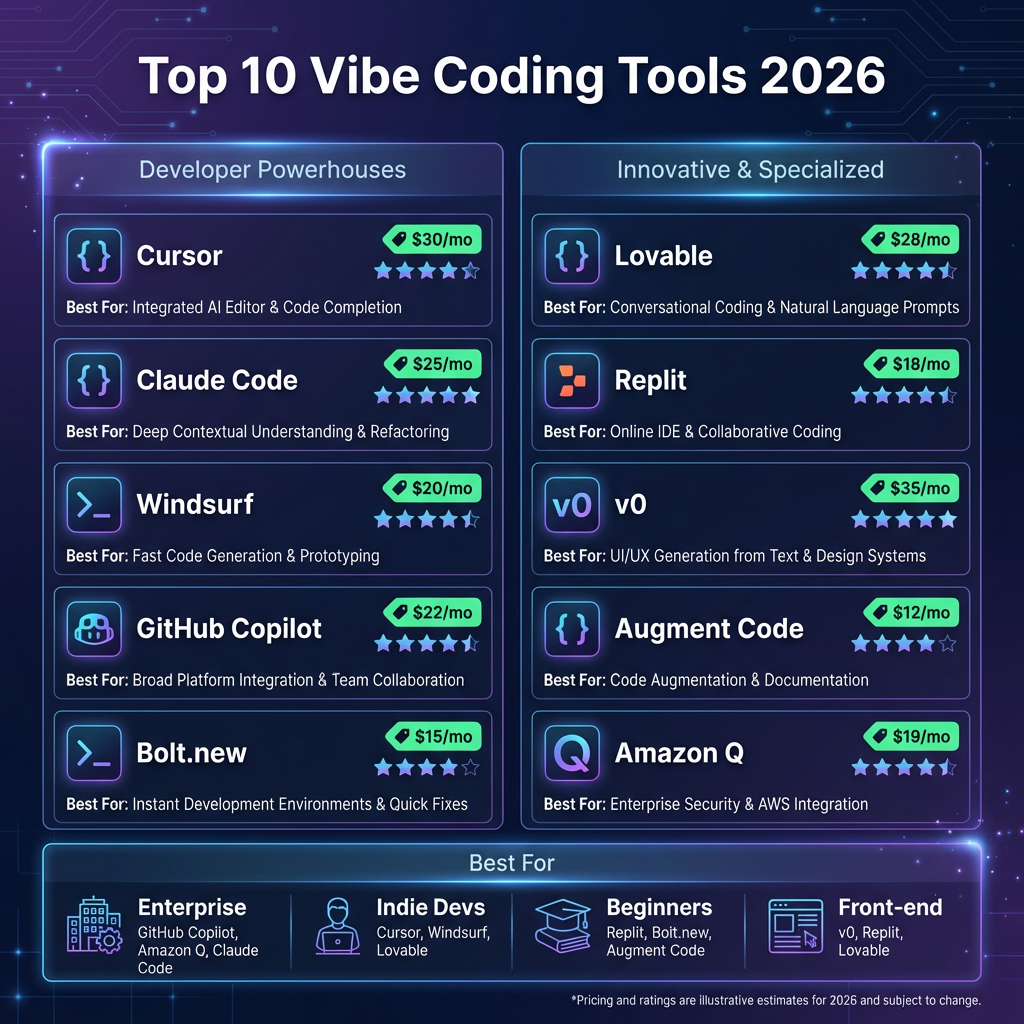
Comparison Table: All 10 Tools at a Glance
| Tool | Best For | Starting Price | AI Model | Key Feature | Free Tier |
|---|---|---|---|---|---|
| Cursor | Professional devs | $20/mo | Claude/GPT-4 | Composer multi-file | Limited trial |
| Claude Code | Terminal users | $20/mo | Claude 3.5 | Agentic workflows | No |
| Windsurf | Budget-conscious | $15/mo | Codeium | Cascade flow | 25 credits |
| GitHub Copilot | GitHub teams | $10/mo | GPT-4/Codex | IDE integration | 30-day trial |
| Bolt.new | Prototyping | Free | Claude/GPT-4 | Full-stack gen | Yes |
| Lovable | Non-developers | Usage-based | Claude/GPT-4 | Conversational UI | Limited |
| Replit | Learning | $7/mo | Replit AI | All-in-one env | Yes |
| v0 by Vercel | Frontend/React | Free | Claude/GPT-4 | UI generation | Yes |
| Augment Code | Enterprise | $60/dev | Proprietary | Context Engine | No |
| Amazon Q | AWS projects | Free/$19 | Amazon Titan | AWS integration | Yes |
How to Choose the Right Vibe Coding Tool
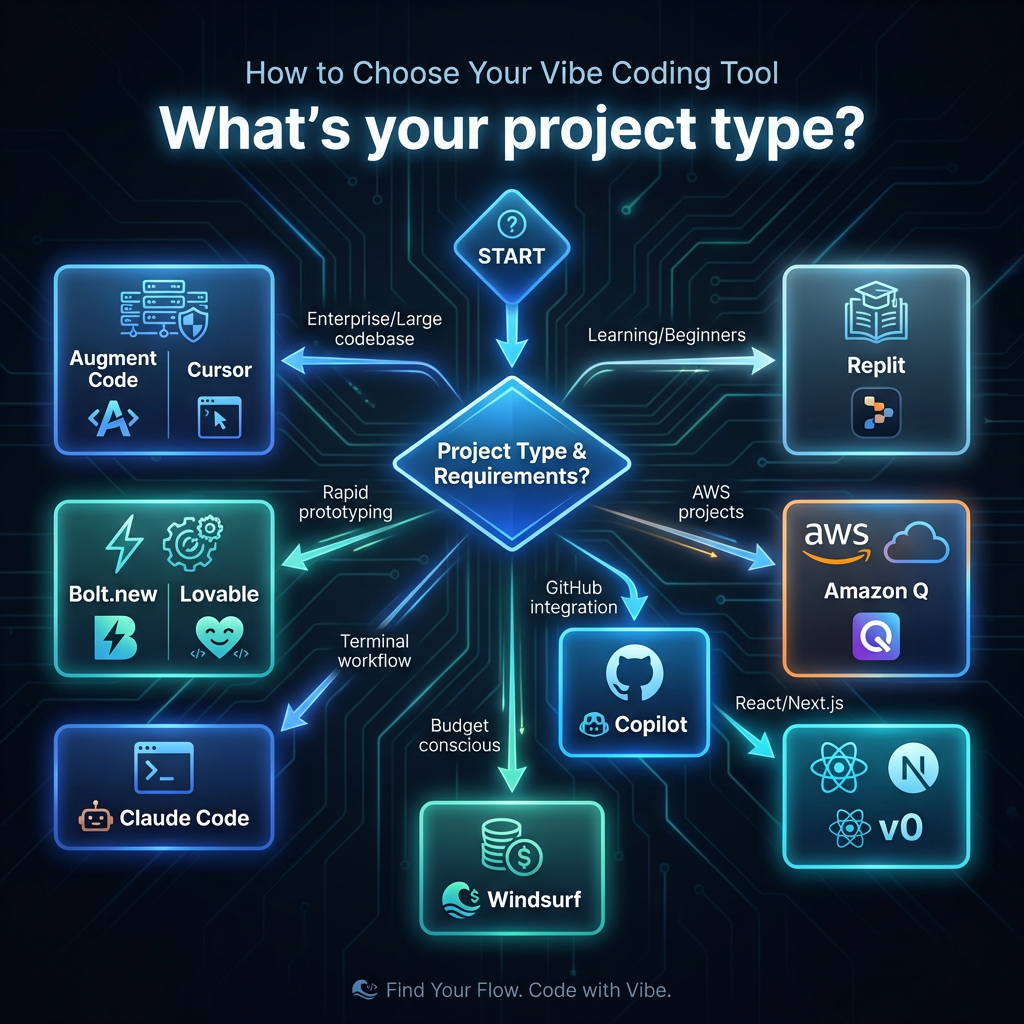
With 10 solid options, how do you decide? Here’s a decision framework based on your specific situation:
Step 1: Define Your Primary Use Case
- Professional development on complex projects: Cursor or Claude Code
- Rapid prototyping/MVPs: Bolt.new or Lovable
- Learning/teaching: Replit
- Enterprise/legacy codebases: Augment Code
- Frontend/React work: v0 by Vercel
- AWS infrastructure: Amazon Q Developer
Step 2: Consider Your Budget Constraints
- Free/low budget: Bolt.new, v0, Replit Core, Windsurf free tier
- Individual pro ($10-20/mo): Copilot, Windsurf Pro, Claude Code
- Team budget ($30-40/user/mo): Cursor Business, Copilot Business
- Enterprise budget: Augment Code, Cursor Enterprise
Step 3: Evaluate Your Technical Requirements
- IDE integration critical: Cursor, Copilot, Windsurf
- Terminal-native workflow: Claude Code
- Browser-only environment: Replit, Bolt.new, Lovable
- Specific framework needs: v0 (React), Amazon Q (AWS)
Step 4: Assess Security and Compliance Needs
- Enterprise security requirements: Augment Code, Cursor Enterprise, Copilot Enterprise
- Code privacy concerns: Check each tool’s data handling policies
- Air-gapped environments: Limited options—most require internet
Key Takeaways
- Cursor leads for professional developers with the most mature IDE integration and powerful multi-file editing capabilities.
- Claude Code is the fastest-growing alternative for terminal-native developers who prioritize reasoning capabilities.
- Windsurf offers the best value at $15/mo with a genuinely usable free tier.
- GitHub Copilot remains the safe enterprise choice with broad adoption and proven reliability.
- Specialized tools win for specific use cases: Bolt.new for prototyping, v0 for React, Augment for enterprise scale, Amazon Q for AWS.
- The vibe coding paradox is real: faster development can mean more debugging. Choose tools that help you understand the code they generate.
Frequently Asked Questions
What exactly is vibe coding?
Vibe coding is an AI-assisted development approach where you describe what you want in natural language, and AI tools generate, refactor, and manage the implementation. It shifts focus from syntax to problem-solving, allowing developers to work at a higher level of abstraction.
Are AI coding tools secure for production code?
AI coding tools require the same security practices as any code source. The 45% vulnerability statistic highlights the importance of code review, static analysis, and security testing. Never deploy AI-generated code without review, and use tools with enterprise security features for sensitive projects.
Will AI coding tools replace developers?
No. Current data shows developers using AI tools are more productive, not obsolete. The role shifts from writing every line to directing, reviewing, and architecting. The 63% statistic about debugging AI code actually shows developers remain essential—someone needs to understand and fix what the AI creates.
Which vibe coding tool is best for beginners?
Replit is the best choice for beginners due to its educational features and all-in-one browser environment. For non-technical founders looking to build without coding knowledge, Lovable provides the most accessible path to working applications.
How much should I budget for AI coding tools?
For individual developers, expect $15-20/month for a quality tool. Teams should budget $30-40 per user monthly. Enterprise deployments with advanced security and compliance features can run $60-80 per developer. Many tools offer free tiers for evaluation.
Conclusion
The vibe coding revolution isn’t coming—it’s here. With 92% of developers using AI tools daily, the question isn’t whether to adopt these tools, but which ones fit your workflow.
Cursor and Claude Code lead the pack for professional developers, while specialized tools like Bolt.new, v0, and Augment Code dominate their niches. The key is matching the tool to your specific needs rather than chasing the most popular option.
Remember the vibe coding paradox: speed without understanding creates technical debt. The best developers in 2026 aren’t those who generate the most code—they’re the ones who direct AI tools effectively while maintaining deep understanding of what gets built.
Ready to build your next project with the right tools? Whether you’re shipping a SaaS product, an indie game, or the next big app, choosing the right vibe coding tool is your first step toward faster, smarter development.
Looking for a Merchant of Record to handle payments, taxes, and compliance for your SaaS or game? Fungies.io provides a no-code checkout solution that lets you focus on building while we handle the complexity of global payments.
References
- Stack Overflow Developer Survey 2026 – AI Tool Adoption Statistics
- GitHub Copilot Usage Report 2026
- OWASP AI Security Guidelines 2026
- Cursor IDE Documentation and Pricing
- Anthropic Claude Code Official Documentation
- Windsurf (Codeium) Product Documentation
- Vercel v0 Documentation
- Amazon Q Developer Official Guide
- Augment Code Enterprise Documentation
- Replit AI Features Guide