Spreadsheets are one of the most underrated digital products you can sell online. While everyone talks about selling courses, ebooks, and Notion templates, savvy creators are quietly building profitable businesses selling Excel and Google Sheets templates—with profit margins exceeding 90%.
In 2026, the demand for spreadsheet templates has exploded. Businesses need inventory trackers. Freelancers want budget planners. Couples are searching for wedding budget spreadsheets. The market is massive, the competition is lower than other digital products, and you probably already have the skills to get started.
Why Spreadsheets Are a Goldmine for Digital Sellers
Before diving into how to sell spreadsheets, let’s talk about why this opportunity is so compelling. Unlike physical products, spreadsheets have zero inventory costs, no shipping headaches, and unlimited scalability. Create a template once, and you can sell it thousands of times without any additional production costs.
The profit margins are exceptional. When you sell a $25 spreadsheet template on Etsy, you might pay $1.50 in fees and keep $23.50. That’s a 94% profit margin. Compare that to selling a physical product where margins often hover around 30-40% after manufacturing, shipping, and storage costs.
Another advantage is the evergreen nature of spreadsheet templates. A well-designed budget tracker or business finance template can sell consistently for years with minimal updates. People always need to track expenses, manage projects, and organize their lives.
The 5 Most Profitable Spreadsheet Templates to Sell
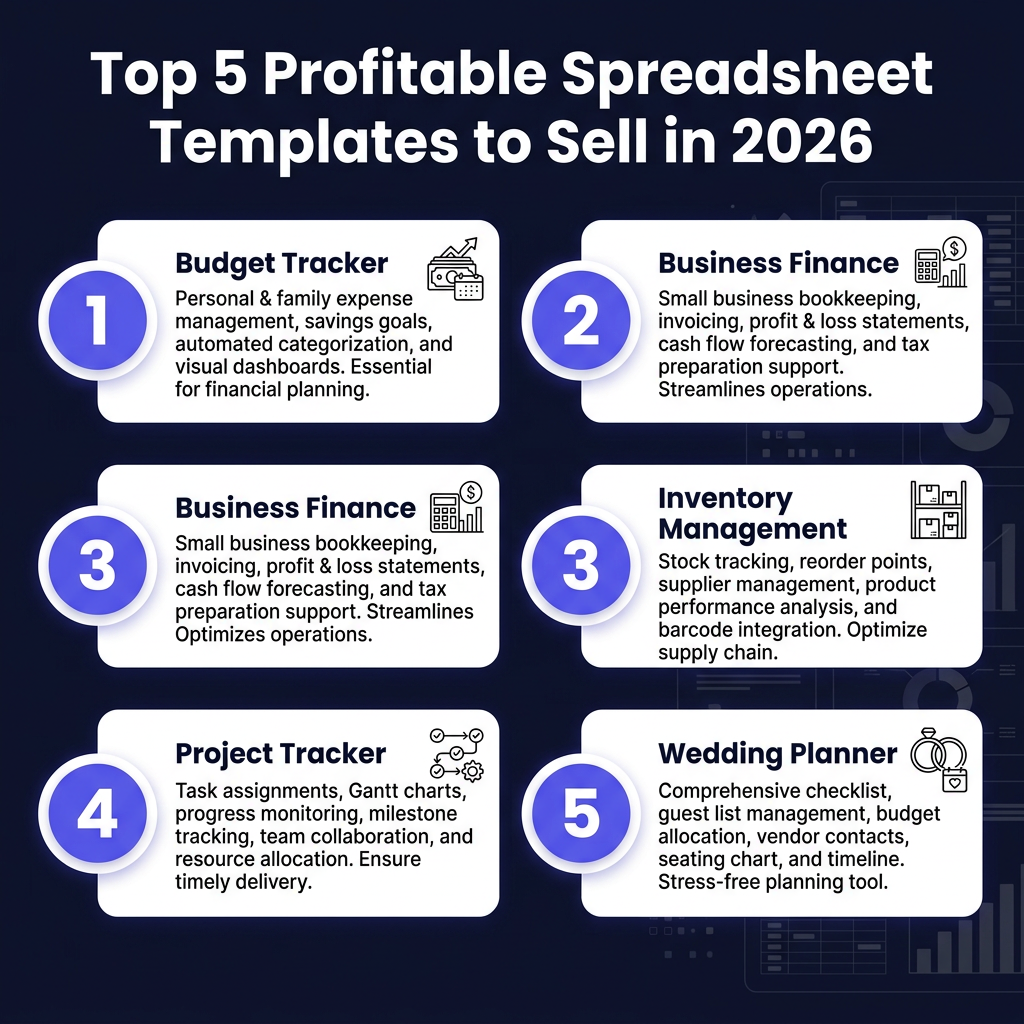
Not all spreadsheet templates are created equal. After analyzing market trends and bestseller data from platforms like Etsy and Gumroad, here are the five categories generating the most consistent revenue for creators:
1. Budget Trackers and Personal Finance Spreadsheets
Personal finance templates consistently rank among the top sellers. People are desperate for simple ways to track spending, save for goals, and get out of debt. A well-designed monthly budget tracker with automatic calculations, visual charts, and goal-setting features can easily sell for $15-30.
The key is making it visually appealing and dead simple to use. Include pre-built categories, automatic sum formulas, and maybe a dashboard showing spending trends. The less work the buyer has to do, the more valuable your template becomes.
2. Small Business Finance and Accounting Templates
Small business owners are willing to pay premium prices for spreadsheets that save them time and money. Invoice trackers, expense categorization sheets, profit and loss statements, and tax preparation organizers are all in high demand.
These templates typically command higher prices—$25-75—because they’re B2B products. A freelancer who saves 5 hours per month on bookkeeping will happily pay $50 for a template that automates the process.
3. Inventory Management Systems
Resellers, e-commerce sellers, and small retailers need inventory tracking solutions. Spreadsheets that track stock levels, calculate reorder points, monitor profit per item, and generate purchase orders are extremely valuable.
This niche has seen explosive growth with the rise of reselling on platforms like Poshmark, Mercari, and eBay. Resellers need to track hundreds or thousands of items, and a well-designed inventory spreadsheet can be a game-changer for their business.
4. Project Management and Productivity Trackers
Project managers, team leads, and solopreneurs need tools to track tasks, deadlines, and team workloads. Gantt charts, project timelines, task trackers, and team capacity planners are all popular template categories.
These templates work best when they include automation—progress bars that fill automatically, status indicators that change color, and deadline alerts. The more “smart” features you build in, the more you can charge.
3. Wedding and Event Planning Spreadsheets
The wedding industry is massive, and couples are constantly searching for tools to manage their budgets, guest lists, and vendor contracts. Wedding budget trackers are particularly popular because weddings involve complex budgets with dozens of categories and payment deadlines.
Event planners also need tools for corporate events, parties, and conferences. This category has strong seasonal demand, with peaks during wedding season and the holiday party season.
Where to Sell Your Spreadsheet Templates
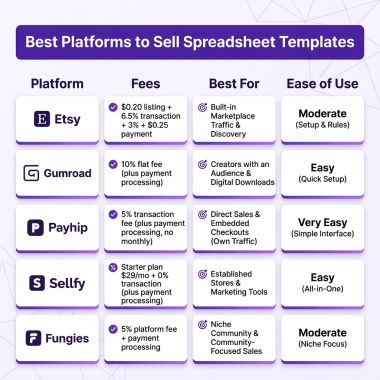
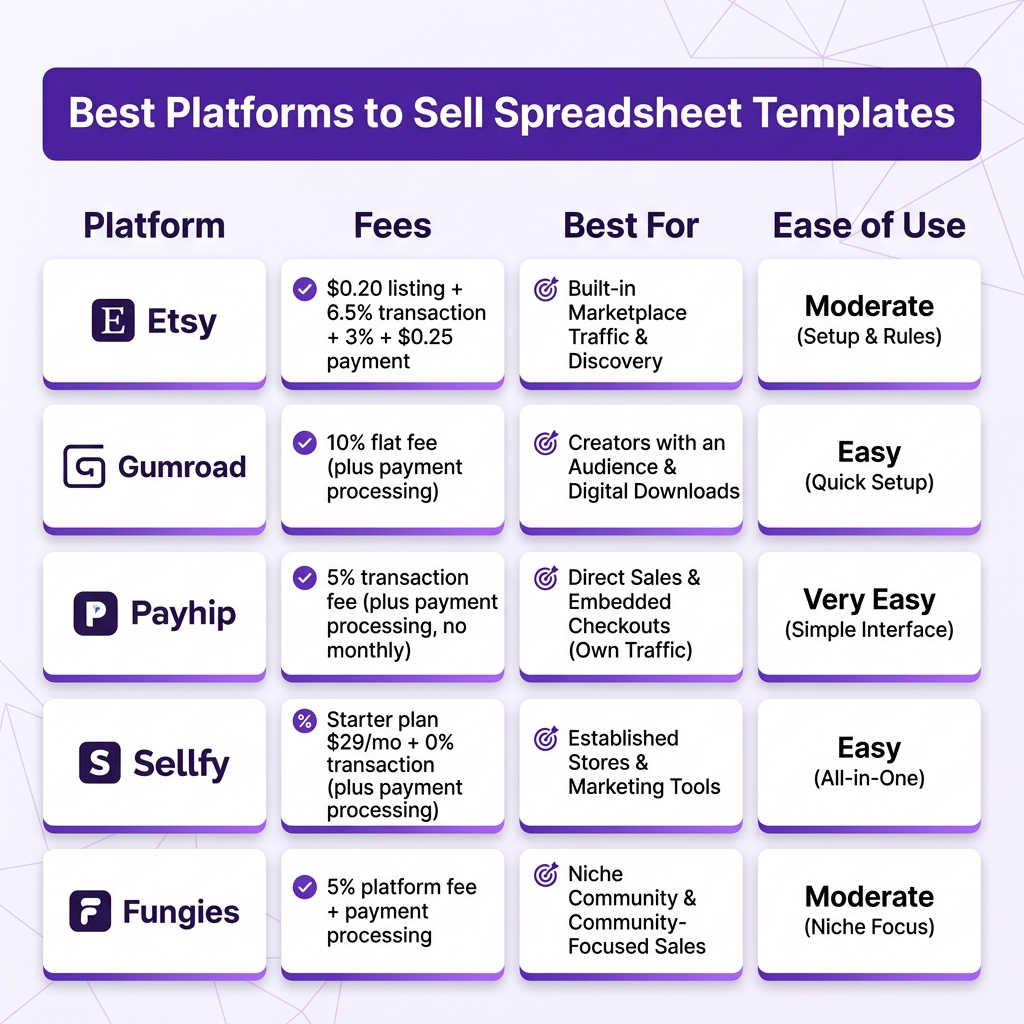
Choosing the right platform can make or break your spreadsheet business. Here’s a breakdown of the top options, with honest assessments of who each platform is best for:
Etsy: Best for Beginners
Etsy is the largest marketplace for digital products, and spreadsheet templates are no exception. The platform has built-in traffic—millions of buyers actively searching for templates every day. If you’re just starting out, Etsy gives you immediate access to a massive audience.
The downside is competition. There are thousands of spreadsheet sellers on Etsy, so you’ll need strong SEO and eye-catching listing photos to stand out. Fees are $0.20 per listing plus 6.5% transaction fee and payment processing.
Gumroad: Simple but Expensive
Gumroad is incredibly easy to use—just upload your file, set a price, and start selling. The platform handles delivery, payments, and even EU VAT compliance. However, the fees are steep: 10% + processing fees on every sale.
Gumroad works best if you already have an audience. If you’re driving your own traffic from social media or an email list, Gumroad’s simplicity is worth the higher fees. But if you’re relying on marketplace discovery, Etsy is probably a better choice.
Payhip: Low Fees, Basic Features
Payhip offers lower fees than Gumroad (5% on the free plan) and includes basic features for selling digital downloads. It’s a solid middle-ground option for creators who want lower fees without the complexity of a full e-commerce platform.
The platform is less well-known than Etsy or Gumroad, so you’ll need to drive most of your own traffic. However, the lower fees mean you keep more of each sale.
Fungies: Best for Scaling Creators
For creators serious about building a spreadsheet template business, Fungies offers the best combination of low fees (5% + $0.50), professional checkout experience, and Merchant of Record protection. Unlike Etsy, you own your customer relationships and can build an email list.
Fungies handles tax compliance automatically, supports 50+ payment methods, and gives you a branded storefront. If you’re planning to sell spreadsheets as a serious business rather than a side hustle, Fungies is worth considering.
How to Create Spreadsheet Templates That Sell
Creating a spreadsheet template that sells requires more than just functional formulas. Here are the key principles that separate bestsellers from duds:
Start with a Specific Problem
The most successful templates solve a specific, painful problem. “Budget tracker” is too generic. “Wedding budget tracker for couples planning a $30,000 wedding” is specific and targets a defined audience. The more specific your template, the easier it is to market and the more you can charge.
Make It Beautiful
Spreadsheets don’t have to be ugly. Use consistent color schemes, clean fonts, and plenty of white space. Add your branding subtly. Include a cover sheet with instructions. Buyers judge templates by appearance, and a professional-looking spreadsheet commands higher prices.
Include Clear Instructions
Most buyers aren’t Excel experts. Include a “How to Use” tab with step-by-step instructions. Add comments to complex formulas explaining what they do. The easier you make it for buyers to get value from your template, the better your reviews will be.
Test Everything
Before selling, test your template thoroughly. Enter sample data and verify all formulas work correctly. Check that charts update properly. Make sure the template works in different versions of Excel and Google Sheets. One broken formula can lead to negative reviews that tank your sales.
Pricing Your Spreadsheet Templates
Pricing digital products is part art, part science. Here are some guidelines based on market research:
- Simple templates (basic budget tracker, simple checklist): $5-12
- Standard templates (business finance tracker, project manager): $15-35
- Complex templates (inventory management system, automated dashboard): $40-100+
Don’t undervalue your work. A business owner who saves 10 hours per month with your template will gladly pay $50. Price based on the value you provide, not just the time it took to create.
Marketing Your Spreadsheet Templates
Creating great templates is only half the battle. Here’s how to actually sell them:
Optimize for Search
Whether you’re selling on Etsy or your own website, SEO is crucial. Use keyword-rich titles and descriptions. Include terms like “Excel template,” “Google Sheets,” “budget tracker,” and specific use cases. Think about what your target customer would search for.
Create Eye-Catching Mockups
Your listing photos are your first impression. Create professional mockups showing your spreadsheet in action. Use tools like Canva or Photoshop to create lifestyle images showing how the template helps solve problems.
Build an Email List
The most successful spreadsheet sellers don’t rely solely on marketplace traffic. They build email lists of interested buyers and launch new templates to their audience. Offer a free simple template in exchange for email signups, then market paid templates to your list.
FAQ: Selling Spreadsheet Templates
Can I really make money selling spreadsheets?
Absolutely. Top sellers on Etsy earn thousands per month selling spreadsheet templates. While results vary, the low overhead and high margins make it a viable side hustle or full-time business.
Do I need to be an Excel expert?
Not at all. Intermediate Excel or Google Sheets skills are sufficient for most templates. You need to know formulas, conditional formatting, and basic design principles. Everything else can be learned as you go.
What’s better: Excel or Google Sheets?
Google Sheets is often preferred because it’s easier to share (just a link) and works across all devices. However, some advanced features work better in Excel. Consider offering both formats to maximize your market.
How do I protect my templates from being shared?
You can’t completely prevent sharing, but you can include watermarks, license terms, and make templates personalized to reduce unauthorized distribution. Focus on providing excellent customer service—buyers who feel supported are less likely to share files.
How long does it take to create a template?
A simple template might take 2-4 hours. Complex templates with automation and dashboards can take 10-20 hours. The key is creating templates that can sell hundreds or thousands of times, making the initial time investment worthwhile.
Conclusion: Start Your Spreadsheet Business Today
Selling spreadsheet templates is one of the most accessible digital product businesses you can start in 2026. The skills required are learnable, the startup costs are minimal, and the profit margins are exceptional.
Start by identifying a specific problem you can solve. Create a beautiful, functional template. List it on a marketplace or your own store. Learn from customer feedback and iterate. With consistency and smart marketing, you can build a profitable spreadsheet template business that generates passive income for years to come.
The opportunity is real. The market is growing. And the best time to start is right now.
Ready to Sell Your Spreadsheets Without the Hassle?
Join hundreds of creators using Fungies.io — automated delivery, tax compliance handled, and you keep more of your earnings with our 5% + $0.50 fee structure.
No credit card required