Here’s a number that should get your attention: running a 70B parameter model in the cloud costs $300 to $800 per month for heavy users. Buy the right hardware once, and that same workload costs roughly $50 to $150 per year in electricity. The question isn’t whether local LLMs make sense—it’s which hardware setup matches your budget and use case.
In 2026, the local AI hardware landscape has exploded with options. From a $700 budget GPU to NVIDIA’s $4,699 DGX Spark, there’s a setup for every developer. This guide ranks the 7 best hardware configurations for running local LLMs, with real performance numbers, VRAM requirements, and specific model recommendations for each tier.
Why Hardware Choice Matters for Local LLMs
The hardware you choose determines three critical factors: which models you can run, how fast they run, and how much you’ll spend upfront. A 7B model like Llama 3.1 8B needs just 6-8GB VRAM and runs fine on entry-level GPUs. But a 70B model requires 40GB+ VRAM—more than a single RTX 4090 can provide without quantization.
Here’s what changed in 2026: NVIDIA’s DGX Spark brought petaflop-scale compute to a desktop form factor. Apple’s M3 Ultra unified memory architecture lets you run 70B models at full precision. And quantization techniques (GGUF, AWQ, GPTQ) now let you fit larger models into less VRAM with minimal quality loss.
| Model Size | VRAM Required (Q4) | VRAM Required (FP16) | Best Use Case |
|---|---|---|---|
| 7B | 4-6 GB | 14 GB | Chat, simple coding |
| 13B | 8-10 GB | 26 GB | General purpose |
| 32B | 20-24 GB | 64 GB | Complex reasoning |
| 70B | 40-48 GB | 140 GB | Enterprise workloads |
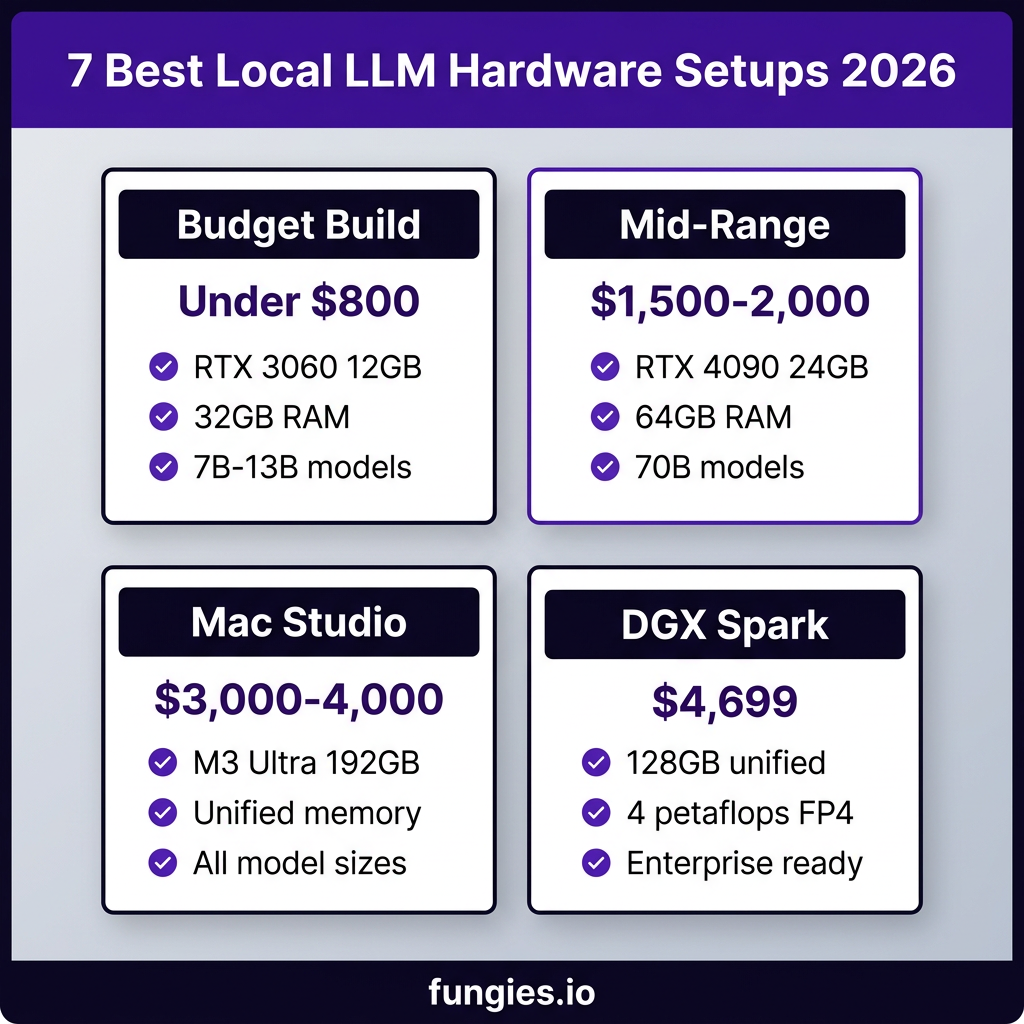
1. Budget Hero: RTX 3060 12GB Setup (~$700 total)
Don’t let the “budget” label fool you. An RTX 3060 with 12GB VRAM handles 7B and 13B models comfortably, and with Q4 quantization, you can even run 32B models at reduced speed. This is the entry point for developers who want to experiment with local LLMs without a major investment.
Recommended build: RTX 3060 12GB ($280 used), 32GB DDR4 RAM ($80), mid-tier CPU ($150), 1TB NVMe SSD ($90), PSU and case ($100). Total: around $700 if building from scratch, or just the GPU upgrade if you have a compatible PC.
Performance: Llama 3.1 8B runs at 45-55 tokens/sec. Qwen 2.5 14B at Q4 runs at 25-30 tok/s. You can squeeze a 32B model at Q4 with 20GB+ system RAM, but expect 8-12 tok/s.
Best for: Students, hobbyists, developers testing local LLM workflows before scaling up.
2. Sweet Spot: RTX 4070 Ti Super 16GB (~$1,200)
The RTX 4070 Ti Super hits a sweet balance of price, power, and VRAM. With 16GB, you can run 13B models at full precision or 32B models at Q4 with headroom. The 285W TDP means it won’t heat your office like a space heater.
Performance: Llama 3.1 8B at 75-85 tok/s. Mistral Small 22B at Q4 hits 35-40 tok/s. This is the card where local LLMs start feeling genuinely fast for interactive use.
Best for: Developers building AI-powered applications, content creators using local models for drafting, anyone wanting a responsive local AI assistant.
3. Power User: RTX 4090 24GB (~$1,800)
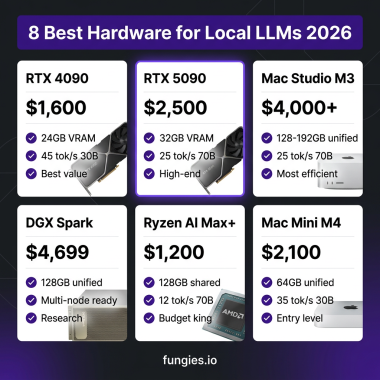
The RTX 4090 remains the gold standard for local LLM enthusiasts. With 24GB VRAM, you can run 32B models at Q4 comfortably, or use two cards (NVLink or PCIe) for 70B models. The 1,792 GB/s memory bandwidth keeps tokens flowing fast.
Performance: Llama 3.1 70B at Q4 across dual 4090s runs at 15-20 tok/s. Single-card 32B models hit 50-60 tok/s. This is the setup where local inference starts competing with cloud API speeds for smaller models.
Best for: AI researchers, developers running RAG pipelines, anyone needing to run 70B models locally without enterprise budgets.
4. Apple M3 Max 128GB (~$3,500)
Apple’s unified memory architecture changes the game. The M3 Max with 128GB RAM can run 70B models at full precision—no quantization needed. The memory bandwidth (400-800 GB/s depending on config) keeps inference fast despite no discrete GPU.
Performance: Llama 3.1 70B at FP16 runs at 12-15 tok/s. Gemma 4 27B hits 25-30 tok/s. The efficiency is remarkable—you get workstation-class inference in a laptop form factor.
Best for: Developers in the Apple ecosystem, those prioritizing power efficiency, mobile AI workflows.
5. Mac Studio M3 Ultra 192GB (~$5,000)
The Mac Studio M3 Ultra is currently the most capable local AI workstation for most users. With 192GB unified memory and 800 GB/s bandwidth, it runs 70B models at 25-30 tok/s—faster than many GPU setups. You can even run 120B+ MoE models with room to spare.
Performance: Llama 3.1 70B at Q4 hits 25-30 tok/s. Qwen 3 235B-A22B (MoE) runs at 8-12 tok/s. This is the setup where you stop compromising on model size.
Best for: AI researchers, data scientists, developers running multiple large models simultaneously.
6. AMD Ryzen AI Max+ 395 (~$2,500)
AMD’s Ryzen AI Max+ 395 with 128GB unified memory offers an alternative to Apple’s ecosystem. The integrated Radeon 8060S graphics and 256 GB/s bandwidth handle 70B models at Q4 with 12-15 tok/s performance.
Performance: 70B models at Q4 run at 12-15 tok/s. 32B models hit 30-35 tok/s. The advantage here is running standard Linux with full CUDA alternatives (ROCm).
Best for: Linux users wanting unified memory benefits without switching to Apple Silicon.
7. Enterprise Desktop: NVIDIA DGX Spark ($4,699)
The DGX Spark is NVIDIA’s compact AI supercomputer built around the GB10 Grace Blackwell Superchip. It delivers 1 petaflop of FP4 AI performance and 128GB unified LPDDR5X memory in a 150 × 150 × 50.5 mm chassis weighing just 1.2 kg.
Key specs: 128GB unified memory, 1 petaflop FP4 compute, 273 GB/s memory bandwidth, 4x DGX Spark clusterable via 200 GbE RoCE for 512GB aggregate memory.
Performance: Llama 3.1 70B at FP8 runs at 2.7 tok/s (NVIDIA’s own benchmark). Smaller models like Nemotron 3 Nano hit 80+ tok/s. The DGX Spark shines in multi-model deployments and enterprise features, not raw single-model speed.
Best for: Research labs, startups building AI products, enterprises needing on-premise AI with NVIDIA support.
Hardware Comparison: Real-World Performance
| Setup | Price | VRAM/Memory | 70B Model Speed | Power Draw |
|---|---|---|---|---|
| RTX 3060 12GB | $700 | 12 GB | N/A (insufficient VRAM) | 170W |
| RTX 4070 Ti Super | $1,200 | 16 GB | N/A (needs Q4 + system RAM) | 285W |
| RTX 4090 24GB | $1,800 | 24 GB | 15-20 tok/s (dual card) | 450W |
| MacBook M3 Max | $3,500 | 128 GB | 12-15 tok/s | 100W |
| Mac Studio M3 Ultra | $5,000 | 192 GB | 25-30 tok/s | 200W |
| AMD Ryzen AI Max+ | $2,500 | 128 GB | 12-15 tok/s | 120W |
| DGX Spark | $4,699 | 128 GB | 2.7 tok/s (FP8) | 150W |
Key Takeaways: Choosing Your Local LLM Hardware
- Budget-conscious? Start with an RTX 3060 12GB or used RTX 3090. You can run 7B-13B models comfortably and experiment with 32B at Q4.
- Need 70B models? You need 40GB+ VRAM. Options: dual RTX 4090s, Mac Studio M3 Ultra, AMD Ryzen AI Max+, or DGX Spark.
- Speed matters? The Mac Studio M3 Ultra currently leads for 70B inference at 25-30 tok/s. For smaller models, RTX 4090 is fastest.
- Power efficiency? Apple Silicon wins here. The M3 Ultra delivers 25-30 tok/s at 200W—less than half the power of dual 4090s.
- Enterprise features? DGX Spark offers NVIDIA support, multi-node clustering, and validated software stacks.
Frequently Asked Questions
Can I run local LLMs without a GPU?
Yes, but with significant limitations. CPU-only inference works for 7B models at 5-10 tok/s using llama.cpp with AVX2/AVX-512 optimizations. Apple Silicon’s Neural Engine helps, but dedicated GPU or unified memory architectures are strongly recommended for usable performance.
How much RAM do I need for local LLMs?
For GPU setups, system RAM matters less—32GB is sufficient. For unified memory systems (Apple Silicon, AMD Ryzen AI), you need 64GB minimum for 32B models and 128GB+ for 70B models. The model loads entirely into memory, so more is always better.
Is the DGX Spark worth $4,699?
For most individual developers, no. The DGX Spark’s value is in enterprise features, NVIDIA support, and multi-node clustering. A Mac Studio M3 Ultra outperforms it on single-model inference for similar money. But for startups building products on local AI, the support and validation may justify the premium.
What’s the best value for running 70B models?
The Mac Studio M3 Ultra (192GB) offers the best combination of performance, power efficiency, and ease of use for 70B models. If you’re on a tighter budget, dual RTX 4090s in a workstation provide comparable speed for less money but with higher power draw and complexity.
How do I get started with local LLMs?
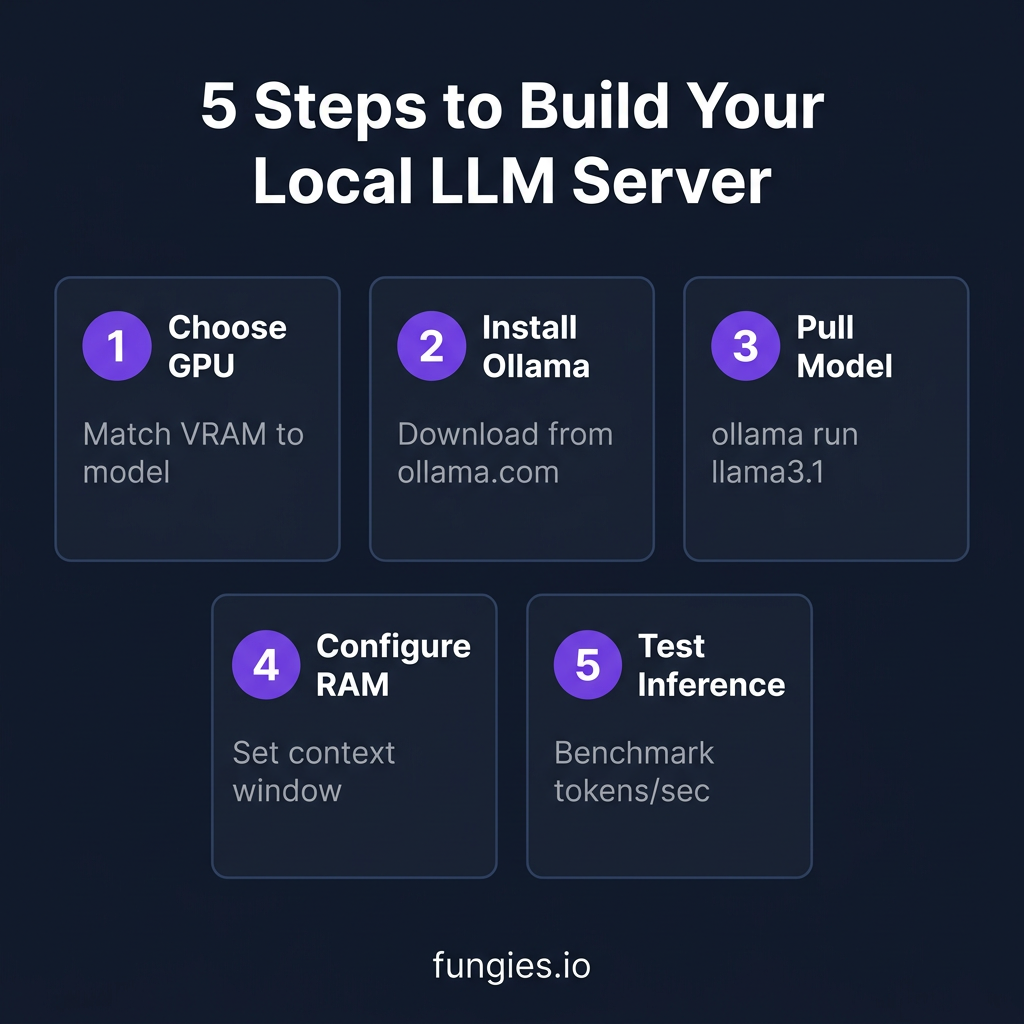
Download Ollama from ollama.com, install it, and run ollama run llama3.1. It automatically downloads the model and starts an interactive chat. For a GUI, try LM Studio or Open WebUI. Start with 7B models to verify your setup works before moving to larger models.
Conclusion: Build for Your Use Case
The local LLM hardware landscape in 2026 offers genuine options at every price point. A $700 RTX 3060 setup handles most developer workflows. A $1,800 RTX 4090 setup competes with cloud APIs on speed. And a $5,000 Mac Studio M3 Ultra runs 70B models faster than many cloud instances.
The DGX Spark represents a new category—enterprise desktop AI. It’s not the fastest single-model inference box, but it’s the most polished, supported, and clusterable option for organizations building on local AI.
Whatever your budget, local LLMs are now genuinely viable. The cloud isn’t going away, but for privacy, cost control, and offline capability, running models locally has never made more sense.
Ready to monetize your AI-powered applications? Fungies.io handles payments, tax compliance, and global checkout for SaaS and digital products—so you can focus on building.
References
- How to Run Your Own Local LLM — 2026 Edition – HackerNoon
- Picking the Right Hardware to Run LLMs Locally in 2026 – Pinggy
- Best GPU for LLM Inference and Training – 2026 – BIZON
- Local LLM Hardware Requirements 2026 – PromptQuorum
- Day 1: The Local LLM Revolution on NVIDIA DGX Spark – KubeSimplify
- The Best Open Source and Open-Weight LLM Models to Run Locally in 2026 – HuggingFace
- Guide to Local LLMs in 2026 – SitePoint
- How to Run LLMs Locally with Ollama in 11 Steps [2026] – Tech Insider