Here’s a number that should get your attention: running a 70B parameter model in the cloud can cost $300 to $800 per month for heavy users. Buy the right hardware once, and that same workload costs roughly $50 to $150 per year in electricity.
But here’s the catch — not all hardware is created equal for local LLM inference. VRAM capacity, memory bandwidth, and quantization support determine what models you can actually run and how fast they’ll perform.
In this guide, I’ll break down the 8 best hardware setups for running local LLMs in 2026. I’ve compiled real benchmarks, street prices, and VRAM requirements so you can make an informed decision based on your budget and use case.
Why Hardware Choice Matters for Local LLMs
Before diving into the rankings, let’s talk about what actually matters for local LLM inference:
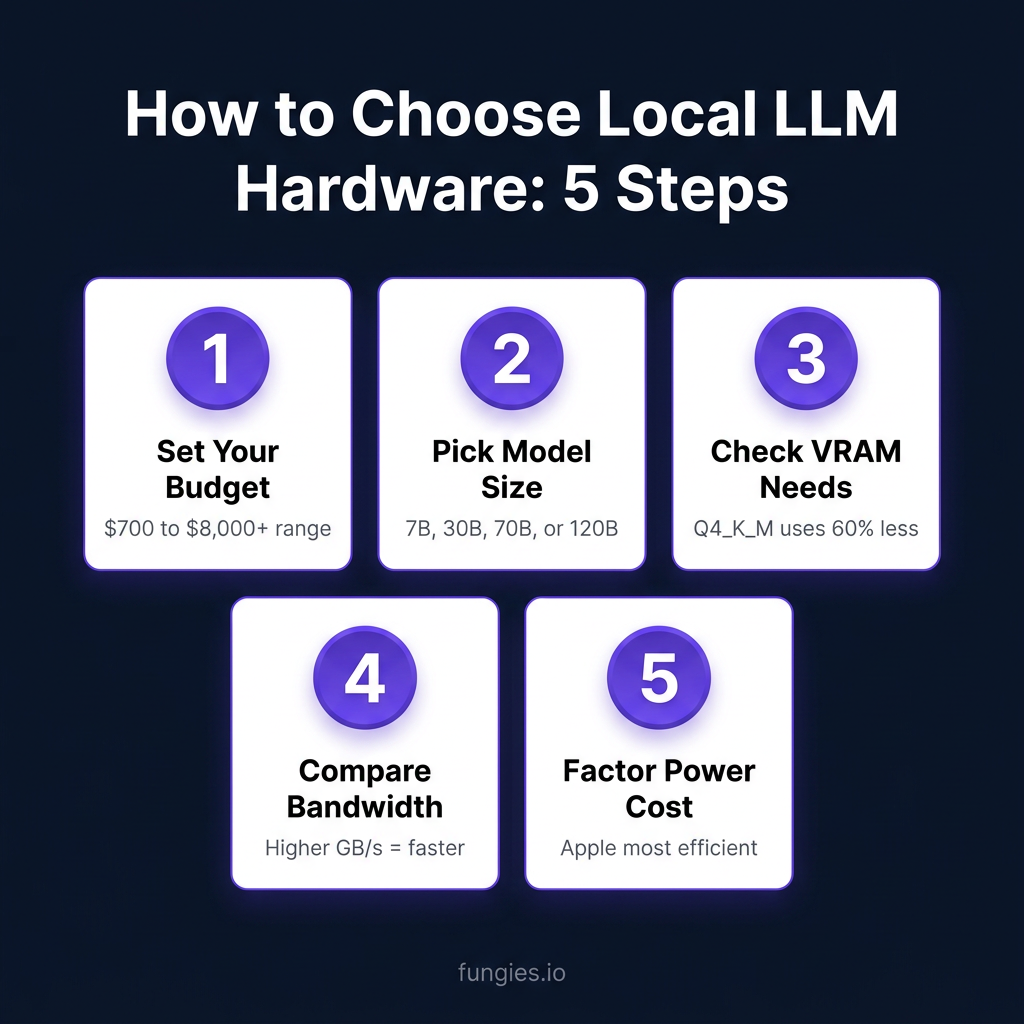
- VRAM (Video RAM): The single most important spec. A 70B parameter model needs ~40GB VRAM at Q4_K_M quantization. No VRAM, no model.
- Memory Bandwidth: Determines tokens per second. Higher bandwidth = faster inference. Apple Silicon dominates here.
- Quantization Support: GGUF, AWQ, and GPTQ formats let you run larger models on less VRAM with minimal quality loss.
- Power Draw: Affects electricity costs and cooling requirements. A 450W GPU running 24/7 adds ~$50/month to your bill.
The VRAM Math You Need to Know
Here’s the rough VRAM requirement formula for GGUF models (the most common format):
| Model Size | Q4_K_M VRAM | Q8_0 VRAM | FP16 VRAM |
|---|---|---|---|
| 7B parameters | 4-5 GB | 7-8 GB | 14-16 GB |
| 13B parameters | 8-9 GB | 14-15 GB | 26-28 GB |
| 30B parameters | 18-20 GB | 32-34 GB | 60-64 GB |
| 70B parameters | 40-42 GB | 75-80 GB | 140-150 GB |
| 120B+ parameters | 70-75 GB | 130-140 GB | 240+ GB |
Most users stick with Q4_K_M — it’s the sweet spot between quality and memory efficiency. You lose maybe 2-3% quality compared to FP16 but save 60-70% VRAM.
8 Best Hardware Setups for Local LLMs in 2026
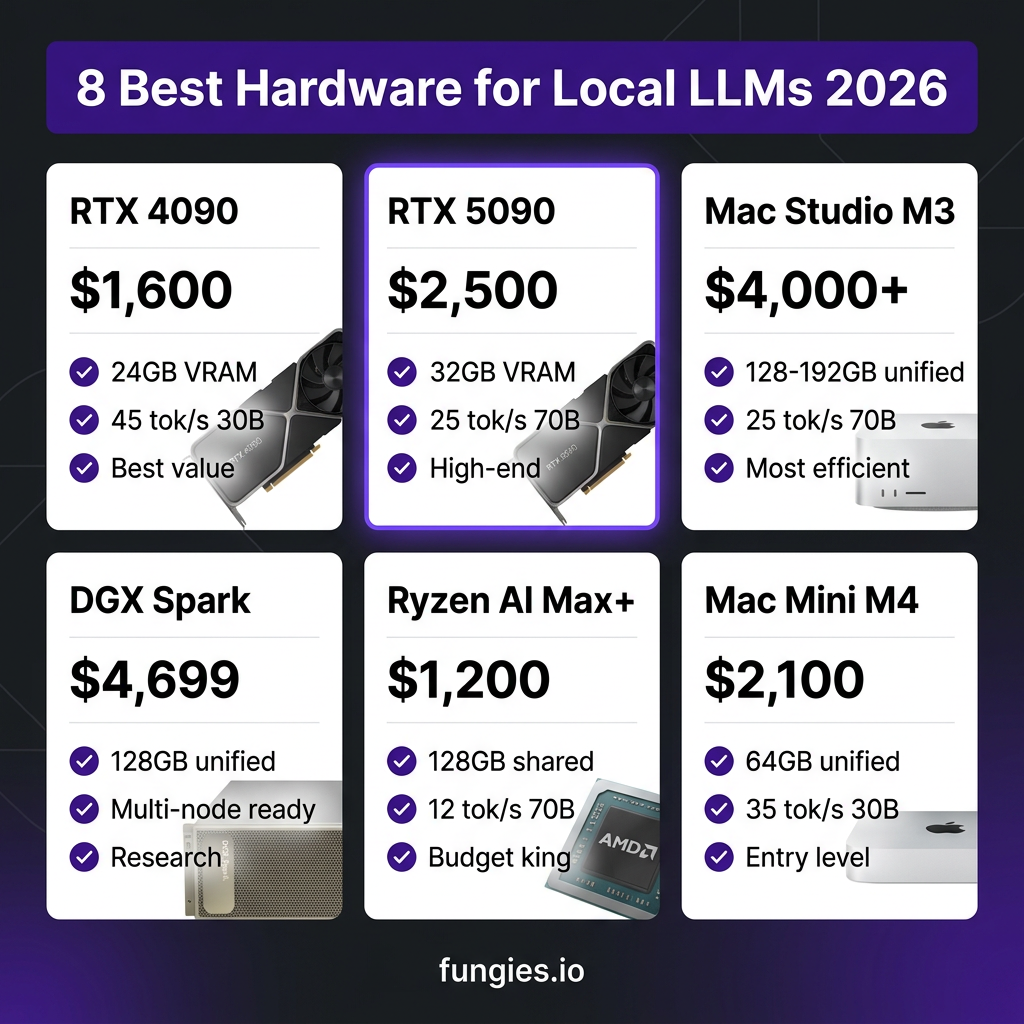
1. NVIDIA RTX 4090 — Best Value for 30B Models
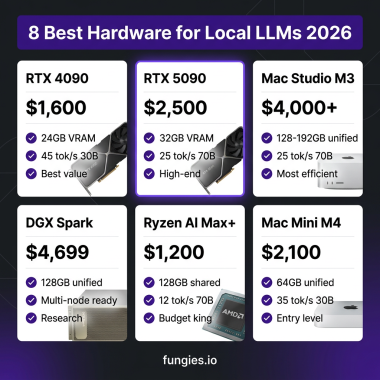
The RTX 4090 remains the king of consumer GPUs for local LLMs in 2026. With 24GB of GDDR6X VRAM and a street price around $1,600, it’s the most cost-effective way to run 30B parameter models at full speed.
- VRAM: 24 GB GDDR6X
- Memory Bandwidth: 1,008 GB/s
- Power Draw: 450W
- Street Price: ~$1,600
- Best For: Llama 3.1 30B, Mistral Large, Qwen 2.5 32B
- Tokens/sec (30B Q4): ~45-55 tok/s
The 4090 handles 30B models comfortably at Q4_K_M quantization. You can squeeze in a 70B model with aggressive quantization (Q3_K_S), but it’s not ideal. For most developers and enthusiasts, this is the entry point into serious local LLM inference.
2. NVIDIA RTX 5090 — Best High-End Consumer GPU
NVIDIA’s Blackwell-based RTX 5090 launched in early 2026 with 32GB of GDDR7 VRAM. It’s the new flagship for local LLM enthusiasts who want to run 70B models without compromises.
- VRAM: 32 GB GDDR7
- Memory Bandwidth: 1,792 GB/s
- Power Draw: 575W
- Street Price: ~$2,500
- Best For: Llama 3.1 70B, Mixtral 8x22B, Qwen 2.5 72B
- Tokens/sec (70B Q4): ~25-30 tok/s
The 5090’s 32GB VRAM lets you run 70B models at Q4_K_M without quantization tricks. The GDDR7 memory delivers significantly better bandwidth than the 4090, translating to faster inference. Just be prepared for the power requirements — you’ll want a 1000W+ PSU.
3. Mac Studio M3 Ultra — Best Unified Memory System
Apple’s Mac Studio with the M3 Ultra chip is the surprise champion of local LLM inference. The unified memory architecture means the CPU and GPU share the same memory pool — no data copying overhead, incredible bandwidth.
- VRAM (Unified Memory): 128 GB or 192 GB
- Memory Bandwidth: 800 GB/s
- Power Draw: 200W (entire system)
- Street Price: ~$4,000 (128GB) / ~$5,200 (192GB)
- Best For: Any model up to 120B parameters
- Tokens/sec (70B Q4): ~25-30 tok/s
The 192GB unified memory model can run a 120B parameter model in full precision. No quantization needed. The efficiency is remarkable — you get workstation-class inference at a fraction of the power draw. The downside? You’re locked into macOS and the Apple ecosystem.
4. NVIDIA DGX Spark — Best Compact AI Workstation
The DGX Spark is NVIDIA’s desktop AI supercomputer. It’s essentially a petaflop in a shoebox — 128GB of unified LPDDR5x memory and the GB10 Grace Blackwell Superchip.
- VRAM (Unified Memory): 128 GB LPDDR5x
- Memory Bandwidth: 273 GB/s
- Power Draw: 170W
- Street Price: ~$4,699
- Best For: Multi-node setups, research, 70B+ models
- Tokens/sec (70B Q4): ~15-20 tok/s
The DGX Spark shines in multi-node configurations. Link four units via 200 GbE RoCE and you get 512GB of unified memory — enough for 405B parameter models. It’s overkill for most individuals but perfect for research labs and startups.
5. AMD Ryzen AI Max+ 395 — Best Budget All-in-One
AMD’s Ryzen AI Max+ 395 processors with integrated RDNA 3.5 graphics offer surprising LLM performance at a budget price. The integrated GPU shares system memory — up to 128GB of DDR5.
- VRAM (Shared): Up to 128 GB DDR5
- Memory Bandwidth: ~256 GB/s
- Power Draw: 120W
- Street Price: ~$1,200 (mini PC)
- Best For: 30B-70B models, budget-conscious users
- Tokens/sec (70B Q4): ~12-15 tok/s
Don’t expect 4090-level speeds, but the value proposition is compelling. A complete system for $1,200 that can run 70B models? That’s accessible to almost anyone. Mini PCs like the Minisforum AI X1 Pro pack this chip into a tiny footprint.
6. Dual RTX 3090 Setup — Best Multi-GPU Budget Build
Used RTX 3090s have become the secret weapon of budget local LLM builders. With 24GB VRAM each, two cards give you 48GB total — enough for 70B models with headroom.
- VRAM: 48 GB total (2x 24 GB)
- Memory Bandwidth: 936 GB/s per card
- Power Draw: 700W (both cards)
- Street Price: ~$700-900 per card (used)
- Best For: 70B models, tinkerers, multi-GPU experiments
- Tokens/sec (70B Q4): ~20-25 tok/s
The catch? Multi-GPU inference requires model parallelism, which not all tools support well. Ollama doesn’t natively split models across GPUs (yet), but vLLM and llama.cpp can handle it. This setup is for people who enjoy tinkering.
7. Mac Mini M4 Pro — Best Entry-Level Setup
The Mac Mini M4 Pro with 64GB unified memory is the perfect entry point for developers curious about local LLMs. It’s affordable, silent, and surprisingly capable.
- VRAM (Unified Memory): 64 GB
- Memory Bandwidth: 273 GB/s
- Power Draw: 65W
- Street Price: ~$2,100
- Best For: 30B models, coding assistants, experimentation
- Tokens/sec (30B Q4): ~35-40 tok/s
64GB is enough for 30B models at Q4_K_M or 70B at Q3_K_M. The M4 Pro’s neural engine accelerates inference, and the entire system draws less power than a single desktop GPU. Perfect for developers who want to experiment without a massive investment.
8. RTX PRO 6000 Blackwell — Best Professional Workstation
For professionals who need the absolute best, the RTX PRO 6000 Blackwell delivers 96GB of GDDR7 VRAM. It’s enterprise-grade hardware with a price tag to match.
- VRAM: 96 GB GDDR7
- Memory Bandwidth: 1,536 GB/s
- Power Draw: 600W
- Street Price: ~$8,000+
- Best For: 120B+ models, production serving, fine-tuning
- Tokens/sec (70B Q4): ~50-60 tok/s
This is overkill for almost everyone except AI researchers and companies running production inference. The 96GB VRAM lets you run 120B models at Q4_K_M or 70B models at Q8_0 with room for context. If money is no object, this is the fastest local LLM setup available.
Complete Hardware Comparison Table
| Hardware | VRAM | Price | Power | Max Model | Best For |
|---|---|---|---|---|---|
| RTX 4090 | 24 GB | $1,600 | 450W | 30B (Q4) | Value & speed |
| RTX 5090 | 32 GB | $2,500 | 575W | 70B (Q4) | High-end consumer |
| Mac Studio M3 Ultra | 128-192 GB | $4,000+ | 200W | 120B (FP16) | Efficiency & memory |
| DGX Spark | 128 GB | $4,699 | 170W | 70B+ (multi-node) | Research & scaling |
| Ryzen AI Max+ 395 | 128 GB | $1,200 | 120W | 70B (Q4) | Budget all-in-one |
| Dual RTX 3090 | 48 GB | $1,400 | 700W | 70B (Q4) | Multi-GPU tinkerers |
| Mac Mini M4 Pro | 64 GB | $2,100 | 65W | 30B (Q4) | Entry-level |
| RTX PRO 6000 | 96 GB | $8,000+ | 600W | 120B (Q4) | Professional |
How to Choose the Right Hardware for Your Needs
Still not sure which setup is right for you? Here’s my decision framework:
Budget Under $1,500
Go with a used RTX 3090 or a Ryzen AI Max+ 395 mini PC. Both can handle 30B models comfortably. The 3090 is faster; the Ryzen setup is more power-efficient and gives you more total memory.
Budget $1,500 – $3,000
The RTX 4090 is the obvious choice. Best price-to-performance ratio for 30B models. If you want to run 70B models, consider dual 3090s or save up for a 5090.
Budget $3,000 – $5,000
This is the sweet spot for serious local LLM work. The Mac Studio M3 Ultra (128GB) or DGX Spark are your best bets. The Mac Studio is more efficient and user-friendly; the DGX Spark scales better for multi-node setups.
Budget $5,000+
Mac Studio M3 Ultra (192GB) or RTX PRO 6000. The Mac gives you the most total memory; the PRO 6000 gives you the fastest inference. Your choice depends on whether you prioritize model size or speed.
Software Stack Recommendations
Hardware is only half the equation. Here’s the software I recommend for each use case:
| Use Case | Primary Tool | Alternative |
|---|---|---|
| Quick experimentation | Ollama | LM Studio |
| Production serving | vLLM | TGI |
| Maximum performance | llama.cpp | Kobold.cpp |
| API compatibility | Ollama | LocalAI |
| Multi-GPU setups | vLLM | llama.cpp (tensor split) |
Key Takeaways
- VRAM is everything. Check the model size requirements before buying hardware.
- Q4_K_M quantization is your friend. It cuts VRAM usage by 60-70% with minimal quality loss.
- Apple Silicon dominates efficiency. If you care about power draw and noise, go Mac.
- NVIDIA still rules raw performance. For maximum tokens per second, you want CUDA.
- Used RTX 3090s are the budget king. $700-900 for 24GB VRAM is unbeatable value.
Frequently Asked Questions
Can I run local LLMs without a GPU?
Yes, but it’s slow. Modern CPUs can run 7B models at 5-10 tokens per second. For anything larger or faster, you need a GPU. Apple Silicon Macs blur this line — the unified memory acts like VRAM.
How much electricity does a local LLM server use?
A 450W GPU running 24/7 costs roughly $40-60/month in electricity (at $0.12/kWh). Apple Silicon systems are much cheaper — a Mac Studio draws 200W under load, costing ~$20/month for continuous use.
What’s the best model for coding assistance?
Qwen3-Coder-480B and DeepSeek-Coder-V2 are the current leaders for coding tasks. For local use, Qwen2.5-Coder-32B and Codellama-34B run well on 24GB VRAM setups.
Is local LLM inference cheaper than cloud APIs?
For high-volume usage (1M+ tokens/day), absolutely. The break-even point is typically 6-12 months depending on your hardware choice. For occasional use, cloud APIs are more cost-effective.
Can I use multiple GPUs for larger models?
Yes, but tool support varies. vLLM and llama.cpp support tensor parallelism across GPUs. Ollama currently doesn’t split models across multiple GPUs natively, though this may change.
Conclusion
Running local LLMs in 2026 is more accessible than ever. Whether you’re spending $700 on a used RTX 3090 or $5,000 on a Mac Studio, there’s a hardware setup that fits your budget and use case.
The key is matching your hardware to your actual needs. Don’t buy a 192GB Mac Studio if you’re only running 7B models. Conversely, don’t expect a 24GB GPU to handle 70B models comfortably.
Start with your target model size, work backwards to VRAM requirements, and choose the hardware that delivers the best value at that tier. And remember — the software stack matters just as much as the hardware. Tools like Ollama and vLLM can make or break your local LLM experience.
Ready to build your own AI-powered applications? Sign up for Fungies.io and start selling your digital products globally with our Merchant of Record platform.
References
- Digital Applied – Best Hardware to Run Local AI Models in 2026
- Pinggy – Picking the Right Hardware to Run LLMs Locally in 2026
- Fluence Network – Best GPU for LLM in 2026
- HackerNoon – How to Run Your Own Local LLM 2026 Edition
- Kunal Ganglani – Local LLM Hardware Guide 2026
- Ollama Model Library
- HuggingFace – Best Open Source LLM Models to Run Locally