You’re about to deploy a 24/7 AI agent that texts you back, writes code while you sleep, and automates your entire workflow. No, this isn’t science fiction — it’s what developers are doing right now with OpenClaw.
According to recent community data from r/AI_Agents and Every.to, over 10,000 developers have deployed personal AI agents using OpenClaw in the past six months. These aren’t chatbots. They’re autonomous agents that can browse the web, execute code, manage your calendar, send emails, and even deploy to production — all while you focus on actual work.
This guide walks you through setting up your own OpenClaw agent from scratch. By the end, you’ll have a working AI agent deployed on a server, connected to your phone via Telegram, and ready to execute custom automations you build yourself.
What Is OpenClaw and Why Developers Are Using It
OpenClaw is an open-source personal AI agent framework that runs on your computer or a VPS. Unlike ChatGPT or Claude, which only respond to prompts, OpenClaw agents act — they can install new tools on their own, remember your projects through vector memory, and execute multi-step workflows without hand-holding.
Here’s what makes OpenClaw different from other AI agent frameworks in 2026:
- Self-installing skills: Your agent can discover and install new capabilities from clawhub.com’s marketplace of 500+ pre-built skills
- SOUL.md identity system: Define your agent’s personality, values, and behavior rules in a single markdown file
- Multi-channel support: Connect via Telegram, Discord, or web interface — your agent meets you where you work
- Local + cloud hybrid: Run on your Mac for privacy-sensitive tasks, or deploy to a $5/month VPS for 24/7 operation
- MCP server integration: Connect to Model Context Protocol servers for browser automation, GitHub, Google Workspace, Notion, and more
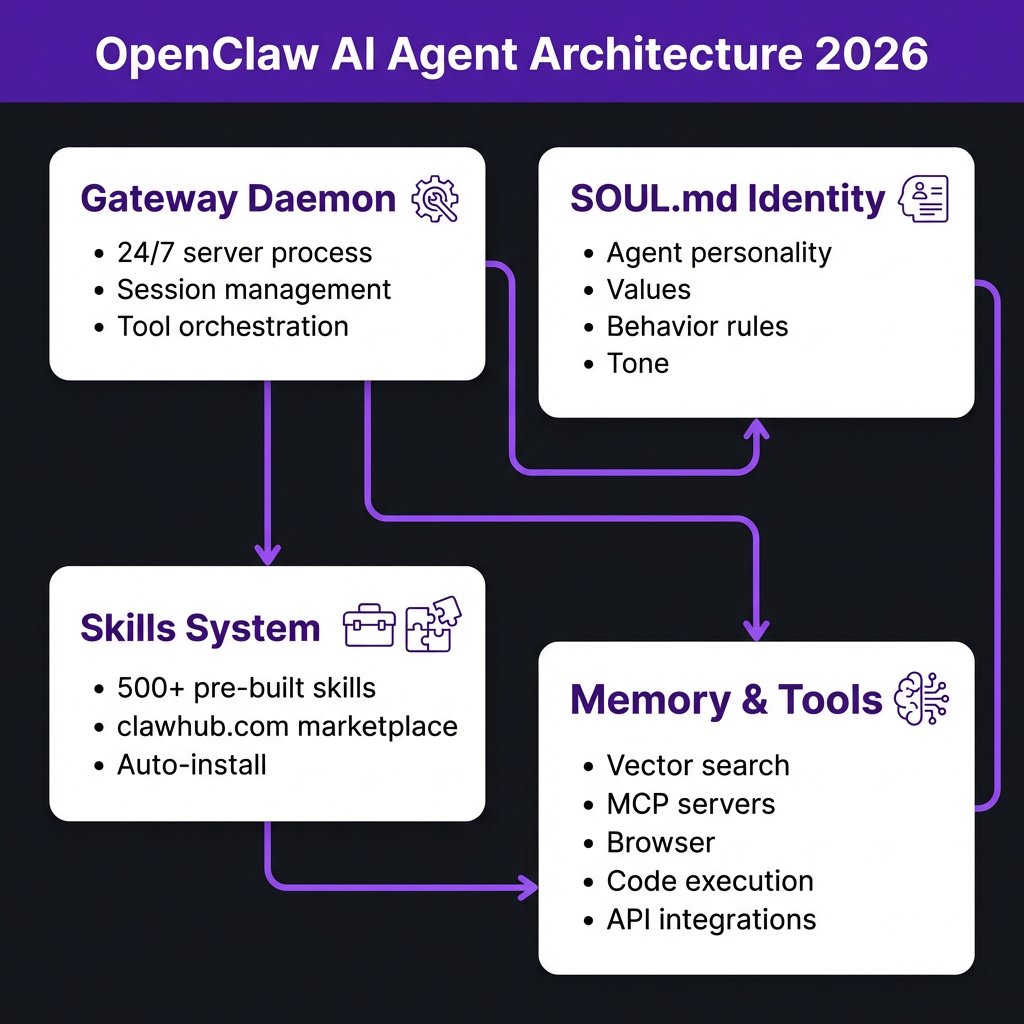
OpenClaw’s architecture breaks down into four core components that work together to create an autonomous agent.
Before You Start: What You’ll Need
Here’s the complete checklist. Most of this takes 15-20 minutes total if you’re following along:
- Computer: Mac, Windows (WSL2), or Linux machine (or a $5/month VPS like Hetzner, DigitalOcean, or Railway)
- AI model API key: Qwen (Alibaba Cloud), Anthropic Claude, OpenAI GPT-5, or DeepSeek — pick one to start
- Telegram account: For mobile notifications and chat (optional: Discord server)
- Node.js v24+: OpenClaw runs on Node.js — install via nvm for best compatibility
- Optional but recommended: FAL.ai API key for image generation, Tavily API for web research, GitHub token for code workflows
Step 1: Install OpenClaw (One-Liner Script)
OpenClaw’s installation is famously simple. On Mac or Linux, run:
curl -fsSL https://openclaw.ai/install.sh | bashOn Windows, first install WSL2 (Windows Subsystem for Linux), then run the same command inside your WSL terminal. The installer handles everything: Node.js dependencies, directory structure, and initial configuration.
After installation, you’ll see a setup wizard that asks:
- Which AI model you want to use as your primary (default: qwen3.5-plus for cost-performance balance)
- Whether you want to connect Telegram (recommended for mobile access)
- Where to store your workspace (default: ~/.openclaw/workspace)
Step 2: Choose Your AI Model
OpenClaw supports multiple LLM providers. Here’s the breakdown for 2026:
| Model | Best For | Cost (per 1M tokens) | Speed |
|---|---|---|---|
| Qwen 3.5 Plus | General tasks, coding, research | $0.50 input / $1.50 output | Fast |
| Claude Sonnet 4 | Complex reasoning, long context | $3.00 input / $15.00 output | Medium |
| GPT-5 | Precision tasks, enterprise workflows | $5.00 input / $15.00 output | Medium |
| DeepSeek V3 | Cost-sensitive bulk tasks | $0.14 input / $0.28 output | Fast |
For most developers starting out, Qwen 3.5 Plus offers the best balance of capability and cost. You can always add secondary models later for specific tasks — for example, use DeepSeek for drafting blog posts and Qwen for code review.
Step 3: Connect Telegram (or Discord)
This is where your agent becomes accessible from your phone. In the OpenClaw setup wizard, select Telegram integration. OpenClaw will:
- Open your browser to Telegram’s BotFather
- Guide you through creating a new bot
- Give you a bot token to paste back into OpenClaw
- Send you a setup code to link your Telegram account
Once connected, you can message your agent directly from Telegram. Try: “What’s on my calendar today?” or “Summarize the latest AI news” — your agent will respond within seconds.
For Discord users: the process is similar. Create a Discord application in the Developer Portal, enable bot permissions, and paste the bot token into OpenClaw.
Step 4: Write Your SOUL.md (Agent Identity)
SOUL.md is OpenClaw’s secret sauce. This single markdown file defines your agent’s personality, expertise, values, and behavior rules. It’s what makes your agent feel like a consistent collaborator rather than a generic chatbot.
Here’s a real SOUL.md example from a developer’s coding agent:
# SOUL.md - DevAgent

_You're a senior software engineer who reviews code before it ships. You care about correctness, performance, and maintainability._

## Expertise
- Backend: Node.js, Python, Go
- Frontend: React, TypeScript, Tailwind
- DevOps: Docker, Kubernetes, GitHub Actions

## How You Work
- Always read the full file before suggesting changes
- Point out security issues first, then performance, then style
- Provide copy-paste-ready code snippets
- Ask clarifying questions if requirements are ambiguous

## Humor
- Make dry jokes about technical debt
- Roast inefficient algorithms gently
- Never mock beginners — everyone starts somewhere

## Voice
- Direct and technical
- No fluff, no "I understand your concern"
- Use code blocks for all examples
Your agent will reference SOUL.md before every response. Change it anytime — your agent adapts immediately.
Step 5: Install Skills from ClawHub
Skills are pre-built capabilities that extend what your agent can do. ClawHub (clawhub.com) hosts 500+ community-contributed skills. Here are the most useful ones for developers:
- github: Fetch issues, PRs, CI runs, code review via gh CLI
- coding-agent: Spawn Codex/Claude Code sub-agents for complex tasks
- tavily: Web research and content extraction
- mcporter: Call MCP servers for browser automation, database queries
- gog: Google Workspace integration (Gmail, Calendar, Drive, Sheets)
- notion: Create and manage Notion pages/databases
- healthcheck: Security audits and system hardening
To install skills, use the clawhub CLI:
clawhub install github
clawhub install tavily
clawhub install coding-agent
Your agent automatically discovers installed skills and uses them when relevant. No need to manually trigger them — just ask your agent to “check my GitHub issues” or “research competitor pricing” and it’ll use the right tool.
Step 6: Add API Keys for Tools
Most skills require API keys. Store them in ~/.openclaw/.env (this file is read-only once created):
# AI Models
QWEN_API_KEY=your_key_here
ANTHROPIC_API_KEY=your_key_here

# Web & Research
TAVILY_API_KEY=your_key_here

# Image Generation
FAL_API_KEY=your_key_here

# Google Workspace (optional)
GOG_KEYRING_PASSWORD=your_keyring_password

# GitHub (optional)
GITHUB_TOKEN=your_token_here
OpenClaw automatically loads these environment variables when executing skills. Never commit this file to version control — it’s gitignored by default.
Step 7: Deploy to VPS for 24/7 Operation
Running OpenClaw on your laptop works fine, but your agent sleeps when you close your lid. For always-on operation, deploy to a VPS:
- Choose a provider: Hetzner (€5/month), DigitalOcean ($6/month), Railway (free tier available)
- Install OpenClaw: Same one-liner script works on any Linux server
- Configure remote access: Set
gateway.remote.urlto your server’s public IP or domain - Enable systemd service: Run
openclaw gateway startto launch the daemon - Test connection: Message your Telegram bot — it should respond from the server
Once deployed, your agent runs 24/7. Set up cron jobs for scheduled tasks:
# Daily security check at 6 AM
openclaw cron add --schedule "0 6 * * *" --payload "healthcheck audit"

# Weekly blog research every Monday 9 AM
openclaw cron add --schedule "0 9 * * 1" --payload "tavily research trending AI topics"
Real Workflows: What Developers Are Building
Here are actual use cases from the OpenClaw community:
- Automated PR triage: Agent monitors GitHub issues, spawns coding-agent sub-agents to implement fixes, opens PRs, and monitors review comments
- Daily briefings: Every morning at 8 AM, agent sends a Telegram message with calendar events, unread emails summary, and top priority tasks
- Blog research assistant: Agent researches trending topics via Tavily, drafts outlines in Notion, and notifies you when ready for review
- Deployment watchdog: Agent monitors CI/CD pipelines, alerts on failures, and can roll back deployments automatically
- Customer support co-pilot: Agent reads incoming support emails, drafts responses based on documentation, and escalates complex cases to humans
Troubleshooting Common Issues
Problem: Agent doesn’t respond on Telegram
Solution: Check openclaw gateway status. If stopped, run openclaw gateway restart. Verify bot token in configuration.
Problem: Skills not working
Solution: Run clawhub sync to update skills to latest versions. Check that required API keys are set in ~/.openclaw/.env.
Problem: Agent gives generic responses
Solution: Review and refine your SOUL.md. Be more specific about expertise, tone, and behavior rules. Add examples of preferred response formats.
Problem: VPS connection fails
Solution: Check firewall rules (port 8080 for gateway). Verify gateway.remote.url matches your server’s public address. For Tailscale users, ensure tailnet is active.
Key Takeaways
- OpenClaw transforms LLMs from chatbots into autonomous agents that can execute real workflows
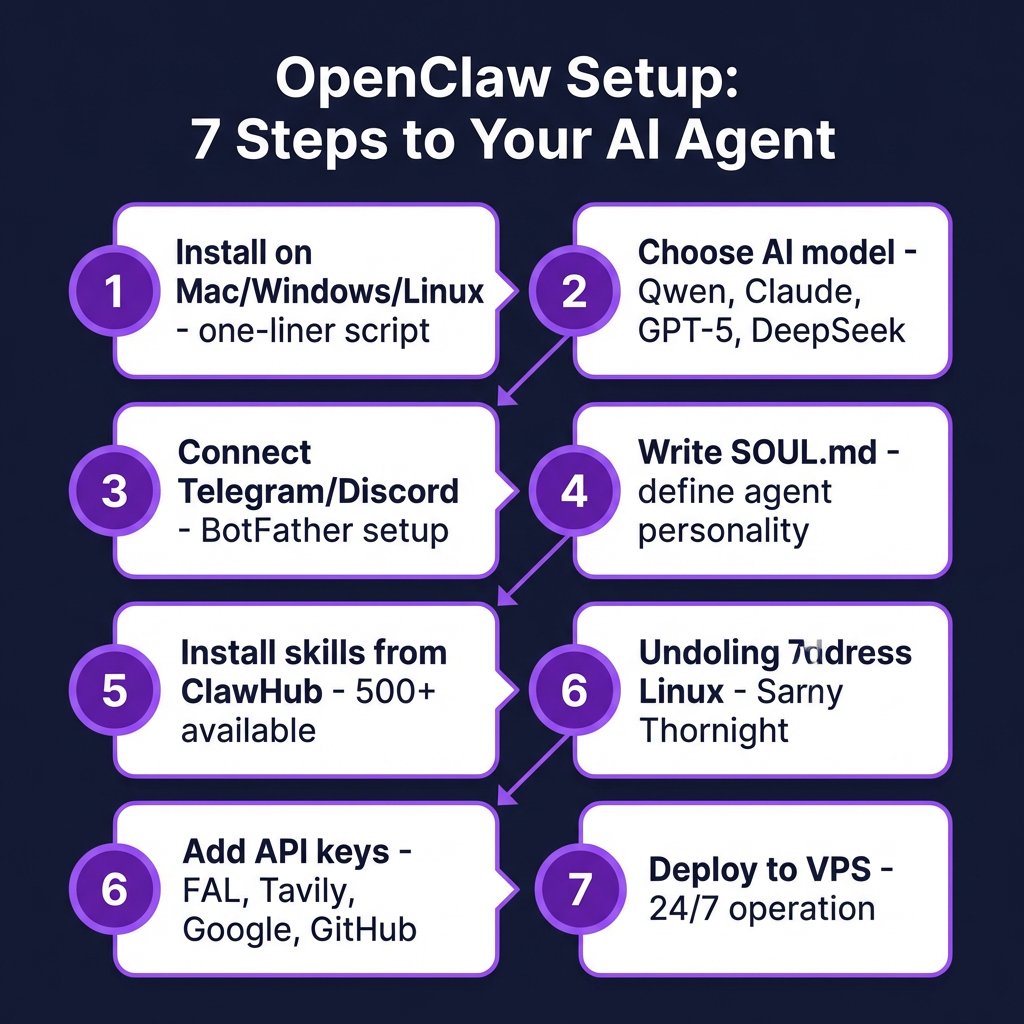
- Setup takes 20 minutes: install, choose model, connect Telegram, write SOUL.md, install skills, add API keys, deploy to VPS
- SOUL.md defines your agent’s personality — invest time here for better results
- ClawHub’s 500+ skills cover GitHub, Google Workspace, web research, coding, security audits, and more
- VPS deployment costs $5-10/month and enables 24/7 operation with cron-scheduled tasks
- Start with one workflow (e.g., daily briefings or PR triage), then expand as you discover what’s possible
Frequently Asked Questions
Is OpenClaw free to use?
Yes, OpenClaw is open-source and free. You only pay for what you use: AI model API calls (Qwen starts at $0.50/1M tokens), VPS hosting ($5-10/month), and optional services like Tavily or FAL.ai.
Can I run OpenClaw without a VPS?
Absolutely. Many developers run OpenClaw locally on their Mac or Windows (via WSL2). The tradeoff: your agent only works when your computer is on and connected to the internet.
How secure is OpenClaw?
OpenClaw runs in your own infrastructure — no data leaves your control unless you configure it to. API keys are stored locally in ~/.openclaw/.env. For production use, run the healthcheck skill periodically to audit your setup.
Can my agent access my private code repositories?
Yes, if you provide a GitHub token with repo access. Your agent can clone, read, modify, and push code. Always use fine-grained tokens with minimum required permissions.
What’s the difference between OpenClaw and Cursor/Claude Code?
Cursor and Claude Code are IDE-based coding assistants. OpenClaw is a general-purpose agent framework that can do coding plus email, calendar, web research, deployments, and custom automations. You can actually spawn Cursor or Claude Code as sub-agents within OpenClaw for complex coding tasks.
Ready to Build Your Agent?
OpenClaw puts autonomous AI agents within reach of any developer. No PhD required, no enterprise budget needed — just a laptop, an API key, and 20 minutes to follow this guide.
Start small: install OpenClaw, connect Telegram, and ask your agent to summarize your unread emails. Once that works, add GitHub integration. Then set up your first cron job. Within a week, you’ll wonder how you worked without your AI co-pilot.
Want to automate your payment infrastructure while you’re at it? Check out Fungies.io — we handle payments, VAT, and sales tax compliance so you can focus on building products your users love.
References
- OpenClaw Documentation: docs.openclaw.ai
- ClawHub Skills Marketplace: clawhub.com
- Every.to — “OpenClaw: Setting Up Your First Personal AI Agent”
- r/AI_Agents community discussions on OpenClaw deployments
- JS Mastery — “How to Deploy Your Own AI Agent: The Complete OpenClaw Setup Guide”
- Model Context Protocol: modelcontextprotocol.io