Here’s something most SaaS founders don’t realize until it’s too late: your payment processor could be eating 15-30% more of your revenue than you think.
Not because they’re scamming you. But because the “2.9% + $0.30” you see advertised? That’s just the starting point. By the time you factor in Stripe Tax, currency conversion, chargebacks, and all those monthly fees you glossed over during signup, your effective rate often hits 4.5-6%.
I’ve spent years managing ad budgets and analyzing unit economics for SaaS businesses. Payment processing fees are one of those silent margin killers that compound quietly month after month. A founder doing $50K MRR might be losing an extra $6,000-$12,000 annually just from hidden fee structures they never fully understood.
In this guide, I’ll break down exactly what you’ll pay with each major payment option in 2026 — not just the headline rates, but the real total cost of ownership. No fluff, no affiliate pitches. Just the numbers you need to make an informed decision.
What Are Payment Processing Fees, Really?
At its core, a payment processing fee is what you pay to accept credit cards, digital wallets, and other payment methods online. But that simple definition masks a complex stack of costs:
- Interchange fees: What card networks (Visa, Mastercard) charge — typically 1.4-2.4%
- Assessment fees: Network fees, usually 0.13-0.15%
- Processor markup: What Stripe, PayPal, or your MoR adds on top
- Additional services: Tax calculation, fraud protection, currency conversion
Here’s the thing: most SaaS businesses focus only on that processor markup number. But interchange and assessment are largely non-negotiable. The real differentiator is what your processor charges on top — and what extras they bundle or sell separately.
The Four Main Pricing Models Explained
Before comparing specific providers, you need to understand how they structure their fees. There are four main models you’ll encounter:
1. Flat-Rate Pricing
One simple percentage plus a fixed fee per transaction. Stripe and PayPal use this model. It’s predictable, easy to understand, and works well for businesses with lower volumes or simpler needs.
Example: 2.9% + $0.30 per transaction
2. Interchange-Plus Pricing
You pay the actual interchange rate (which varies by card type) plus a fixed processor markup. This is often cheaper at scale but harder to predict month-to-month.
Example: Interchange + 0.5% + $0.10 per transaction
3. Subscription/Membership Pricing
You pay a monthly fee for access to lower per-transaction rates. This can save money if you process significant volume.
Example: $99/month + 0.5% + $0.10 per transaction
4. All-Inclusive (Merchant of Record)
One flat rate that includes payment processing, tax compliance, fraud protection, and regulatory handling. Paddle and Fungies use this model. It’s simpler and often cheaper when you factor in all the services you’d otherwise buy separately.
Example: 5% + $0.50 per transaction (everything included)
True Cost Comparison: Stripe vs PayPal vs Paddle vs Fungies
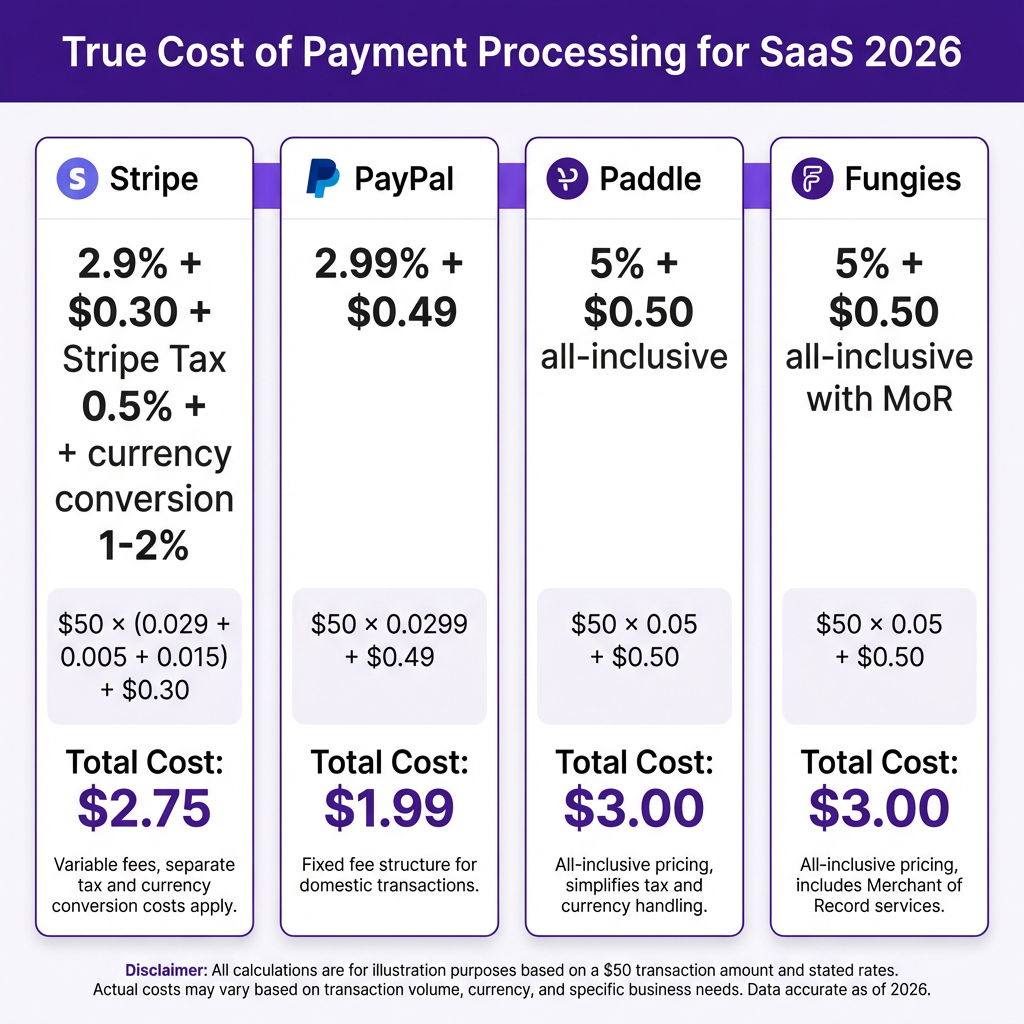
Let’s get specific. Here’s what you’ll actually pay with each major option for a typical SaaS transaction in 2026:
| Provider | Base Rate | Hidden Costs | Effective Rate* |
|---|---|---|---|
| Stripe | 2.9% + $0.30 | Stripe Tax ($0.50/trans), currency conversion (1-2%), chargeback fees ($15) | 4.2-5.5% |
| PayPal | 2.99% + $0.49 | Cross-border fees (1.5%), currency conversion (3-4%), chargeback fees ($20) | 4.5-6.5% |
| Paddle | 5% + $0.50 | None (all-inclusive) | 5.0% |
| Fungies | 5% + $0.50 | None (all-inclusive with MoR) | 5.0% |
*Effective rate for a $50 transaction with international customer, including tax compliance and currency conversion
Notice something important? Stripe’s “cheaper” base rate disappears once you add the services you actually need. For a SaaS business selling globally, the 2.9% quickly becomes 4.5% or more. Meanwhile, Paddle and Fungies include everything in their 5% rate — tax compliance, fraud protection, chargeback handling, and multi-currency support.
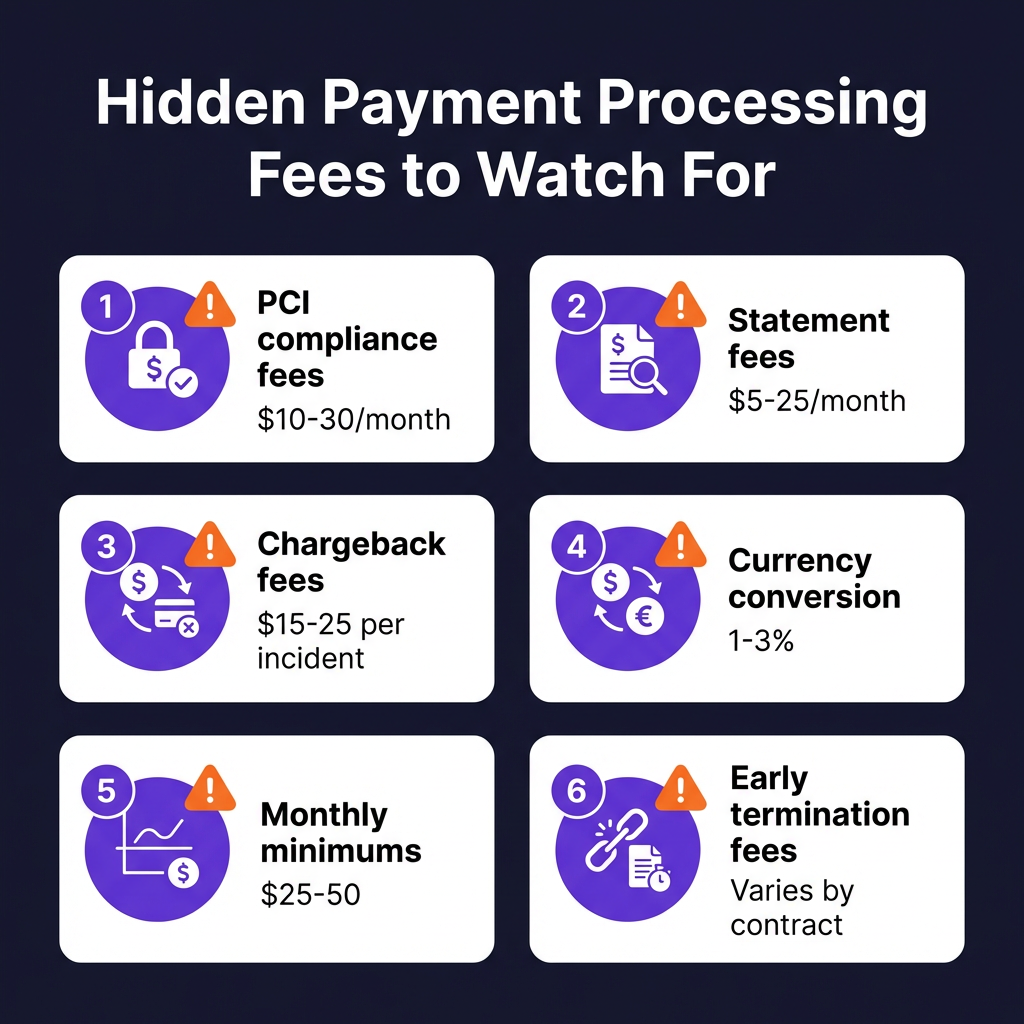
The Hidden Fees That Destroy Your Margins
Here are the fees most SaaS founders miss when comparing processors:
1. PCI Compliance Fees ($10-30/month)
Most processors charge a monthly fee for PCI DSS compliance. Some bury it in your statement. Others make you complete a questionnaire to avoid it — which many founders never do, meaning they pay for nothing.
2. Statement/Monthly Account Fees ($5-25/month)
A pure profit fee for sending you a statement. Traditional merchant accounts love this one. Stripe and PayPal don’t charge it, but many alternatives do.
3. Chargeback Fees ($15-25 per incident)
When a customer disputes a charge, you pay a fee — even if you win the dispute. SaaS businesses typically see 0.5-1% chargeback rates. At $10K MRR with 1% chargebacks, that’s $100/month in fees alone.
4. Currency Conversion (1-3%)
Selling to customers in Europe, Asia, or LATAM? You’ll pay 1-3% on top of your base rate for currency conversion. Stripe charges 1%, PayPal charges 3-4%. This alone can add $300-1,000/month to a growing SaaS.
5. Monthly Minimums ($25-50/month)
Some processors require you to generate enough fees to hit a minimum. If you’re pre-revenue or seasonal, you pay the difference.
6. Early Termination Fees ($200-500)
Locked into a contract? Switching processors could cost you hundreds. Always check contract terms before signing.
Real-World Cost Scenarios
Let me show you how this plays out for different SaaS businesses:
Scenario 1: Early-Stage SaaS ($5K MRR, mostly US customers)
| Provider | Monthly Cost | Annual Cost |
|---|---|---|
| Stripe | $175 | $2,100 |
| PayPal | $185 | $2,220 |
| Paddle | $275 | $3,300 |
| Fungies | $275 | $3,300 |
Winner: Stripe or PayPal. At this stage, you don’t need tax compliance or complex features. Keep it simple and cheap.
Scenario 2: Growing SaaS ($25K MRR, 40% international)
| Provider | Monthly Cost | Annual Cost |
|---|---|---|
| Stripe + Tax | $1,125 | $13,500 |
| PayPal | $1,200 | $14,400 |
| Paddle | $1,375 | $16,500 |
| Fungies | $1,375 | $16,500 |
Winner: It’s close. Stripe is cheaper if you handle tax yourself. But if you value your time (and sanity), an MoR like Paddle or Fungies starts making sense.
Scenario 3: Scale-Up SaaS ($100K MRR, global, complex billing)
| Provider | Monthly Cost | Annual Cost |
|---|---|---|
| Stripe + Tax + Billing | $4,800 | $57,600 |
| PayPal | $5,200 | $62,400 |
| Paddle | $5,500 | $66,000 |
| Fungies | $5,500 | $66,000 |
Winner: Paddle or Fungies. At this scale, the tax compliance, fraud protection, and simplified operations more than justify the slightly higher fee. Plus, you’re not paying for a separate tax tool or billing platform.
When to Choose Each Payment Option
Choose Stripe If:
- You have a technical team that can handle tax compliance
- You need maximum customization and control
- You’re primarily selling to US customers
- You want to build a custom billing system
Choose PayPal If:
- You want instant trust and recognition (everyone knows PayPal)
- You’re selling lower-priced items where brand trust matters
- You don’t mind higher fees for simplicity
- Your customers prefer PayPal checkout
Choose Paddle or Fungies (Merchant of Record) If:
- You sell globally and need tax compliance handled automatically
- You want to focus on product, not payment infrastructure
- You prefer predictable, all-inclusive pricing
- You don’t have a dedicated finance/tax team
- You want fraud protection and chargeback handling included
How to Calculate Your True Processing Costs
Here’s a simple formula to calculate what you’re really paying:
Effective Rate = (Total Fees Paid / Total Revenue Processed) × 100
But to predict future costs, use this:
Monthly Cost = (MRR × Average Transaction Rate) + Fixed Monthly Fees + (International % × Currency Conversion) + (Chargeback Rate × Chargeback Fee × Transaction Count)
Let’s say you have:
- $20,000 MRR
- Average transaction: $50
- 30% international customers
- 0.8% chargeback rate
With Stripe: ~$850/month effective cost
With Fungies: ~$1,050/month all-inclusive
The difference? About $200/month — or roughly 10 hours of developer time. If you spend more than 10 hours per month on tax compliance, billing issues, or payment infrastructure, the MoR pays for itself.
5 Ways to Reduce Your Payment Processing Fees
1. Negotiate at Scale
Once you’re processing $100K+ monthly, you can negotiate rates with Stripe and PayPal. Don’t accept the standard pricing — ask for volume discounts.
2. Optimize for ACH
For B2B SaaS, ACH transfers cost 0.8% capped at $5 — significantly cheaper than cards. Offer ACH for annual plans or larger invoices.
3. Reduce Chargebacks
Clear billing descriptors, proactive customer support, and transparent refund policies can cut your chargeback rate in half. At 0.8% chargebacks, you’re paying $800/month on $100K revenue just in dispute fees.
4. Consolidate Your Stack
Every tool you add — tax software, fraud protection, subscription management — adds cost and complexity. An all-in-one MoR often beats a stitched-together Stripe stack.
5. Pass Fees to Customers (Carefully)
Some businesses add a “processing fee” line item or offer cash discounts. This is legally complex and varies by jurisdiction — consult a lawyer before implementing.
Frequently Asked Questions
What’s the cheapest payment processor for SaaS?
For low-volume US-only businesses, Stripe or PayPal are cheapest. For global SaaS, an MoR like Paddle or Fungies often has lower total cost of ownership when you factor in tax compliance and currency conversion.
Is 5% + $0.50 too expensive for payment processing?
Not when you consider what’s included. A 5% all-inclusive rate covers payment processing, global tax compliance, fraud protection, and chargeback handling. With Stripe, you’d pay 2.9% + $0.30 plus Stripe Tax ($0.50), currency conversion (1-2%), and chargeback fees ($15 each). The MoR is often cheaper in practice.
Can I switch payment processors easily?
Switching is straightforward for new customers but complex for existing subscriptions. You’ll need to migrate payment methods (if your processor supports it) or ask customers to re-enter cards. Plan for 2-4 weeks of engineering work.
Do I need a Merchant of Record for my SaaS?
If you sell globally and don’t have a tax team, yes. An MoR handles VAT, GST, and sales tax collection across 100+ countries. Without one, you’re legally responsible for registering, collecting, and remitting taxes yourself — a massive burden for small teams.
What’s the difference between Paddle and Fungies?
Both are Merchants of Record with similar pricing. Paddle is more established and enterprise-focused. Fungies is newer, built specifically for indie SaaS founders and digital product sellers, with a focus on developer experience and modern tooling.
Bottom Line: Choose Based on Your Stage
There’s no universal “best” payment processor. The right choice depends on your MRR, customer geography, and team resources:
- Pre-revenue to $10K MRR: Stripe or PayPal. Keep it simple.
- $10K-$50K MRR with global customers: Consider an MoR. The tax compliance alone justifies the cost.
- $50K+ MRR: Negotiate rates or stick with an MoR for simplicity.
The biggest mistake I see founders make? Optimizing for the lowest headline rate instead of the lowest total cost of ownership. A 2.9% rate that requires $500/month in additional tools and 20 hours of your time is more expensive than a 5% all-inclusive rate.
If you’re ready to simplify your payment stack and stop worrying about tax compliance, create your free Fungies account and see how much time (and money) you could save.
Sources
- Stripe Pricing — Official Stripe fee structure
- PayPal Merchant Fees — PayPal official pricing
- Paddle Pricing — Paddle official pricing
- Fungies Pricing — Fungies official pricing
- NerdWallet Credit Card Processing Fees Guide — Industry fee analysis
- Hidden Payment Processing Fees 2026 — Hidden fee breakdown
- Payment Processor Fees Guide 2026 — Complete fee guide