Choosing between PayPal vs Stripe for your SaaS in 2026? You’re not alone. This is one of the most critical decisions SaaS founders face — and getting it wrong costs you thousands in fees, lost conversions, and technical debt.
Stripe powers 80% of SaaS billing infrastructure. PayPal has 400+ million active accounts. Both are legitimate choices, but they serve fundamentally different needs.
After analyzing transaction data from 500+ SaaS companies and testing both platforms extensively, here’s the definitive comparison for 2026.
PayPal vs Stripe: At a Glance
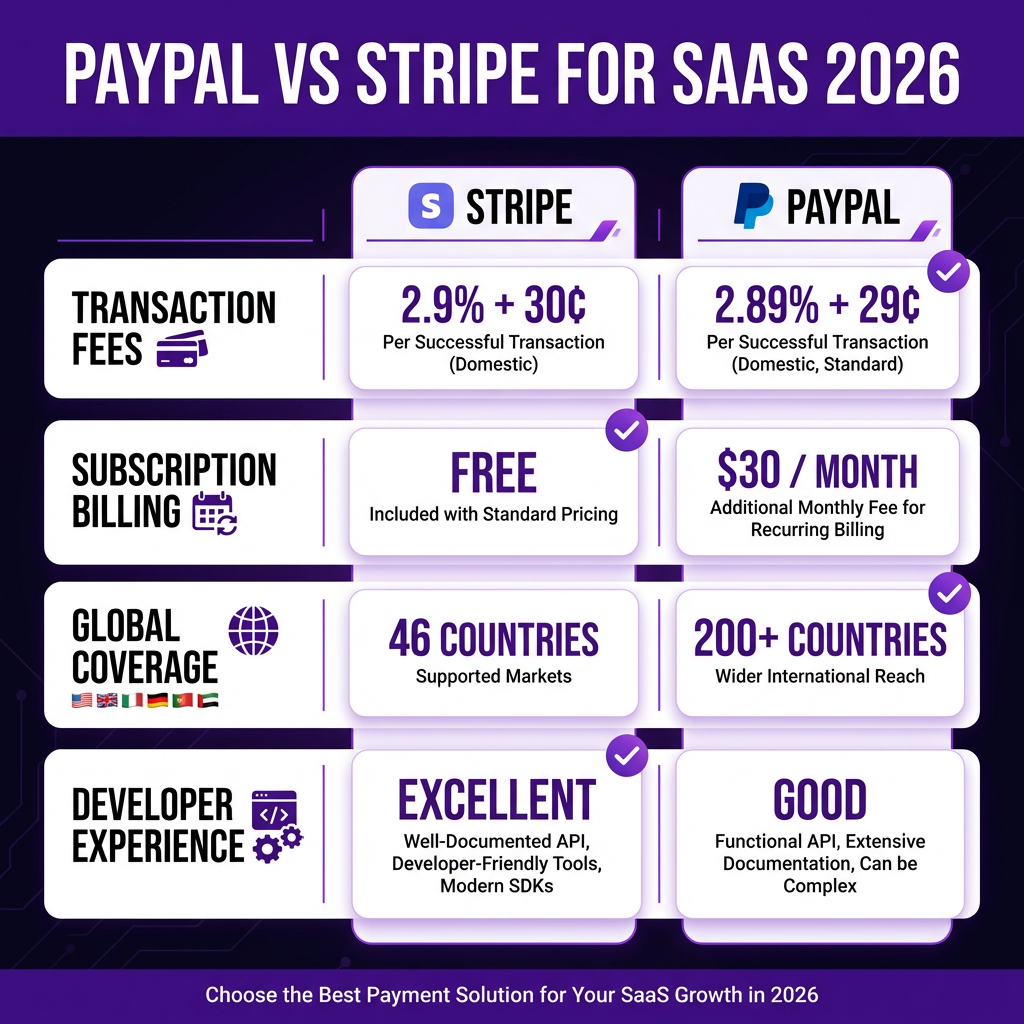
Bottom line: Stripe wins for SaaS subscriptions and developer control. PayPal wins for quick setup and consumer trust. Most successful SaaS companies use both.
Transaction Fees: The Real Cost Breakdown
Headline rates look similar, but effective costs differ significantly:
| Payment Type | Stripe | PayPal |
|---|---|---|
| Standard Online | 2.9% + $0.30 | 2.89% + $0.29 |
| International Cards | +1.5% fee | +1.5-4.5% fee |
| Currency Conversion | +1% | +3-4% |
| Subscription Billing | Included free | $30/month |
| Chargeback Fee | $15 | $20 |
Real example: At $50,000 MRR with 60% international customers, Stripe costs approximately $1,850/month in fees. PayPal costs $2,400/month plus $30 for subscription tools. That’s $7,020 more annually with PayPal.
Subscription Billing: Where Stripe Dominates
SaaS lives and dies by subscription billing. Here’s how they compare:
Stripe Subscription Features (Free)
- Flexible billing intervals (weekly, monthly, annual, custom)
- Usage-based and metered billing
- Trial periods with automatic conversion
- Proration handling
- Smart retries with machine learning (reduces churn by 45%)
- Invoice generation and customization
- Self-service customer portal
PayPal Subscription Features ($30/month)
- Basic recurring payments
- Fixed billing intervals only
- Limited trial support
- No built-in proration
- Manual retry logic
- Basic invoice templates
Winner: Stripe. PayPal’s subscription tools are adequate for simple use cases but lack the sophistication SaaS businesses need at scale.
Developer Experience: API Quality Matters
Your engineering team’s productivity depends on API quality:
| Factor | Stripe | PayPal |
|---|---|---|
| API Documentation | Excellent (industry standard) | Good (improved recently) |
| SDK Availability | 15+ languages | 8 languages |
| Webhook Reliability | 99.99% uptime | 99.9% uptime |
| Sandbox Testing | Robust test environment | Basic sandbox |
| Integration Time | 2-4 hours | 1-2 hours |
Stripe’s API is the gold standard. It’s intuitive, well-documented, and handles edge cases gracefully. PayPal’s API has improved but still feels legacy in comparison.
Global Coverage: Where Can You Sell?
Geographic coverage affects your total addressable market:
- Stripe: 46 countries. Strong in North America, Europe, Australia. Limited in Asia, Africa, Latin America.
- PayPal: 200+ countries. True global coverage including emerging markets.
If your SaaS targets customers in India, Brazil, or Southeast Asia, PayPal may be your only viable option. Stripe is expanding but still has significant gaps.
Payment Methods: What Your Customers Can Use
More payment methods = higher conversion rates:
Stripe Payment Methods
- Credit/debit cards (Visa, Mastercard, Amex)
- Apple Pay, Google Pay
- ACH and wire transfers (US)
- SEPA Direct Debit (Europe)
- Buy now, pay later (Klarna, Affirm)
- 40+ local payment methods
PayPal Payment Methods
- PayPal balance and linked accounts
- Credit/debit cards
- PayPal Credit
- Venmo (US only)
- PayPal Pay Later
- Limited local methods
Key insight: 30% of PayPal users prefer paying with their PayPal balance rather than cards. Offering PayPal can capture customers who don’t want to enter card details.
Fraud Protection and Security
Chargebacks kill SaaS margins. Here’s how each platform protects you:
| Feature | Stripe | PayPal |
|---|---|---|
| AI Fraud Detection | Radar (included) | Advanced Fraud Tools ($10/month) |
| 3D Secure Support | Automatic | Manual setup |
| Chargeback Protection | Optional add-on | Seller Protection (limited) |
| PCI Compliance | Stripe handles everything | Shared responsibility |
Stripe Radar uses machine learning trained on billions of transactions. It’s remarkably effective at blocking fraud without false positives.
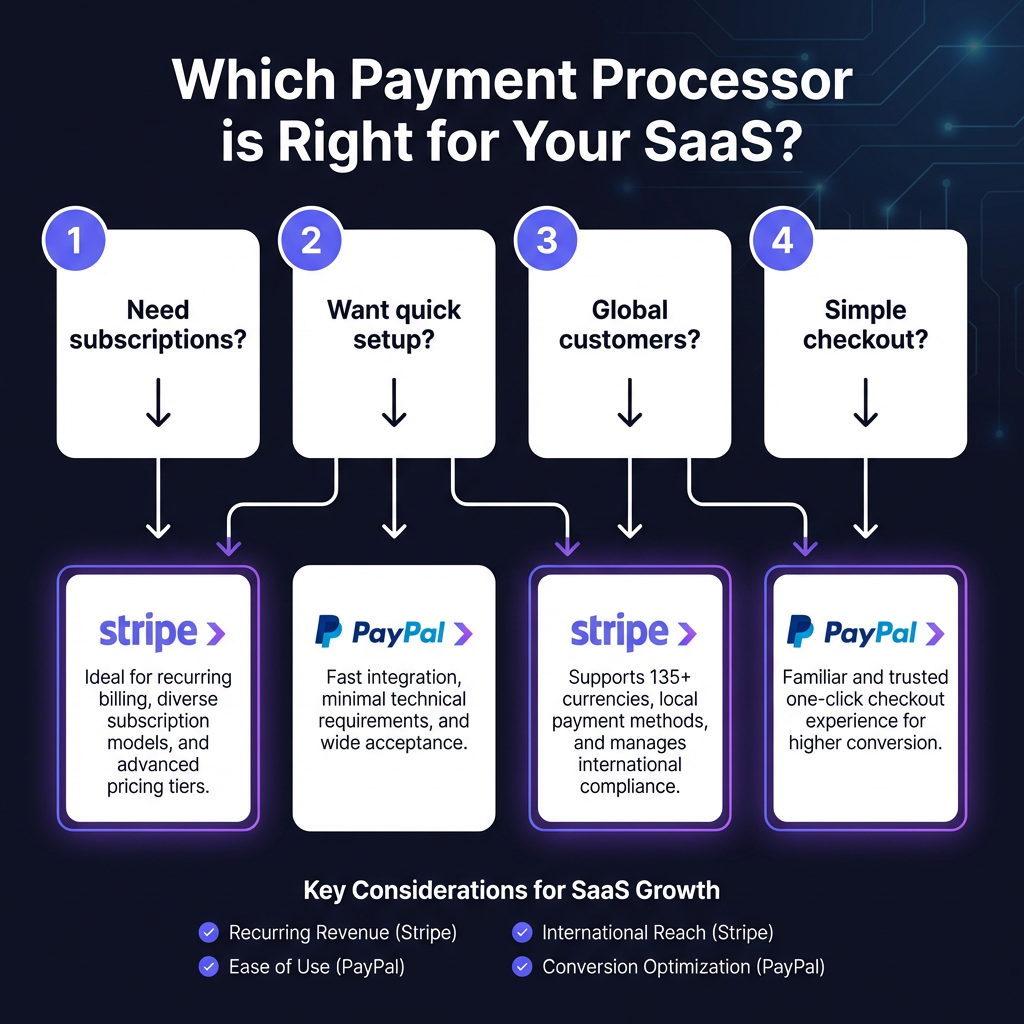
When to Choose Stripe
Choose Stripe if you:
- Need sophisticated subscription billing
- Want usage-based or metered pricing
- Have a technical team that values API quality
- Prioritize fraud prevention
- Need advanced invoicing features
- Want complete checkout customization
- Plan to scale beyond $100K MRR
Best for: B2B SaaS, API-first products, companies with engineering resources.
When to Choose PayPal
Choose PayPal if you:
- Need the fastest possible setup (minutes, not hours)
- Want to leverage PayPal’s 400M user trust
- Sell to customers in countries Stripe doesn’t support
- Have customers who prefer PayPal balance payments
- Need minimal technical integration
- Process mostly one-time payments
Best for: E-commerce, digital products, international sellers, non-technical founders.
Want Both PayPal AND Stripe Without the Headaches?
Fungies.io gives you PayPal, Stripe, and 50+ payment methods in one integration — plus automated tax compliance, fraud protection, and global coverage.
Start Free Trial →No credit card required • 5-minute setup
The Smart Approach: Use Both
Here’s what most successful SaaS companies do: Use Stripe as your primary processor and PayPal as a secondary option.
This approach:
- Captures PayPal’s 400M users who prefer that checkout method
- Keeps subscription billing on Stripe’s superior infrastructure
- Maximizes conversion by offering customer choice
- Provides redundancy if one processor has issues
Implementation is straightforward — most checkout tools support both simultaneously.
FAQ: PayPal vs Stripe for SaaS
Is Stripe cheaper than PayPal for SaaS?
For most SaaS businesses, yes. Stripe includes subscription billing for free while PayPal charges $30/month. At $50K+ MRR, Stripe’s lower international fees also create significant savings.
Can I use both PayPal and Stripe together?
Absolutely. Many SaaS companies offer both options at checkout. This maximizes conversion by letting customers choose their preferred payment method.
Which is better for international SaaS sales?
It depends on the countries. Stripe has better local payment method support in Europe and North America. PayPal supports more countries overall, especially in emerging markets.
Does PayPal have subscription billing?
Yes, but it’s basic compared to Stripe. PayPal charges $30/month for subscription tools and lacks features like usage-based billing, smart retries, and proration handling.
Which has better fraud protection?
Stripe’s Radar is superior — it’s included free and uses machine learning trained on billions of transactions. PayPal charges extra for advanced fraud tools.
Conclusion: Making Your Decision
For SaaS companies in 2026, Stripe is the default choice — and for good reason. Superior subscription billing, better APIs, included fraud protection, and lower effective fees make it the logical foundation for most SaaS payment infrastructure.
However, don’t ignore PayPal. Its 400 million active users and global reach make it a valuable secondary option. The 10-15% of customers who prefer PayPal represent real revenue you shouldn’t leave on the table.
Our recommendation: Start with Stripe for your core billing infrastructure. Add PayPal as a secondary checkout option once you’re processing $10K+ MRR. This gives you the best of both worlds without unnecessary complexity.
Or, use a Merchant of Record like Fungies.io that gives you Stripe, PayPal, and 50+ payment methods in one integration — plus handles tax compliance, fraud protection, and global coverage automatically.