Here’s a number that keeps SaaS founders awake at night: 68% of online shopping carts are abandoned before checkout completion. For SaaS companies, that translates directly to lost revenue — and often, the culprit isn’t your product or pricing. It’s your payment integration.
I’ve seen too many technically solid SaaS products hemorrhage customers at the final step. The checkout flow breaks. The webhook fails silently. A subscription renewal doesn’t process because the card expired and nobody built dunning logic. These aren’t edge cases — they’re daily realities for teams that treat payments as an afterthought.
This guide is for developers who need to get payment integration right the first time. We’ll cover everything from choosing your payment architecture to securing webhooks, handling edge cases, and building a system that scales. Whether you’re integrating Stripe, Paddle, or a Merchant of Record like Fungies, the principles here will save you from the expensive mistakes I’ve watched other teams make.
What Is SaaS Payment Integration?
SaaS payment integration is the technical infrastructure that enables your application to accept payments, manage subscriptions, handle billing events, and maintain financial records. It’s not just “adding a checkout button” — it’s a complete system that touches nearly every part of your application.
A proper SaaS payment integration includes:
- Payment collection: Capturing card details, processing one-time charges, and setting up recurring billing
- Subscription management: Creating, updating, canceling, and pausing subscriptions with proper proration
- Webhook handling: Receiving and processing asynchronous events like successful payments, failed charges, and subscription changes
- Customer portal: Allowing users to manage their payment methods, view invoices, and update billing details
- Dunning management: Recovering failed payments through retry logic and customer communication
- Tax compliance: Calculating, collecting, and remitting sales tax and VAT based on customer location
- Reporting and reconciliation: Matching payment events to your internal records for accurate financial reporting
The complexity scales with your business model. A simple monthly subscription is straightforward. But add usage-based billing, multiple pricing tiers, annual plans with monthly payment options, and global tax requirements — suddenly you’re managing a system that touches your database, your email service, your accounting software, and your customer support tools.
Why Payment Integration Matters More Than Ever in 2026
The SaaS landscape has shifted dramatically. Here’s what’s changed and why your payment integration strategy needs to keep up:
Global Tax Enforcement Is Tightening
Tax authorities worldwide have gotten serious about digital sales. The EU’s VAT rules, US state sales tax requirements, and new regulations in markets like India and Brazil mean that selling globally without proper tax handling is a liability risk. In 2026, “we’ll figure out taxes later” isn’t a viable strategy — auditors are actively targeting SaaS companies.
Customer Expectations Have Evolved
Users expect frictionless checkout, multiple payment methods, and instant access after purchase. They want to upgrade, downgrade, or cancel without emailing support. They expect invoices in their inbox immediately. Fail to deliver, and they’ll churn to a competitor who does.
Payment Fraud Is More Sophisticated
Card testing attacks, friendly fraud, and stolen credential usage are up across the board. A poorly secured payment integration isn’t just a compliance risk — it’s an open door for fraud that can result in chargeback rates high enough to get you banned from payment processors.
The Cost of Getting It Wrong Has Increased
Payment processors now scrutinize chargeback rates more closely. Exceed 1% and you’re in remediation. Exceed 2% and you can lose your account entirely. The technical debt of a bad payment integration doesn’t just slow you down — it can kill your business.
Choosing Your Payment Architecture
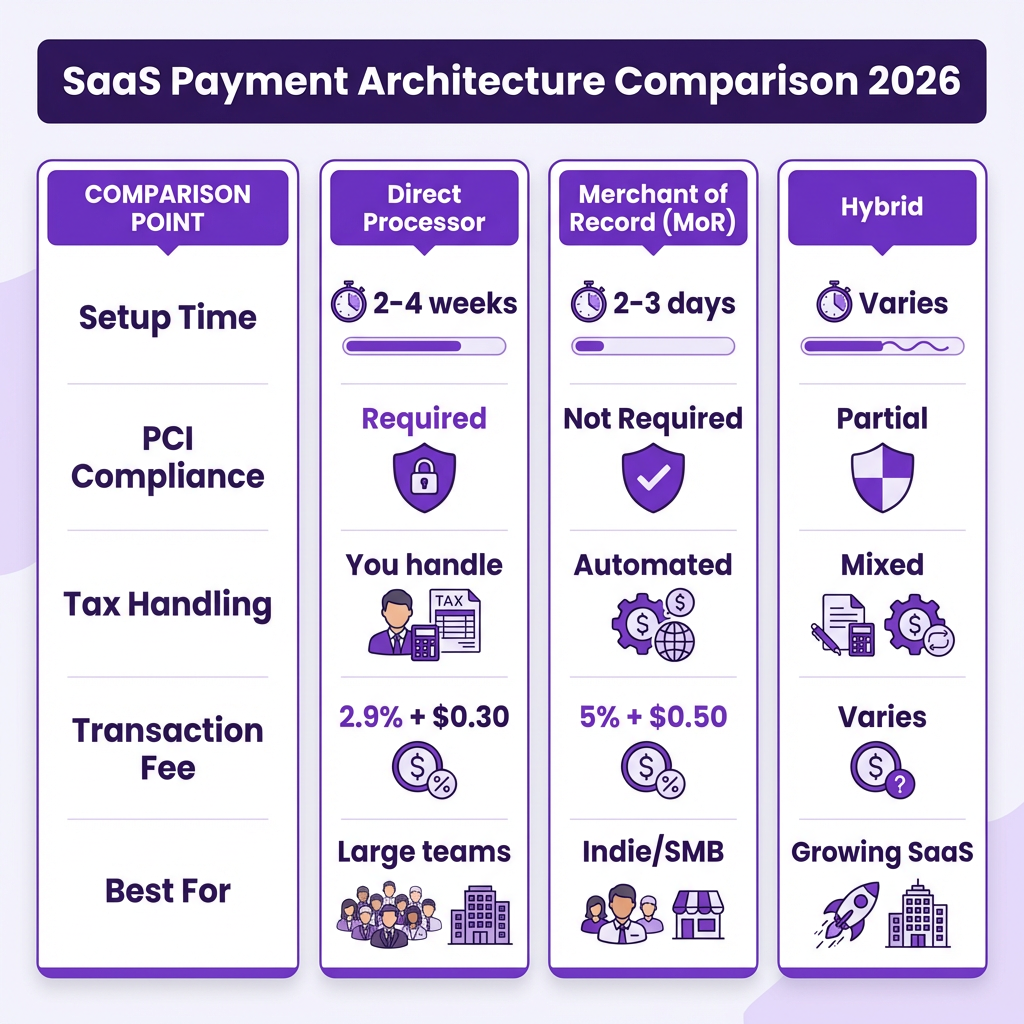
Before writing any code, you need to decide on your payment architecture. This choice affects everything from your compliance burden to your development timeline.
Option 1: Direct Payment Processor Integration (Stripe, Adyen, etc.)
Best for: Teams with dedicated payment infrastructure expertise, complex custom billing needs, or those who want maximum control.
With a direct integration, you connect to a payment processor’s API and build your own subscription logic, tax handling, and compliance systems. You maintain your own merchant account and assume full liability for chargebacks, fraud, and tax compliance.
Pros:
- Lowest per-transaction fees (typically 2.9% + $0.30)
- Complete control over the checkout experience
- Direct access to raw payment data
- Flexibility to build custom billing logic
Cons:
- You’re responsible for PCI DSS compliance
- You handle all tax calculation and remittance
- You manage chargeback disputes and fraud prevention
- Significant development and maintenance overhead
Option 2: Merchant of Record (Fungies, Paddle, Lemon Squeezy)
Best for: Indie developers, small teams, and anyone who wants to offload compliance and tax complexity.
A Merchant of Record (MoR) becomes the legal seller of your product. They handle payment processing, tax compliance, chargeback management, and regulatory requirements. You integrate with their API, and they handle the complexity.
Pros:
- Zero PCI compliance burden — card data never touches your servers
- Automatic global tax calculation and remittance
- Chargeback handling and fraud protection included
- Faster time to market — often days instead of weeks
Cons:
- Higher per-transaction fees (typically 5% + $0.50)
- Less control over the exact checkout flow
- Dependent on the MoR’s uptime and policies
Option 3: Hybrid Approach
Best for: Growing SaaS companies with complex needs that still want to offload compliance.
Some teams use a Merchant of Record for initial launch and simpler billing scenarios, then migrate to direct processor integration as they scale and develop in-house expertise. This is a valid strategy, but plan for the migration complexity — switching payment providers with active subscriptions is non-trivial.
The Complete SaaS Payment Integration Checklist
Here’s the implementation framework I use for every SaaS payment integration. Treat this as your roadmap.
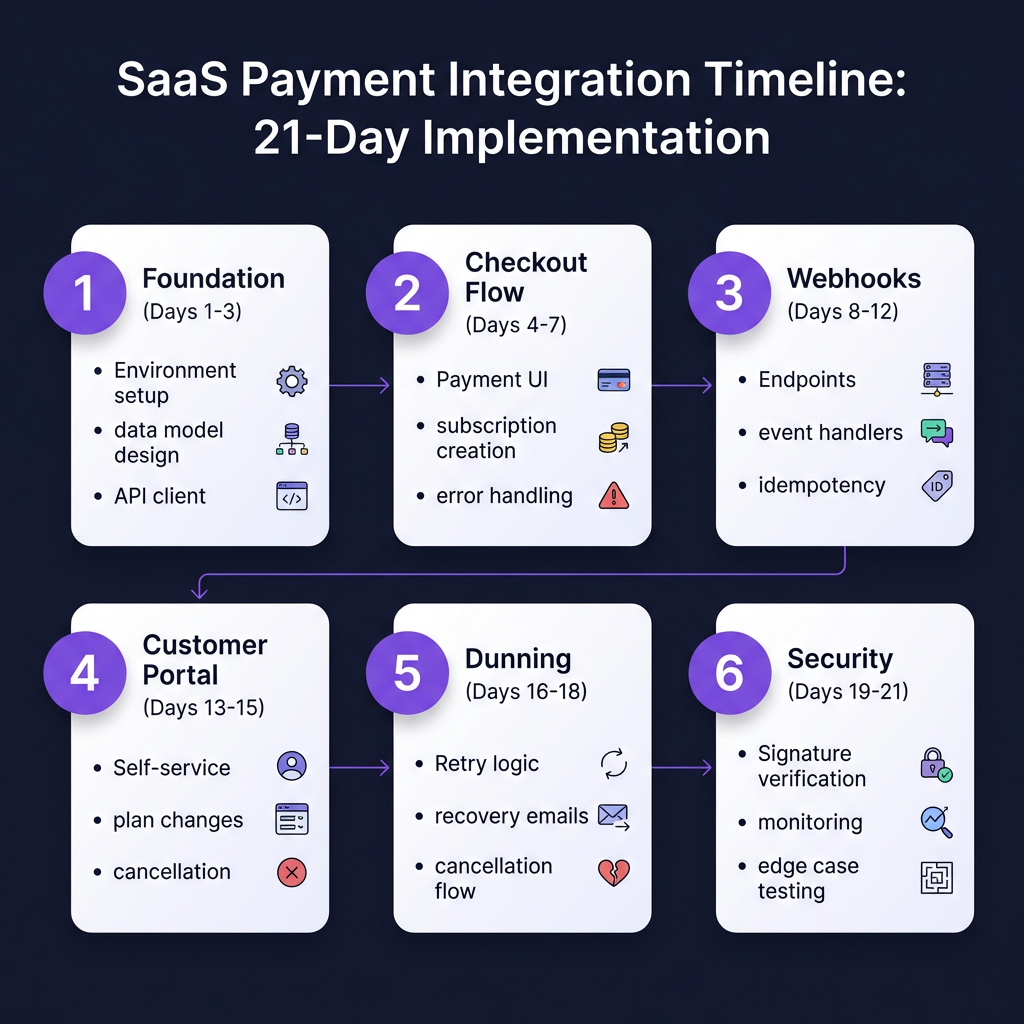
Phase 1: Foundation (Days 1-3)
1. Set Up Your Development Environment
- Create sandbox/test accounts with your chosen provider
- Configure webhook endpoints for local development (use ngrok or similar)
- Set up environment variables for API keys (never commit these to version control)
2. Design Your Data Model
You’ll need tables/collections for:
- Customers (linked to your user accounts)
- Subscriptions (status, plan, billing cycle)
- Payment methods (cards, bank accounts)
- Invoices (for record-keeping and customer access)
- Events/webhook logs (for debugging and auditing)
Critical: Store provider-specific IDs (like Stripe’s customer_id or Paddle’s subscription_id) in your database. You’ll need these for API calls.
3. Implement Core API Client
Create a service class/module that wraps your payment provider’s SDK. This abstraction layer makes it easier to switch providers later if needed, mock payments in tests, and add logging and error handling consistently.
Phase 2: Checkout Flow (Days 4-7)
4. Build the Payment Collection UI
For PCI compliance, never collect card details directly on your server. Use hosted checkout pages, embedded checkout components, or tokenization where the provider’s JavaScript library creates tokens.
5. Implement Subscription Creation
When a customer completes checkout: create the customer in your payment provider, attach the payment method, create the subscription, store all provider IDs in your database, and provision access to your product immediately.
6. Handle Immediate Failures
Cards can fail for many reasons: insufficient funds, incorrect CVV, bank rejection. Your checkout flow needs to display clear, actionable error messages, allow customers to try a different payment method, and log failures for analysis.
Phase 3: Webhook Infrastructure (Days 8-12)
7. Set Up Webhook Endpoints
Webhooks are how your payment provider tells you about events: successful payments, failed charges, subscription cancellations, and more. Create a dedicated endpoint that verifies webhook signatures, parses the event payload, updates your database accordingly, and returns a 200 status quickly.
8. Implement Event Handlers
At minimum, handle these events:
| Event | Action Required |
|---|---|
| invoice.paid | Provision/extend access, send receipt |
| invoice.payment_failed | Initiate dunning, notify customer |
| customer.subscription.deleted | Revoke access, initiate offboarding |
| customer.subscription.updated | Update plan features, handle proration |
| charge.dispute.created | Alert team, gather evidence |
9. Build Idempotency Protection
Webhooks can be delivered multiple times. Every handler must be idempotent — processing the same event twice should have the same result as processing it once. Use the event ID to deduplicate.
Phase 4: Customer Management (Days 13-15)
10. Create Customer Portal
Build a self-service area where customers can update payment methods, view billing history and download invoices, upgrade/downgrade plans, and cancel subscriptions.
11. Implement Plan Changes
Handle upgrades and downgrades with proper proration. Upgrades should charge the difference immediately and grant new features. Downgrades should apply credit to next invoice and restrict features at period end.
12. Build Cancellation Flow
Don’t just delete the subscription. Implement cancellation surveys to gather feedback, grace periods allowing access until period end, win-back offers with discounts to stay, and easy reactivation with one-click resubscription.
Phase 5: Dunning and Recovery (Days 16-18)
13. Implement Retry Logic
When payments fail, retry with an exponential backoff: immediate retry on Day 0, second attempt on Day 1, third attempt on Day 3, and final attempt on Day 5 before cancellation.
14. Create Dunning Emails
Send automated emails at each retry point: notify about the failed payment, provide a direct link to update payment method, and warn about impending cancellation.
15. Handle Final Cancellation
If all retries fail: revoke product access, preserve data for a grace period (30 days typical), send final invoice if applicable, and offer easy reactivation.
Phase 6: Compliance and Security (Days 19-21)
16. Implement Webhook Security
Verify webhook signatures using your provider’s secret. Never trust webhook data without verification — it’s a common attack vector.
17. Set Up Logging and Monitoring
Log all payment events for debugging and auditing. Monitor for unusual failure rates, webhook delivery failures, chargeback notifications, and API errors from your provider.
18. Test Edge Cases
Before going live, test card declines at checkout, expired cards during renewal, subscription upgrades mid-cycle, immediate cancellations, and chargeback scenarios.
Webhook Security: Protecting Your Payment System
Webhooks are the Achilles’ heel of many payment integrations. They’re public endpoints that receive sensitive data — making them attractive targets for attackers.
The Risks
According to Obsidian Security’s 2026 data, the average enterprise has 47 active webhook endpoints, but security teams can only document 23% of them. When a SaaS vendor is breached, attackers often gain access to webhook credentials, allowing them to impersonate legitimate sources and inject malicious payloads.
Essential Security Practices
- Verify Signatures: Always verify the HMAC signature included in webhook headers. This proves the webhook came from your payment provider, not an attacker.
- Use HTTPS Only: Never accept webhooks over HTTP. TLS encryption prevents man-in-the-middle attacks.
- Implement IP Allowlisting: Restrict webhook acceptance to known IP ranges from your payment provider.
- Validate Payloads: Sanitize all incoming data before processing. Never trust that the payload structure matches expectations.
- Apply Least Privilege: Your webhook endpoint should only have permissions to perform necessary actions.
- Log Everything: Maintain comprehensive logs of all webhook events for forensic analysis.
- Rotate Secrets Regularly: Periodically rotate your webhook signing secrets to limit the impact of potential compromises.
Common Payment Integration Mistakes
After reviewing dozens of SaaS payment implementations, here are the mistakes I see most often:
- Not Handling Webhook Failures: Your webhook endpoint will fail. Your database will be down. Build retry logic and dead letter queues to handle these scenarios gracefully.
- Storing Sensitive Card Data: Unless you’re PCI DSS Level 1 certified (which costs $50K+ annually), you cannot store raw card numbers. Use your provider’s tokenization instead.
- Ignoring Idempotency: Processing the same webhook twice can double-charge a customer or extend their subscription twice. Always check event IDs before processing.
- Hard-Coding Pricing: Don’t hard-code prices in your application. Store them in your database or fetch from your payment provider.
- Forgetting About Taxes: If you’re using a direct processor integration, you’re responsible for tax calculation. This isn’t optional.
- No Dunning Strategy: Failed payments are inevitable. Without a dunning strategy (retries + emails), you’re leaving money on the table. A good dunning flow can recover 30-40% of failed payments.
- Poor Error Messages: “Payment failed” isn’t helpful. “Your card was declined by your bank. Please try a different payment method or contact your bank” is.
Testing Your Payment Integration
A payment integration without comprehensive testing is a disaster waiting to happen. Here’s my testing checklist:
- Unit Tests: Test each webhook handler in isolation, mock payment provider responses, verify database state changes
- Integration Tests: Test complete checkout flows, verify webhook signature verification, test plan changes and proration
- End-to-End Tests: Use provider test cards to simulate various scenarios, test the full customer lifecycle, verify email delivery
- Load Tests: Simulate high-volume webhook delivery, ensure your database can handle concurrent subscription updates
FAQ
Q: How long does a typical SaaS payment integration take?
A basic integration with a Merchant of Record can be live in 2-3 days. A full custom integration with Stripe or Adyen typically takes 2-4 weeks for an experienced developer. Add another 1-2 weeks for testing and edge case handling.
Q: Should I build my own checkout or use a hosted solution?
For most SaaS companies, a hosted or embedded checkout is the right choice. It eliminates PCI compliance burden and reduces development time. Build custom only if you have very specific UX requirements and the resources to handle compliance.
Q: What’s the difference between a payment gateway and a Merchant of Record?
A payment gateway (like Stripe) processes transactions but you’re still the legal merchant responsible for taxes, compliance, and chargebacks. A Merchant of Record (like Fungies) becomes the legal seller, handling all compliance and liability for you.
Q: How do I handle payments in different currencies?
Most payment providers support multi-currency transactions. If using a direct processor, you’ll need to decide whether to present prices in local currency or charge in your base currency with conversion. MoR platforms typically handle currency conversion automatically.
Q: What happens if my webhook endpoint is down?
Payment providers retry webhook delivery with exponential backoff (typically over 24-72 hours). Implement proper monitoring so you know when webhooks are failing, and have a process for manually reconciling missed events.
Q: Do I need to be PCI compliant if I use a Merchant of Record?
No — that’s one of the main benefits. The MoR handles PCI compliance because they’re the ones processing card data. You still need basic security practices, but the heavy compliance burden is lifted.
Conclusion
Getting payment integration right is one of the highest-leverage investments you can make in your SaaS business. A smooth checkout experience converts more trials. Robust webhook handling prevents revenue leakage. Proper dunning recovers failed payments. And offloading compliance to a Merchant of Record lets you focus on your product instead of tax codes.
The checklist in this guide has been battle-tested across multiple SaaS implementations. Follow it, test thoroughly, and you’ll have a payment system that scales with your business.
If you’re looking for the fastest path to production with built-in tax compliance and zero PCI burden, Fungies handles all of this for you. One integration, global payments, and you never have to think about VAT remittance again.
Sources
- Obsidian Security: Webhook Security Best Practices 2026
- Postman Blog: Best Payment APIs for Developers 2026
- Snyk: Creating Secure Webhooks
- Stytch: Webhooks Security Best Practices
- Dodo Payments: Payment Security Best Practices for SaaS Founders
- Payroc: From Integration to Infrastructure – SaaS Payments in 2026
- SolveIt: Payment App Development Guide 2026
- Beta Tech: Modern SaaS Development and Enterprise Integrations 2026