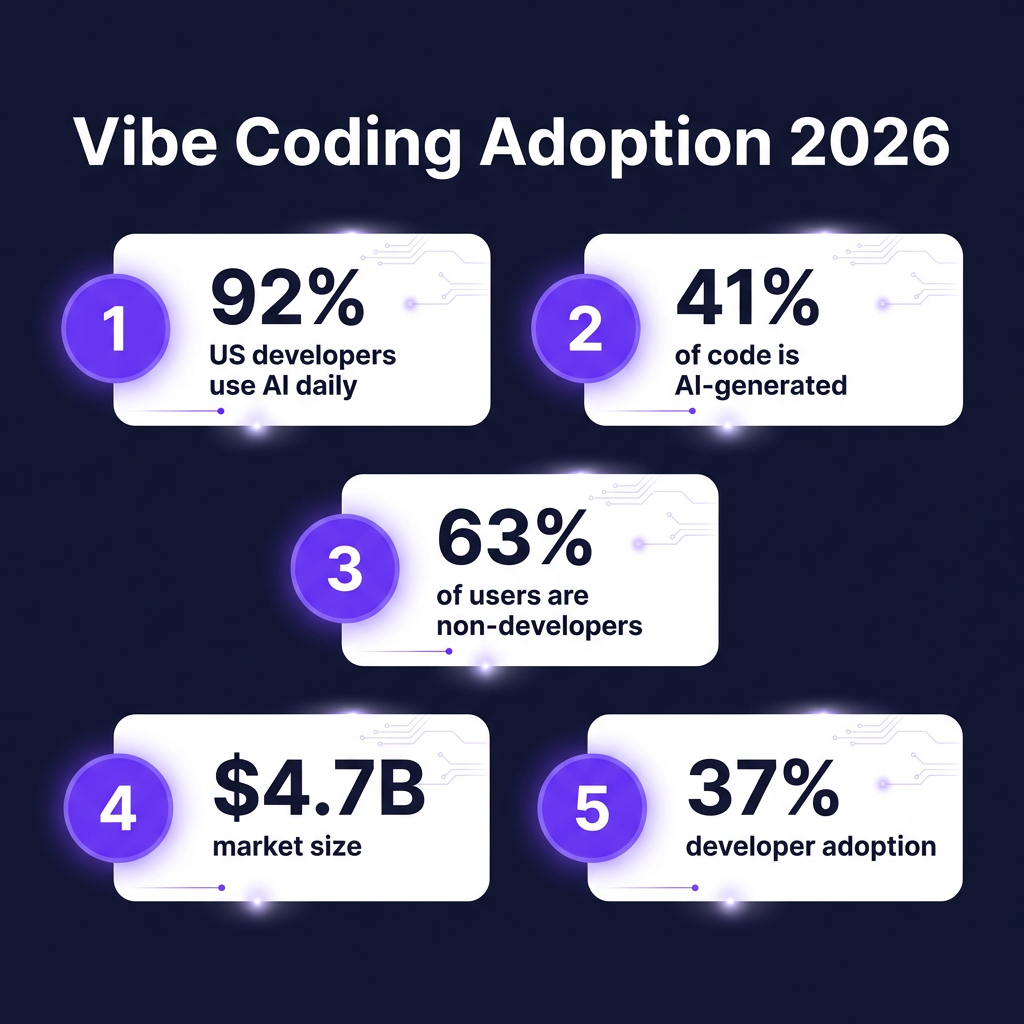
Here’s a stat that should get your attention: 92% of U.S. developers now use AI coding tools daily, and 41% of all code written globally is AI-generated. But here’s the twist — 63% of the people building with these tools aren’t developers at all.
Welcome to vibe coding — the practice of building software by describing what you want in plain English and letting AI handle the implementation. The vibe coding market hit $4.7 billion in 2026, with over $5 billion in VC funding pouring into AI coding tools in 2024 alone.
This isn’t just about developers working faster. It’s about founders, designers, and product managers building functional applications without writing a single line of code. I’ve researched and tested the leading platforms to bring you the 7 best vibe coding tools that actually deliver production-ready results.
What Is Vibe Coding (And Why It Matters in 2026)
Vibe coding is a software development approach where you describe your application in natural language, and AI generates the actual code, infrastructure, and deployment. The term gained traction in 2025 as tools like Lovable, Bolt.new, and Replit Agent made it possible to go from idea to deployed app in hours instead of weeks.
The workflow is simple: intent → prompt → generate → review → iterate. You describe what you want. The AI builds it. You refine through conversation. The barrier between “I have an idea” and “I have a working product” has never been lower.
For SaaS founders and indie developers, this changes everything. You can validate ideas faster, build MVPs without hiring engineers, and iterate based on user feedback without waiting for development cycles. The tools on this list range from pure no-code builders to AI-powered IDEs — choose based on your technical comfort level and project complexity.
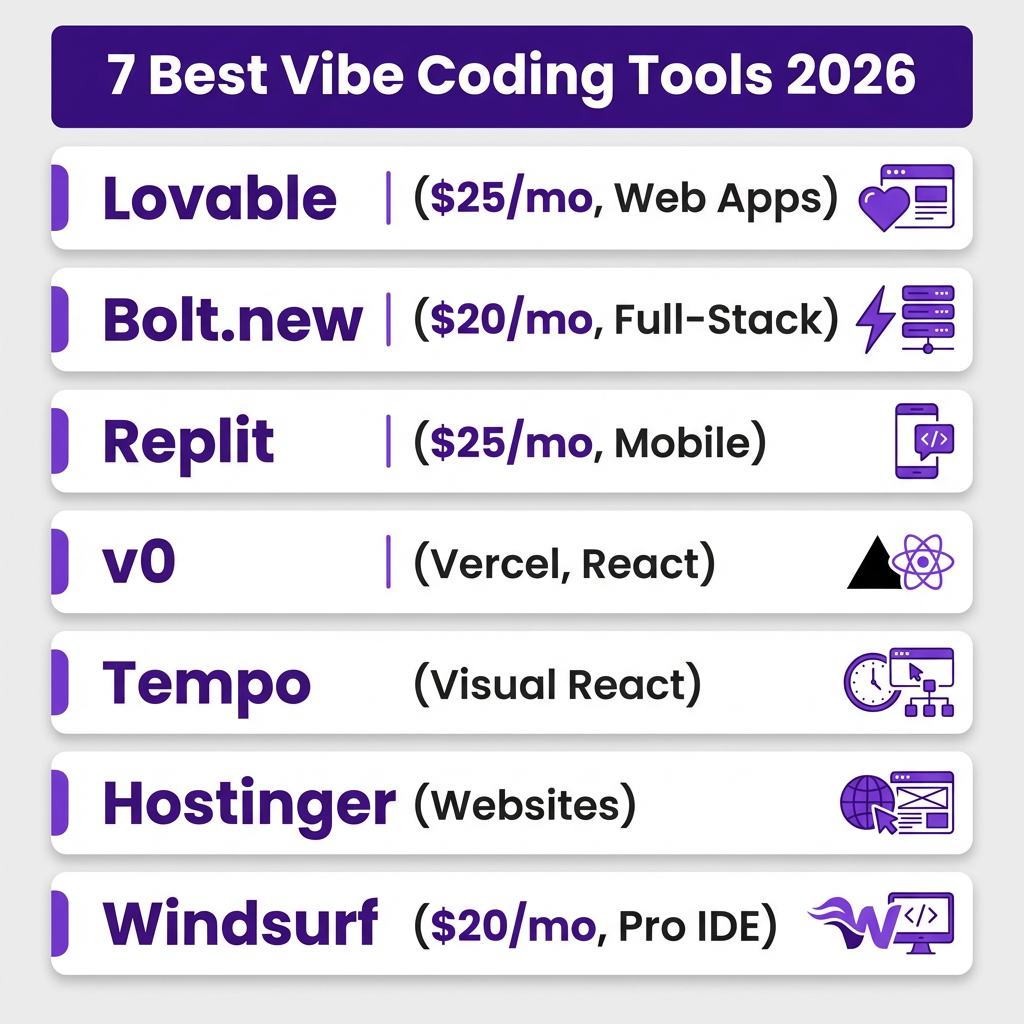
1. Lovable — Best for Beautiful Web Apps
Pricing: Free tier / Pro $25/month (unlimited users)
Lovable has earned its reputation as the most polished vibe coding platform for web applications. Where other tools generate functional but generic interfaces, Lovable consistently produces clean, modern UIs that look like they came from a professional design team.
Key Features
- Best-in-class UI generation with consistent design systems
- Visual direct editing — click any element to modify
- GitHub two-way sync for code export and version control
- Automatic fake dataset generation for realistic previews
- Built-in authentication and database integration
- Stripe payment integration for monetization
Pros and Cons
| Pros | Cons |
|---|---|
| Fastest initial build time | Web apps only (no native mobile) |
| Smoothest user experience | Limited complex backend logic |
| Unlimited team members on Pro | Less control for advanced users |
| Excellent for MVPs and landing pages | Can hit limits with scale |
Best for: Founders who want beautiful, functional web apps without design skills. Perfect for SaaS landing pages, dashboards, and internal tools.
2. Bolt.new — Best for Full-Stack Web Apps
Pricing: Free tier / Pro $20/month / Teams $30/user/month
Bolt.new (now in v2) takes a different approach from Lovable. Instead of optimizing for visual polish, Bolt focuses on full-stack capability and enterprise-grade infrastructure. The WebContainer runtime means your app runs entirely in the browser during development — no local setup required.
Key Features
- 10 million tokens per month on Pro plan (no daily cap)
- WebContainer technology for instant browser-based development
- Figma design import for pixel-perfect implementation
- Bolt v2 enterprise infrastructure for scaling
- Full backend support with databases and APIs
- One-click deployment to production
Pros and Cons
| Pros | Cons |
|---|---|
| No daily token limits | Token usage can be unpredictable |
| Strong integration ecosystem | UI generation less polished than Lovable |
| Excellent for complex applications | Steeper learning curve |
| Good code export and customization | Team plan gets expensive |
Best for: Developers and technical founders building full-stack applications with complex requirements. The token-based pricing rewards efficient prompting.
3. Replit Agent 3 — Best for Mobile Apps
Pricing: Free tier / Core $25/month
Replit has evolved far beyond its origins as a browser-based IDE. Agent 3 is their most capable autonomous coding agent yet, with a key differentiator: it’s the only major vibe coding platform that supports native mobile app development, not just mobile-responsive web apps.
Key Features
- 200-minute autonomous task execution
- Native iOS and Android app development
- Automatic hosting, authentication, and database setup
- All-in-one cloud IDE with multi-language support
- Built-in deployment and app store publishing
- Collaborative coding environment
Pros and Cons
| Pros | Cons |
|---|---|
| Only platform with true native mobile | Interface assumes coding knowledge |
| Longest autonomous operation time | Free plan limited to one 30-day app |
| Handles complete deployment pipeline | Can be overwhelming for beginners |
| Excellent for learning and prototyping | Mobile builds take longer |
Best for: Founders who need native mobile apps, not just web wrappers. Also excellent for developers who want an autonomous agent that can work independently for extended periods.
4. v0 (by Vercel) — Best for React Components
Pricing: Free tier / Included with Vercel Pro
Vercel’s v0 is laser-focused on one thing: generating React components and applications with exceptional code quality. If you’re already in the React/Next.js ecosystem, v0 produces code that feels like it was written by a senior frontend engineer.
Key Features
- Native shadcn/ui component generation
- Instant deployment to Vercel infrastructure
- Clean, exportable React/Next.js code
- Tailwind CSS integration
- Component-level generation and full apps
- TypeScript by default
Pros and Cons
| Pros | Cons |
|---|---|
| Cleanest code output of any tool | Limited backend capabilities |
| Seamless Vercel deployment | React/Next.js only |
| Excellent for component libraries | Requires technical knowledge to extend |
| Free tier generous for prototyping | Not a complete no-code solution |
Best for: React developers who want to accelerate frontend development. Great for generating UI components, landing pages, and dashboard interfaces that integrate with existing backends.
5. Tempo — Best for Visual React Editing
Pricing: Free tier / Pro plans available
Tempo occupies a unique position between design tools and development environments. It’s a visual editor specifically for React applications, letting designers and product managers generate and edit frontend code through drag-and-drop interaction combined with natural language prompts.
Key Features
- Drag-and-drop React component editing
- Designer-friendly interface
- Natural language prompt integration
- Real-time preview and code sync
- Component library integration
- Team collaboration features
Pros and Cons
| Pros | Cons |
|---|---|
| Bridges design and development | React-only ecosystem |
| Visual editing reduces iteration time | Limited backend generation |
| Great for design-system-driven teams | Smaller community than alternatives |
| Intuitive for non-developers | Advanced customization requires code |
Best for: Design teams who need to produce production React code without engineering handoffs. Excellent for maintaining design systems and iterating on UI quickly.
6. Hostinger Horizons — Best for Simple Websites
Pricing: Bundled with Hostinger hosting plans
Hostinger Horizons is the most accessible entry point into vibe coding. Bundled with Hostinger’s hosting plans, it’s designed for small business owners, bloggers, and entrepreneurs who need a professional website without the complexity of full-stack development.
Key Features
- AI-powered website builder with templates
- Integrated hosting and domain management
- E-commerce functionality
- SEO optimization tools
- 24/7 customer support
- Affordable pricing with hosting included
Pros and Cons
| Pros | Cons |
|---|---|
| Most affordable option | Less sophisticated than dedicated tools |
| Hosting included | Limited customization |
| Great for simple sites | Not suitable for complex applications |
| Excellent customer support | Code export limitations |
Best for: Small businesses and individuals who need a simple website, portfolio, or basic e-commerce store without the learning curve of more complex platforms.
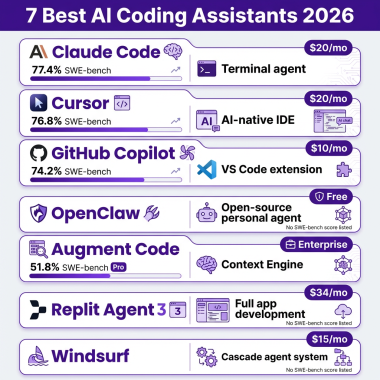
7. Windsurf — Best for Professional Developers
Pricing: $15-20/month Pro plans
Windsurf (formerly Codeium) is an AI-native IDE built for professional developers who want agentic capabilities within a traditional coding environment. Unlike the other tools on this list, Windsurf assumes you know how to code — it just makes you significantly faster.
Key Features
- Multi-file agentic editing
- Deep codebase understanding
- Advanced autocomplete and suggestions
- Integration with existing development workflows
- Support for multiple programming languages
- Local and cloud development options
Pros and Cons
| Pros | Cons |
|---|---|
| Most powerful for complex projects | Requires coding knowledge |
| Deep IDE integration | Not a no-code solution |
| Excellent for production codebases | Steeper learning curve |
| Affordable pricing | Limited appeal for non-developers |
Best for: Professional developers who want AI assistance within a full-featured IDE. Not for beginners, but powerful for experienced engineers working on complex systems.
Complete Comparison: Which Vibe Coding Tool Should You Choose?
Here’s a side-by-side comparison to help you decide based on your specific needs:
| Tool | Best For | Pro Price | Mobile | Backend | Code Export |
|---|---|---|---|---|---|
| Lovable | Beautiful web apps | $25/mo | No | Yes | Yes |
| Bolt.new | Full-stack web | $20/mo | No | Yes | Yes |
| Replit | Mobile + autonomous | $25/mo | Yes | Yes | Yes |
| v0 | React prototyping | Vercel Pro | No | Limited | Yes |
| Tempo | Visual React editing | Paid plans | No | Limited | Yes |
| Hostinger | Simple websites | Hosting bundle | No | Basic | Limited |
| Windsurf | Pro developers | $20/mo | No | Yes | N/A |
Key Takeaways: Making the Right Choice
After testing all seven platforms, here’s my practical advice for choosing the right vibe coding tool:
- Choose Lovable if you want the fastest path from idea to beautiful web app without design skills. It’s the most polished experience for non-technical founders.
- Choose Bolt.new if you’re building a complex full-stack application and need enterprise-grade infrastructure. The token model rewards efficient prompting.
- Choose Replit if you need native mobile apps or want an agent that can work autonomously for hours. It’s the only option for true iOS/Android development.
- Choose v0 if you’re already in the React ecosystem and want clean, exportable code that follows best practices.
- Choose Tempo if you’re a designer or product manager who needs to produce production React code without engineering resources.
- Choose Hostinger Horizons if you just need a simple website and want the most affordable, supported option.
- Choose Windsurf if you’re a developer who wants AI superpowers within a professional IDE.
The reality in 2026 is that most successful teams use multiple tools. You might prototype in Lovable, export to v0 for React refinement, and use Windsurf for complex backend logic. The vibe coding ecosystem is modular — mix and match based on what each tool does best.
Frequently Asked Questions
What is vibe coding?
Vibe coding is an approach to software development where you describe what you want to build in natural language, and AI generates the code, infrastructure, and deployment. Instead of writing syntax, you iterate through conversation with AI tools until you get the desired result.
Can non-developers really build apps with vibe coding tools?
Yes. 63% of vibe coding users are non-developers. Tools like Lovable, Bolt.new, and Hostinger Horizons are designed specifically for people without coding experience. However, you’ll still need to understand basic logic, user experience principles, and how to test your application.
Are vibe coding tools free?
Most vibe coding tools offer free tiers for prototyping and learning. However, to publish apps, connect custom domains, or access advanced features, you’ll need a paid plan ranging from $15-30 per month. Some platforms like Hostinger bundle the AI builder with hosting for additional value.
Which vibe coding tool is best for beginners?
Lovable is the most beginner-friendly for web apps, with the smoothest onboarding and most polished output. Hostinger Horizons is the simplest overall if you just need a basic website. Both require no prior coding knowledge.
Can I build a real production app with vibe coding?
Yes, but with caveats. Vibe coding tools can produce production-ready applications, especially for MVPs, internal tools, and straightforward SaaS products. However, complex applications with unique requirements, heavy customization, or specific performance needs will still require traditional development. Many successful founders start with vibe coding and transition to custom code as they scale.
Conclusion: The Future of Software Development
Vibe coding isn’t replacing developers — it’s democratizing software creation. The 92% of developers already using AI tools daily aren’t being automated away; they’re becoming significantly more productive. Meanwhile, the 63% of non-developers building with these tools are creating applications that would never have existed otherwise.
The $4.7 billion vibe coding market in 2026 is just the beginning. As models improve and tools become more sophisticated, the gap between “I have an idea” and “I have a product” will continue to shrink.
If you’re a SaaS founder, indie developer, or product builder, now is the time to integrate vibe coding into your workflow. Start with the tool that matches your technical level and project needs. Build something. Iterate. Ship.
And when you’re ready to monetize your creation, Fungies.io handles payments, tax compliance, and global sales — so you can focus on building, not bureaucracy.
References
- Taskade — State of Vibe Coding 2026: Market Size, Adoption & Trends. https://www.taskade.com/blog/state-of-vibe-coding
- Hashnode — The state of vibe coding in 2026: Adoption won, now what? https://hashnode.com/blog/state-of-vibe-coding-2026
- Second Talent — Top Vibe Coding Statistics & Trends [2026]. https://www.secondtalent.com/resources/vibe-coding-statistics/
- Daily.dev — Vibe Coding in 2026: How AI Is Changing the Way Developers Write Code. https://daily.dev/blog/vibe-coding-2026-ai-changing-how-developers-write-code
- Lovable — Best Vibe Coding Tools in 2026: Build Apps by Chatting. https://lovable.dev/guides/best-vibe-coding-tools-2026-build-apps-chatting
- Y Build — Replit vs Lovable vs Bolt.new: 2026 Comparison. https://ybuild.ai/en/blog/replit-vs-lovable-vs-bolt-ai-platform-comparison-2026
- NoCode MBA — Bolt vs Lovable Pricing 2026: Complete Cost Comparison. https://www.nocode.mba/articles/bolt-vs-lovable-pricing