Over 1,000 MCP servers launched in the past 18 months. Anthropic’s Model Context Protocol went from an experimental standard to the backbone of modern AI agent workflows. If you’re still writing custom integrations for every new tool your AI needs, you’re doing it wrong.
What Is MCP (Model Context Protocol)?
MCP stands for Model Context Protocol. It’s an open standard created by Anthropic in late 2024 that lets AI agents securely connect to external tools, data sources, and APIs.
Think of it like USB-C for AI. Before USB-C, every device needed its own cable, its own adapter, its own headache. After USB-C, one connector works everywhere. MCP does the same thing for AI agents.
Before MCP, every AI agent needed custom integration code for every service. Want your AI to check GitHub? Write a GitHub integration. Need it to query your database? Write another integration. Each one was a maintenance burden.
After MCP, a standardized protocol works across all compatible agents. Write once, connect everywhere. Your AI gets structured context, proper permissions, and real-time data access. The result? Fewer hallucinations, faster development, and agents that actually know what’s happening in your systems.
How MCP Works: The Technical Overview
MCP servers use JSON-RPC 2.0 as their communication protocol. This isn’t some proprietary format—it’s a well-established standard that developers already understand.
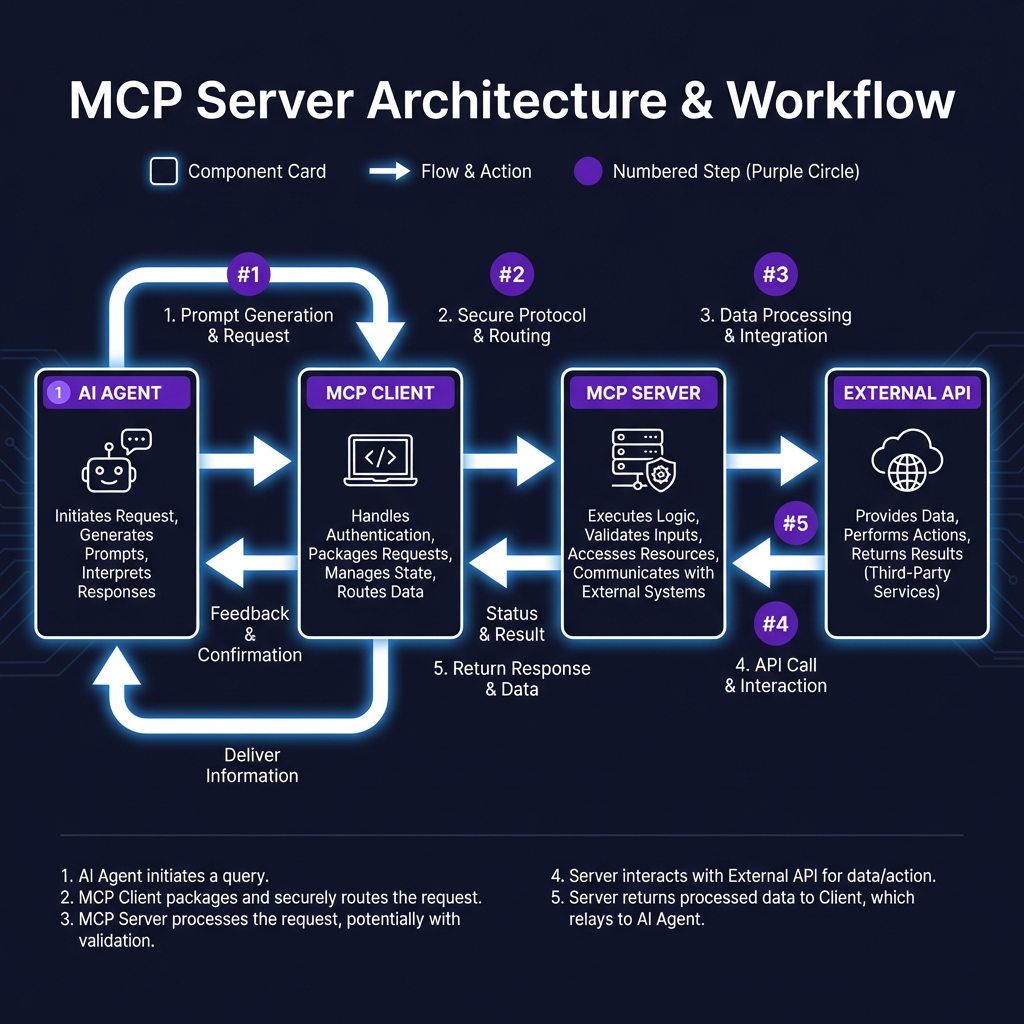
The architecture has two transport modes:
- stdio (local): The MCP server runs as a local process. Your AI agent spawns it directly. Fast, simple, perfect for development.
- HTTP/SSE (remote): The MCP server runs on a remote host. Your AI connects via HTTP or Server-Sent Events. Scalable, shareable, production-ready.
Each MCP server exposes two things:
- Tools: Callable functions your AI can invoke. “Create a GitHub issue.” “Query the database.” “Deploy to Vercel.”
- Resources: Structured data your AI can access. File contents, database schemas, API documentation.
When your AI needs to do something, it doesn’t guess. It checks what tools are available, calls the right one with proper parameters, and gets structured results back. No more parsing HTML with regex. No more hoping the API response format hasn’t changed.
Top 10 MCP Servers for Developers in 2026
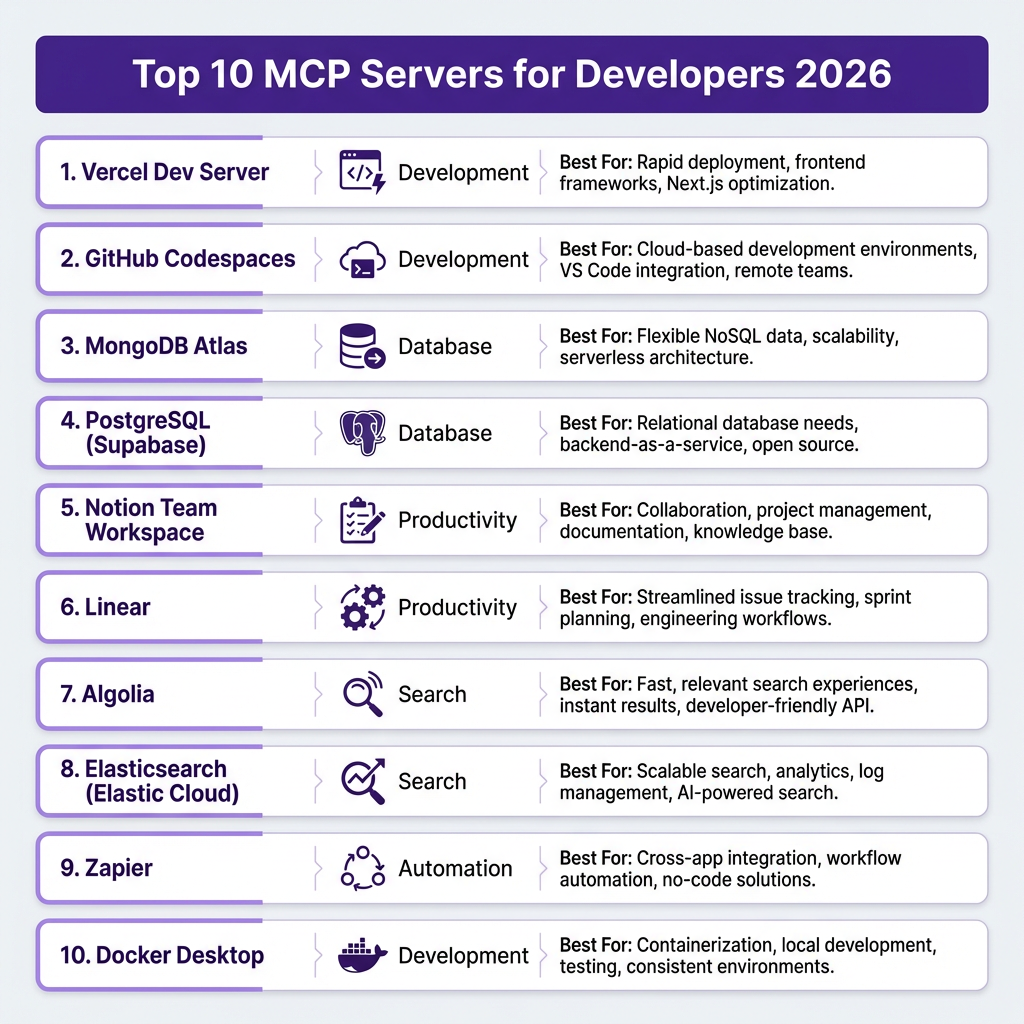
Here are the MCP servers every developer should know about. These aren’t theoretical—they’re production-ready tools that thousands of developers use daily.
1. GitHub MCP Server
The GitHub MCP server turns your AI into a repository management assistant. It handles repository operations, pull request reviews, code search, and issue tracking.
Best for: Automated code reviews, searching across repositories, generating changelogs, managing issues without leaving your editor.
Real use case: Ask Claude to “find all open PRs that modify authentication code and summarize the changes.” Instead of clicking through 15 pull requests, you get a concise summary in seconds.
2. Supabase MCP Server
Supabase is the open-source Firebase alternative. Its MCP server gives your AI direct access to database queries, schema exploration, and table management.
Best for: Writing SQL with natural language, exploring database schemas, generating migration scripts, analyzing query performance.
Real use case: “Show me all users who signed up in the last 30 days but haven’t made a purchase.” Your AI queries the database, understands the schema, and returns results without you writing SQL.
3. Vercel MCP Server
Vercel’s MCP server handles deployment management, preview URLs, and project configuration. It’s essential for teams using Next.js or any Vercel-hosted project.
Best for: Deploying previews from natural language, checking deployment status, managing environment variables, rolling back releases.
Real use case: “Deploy a preview of the feature branch I’m working on and share the URL.” Your AI triggers the deployment, waits for completion, and returns the preview link.
4. Stripe MCP Server
Stripe’s MCP server connects your AI to payment processing, customer data, subscription management, and financial reporting.
Best for: Analyzing revenue data, managing subscriptions, generating financial reports, debugging payment issues.
Real use case: “What’s our MRR trend over the last 6 months, broken down by plan type?” Your AI queries Stripe, calculates the metrics, and presents a summary with insights.
5. Notion MCP Server
Notion’s MCP server gives your AI access to documentation, knowledge bases, and project management data. It’s a bridge between your AI and your team’s brain.
Best for: Searching documentation, updating project specs, extracting requirements, maintaining wikis.
Real use case: “Find all pages related to our API authentication and summarize the current approach.” Your AI searches Notion, reads the relevant pages, and gives you a coherent summary.
6. Linear MCP Server
Linear is the issue tracker that developers actually enjoy using. Its MCP server connects your AI to issue tracking, project management, and team workflows.
Best for: Creating issues from code comments, generating sprint summaries, finding related tickets, tracking project progress.
Real use case: “Create a Linear issue for this TODO comment and assign it to the backend team.” Your AI reads the comment, creates a properly formatted issue, and links it to the right project.
7. Tavily MCP Server
Tavily provides AI-optimized web search. Its MCP server gives your agent real-time research capabilities without hallucinated facts.
Best for: Researching current events, finding documentation, verifying facts, gathering competitive intelligence.
Real use case: “What’s the latest version of React and what are the key changes?” Your AI searches the web, finds the official release notes, and gives you accurate, current information.
8. Playwright MCP Server
Playwright is Microsoft’s browser automation framework. Its MCP server lets your AI control browsers for testing, scraping, and automation.
Best for: End-to-end testing, web scraping, automated QA, generating test scripts from natural language.
Real use case: “Write a test that logs in, adds an item to cart, and checks out.” Your AI generates the Playwright code, runs it, and reports success or failure.
9. PostgreSQL MCP Server
The PostgreSQL MCP server provides direct database access without going through an ORM or API layer. Raw SQL power with AI assistance.
Best for: Complex queries, database administration, performance analysis, schema migrations.
Real use case: “Analyze our slowest queries from the last week and suggest indexes.” Your AI queries pg_stat_statements, identifies bottlenecks, and recommends specific CREATE INDEX statements.
10. Sequential Thinking MCP Server
This unique MCP server enables multi-step reasoning. It helps AI agents break down complex problems into manageable steps.
Best for: Complex debugging, architectural decisions, algorithm design, problem decomposition.
Real use case: “Help me design a caching strategy for our API.” Your AI works through the problem step-by-step: analyzing current usage patterns, identifying cacheable data, choosing eviction policies, and proposing an implementation plan.
Setting Up Your First MCP Server
Getting started with MCP is straightforward. Here’s how to set up the GitHub MCP server with Claude Desktop or Cursor.
Step 1: Install the MCP Server
Most MCP servers are distributed via npm or pip. For the GitHub server:
npm install -g @github/mcp-server
Step 2: Configure Your AI Client
Add the server to your Claude Desktop or Cursor configuration:
// claude_desktop_config.json or cursor_config.json
{
  "mcpServers": {
    "github": {
      "command": "npx",
      "args": ["-y", "@github/mcp-server"],
      "env": {
        "GITHUB_TOKEN": "your_token_here"
      }
    }
  }
}
Step 3: Restart and Verify
Restart Claude Desktop or Cursor. You should see the GitHub tools available in your AI’s context. Try asking: “What repositories do I have access to?”
Step 4: Add More Servers
Repeat the process for other servers. Your configuration can include multiple MCP servers:
{
  "mcpServers": {
    "github": { ... },
    "supabase": { ... },
    "vercel": { ... },
    "stripe": { ... }
  }
}
That’s it. No custom code. No API wrappers. Just configuration.
MCP in Action: Real Workflow Examples
Theory is nice. Let’s look at three real workflows that MCP enables.
Workflow 1: Automated Code Review Assistant
A senior developer at a 50-person startup uses Claude with the GitHub MCP server to handle initial code reviews. Every morning, they ask: “Show me all PRs opened since yesterday that touch payment code.”
Claude fetches the PRs, reads the diffs, checks for common issues (missing error handling, hardcoded values, security concerns), and generates a review summary. What used to take 45 minutes of clicking through GitHub now takes 5 minutes of reading a summary.
The developer still does the final review, but the AI handles the tedious parts: finding relevant PRs, checking for obvious issues, and formatting the feedback.
Workflow 2: Self-Service Analytics
A product manager at a SaaS company uses the Supabase MCP server to answer their own data questions. Instead of filing Jira tickets for the data team, they ask Claude directly.
“What’s our weekly active user trend for the last 8 weeks, broken down by acquisition channel?” Claude queries the database, handles the SQL, and presents a chart-ready summary. The data team isn’t bothered. The PM gets answers in minutes, not days.
Workflow 3: Documentation-Driven Development
A tech lead uses the Notion and Linear MCP servers together. When planning a feature, they ask Claude to: “Read the product spec in Notion, create implementation tasks in Linear, and estimate the complexity.”
The AI reads the spec, breaks it down into technical tasks, creates them in Linear with proper descriptions, and suggests story points based on similar past work. A process that used to take an hour of context-switching now happens in one conversation.
MCP vs Traditional APIs: A Comparison
Let’s be direct about what MCP changes.
| Aspect | Traditional API Integration | MCP Server |
|---|---|---|
| Setup time | Hours to days per service | Minutes via configuration |
| Code required | Custom wrapper for each API | Zero (configuration only) |
| Maintenance | Update wrappers when APIs change | Update the MCP server package |
| Context handling | Manual prompt engineering | Structured, automatic |
| Tool discovery | Document and hardcode endpoints | AI discovers available tools |
| Security | Implement auth per integration | Standardized permission model |
| Portability | Tied to specific AI/agent | Works across MCP-compatible agents |
The pattern is clear. Traditional integrations are bespoke suits—tailored, expensive, high maintenance. MCP is off-the-rack—standardized, affordable, easy to replace.
For most use cases, MCP is good enough. And “good enough” that takes 10 minutes to set up beats “perfect” that takes 3 days.
Security and Best Practices
MCP servers have powerful access to your systems. Treat them accordingly.
Token Management
Never hardcode API tokens in your MCP configuration files. Use environment variables or your system’s secret management. Most MCP servers support reading tokens from env vars:
{
  "env": {
    "GITHUB_TOKEN": "${GITHUB_TOKEN}"
  }
}
Principle of Least Privilege
Give your MCP servers the minimum permissions they need. Your GitHub token for code review doesn’t need admin access. Your database connection doesn’t need DROP TABLE privileges. Create dedicated service accounts with scoped permissions.
Audit and Monitor
Log what your MCP servers are doing. Most servers support verbose logging. Enable it during setup and review the logs to understand what data flows where.
Self-Hosting for Enterprise
If you’re dealing with sensitive data, self-host your MCP servers. The open-source nature means you can audit the code, run it in your infrastructure, and maintain full control. This is common in healthcare, finance, and other regulated industries.
Network Isolation
Run MCP servers in isolated network segments when possible. If your AI only needs to read from the database, put the MCP server in a read-only replica network. Defense in depth still applies.
The Future of MCP: What’s Coming
MCP isn’t standing still. Here’s what to watch for in 2026 and beyond.
Platform Adoption Accelerates
Red Hat OpenShift AI already supports MCP. Claude, Cursor, and Windsurf are expanding their MCP capabilities. Expect every major AI platform to add MCP support by end of 2026. The network effects are kicking in—more platforms means more servers, which means more platforms.
Enterprise Features
The current MCP spec is solid but basic. Expect enterprise features to emerge: audit logging, role-based access control, compliance certifications (SOC 2, HIPAA), and centralized management dashboards.
Server Marketplaces
With 1,000+ servers available, discovery becomes a problem. MCP server marketplaces are emerging—curated collections with ratings, reviews, and verified publishers. Think npm for AI tools.
Hosted vs Self-Hosted Tension
Most MCP servers are free and open-source today. That will shift. Expect premium hosted versions with SLAs, support, and advanced features. The open-source core will remain, but enterprise users will pay for convenience.
Standardization Beyond Anthropic
Anthropic created MCP, but it’s becoming a de facto standard. Other AI companies are contributing to the spec. Don’t be surprised if a vendor-neutral standards body (like the LF AI & Data Foundation) takes over governance in 2027.
Key Takeaways
- MCP is an open standard that lets AI agents connect to external tools via a unified protocol
- It reduces integration time from days to minutes—configuration replaces custom code
- Over 1,000 MCP servers are available, covering everything from GitHub to databases to browsers
- Major platforms (Claude, Cursor, Red Hat) are adopting MCP as a core feature
- Most servers are free and open-source; enterprise features and hosted versions are emerging
- Security matters: use scoped tokens, audit logs, and network isolation
- MCP turns AI agents from isolated tools into connected workflow engines
Frequently Asked Questions
What is MCP server for AI agents?
An MCP (Model Context Protocol) server is a standardized bridge that connects AI agents to external tools, APIs, and data sources. It uses JSON-RPC 2.0 to expose tools and resources that AI agents can discover and call. Instead of writing custom integration code for every service, developers configure MCP servers and their AI agents gain immediate access.
Is MCP free to use?
Yes, the Model Context Protocol itself is free and open-source. Most MCP servers are also free, maintained by the community or the service providers themselves. Some hosted versions charge for usage, particularly for high-volume enterprise use cases, but self-hosting the open-source servers costs nothing.
Which AI agents support MCP servers?
As of 2026, Claude Desktop, Cursor, and Windsurf have full MCP support. Red Hat OpenShift AI supports MCP for enterprise deployments. More platforms are adding support monthly. Check your AI tool’s documentation for MCP compatibility—if it’s not supported yet, it likely will be soon.
How do I create my own MCP server?
Anthropic provides SDKs for Python and TypeScript that make building MCP servers straightforward. You define your tools (callable functions) and resources (data access), implement the JSON-RPC handlers, and package it. The official MCP documentation has tutorials and examples. Many developers start by wrapping internal APIs their team uses frequently.
What’s the difference between MCP and traditional API integration?
Traditional API integration requires writing custom code for each service—handling authentication, parsing responses, managing errors, and prompting the AI correctly. MCP standardizes all of this. You configure the server once, and any MCP-compatible AI can use it. It’s the difference between building a custom cable for every device versus using USB-C.
Ready to Connect Your AI to the Real World?
MCP servers are transforming how developers work with AI. Instead of isolated chatbots, you get connected workflow engines that understand your codebase, your data, and your infrastructure.
The setup takes minutes. The productivity gains compound daily. And with over 1,000 servers available, there’s likely one for every tool you use.
If you’re building a SaaS product or indie game and need a payment solution that handles the complexity for you, check out Fungies.io. We handle payments, tax compliance, and checkout—so you can focus on what you do best: building.
Get started free today. No credit card required.