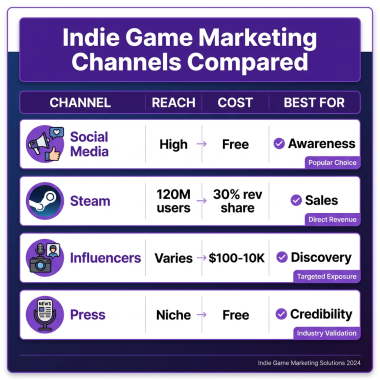
Creating a dedicated website for your game isn’t just optional anymore — it’s essential. With over 3 billion gamers worldwide and the indie game market exceeding $25 billion annually, having your own platform gives you control over your brand, revenue, and player relationships. This guide will show you exactly how to make a game website that converts visitors into players and players into paying customers.
Why Every Indie Developer Needs a Game Website
While Steam, Epic Games Store, and mobile app stores are important distribution channels, relying solely on them means giving up control. Here’s why smart developers build their own game websites:
- Direct revenue: Keep 95% of sales instead of losing 30% to platform fees
- Player data: Build an email list for updates, DLC announcements, and sequels
- Brand control: Present your game exactly how you envision it
- Marketing flexibility: Run promotions, bundles, and cross-sells on your terms
- Long-term asset: Your website grows in value as your player base expands
Successful indie games like Stardew Valley, Undertale, and Hollow Knight all maintain strong direct-to-player websites alongside their store presence. This dual-channel approach maximizes both reach and profitability.
Choosing the Right Platform for Your Game Website
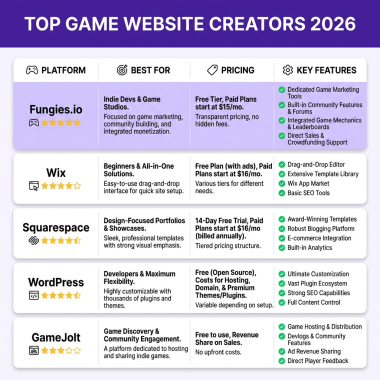
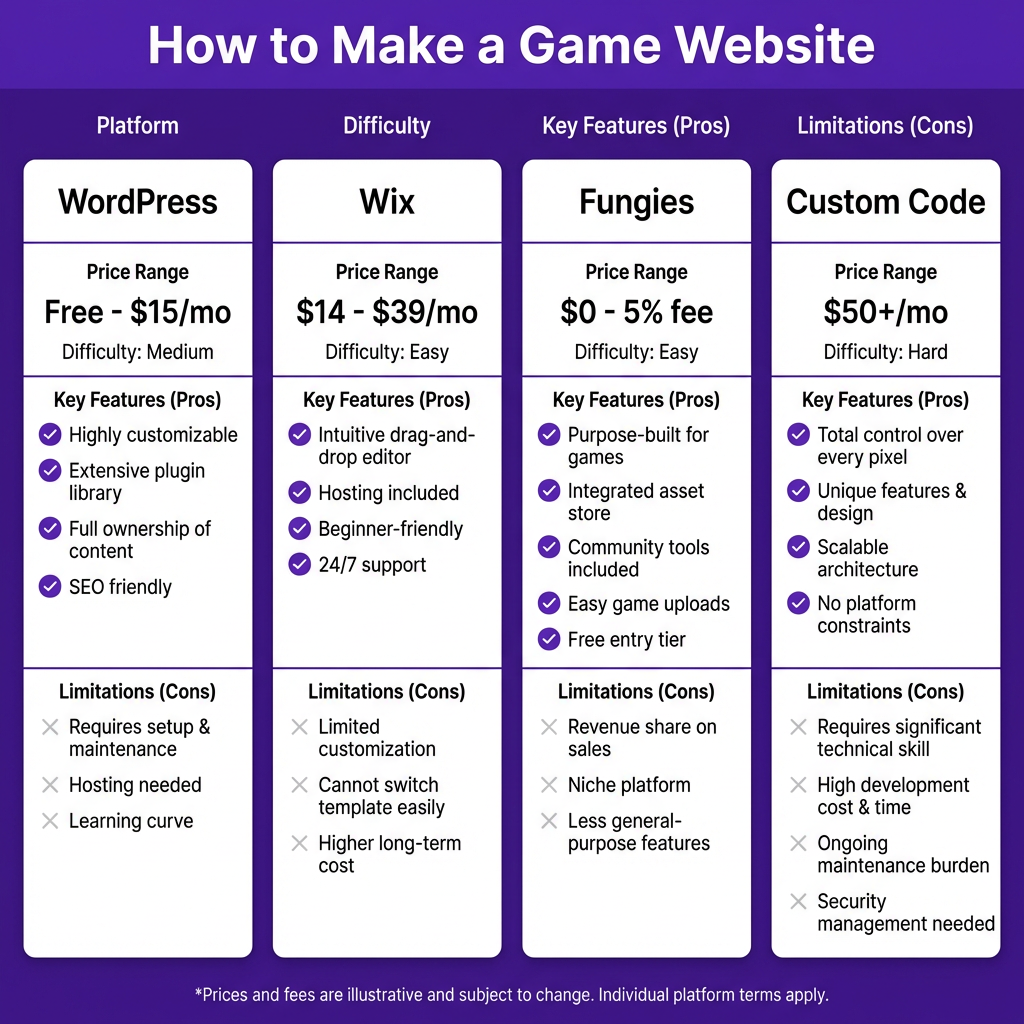
Not all website builders are created equal for game developers. You need a platform that handles more than just pretty pages — you need one that can sell digital products, manage downloads, handle global payments, and comply with tax regulations. Let’s compare your options:
Option 1: WordPress + E-commerce Plugins
WordPress powers over 40% of the web and offers unmatched flexibility. With plugins like WooCommerce, Easy Digital Downloads, or WP Engine’s e-commerce solutions, you can create a fully functional game store.
Pros: Complete customization, huge plugin ecosystem, SEO-friendly, full content control.
Cons: Requires technical setup, plugin conflicts possible, security maintenance needed, tax compliance is DIY.
Best for: Developers comfortable with web tech who want maximum control and don’t mind ongoing maintenance.
Option 2: Website Builders (Wix, Squarespace, Webflow)
Drag-and-drop builders have come a long way. Wix and Squarespace now offer e-commerce features, while Webflow provides design flexibility with less coding.
Pros: Visual editing, fast setup, hosting included, professional templates.
Cons: Limited payment options for digital goods, transaction fees add up, tax compliance not included, less flexible for game-specific needs.
Best for: Developers prioritizing design speed over specialized game commerce features.
Option 3: Fungies (Merchant of Record for Games)
Fungies is purpose-built for game developers who want to sell direct without the headache of payment processing, tax compliance, or global regulations. As a Merchant of Record, Fungies handles VAT, sales tax, and regulatory requirements automatically.
Pros: Zero setup for payments/taxes, global compliance built-in, game-focused features, 50+ payment methods, fraud protection, instant payouts.
Cons: Less design flexibility than full CMS platforms.
Best for: Developers who want to focus on making games, not managing tax codes and payment gateways.
Option 4: Custom Development
Building from scratch with React, Next.js, or similar frameworks gives you ultimate control — if you have the skills or budget.
Pros: Unlimited customization, optimized performance, unique features.
Cons: High development cost, ongoing maintenance burden, security responsibility, compliance complexity.
Best for: Established studios with dedicated web developers or significant budget.
Step-by-Step: How to Make a Game Website
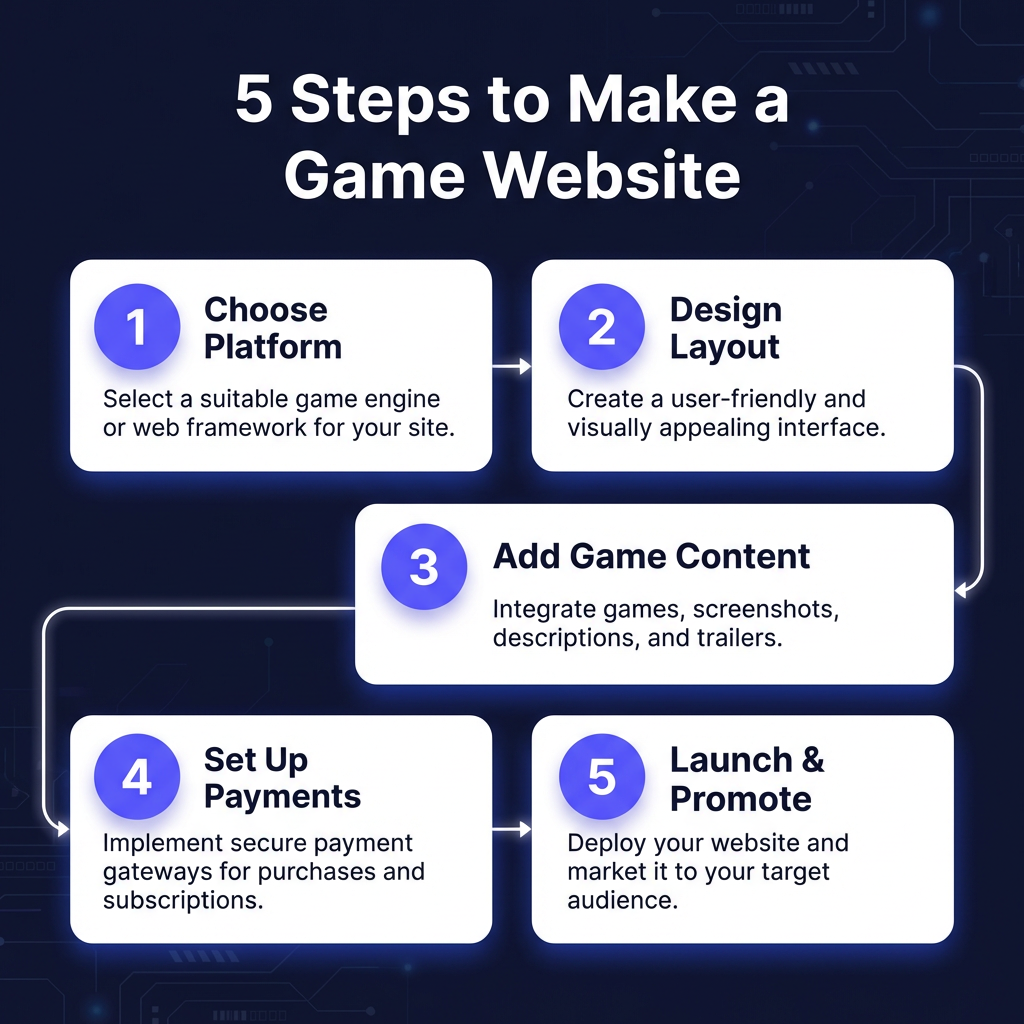
Step 1: Define Your Goals and Audience
Before choosing a platform, clarify what your website needs to accomplish:
- Primary goal: Direct sales, community building, or portfolio showcase?
- Target audience: Casual mobile gamers, hardcore PC players, or console enthusiasts?
- Content needs: Blog, forums, media gallery, or just a landing page?
- Budget: Free tier, $20/month, or enterprise-level investment?
Your answers will determine which platform makes sense. A single-dev mobile game might thrive on a simple Fungies page, while a multiplayer PC title might need WordPress with community features.
Step 2: Choose and Set Up Your Platform
Based on your goals, select your platform and get it running:
- WordPress: Install on hosting (SiteGround, WP Engine, or Cloudways recommended), add a gaming theme, install WooCommerce or Easy Digital Downloads.
- Fungies: Sign up at app.fungies.io, connect your domain, upload your game build.
- Wix/Squarespace: Choose a template, connect domain, enable e-commerce plan.
- Custom: Set up hosting (Vercel, Netlify, or AWS), deploy your code, configure CDN.
Pro tip: Start simple. You can always migrate or upgrade as your game grows. Many successful indies began with basic pages and expanded over time.
Step 3: Design for Conversion
Your game website isn’t just a brochure — it’s a sales tool. Every element should guide visitors toward becoming players:
- Hero section: Stunning key art or trailer above the fold with clear CTA button
- Social proof: Reviews, awards, streamer clips, or player counts
- Clear pricing: No hidden costs — show exactly what players get
- Trust signals: Secure payment badges, refund policy, developer story
- Mobile optimization: 60%+ of traffic may come from phones
Study successful indie game sites like Celeste, Hades, or Valheim for inspiration. Notice how they balance visual appeal with clear purchase paths.
Step 4: Set Up Payments and Delivery
This is where many DIY approaches get complicated. To sell games directly, you need:
- Payment processor: Stripe, PayPal, or regional alternatives
- Tax compliance: VAT for EU, sales tax for US states, GST for other regions
- Download delivery: Secure, fast file hosting with download management
- License keys: DRM or activation system if needed
- Refund handling: Automated or manual process
Platforms like Fungies handle all of this automatically. With WordPress or custom builds, you’ll need to integrate multiple services and stay current with changing tax laws across 100+ countries.
Step 5: Launch and Promote
Once your site is live, the real work begins:
- SEO optimization: Target keywords like “[your game name] download,” “indie [genre] games,” and related terms
- Social media: Twitter/X, TikTok, and Discord are essential for indie games
- Influencer outreach: Send keys to YouTubers and streamers who cover your genre
- Email list: Capture visitor emails for launch announcements and updates
- Press kit: Make it easy for journalists to cover your game
Remember: your website is a living asset. Update it regularly with news, patches, and community content to keep players engaged and attract new ones.
Ready to Launch Your Game Website?
Fungies.io lets you create a professional game website with built-in payments, tax compliance, and global reach — no coding required.
Start free, pay only when you sell
Common Mistakes to Avoid
After analyzing hundreds of indie game websites, here are the most common pitfalls:
- Neglecting mobile: A site that looks great on desktop but breaks on phones loses half your potential audience
- Hiding the buy button: Players should never scroll more than one screen to find your purchase link
- Ignoring page speed: Slow sites kill conversions — optimize images and use caching
- DIY tax compliance: Getting tax wrong can result in massive penalties; use a Merchant of Record or specialized service
- No email capture: Visitors who don’t buy immediately are lost forever without a way to reach them later
Frequently Asked Questions
How much does it cost to make a game website?
Costs range from free (Fungies free tier, WordPress.com basic) to $50+/month for premium hosting and plugins. Factor in domain registration ($10-15/year) and any premium themes or services. The real cost difference comes from payment processing (2-5% per transaction) and whether you handle tax compliance yourself or use a Merchant of Record service.
Do I need a game website if I’m selling on Steam?
Absolutely. Steam takes 30% of revenue and controls the relationship with your players. A direct website lets you keep 95% of sales, build an email list, and maintain brand independence. The most successful indies use both channels — Steam for discovery, direct sales for maximum revenue.
What’s the easiest way to accept payments for my game?
For non-technical developers, a Merchant of Record like Fungies is the simplest solution — payments, tax compliance, and global regulations are handled automatically. For DIY approaches, Stripe is developer-friendly but requires you to manage tax obligations yourself.
How do I handle game downloads and updates?
Options include: 1) Built-in delivery from your platform (Fungies, itch.io), 2) CDN services like Cloudflare or AWS S3 for fast global downloads, 3) Patch systems like Steamworks-style updaters for larger games. For most indies, using a platform with built-in delivery is the most reliable approach.
Can I sell games from my website if I’m a solo developer?
Yes — and you should. Solo developers often benefit most from direct sales since every dollar counts. Platforms designed for indies make it possible to compete with larger studios without a dedicated web team.
Conclusion: Start Building Your Game Website Today
Creating a game website isn’t just about having an online presence — it’s about taking control of your game’s destiny. Whether you choose WordPress for flexibility, Fungies for simplicity, or a custom build for ultimate control, the key is to start now.
Your future players are searching for games like yours right now. A well-designed website ensures they find you, trust you, and become part of your community. Don’t leave your game’s success entirely in the hands of platform algorithms.
Ready to build your game website? Create your free Fungies account and launch your direct sales channel in minutes — no coding required, global compliance included.