Tax compliance is the silent killer of SaaS growth. While you’re focused on building features and acquiring customers, tax obligations are piling up across dozens of jurisdictions. The average SaaS company now needs to track sales tax in 15+ US states and VAT across 27 EU countries. Manual compliance isn’t just tedious—it’s a liability that can cost you thousands in penalties and countless hours of engineering time.
Here’s the reality: SaaS tax compliance has become too complex for spreadsheets. With economic nexus laws triggering at as low as $100,000 in revenue or 200 transactions per state, even small SaaS businesses face multi-jurisdictional obligations. The solution isn’t hiring more accountants—it’s automation. This guide shows you exactly how automated SaaS tax compliance works and why it’s become essential for scaling software companies.
Why Manual Tax Compliance Fails for SaaS
Manual tax management made sense when you had one or two states to worry about. But SaaS businesses sell globally from day one. A customer in California, another in Germany, a third in Australia—and suddenly you’re juggling three different tax regimes with conflicting rules.
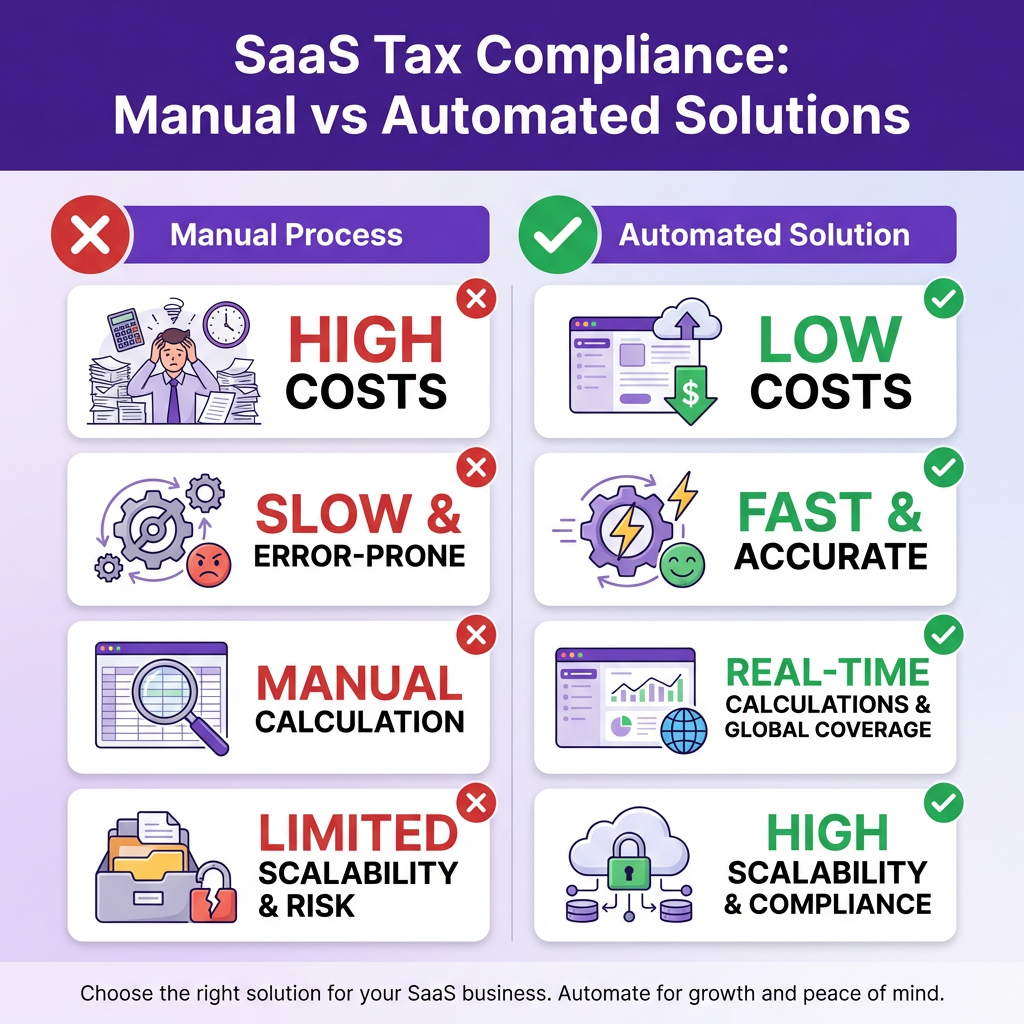
The manual approach breaks down in four critical ways. First, rate accuracy. Tax rates change constantly. Colorado alone has over 700 local tax jurisdictions, each with its own rate. Keeping a spreadsheet updated is impossible. Second, nexus tracking. You need to monitor transaction counts and revenue thresholds across every jurisdiction. Miss a threshold, and you’re non-compliant. Third, filing deadlines. Each state has different due dates, forms, and payment requirements. One missed deadline means penalties. Fourth, audit risk. Manual calculations leave a paper trail of errors that auditors love to find.
The cost adds up fast. Companies spend an average of 163 hours per year on sales tax compliance. At $150/hour for accounting time, that’s $24,450 annually—before penalties. And penalties aren’t rare. States collected over $57 billion in sales tax penalties in 2024, with SaaS companies increasingly in the crosshairs.
How Automated Tax Compliance Works
Automated tax compliance isn’t magic—it’s software doing what software does best: tracking thousands of variables, applying complex rules instantly, and never missing a deadline. Here’s how modern solutions handle the entire tax lifecycle.
Real-time rate calculation. When a customer checks out, the system instantly determines the correct tax rate based on their precise location. Not just state-level, but county, city, and special district rates. The system queries up-to-date rate databases, applies product taxability rules (SaaS is taxable in some states, exempt in others), and calculates the exact amount in milliseconds.
Nexus monitoring. The platform tracks your economic nexus exposure across all jurisdictions. It monitors transaction counts and revenue thresholds, alerting you when you’re approaching nexus in a new state. This gives you time to register before you become liable—not after you’ve already accumulated uncollected tax.
Automatic tax collection. Taxes are calculated and collected at the point of sale. No manual invoicing adjustments. No end-of-month reconciliation headaches. The customer sees the total, pays it, and the tax portion is automatically segregated for remittance.
Return preparation and filing. This is where automation really shines. The system compiles all your transaction data, populates the correct forms for each jurisdiction, and either files automatically or provides ready-to-submit returns. Some platforms even handle the payment, debiting your account and remitting to each state on the correct schedule.
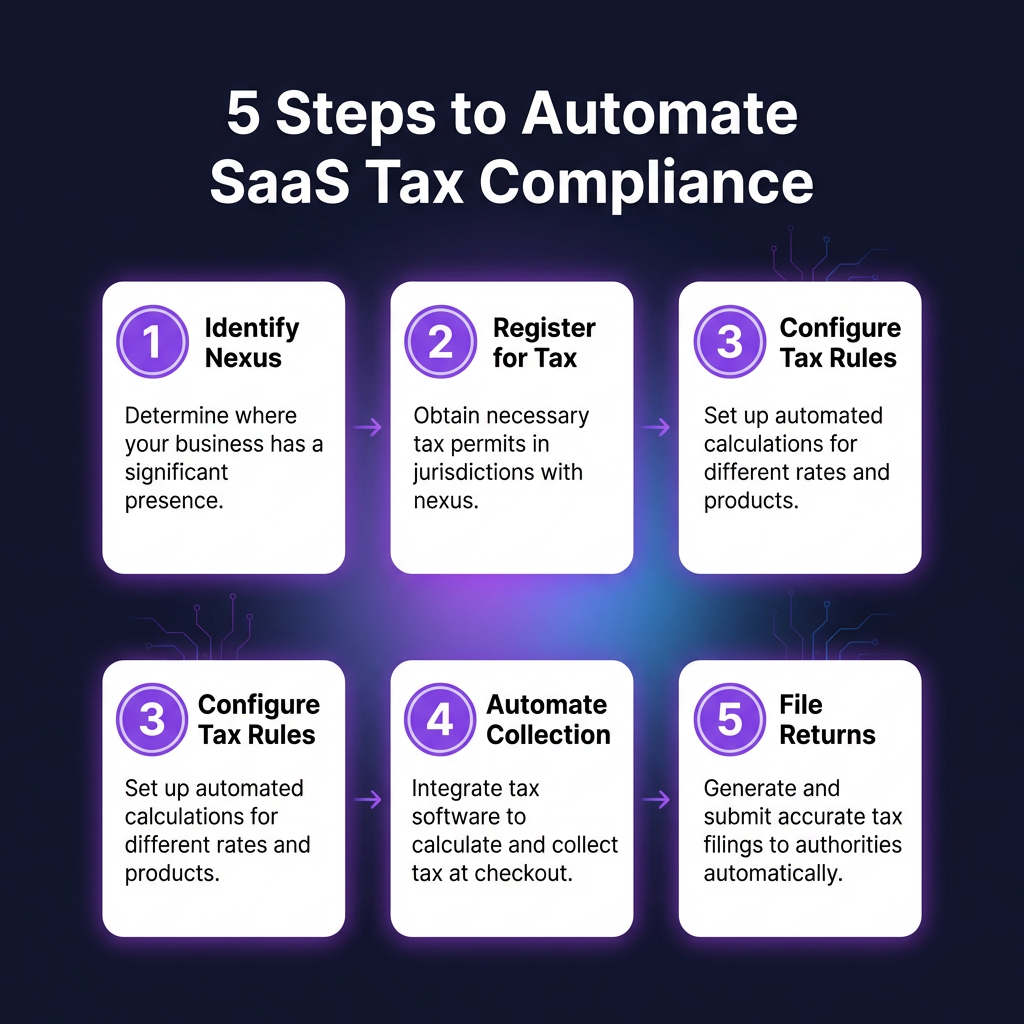
The 5-Step Process to Automate Your Tax Compliance
Ready to move from manual chaos to automated compliance? Here’s the exact implementation process that successful SaaS companies follow.
Step 1: Identify Your Nexus Obligations
Before automating, you need to know where you owe tax. Review your sales data for the past 12-24 months. Look at transaction counts and revenue by state. Compare against economic nexus thresholds—typically $100,000 in sales or 200 transactions annually, though some states use different numbers. Don’t forget physical nexus: employees, offices, or inventory in a state create immediate obligations regardless of sales volume.
Step 2: Register in Required Jurisdictions
You can’t collect tax without a permit. Register for sales tax permits in every state where you have nexus. This typically takes 2-4 weeks per state. Some states offer online registration; others require paper forms. Budget $50-300 per state for registration fees. While you’re registering, note your filing frequency—monthly, quarterly, or annual—which varies by state and your sales volume.
Step 3: Configure Your Tax Rules
Set up your tax automation platform with your nexus states, product taxability categories, and exemption handling. SaaS is treated differently across states: taxable in Texas, exempt in California (mostly), taxable in New York. Your platform needs to know your specific product classification for each jurisdiction. Also configure exemption certificates for B2B sales—resale certificates and direct pay permits require proper documentation.
Step 4: Integrate with Your Payment Flow
Connect your tax engine to your checkout process. Most platforms offer APIs, pre-built integrations with Stripe/PayPal, or JavaScript widgets. The integration should capture the customer’s location (billing address or IP geolocation), apply the correct rate, and add the tax as a separate line item. Test thoroughly: verify rates in multiple jurisdictions, check exemption handling, and confirm tax-included vs tax-added pricing displays correctly.
Step 5: Automate Filing and Remittance
Once collection is working, set up automated filing. Configure your platform to generate returns for each jurisdiction on the correct schedule. Review the first few filings manually to catch any issues. Then enable auto-filing if your platform supports it. Set up payment funding—most platforms debit your bank account and remit to states automatically. Keep a calendar of filing deadlines for spot-checking.
Choosing the Right Tax Automation Solution
Not all tax automation tools are created equal. Here’s what to evaluate when selecting a platform for your SaaS business.
Coverage breadth. Does the platform support all jurisdictions where you have nexus? US sales tax, EU VAT, UK VAT, Australian GST, Canadian GST/HST? Global SaaS needs global coverage.
Integration ease. How quickly can you integrate? API-first platforms take hours. Legacy systems might require weeks of implementation. Look for pre-built integrations with your payment processor and billing platform.
Pricing model. Most platforms charge per transaction or as a percentage of tax collected. Compare total cost at your current volume and projected growth. Watch for hidden fees: filing fees, registration assistance, audit support.
Compliance depth. Does the platform just calculate rates, or does it handle the full lifecycle? The best solutions offer nexus monitoring, registration assistance, automatic filing, and audit defense. Partial solutions leave you with manual work—and risk.
FAQ: Automated SaaS Tax Compliance
When should a SaaS company start automating tax compliance?
The moment you have customers in multiple states or countries. Economic nexus laws mean you can trigger obligations with surprisingly low revenue. Early automation prevents the painful retrofit of tax collection into an established billing system.
Can I use my regular accounting software for SaaS tax compliance?
QuickBooks and Xero handle basic sales tax, but they lack the sophistication for multi-jurisdictional SaaS compliance. You need real-time rate lookups, nexus monitoring, and automated filing—features that require specialized tax software.
What happens if I don’t collect sales tax when I should have?
You’ll owe the uncollected tax plus penalties and interest. States can audit up to 3-4 years back (longer in some cases). The bill can be substantial: uncollected tax on $1M in sales with 6% average rate is $60,000, plus 25% penalties and interest brings it to $80,000+. And yes, you pay this even though you never collected it from customers.
Is SaaS taxable in all US states?
No. As of 2026, approximately 30 states tax SaaS, while 20 do not. Some states tax SaaS delivered via download but not cloud-based access. Others tax B2B SaaS differently than B2C. Rules change frequently—another reason automation is essential.
What’s the difference between tax calculation and tax compliance?
Calculation is just the math—determining the correct tax amount. Compliance is the full process: knowing where you owe tax, registering to collect, calculating correctly, collecting at checkout, filing returns, remitting payments, and maintaining documentation. Calculation is a subset of compliance.
Conclusion: Automation Is Now Essential
SaaS tax compliance has crossed the complexity threshold where manual management is viable. Between economic nexus expansion, changing product taxability rules, and increasing audit activity, the risk of getting it wrong has never been higher. Automation isn’t a luxury—it’s infrastructure that protects your business and frees your team to focus on growth.
The good news: implementation is straightforward. Modern platforms integrate in hours, not weeks. The cost is predictable and typically far less than manual compliance or penalty exposure. And once running, automated systems operate silently in the background, handling thousands of calculations while you sleep.
If you’re still managing tax compliance manually, the question isn’t whether to automate—it’s how quickly you can get it done.
Ready to Automate Your SaaS Tax Compliance?
Join hundreds of SaaS companies using Fungies.io — automated tax compliance, 50+ payment methods, global Merchant of Record.
No credit card required
Sources
• Avalara Sales Tax Report 2025
• Tax Foundation State Sales Tax Data
• Anrok SaaS Tax Compliance Survey 2024
• Stripe Tax Documentation and Rate Database