Selling games on Steam is the dream for many indie developers. With over 120 million monthly active users, Steam represents the largest PC gaming marketplace in the world. But getting your games on Steam and actually making sales requires understanding the platform’s unique ecosystem, fee structure, and marketing requirements.
In this comprehensive guide, we’ll walk you through everything you need to know about how to sell games on Steam in 2026 — from setting up your Steamworks account to optimizing your store page for maximum conversions. We’ll also compare Steam’s revenue split with direct sales alternatives so you can make an informed decision about your distribution strategy.
Understanding Steam’s Platform
Steam dominates the PC gaming market with a 75% market share. For game developers, this means unparalleled access to potential customers. However, this access comes at a cost — both financially and in terms of creative control.
When you sell games on Steam, you’re operating within Valve’s ecosystem. This provides benefits like automatic updates, Steam Workshop integration, achievements, and built-in multiplayer infrastructure. But it also means adhering to Steam’s content guidelines, accepting their revenue split, and competing with thousands of other titles for visibility.
The Steam marketplace has evolved significantly since Steam Direct replaced Steam Greenlight in 2017. Today, anyone can publish a game on Steam by paying the $100 recoupable fee and completing the Steamworks onboarding process. This democratization has led to over 50,000 games on the platform — making discoverability the biggest challenge for new developers.
The Steam Revenue Split Explained
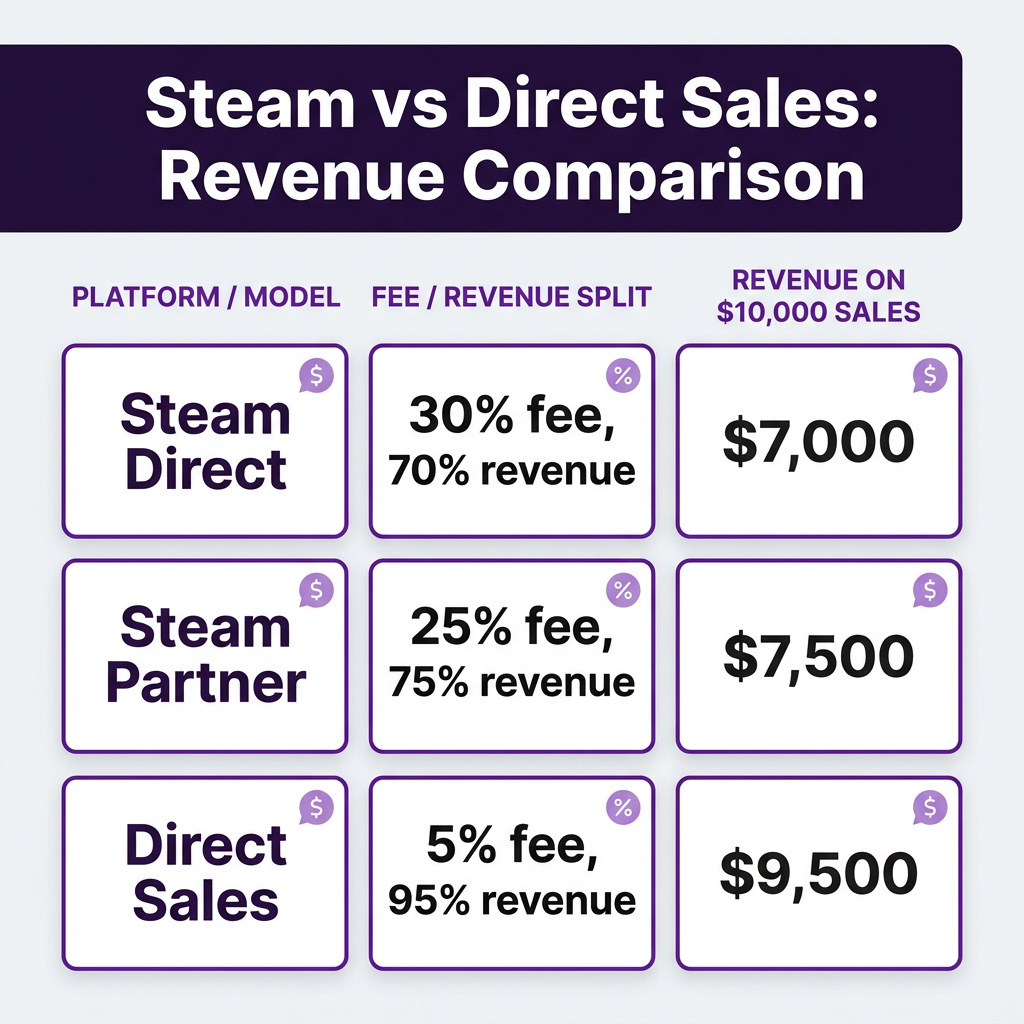
Steam takes a 30% cut of all sales by default. This is the industry-standard revenue split that has been in place since Steam’s inception. However, Valve introduced a tiered system in 2018 that reduces this percentage for high-performing games.
Here’s how the Steam revenue split works:
- $0 – $10 million in revenue: 30% to Steam, 70% to developer
- $10 million – $50 million: 25% to Steam, 75% to developer
- Over $50 million: 20% to Steam, 80% to developer
For most indie developers, the 30% fee applies to all sales. This means if you sell a $20 game, Steam keeps $6 and you receive $14. While this may seem steep, remember that Steam handles payment processing, bandwidth for downloads, update distribution, and provides access to their massive user base.
Compare this to selling directly through your own website. With a Merchant of Record solution like Fungies.io, you pay only 5% in platform fees plus standard payment processing (around 2.9% + $0.30). On that same $20 game, you’d keep approximately $18.42 instead of $14. For a game that sells 10,000 copies, that’s a difference of over $44,000 in your pocket.
Step-by-Step: How to Sell Games on Steam

Step 1: Create Your Steamworks Account
To begin selling on Steam, you need a Steamworks partner account. Visit partner.steamgames.com and sign in with your existing Steam account (or create one). You’ll need to provide:
- Your legal business name and contact information
- Tax information (W-9 for US developers, W-8BEN for international)
- Bank account details for receiving payments
- Identity verification documents
The verification process typically takes 2-5 business days. Once approved, you’ll gain access to the Steamworks backend where you can manage your games.
Step 2: Pay the Steam Direct Fee
Steam requires a $100 recoupable fee for each game you publish. This fee exists to reduce spam and low-quality submissions. The “recoupable” part means you’ll earn this money back — Steam returns the $100 after your game generates $1,000 in revenue.
This fee must be paid via credit card or PayPal before you can access the app administration tools for your game.
Step 3: Prepare Your Store Page
Your Steam store page is your sales pitch. It needs to be compelling, informative, and optimized for conversions. Key elements include:
- Capsule images: Multiple sizes for different Steam locations (main capsule, small capsule, header)
- Trailer: A compelling video showing gameplay (essential for conversions)
- Screenshots: 5-10 high-quality images showcasing your game’s best features
- Description: Clear, benefit-focused copy explaining what your game offers
- Tags: Accurate genre and feature tags for discoverability
- System requirements: Minimum and recommended specs
Steam provides a “Coming Soon” page option that lets you build a wishlist audience before launch. This is highly recommended — games with strong wishlist numbers get better visibility on launch day.
Step 4: Upload Your Build and Set Pricing
Using Steam’s content delivery system, upload your game build. Steam supports Windows, macOS, and Linux. You’ll need to:
- Configure depot settings for each platform
- Upload your game files through SteamPipe
- Set up launch options and installation scripts
- Configure pricing in all supported currencies
- Set up regional pricing if desired
Steam’s pricing tools allow you to run sales and discounts. The platform automatically promotes games that offer discounts, making sales events crucial for visibility.
Step 5: Launch and Market Your Game
Once everything is set up, you can release your game. Steam offers several release options:
- Immediate release: Game goes live as soon as you click the button
- Scheduled release: Set a specific date and time
- Early Access: Release an unfinished version to gather feedback and funding
Marketing is entirely your responsibility. Steam provides the platform, but you must drive traffic to your store page. Successful Steam games typically build an audience through social media, Discord communities, Reddit, YouTube let’s plays, and gaming press coverage before launch.
Steam vs. Direct Sales: Which Is Better?
Many successful indie developers use both Steam and direct sales. Here’s how to think about the trade-offs:
Choose Steam if: You want maximum reach, don’t mind the 30% fee, and are prepared to compete for visibility. Steam is essential for most PC games because that’s where the players are.
Choose Direct Sales if: You have an existing audience, want to maximize revenue per sale, or need more control over the customer relationship. Direct sales work best when you can drive your own traffic.
Best approach: Launch on both. Use Steam for discoverability and reach, while also offering direct purchases through your website for fans who want to support you more directly. Many developers offer Steam keys to direct purchasers, giving players the convenience of Steam with the revenue benefits of direct sales.
Ready to Maximize Your Game Revenue?
Join hundreds of game developers using Fungies.io — sell directly to players with only 5% fees, automated tax compliance, and global payment processing.
No credit card required • Keep 95% of every sale
Common Mistakes When Selling on Steam
Avoid these pitfalls that doom many indie releases:
- Poor store page: Bad trailers, ugly screenshots, or confusing descriptions kill conversions
- No marketing: “Build it and they will come” doesn’t work on Steam
- Wrong pricing: Research similar games and price competitively
- Ignoring reviews: Respond to feedback and update your game post-launch
- Launching unfinished: First impressions matter; buggy launches get buried
FAQ: Selling Games on Steam
How much does it cost to sell a game on Steam?
The Steam Direct fee is $100 per game (recoupable after $1,000 in sales). There are no ongoing hosting or bandwidth fees.
Can I sell the same game on Steam and my own website?
Yes, you can sell Steam keys through your website. Many developers offer direct purchases that include Steam keys, maximizing both reach and revenue.
How long does Steam take to approve a game?
Account verification takes 2-5 days. Once verified, you can publish immediately after paying the Direct fee. There’s no content approval process like on consoles.
What percentage does Steam take?
30% by default, dropping to 25% after $10 million in sales and 20% after $50 million.
Do I need a company to sell on Steam?
No, individuals can sell on Steam. However, you’ll need to handle taxes appropriately for your jurisdiction.
Conclusion
Selling games on Steam remains one of the best ways to reach PC gamers, but success requires more than just uploading your game. You need a compelling store page, an active marketing strategy, and realistic expectations about the 30% platform fee.
For developers looking to maximize revenue, consider complementing your Steam presence with direct sales. By offering purchases through your own website, you can keep significantly more of each sale while still providing players the convenience of Steam keys.
Ready to start selling? Set up your Steamworks account, prepare your marketing materials, and consider your distribution strategy carefully. The indie game market is competitive, but with the right approach, Steam can be a powerful platform for building your game development career.