Here’s a number that should get your attention: 67% of developers now use AI coding assistants daily, and teams that integrate them properly report 30-40% reductions in time spent on boilerplate code and documentation. But here’s the catch — most developers are barely scratching the surface of what these tools can do.
This isn’t about autocomplete anymore. The best AI coding assistants in 2026 are autonomous agents that can plan, execute, debug, and deploy entire features. The gap between developers who know how to use them and those who don’t is widening fast.
What Are AI Coding Assistants in 2026?
AI coding assistants have evolved from simple code completion tools into autonomous development agents. They fall into three distinct categories:
- IDE Extensions (GitHub Copilot) — Inline suggestions inside your existing editor
- AI-Native IDEs (Cursor, Windsurf) — Purpose-built editors with agentic capabilities
- Terminal Agents (Claude Code, Aider) — Command-line tools for complex multi-file operations
- Autonomous Engineers (Devin) — Full end-to-end development in sandboxed environments
The key shift in 2026 is agentic AI — tools that don’t just suggest code but can execute multi-step tasks, use terminal commands, browse documentation, and even create pull requests.
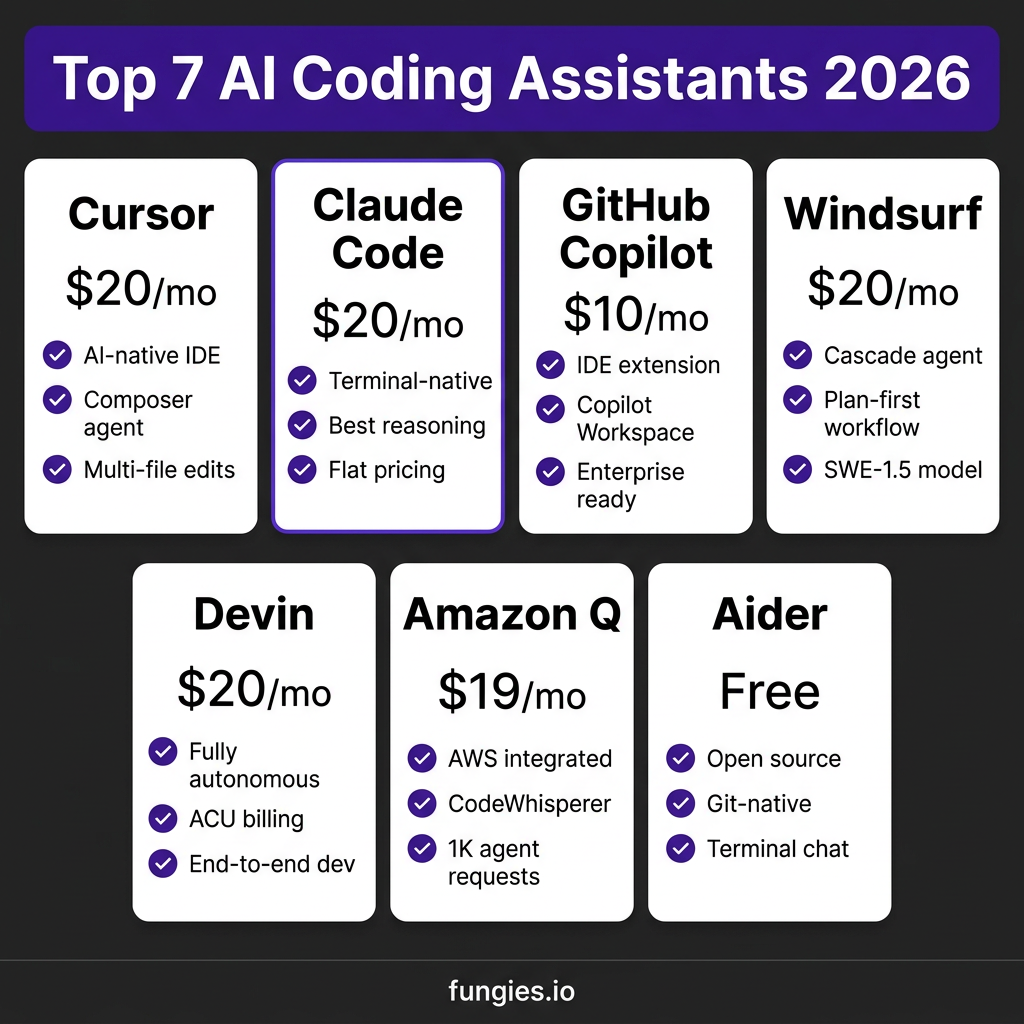
The 7 Best AI Coding Assistants: Complete Comparison
I tested the leading tools across real-world scenarios: refactoring legacy code, building features from scratch, debugging production issues, and reviewing pull requests. Here’s what actually matters.
1. Cursor — The AI-Native IDE Leader
Pricing: $20/month (Pro), $40/month (Business), $200/month (Ultra)
Cursor is a fork of VS Code rebuilt around AI. Its Composer feature allows multi-file editing with natural language instructions. The Agent Mode can execute terminal commands, run tests, and iterate on failures.
Best for: Solo developers and teams who want the most polished AI IDE experience. The diff-first workflow shows exactly what will change before you accept.
Catch: Cursor uses credit-based pricing with overage charges. One developer reported paying $1,400 in a month due to heavy agent usage.
2. Claude Code — Terminal-Native Power
Pricing: $20/month (Pro), $100-200/month (Max)
Anthropic’s Claude Code runs in your terminal and excels at complex reasoning tasks. It has the best context understanding for large codebases and offers truly flat pricing — no surprise overages.
Best for: Developers working on complex architecture, large monorepos, or who prefer terminal workflows. One developer tracked 10 billion tokens over 8 months on the $100/month Max plan — equivalent to roughly $15,000 in per-token API costs.
3. GitHub Copilot — The Enterprise Standard
Pricing: $10/month (Pro), $19/month (Business), $39/month (Enterprise)
Copilot remains the safest choice for enterprise teams. The Copilot Workspace feature (currently in preview) represents GitHub’s vision for the future: an AI that encompasses the entire software development lifecycle from ticket to deployment.
Best for: Teams already standardized on GitHub, VS Code, and Azure DevOps. The tight integration with GitHub Actions and pull request workflows is unmatched.
4. Windsurf — The Plan-First Alternative
Pricing: $20/month (Pro), $40/month (Teams)
From the makers of Codeium, Windsurf takes a different approach with its Cascade agent. Instead of immediate execution, Cascade creates a plan first — useful for complex multi-step changes where you want to review before committing.
Best for: Developers who prefer structured workflows with more guardrails. The SWE-1.5 model is optimized for autonomous coding tasks.
5. Devin — The Autonomous Engineer
Pricing: $20/month (Core), $500/month (Team), Custom (Enterprise)
Devin is the most ambitious AI coding assistant. It runs in a secure sandbox with its own terminal, editor, and browser. Give it a task, and it plans, codes, debugs, and deploys — documenting each step.
Best for: Teams willing to experiment with fully autonomous development. The new $20/month Core plan makes it accessible for individual developers.
6. Amazon Q Developer — The AWS Choice
Pricing: Free tier, $19/month (Pro)
Amazon’s successor to CodeWhisperer integrates deeply with AWS services. The free tier includes 50 agentic chats per month and 1,000 lines of code upgrades — generous for individual developers.
Best for: Developers building on AWS who want integrated security scanning and cloud-specific code generation.
7. Aider — The Open Source Option
Pricing: Free (open source, BYO API keys)
Aider is a terminal-based AI pair programmer that edits code via chat commands and automatically commits changes through Git. It’s completely free — you just bring your own API keys.
Best for: Developers who want full control, privacy-conscious teams, and those who prefer auditable, Git-native workflows.
AI Coding Assistants Pricing Comparison 2026
| Tool | Entry Price | Power User | Team/Enterprise | Best For |
|---|---|---|---|---|
| Cursor | $20/mo | $200/mo (Ultra) | $40/user/mo | AI-native IDE experience |
| Claude Code | $20/mo | $100-200/mo (Max) | $30/user/mo | Complex reasoning, flat pricing |
| GitHub Copilot | $10/mo | $19/mo (Business) | $39/user/mo | Enterprise GitHub integration |
| Windsurf | $20/mo | $40/mo (Teams) | Custom | Plan-first workflows |
| Devin | $20/mo | $500/mo (Team) | Custom | Fully autonomous coding |
| Amazon Q | Free | $19/mo (Pro) | $19/user/mo | AWS-centric development |
| Aider | Free | API costs only | Free | Open source, privacy-first |
How to Integrate AI Coding Assistants Into Your Workflow
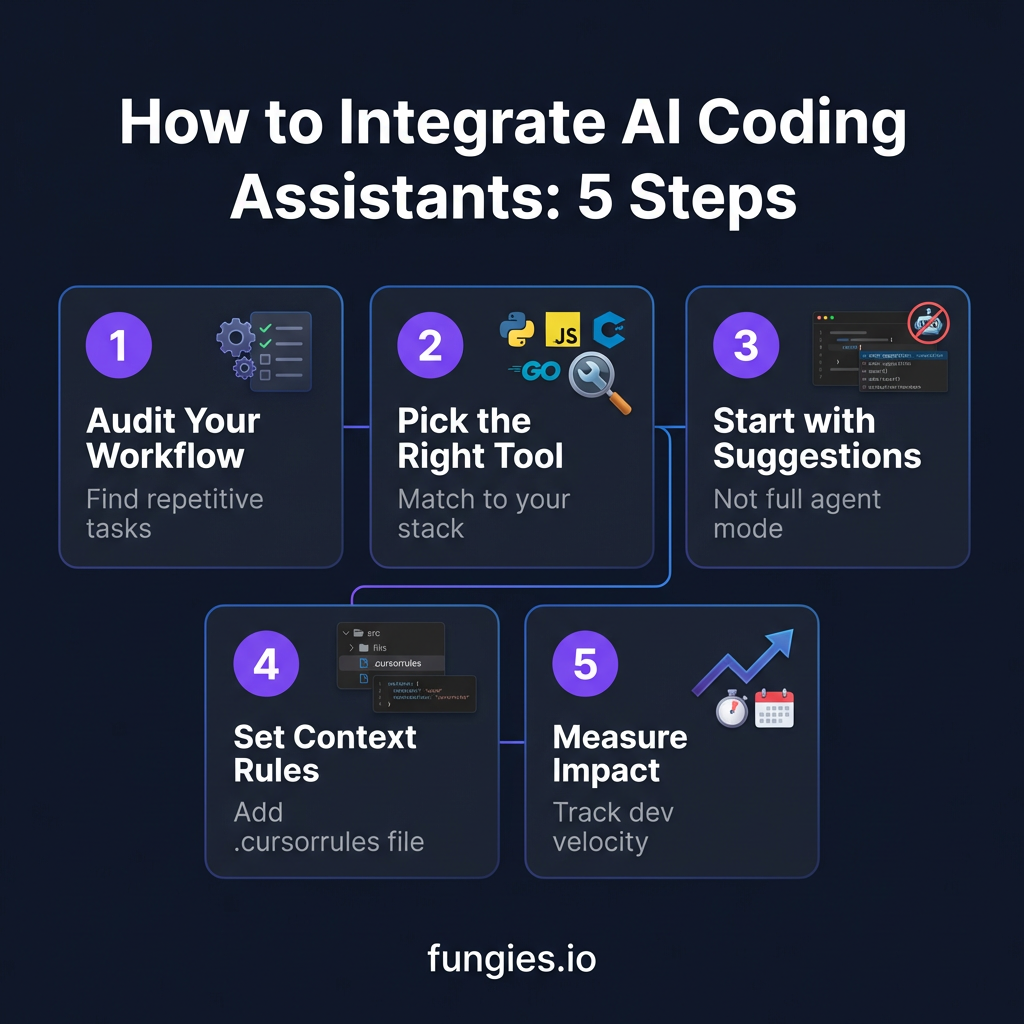
Step 1: Audit Your Current Workflow
Before choosing a tool, identify where you spend unproductive time:
- Writing boilerplate code and tests
- Searching documentation
- Debugging repetitive issues
- Refactoring legacy code
- Writing commit messages and PR descriptions
Track this for one week. The patterns will tell you which AI assistant features matter most for your work.
Step 2: Choose the Right Tool for Your Stack
Match the tool to your workflow, not the other way around:
- VS Code user? Start with Cursor or GitHub Copilot
- Terminal-first developer? Claude Code or Aider
- JetBrains IDEs? GitHub Copilot or Amazon Q
- AWS-heavy stack? Amazon Q Developer
- Need full autonomy? Devin
Step 3: Start with Suggestions, Not Agents
Don’t enable agent mode on day one. Start with inline suggestions to build trust. Learn when the AI is right and when it’s confidently wrong. This calibration period is essential — developers who skip it often reject valid suggestions later out of skepticism.
Step 4: Configure Context Rules
Most AI coding assistants support context configuration files:
- Cursor: Create a
.cursorrulesfile with your coding standards - Claude Code: Use
CLAUDE.mdfor project-specific instructions - GitHub Copilot: Configure via
.github/copilot-instructions.md
Include your tech stack, naming conventions, testing requirements, and architectural patterns. This single step can improve suggestion quality by 40%.
Step 5: Measure and Iterate
Track metrics that matter:
- Time to complete common tasks
- Lines of code written vs. reviewed
- Bug escape rate (bugs found in production)
- Developer satisfaction scores
Teams that measure see 2-3x better outcomes than those that don’t. The data will tell you when to upgrade plans, add team members, or switch tools.
Common Integration Pitfalls (And How to Avoid Them)
Pitfall 1: Blind Trust
AI coding assistants are confident even when wrong. A 2026 study found that 23% of AI-generated code contained subtle bugs that passed initial review. Always review suggestions, especially for security-critical code.
Pitfall 2: Context Overload
Dumping your entire codebase into context leads to “context rot” — the model gets overloaded with stale information and makes worse decisions. Use targeted context: relevant files, recent changes, and clear task descriptions.
Pitfall 3: Ignoring Security
Some AI assistants send code to cloud APIs. For sensitive codebases, use self-hosted options like Tabby or Aider with local models. Enable enterprise features like code isolation and audit logs when available.
Key Takeaways: Getting the Most from AI Coding Assistants
- Start small: Begin with suggestions, graduate to agents as you build trust
- Configure context: Rules files dramatically improve suggestion quality
- Watch pricing: Credit-based models (Cursor) can surprise you; flat pricing (Claude Code) is predictable
- Measure impact: Track velocity and quality to justify the investment
- Review everything: AI is a multiplier — it makes good developers faster and bad developers faster at producing bugs
Frequently Asked Questions
Which AI coding assistant is best for beginners?
GitHub Copilot is the safest starting point. At $10/month, it’s affordable, works in familiar IDEs, and has the most documentation and community support. The suggestions are conservative but reliable.
Can AI coding assistants replace developers?
No. They’re amplifiers, not replacements. The best developers use AI to automate boilerplate and focus on architecture, user experience, and complex problem-solving. Junior developers still need mentorship — AI can’t replace code review feedback and career guidance.
Are AI coding assistants secure for proprietary code?
It depends. Enterprise plans from Cursor, Copilot, and Claude Code offer code isolation and zero-data-retention policies. For maximum security, use self-hosted options like Aider or Tabby with local models.
How do I convince my team to adopt AI coding assistants?
Start with a pilot program. Track metrics before and after: task completion time, bug rates, and developer satisfaction. The data usually speaks for itself. Teams that adopt AI coding assistants report 30-40% productivity gains within three months.
What’s the difference between an AI coding assistant and an AI coding agent?
Assistants suggest code; agents execute tasks. An assistant might suggest a function. An agent can write the function, run tests, fix failures, and create a pull request. Cursor’s Agent Mode, Claude Code, and Devin are examples of agentic tools.
Conclusion: The Future of Development Is AI-Augmented
The developers who thrive in 2026 won’t be those who resist AI coding assistants — they’ll be the ones who learn to work with them effectively. The tools are now good enough that not using them is a competitive disadvantage.
Start with one tool. Configure it properly. Measure the impact. Expand from there. The 30-40% productivity gains aren’t hypothetical — they’re being reported by teams every day.
And if you’re building a SaaS product and need a payment solution that handles global tax compliance automatically, check out Fungies.io. We handle the complexity so you can focus on building.
References
- LeadDev — Best AI Coding Tools 2026
- Qodo — 15 Best AI Coding Assistant Tools 2026
- Spectrum AI Labs — AI Coding Tools Pricing Compared 2026
- IJONIS — AI Coding Tools Pricing 2026
- SitePoint — AI Coding Tools Comparison 2026
- Lindy — Devin Pricing Breakdown 2026
- Superblocks — Amazon Q Developer Pricing 2026