Here is a number that should stop you in your tracks: 46% of professional developers now name Claude Code as their primary AI coding tool. Cursor sits at 19%. GitHub Copilot? Just 9%.
But here is what those headlines will not tell you. The same State of Dev Q1 2026 report that produced those rankings also found something else. Developers in the top quartile of weekly merged pull requests use an average of 2.3 AI coding tools. Not one. Not the “winner.” A stack.
The AI coding agent market has matured fast. These are no longer autocomplete gimmicks. They are agentic systems capable of multi-file refactoring, autonomous debugging, deep codebase reasoning, and even converting GitHub issues into pull requests while you sleep.
In this guide, I rank the 7 best AI coding agents of 2026 based on real performance data, verified pricing, and actual developer workflows. No marketing fluff. Just the numbers and trade-offs that matter.
What Is an AI Coding Agent?
An AI coding agent is a software tool that uses large language models (LLMs) to help developers write, review, refactor, and understand code. But that definition undersells what these tools have become in 2026.
Modern AI coding agents can:
- Generate entire functions and classes from natural language descriptions
- Refactor across multiple files while maintaining context
- Debug by reading error traces and proposing fixes
- Write and run tests autonomously
- Explain complex legacy code
- Convert GitHub issues into working pull requests
The key differentiator in 2026 is agentic capability — the ability to plan, execute, and iterate on multi-step tasks without constant human intervention.
The State of AI Coding in 2026: By the Numbers
Before we dive into the rankings, let us ground this in actual data:
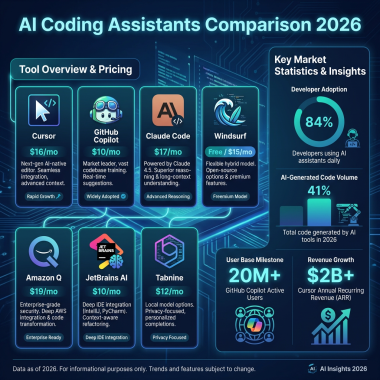
- 92% of developers use AI tools in their workflow (2026)
- 84% use or plan to use AI coding assistants specifically
- 41% of all code in production is now AI-generated
- $8.5 billion — the size of the AI coding tools market in 2026
- 46% of developers use Claude Code as their primary tool
- 2.3 — average number of AI coding tools used by top-performing developers
The takeaway? AI coding agents are not optional anymore. They are infrastructure. The question is not whether to use one, but which one (or which combination) fits your workflow.
7 Best AI Coding Agents in 2026: The Rankings
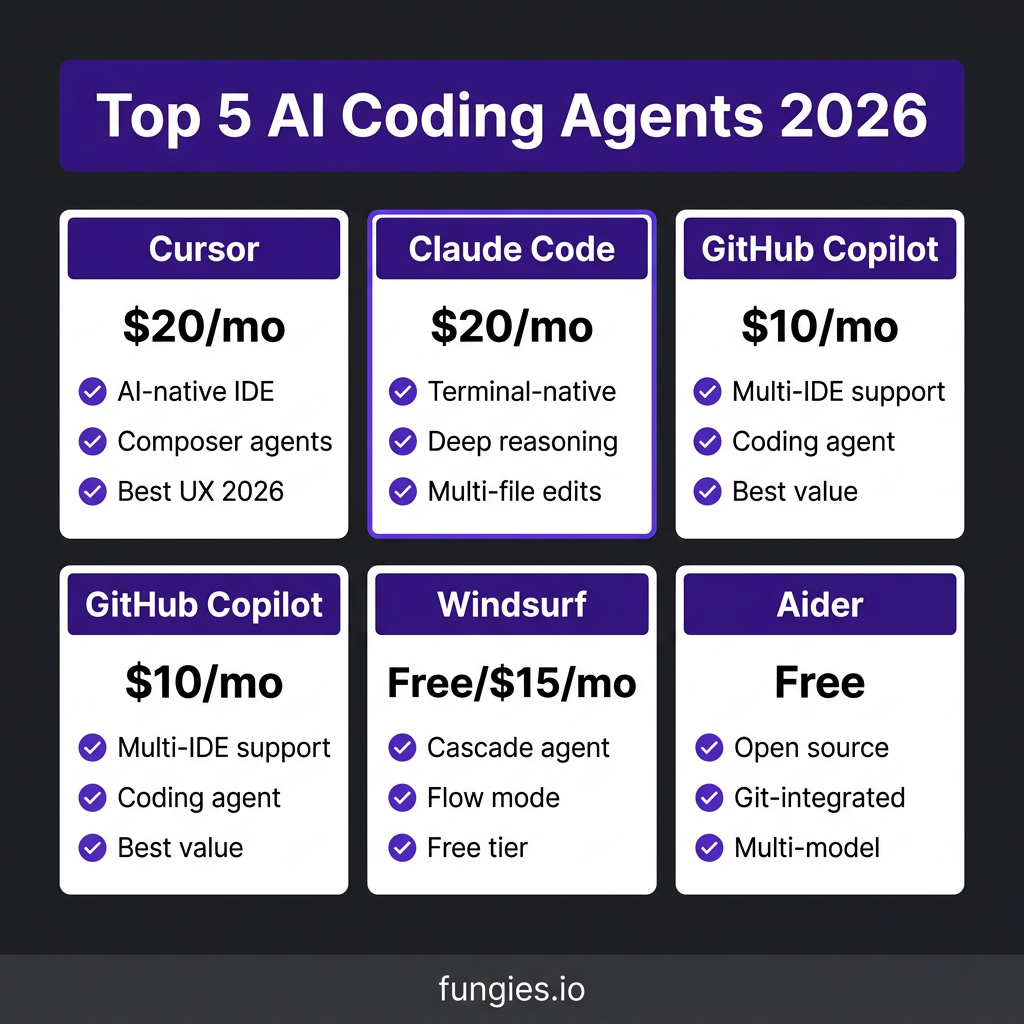
1. Cursor — Best Overall AI-Native IDE
Price: $20/month (Pro), $40/user/month (Business)
Cursor is not an extension. It is a complete fork of VS Code built from the ground up with AI at every layer. That distinction matters. While other tools bolt AI onto existing editors, Cursor bakes it into the foundation.
Key Features:
- Composer: Visual multi-file editing with AI assistance
- Supermaven autocomplete: 72% acceptance rate on suggestions
- Background agents: Run autonomous tasks while you work
- Context-aware indexing: Persistent semantic understanding of your entire codebase
- Custom models: Bring your own API keys for flexibility
Best For: Developers who want the most polished AI-native editing experience and are willing to switch from VS Code.
Pros: Best-in-class UX, powerful agentic features, fast autocomplete, excellent multi-file editing
Cons: Requires switching editors, $20/month entry price, can be overwhelming for simple tasks
2. Claude Code — Best for Terminal-First Workflows
Price: $20/month (Pro), $100/month (Max 5x), $200/month (Max 20x)
Claude Code is Anthropic’s official CLI agent. It runs in your terminal, not your IDE. That design choice makes it uniquely powerful for certain workflows — and completely wrong for others.
Key Features:
- Terminal-native: Works anywhere you have a command line
- Deep reasoning: Built on Claude Sonnet 4.6 for complex problem-solving
- Multi-file editing: Can refactor across entire codebases
- Tool use: Can run tests, check logs, and iterate autonomously
- Long-horizon tasks: Excels at end-to-end workflows without human intervention
Best For: Developers who live in the terminal, work on complex system-level tasks, or need an agent that can run end-to-end without babysitting.
Pros: Unmatched reasoning capability, no IDE lock-in, excellent for debugging and system architecture
Cons: Steep learning curve, terminal-only interface, expensive at high usage tiers
3. GitHub Copilot — Best Value and Accessibility
Price: $10/month (Pro), $39/month (Pro+), Free tier (50 requests/month)
GitHub Copilot remains the most widely distributed AI coding tool. It works in VS Code, JetBrains, Neovim, and even has a dedicated chat interface. If you want AI assistance without changing your workflow, Copilot is the default choice.
Key Features:
- Multi-IDE support: Works in virtually every popular editor
- Coding agent: New agent mode converts issues into PRs
- Code review: AI-powered PR reviews and suggestions
- GitHub integration: Deep ties to the world’s largest code host
- Free tier: 50 requests/month for individuals
Best For: Teams, beginners, and developers who want AI assistance without switching editors or workflows.
Pros: Best value at $10/month, widest IDE support, genuine free tier, excellent GitHub integration
Cons: Agent capabilities lag behind Cursor and Claude Code, Microsoft ecosystem lock-in for advanced features
4. Windsurf — Best Free Tier
Price: Free (individuals), $15/month (Pro), $60/month (Pro Ultimate)
Windsurf (formerly Codeium) offers a genuinely usable free tier that does not feel like a trial. Its Cascade agent and Flow mode provide real productivity gains without opening your wallet.
Key Features:
- Cascade agent: Multi-file editing with context awareness
- Flow mode: AI-assisted continuous coding sessions
- Generous free tier: Unlimited autocomplete, limited agent usage
- Team sync: Collaboration features for engineering teams
- BYO API key: Use your own model providers
Best For: Individual developers on a budget, students, and anyone who wants to try AI coding without commitment.
Pros: Excellent free tier, solid agent features, lower paid tier than competitors
Cons: Less polished than Cursor, smaller community, fewer enterprise features
5. Aider — Best Open Source Option
Price: Free (open source)
Aider is the open-source alternative for developers who want full control. It integrates with git, supports multiple LLM providers, and runs entirely on your machine.
Key Features:
- Git-integrated: Every change is a commit you can review
- Multi-model support: Use GPT-4, Claude, Gemini, or local models via Ollama
- Pair programming mode: Real-time collaborative coding
- Voice coding: Experimental voice interface
- Self-hosted: Complete data privacy
Best For: Privacy-conscious developers, open-source enthusiasts, and teams with strict data requirements.
Pros: Completely free, full control over data, works with any model, excellent git integration
Cons: Requires technical setup, no GUI, smaller feature set than commercial tools
6. Amazon Q — Best for AWS Workflows
Price: $19/month (Developer), Custom (Enterprise)
Amazon Q is purpose-built for developers working in the AWS ecosystem. If your infrastructure lives in AWS, this tool understands your services, IAM policies, and CloudFormation templates better than generic alternatives.
Key Features:
- AWS-native: Deep understanding of AWS services and best practices
- Code transformation: Automated language upgrades (e.g., Java 8 to 17)
- Security scans: Built-in vulnerability detection
- IDE integration: Works in VS Code and JetBrains
- Chat interface: Natural language AWS queries
Best For: AWS-heavy development teams and enterprises with significant cloud infrastructure.
Pros: Unmatched AWS knowledge, automated upgrades, enterprise security features
Cons: Limited value outside AWS ecosystem, enterprise pricing opaque
7. Cody — Best for Large Codebases
Price: Free, $9/month (Pro), Enterprise pricing
Sourcegraph’s Cody is built for one thing: understanding massive codebases. If you work at a company with millions of lines of code across hundreds of repositories, Cody’s indexing and search capabilities are unmatched.
Key Features:
- Code intelligence: Precise code navigation across repositories
- Universal search: Find anything across your entire codebase
- Batch changes: Automated multi-repository refactoring
- Code insights: Analytics and visibility into code health
- Enterprise security: SSO, audit logs, data residency
Best For: Enterprises with large, complex codebases and teams that need cross-repository visibility.
Pros: Best-in-class codebase search, excellent for monorepos, strong enterprise features
Cons: Overkill for small projects, requires Sourcegraph infrastructure, complex setup
AI Coding Agents Comparison Table
| Tool | Price | Interface | Best For | Free Tier |
|---|---|---|---|---|
| Cursor | $20/mo | AI-native IDE | Best overall UX | Limited |
| Claude Code | $20/mo | Terminal/CLI | Deep reasoning | No |
| GitHub Copilot | $10/mo | Multi-IDE extension | Value & accessibility | 50 req/mo |
| Windsurf | Free/$15/mo | AI-native IDE | Budget-conscious | Yes |
| Aider | Free | Terminal/CLI | Open source | Full |
| Amazon Q | $19/mo | IDE extension | AWS workflows | Limited |
| Cody | Free/$9/mo | IDE extension | Large codebases | Yes |

How to Choose the Right AI Coding Agent
The rankings above are a starting point. Your specific situation matters more than any headline. Here is a decision framework:
Step 1: Check Your Workflow
Do you live in an IDE (VS Code, JetBrains) or the terminal? IDE users should start with Cursor or Windsurf. Terminal-first developers should try Claude Code or Aider.
Step 2: Set Your Budget
The $10-20/month tier covers most developers. But heavy users should budget $60-200/month. Power users on Claude Code, Cursor Ultra, or Windsurf Max pay premium prices for premium limits.
Step 3: Test Free Tiers
Every tool on this list except Claude Code offers a free trial or tier. Spend a week with each. The “best” tool is the one that fits your brain, not the one with the most features.
Step 4: Evaluate Agent Features
Not all “AI coding” is equal. Test multi-file refactoring, test generation, and autonomous debugging. These are the capabilities that separate 2026’s agents from 2024’s autocomplete toys.
Step 5: Consider Stacking
Remember that 2.3 number? The best developers use Cursor for daily editing and Claude Code for complex terminal tasks. Or Copilot for IDE assistance plus Claude Code for system-level work. Do not force yourself to pick one.
Key Takeaways
- Cursor leads on developer experience and agentic features — $20/month well spent for most
- Claude Code dominates terminal workflows and deep reasoning tasks
- GitHub Copilot offers unbeatable value at $10/month with genuine multi-IDE support
- Windsurf is the best entry point with a truly usable free tier
- Aider is the choice for privacy-conscious developers and open-source purists
- The best developers use 2+ tools — consider stacking instead of choosing
- Test before you buy. Workflow fit beats feature lists every time
FAQ: AI Coding Agents in 2026
Which AI coding agent is best for beginners?
GitHub Copilot is the most beginner-friendly. It works in familiar IDEs, has a genuine free tier, and requires zero setup. At $10/month, it is also the safest financial commitment.
Is Cursor worth switching from VS Code?
If you use AI coding features daily, yes. Cursor’s Composer and background agents justify the switch for most developers. The UX is polished enough that you will not miss vanilla VS Code.
Can I use multiple AI coding agents together?
Absolutely. The data shows top performers use 2.3 tools on average. Common stacks: Cursor for editing + Claude Code for terminal tasks, or Copilot for IDE + Claude Code for complex work.
Are free tiers actually usable?
In 2026, yes. Windsurf’s free tier is genuinely productive. GitHub Copilot Free gives you 50 requests monthly. Aider is fully free and open source. You can code with AI assistance without spending a dime.
What about AI coding agents replacing developers?
They are not replacing anyone. They are multiplying productivity. The developers shipping the most code in 2026 are the ones who learned to work with AI, not against it. The job is changing, not disappearing.
Conclusion
The AI coding agent market in 2026 is mature, competitive, and full of genuinely useful tools. Whether you choose Cursor’s polished IDE experience, Claude Code’s terminal power, or GitHub Copilot’s unbeatable value, you are getting a productivity multiplier that pays for itself.
Start with the free tier. Test your workflow. Then invest in the tool (or tools) that fits how you actually work. The developers winning in 2026 are not the ones with the fanciest setup. They are the ones who figured out how to make AI coding agents work for them.
Ready to streamline your development workflow? Get started with Fungies.io — the Merchant of Record platform that handles payments, tax compliance, and checkout for SaaS and digital products, so you can focus on building with your new AI coding agent.
References
- Index.dev — Developer Productivity Statistics 2026
- State of Dev Report Q1 2026 — Macro Lens
- TLDL — AI Coding Tools Compared 2026
- NxCode — AI Coding Tools Pricing Comparison 2026
- SitePoint — Claude Code vs Cursor vs Copilot 2026
- Cosmic JS — Claude Code vs Copilot vs Cursor 2026
- Get AI Perks — Claude Code Pricing vs Alternatives