84% of developers now use or plan to use AI coding tools. That’s not a niche trend—that’s the new normal. Yet here’s the paradox: while AI assistants promise to 10x your productivity, only 29% of developers actually trust AI outputs, down from 40% in 2024. The biggest complaint? The code is “almost right but not quite.”
I’ve spent the last month testing every major AI coding assistant on the market. Some are genuinely transformative. Others are expensive autocomplete dressed up as magic. This guide cuts through the hype and ranks the 7 best AI coding assistants in 2026 based on real-world performance, pricing, and use cases.
What Are AI Coding Assistants?
AI coding assistants are software tools that use large language models (LLMs) to help developers write, debug, refactor, and understand code. They started as simple autocomplete extensions—think IntelliSense on steroids—but have evolved into full-fledged AI agents that can:
- Generate entire functions or classes from natural language descriptions
- Debug errors by analyzing stack traces and suggesting fixes
- Refactor code across multiple files simultaneously
- Explain complex codebases in plain English
- Write tests, documentation, and commit messages
- Execute terminal commands and manage Git workflows
The evolution has been rapid. In 2022, GitHub Copilot was a novelty. By 2024, 41% of all code was AI-generated. In 2026, we’re seeing the rise of “agentic” coding—AI that doesn’t just suggest code but actively manages your development workflow.
The 7 Best AI Coding Assistants Ranked
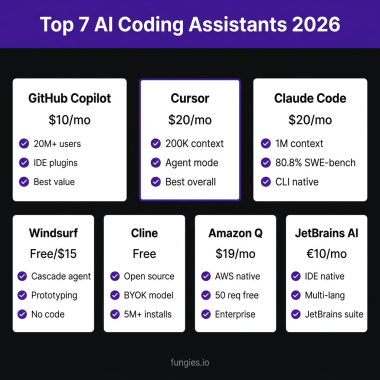
1. Cursor — Best Overall Experience
Pricing: $16/month (Pro), $240/month (Business)
Cursor is a VS Code fork built from the ground up for AI-assisted development. It’s not an extension—it’s an AI-native IDE. And the numbers back up the hype: Cursor hit $2B+ ARR in February 2026, doubling in just three months, with a $29.3B valuation.
Key Features:
- Native AI chat built into the editor (Cmd+K for quick edits, Cmd+L for chat)
- Multi-file editing with full codebase awareness
- Support for GPT-4o, Claude 3.5 Sonnet, and custom models
- Composer mode for building features from scratch
- Automatic context gathering from your entire project
- One-click apply of AI suggestions directly to your code
Best For: Developers who want the most polished AI experience without switching editors. Cursor feels like using VS Code from the future.
Pros:
- Seamless VS Code migration (imports all settings and extensions)
- Best-in-class multi-file refactoring
- Fast and responsive UI
- Excellent code context awareness
Cons:
- Limited terminal integration compared to CLI tools
- Basic Git integration (no advanced Git workflows)
- More expensive than some alternatives
2. GitHub Copilot — Best for Teams and Enterprise
Pricing: $10/month (Individual), $19/month (Business), $39/month (Enterprise)
With ~20 million users, 4.7 million paid subscribers, and 42% market share, GitHub Copilot is still the king of AI coding tools. 90% of Fortune 100 companies use it. If you’re working in a team environment, Copilot’s deep GitHub integration is hard to beat.
Key Features:
- Real-time code suggestions as you type (46% code generation rate)
- Copilot Chat for explaining and refactoring code
- Deep GitHub integration (PR summaries, code review assistance)
- Enterprise features: code snippet policies, audit logs, SSO
- Support for Visual Studio, VS Code, JetBrains IDEs, Vim, and Neovim
- GitHub Copilot Workspace for planning and implementing features
Best For: Teams already using GitHub, enterprises needing compliance and security features, and developers who want broad IDE support.
Pros:
- Unmatched ecosystem and IDE support
- Deep Git integration and GitHub workflow support
- Strong enterprise security and compliance features
- Proven track record with massive user base
Cons:
- Multi-file editing is good but not as powerful as Cursor
- Can feel less “magical” than newer AI-native tools
- Enterprise pricing gets expensive at scale
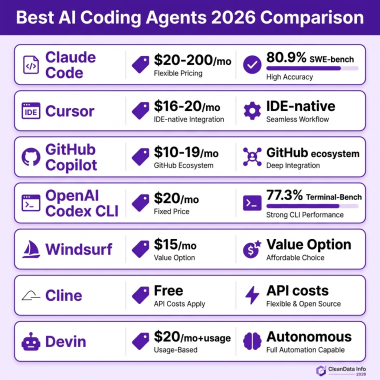
3. Claude Code — Best for Terminal Workflows
Pricing: $17/month (Pro), $100+/month (Max)
Anthropic’s Claude Code is different. It’s not an IDE extension—it’s a CLI agent that runs in your terminal. And developers love it: 91% customer satisfaction (the highest of any tool) and 18% adoption as of January 2026.
Key Features:
- Natural language command interface in your terminal
- Native Git integration (branching, committing, diffing)
- Can execute shell commands and read file outputs
- Multi-file editing with full project context
- Powered by Claude 3.5 Opus (best reasoning model for code)
- Works with any editor or IDE (or none at all)
Best For: Terminal-first developers, DevOps engineers, and anyone who prefers CLI workflows over GUI-heavy tools.
Pros:
- Highest customer satisfaction rating (91%)
- Native terminal and Git integration
- Works with any development environment
- Claude Opus has excellent reasoning for complex tasks
Cons:
- No visual IDE integration (terminal only)
- Max tier is expensive ($100+/month)
- Steeper learning curve for GUI-oriented developers
4. Windsurf — Best Free Option
Pricing: Free for individuals, $15+/month for teams
Windsurf (formerly Codeium) is the best free AI coding assistant available. It’s a full AI-native IDE like Cursor, but with a generous free tier that makes it accessible to hobbyists and indie developers.
Key Features:
- Cascade AI for multi-file editing and codebase-wide changes
- Real-time collaborative AI coding
- Support for multiple AI models
- VS Code-compatible extension also available
- Fast autocomplete and inline suggestions
Best For: Budget-conscious developers, students, and anyone wanting to try AI coding without committing to a subscription.
Pros:
- Completely free for individual use
- Good multi-file editing capabilities
- Clean, modern interface
- No credit card required to start
Cons:
- Free tier has usage limits
- Less polished than Cursor
- Limited terminal and Git integration
5. Amazon Q Developer — Best for AWS Ecosystem
Pricing: $19/month
If your infrastructure lives on AWS, Amazon Q Developer is purpose-built for your workflow. It understands AWS services, CloudFormation, CDK, and the entire AWS ecosystem in ways general-purpose tools can’t match.
Key Features:
- Deep AWS service knowledge and integration
- Code transformation for AWS migrations
- Security vulnerability scanning and remediation
- IDE support for VS Code and JetBrains
- Chat interface for AWS architecture questions
Best For: AWS-heavy organizations, cloud architects, and developers working extensively with AWS services.
Pros:
- Unmatched AWS expertise
- Security scanning built-in
- Good for infrastructure-as-code workflows
Cons:
- Limited value outside AWS ecosystem
- More expensive than some alternatives
- Smaller community and ecosystem
6. JetBrains AI Assistant — Best for JetBrains IDEs
Pricing: $10/month
JetBrains makes some of the best IDEs in the world—IntelliJ IDEA, PyCharm, WebStorm, GoLand. Their AI Assistant is deeply integrated into these tools, offering a native experience that third-party extensions can’t match.
Key Features:
- Native integration with all JetBrains IDEs
- In-editor AI chat and code generation
- Test generation and documentation
- Commit message suggestions
- Support for multiple AI models
Best For: Developers committed to JetBrains IDEs who want seamless AI integration without switching tools.
Pros:
- Native IDE integration (no extension needed)
- Affordable pricing
- Works across all JetBrains products
Cons:
- Only works with JetBrains IDEs
- Less powerful than Cursor or Claude Code for complex tasks
- Smaller feature set than competitors
7. Tabnine — Best for Privacy and Compliance
Pricing: $12/month (Pro)
Tabnine has carved out a niche as the privacy-first AI coding assistant. For organizations in regulated industries—or developers who simply don’t want their code sent to third-party servers—Tabnine offers local and private cloud deployment options.
Key Features:
- Local model support (code never leaves your machine)
- Private cloud deployment options
- Whole-line and full-function code completion
- Chat interface for code explanation
- Broad IDE support (VS Code, JetBrains, Vim, etc.)
Best For: Enterprises with strict compliance requirements, developers working on sensitive codebases, and privacy-conscious individuals.
Pros:
- Strongest privacy and security options
- Local model support
- Affordable pricing
- Good IDE support
Cons:
- Less powerful than cloud-based alternatives
- Smaller context window for complex tasks
- Local models require more setup
Complete Comparison Table
| Feature | Cursor | Copilot | Claude Code | Windsurf | Amazon Q | JetBrains | Tabnine |
|---|---|---|---|---|---|---|---|
| Price | $16/mo | $10/mo | $17/mo | Free/$15 | $19/mo | $10/mo | $12/mo |
| Type | AI IDE | IDE Extension | CLI Agent | AI IDE | IDE Extension | Native IDE | IDE Extension |
| Best Model | GPT-4o/Claude | GPT-4o | Claude Opus | Multiple | Amazon models | Multiple | Proprietary/Local |
| Multi-file | Excellent | Good | Excellent | Good | Good | Fair | Fair |
| Terminal | Limited | Limited | Native | Limited | Limited | Limited | Limited |
| Git Integration | Basic | Deep | Native | Basic | Basic | Basic | Basic |
| Privacy Options | Enterprise | Enterprise | Standard | Standard | Enterprise | Standard | Local/Private |
How to Choose the Right AI Coding Assistant
With so many options, how do you pick the right one? Here’s a simple decision framework:
Choose Cursor if…
- You want the best overall AI coding experience
- You’re comfortable switching from VS Code (or already use it)
- Multi-file refactoring is a priority
- You value polish and UX
Choose GitHub Copilot if…
- You work in a team or enterprise environment
- Deep GitHub integration matters
- You need broad IDE support
- Compliance and audit features are required
Choose Claude Code if…
- You live in the terminal
- Git workflow automation is important
- You want the highest customer satisfaction tool
- You prefer CLI over GUI
Choose Windsurf if…
- Budget is a primary concern
- You want to try AI coding without commitment
- You need a capable free option
Choose Amazon Q if…
- Your infrastructure is AWS-heavy
- You need AWS-specific expertise
- Cloud architecture assistance is valuable
Choose JetBrains AI if…
- You’re committed to JetBrains IDEs
- You want native integration
- You don’t want to switch tools
Choose Tabnine if…
- Privacy and compliance are critical
- You need local/on-premise deployment
- You’re in a regulated industry
Key Takeaways
| Tool | Best For | Price | Key Strength |
|---|---|---|---|
| Cursor | Best Overall | $16/mo | AI-native IDE experience |
| GitHub Copilot | Teams/Enterprise | $10-39/mo | Ecosystem & Git integration |
| Claude Code | Terminal Users | $17-100+/mo | Highest satisfaction (91%) |
| Windsurf | Budget Option | Free/$15 | Best free tier |
| Amazon Q | AWS Users | $19/mo | AWS ecosystem expertise |
| JetBrains AI | JetBrains IDE Users | $10/mo | Native IDE integration |
| Tabnine | Privacy-First | $12/mo | Local model support |
The bottom line: AI coding assistants are no longer optional—they’re essential. The data is clear: developers using AI tools save 1-8 hours per week and complete tasks 55% faster. But the “almost right but not quite” problem is real. The tools ranked above minimize that frustration through better context awareness, smarter models, and more polished UX.
Frequently Asked Questions
What is the best AI coding assistant in 2026?
Cursor is the best overall AI coding assistant in 2026 for most developers, offering the most polished AI-native IDE experience. However, GitHub Copilot remains the best choice for teams and enterprises due to its ecosystem and security features.
Is GitHub Copilot still worth it in 2026?
Yes, GitHub Copilot is still worth it in 2026, especially for teams. With 20 million users, deep GitHub integration, and strong enterprise features, it remains the market leader. However, individual developers may find better value in Cursor or Windsurf.
Can AI coding assistants replace programmers?
No, AI coding assistants cannot replace programmers. While 41% of code is now AI-generated, developers still need to review, understand, and maintain that code. AI tools augment productivity—they don’t replace human judgment, creativity, or architectural thinking.
What’s the difference between Cursor and GitHub Copilot?
Cursor is an AI-native IDE (a VS Code fork), while GitHub Copilot is an extension that works across multiple IDEs. Cursor offers better multi-file editing and a more integrated AI experience, while Copilot has broader IDE support and deeper Git/GitHub integration.
Is there a free AI coding assistant that’s actually good?
Yes, Windsurf (formerly Codeium) offers a genuinely good free tier for individual developers. While it has usage limits, it provides capable AI code completion and chat features without requiring a credit card.
Conclusion
The AI coding assistant landscape in 2026 is mature, competitive, and full of excellent options. Whether you prioritize the polished experience of Cursor, the ecosystem of GitHub Copilot, the terminal-first approach of Claude Code, or the privacy of Tabnine, there’s a tool that fits your workflow.
The 84% adoption rate isn’t just hype—it’s a reflection of real productivity gains. Developers using these tools are shipping code faster, spending less time on boilerplate, and focusing on higher-level problems. The key is choosing the right tool for your specific needs and workflow.
Ready to streamline your development workflow? Sign up for Fungies and handle payments, tax compliance, and checkout for your SaaS or digital products—so you can focus on building with your new AI coding assistant.