Notion has 30 million users. Most of them hate building systems from scratch. That’s your opportunity.
Creators are earning $500 to $50,000+ per month selling Notion templates — simple, pre-built workspaces that help people organize their business, finances, content, or life. Thomas Frank crossed $1 million in Notion template sales. Easlo built a six-figure business from a single niche. A small shop with just 16 listings generated nearly $400,000 over 3 years.
It’s not magic. It’s a repeatable process. Pick a niche, build a useful template, choose the right platform, price it correctly, and market it to people who already want what you’re selling.
This guide covers everything — from deciding what to sell Notion templates on, to how to price, where to distribute, and how to keep more of every sale you make.
Why Selling Notion Templates Is a Real Business in 2026
The “Notion template market” didn’t exist 5 years ago. Now it’s a legitimate digital product category with verified buyers, established marketplaces, and creators running full-time income streams.
Here’s what makes it work:
- Zero production cost. You build templates inside Notion, which is free. No design tools, no hosting, no physical inventory.
- Passive delivery. Once listed on a platform, sales happen automatically. No shipping, no fulfillment, no support overhead for basic templates.
- Massive, active audience. Notion users actively search for pre-built systems. The official Notion Marketplace has a dedicated buyer pool, and Etsy/Gumroad surface templates to millions of searchers.
- Recurring potential. Template libraries and subscriptions let you earn monthly instead of one-off sales.
The barrier isn’t technical skill — it’s knowing which niche to pick and where to sell.
The Most Profitable Notion Template Niches
The templates that sell best aren’t the most complex. They’re the ones that solve a specific, painful problem for a specific type of person.
The 9 most consistently profitable Notion template niches:
1. Productivity & Time Management
Daily planners, habit trackers, weekly reviews, time-blocking systems. This is the biggest category by volume. People obsessively search for “daily planner Notion template” and “habit tracker Notion.” High competition, but also highest buyer intent.
2. Business & Entrepreneurship
Client CRM systems, project management dashboards, business planning templates, freelancer trackers. Buyers in this niche pay more — a freelancer CRM can go for $49–$99 because it saves real time worth real money.
3. Finance & Budget Tracking
Personal budget trackers, expense dashboards, net worth calculators. Finance templates consistently punch above their weight in conversion rate because the pain is acute and the value is immediately visible.
4. Content Creation & Social Media
Editorial calendars, YouTube video planners, newsletter planning systems, brand asset trackers. Content creators are heavy Notion users and willing to pay for good systems.
5. Study & Learning
Study planners, course notes templates, knowledge management systems. Student creators are a huge segment — especially if you build templates specifically for university, online courses, or certification prep.
6. Health & Wellness
Meal planners, fitness trackers, sleep logs, mental health journals. Growing niche with strong emotional purchase motivation.
7. Team & Agency Operations
SOP libraries, client onboarding flows, hiring trackers, team wikis. B2B buyers spend more and look for polish. These can command $99–$149 for a full system.
8. Job Hunting & Career
Job application trackers, resume builders, networking dashboards. Timeless need, highly searchable.
9. Real Estate & Investing
Property analysis trackers, deal pipelines, rental income dashboards. Niche enough to have less competition, passionate enough buyers to pay $29–$49 per template.
The rule: Pick one niche, solve one problem. “A productivity dashboard for solopreneur coaches” beats “a general productivity template” every time. Specificity drives conversions.
How to Create a Sellable Notion Template
Building a template that sells isn’t about making it look beautiful — it’s about making it work immediately. Here’s what separates templates that convert from ones that don’t:
Step 1: Validate Before You Build
Before spending 10 hours on a complex system, check if people want it. Search Etsy for your template niche — if there are listings with 100+ reviews, it’s a proven market. Browse Reddit’s r/Notion and r/productivity for pain points. Check the Notion Marketplace for gaps in coverage.
Step 2: Build for Instant Usability
A great Notion template loads and makes sense in under 30 seconds. Add a “Start Here” section, pre-filled sample data, and a short setup guide. Professional templates that are multi-database, well-documented, and have setup instructions consistently command higher prices — and get fewer refund requests.
Step 3: Add Real Documentation
Write a walkthrough. Explain each database and how they connect. Include use case examples. This reduces support emails, increases perceived value, and justifies a higher price.
Step 4: Create Good Screenshots
Your listing thumbnail and screenshots are your sales page. Show the template in action with sample data populated. Dark mode screenshots tend to look more premium. On Etsy, the first image is everything — treat it like a cover design.
Step 5: Package it as a Duplicate Link
Notion lets you share templates via a public “Duplicate” link. This is how buyers get access — they click the link, duplicate it to their Notion workspace, and it’s ready to use. On most platforms, you’ll deliver this link via email after purchase. Make sure the link is set to public before listing.
For bundles, group related templates into a Notion page with multiple duplicate links, or create a central hub page that links to each individual template.
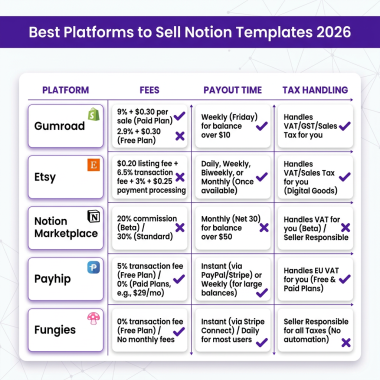
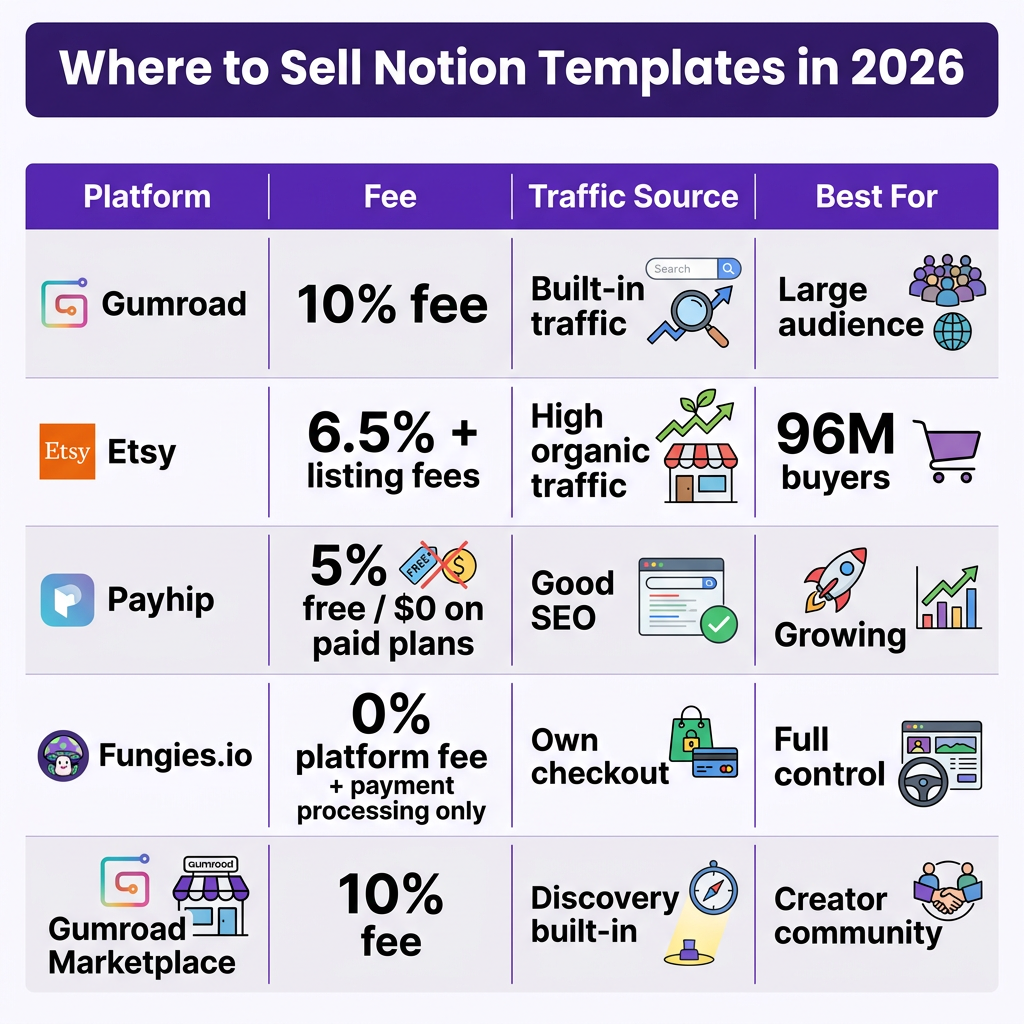
Where to Sell Notion Templates: Platform Comparison
Your platform choice affects your take-home pay, your audience size, and how much work you have to do to get sales. Here’s the honest breakdown:
| Platform | Platform Fee | Payment Processing | Built-in Traffic? | Best For |
|---|---|---|---|---|
| Gumroad | 10% per sale | ~2.9% + $0.30 | Yes (discovery) | Beginners, simple listings |
| Etsy | 6.5% + $0.20 listing fee | ~3% + $0.25 | Yes (strong SEO) | Consumer templates, high volume |
| Payhip | 5% (free) / $0 (paid plan) | ~2.9% + $0.30 | Limited | Cost-conscious creators |
| Notion Marketplace | 10% + $0.40 per sale | Included | Yes (Notion users) | Native Notion audience |
| Fungies.io | 0% platform fee | Payment processing only | No (own traffic) | Own store, full control, global tax handled |
| Sellfy | 0% (paid plan from $29/mo) | ~2.9% + $0.30 | Limited | Subscription stores, multiple products |
The math that matters: On a $29 template sold via Gumroad, you keep about $23.18 after platform fees + payment processing. On the same sale through your own store with Fungies.io, you keep ~$27.81 (just payment processing). At 100 sales/month, that’s $360/month difference — which compounds significantly at scale.
Recommended starting stack:
- New creators: Start on Gumroad + Notion Marketplace for built-in discovery. Validate that people want your template.
- Growing creators: Add Etsy for organic search traffic. It’s the highest-traffic channel for digital product discovery.
- Established creators: Move to your own store (Fungies.io, Payhip Pro, or Sellfy) to stop paying 10% forever. Use the marketplaces as acquisition channels and your own store for the main revenue stream.

Pricing Your Notion Templates: What Actually Works
Most first-time creators underprice. A lot. They see $9 templates on Gumroad and go lower to compete. That’s a mistake — price is a signal of quality, and a $5 template triggers more doubt than a $29 one.
Price Bands by Template Type
| Template Type | Typical Price Range | Example |
|---|---|---|
| Simple single-use template | $5–$29 | Habit tracker, daily planner |
| Professional multi-database system | $29–$99 | Business CRM, freelancer OS |
| Bundles (3–10 templates) | $35–$149 | Productivity bundle, creator kit |
| Template + mini-course combo | $47–$97 | Second Brain setup course + templates |
| Monthly subscription (template library) | $9–$50/month | Premium template club |
| Custom/done-for-you Notion setup | $200–$1,000+ | Agency OS, team wiki build |
Pricing Tactics That Work
Launch discounts: Start at ~30% below your target price. Collect early reviews and testimonials. Then raise the price once you have social proof. This is standard in the space and it works — reviews sell templates.
Bundle upsell: Offer a single template at $19, then show a bundle of 5 related templates at $49. Most creators who use this report a meaningful percentage of buyers upgrading. Bundles raise average order value without extra marketing effort.
Freemium lead magnet: Give away a lite version for free in exchange for an email. Then sell the pro version. This is how many top Notion creators built their audiences — free gives them organic traffic and social sharing, paid converts the serious buyers.
Price anchoring: If you sell a template at $29 and a bundle at $59, put the bundle first. People price-anchor to the first number they see, making $29 feel like a bargain.
How to Market Notion Templates Without a Big Audience
You don’t need 10,000 followers to make money selling Notion templates. You need the right traffic sources. Here’s what’s working in 2026:
Pinterest (Biggest Underrated Channel)
Pinterest is a visual search engine. Notion template aesthetics perform extremely well here. Pin screenshots of your templates with keyword-rich descriptions. Pins have long shelf lives — a well-optimized pin can drive traffic for years. This is how a lot of Etsy Notion sellers quietly build passive traffic.
TikTok & Instagram Reels
Show the template in action. “Here’s how I track my freelance income in Notion” → [show template] → “Link in bio.” Short-form video drives impulse purchases for lower-priced templates ($9–$29). High reach, fast feedback loop.
YouTube
Thomas Frank built $1M+ in template sales largely through YouTube. Tutorial-style content (“how I built my second brain in Notion”) with a template download as a bonus converts at high rates. Slower to build but high quality traffic.
Reddit & Notion Communities
r/Notion, r/productivity, and r/digitalnomad are full of people actively seeking template recommendations. Don’t spam — contribute genuinely, then mention your template when directly relevant. One thread can drive hundreds of sales.
SEO via Your Own Store or Blog
If you have your own site, write keyword-targeted content: “best Notion CRM for freelancers,” “how to track habits in Notion,” etc. These searches have buyers at the bottom of the funnel. Use your Fungies.io or Payhip store as the destination.
Newsletter/Email List
Build an email list from day one. Offer a free template in exchange for signup. Email converts 3–5x better than social for product launches. Even a 500-person list of engaged Notion fans is worth real money at launch time.

How to Handle Tax and Compliance When Selling Globally
This is where most creators get surprised. If you’re selling to customers in the EU, UK, Australia, or other jurisdictions with digital services VAT, you’re legally required to collect and remit VAT — even if you’re based in the US or another country.
The simplest way to handle this: use a Merchant of Record (MoR). This is a platform that acts as the seller of record for your transactions, handling tax collection and remittance automatically.
| Platform | Merchant of Record? | Tax Handling | Global Payouts? |
|---|---|---|---|
| Fungies.io | ✅ Yes | Automatic (100+ countries) | ✅ Yes |
| Gumroad | ⚠️ Partial | US states only (not global VAT) | ✅ Yes |
| Etsy | ✅ Yes | Handles most jurisdictions | ✅ Yes |
| Payhip | ✅ Yes | Handles EU VAT via Stripe | ✅ Yes |
| Notion Marketplace | ✅ Yes | Regional sales tax handled | ✅ Yes (biweekly) |
The practical advice: If you’re just starting out and using Gumroad, you may be under-collecting VAT on international sales. If you’re selling more than $100/month to European customers, switch to a platform that handles MoR properly, or set up your own store with Fungies.io, which handles global tax compliance automatically at zero platform fee.
Real Income Examples From Notion Template Creators
Here’s what the earnings data actually looks like, based on documented creator case studies:
- Thomas Frank — crossed $1 million in total Notion template sales, driven primarily through YouTube content and multi-edition bundles. His Ultimate Brain template became a category-defining product.
- Easlo — built a six-figure business from Notion templates, scaling through bundling and repeated product releases. Started in college.
- Small shop case study — a creator with 16 listings generated nearly $400,000 over ~3 years. Average ~$11,000/month from a lean catalog, not hundreds of templates.
- Typical active creator range — $1,000–$3,000/month from consistent template sales, documented across Reddit testimonials and creator interviews.
- Top-end established creators — $5,000–$50,000+/month, usually with a YouTube or newsletter audience driving purchases.
The pattern: the creators who earn the most combine a specific niche, a content channel (YouTube, TikTok, newsletter), and multiple price points (free template → $29 template → $99 bundle → $49/month library).
Key Takeaways
- Niche specificity wins. “Daily planner for female entrepreneurs” converts better than “productivity template.” The more specific your target, the higher your conversion rate.
- Don’t start with one platform — start with two. Gumroad or Payhip for control, Notion Marketplace or Etsy for discovery. Cross-list early.
- Price higher than you think. Start at $19–$29 for a solid single template. Use launch discounts and bundle upsells. $5 templates rarely build real income.
- Pinterest + short-form video = scalable free traffic. Both channels have long content lifespans and strong Notion template audiences. Start here before paid ads.
- If you’re serious, own your checkout. A Merchant of Record like Fungies.io lets you sell globally with automatic tax compliance, no platform fee, and full control over your customer relationship. Gumroad’s 10% is fine to validate; it’s costly at scale.
Frequently Asked Questions
How much can you realistically make selling Notion templates?
Most active creators earn between $500 and $3,000/month. Top creators with a content channel (YouTube, newsletter) earn $5,000–$50,000+/month. A small catalog of 5–10 well-positioned templates earning $200–$300/month each is a realistic first-year target with consistent marketing.
Do you need a Notion paid plan to sell templates?
No. You can build and share templates with a free Notion account. The free plan supports duplicate links, which is how buyers receive your templates. A paid plan gives you more blocks and features for complex templates, but it’s not required to start.
What’s the best platform to sell Notion templates as a beginner?
Gumroad is the easiest starting point — quick setup, automatic delivery, and some built-in discovery. Pair it with the official Notion Marketplace for additional exposure to Notion users. Once you’ve validated your templates and want to reduce fees, move to Payhip Pro or a custom store with Fungies.io.
How do I deal with EU VAT when selling Notion templates internationally?
Use a platform that acts as the Merchant of Record. Etsy, Payhip, and the Notion Marketplace handle VAT/sales tax automatically on your behalf. If you sell from your own store, Fungies.io handles global tax compliance in 100+ countries automatically with no platform fee. This is significantly simpler than registering for VAT in each jurisdiction yourself.
Conclusion
Selling Notion templates is one of the most accessible digital product businesses you can start in 2026. Zero inventory, zero shipping, free tools, and a massive audience of buyers who are actively searching for what you can build.
The winning formula is simple: pick a specific niche, build a template that solves a real problem, price it above $19, list it in two or three places, and market it consistently through one content channel. Once you’ve validated demand, move your main sales to a platform where you keep more of each sale.
If you want to sell digital products globally — including Notion templates — without worrying about VAT, payment infrastructure, or platform fees eating your margins, create your free Fungies.io store today. It’s built specifically for digital product creators who want full control over their checkout and pricing, with global tax compliance handled automatically.
References
- Notion Marketplace — Selling Templates Help Guide
- Gumroad Pricing 2026: Real Take-Home Revenue Analysis — Swell
- Make and Sell Notion Templates (2026 Guide) — Sellfy
- The Ultimate Pricing Strategy Guide for Notion Templates — Pascio
- $1 Million in Notion Template Sales — Thomas Frank
- How Easlo Built a Notion Template Empire — Cajobo
- The Best Platforms to Sell Notion Templates — Kajabi
- How to Sell Notion Templates — SendOwl
- Top Platforms to Sell Notion Templates — EzyCourse