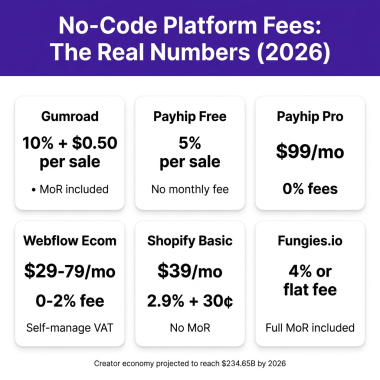
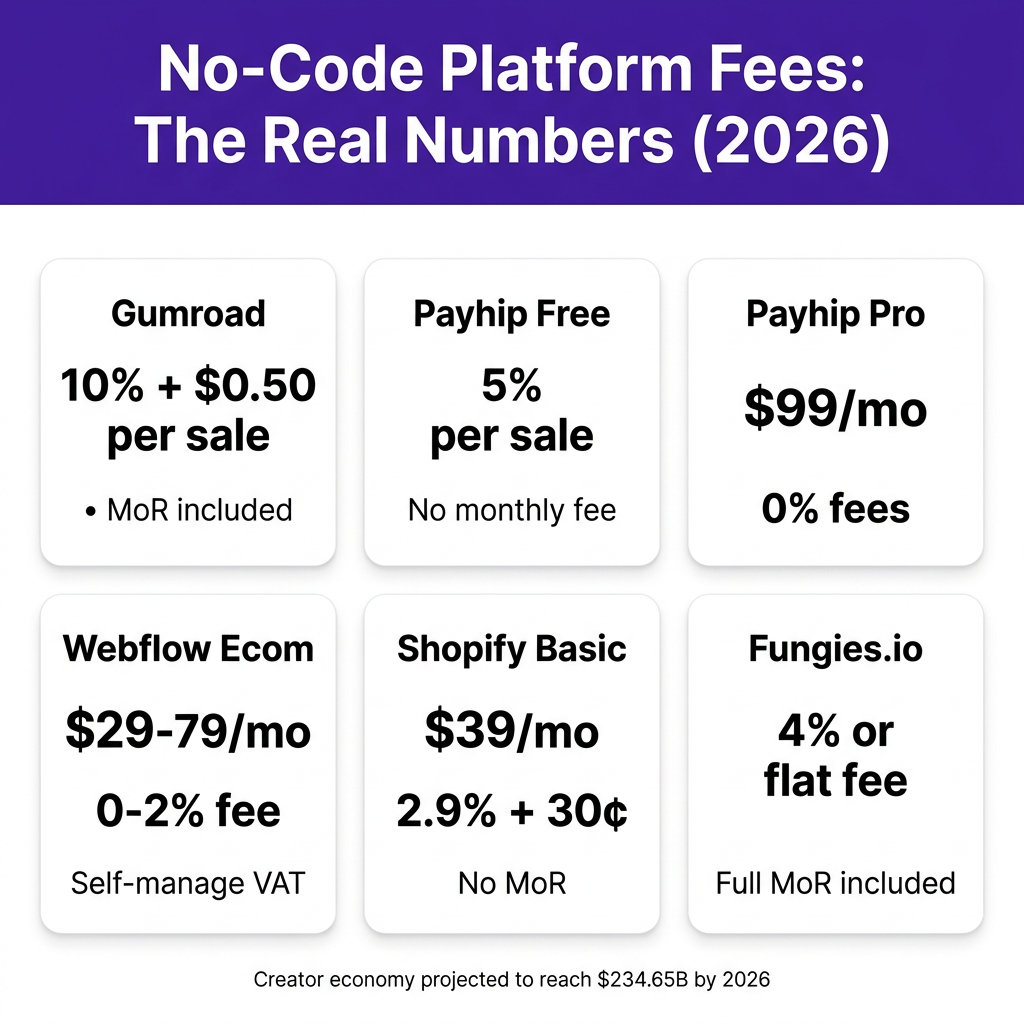
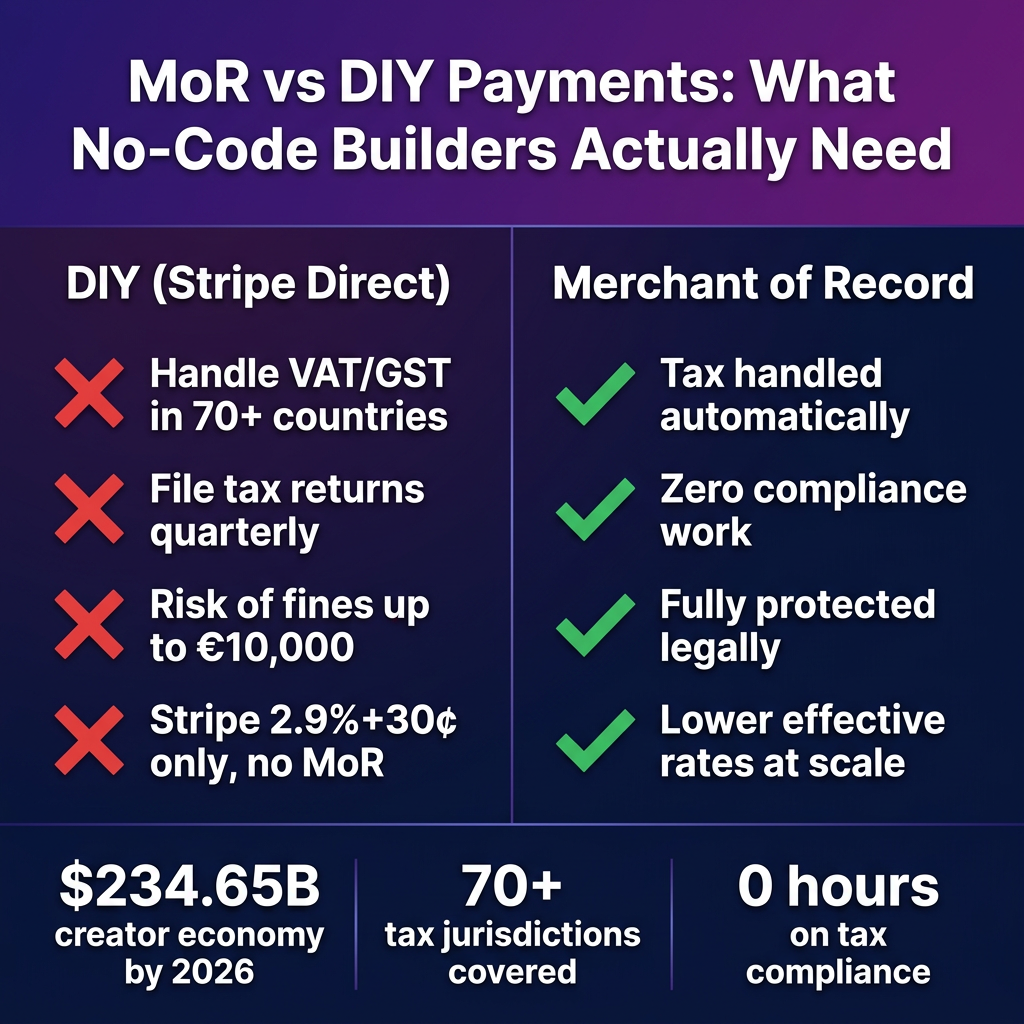
The creator economy is projected to hit $234.65 billion by 2026. Most of that money is being made by people who never wrote a single line of code. But here’s the thing nobody tells you upfront: building a beautiful no-code product page is the easy part. Getting paid — globally, legally, without losing 15% to fees and tax fines — is where most no-code founders hit a wall.
This guide is for you if you’re using Webflow, Bubble, Framer, Carrd, or any similar no-code builder and you want to sell digital products: ebooks, templates, SaaS access, courses, plugins, or anything else. We’ll cover which tools actually work together, what the real fee math looks like, and why the tax compliance question matters a lot more than most tutorials admit.
Why Selling Digital Products Without Code Is Harder Than It Looks
Let’s be honest. The headline “sell digital products without coding” is technically true for platforms like Gumroad, Payhip, and Shopify — you can get a store live in an afternoon. But there are three hidden problems that bite people later:
- Tax compliance is your problem unless someone else owns it. If you’re selling to customers in Germany, France, Australia, or Japan, you’re legally required to collect and remit VAT/GST. Stripe doesn’t do this for you. Neither does Webflow’s native ecommerce unless you set it up manually per jurisdiction.
- Platform fees compound fast. Gumroad’s 10% + $0.50 per sale sounds manageable at $200/month. At $5,000/month, you’re handing over $500+. That’s money that could pay for a year of better tooling.
- No-code builders and payment tools don’t always speak the same language. Webflow Ecommerce can’t natively integrate with Gumroad. You need webhooks, Zapier, or custom logic — which defeats the “no coding” promise.
The solution is a stack, not a single tool. A no-code page builder for design, a Merchant of Record (MoR) for payments and compliance. Here’s exactly how to build it.
The No-Code Builder Landscape in 2026
Your builder handles the front-end experience. Pick the one that matches your technical comfort and product type:
Webflow
Webflow is the most powerful visual design tool available without code. It has native Ecommerce functionality (Stripe + PayPal), but it comes with important caveats. The Standard plan costs $29/month and charges a 2% transaction fee. The Plus plan ($74/month) and Advanced plan ($212/month) drop that to 0%, but you’re still responsible for tax compliance in every country you sell to — Webflow doesn’t act as a Merchant of Record.
Best for: creators who want pixel-perfect design control and are comfortable manually handling tax obligations or adding a third-party MoR layer.
Bubble
Bubble is for building full web apps — not just landing pages. If your digital product IS a web app (a SaaS tool, a dashboard, an interactive tool), Bubble makes sense. Payment integration usually means the Stripe plugin, which covers basic card processing but leaves tax compliance entirely in your hands. Bubble’s free plan has limitations; the paid plans start at $32/month.
Best for: indie developers building app-like products who want no-code flexibility with more dynamic behavior.
Framer
Framer is a fast-growing Webflow competitor focused on beautiful marketing sites. It doesn’t have native ecommerce, so you’ll integrate an external payment layer (Gumroad embed, Lemon Squeezy widget, or Fungies checkout embed).
Best for: creators who want fast, beautiful sites and are happy using a separate checkout tool.
Carrd
Carrd is the simplest option — one-page sites for $19/year. You can embed Gumroad or Payhip buttons directly. No transaction fees from Carrd itself, but you pay whatever your payment tool charges.
Best for: low-volume digital product sellers who want minimal setup and minimal cost.
Payment Tools That Actually Work With No-Code Builders
The right payment tool depends on whether you want to handle tax compliance yourself or have someone else own it. The second category is called a Merchant of Record, and it’s increasingly the smart choice for anyone selling internationally.
Gumroad
Gumroad is the most recognized name in creator payments. It’s a full MoR — they handle VAT, sales tax, and GST globally. The trade-off is the fee: 10% + $0.50 per transaction, plus Stripe’s 2.9% + $0.30 on top. On a $50 product, you’re paying roughly $6.45 in combined fees (12.9% effective). That’s high, but the compliance coverage is legitimate.
You can embed a Gumroad checkout button into any no-code site. It doesn’t require any coding — just copy the embed snippet. The downside: it routes buyers to Gumroad’s checkout flow, which means your branding disappears at the most important moment.
Payhip
Payhip is positioned as a cheaper alternative to Gumroad. Their Free plan charges 5% per transaction (no monthly fee). The Plus plan at $29/month drops to 2%. The Pro plan at $99/month is 0% fees. Payhip also acts as a Merchant of Record for VAT in EU and UK, but not for all global jurisdictions the way Gumroad does.
The fee math: at $1,000/month in revenue, Payhip Free costs $50. At $3,000/month, Payhip Plus ($29 + $60 in fees) costs $89 versus Payhip Free at $150. Pro makes sense only above roughly $5,000/month in sales.
Shopify
Shopify’s Basic plan is $39/month with 2.9% + $0.30 per transaction. It’s not an MoR by default — you still manage tax registration and filing yourself, though their Tax tool helps. Shopify is great if you’re selling physical goods alongside digital products, but overkill for pure digital with no dev resources.
Fungies.io
Fungies.io is purpose-built for selling digital products and SaaS with full MoR coverage — they handle VAT, GST, and sales tax in 100+ countries. Pricing is 4% per transaction for lower volume sellers, with flat-rate plans as you scale. Fungies offers an embeddable checkout that keeps your no-code site’s design intact, which solves the biggest problem with Gumroad embeds. It integrates cleanly with Webflow and Framer via a JavaScript snippet or hosted checkout link — no code required.
The Real Fee Comparison at Scale
| Tool | Monthly Fee | Transaction Fee | MoR (Tax Included) | Cost at $1K/mo Rev | Cost at $5K/mo Rev |
|---|---|---|---|---|---|
| Gumroad | $0 | 10% + $0.50/sale | ✅ Yes | ~$105 | ~$525 |
| Payhip Free | $0 | 5% | Partial (EU/UK) | $50 | $250 |
| Payhip Plus | $29 | 2% | Partial (EU/UK) | $49 | $129 |
| Payhip Pro | $99 | 0% | Partial (EU/UK) | $99 | $99 |
| Webflow Standard | $29 | 2% + Stripe fees | ❌ No | $49+ | $129+ |
| Shopify Basic | $39 | 2.9% + $0.30 | ❌ No | $68+ | $184+ |
| Fungies.io | $0 | 4% | ✅ Yes (100+ countries) | $40 | $200 |
Note: “Cost” columns show estimated platform fees only, excluding Stripe/PayPal processing charges where applicable. Gumroad’s $0.50/sale assumes ~10 transactions/month at $1K revenue.

How to Connect a No-Code Builder to a Payment MoR
This is the part most guides skip. Here’s the actual step-by-step for the most common setups.
Webflow + Fungies.io
- Create your product in the Fungies dashboard — set the name, price, and upload your digital file or set up webhook delivery.
- Generate a hosted checkout link or embeddable widget from Fungies.
- In Webflow, add a Button element with the Fungies checkout link as the href. Or embed the JavaScript snippet via a Custom Code embed block.
- Fungies handles payment processing, tax collection, and file delivery. You get a webhook notification on every sale.
- Optionally, connect Fungies webhooks to Zapier/Make to trigger email sequences, Notion entries, or Airtable updates.
Framer + Gumroad
- List your product on Gumroad and get your embed code.
- In Framer, use a Code component (HTML embed) to drop in the Gumroad button snippet.
- No Framer-side code needed — Gumroad hosts the checkout overlay.
- Trade-off: checkout is Gumroad-branded, not yours.
Carrd + Payhip
- List your product on Payhip.
- Copy the Payhip “Add to Cart” embed code.
- In Carrd, add an Embed element and paste the Payhip code.
- Works on Carrd’s Pro Lite plan ($19/year).
Bubble + Custom Payment Integration
Bubble requires a different approach. The Stripe plugin handles basic card processing, but if you need MoR behavior, you’ll typically build a hybrid: use Bubble for your app interface and redirect to a Fungies or Paddle hosted checkout for the actual payment step. Bubble’s webhooks then receive purchase confirmation and unlock features in your app.
No-Code + MoR: The Tax Compliance Reality Check
Here’s the scenario most tutorials ignore. You build a beautiful Framer site. You embed a Payhip button. You launch. A customer in Germany buys your $49 template. Payhip collects 19% German VAT and remits it to the German tax authority. You’re covered.
Now imagine the same product, but you used Webflow Ecommerce with Stripe Direct. The 19% VAT was your responsibility to collect, register for in Germany, and file quarterly. Miss it, and you’re liable for fines of up to €10,000 per jurisdiction. This is exactly why the “just use Stripe” advice doesn’t work for global digital product sales.
Countries where digital products require VAT/GST registration (even for non-resident sellers):
| Region/Country | Tax Name | Standard Rate | Threshold |
|---|---|---|---|
| European Union (27 countries) | VAT | 17–27% | €0 (no threshold for non-EU sellers) |
| United Kingdom | VAT | 20% | £0 for non-UK sellers |
| Australia | GST | 10% | AUD $75,000/year |
| Canada | GST/HST | 5–15% | CAD $30,000/year |
| Norway | VAT | 25% | NOK 50,000/year |
| Japan | Consumption Tax | 10% | ¥10M/year |
An MoR eliminates this problem entirely. They’re the legal seller on record, so their obligations — not yours.
Picking the Right Stack: Decision Framework
Here’s a quick decision tree based on your situation:
You want zero setup and don’t care about branding your checkout:
→ Use Carrd or Framer + Gumroad. Highest fees, simplest setup, full MoR coverage.
You want design control but low volume (<$1K/month):
→ Webflow or Framer + Payhip Free. Accept the 5% fee; avoid $99/month plans.
You’re scaling past $2K/month and selling globally:
→ Webflow or Framer + Fungies.io. Lowest effective fees at scale with full MoR coverage. Fungies’s 4% rate beats Gumroad’s ~13% total effective rate significantly.
You’re building a web app (not just a storefront):
→ Bubble for the app, redirect to Fungies or Paddle hosted checkout. Connect via webhooks.
You want the absolute cheapest setup:
→ Payhip free + a simple Linktree or Carrd page. $0/month, 5% fee, EU/UK MoR coverage only.
Key Takeaways
- No-code builders handle design, not payments compliance. Webflow, Framer, Bubble — none of them act as a Merchant of Record by default. You need a separate tool for that.
- Gumroad’s 10% fee is high but buys you complete MoR coverage. At low volumes, the convenience is worth it. Above $3K/month, look for alternatives.
- Payhip’s free plan (5%) beats Gumroad below $2K/month. Above that, the Pro plan ($99/month, 0% fees) is worth doing the math on — but Payhip’s MoR coverage doesn’t extend to all global jurisdictions.
- Fungies.io offers the best fee-to-coverage ratio at scale. 4% with full global MoR coverage in 100+ countries outperforms every option above $1,500/month in revenue.
- The VAT compliance risk is real. If you’re selling to EU, UK, or Australian customers via a DIY Stripe setup without MoR coverage, you are technically non-compliant. It’s a legal exposure, not just a nice-to-have.
FAQ
Can I sell digital products on Webflow without coding?
Yes. Webflow has native Ecommerce functionality (Standard plan at $29/month) with Stripe and PayPal integration. You can also embed third-party checkout tools like Fungies.io or Gumroad using custom code blocks without any programming knowledge. The native Webflow Ecommerce option doesn’t include Merchant of Record tax compliance — you’ll need to add that separately.
What’s the cheapest way to sell digital products without code?
The cheapest entry point is Payhip’s Free plan (5% transaction fee, no monthly fee) paired with a free Carrd or Framer site. Your total platform cost is $0/month — you only pay when you sell. Note that Payhip’s free plan provides Merchant of Record services for EU and UK VAT, but not all global tax jurisdictions.
Does Bubble work for selling digital products?
Bubble works, but it’s more complex than purpose-built ecommerce tools. For simple file downloads, you’d connect Bubble to Stripe via the native plugin, set up a file delivery webhook, and handle tax compliance yourself or via an MoR. For SaaS products built on Bubble, a more common pattern is using Bubble for the app interface and routing checkout to a hosted payment page (Paddle, Fungies.io, or similar).
Do I need to register for VAT if I sell digital products internationally?
If you sell to EU customers (any amount), you’re technically required to collect EU VAT and either register under the OSS (One-Stop Shop) scheme or use a platform that acts as the Merchant of Record. The same applies for UK VAT post-Brexit, Australian GST above AUD $75,000/year in sales, and several other jurisdictions. Using a Merchant of Record (Gumroad, Payhip, Fungies.io, Paddle) shifts this obligation to the platform — they handle registration, collection, and remittance on your behalf.
Conclusion
Selling digital products without code has never been more accessible — but “no code” doesn’t mean “no complexity.” The payment and compliance layer matters as much as your product page design. Get it wrong and you’re looking at fee leakage, compliance risk, or both.
The right stack: pick a no-code builder that gives you design control (Webflow, Framer, or Carrd for simpler needs), then layer in a Merchant of Record for payments. Gumroad works for beginners who want the simplest possible setup. Fungies.io is the better choice once you’re past $1,500/month — lower fees, global MoR coverage, and a checkout experience that stays on-brand.
Ready to launch without the tax headache? Start your free Fungies.io account — set up takes under 10 minutes and you can embed the checkout into any no-code site today.
References
- Gumroad Pricing — 10% flat fee, MoR included
- Payhip Fees 2026 — AstroLink
- Webflow Updated Pricing — May 2026
- Creator Platform Fee Comparison 2026 — Behind the Scenes
- Top Merchant of Record Providers 2026 — Cleverbridge
- Bubble eCommerce and Payments — Official Docs
- What Is a Merchant of Record? — Nexway