Creating a dedicated website for your game isn’t just a nice-to-have anymore — it’s essential. Whether you’re an indie developer launching your first title or a studio building a portfolio, having your own game website gives you complete control over your brand, your player relationships, and most importantly, your revenue.
In this guide, I’ll walk you through exactly how to make a game website from scratch, even if you’ve never built a website before. We’ll cover everything from choosing the right platform to optimizing your site for conversions.
Why Every Game Developer Needs Their Own Website
Steam, itch.io, and the App Store are great for distribution, but they come with serious limitations. You’re competing with thousands of other games for attention, you’re subject to their algorithms, and you’re paying their fees (Steam takes 30%, Apple takes 15-30%).
Your own website changes the game:
- You own the relationship — Collect emails, build a community, and communicate directly with players
- You keep more revenue — Payment processors charge 2.9% + $0.30 vs. platform cuts of 15-30%
- You control the experience — No competing ads, no algorithm changes, no platform rules
- You build long-term value — Your website becomes an asset that grows with each game
Choosing the Right Game Website Builder
Not all website builders are created equal for game developers. You need something that can handle media-rich content (trailers, screenshots, GIFs), integrate with payment systems, and look professional without requiring a computer science degree.
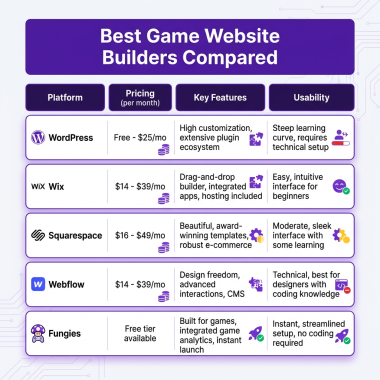
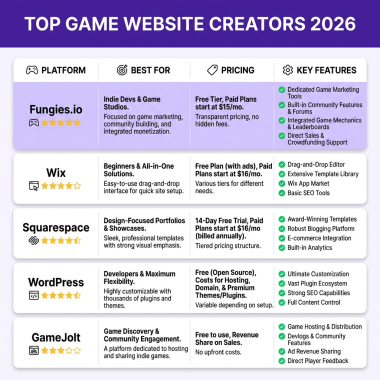
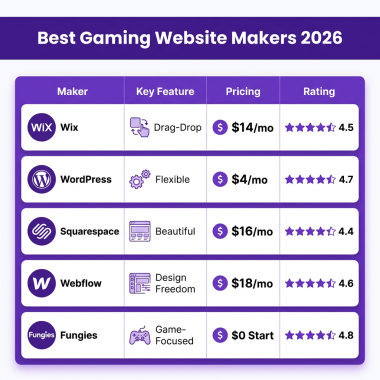
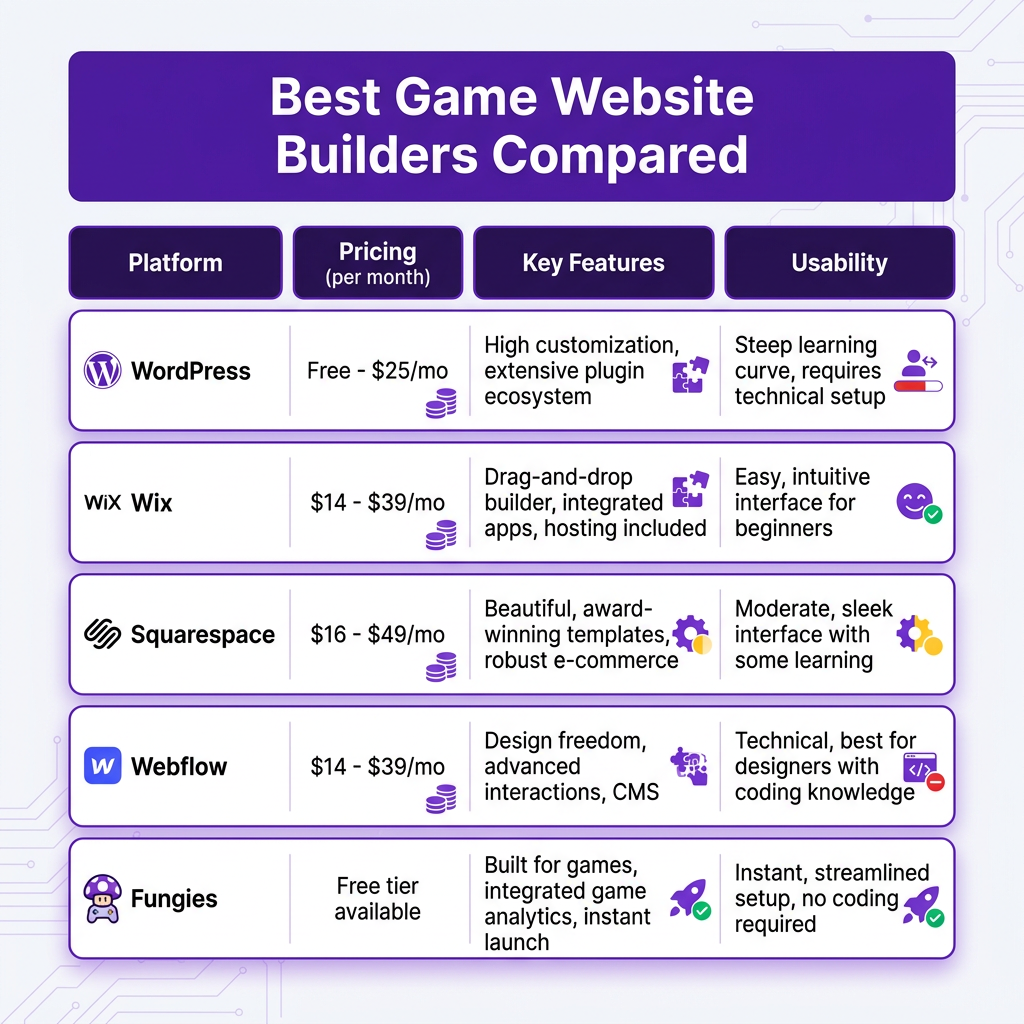
Here’s how the top platforms compare:
WordPress (Best for Flexibility)
WordPress powers 43% of the internet for a reason. With themes like Astra or Divi and plugins like Elementor, you can build a stunning game site. The downside? There’s a learning curve, and you’ll need to handle hosting, security, and updates yourself.
Best for: Developers who want complete control and don’t mind getting technical.
Wix (Best for Beginners)
Wix’s drag-and-drop editor makes it dead simple to create a professional-looking site. They have gaming-specific templates and handle all the technical stuff. The trade-off is less flexibility and higher long-term costs.
Best for: First-time developers who want to launch fast.
Fungies (Best for Selling Games)
Full disclosure — I work with Fungies, but hear me out. Unlike general website builders, Fungies is built specifically for game developers. You get instant game pages, built-in payment processing with global tax compliance handled automatically, and zero setup headaches. It’s the fastest path from “I have a game” to “I’m selling downloads.”
Best for: Developers who want to start selling immediately without dealing with taxes, VAT, or payment setup.
Step-by-Step: How to Make a Game Website
Step 1: Choose Your Platform
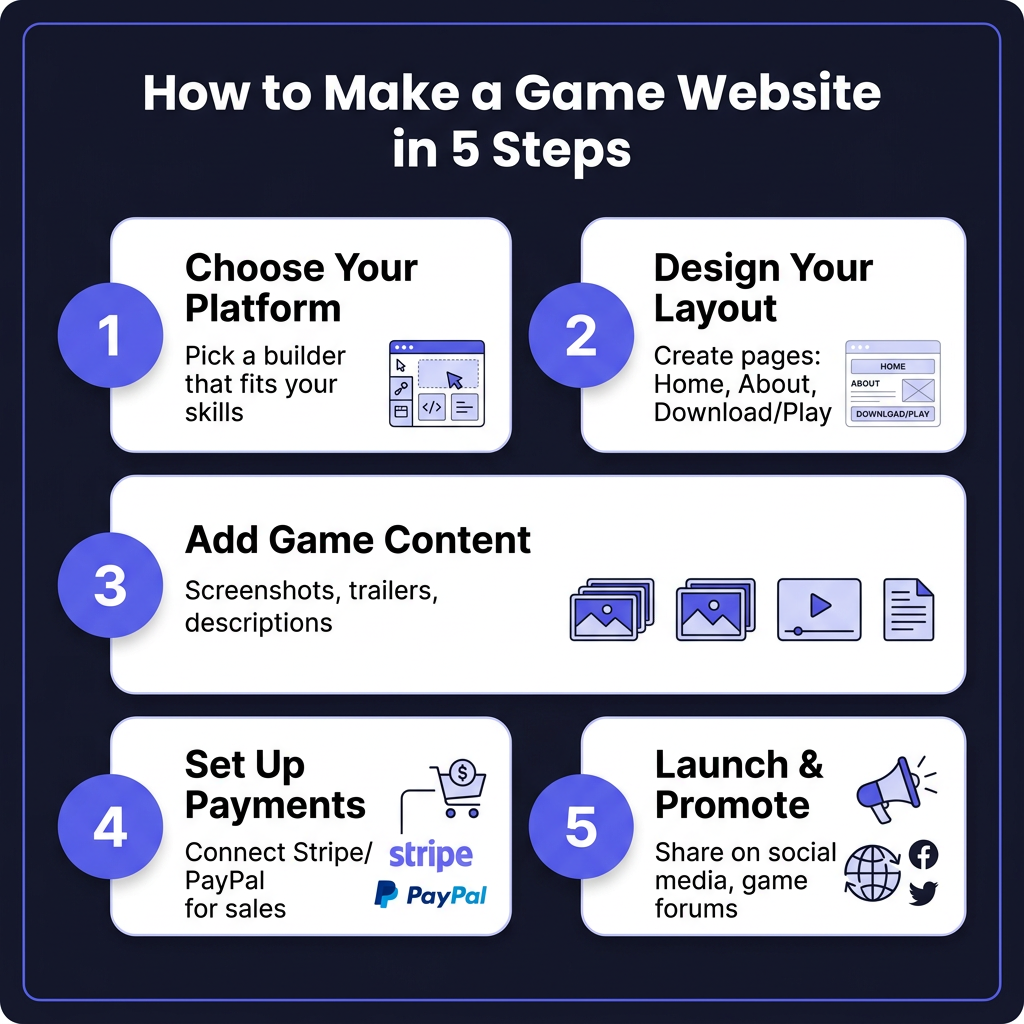
Based on your technical comfort level and goals, pick a platform from the comparison above. If you’re just testing the waters, start with something simple like Wix or Fungies. If you’re building a long-term studio brand, WordPress or Webflow gives you more room to grow.
Step 2: Design Your Layout
Every effective game website needs these core pages:
- Homepage: Your trailer above the fold, clear value proposition, and a prominent download/buy button
- About: Your story as a developer — players connect with people, not just products
- Game Page: Screenshots, features, system requirements, and reviews
- Contact: Press kit, social links, and a way for players to reach you
Step 3: Add Game Content
This is where most developers mess up. Your website isn’t just a storefront — it’s a pitch. Every element should answer one question: “Why should I play this game?”
Essential content to include:
- A 60-90 second trailer that shows gameplay (not just cinematics)
- 5-8 high-quality screenshots that showcase different features
- A compelling description that focuses on benefits, not just features
- Social proof — reviews, awards, or player testimonials
Step 4: Set Up Payments
If you’re selling your game directly, you need a payment solution. Stripe and PayPal are the standards, but here’s what most developers don’t realize: accepting payments globally means dealing with VAT, sales tax, and compliance in dozens of countries.
A Merchant of Record service like Fungies handles all of this automatically — tax calculation, collection, remittance, and compliance — so you can focus on making games instead of studying tax law.
Step 5: Launch & Promote
Your website is live. Now what? Here’s your launch checklist:
- Share on Reddit (r/gamedev, r/indiegaming, genre-specific subreddits)
- Post on Twitter/X with relevant hashtags (#indiedev #gamedev)
- Reach out to gaming journalists and YouTubers
- Submit to game festivals and awards
- Set up Google Analytics to track your traffic
Ready to Launch Your Game?
Fungies.io gives indie developers everything they need — instant game pages, built-in payments, and global tax compliance handled automatically.
No credit card required • Get started in minutes
Common Mistakes to Avoid
I’ve seen hundreds of game websites. Here are the mistakes that kill conversions:
- No clear call-to-action — Every page should guide visitors toward playing or buying
- Slow loading times — Compress images and videos. 53% of mobile users abandon sites that take longer than 3 seconds
- Ignoring mobile — 60%+ of gaming traffic comes from mobile devices
- No email capture — You’re leaving money on the table if you’re not building a mailing list
- burying the price — Be transparent about pricing upfront
FAQ
Do I need coding skills to make a game website?
No. Platforms like Wix, Squarespace, and Fungies let you build professional sites with drag-and-drop editors. If you want more customization, basic HTML/CSS knowledge helps but isn’t required.
How much does it cost to create a game website?
Costs range from free (Fungies free tier, WordPress.com basic) to $50+/month for premium builders with e-commerce features. Factor in domain registration ($10-15/year) and any premium themes or plugins.
Should I sell on my own website or use Steam?
Do both. Steam gives you access to their massive user base, but you keep more revenue and control when selling direct. Many successful indies use Steam for discovery and their website for the best margins.
What’s the best platform for selling games directly?
For developers who want to sell immediately without technical headaches, Fungies is purpose-built for game sales with built-in tax compliance. For more control (and more setup), WordPress + WooCommerce or Webflow are solid options.
Conclusion
Learning how to make a game website is one of the highest-ROI skills for any indie developer. You don’t need to be a web designer or a marketing expert — you just need to choose the right platform and follow the steps above.
Start simple, launch fast, and iterate based on what your players tell you. Your website will evolve alongside your games, becoming a valuable asset that drives sales and builds your community for years to come.
Ready to build your game website? Create your free Fungies account and launch your game page in minutes — no coding required, tax compliance handled automatically.