HuggingFace Hub hosts over 400,000 open-source AI models. Yet most developers barely scratch the surface of what’s available. They stick to the same five models everyone talks about on Reddit, missing better alternatives that run faster, use less VRAM, and cost nothing.
Here’s the reality: Llama 3.1 8B in Q4_K_M quantization uses just 4.7GB of VRAM and retains 95% of full-precision quality. A 70B model that needs 140GB in FP16 fits into 35GB with 4-bit quantization. The tools to run these models locally have never been better. But first, you need to know how to find them.
What Is HuggingFace Hub (And Why It Matters)
HuggingFace Hub is the GitHub of machine learning. It’s where researchers, companies, and independent developers share pre-trained models, datasets, and demo applications. As of mid-2026, the Hub contains:
- 400,000+ models — from 1B parameter edge models to 1T+ parameter frontier models
- 100,000+ datasets — training data for fine-tuning and evaluation
- Spaces — interactive demos running on HuggingFace’s infrastructure
For developers running local LLMs, the Hub is your primary source for open-weight models. Meta’s Llama 4, Google’s Gemma 4, Alibaba’s Qwen 3.5, Mistral’s Small 4, and DeepSeek’s V4 all live here. So do thousands of fine-tuned variants and quantized versions optimized for different hardware.
Navigating the Model Hub: A Developer’s Workflow
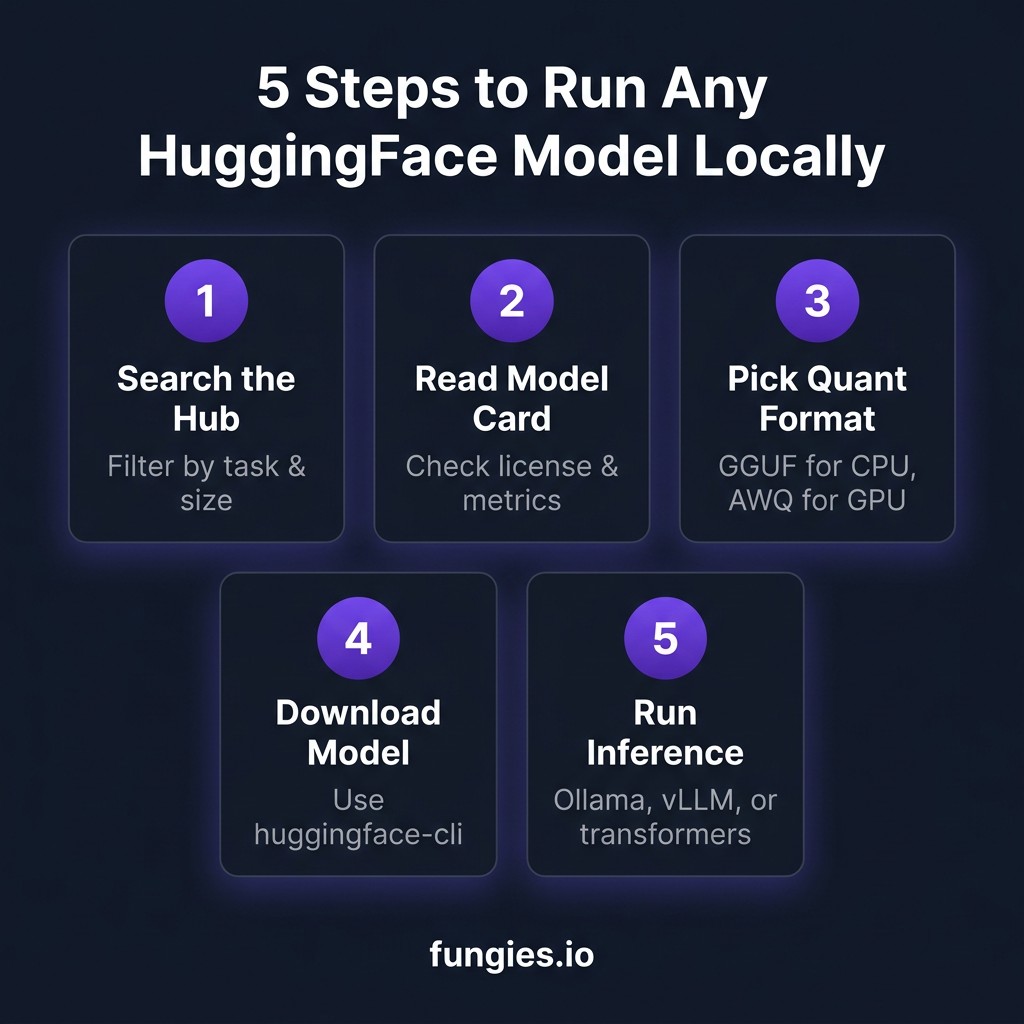
Step 1: Search with Filters
Start at huggingface.co/models. The search bar accepts natural language, but filters are where the power lies. Click “Filter” and set:
- Task: Text Generation for LLMs, Fill-Mask for embeddings, etc.
- Library: Transformers, GGUF, AWQ, or SafeTensors
- Language: English, multilingual, or specific languages
- License: Apache 2.0, MIT, or Llama 3 license for commercial use
- Model size: Filter by parameters (1B, 7B, 70B, etc.)
Pro tip: Use the “Trending” tab to see what the community is actually using. A model with 10,000 downloads this week is often more battle-tested than one with 1M total downloads but no recent activity.
Step 2: Read the Model Card
Every model on the Hub has a model card — a README.md file with structured metadata. Here’s what to look for:
| Section | What to Check |
|---|---|
| Model Summary | Base model, parameter count, architecture (Dense vs MoE) |
| License | Apache 2.0 = commercial OK; Llama 3 = need acceptance |
| Training Data | Dataset size, quality filters, contamination checks |
| Benchmarks | MMLU, HumanEval, GSM8K scores vs base model |
| Hardware Requirements | Minimum VRAM, recommended GPU/CPU |
| Intended Use | Chat, coding, RAG, or specialized tasks |
Red flags in a model card: Missing benchmark scores, vague training data descriptions, no license specified, or “for research purposes only” disclaimers without legal clarity.
Step 3: Check the Files Tab
The Files tab shows what’s actually in the repository. For running local LLMs, look for:
- config.json — model architecture and hyperparameters
- tokenizer.json — vocabulary and tokenization rules
- model.safetensors — actual weights (safetensors format is faster/safer than .bin)
- GGUF files — quantized versions for llama.cpp/Ollama (look for Q4_K_M, Q5_K_M, Q8_0)
- AWQ/GPTQ folders — GPU-optimized quantized versions
Critical: Always check if there’s an “Instruct” version. Base models predict the next token. Instruct models follow conversations and instructions. For most use cases, you want Instruct.
Understanding Quantization: The Memory Game
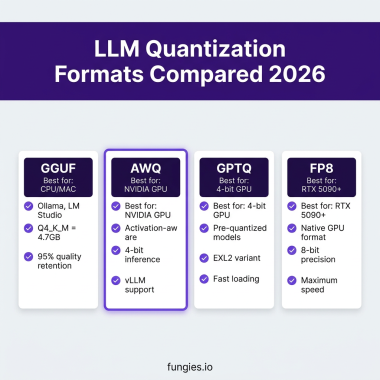
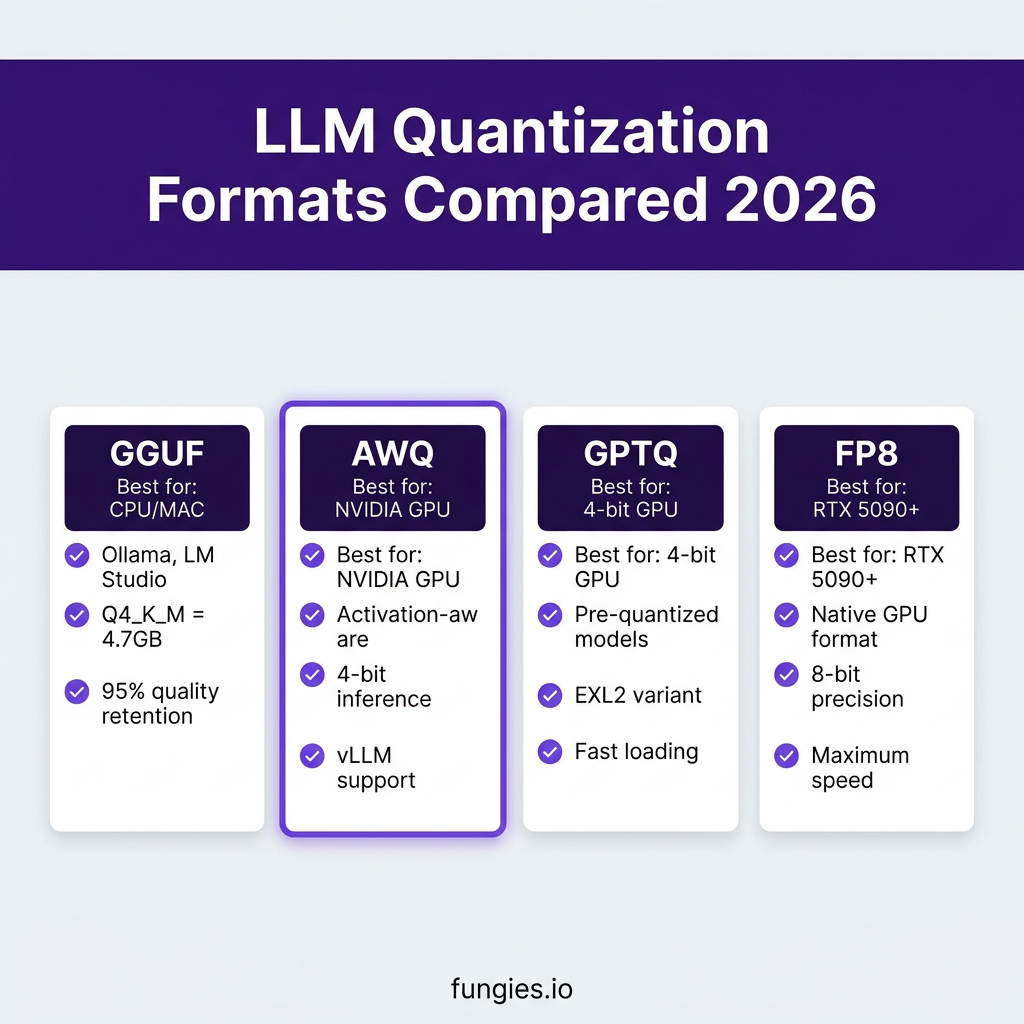
Quantization converts model weights from 16-bit floating point (FP16) to lower precision formats. This reduces memory usage and speeds up inference. Here’s how the major formats compare in 2026:
| Format | Bits | 8B Model Size | 70B Model Size | Best For | Quality |
|---|---|---|---|---|---|
| FP16 | 16 | 16 GB | 140 GB | Training, max quality | 100% |
| Q8_0 (GGUF) | 8 | 8.5 GB | 75 GB | CPU inference, quality-critical | ~99.5% |
| Q5_K_M (GGUF) | 5 | 5.5 GB | 48 GB | Balanced quality/speed | ~97% |
| Q4_K_M (GGUF) | 4 | 4.7 GB | 41 GB | Consumer GPUs | ~95% |
| AWQ | 4 | 4.5 GB | 39 GB | NVIDIA GPU inference | ~96% |
| GPTQ | 4 | 4.5 GB | 39 GB | Pre-quantized deployment | ~95% |
| FP8 | 8 | 8 GB | 70 GB | RTX 5090+, native speed | ~99% |
GGUF: The Universal Format
GGUF (GPT-Generated Unified Format) is the successor to GGML. It’s designed for llama.cpp and tools built on it (Ollama, LM Studio, Kobold.cpp). Key advantages:
- CPU-friendly — runs efficiently on Apple Silicon and consumer CPUs
- Multiple quality levels — Q3 to Q8 with predictable tradeoffs
- Single file — everything needed in one .gguf file
- Wide tooling support — Ollama, LM Studio, text-generation-webui
When choosing a GGUF quantization, use this rule of thumb:
- Q8_0: Maximum quality, use when you have VRAM to spare
- Q6_K: Nearly indistinguishable from Q8 for most tasks
- Q5_K_M: Sweet spot for reasoning and coding tasks
- Q4_K_M: Default choice — 95% quality at 75% memory reduction
- Q3_K_M: Only if desperate for VRAM — quality drops noticeably
AWQ and GPTQ: GPU-Optimized
AWQ (Activation-aware Weight Quantization) and GPTQ (General-purpose Post-Training Quantization) are designed for NVIDIA GPU inference:
- AWQ: Protects “salient” weights based on activation patterns. Better for instruction-tuned models. Supported by vLLM and AutoAWQ.
- GPTQ: Older but widely supported. Many pre-quantized models available. EXL2 is a faster variant for specific GPU architectures.
For new projects in 2026, AWQ generally outperforms GPTQ on quality benchmarks while offering similar speed. Use GPTQ only when you need a specific model that only has GPTQ versions available.
Top Open-Source Models to Run Locally in 2026
Based on benchmark scores, community adoption, and hardware efficiency, here are the models worth your time:
| Model | Size | Best For | Min VRAM (Q4) | License |
|---|---|---|---|---|
| Qwen 3.5 32B | 32B | General purpose, coding | 20 GB | Apache 2.0 |
| Llama 4 Scout | 17B active | Long context (10M tokens) | 12 GB | Llama 3 |
| Gemma 4 26B A4B | 26B (3.8B active) | Efficiency, edge devices | 6 GB | Gemma |
| DeepSeek V4 | 671B (32B active) | Reasoning, math, code | 24 GB | MIT |
| Mistral Small 4 | 119B (6B active) | Multilingual, vision | 10 GB | Apache 2.0 |
| Phi-4 | 14B | Small but capable | 9 GB | MIT |
MoE note: Models marked with “active” parameters use Mixture-of-Experts architecture. Only a subset of parameters activates per token, reducing inference cost while maintaining capability. A “671B (32B active)” model has 671B total parameters but only uses 32B per forward pass.
Downloading and Running Models
Method 1: huggingface-cli (Recommended)
Install the HuggingFace Hub client:
pip install huggingface-hubDownload a model:
# Download full model (safetensors)
huggingface-cli download meta-llama/Llama-3.1-8B-Instruct --local-dir ./llama-3.1-8b

# Download specific GGUF file
huggingface-cli download bartowski/Meta-Llama-3.1-8B-Instruct-GGUF --include "*Q4_K_M.gguf" --local-dir ./llama-gguf
Method 2: Ollama (Easiest)
Ollama pulls models directly from HuggingFace (via its own registry):
# Pull and run
ollama run llama3.1:8b

# Or specify quantization
ollama run llama3.1:70b-q4_K_M
Method 3: Transformers (Python)
from transformers import AutoModelForCausalLM, AutoTokenizer
import torch

model_id = "meta-llama/Llama-3.1-8B-Instruct"
tokenizer = AutoTokenizer.from_pretrained(model_id)
model = AutoModelForCausalLM.from_pretrained(
    model_id,
    torch_dtype=torch.bfloat16,
    device_map="auto"
)
Method 4: vLLM (Production)
For high-throughput serving:
pip install vllm

# Run server
python -m vllm.entrypoints.openai.api_server   --model casperhansen/llama-3.1-8b-instruct-awq   --quantization awq   --port 8000
Key Takeaways
- Start with the model card — it tells you everything about intended use, benchmarks, and hardware requirements
- Choose quantization based on your hardware — GGUF for CPU/Apple Silicon, AWQ for NVIDIA GPUs
- Q4_K_M is the default sweet spot — 75% memory reduction with ~95% quality retention
- Check the license — Apache 2.0 and MIT are safest for commercial use
- Use huggingface-cli for scripting — Ollama for quick experiments — vLLM for production
FAQ
What’s the difference between Base and Instruct models?
Base models predict the next token in a sequence. They’re good for completion but don’t follow instructions well. Instruct models are fine-tuned on conversation data and follow prompts. For chatbots, coding assistants, or any interactive use, always choose Instruct.
How much VRAM do I need for a 70B model?
In FP16: 140GB (requires multiple GPUs or cloud). In Q4_K_M: ~41GB (fits on RTX 4090 48GB or RTX 5090). In Q3_K_M: ~31GB (fits on RTX 4090 24GB with some offloading to system RAM).
Can I run these models on a Mac?
Yes. Macs with Apple Silicon (M1/M2/M3/M4) run GGUF models efficiently using llama.cpp or Ollama. A MacBook Pro with 36GB unified memory can run 70B Q4 models. Mac Mini M4 Pro with 64GB handles most 70B models comfortably.
What’s the best model for coding?
As of mid-2026, DeepSeek V4 and Qwen 3.5 32B lead on HumanEval and SWE-Bench coding benchmarks. For local use with limited VRAM, CodeLlama 7B or 13B in Q5 quantization offers excellent performance.
Do I need to accept licenses before downloading?
Some models (Llama 3, Gemma) require accepting a license on the HuggingFace website before download. You’ll get a 403 error if you haven’t accepted. Visit the model page, click “Access repository,” and accept the terms.
Conclusion
HuggingFace Hub is the gateway to running powerful AI on your own hardware. The combination of open-weight models, standardized quantization formats, and mature tooling means you no longer need cloud APIs for most tasks. A $2,000 gaming PC can run models that match GPT-4’s performance on many benchmarks.
The key is knowing how to navigate the Hub, read model cards critically, and choose the right quantization for your hardware. Start with Q4_K_M GGUF files and Ollama for experimentation. Scale to AWQ and vLLM when you need production throughput.
Ready to sell your AI-powered tools? Fungies.io handles payments, tax compliance, and global checkout so you can focus on building.