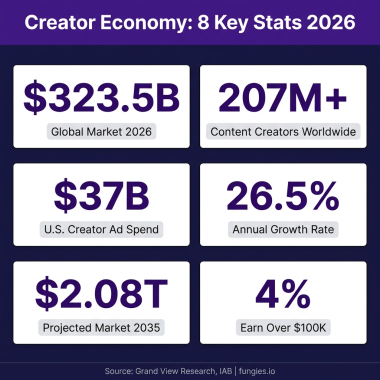
Notion templates have become one of the most profitable digital products in the creator economy. With over 30 million Notion users worldwide and the platform’s growing popularity among productivity enthusiasts, entrepreneurs, and businesses, selling Notion templates represents a significant opportunity for creators looking to generate passive income. In this comprehensive guide, you’ll learn exactly how to sell Notion templates online — from creation to your first sale.
Why Sell Notion Templates?
The market for Notion templates has exploded in recent years. Creators are earning anywhere from $500 to $50,000+ per month selling templates for everything from personal productivity systems to complex business workflows. Here’s why this market is so attractive:
- High profit margins: Once created, templates cost virtually nothing to duplicate and deliver
- Passive income potential: Templates can sell while you sleep with automated delivery
- Low barrier to entry: You only need Notion (free tier works) and basic design skills
- Growing demand: Remote work and productivity culture drive continuous interest
- Scalable business model: Start with one template, expand to a full template shop
According to industry data, the average successful Notion template creator earns between $2,000-$5,000 per month within their first year. Top creators on platforms like Gumroad and Etsy regularly report six-figure annual revenues from template sales alone.
Step 1: Identify Profitable Notion Template Ideas
Success starts with choosing the right template to create. The most profitable Notion templates solve specific problems for defined audiences. Here’s how to find winning ideas:
Research High-Demand Categories
- Personal productivity: Daily planners, habit trackers, goal-setting systems
- Business operations: CRM systems, project management dashboards, content calendars
- Creative workflows: Editorial calendars, portfolio trackers, client management
- Finance tracking: Budget planners, expense trackers, investment portfolios
- Student/academic: Study planners, note-taking systems, thesis organizers
Validate Your Idea
Before investing time in creation, validate demand:
- Search Etsy, Gumroad, and Twitter for similar templates — competition indicates demand
- Check Notion template galleries and community forums for trending requests
- Survey your existing audience or relevant communities (Reddit, Facebook groups)
- Look for templates with 100+ sales or reviews as proof of market validation
Step 2: Create a High-Quality Notion Template
Quality is what separates $10 templates from $50+ templates. Here’s how to create templates that command premium prices:
Design Principles for Professional Templates
- Clean aesthetics: Use consistent colors, fonts, and spacing throughout
- Logical structure: Organize information hierarchically with clear navigation
- Placeholder content: Include realistic examples that guide users
- Instructions included: Add a “Getting Started” page with setup guidance
- Mobile optimization: Test your template on mobile devices
Essential Template Components
Every professional Notion template should include:
- Cover image and icon for visual appeal
- Welcome/introduction page explaining the template
- Clear database structures with pre-filled examples
- Linked databases for relational workflows
- Instructional callouts or toggle sections with guidance
- Template duplication instructions for buyers
Step 3: Choose the Right Platform to Sell
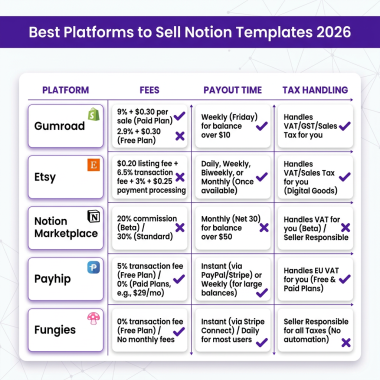
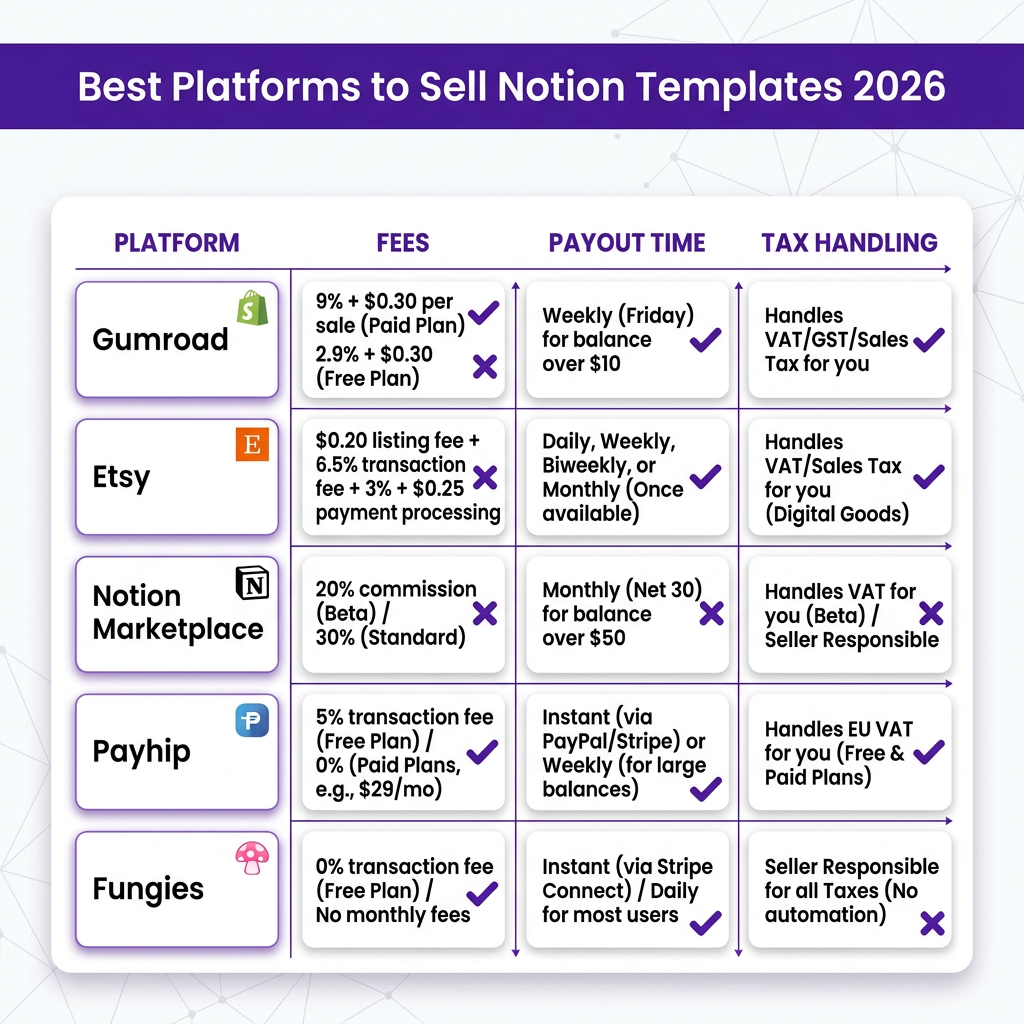
Selecting where to sell your Notion templates is a critical decision that affects your fees, audience reach, and operational complexity. Here’s a detailed comparison of the top platforms:
Gumroad
Best for: Creators building an audience
- Fees: 10% + processing fees (or $0/month + 3.5% + 30¢ with Premium)
- Pros: Simple setup, built-in email marketing, pay-what-you-want pricing
- Cons: No automatic tax handling, limited customization
Etsy
Best for: Access to established marketplace traffic
- Fees: $0.20 listing fee + 6.5% transaction fee + payment processing
- Pros: Massive built-in audience, SEO benefits, trust factor
- Cons: Competitive marketplace, limited customer data, no automatic tax compliance
Notion Marketplace
Best for: Official platform credibility
- Fees: 0% (Notion takes no cut currently)
- Pros: Official platform, high intent traffic, no fees
- Cons: Application required, limited to templates only, no tax handling
Fungies.io (Merchant of Record)
Best for: Serious creators wanting automated compliance
- Fees: Competitive rates with full tax automation
- Pros: Automatic VAT/sales tax handling, global payment methods, instant payouts, fraud protection
- Cons: Newer platform with smaller marketplace (but growing)
Step 4: Price Your Notion Template Strategically
Pricing psychology plays a huge role in template sales. Here’s how to price for maximum revenue:
Market Pricing Benchmarks
- Simple templates: $5-$15 (basic trackers, simple dashboards)
- Standard templates: $15-$35 (comprehensive systems with databases)
- Premium templates: $35-$75 (complex workflows, multiple integrated systems)
- Template bundles: $50-$150 (collections of related templates)
Pricing Strategies That Work
- Value-based pricing: Price based on the time/money your template saves users
- Tiered options: Offer basic ($15), pro ($35), and bundle ($75) versions
- Launch pricing: Start at 50% off for the first 48 hours to generate reviews
- Bundle discounts: Create template packs at 20-30% off individual prices
Step 5: Set Up Payments and Delivery
Automated delivery is essential for passive income. Here’s how to set it up:
Template Delivery Methods
- Direct download: Buyers receive a PDF with template link and duplication instructions
- Email delivery: Automated email with access instructions post-purchase
- Membership portal: Buyers get access to a private page with all their purchases
Payment Processing Considerations
When selling globally, you need to consider:
- Multiple payment methods: Credit cards, PayPal, Apple Pay, Google Pay
- Currency conversion: Display prices in local currencies when possible
- Tax compliance: VAT in EU, sales tax in US states — this is where Merchant of Record services like Fungies become essential
- Fraud protection: Chargebacks can hurt small creators significantly
Ready to Sell Notion Templates Without the Tax Hassle?
Join creators using Fungies.io — automated tax compliance, instant payouts, and global payment methods for your Notion templates.
No credit card required • 5-minute setup
Step 6: Market Your Notion Templates
Creating a great template is only half the battle. Marketing drives sales:
Free Marketing Channels
- Twitter/X: Share template previews, productivity tips, and behind-the-scenes creation content
- Reddit: Participate in r/Notion, r/productivity, and niche communities (without spamming)
- YouTube: Create template walkthrough videos showing the value proposition
- Notion communities: Facebook groups, Discord servers, and Slack communities
- Email list: Build a list of interested buyers for launch announcements
Paid Marketing Options
- Etsy ads: Promoted listings within the marketplace
- Pinterest ads: Visual platform perfect for template previews
- Influencer partnerships: Collaborate with productivity YouTubers and TikTokers
- Newsletter sponsorships: Sponsor relevant creator and productivity newsletters
The Tax Reality Most Template Sellers Ignore
Here’s something most guides won’t tell you: selling digital products internationally creates significant tax obligations. When you sell to customers in the EU, UK, US states, Australia, and other jurisdictions, you’re responsible for collecting and remitting VAT, sales tax, and GST.
For a template seller making $3,000/month:
- You might owe VAT to 15+ EU countries
- US sales tax obligations in 10+ states
- Quarterly or monthly filing requirements
- Penalties for non-compliance can reach 20%+ of revenue
This is why many successful template creators eventually switch to a Merchant of Record platform like Fungies. Instead of managing tax compliance yourself, the MoR handles all tax collection, filing, and remittance automatically — letting you focus on creating and marketing templates.
Frequently Asked Questions
How much can you make selling Notion templates?
Beginners typically earn $200-$1,000 in their first month. Established creators with 5-10 templates regularly earn $2,000-$10,000 monthly. Top creators with template shops and audiences make $20,000-$50,000+ per month.
Do I need a business license to sell Notion templates?
Requirements vary by location. In most jurisdictions, you can start as a sole proprietor without formal registration. However, once you exceed $1,000-$5,000 in monthly revenue, consider formalizing your business structure for tax and liability protection.
What’s the best platform for beginners?
Gumroad is the easiest starting point due to simple setup and no upfront costs. However, if you plan to scale internationally, starting with a Merchant of Record platform like Fungies saves you from painful tax compliance migrations later.
How do I protect my templates from being shared?
Unfortunately, Notion templates can’t be fully protected from sharing once purchased. Focus on providing exceptional value, building a brand, and offering support that makes buying from you worthwhile. Many successful creators find that piracy is less of an issue than expected.
Can I sell the same template on multiple platforms?
Yes, you can list the same template on Gumroad, Etsy, your own website, and other platforms simultaneously. Just ensure your pricing is consistent or adjust for platform fees. Some creators offer platform-exclusive bonuses to differentiate listings.
Conclusion: Start Your Notion Template Business Today
Selling Notion templates represents one of the best opportunities in the creator economy right now. With low startup costs, high profit margins, and growing demand, there’s never been a better time to start.
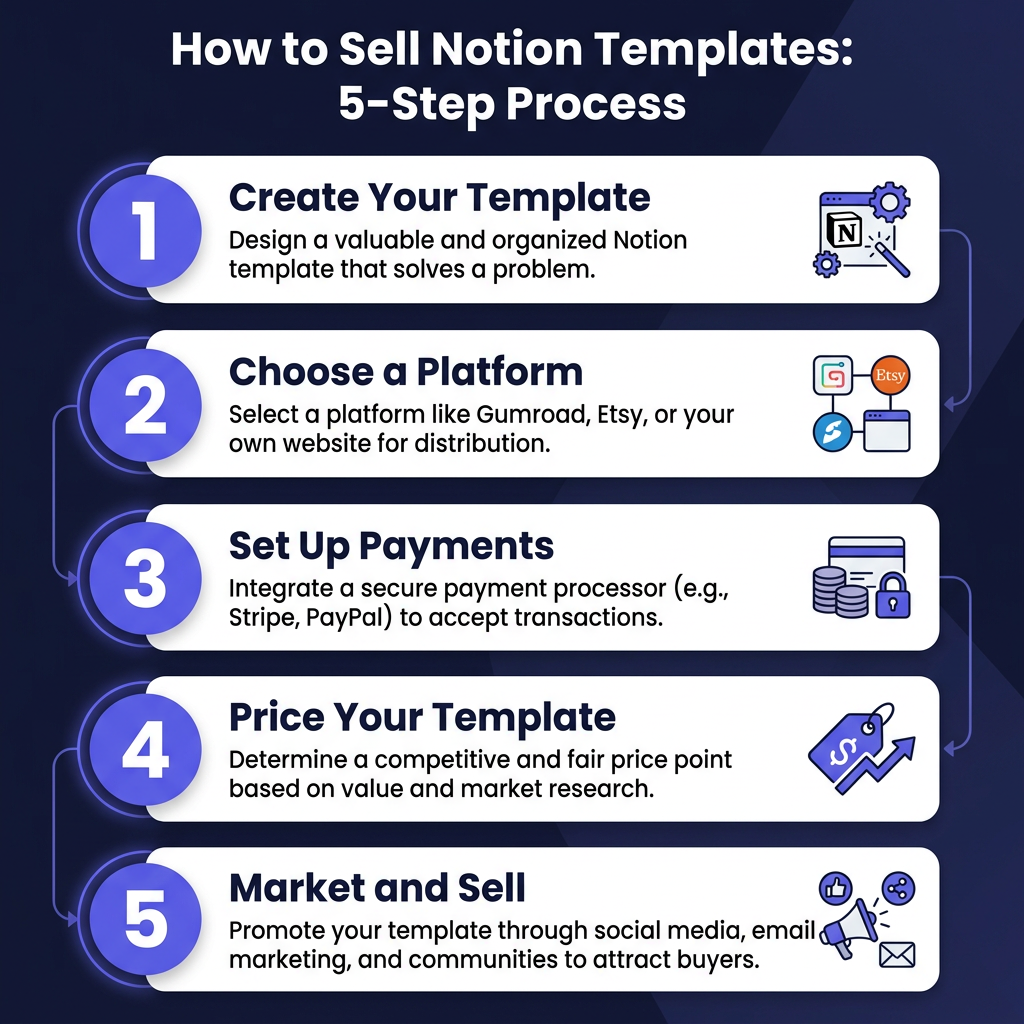
Follow the six steps in this guide: validate your idea, create a quality template, choose the right platform, price strategically, automate delivery, and market consistently. Within 30 days, you could have your first sales. Within a year, you could have a significant passive income stream.
Remember: the creators who succeed aren’t necessarily the most talented designers — they’re the ones who consistently show up, create value, and put their work in front of the right audience. Your first template doesn’t need to be perfect; it just needs to solve a real problem for real people.
Ready to start selling? Choose your platform, create your first template, and launch within the next 7 days. The best time to start was yesterday. The second-best time is now.