Building a dedicated website for your game isn’t optional anymore—it’s essential. With over 3 billion gamers worldwide and the indie game market projected to hit $2.5 billion by 2027, having your own platform gives you control over your brand, your audience, and your revenue. The right gaming website builder can make the difference between a game that gets lost in the noise and one that builds a loyal community.
But here’s the problem: most website builders aren’t built for games. They’re generic tools that force you to hack together solutions for screenshots, trailers, download links, and payment processing. You end up spending more time wrestling with plugins than actually promoting your game.
This guide cuts through the noise. We’ll compare the best gaming website builders in 2026, show you exactly what features matter, and walk you through building a site that converts visitors into players—and players into paying customers.
Why Every Game Developer Needs a Dedicated Website
Steam, Epic, and the App Store are great for distribution. But they own the relationship with your players. When someone buys your game on Steam, Valve has their email—not you. When Steam changes its algorithm (which it does constantly), your visibility can drop overnight.
Your own website changes the equation. You control the experience, capture visitor emails for your newsletter, and keep more of your revenue. Indie developers with direct sales channels earn 25-40% more revenue per player compared to those relying solely on marketplaces.
A professional gaming website also builds credibility. Press outlets, streamers, and potential partners expect a central hub where they can find high-res assets, your story, and easy contact information. Without one, you’re invisible to the people who could amplify your reach.
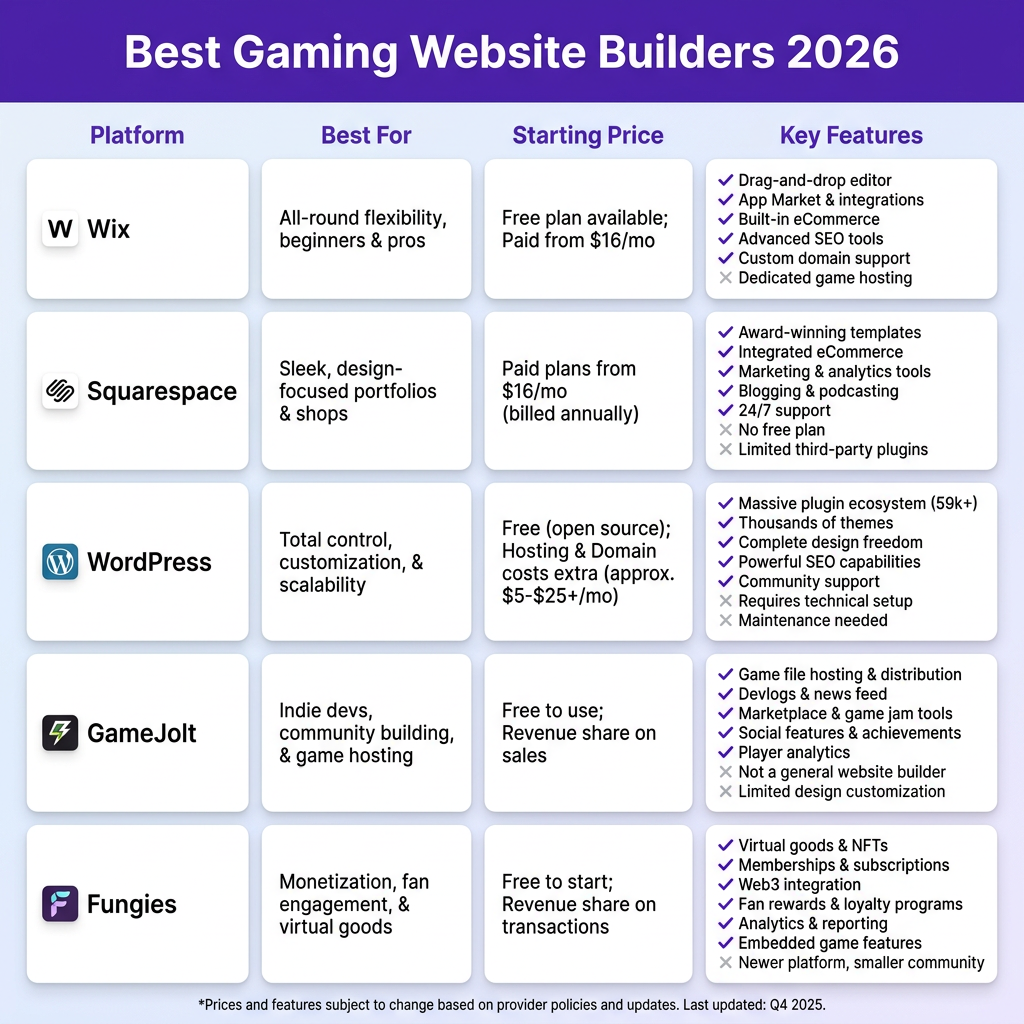
The 5 Best Gaming Website Builders Compared
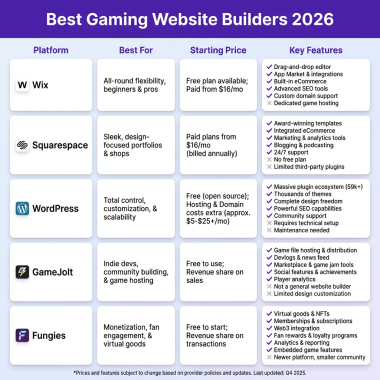
We evaluated dozens of platforms based on features specifically relevant to game developers: media handling, download management, payment integration, and ease of use. Here are the top 5 that actually deliver.
1. Wix — Best for Visual-First Games
Wix has evolved from a basic drag-and-drop builder into a serious platform for creative professionals. For game developers, its strength is visual storytelling. The template library includes portfolio and showcase designs that work beautifully for game presentations.
The video backgrounds, parallax scrolling, and animation effects let you create an immersive first impression. Upload your trailer as a hero video, showcase screenshots in interactive galleries, and embed Steam widgets directly. Wix handles the technical heavy lifting so you can focus on presentation.
However, Wix falls short on commerce features for games. While you can sell digital products, the checkout experience isn’t optimized for game downloads. You’ll need workarounds for license key distribution and version management.
- Best for: Visual storytelling, portfolio sites, art-heavy games
- Starting price: $14/month (Light plan)
- Game-specific features: Video backgrounds, image galleries, basic digital downloads
2. Squarespace — Best for Professional Studios
Squarespace is the choice of established indie studios who want a polished, professional look without hiring a designer. The templates are consistently beautiful, and the typography and spacing are handled automatically.
For game developers, Squarespace offers solid blogging capabilities—essential for devlogs and updates that build community. The built-in email marketing integration helps you capture and nurture leads. The commerce features support digital products, though with the same limitations as Wix when it comes to game-specific needs.
The downside? You’re locked into Squarespace’s ecosystem. Custom functionality requires third-party integrations, and the platform isn’t built for rapid iteration or A/B testing different landing page versions.
- Best for: Professional studios, devlogs, content marketing
- Starting price: $16/month (Personal plan)
- Game-specific features: Blogging, email marketing, digital product sales
3. WordPress + Elementor — Best for Customization
If you want complete control and don’t mind a steeper learning curve, WordPress with Elementor is the gold standard. The combination gives you unlimited customization potential—every pixel can be adjusted, every feature can be added via plugins.
For games, this means you can build exactly what you need: a press kit section with downloadable assets, a devlog with categories, a community forum, or a storefront with license key management. The WooCommerce ecosystem has extensions for software licensing, subscriptions, and affiliate programs.
The tradeoff is complexity. You’ll spend time on hosting, security updates, plugin conflicts, and performance optimization. For solo developers, this overhead can be a significant distraction from actual game development.
- Best for: Technical developers, complex sites, maximum flexibility
- Starting price: $5-15/month hosting + Elementor Pro $59/year
- Game-specific features: Unlimited via plugins, WooCommerce for digital sales
4. GameJolt — Best for Indie Community
GameJolt occupies a unique position. It’s part marketplace, part social network, and part website builder. Your GameJolt page serves as both your game’s homepage and its distribution channel.
The built-in audience is GameJolt’s superpower. Millions of players browse the platform specifically looking for indie games. Your page gets discovered organically, and the community features—comments, ratings, collections—drive engagement without extra effort.
However, you’re building on rented land. GameJolt controls the design, the discovery algorithm, and takes a cut of sales. It’s a fantastic starting point for hobbyists and early-stage indies, but serious developers eventually outgrow it.
- Best for: Hobbyists, early-stage indies, community building
- Starting price: Free
- Game-specific features: Built-in distribution, community tools, analytics
5. Fungies — Best for Monetization
Fungies is the only platform built specifically for game developers who want to sell direct. It combines a gaming website builder with a complete Merchant of Record solution—handling payments, tax compliance, and global distribution in one tool.
The website templates are designed for games from the ground up. Showcase your trailer, screenshots, and features in layouts that convert. The checkout process is optimized for digital downloads, with automatic delivery, license key generation, and version management built in.
Most importantly, Fungies handles the business complexity that stops most developers from selling direct. Global tax compliance (VAT, sales tax), fraud prevention, and payment processing across 50+ methods are all included. You focus on your game; Fungies handles the rest.
- Best for: Developers ready to sell direct, global distribution, tax compliance
- Starting price: 5% + $0.50 per transaction (no monthly fees)
- Game-specific features: Built-in MoR, license keys, global tax handling, analytics
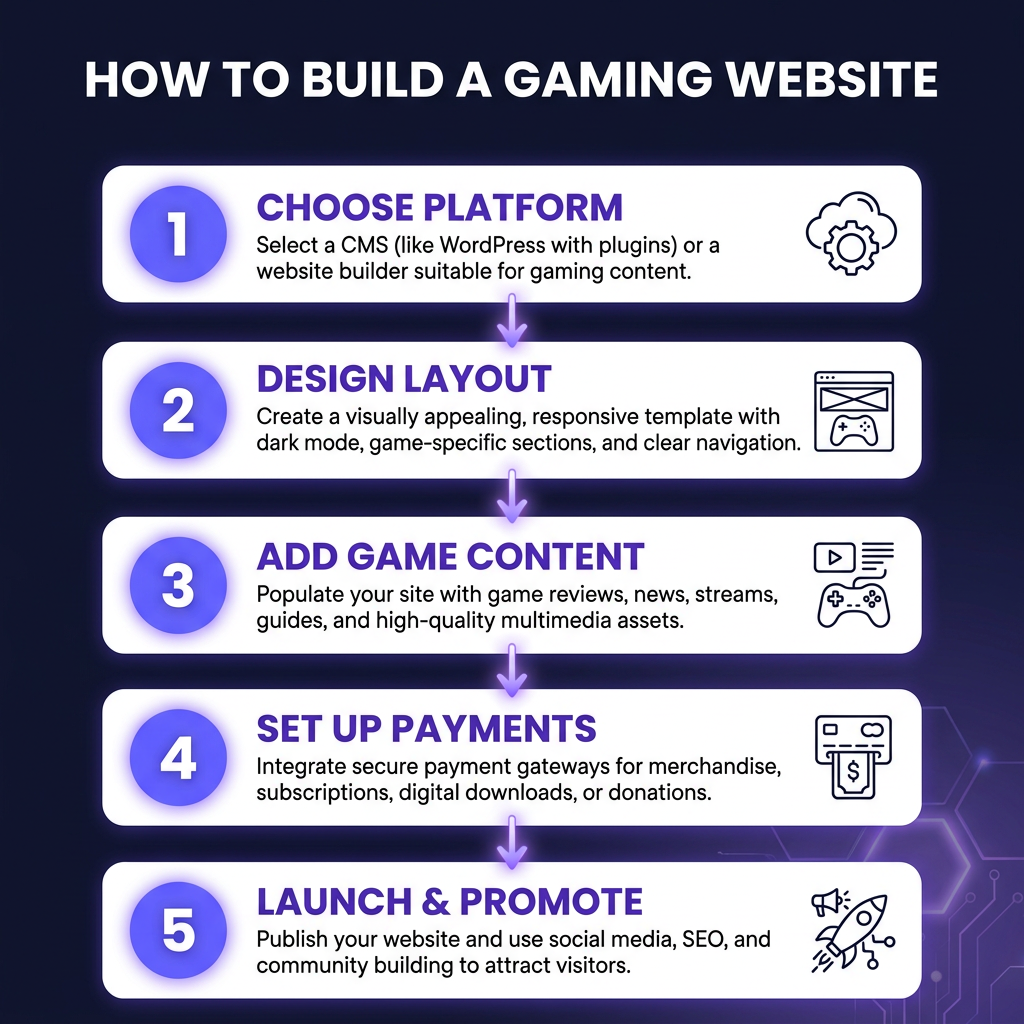
How to Build Your Gaming Website: A 5-Step Framework
Choosing a platform is just the start. Here’s the proven framework we use to build gaming websites that convert visitors into players.
Step 1: Define Your Primary Goal
Before touching any design tools, answer this: what’s the one action you want every visitor to take? Wishlist your game on Steam? Join your Discord? Buy directly? Your entire site should funnel toward this goal.
Most indie developers spread themselves thin trying to do everything. Pick one primary conversion and optimize ruthlessly for it. Secondary goals (social follows, newsletter signups) should support, not compete with, your main objective.
Step 2: Craft Your Above-the-Fold Experience
60% of gaming traffic is mobile. Your hero section needs to communicate what your game is and why someone should care—in under 3 seconds. Lead with your best trailer or gameplay GIF, a compelling headline, and a single clear call-to-action.
Avoid the common mistake of burying your trailer below a wall of text. Players decide whether to stay or leave within seconds. Give them the payoff immediately.
Step 3: Build Trust with Social Proof
Indie games face a credibility challenge. Players are wary of unfinished projects and scams. Counter this with social proof: quotes from beta testers, screenshots of community engagement, press mentions, or development milestones.
If you don’t have external validation yet, show your process. Devlogs, behind-the-scenes content, and transparent development roadmaps build trust through authenticity.
Step 4: Optimize for Conversion
Every page element should serve your primary goal. Remove distractions. If you’re selling direct, the buy button should be visible without scrolling. If you’re building a wishlist, make the Steam widget prominent.
Test different versions. Try alternate headlines, button colors, and page layouts. Small changes in conversion rate compound dramatically when you’re driving significant traffic.
Step 5: Set Up Analytics and Iterate
You can’t improve what you don’t measure. Install analytics to track where visitors come from, which pages they view, and where they drop off. Heatmap tools show you exactly how people interact with your site.
Use this data to iterate. If 80% of visitors leave after 10 seconds, your hero section needs work. If they watch your trailer but don’t convert, your call-to-action is weak. Data turns guessing into informed decisions.
Essential Features Every Gaming Website Needs
Regardless of which platform you choose, your gaming website needs these core elements:
- Trailer/Gameplay Video: Autoplay muted video or prominent play button above the fold
- Screenshot Gallery: High-res images with lightbox functionality
- Clear Description: One-sentence hook + short paragraph explaining the game
- System Requirements: Minimum and recommended specs
- Press Kit: Downloadable high-res assets, developer bio, fact sheet
- Contact Information: Email or form for press, business, and support inquiries
- Social Links: Discord, Twitter, YouTube, TikTok—wherever your community lives
- Newsletter Signup: Capture emails for launch announcements and updates
Optional but powerful: a devlog section for regular updates, a community forum for player discussions, and direct sales capabilities if you’re ready to handle payments.
Ready to Monetize Your Game?
Fungies.io handles payments, tax compliance, and checkout for game developers. No code required.
No credit card required
SEO Tips for Gaming Websites
A beautiful website is useless if no one finds it. Here are the SEO fundamentals specific to game development:
Target long-tail keywords. “Indie puzzle platformer” is easier to rank for than “video game.” Use specific genre combinations, art style descriptors, and unique mechanics in your page titles and headers.
Optimize your images. Screenshot filenames should describe the content (“neon-cyberpunk-city-level.jpg” not “screenshot_01.jpg”). Use descriptive alt text for accessibility and SEO.
Create content regularly. A devlog isn’t just for your existing community—it’s fresh content that search engines love. Weekly updates targeting development keywords (“how we built the combat system”) attract both players and fellow developers.
Build backlinks strategically. Press coverage, guest posts on gaming blogs, and community forum participation all drive authority. Focus on quality over quantity—a single link from a major gaming site outweighs dozens of spammy directory listings.
Frequently Asked Questions
Do I need a website if my game is on Steam?
Yes. Steam owns the customer relationship—you don’t get buyer emails, and Steam can change visibility rules at any time. Your website is insurance against platform risk and a channel for direct communication with your most engaged players.
How much does a gaming website cost?
Basic sites start at $5-15/month for hosting (WordPress) or $14-16/month for all-in-one builders (Wix, Squarespace). Game-specific platforms like Fungies charge per transaction (5% + $0.50) with no monthly fees. Budget $50-200 for premium themes or custom design if needed.
Can I sell games directly from my website?
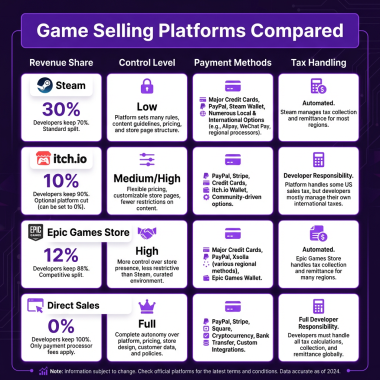
Absolutely. Platforms like Fungies, WooCommerce (WordPress), and Gumroad enable direct sales. You’ll keep more revenue (typically 90-95% vs Steam’s 70%), but you’re responsible for payment processing, tax compliance, and customer support—or you can use a Merchant of Record service to handle the complexity.
What’s the best free gaming website builder?
GameJolt offers the best free option specifically for games, with built-in distribution and community features. For general-purpose sites, WordPress.org is free (you pay only for hosting), and Wix has a free tier with ads. For professional results, expect to invest at least $10-15/month.
How long does it take to build a gaming website?
With a template-based builder (Wix, Squarespace, Fungies), you can have a professional site live in 2-4 hours. Custom WordPress sites take 1-2 days depending on complexity. The content (trailers, screenshots, copy) takes longer than the technical setup.
Conclusion: Choose the Right Tool for Your Stage
The best gaming website builder depends on where you are in your development journey. Just starting out? GameJolt gets you online instantly with zero cost. Building your portfolio? Wix or Squarespace delivers professional results without technical headaches. Need maximum flexibility? WordPress + Elementor gives you unlimited control.
Ready to sell direct and keep more of your revenue? Fungies is purpose-built for game developers who want professional websites with built-in monetization, global tax compliance, and payment processing.
Whatever you choose, start now. Every day without a website is a day you’re not capturing emails, building your audience, or controlling your brand. Your game deserves a home base—build it today.
Ready to Monetize Your Game?
Fungies.io handles payments, tax compliance, and checkout for game developers. No code required.
No credit card required