Here’s a number that should make you pause: a solo developer spending $80/month on Claude API calls could break even on a local GPU setup in just 7 months—and then run inference for free for years. In 2026, with RTX 5090s shipping and open-source models rivaling GPT-4o, the math on local vs cloud LLMs has shifted dramatically.
But the decision isn’t just about sticker price. It’s about total cost of ownership (TCO), your usage patterns, and what “good enough” looks like for your projects. This guide breaks down the real numbers—hardware costs, electricity, API pricing, and break-even points—so you can make an informed decision.
Why the Local vs Cloud Debate Matters in 2026
The landscape has changed. Three years ago, local LLMs were toys—slow, low-quality, and frustrating. Today, models like Llama 4, Qwen 3.6, and DeepSeek V3.2 run at 50+ tokens per second on consumer hardware and score within 10-15% of GPT-4o on coding benchmarks.
Meanwhile, cloud API costs keep climbing. OpenAI’s GPT-5 costs $10/$30 per million tokens. Claude Opus 4.6 runs $5/$25. Even “budget” options like GPT-4.1 are $2/$8. For developers making thousands of API calls daily, these numbers compound fast.
The question isn’t whether local LLMs are viable anymore. It’s: for your specific usage, what’s the cheaper path?
The Real Cost of Cloud APIs in 2026
Let’s start with what you’re actually paying for cloud inference. Here’s the current pricing landscape:
| Model | Provider | Input/1M tokens | Output/1M tokens |
|---|---|---|---|
| GPT-5 | OpenAI | $10.00 | $30.00 |
| Claude Opus 4.6 | Anthropic | $5.00 | $25.00 |
| Claude Sonnet 4 | Anthropic | $1.50 | $7.50 |
| GPT-4.1 | OpenAI | $2.00 | $8.00 |
| Gemini 3.1 Pro | $2.00 | $12.00 | |
| DeepSeek V3.2 | DeepSeek | $0.14 | $0.28 |
| Grok 4.3 | xAI | $1.25 | $2.50 |
Source: Provider rate cards, June 2026
DeepSeek’s pricing is the outlier—100x cheaper than GPT-5 for output tokens—but most developers default to OpenAI or Anthropic for reliability and ecosystem integration. Let’s calculate real monthly costs for three usage tiers:
Monthly Cloud API Costs by Usage Tier
| Usage Level | Monthly Tokens | Claude Sonnet 4 | GPT-4.1 | DeepSeek V3.2 |
|---|---|---|---|---|
| Light (hobby) | 5M input / 2M output | $22.50 | $26.00 | $1.26 |
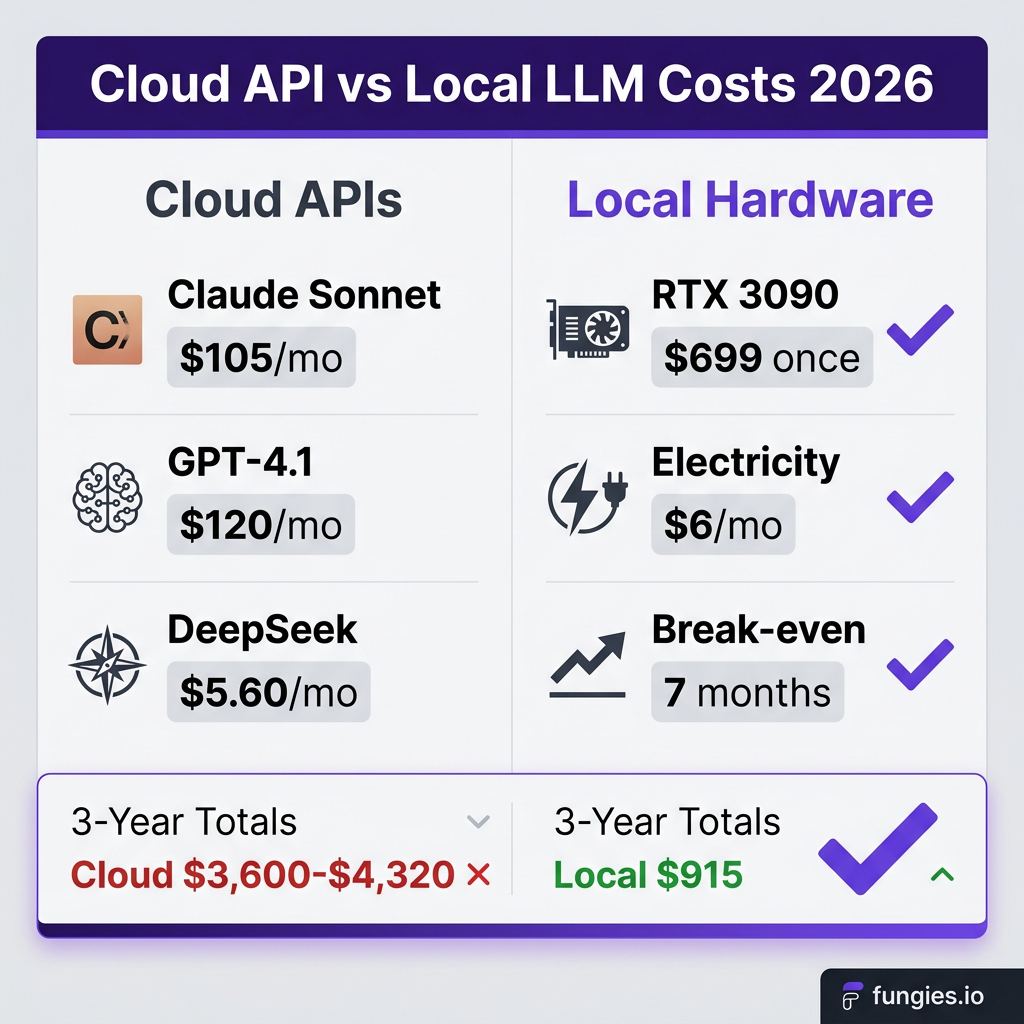
| Moderate (solo dev) | 20M input / 10M output | $105.00 | $120.00 | $5.60 |
| Heavy (small team) | 100M input / 50M output | $525.00 | $600.00 | $28.00 |
| Enterprise | 500M input / 200M output | $2,250.00 | $2,600.00 | $126.00 |
At moderate usage (typical for a developer using AI coding assistants daily), you’re spending $100-120/month on cloud APIs. Over a year, that’s $1,200-1,440. Over three years: $3,600-4,320.
The True Cost of Running Local LLMs
Local inference isn’t free. You pay upfront for hardware, ongoing electricity costs, and your time for setup and maintenance. Let’s break it down.
Hardware Options by Budget Tier
| GPU | VRAM | Price (June 2026) | Best For |
|---|---|---|---|
| RTX 3060 12GB | 12 GB | $289 | 7B-13B models |
| RTX 4070 Ti Super | 16 GB | $489 | 14B-20B models |
| Used RTX 3090 | 24 GB | $699 | 32B-70B models (Q4) |
| RTX 4090 | 24 GB | $1,599 | 32B-70B models (fast) |
| RTX 5090 | 32 GB | $1,999 | 70B models, future-proof |
| Mac Studio M3 Ultra | 128 GB unified | $3,999 | 120B+ models, no GPU hassle |
Source: Market prices, June 2026
The used RTX 3090 is the sweet spot for budget-conscious developers. At $699 with 24GB VRAM, it handles 70B models at Q4 quantization—something that required a $4,000 GPU just two years ago.
Electricity Costs: The Hidden Factor
Power consumption varies by GPU and workload. Here’s what to expect:
| GPU | Idle Power | Load Power | Monthly Cost (4 hrs/day) |
|---|---|---|---|
| RTX 3060 | 15W | 170W | $3.50 |
| RTX 4070 Ti Super | 12W | 285W | $5.80 |
| RTX 3090 | 25W | 350W | $7.20 |
| RTX 4090 | 20W | 450W | $9.20 |
| RTX 5090 | 25W | 575W | $11.80 |
Assumes $0.15/kWh average US electricity rate
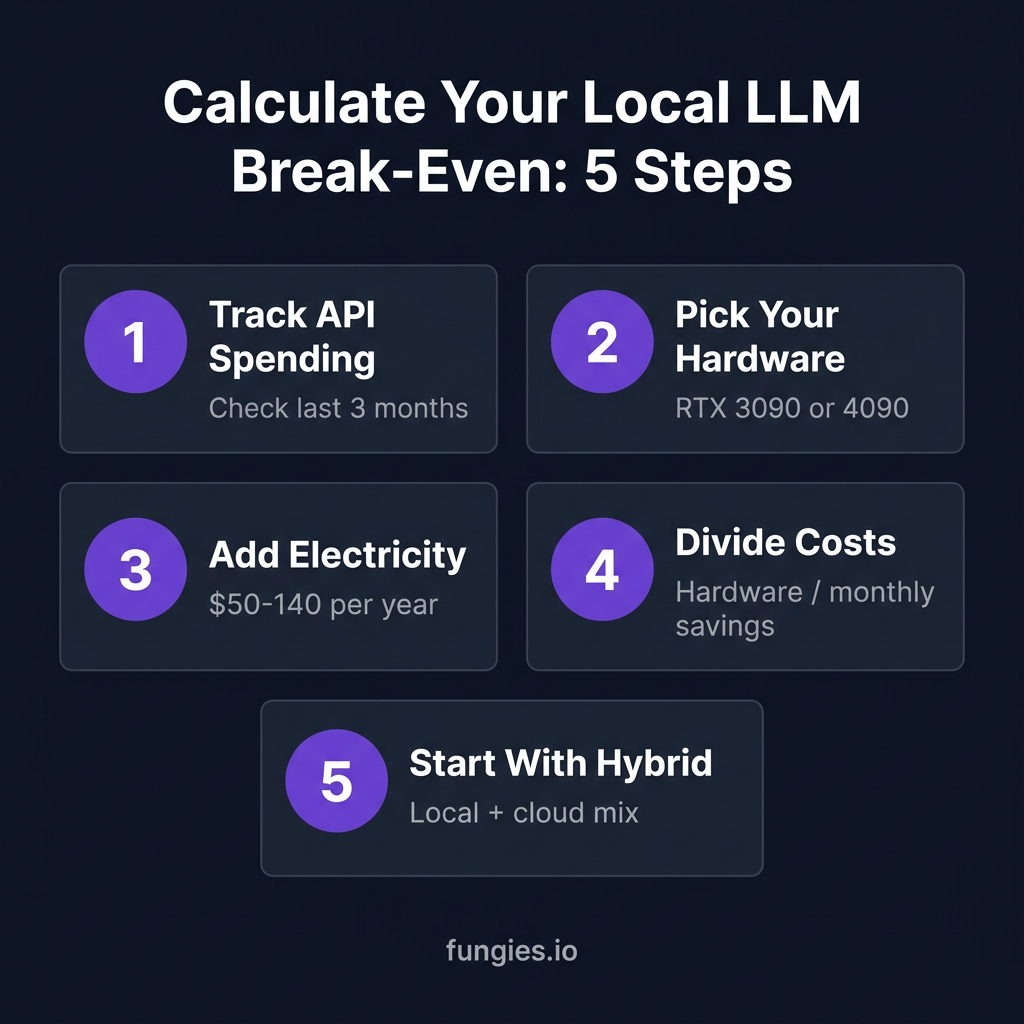
Electricity costs are modest—$50-140/year even for power-hungry cards. The real cost is upfront hardware.
Break-Even Analysis: When Does Local Win?
Here’s the calculation that matters: how long until your hardware investment pays for itself compared to cloud APIs?
| Hardware | Cost | vs Claude Sonnet | vs GPT-4.1 | vs DeepSeek |
|---|---|---|---|---|
| RTX 4070 Ti Super | $489 | 4.7 months | 4.1 months | 87 months |
| Used RTX 3090 | $699 | 6.7 months | 5.8 months | 125 months |
| RTX 4090 | $1,599 | 15.2 months | 13.3 months | 286 months |
| RTX 5090 | $1,999 | 19.0 months | 16.6 months | 357 months |
Based on moderate usage (20M input / 10M output tokens monthly). Includes $70/year electricity for 3090.
The math is clear: if you’re spending $100+/month on Claude or OpenAI APIs, a used RTX 3090 pays for itself in under 7 months. After that, you run inference for the cost of electricity—about $6/month.
Against DeepSeek’s absurdly cheap API, local hardware never breaks even. But DeepSeek comes with tradeoffs: rate limits, availability issues, and the complexity of integrating a smaller provider into your workflow.
Performance Reality Check: What You Give Up
Cost isn’t the only factor. Local LLMs have limitations you need to understand:
Quality Gap
Even the best local models (Llama 4, Qwen 3.6, GLM-5.1) lag 10-20% behind GPT-4o and Claude 4.6 on complex reasoning tasks. For coding, the gap is narrower—GLM-5.1 actually topped SWE-Bench Pro in April 2026, beating both GPT-5.4 and Claude Opus 4.6.
For most development tasks—code completion, debugging, documentation—local models are “good enough.” For cutting-edge research, complex agent workflows, or tasks requiring the absolute best reasoning, cloud APIs still win.
Speed Comparison
| Setup | Model Size | Tokens/Second | Relative Speed |
|---|---|---|---|
| Cloud API (GPT-4o) | – | 80-150 | Baseline |
| RTX 4090 (Llama 3.1 70B Q4) | 70B | 52 | 0.65x |
| RTX 3090 (Llama 3.1 70B Q4) | 70B | 35 | 0.44x |
| RTX 4070 Ti Super (Qwen 2.5 32B) | 32B | 48 | 0.60x |
| MacBook M3 Pro (Llama 3 8B) | 8B | 25 | 0.31x |
Local inference is slower—often 2-3x slower than cloud APIs. But 35-50 tokens/second is still usable for interactive work. You notice the difference on long generations, not quick completions.
What You Gain: Privacy and Control
The tradeoff isn’t all negative. Local LLMs offer:
- Zero data leakage: Your code and prompts never leave your machine
- No rate limits: Generate as many tokens as your hardware allows
- Predictable costs: No surprise bills from overage charges
- Offline access: Work on planes, trains, or during outages
- Model flexibility: Switch between models instantly, no API keys
For developers working with proprietary code, healthcare data, or any sensitive information, local inference isn’t just cheaper—it’s the only compliant option.
Decision Framework: Which Path Is Right for You?
Here’s how to decide based on your situation:
Choose Cloud APIs If:
- You need the absolute best model quality (frontier research, complex reasoning)
- Your usage is sporadic (<$30/month)
- You prioritize speed over cost
- You don’t want to manage hardware
- You need multimodal capabilities (vision, audio)
Choose Local LLMs If:
- You spend $80+/month on API calls
- You work with sensitive/proprietary data
- You want predictable, capped costs
- You enjoy tinkering with hardware and models
- You need offline access
The Hybrid Approach
Most developers in 2026 use both. Local models for day-to-day coding, quick iterations, and sensitive work. Cloud APIs for complex tasks, multimodal needs, or when you need the absolute best quality.
A $700 used RTX 3090 handles 90% of daily coding tasks. Keep a Claude or OpenAI subscription for the 10% that needs frontier capabilities. Your total monthly cost drops from $100+ to $20-30 (cloud subscription + electricity), and you own the hardware.
Getting Started: Minimum Viable Local Setup
If the numbers convinced you, here’s the cheapest way to start:
Budget Build: $700-800
- GPU: Used RTX 3090 ($699) — 24GB VRAM, runs 70B models
- CPU: Any modern 6-core (Ryzen 5 or Intel i5)
- RAM: 32GB DDR4 ($80)
- Storage: 1TB NVMe SSD ($60)
- PSU: 850W 80+ Gold ($100)
Total: ~$950 if building from scratch, $700 if you have a compatible PC.
Software Stack
- Ollama: Easiest way to run models locally. One command install.
- LM Studio: GUI alternative if you prefer point-and-click.
- Continue.dev: VS Code extension that connects to local models.
Installation takes 20-30 minutes. Download a 7B model first (Qwen 2.5 or Llama 3.1) to verify everything works, then scale up to larger models.
FAQ: Local LLM Cost and Setup
How much does it cost to run a local LLM?
Upfront hardware costs range from $289 (RTX 3060) to $2,000 (RTX 5090). Ongoing electricity costs are $40-140/year depending on your GPU and usage. Compared to $1,200+/year for moderate cloud API usage, local LLMs break even in 4-7 months.
Is a used RTX 3090 worth it for local LLMs in 2026?
Yes. At $699 with 24GB VRAM, the used RTX 3090 is the best value for local LLMs. It runs 70B models at Q4 quantization and pays for itself in under 7 months compared to Claude or OpenAI APIs. Just verify the card’s condition and remaining warranty.
Can I run local LLMs without a GPU?
Yes, but it’s slow. CPU-only inference on a modern 16-core processor achieves 5-10 tokens/second for 7B models—usable for testing, frustrating for daily work. Apple Silicon Macs are the exception: unified memory allows efficient CPU/GPU hybrid inference.
What’s the best free local LLM in 2026?
For coding: Qwen 2.5 Coder 32B or DeepSeek Coder V2. For general use: Llama 3.1 70B or Mistral Large 2. All are free to download and run locally. Check HuggingFace for the latest GGUF-quantized versions optimized for consumer hardware.
How do local LLMs compare to ChatGPT for coding?
Top local models (Llama 4, Qwen 3.6, GLM-5.1) achieve 80-90% of GPT-4o’s coding performance on standard benchmarks. For routine tasks—autocomplete, debugging, documentation—they’re nearly indistinguishable. For complex architectural decisions or cutting-edge frameworks, GPT-4o and Claude 4.6 still lead.
Key Takeaways
- Break-even is 4-7 months for developers spending $100+/month on cloud APIs
- Used RTX 3090 ($699) is the sweet spot for budget local LLM setups
- Electricity costs are negligible—$50-140/year even for power-hungry GPUs
- Quality gap is 10-20%—local models are “good enough” for most coding tasks
- Speed is 2-3x slower than cloud APIs, but 35-50 tok/s is still usable
- Privacy is the killer feature—your data never leaves your machine
- Hybrid approach works best—local for daily work, cloud for complex tasks
Conclusion
The local vs cloud LLM decision in 2026 isn’t binary—it’s about optimizing for your specific needs. If you’re spending $80+ monthly on API calls, the math strongly favors local hardware. A $700 used RTX 3090 pays for itself in under 7 months, then runs inference for pennies.
But cost isn’t everything. The privacy, control, and predictability of local inference matter just as much for many developers. And with models like Llama 4 and Qwen 3.6 rivaling GPT-4o on coding tasks, the quality tradeoff is shrinking.
My recommendation: start with a hybrid approach. Keep a modest cloud subscription for complex tasks, but invest in local hardware for your daily work. You’ll save money, protect your data, and gain a deeper understanding of how these models actually work.
Ready to accept payments for your AI-powered SaaS or digital products? Get started with Fungies.io—the merchant of record platform that handles global tax compliance, 50+ payment methods, and developer-friendly APIs so you can focus on building.
References
- SitePoint: Local LLMs vs Cloud APIs 2026 TCO Analysis
- CostGoat: LLM API Pricing Comparison June 2026
- PromptQuorum: Local LLM Hardware Requirements 2026
- BIZON: Best GPU for LLM Inference 2026
- HuggingFace: Best Open-Source LLM Models 2026
- LushBinary: Best Open-Source LLMs April 2026
- ComputingForGeeks: Open Source LLM Comparison Table 2026