84% of developers now use AI coding tools. But only 29% trust what they produce. That gap between adoption and trust is the defining story of software development in 2026.
I spent weeks digging into developer surveys, platform data, and real-world usage statistics from over 50,000 developers. The numbers tell a story that contradicts a lot of the hype—and reveals where AI coding agents actually deliver value versus where they fall short.
This article breaks down the hard data on AI coding agent adoption, developer trust, productivity gains, and workflow patterns. No fluff. Just numbers you can use to make decisions about your own AI tooling strategy.
The State of AI Coding Agent Adoption in 2026
Overall Adoption: 84% and Climbing
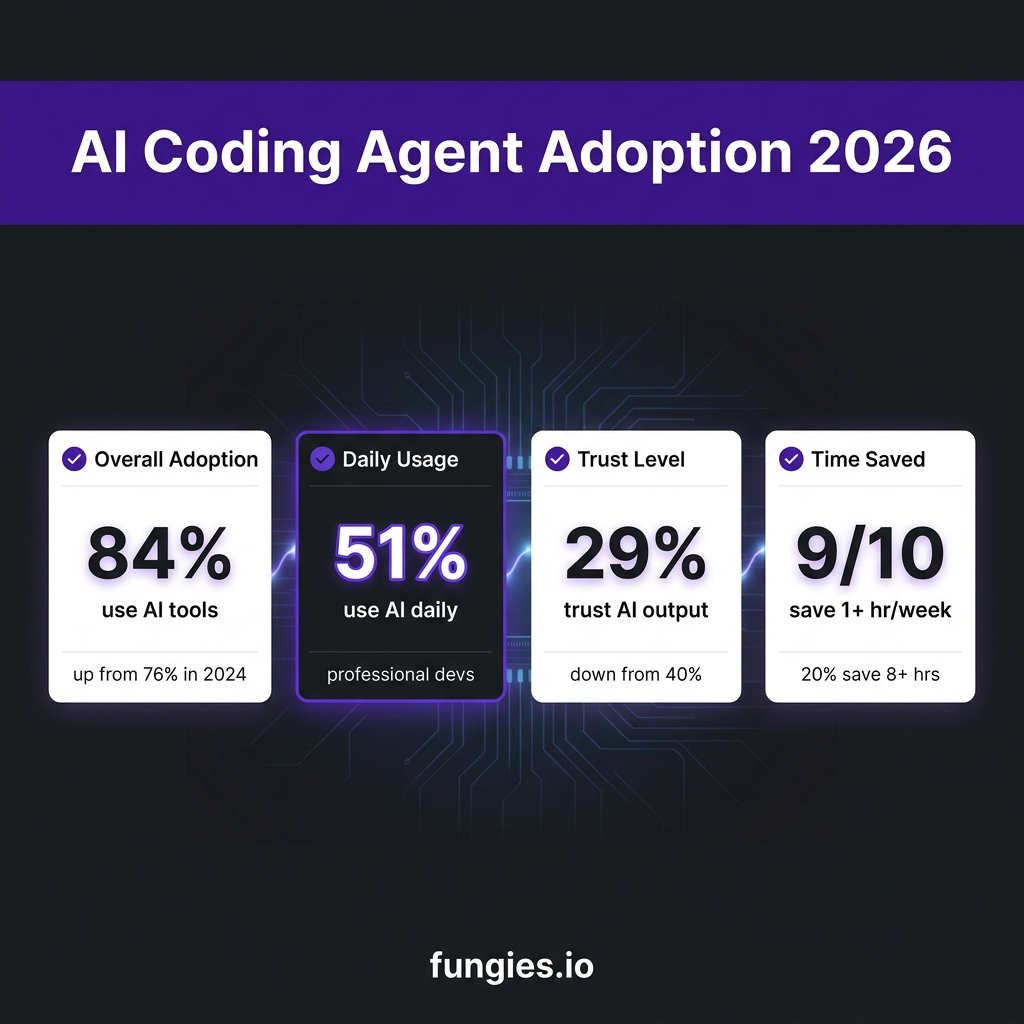
According to Stack Overflow’s 2025 Developer Survey (n=49,000+), 84% of developers now use or plan to use AI tools in their development process—up from 76% in 2024. JetBrains’ State of Developer Ecosystem 2025 (n=24,534) confirms this, showing 85% of developers regularly use AI tools for coding.
But here’s the nuance: adoption doesn’t mean the same thing across all developers. The Digital Applied Q1 2026 survey of 2,847 developers found that while 58% of developers have tried GitHub Copilot at some point, only 17% use it as their primary tool. Claude Code, by contrast, has a 28% primary-tool share despite lower overall awareness.
| Tool | Primary-Tool Share | Any-Use Share | QoQ Change |
|---|---|---|---|
| Claude Code | 28% | 54% | +7 pts |
| Cursor | 24% | 49% | +2 pts |
| GitHub Copilot | 17% | 58% | -4 pts |
| OpenAI Codex | 11% | 31% | +3 pts |
| Windsurf | 5% | 14% | -1 pt |
The data shows a clear migration pattern: developers are moving from using Copilot as an “anchor” tool to using it as a supplemental completion tool alongside a primary agent like Claude Code or Cursor.
Daily Usage Is Now the Norm
51% of professional developers use AI tools daily, according to Stack Overflow’s 2025 survey. Google’s DORA 2025 report (n≈5,000) puts this number even higher at 90% of software teams using AI at work daily.
The discrepancy comes from how “using AI” is defined. If you count occasional autocomplete suggestions, the number is high. If you count intentional, workflow-integrated AI usage, it’s more modest—but still significant.
The Trust Problem: Why 71% of Developers Are Skeptical
Trust Has Declined Despite Higher Usage
Here’s a counterintuitive finding: trust in AI coding tools has decreased as adoption has increased. Stack Overflow’s data shows only 29% of developers trust AI outputs to be accurate—down from 40% in 2024.
Why the decline? Two factors:
- Reality is setting in. Early adopters had lower expectations. As AI tools became mainstream, developers expected more—and were disappointed when AI-generated code required significant rework.
- The “almost right” problem. 66% of developers say their biggest frustration is AI output that is “almost right, but not quite.” This is more annoying than obviously wrong code because it takes longer to spot and fix.
Code Churn Is Rising
GitClear’s analysis of 211 million lines of code found that code churn—code revised within two weeks of being written—rose from 3.1% in 2020 to 5.7% in 2024, correlating with increased AI adoption.
This doesn’t mean AI is making code worse. It means developers are iterating faster, and AI-generated code often needs refinement. The question is whether the time saved generating code outweighs the time spent revising it.
Productivity Data: What Developers Actually Save
Time Savings Are Real
JetBrains’ 2025 survey found that nearly 9 in 10 developers who use AI save at least one hour per week. 1 in 5 save eight hours or more. McKinsey’s research shows a 46% productivity increase for certain development tasks when AI is properly integrated.
But these numbers vary dramatically by workflow:
| Workflow | Median Hours/Week | YoY Change | “Largest Time Sink” Share |
|---|---|---|---|
| Reviewing AI-generated code | 11.4 | +31% | 38% |
| Writing new code with AI | 9.8 | +8% | 29% |
| Debugging with AI assistance | 6.1 | +14% | 17% |
| Refactoring existing code | 4.7 | +22% | 10% |
| Writing documentation/tests | 3.3 | +18% | 6% |
The key insight: reviewing AI-generated code has overtaken writing as the single largest AI-assisted time sink. Developers spend more time checking AI work than creating with it.
The Hybrid Workflow Is Dominant
The most common pattern among professional developers isn’t using one AI tool—it’s using two or more in combination:
- Cursor + Claude Code: Cursor for daily editing, Claude Code for complex multi-file tasks
- Copilot + Claude Code: Copilot for inline suggestions, Claude Code for architecture decisions
- IDE agent + Terminal agent: One tool in the editor, another in the terminal
The Digital Applied survey found that most respondents reported using at least two additional tools in a supporting role beyond their primary choice.
How Different Roles Use AI Coding Agents
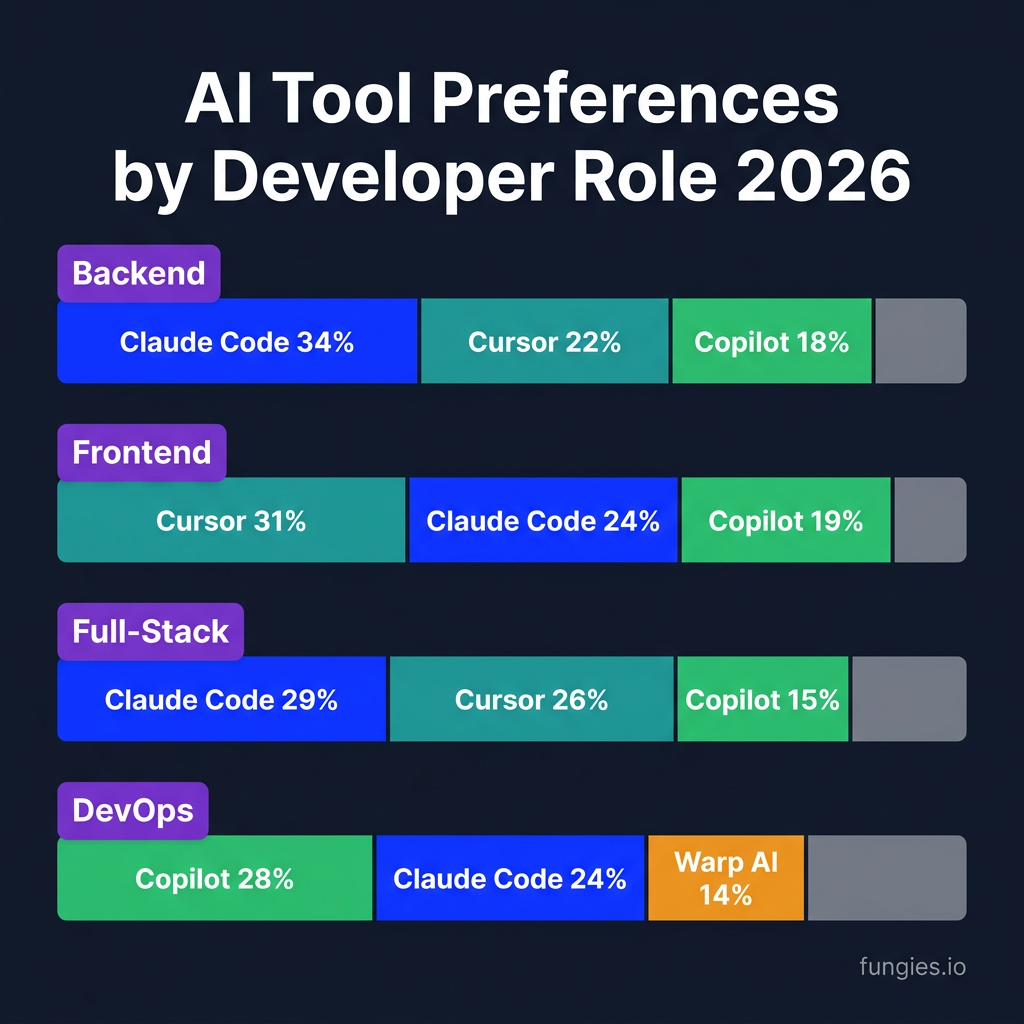
Backend Developers (n=626)
- Claude Code: 34%
- Cursor: 22%
- GitHub Copilot: 18%
- OpenAI Codex: 12%
Backend developers favor Claude Code for its deep multi-file reasoning and terminal-native workflow. Complex API design, database migrations, and service architecture benefit from Claude’s 1M token context window.
Frontend Developers (n=541)
- Cursor: 31%
- Claude Code: 24%
- GitHub Copilot: 19%
- Windsurf: 9%
Frontend developers prefer Cursor for its VS Code integration and visual editing experience. Component-based development with immediate visual feedback aligns well with Cursor’s IDE-first approach.
Full-Stack Developers (n=968)
- Claude Code: 29%
- Cursor: 26%
- GitHub Copilot: 15%
- OpenAI Codex: 11%
Full-stack developers are split between terminal-first and IDE-first workflows, reflecting the dual nature of their work. Those doing more backend work lean Claude; those focused on UI lean Cursor.
DevOps / Platform Engineers (n=256)
- GitHub Copilot: 28%
- Claude Code: 24%
- Warp AI: 14%
- OpenAI Codex: 12%
DevOps engineers favor Copilot for its GitHub integration and multi-IDE support. Infrastructure-as-code work often happens across multiple tools and environments, making Copilot’s flexibility valuable.
Enterprise Adoption: The Numbers Behind the Shift
Fortune 100 Deployment
90% of Fortune 100 companies have deployed GitHub Copilot, according to Microsoft CEO Satya Nadella’s July 2025 earnings call. But deployment doesn’t mean universal adoption within those companies.
Enterprise adoption follows a predictable pattern:
- Pilot phase: Small teams test AI tools on non-critical projects
- Controlled rollout: Approved tools integrated into standard workflows
- Governance implementation: Security, compliance, and usage policies established
- Full adoption: AI tools become standard infrastructure
Most enterprises are between phases 2 and 3.
Security and Privacy Concerns
The biggest blocker to enterprise adoption isn’t capability—it’s trust. 44% of organizations expect AI agents to deliver efficiency gains over the next 12 months, but security teams remain cautious about:
- Code leakage to third-party AI providers
- Intellectual property exposure
- Compliance with SOC 2, GDPR, and industry regulations
- Audit trails for AI-generated code
Tools that offer self-hosted or air-gapped options (like Tabnine Enterprise and some JetBrains solutions) are gaining traction in regulated industries despite lower capability.
The Economics of AI Coding Agents
Market Size and Growth
The AI coding assistant market is experiencing explosive growth:
- Cursor: $2 billion annualized recurring revenue as of February 2026, doubling from $1B in November 2025
- GitHub Copilot: ~20 million total users by July 2025, 4.7 million paid subscribers by January 2026
- Claude Code: 18% adoption among developers by January 2026, with the highest satisfaction score (91% CSAT)
Pricing Comparison
| Tool | Entry Price | Premium Tier | Enterprise |
|---|---|---|---|
| GitHub Copilot | $10/mo | $20/mo | $39/user/mo |
| Claude Code | $20/mo | $100-200/mo | Custom |
| Cursor | $20/mo | $60/mo | $40/user/mo |
| OpenAI Codex | $20/mo | $200/mo | Custom |
| Windsurf | Free (25 credits) | $15/mo | Custom |
At the low end, GitHub Copilot offers the best value. At the high end, Claude Code’s Max tiers ($100-200/mo) are only justified for developers doing 4+ hours of intensive AI-assisted work daily.
Key Takeaways for Developers
- Adoption is universal, but trust is low. 84% use AI coding tools; only 29% trust them. The gap represents opportunity for tools that can demonstrably improve accuracy.
- The hybrid workflow wins. Most productive developers use multiple AI tools—typically an IDE-integrated tool (Cursor/Copilot) plus a terminal agent (Claude Code).
- Review time is the hidden cost. Developers spend more time reviewing AI-generated code than writing with AI. Tools that reduce review overhead (better first-pass accuracy) will win.
- Role matters. Backend developers favor Claude Code; frontend developers prefer Cursor; DevOps teams lean toward Copilot.
- Enterprise adoption is accelerating. 90% of Fortune 100 companies have deployed AI coding tools, but governance and security remain blockers to full adoption.
FAQ
What percentage of developers use AI coding agents in 2026?
84% of developers use or plan to use AI coding tools, according to Stack Overflow’s 2025 Developer Survey. 51% of professional developers use AI tools daily.
Which AI coding agent has the highest adoption?
GitHub Copilot has the broadest reach with 58% any-use share, but Claude Code leads in primary-tool adoption at 28% as of Q1 2026.
Do developers trust AI-generated code?
Only 29% of developers trust AI outputs to be accurate, down from 40% in 2024. 66% say their biggest frustration is code that’s “almost right, but not quite.”
How much time do AI coding agents save?
Nearly 90% of developers save at least one hour per week; 20% save eight hours or more. However, reviewing AI-generated code has become the largest time sink at 11.4 hours/week median.
What’s the most common AI coding tool combination?
The most common pattern is Cursor for daily editing plus Claude Code for complex tasks, or Copilot for inline suggestions plus Claude Code for architecture work.
Conclusion
The data is clear: AI coding agents are now standard infrastructure for software development. But the transition from “experimental tool” to “trusted collaborator” is still in progress.
The developers seeing the most benefit aren’t just using AI—they’ve built intentional workflows that combine multiple tools, set clear boundaries for AI autonomy, and invest time in reviewing AI-generated code.
If you’re not using AI coding agents yet, you’re in the minority. But if you’re using them without a strategy, you’re probably wasting time and money. The winners in 2026 will be developers who treat AI as an accelerator with human review, not a replacement for engineering judgment.
Ready to streamline your development workflow? Sign up for Fungies and focus on building great products while we handle payments, tax compliance, and global checkout.
References
- Stack Overflow Developer Survey 2025 (n=49,000+): https://stackoverflow.co/company/press/archive/stack-overflow-2025-developer-survey/
- JetBrains State of Developer Ecosystem 2025 (n=24,534): https://blog.jetbrains.com/research/2026/04/which-ai-coding-tools-do-developers-actually-use-at-work/
- Digital Applied Q1 2026 Developer Survey (n=2,847): https://www.digitalapplied.com/blog/ai-coding-tool-adoption-2026-developer-survey
- Google DORA 2025 Report (n≈5,000): https://cloud.google.com/devops/state-of-devops
- GitClear Code Churn Analysis (211M lines): https://www.gitclear.com/
- Microsoft Earnings Call (July 2025): https://www.microsoft.com/en-us/investor
- Bloomberg Cursor Revenue Report (March 2026): https://www.bloomberg.com/news/articles/2026-03-05/cursor-ai-revenue