Here’s a number that should get your attention: developers using AI coding agents report an average productivity increase of 31.4% compared to traditional approaches. In 2026, that gap is widening fast. Teams not using AI coding agents are shipping code at half the speed of those who’ve integrated these tools into their workflow.
But here’s the problem—most developers don’t know where to start. With seven major contenders (Claude Code, Cursor, GitHub Copilot, OpenAI Codex, Windsurf, Google Antigravity, and Amazon Kiro), each with different pricing models, setup requirements, and ideal use cases, choosing and configuring the right agent feels overwhelming.
This guide cuts through the noise. I’ll walk you through exactly how to set up the top AI coding agents in 2026, what each costs (including hidden usage fees), and how to integrate them into your development workflow.

What Are AI Coding Agents (And Why They Matter in 2026)
AI coding agents have evolved far beyond autocomplete. In 2026, these tools are autonomous systems that can:
- Understand entire codebases across multiple files
- Write, refactor, and debug code with minimal human input
- Run terminal commands and execute tests
- Iterate on tasks based on error feedback
- Collaborate through multi-agent workflows
The shift from “AI-assisted coding” to “AI agent coding” happened in early 2026. GitHub Copilot added agent mode. Claude Code shipped with terminal-native capabilities. Cursor introduced parallel agent execution. OpenAI released Codex CLI as open source.
According to Anthropic’s 2026 Agentic Coding Trends Report, organizations using coding agents are seeing 2.5-3.5x ROI on average, with top-quartile teams reaching 4-6x returns. But there’s a catch: agentic tools can cost $200-$2,000+ per engineer per month in token spend—not the $30-60 seat license that older estimates assumed.
The 5 Major AI Coding Agents: Complete Setup Guide
I’ll focus on the five tools that matter most for SaaS developers in 2026: GitHub Copilot, Claude Code, Cursor, OpenAI Codex CLI, and Windsurf. Each serves a different workflow, and many developers use 2-3 simultaneously.
1. GitHub Copilot: The Best Starting Point
Pricing: Free tier (2,000 completions) → Pro ($10/month) → Pro+ ($39/month) → Business/Enterprise ($19-39/user/month)
Best for: Teams new to AI coding, developers wanting IDE integration, organizations already using GitHub
Setup Process:
- Install the Copilot extension in VS Code, JetBrains, or Vim
- Sign in with your GitHub account
- Accept permissions for repository access
- Enable agent mode in VS Code settings (Settings → Copilot → Enable Agent Mode)
- Configure MCP servers for extended capabilities
What You Get: 300 premium requests/month on Pro, multi-model support (including Claude 3.7 Sonnet), code review capabilities, and tight GitHub integration. The agent mode can use terminal commands, edit files, and interact with MCP servers.
Real Cost: Most developers stay within the $10/month Pro plan. Heavy users might need Pro+ at $39/month for unlimited premium requests.
2. Claude Code: The Terminal Powerhouse
Pricing: Free tier → Pro ($20/month) → Max 5x ($100/month) → Max 20x ($200/month)
Best for: Complex refactoring, multi-file changes, terminal-centric workflows, automation scripts
Setup Process:
- Install via npm:
npm install -g @anthropics/anthropic-cli - Authenticate with
claude login - Set your API key or subscribe to Pro
- Navigate to your project directory and run
claude - Configure model preferences (Sonnet for speed, Opus for complex tasks)
What You Get: Deep codebase understanding, agentic task execution, bash command execution, file editing, and git integration. Claude Code excels at complex reasoning tasks across multiple files.
Real Cost: Starts at $20/month, but heavy agentic usage with Opus models runs $150-200/month per developer. The Max tiers are for power users who consistently exhaust lower limits.
3. Cursor: The AI-Native IDE
Pricing: Free tier (limited) → Pro ($20/month) → Pro+ ($60/month) → Ultra ($200/month)
Best for: Daily development, integrated AI experience, parallel agent execution
Setup Process:
- Download Cursor from cursor.com (VS Code fork with AI built-in)
- Sign in with GitHub or email
- Import VS Code settings and extensions (optional)
- Configure API keys for premium models (Claude, GPT-4o, Gemini)
- Set up .cursorrules file for project-specific instructions
What You Get: AI-native editing experience, composer for multi-file changes, agent mode with tool use, @-mentions for context, and parallel agent execution. Cursor feels like the future of IDEs.
Real Cost: Most developers need at least Pro ($20/month). Heavy users with multi-hour agent sessions daily should consider Pro+ ($60/month) or Ultra ($200/month).
4. OpenAI Codex CLI: The Open Source Option
Pricing: Free (open source) — pay only for OpenAI API usage
Best for: Cost-conscious developers, OpenAI model enthusiasts, custom integrations
Setup Process:
- Install Node.js 18+ if not already installed
- Install Codex:
npm install -g @openai/codex - Set your OpenAI API key:
export OPENAI_API_KEY=your_key - Run
codexin your project directory - Configure skills in ~/.codex/skills/ for custom workflows
What You Get: Direct terminal access to OpenAI’s coding models, agent loop architecture, sandboxed execution, and full transparency into the agent’s decision-making process. OpenAI published detailed technical documentation on how the agent loop works.
Real Cost: You pay OpenAI API rates: GPT-4o at $2.50/$10 per 1M tokens, o3 at $2.00/$8 per 1M tokens. For moderate use, expect $20-50/month in API costs.
5. Windsurf: The Cascade Agent
Pricing: Free tier (50 credits) → Pro ($15/month, 500 credits) → Max ($200/month, heavy quota)
Best for: Teams wanting collaboration features, developers who prefer credit-based pricing
Setup Process:
- Download Windsurf from codeium.com/windsurf
- Create an account or sign in
- Choose your plan (Free trial includes 500 bonus credits for 14 days)
- Configure model access (SWE-1, Claude Sonnet 4.6, GPT-5, Gemini 3.1 Pro)
- Set up team workspace if on Team plan ($30/user/month)
What You Get: The Cascade agent system with deep IDE integration, 5 parallel agents, SWE-1 model access, and strong team collaboration features. Credits refresh daily and weekly.
Real Cost: Pro at $15/month covers most developers. Max at $200/month is for power users running multi-hour Cascade sessions daily with frontier models.
Feature Comparison: What Each Agent Does Best
| Feature | GitHub Copilot | Claude Code | Cursor | Codex CLI | Windsurf |
|---|---|---|---|---|---|
| Starting Price | $10/month | $20/month | $20/month | Free + API | $15/month |
| Heavy Use Cost | $39/month | $150-200/month | $60-200/month | $20-50/month | $200/month |
| Interface | IDE Extension | Terminal | AI-Native IDE | Terminal | AI-Native IDE |
| Best For | Daily completions | Complex refactoring | Integrated dev | OpenAI models | Parallel agents |
| Context Window | 128K-200K | 200K | 200K | 128K-200K | 1M tokens |
| Agent Mode | Yes (VS Code) | Native | Yes | Native | Yes (Cascade) |
| Multi-Agent | Limited | Agent Teams | Parallel | Agents SDK | 5 parallel |
Integrating AI Agents Into Your Development Workflow
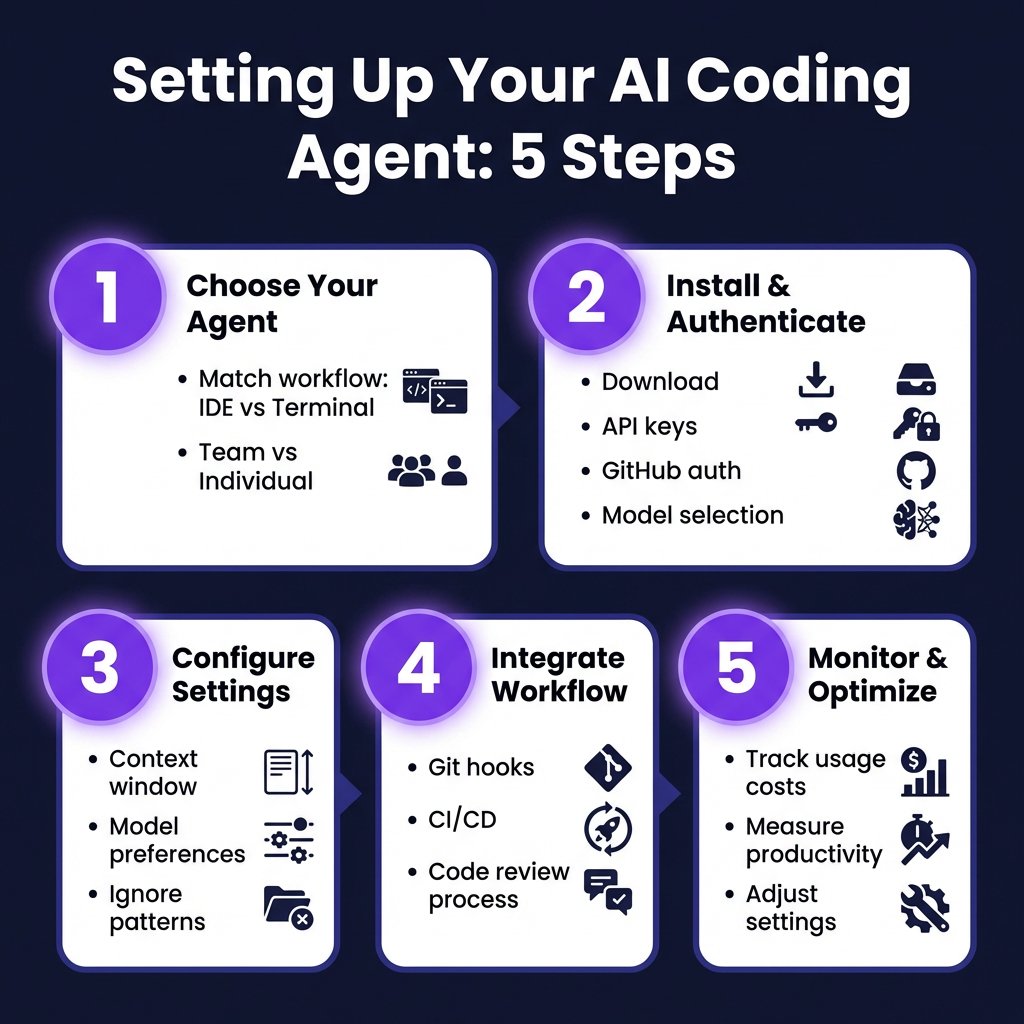
Setting up the tool is only half the battle. The real value comes from integrating AI agents into your existing workflow. Here’s how successful teams are doing it in 2026:
The Tiered Tool Approach
Smart teams use multiple agents for different tasks:
- GitHub Copilot Pro ($10/month) for all developers — daily completions and inline suggestions
- Cursor or Windsurf Pro ($20/month) for senior developers — complex multi-file work
- Claude Code ($20-100/month) for architecture and refactoring tasks
This approach costs $30-50 per developer monthly while covering all use cases.
Git Integration Best Practices
AI-generated code needs the same rigor as human-written code:
- Always review AI changes before committing
- Use descriptive commit messages that mention AI assistance
- Run full test suites on AI-generated code
- Monitor the AI vs Human Turnover Ratio — if AI code churns at 1.5x human code, reduce AI code share
Cost Monitoring and Optimization
Token costs can spiral quickly. Set up monitoring:
- Track monthly spend per developer
- Set alerts for unusual usage spikes
- Use cheaper models (Haiku, Flash) for simple tasks
- Reserve expensive models (Opus, o3) for complex reasoning
Key Takeaways: Choosing Your AI Coding Agent Setup
After testing all five major tools, here’s my recommendation for different scenarios:
- Start with GitHub Copilot Pro ($10/month) if you’re new to AI coding. It’s the best value and integrates everywhere.
- Add Claude Code ($20/month) when you need serious refactoring capabilities or prefer terminal workflows.
- Choose Cursor ($20/month) if you want the most integrated AI experience and don’t mind switching IDEs.
- Use Codex CLI (free + API) if you’re cost-conscious and comfortable managing your own API keys.
- Pick Windsurf ($15/month) if you want credit-based pricing and strong team features.
Most developers in 2026 are running 2-3 agents simultaneously — Copilot for daily coding, Claude Code or Cursor for complex tasks. The productivity gains are real, but so are the costs if you’re not careful.
FAQ: AI Coding Agents Setup
What’s the cheapest way to start with AI coding agents?
GitHub Copilot Free gives you 2,000 completions to test the waters. OpenAI Codex CLI is free (you only pay for API usage), making it the most budget-friendly option for light use.
Can AI coding agents replace developers?
No. AI coding agents are productivity multipliers, not replacements. They handle routine coding tasks, freeing developers to focus on architecture, complex problem-solving, and creative work. The best developers in 2026 are those who’ve learned to work effectively with AI agents.
Which AI coding agent is best for beginners?
GitHub Copilot is the most beginner-friendly. It works in familiar IDEs, requires minimal setup, and has extensive documentation. The $10/month Pro plan is low-risk to try.
How much should I budget for AI coding tools per developer?
Budget $30-60 per developer per month for moderate use. Heavy users running agentic workflows with frontier models should budget $150-200/month. Teams using a tiered approach (Copilot + Cursor/Claude) typically spend $30-50/month per developer.
Are AI coding agents secure for proprietary code?
Most enterprise plans offer data privacy guarantees. GitHub Copilot Business/Enterprise, Claude Code with enterprise agreements, and self-hosted options like local models through Ollama keep code within your infrastructure. Always review the data handling policies before connecting agents to proprietary repositories.
Conclusion: Start With One, Expand Strategically
AI coding agents aren’t optional anymore — they’re as essential as version control. But you don’t need to adopt everything at once.
Start with GitHub Copilot Pro. It’s $10/month, works everywhere, and will immediately improve your daily coding experience. Once you’re comfortable, add Claude Code or Cursor for complex tasks.
The developers and teams shipping the fastest in 2026 aren’t the ones writing the most code. They’re the ones who’ve learned to direct, review, and optimize AI-generated code effectively.
Ready to streamline your SaaS payments and checkout while you focus on building? Get started with Fungies.io — the Merchant of Record platform that handles payments, tax compliance, and checkout for game and SaaS developers.
References
- The Impact of AI Coding in 2026 — Trigi Digital
- Developer Productivity Benchmarks 2026 — Larridin
- 2026 Agentic Coding Trends Report — Anthropic
- AI Coding Tools Pricing Comparison 2026 — NxCode
- AI Coding Agents & IDEs: The Complete 2026 Comparison — Lush Binary
- AI Coding Tools Compared (2026) — TLDL
- Best AI Coding Agents in 2026 — Codegen
- We Tested 15 AI Coding Agents (2026) — Morph