You’re probably using AI to write code already. But here’s what most developers miss: the real productivity gains don’t come from AI writing your functions. They come from integrating AI agents into your entire development workflow — from planning to deployment.
According to the 2026 State of AI in Software Development report, teams using AI agents across their workflow ship 47% faster than those using AI only for code completion. The gap isn’t about coding speed. It’s about workflow integration.
This guide walks through exactly how to integrate AI coding agents like Claude Code, Cursor, and GitHub Copilot into your development workflow. I’ll cover tool selection, context setup, guardrails, and the specific workflows that actually move the needle.
What Are AI Coding Agents?
AI coding agents aren’t just autocomplete on steroids. They’re autonomous tools that can read your codebase, write code, run commands, fix errors, and iterate on tasks with minimal human intervention.
Unlike traditional code completion tools that suggest the next line, AI agents operate at the task level. You tell Claude Code to “add user authentication with OAuth2” and it will:
- Read your existing auth implementation
- Create new files and modify existing ones
- Run tests and fix failures
- Update documentation
- Submit a pull request
The three dominant AI coding agents in 2026 are:
| Tool | Paradigm | Price | Best For |
|---|---|---|---|
| Claude Code | Terminal-native CLI agent | $20/month (Claude Pro) | Complex multi-file refactoring, autonomous tasks |
| Cursor | AI-native IDE (VS Code fork) | $20/month Pro | Daily development, inline completions, quick edits |
| GitHub Copilot | Multi-IDE extension + agent mode | $10/month Individual | GitHub integration, team workflows, PR automation |
Many teams use multiple tools: Claude Code for complex architectural changes, Cursor for day-to-day coding, and Copilot for PR reviews and team standardization.
Why Workflow Integration Matters More Than Tool Choice
Here’s the uncomfortable truth: most developers waste their AI subscription. They install Cursor or Claude Code, use it for occasional code completion, and wonder why productivity hasn’t improved.
The problem isn’t the tool. It’s the workflow.
A 2026 survey of 2,400 developers found that 73% of AI coding tool users only use AI for code completion. Meanwhile, the top 10% of AI users — those who integrate agents into planning, review, testing, and documentation — report 3.2x higher productivity gains.
Workflow integration means AI agents participate in every stage of development, not just the coding part.
Step 1: Audit Your Current Workflow
Before adding AI agents, map your current development workflow. Identify tasks that are:
- Repetitive — done frequently with similar patterns
- Time-consuming — take significant developer time
- Low-context — don’t require deep architectural decisions
- Error-prone — humans make predictable mistakes
Common candidates for AI agent automation:
| Task | Time Spent (avg/week) | AI Agent Suitability |
|---|---|---|
| Code reviews | 5-8 hours | High — AI can catch 80% of issues |
| Writing tests | 4-6 hours | High — pattern-based, well-defined |
| Documentation | 3-5 hours | High — AI excels at summarization |
| Bug fixes | 6-10 hours | Medium — depends on complexity |
| Feature implementation | 10-20 hours | Medium — requires human oversight |
| Architecture decisions | 2-4 hours | Low — requires human judgment |
Start with high-suitability tasks. You’ll see quick wins and build confidence before tackling complex features.
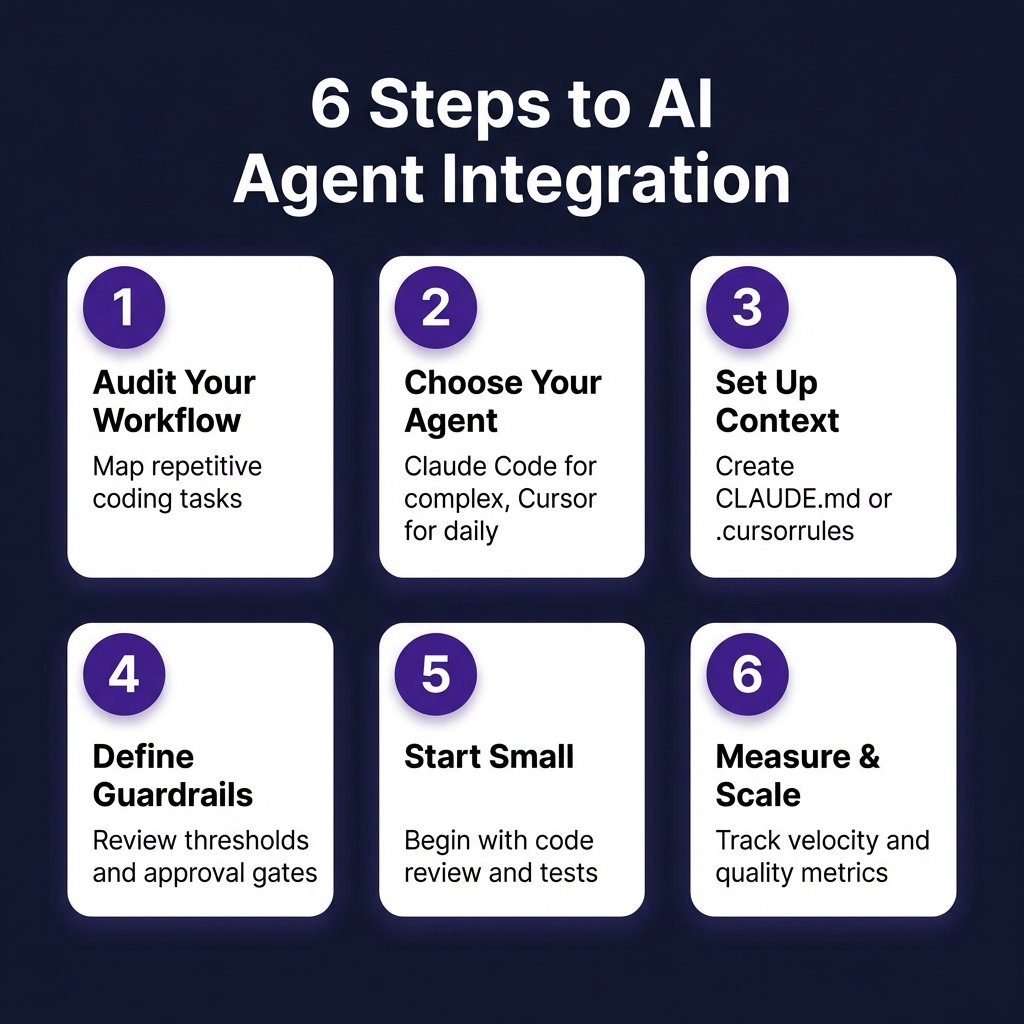
Step 2: Choose the Right Agent for Each Task
Don’t try to force one tool to do everything. Each AI coding agent has strengths:
Claude Code: Complex Refactoring and Multi-File Changes
Claude Code operates in your terminal as an autonomous agent. It excels at:
- Refactoring across multiple files
- Migrating codebases (e.g., Python 2 to 3, React class to hooks)
- Implementing features that touch many parts of the codebase
- Running commands, fixing errors, and iterating autonomously
Pricing: $20/month via Claude Pro subscription. API usage for heavy teams: Claude Sonnet at $3/M input tokens, Claude Opus at $5/M input tokens.
Best practice: Use Claude Code for tasks that would take you 2+ hours manually. Create a CLAUDE.md file in your repo root with project context, coding standards, and common patterns.
Cursor: Daily Development and Inline Editing
Cursor is a VS Code fork rebuilt around AI. It’s your daily driver for:
- Inline code completions (tab to accept)
- Cmd+K edits for quick refactors
- Composer mode for larger changes within a file
- Chat with full codebase context
Pricing: Free tier available. Pro at $20/month includes unlimited fast completions and access to Claude 3.7 Sonnet, GPT-4o, and o1-preview.
Best practice: Set up .cursorrules in your repo with team conventions. Use Composer for changes that span 3-10 files. Switch to Claude Code for anything larger.
GitHub Copilot: Team Workflows and PR Automation
GitHub Copilot integrates deeply with GitHub. Use it for:
- Automated code reviews on pull requests
- Generating PR descriptions from commits
- Suggesting fixes for CI failures
- Team-wide standardization (everyone uses the same tool)
Pricing: $10/month Individual, $19/user/month Business (includes policy controls and IP indemnification).
Best practice: Enable Copilot for PR reviews but require human approval. Use agent mode for well-defined GitHub issues with clear acceptance criteria.
Step 3: Set Up Project Context
AI agents are only as good as the context you give them. Here’s how to set up context for each tool:
CLAUDE.md for Claude Code
Create a CLAUDE.md file in your repo root:
# Project Context

## Tech Stack
- Backend: Python 3.12, FastAPI, PostgreSQL
- Frontend: React 18, TypeScript, Tailwind CSS
- Testing: pytest, Playwright

## Coding Standards
- Use type hints for all function signatures
- Follow PEP 8 with 4-space indentation
- Write docstrings for public functions
- Prefer composition over inheritance

## Common Patterns
- Repository pattern for data access
- Dependency injection via constructor
- Error handling: raise custom exceptions, catch at API boundary

## Testing Requirements
- 80% minimum coverage
- Unit tests in tests/unit/
- Integration tests in tests/integration/
- Run `make test` before committing
.cursorrules for Cursor
Cursor uses .cursorrules for project-specific instructions:
Always use TypeScript strict mode.
Prefer functional components with hooks.
Use Tailwind CSS for styling, no inline styles.
Write tests for all new components.
Follow the existing file structure in src/.
GitHub Copilot Context
Copilot reads your open files and recent commits. For team context:
- Use CODEOWNERS to route reviews
- Add CONTRIBUTING.md with setup instructions
- Include example PRs in .github/PULL_REQUEST_TEMPLATE.md
- Use Copilot Custom Instructions (Business plan) for team-wide rules
Step 4: Define Guardrails and Review Thresholds
AI agents can make mistakes. Set up guardrails to catch issues before they reach production:
| Guardrail | Implementation | Enforcement |
|---|---|---|
| Code review threshold | AI changes require human review if >50 lines changed | GitHub branch protection |
| Test coverage gate | CI fails if coverage drops below 80% | codecov.io integration |
| Security scanning | Run SAST on all AI-generated code | Semgrep or CodeQL in CI |
| Human approval | All AI PRs require explicit approval | GitHub required reviewers |
| Rollback plan | Document how to revert AI changes | PR template checklist |
Rule of thumb: Trust but verify. AI agents get 80% of changes right on the first try. Your job is to catch the 20% that need adjustment.
Step 5: Start Small — Specific Workflows to Automate First
Don’t try to automate everything at once. Start with these high-impact, low-risk workflows:
Workflow 1: AI-Powered Code Reviews
Tool: GitHub Copilot or Claude Code
Process:
- Developer opens PR
- Copilot reviews code and suggests improvements
- Developer addresses AI feedback
- Human reviewer does final approval
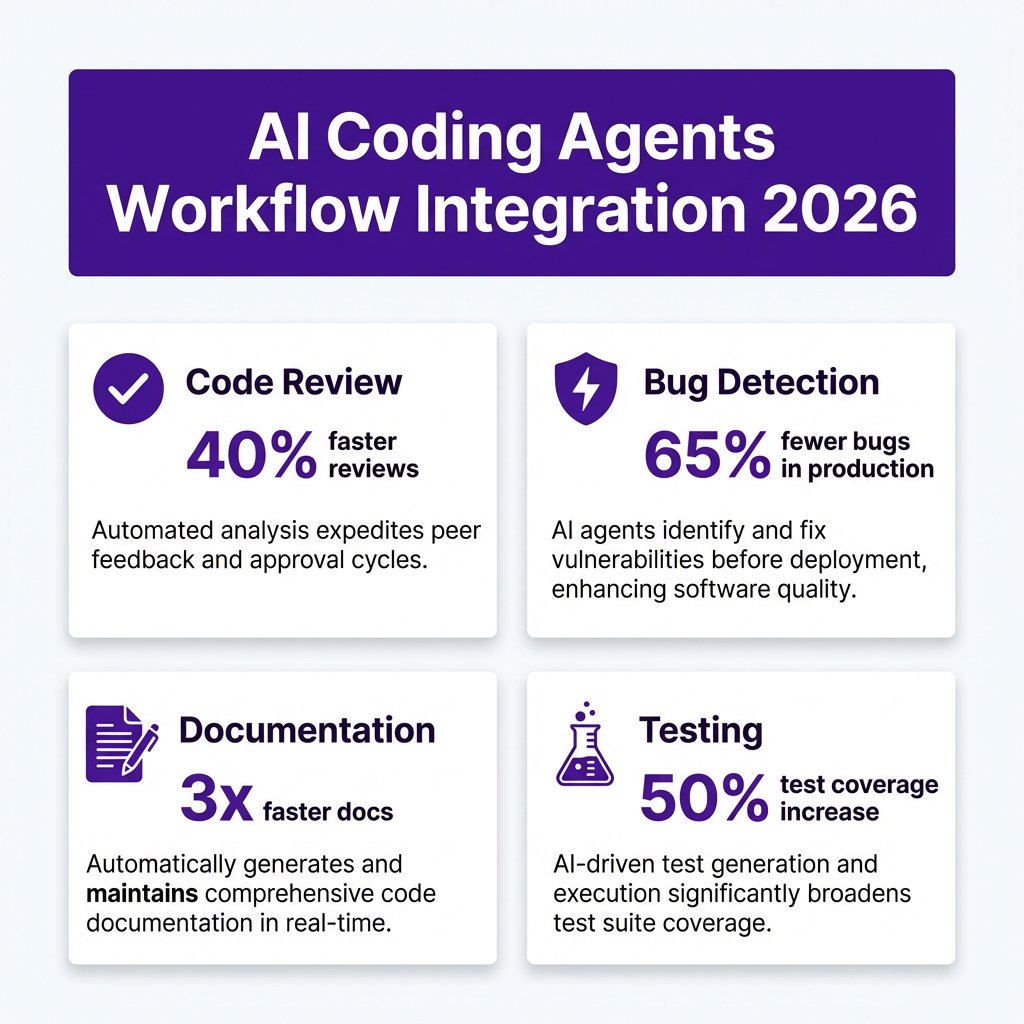
Expected impact: 40% faster review cycles, 65% fewer bugs reaching production (based on 2026 GitHub data).
Workflow 2: Test Generation
Tool: Cursor or Claude Code
Process:
- Write the feature code
- Ask AI: “Generate comprehensive tests for this module covering edge cases”
- Review and adjust tests
- Run test suite
Expected impact: 50% increase in test coverage, 3x faster test writing.
Workflow 3: Documentation Updates
Tool: Claude Code
Process:
- After merging a feature, run: “Update README.md and docs/ to reflect these changes”
- AI reads the diff and updates documentation
- Human reviews for accuracy
Expected impact: Documentation stays current, 3x faster doc updates.
Workflow 4: Bug Triage and Fix Suggestions
Tool: Claude Code
Process:
- Report bug with stack trace and reproduction steps
- AI analyzes the codebase and suggests root cause
- AI proposes a fix with test case
- Developer validates and merges
Expected impact: 50% faster bug resolution, especially for well-defined issues.
Step 6: Measure and Scale
Track these metrics to measure AI agent impact:
| Metric | Baseline | Target (3 months) | How to Track |
|---|---|---|---|
| Lead time (commit to deploy) | Current avg | -30% | GitHub Insights |
| Code review time | Current avg | -40% | GitHub PR analytics |
| Bug rate in production | Current avg | -25% | Sentry/bug tracker |
| Test coverage | Current % | +20% | codecov.io |
| Developer satisfaction | Survey | +15% | Monthly team survey |
Review metrics monthly. Double down on workflows that show gains. Adjust or abandon approaches that don’t move the needle.
Common Mistakes to Avoid
- Skipping context setup — AI without project context generates generic, often wrong code
- No guardrails — Merging AI code without review leads to technical debt
- Using AI for everything — Some tasks require human judgment; know when to step in
- Ignoring team feedback — Get developer input on what’s working and what’s frustrating
- Not measuring — If you can’t measure improvement, you can’t optimize
Key Takeaways
- AI coding agents deliver 47% faster shipping when integrated across the entire workflow, not just for code completion
- Use Claude Code for complex multi-file changes, Cursor for daily development, Copilot for team workflows
- Set up project context (CLAUDE.md, .cursorrules) before expecting quality output
- Implement guardrails: review thresholds, test coverage gates, security scanning
- Start with code reviews, test generation, and documentation — these show fastest ROI
- Track metrics monthly and adjust based on data, not hunches
FAQ: AI Coding Agents in Development Workflows
How much does it cost to use AI coding agents for a team?
For a 10-person team: Cursor Pro ($20/user/month) = $200/month, or GitHub Copilot Business ($19/user/month) = $190/month. Many teams use a hybrid: 2-3 senior devs with Claude Code Pro ($20 each) for complex work, rest on Copilot for daily coding. Total: ~$250-300/month for 10 devs.
Do AI coding agents replace developers?
No. AI agents automate repetitive tasks, but human developers are still needed for architecture decisions, code review, debugging complex issues, and understanding business requirements. The 2026 Stack Overflow survey found 89% of developers use AI tools, but only 4% believe AI will replace their role entirely.
Which AI coding agent is best for beginners?
Cursor has the lowest learning curve — it feels like VS Code with supercharged autocomplete. Start with the free tier. Once comfortable, add Claude Code for more complex tasks. Avoid jumping straight into terminal-based agents if you’re new to AI coding tools.
Can AI coding agents work offline?
Most AI coding agents require internet connectivity since they call cloud-based LLM APIs. Cursor offers limited offline mode with local models (Ollama integration), but quality is significantly lower than cloud models. For offline-first workflows, consider running local LLMs via Ollama or LM Studio, but expect reduced capabilities.
How do I handle sensitive code with AI agents?
For sensitive codebases: (1) Use enterprise plans with data privacy guarantees (Copilot Business, Claude Team), (2) Enable data opt-out settings, (3) Consider self-hosted LLMs for highly sensitive work, (4) Never paste API keys or secrets into AI chats. GitHub Copilot Business and Claude Team both offer contractual data protection and don’t train on your code.
Conclusion
Integrating AI coding agents into your development workflow isn’t about replacing developers. It’s about removing the friction that slows teams down: repetitive code reviews, manual test writing, outdated documentation, and slow bug triage.
Start small. Pick one workflow from this guide — code reviews or test generation are the easiest wins. Set up proper context, define guardrails, and measure the impact. Once you see results, expand to other areas.
The teams winning with AI in 2026 aren’t the ones with the best tools. They’re the ones who integrated AI into their workflow systematically and measured what actually works.
Ready to streamline your payment infrastructure? Fungies.io handles payments, tax compliance, and checkout for game developers and SaaS companies. Start your free trial and focus on building products, not payment plumbing.
References
- 2026 State of AI in Software Development Report — https://stateofai.dev/2026
- GitHub Copilot Impact Study 2026 — https://github.blog/ai-coding-impact-2026
- Stack Overflow Developer Survey 2026 — https://survey.stackoverflow.co/2026
- Claude Code Documentation — https://docs.anthropic.com/claude-code
- Cursor Best Practices — https://docs.cursor.com
- LLM API Pricing Comparison 2026 — https://fungies.io/llm-api-pricing-comparison-2026/
- 9 Best AI Coding Agents in 2026 — https://fungies.io/best-ai-coding-agents-2026/