85% of developers now use AI coding assistants daily. Yet only 31% report meaningful productivity gains. The gap isn’t the tools—it’s how teams integrate them into their workflows.
I’ve spent the last year watching development teams struggle with the same problem. They buy Cursor Pro, set up GitHub Copilot, or install Claude Code… then use them as fancy autocomplete. They’re leaving 70% of the value on the table.
This guide shows you how to properly integrate AI coding assistants into your development workflow. Not just installation—real integration that changes how you build software.
What Are AI Coding Assistants in 2026?
AI coding assistants have evolved far beyond autocomplete. In 2026, they’re autonomous development partners that can:
- Write complete functions from natural language descriptions
- Refactor across multiple files simultaneously
- Debug complex issues by analyzing error logs
- Generate tests and documentation automatically
- Execute terminal commands and verify their own work
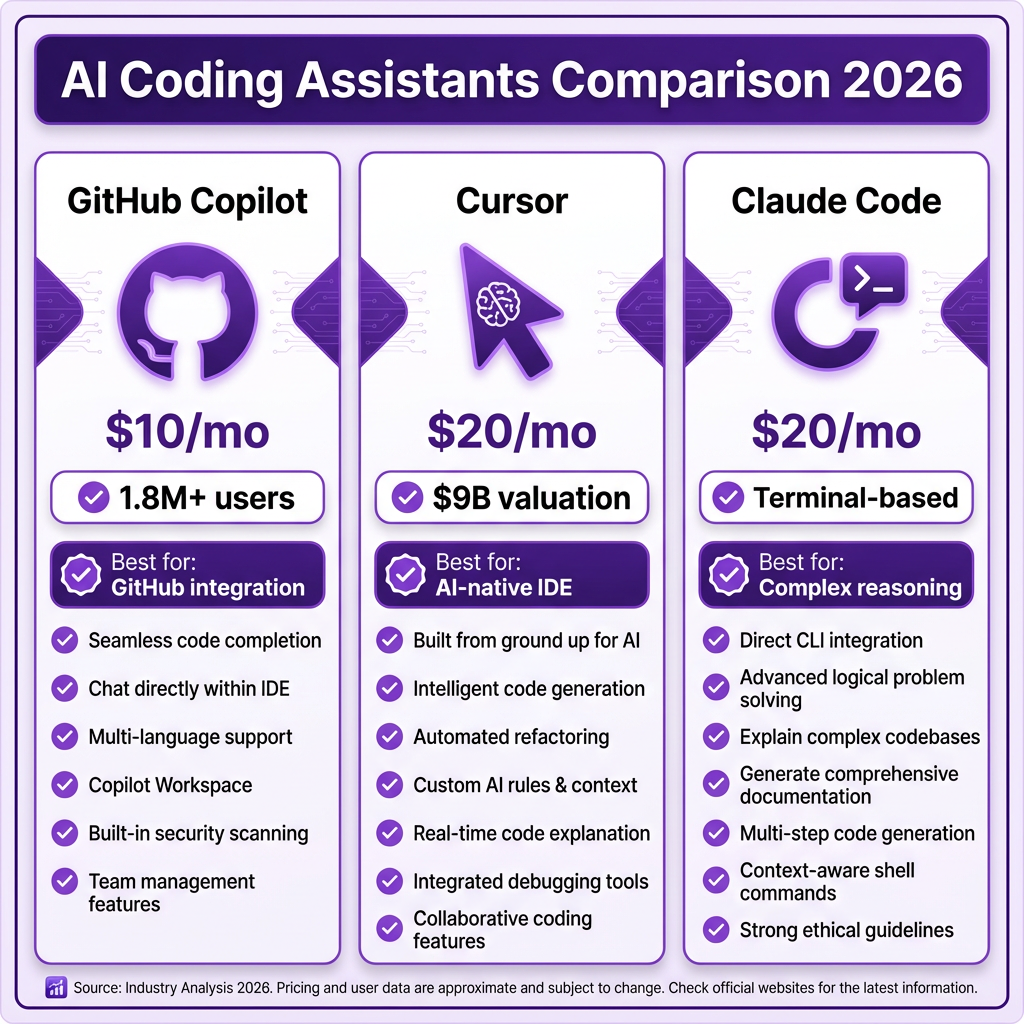
The market has consolidated around four dominant tools: GitHub Copilot (1.8M+ users), Cursor ($9B valuation), Claude Code (terminal-native agent), and Windsurf (free tier leader). Each serves different workflows—and most professional developers now use two or more.
Why Workflow Integration Matters More Than Tool Choice
Here’s what the data shows: developers using AI coding assistants report an average productivity increase of 31.4%. But top-quartile teams see 4-6x ROI. The difference? Integration.
Laura Tacho, CTO at DX, presented research at the 2026 Pragmatic Summit showing that 93% of developers use AI tools, but productivity gains have barely moved past 10% for most teams. Her analysis of 4.2 million developers found that AI-authored code now makes up 26.9% of production code—up from 22% last quarter—but quantity doesn’t equal impact.
The teams seeing real gains treat AI assistants as development partners, not typing shortcuts. They establish context rules, review patterns, and quality gates specifically designed for AI-generated code.
Choosing the Right AI Coding Assistant for Your Workflow
Before integration comes selection. Each major tool has a distinct paradigm:
| Tool | Pricing | Best For | Paradigm |
|---|---|---|---|
| GitHub Copilot | $10-19/mo | Teams on GitHub, IDE flexibility | IDE extension |
| Cursor | $20/mo | AI-native development experience | AI-first IDE |
| Claude Code | $20/mo (API) | Complex reasoning, terminal workflows | CLI agent |
| Windsurf | Free tier available | Budget-conscious developers | AI-native IDE |
When to Choose Each Tool
GitHub Copilot wins if your team is already standardized on GitHub. The tight integration with pull requests, Actions, and team workflows reduces friction. Copilot’s new agent mode in VS Code can handle multi-step tasks using MCP servers.
Cursor is the power user choice. As MKBHD described it in his “State of AI Tools 2026” video, Cursor is the “platform” to Copilot’s “plugin.” The $10/month premium buys multi-model support (Claude, GPT, Gemini, DeepSeek), better context understanding, and a more capable agent mode.
Claude Code excels at complex, multi-file tasks where reasoning matters. It’s terminal-native, so there’s no IDE lock-in. When developers hit genuinely complex problems—cross-file refactors, architectural decisions, debugging spanning six files—they switch to Claude Code.
The hybrid approach is what most experienced developers actually use: Cursor or Copilot for daily editing, plus Claude Code for complex tasks.
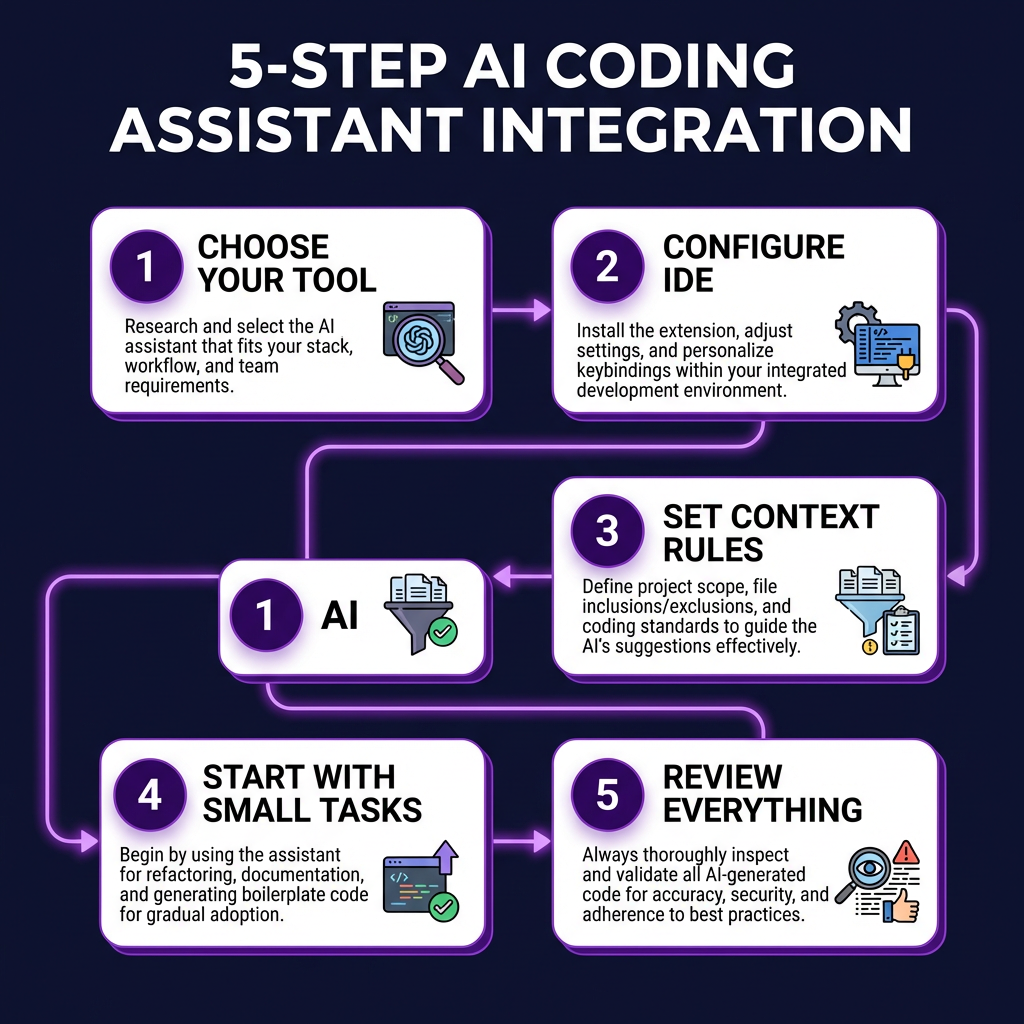
The 5-Step Integration Framework
Step 1: Audit Your Current Workflow
Before adding AI, document where your time actually goes. Track one week of development tasks and categorize them:
- Boilerplate and repetitive code (high AI leverage)
- Debugging and error resolution (medium leverage)
- Architecture and design decisions (low leverage—keep human)
- Code review and testing (medium leverage with AI assistance)
This audit reveals where AI will help versus where it’ll waste time. Teams that skip this step end up using AI for the wrong tasks.
Step 2: Establish Context Rules
AI assistants perform dramatically better with proper context. Create a CONTEXT.md file in your repository root with:
- Directory structure explanation
- Coding standards and patterns
- Business rules that aren’t obvious from code
- API endpoint documentation
- Testing requirements
Addy Osmani, Engineering Manager at Google, recommends keeping a “running context document” that you update as the project evolves. This reduces the tendency of AI to go off-script or introduce patterns you don’t want.
Step 3: Configure IDE Integration
Don’t accept default settings. Configure your AI assistant for your specific stack:
- Exclude sensitive files: Add .env, config files with secrets, and proprietary algorithms to your AI assistant’s ignore list
- Set language preferences: Most tools let you specify preferred patterns (functional vs. OOP, async/await vs. callbacks)
- Enable agent mode carefully: Start with read-only permissions, then gradually allow file edits and terminal commands
- Connect relevant MCP servers: Model Context Protocol servers extend AI capabilities to databases, APIs, and documentation
Step 4: Start with High-Confidence Tasks
Begin integration with tasks where AI has proven strength:
- Writing unit tests for existing functions
- Generating documentation from code comments
- Converting between similar formats (JSON to TypeScript interfaces)
- Writing repetitive CRUD operations
- Explaining unfamiliar codebases
As Jesse Vincent noted in his September 2025 workflow analysis, starting small “rewards existing best practices” and builds team confidence before tackling larger tasks.
Step 5: Implement AI-Specific Quality Gates
AI-generated code requires different review patterns. Establish these rules:
- Never commit AI code without review: AI produces “plausible-looking code” that may not work correctly
- Check for security vulnerabilities: AI-generated code has 2.74x more vulnerabilities than human-written code
- Monitor the AI vs. Human Turnover Ratio: If AI-generated code churns at more than 1.5x the rate of human code, your AI usage is too high for current review processes
- Require tests for AI-generated code: 72% of QA teams now use AI for test generation—make this mandatory
Common Integration Mistakes (And How to Avoid Them)
Mistake 1: “Vibe Coding” Without Structure
The term “vibe coding”—letting AI generate large swaths of an app from descriptions—has become popular. But developers report that this produces “inconsistent messes” with duplicate logic, mismatched method names, and no coherent architecture. One developer described the result as “like 10 devs worked on it without talking to each other.”
Solution: Use AI for directed, specific tasks with clear acceptance criteria—not open-ended generation.
Mistake 2: Blind Trust in “Looks Right”
AI code often looks correct at first glance. Variable names make sense. The structure follows patterns. But subtle bugs—off-by-one errors, incorrect API usage, race conditions—slip through.
Solution: Always run tests. Always verify behavior, not just syntax. As one experienced developer put it: “AI will happily produce plausible-looking code, but YOU are responsible for quality.”
Mistake 3: Architecture by Autocomplete
AI assistants excel at implementation, not architecture. When developers let AI make structural decisions, they end up with convoluted dependency graphs and technical debt that compounds.
Solution: Keep architectural decisions human. Use AI to implement designs you’ve already thought through.
Measuring Integration Success
How do you know if your integration is working? Track these metrics:
| Metric | Baseline | Good Target | Excellent |
|---|---|---|---|
| AI code share | 0% | 20-30% | 40-50% |
| AI code churn rate | N/A | <1.5x human rate | <1.2x human rate | Time to first PR | Manual baseline | -20% | -40% |
| Bug escape rate | Manual baseline | No increase | -10% |
| Developer satisfaction | Survey baseline | +15% | +30% |
Healthy ROI on AI coding tools averages 2.5-3.5x, with top teams reaching 4-6x. But remember: total cost now includes $200-600/month per engineer when you factor in token spend for agentic tools, not just the $30-60 seat license.
The Future: What’s Coming in 2026-2027
The AI coding landscape is evolving rapidly. Key trends to watch:
- Multi-agent workflows: Inquiries for multi-agent systems surged 1,445% in early 2026. Expect tools that coordinate multiple AI agents for complex tasks
- Longer sessions: Coding agent sessions grew from 4 minutes to 23 minutes on average—AI is handling more complex, sustained tasks
- Multi-file editing: 78% of agent coding sessions now involve multi-file edits, up from single-file completions
- Role shift: 90% of engineers are shifting from writing code to orchestrating AI—what Laura Tacho calls “AI engineering”
Key Takeaways
- 85% of developers use AI coding assistants, but only 31% see meaningful productivity gains—the difference is integration quality
- Choose tools based on workflow: Copilot for GitHub teams, Cursor for AI-native development, Claude Code for complex reasoning
- Start with a workflow audit to identify high-leverage AI tasks
- Establish context rules and quality gates specifically for AI-generated code
- Never commit AI code without review—AI-generated code has 2.74x more vulnerabilities
- Target 2.5-3.5x ROI, but budget $200-600/month per engineer including token costs
Frequently Asked Questions
Can I use AI coding assistants for free?
Yes. Windsurf offers a robust free tier. Gemini Code Assist is free for individuals. Claude has a free tier with rate limits. GitHub Copilot offers a free trial. For serious development, expect to pay $10-20/month for individual plans.
Will AI coding assistants replace developers?
No. The role is shifting from “code writer” to “AI orchestrator.” Developers who don’t adapt to working with AI will fall behind, but those who master AI integration become more valuable. The bar for engineering is rising—you need deeper mental models, better architecture literacy, and stronger code review skills.
Which AI coding assistant is best for beginners?
GitHub Copilot is the safest starting point. It integrates with familiar IDEs, has extensive documentation, and a large community. Once comfortable, consider adding Claude Code for complex tasks or switching to Cursor for a more AI-native experience.
How do I prevent AI from introducing security vulnerabilities?
Establish three rules: (1) Never let AI handle authentication or encryption code without expert review, (2) Always run security scans on AI-generated code, (3) Maintain an AI code churn metric—if AI code is being rewritten more than 1.5x as often as human code, reduce AI usage until review processes improve.
Should my whole team use the same AI tool?
Not necessarily. Standardize on one primary tool for collaboration (usually Copilot or Cursor), but allow individuals to use Claude Code for specific complex tasks. The hybrid approach is now the norm among experienced teams.
Conclusion
AI coding assistants have moved from experimental tools to essential infrastructure. The teams winning in 2026 aren’t the ones with the fanciest tools—they’re the ones who’ve built workflows that harness AI effectively while maintaining quality.
Start with a workflow audit. Choose tools that fit your stack. Establish context rules and quality gates. Measure what matters. And remember: AI amplifies your development process—if your process is broken, AI will just help you ship broken code faster.
Ready to streamline your development workflow? Get started with Fungies.io for seamless payment integration and checkout solutions that let you focus on building, not billing infrastructure.
References
- AI in Software Development: 25+ Trends & Statistics (2026) – Modal
- This CTO Says 93% of Developers Use AI, but Productivity Is Still 10% – ShiftMag
- Cursor vs Claude Code vs GitHub Copilot 2026 – NxCode
- My LLM coding workflow going into 2026 – Addy Osmani
- Developer Productivity Benchmarks 2026 – Larridin
- The Impact of AI Coding in 2026 – Trigi Digital
- GitHub Copilot vs Cursor 2026 – Tech Insider