82% of developers now interact with LLMs daily. Yet only 23% have formal training in prompt engineering. That’s a massive gap—and it’s costing teams in output quality, API costs, and debugging time.
This isn’t another “be specific with your prompts” article. You already know that. These are the seven production patterns that engineering teams at scale actually use to ship reliable AI-powered features.
What Prompt Engineering Actually Means in 2026
Prompt engineering has split into two distinct disciplines:
Casual prompting — the art of getting a useful response from ChatGPT or Claude for one-off tasks. The models got better at this. You don’t need training anymore.
Production context engineering — the systematic design of prompts, context windows, and output schemas for shipped features. This is a genuine engineering skill. The gap between careless prompts and well-engineered context is widening, not closing.
If you’re calling an LLM API in production, you’re doing context engineering whether you call it that or not.
Why Bad Prompts Cost More Than You Think
A poorly structured prompt doesn’t just produce worse output. It produces more tokens.
| Prompt Version | Avg Output Tokens | Cost per 1K Requests | Quality Score |
|---|---|---|---|
| V1 (vague) | 847 | $127.05 | 6.2/10 |
| V2 (structured) | 412 | $61.80 | 8.1/10 |
| V3 (optimized) | 298 | $44.70 | 8.7/10 |
Better prompts cost 65% less and produce better results. The optimization work pays for itself.
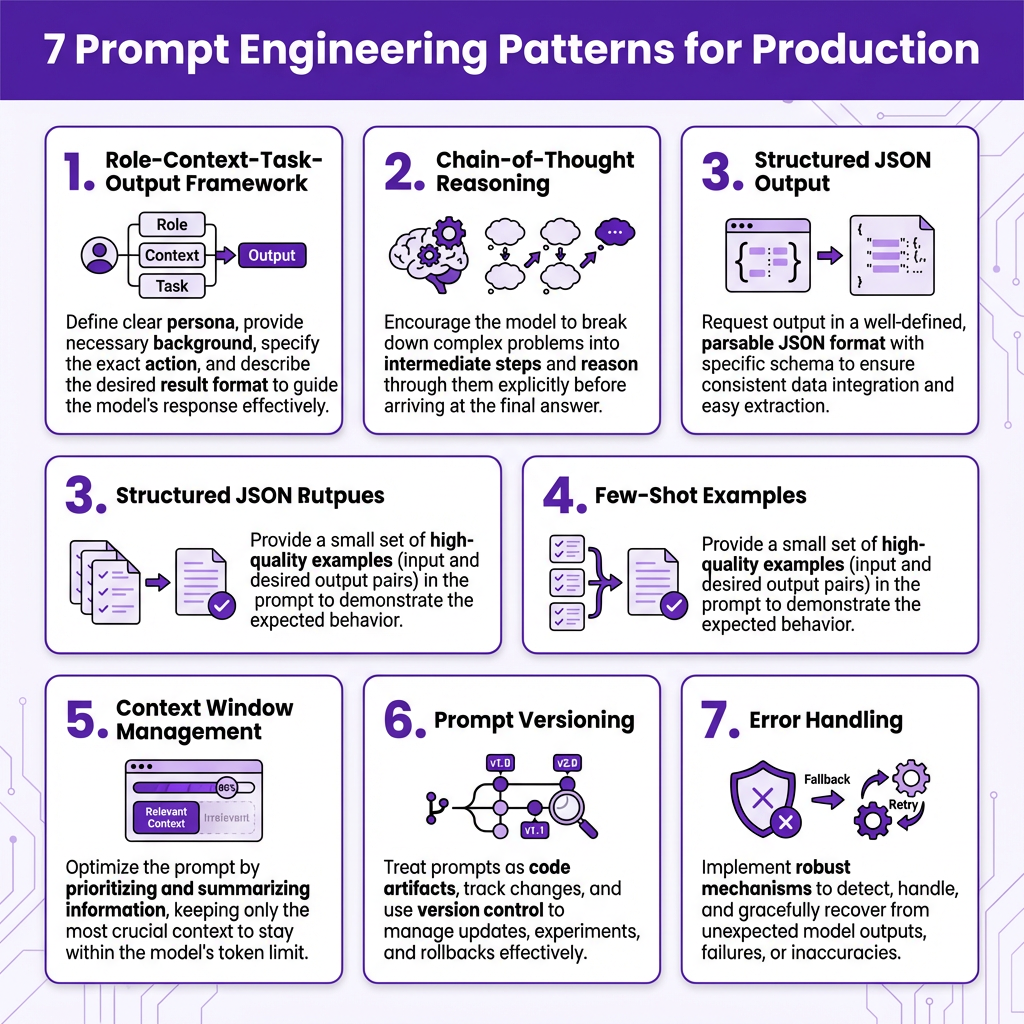
Pattern 1: The Role-Context-Task-Output Framework
Every production prompt needs four elements. Skip one and you’ll get inconsistent results.
- Role: Who the AI should be
- Context: What it needs to know
- Task: What it should do
- Output: How it should respond
Bad Prompt
Generate an API endpoint for user data.
Good Prompt
Role: You are a senior backend engineer specializing in Node.js and Express.

Context: We have a PostgreSQL database with a users table (id, email, name, created_at). Our codebase uses Express 4.x with async/await patterns and centralized error handling.

Task: Generate a GET /api/users/:id endpoint that returns a single user by ID.

Output: Return only the route handler code with:
- Parameterized SQL query using pg
- Proper error handling with 404 for missing users
- JSON response with { success: true, data: user }
- No imports or boilerplate comments
The second prompt costs the same tokens. The output is usable immediately.
Pattern 2: Chain-of-Thought for Complex Reasoning
LLMs perform better when they think step by step. This isn’t speculation—it’s measurable.
In a benchmark of coding tasks:
- Zero-shot: 34% success rate
- With chain-of-thought prompting: 67% success rate
How to Implement It
Add this to your system prompt:
Before providing your answer, think through this step by step:
1. What is the core problem being solved?
2. What are the constraints and requirements?
3. What approach will you take?
4. What could go wrong?

Then provide your solution.
When to Skip It
Don’t use chain-of-thought for simple classification tasks, format conversions, or anything where latency matters more than accuracy. The extra tokens add 200-400ms to response time.
Pattern 3: Structured Output with JSON Schema
Unstructured LLM output is a liability in production. You need guaranteed structure.
Model Support for Structured Output
| Model | JSON Schema | Function Calling | Notes |
|---|---|---|---|
| GPT-5 | ✅ Native | ✅ | Best reliability |
| Claude 4 | ✅ Native | ✅ | Strong typing |
| Gemini 3 | ✅ Native | ✅ | Good for multimodal |
| DeepSeek V3 | ⚠️ Via prompt | ✅ | Use with validation |
Pattern 4: Few-Shot Examples for Consistency
Zero-shot prompting works for simple tasks. For complex or nuanced tasks, you need examples.
The Rule of Three
Provide three examples that cover:
- The standard case
- An edge case
- A variation
Few-shot examples reduce variance in output by 40-60% in production tests.
Pattern 5: Context Window Management
You have limited context. Use it intentionally.
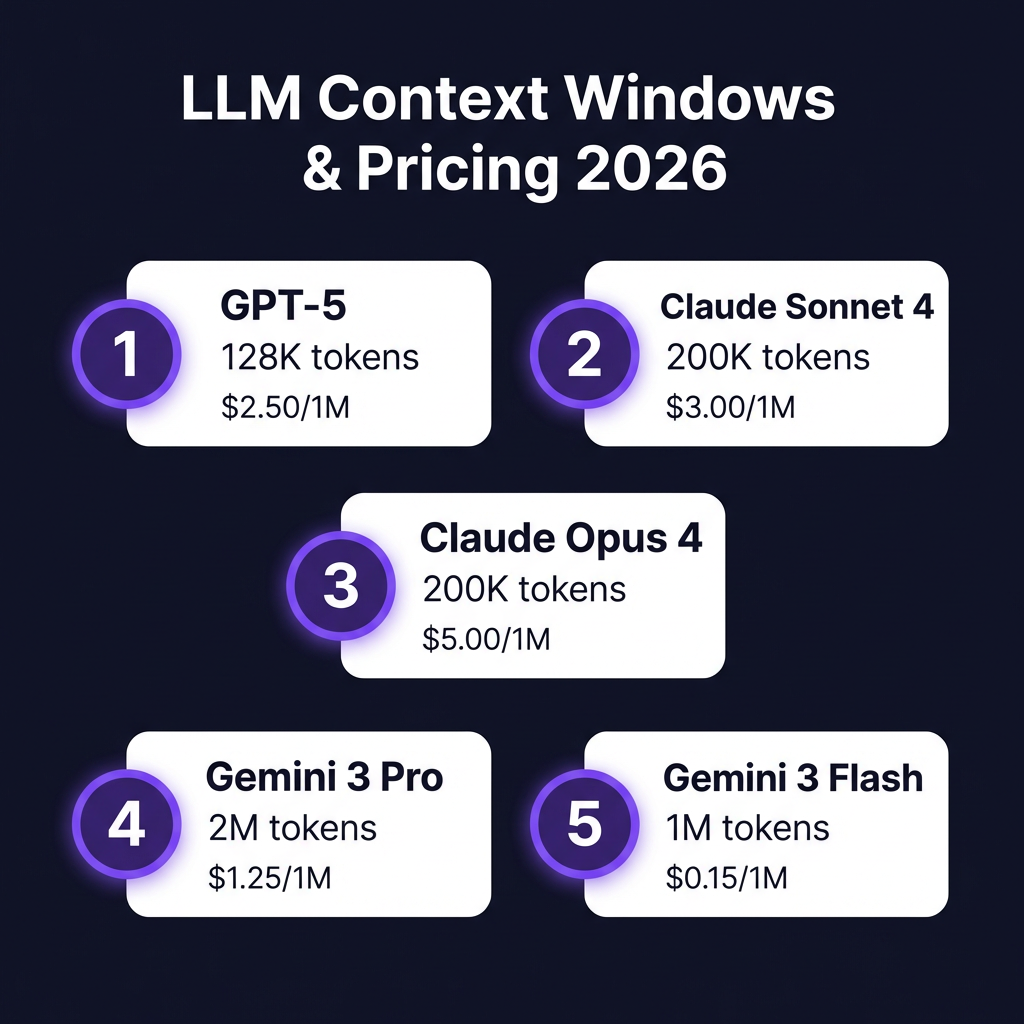
Context Window Sizes (2026)
| Model | Context Window | Cost per 1M Input Tokens |
|---|---|---|
| GPT-5 | 128K | $2.50 |
| GPT-5.4 | 1M | $30.00 |
| Claude Sonnet 4 | 200K | $3.00 |
| Claude Opus 4 | 200K | $5.00 |
| Gemini 3 Pro | 2M | $1.25 |
| Gemini 3 Flash | 1M | $0.15 |
Pattern 6: Prompt Versioning and A/B Testing
Treat prompts like code. Version them. Test them.
Versioning Strategy
prompts/
  ├── v1.0.0/
  │   ├── system.txt
  │   └── examples.json
  ├── v1.1.0/
  │   ├── system.txt
  │   └── examples.json
  └── latest -> v1.1.0/
Key Metrics to Track
- Response quality (human rating or LLM-as-judge)
- Token usage
- Latency
- Error rate
Pattern 7: Error Handling and Fallbacks
LLMs fail. Your system shouldn’t.
| Failure | Cause | Mitigation |
|---|---|---|
| Invalid JSON | Model hallucination | Schema validation + retry |
| Timeout | Slow response | Circuit breaker + fallback |
| Rate limit | Too many requests | Exponential backoff |
| Refusal | Safety filter | Fallback to simpler prompt |
| Hallucination | Bad retrieval | Confidence threshold |
Model-Specific Optimization
Different models respond to different prompting styles.
GPT-5 (OpenAI)
- Responds well to explicit instructions
- Good at following output formats
- Use
response_formatfor JSON - Temperature 0.3-0.5 for deterministic tasks
Claude (Anthropic)
- Excellent at following complex reasoning chains
- Prefers conversational prompts
- Use XML tags for structure
- Temperature 0.0-0.3 for precision
Gemini (Google)
- Strong multimodal capabilities
- Prefers few-shot examples over zero-shot
- Good at long-context tasks
- Temperature 0.2-0.4 for balanced output
Measuring Prompt Performance
You can’t improve what you don’t measure.
| Metric | Target |
|---|---|
| Output quality | >8.0/10 |
| Token efficiency | <500 tokens/response |
| Latency | <2s p99 |
| Error rate | <1% |
Key Takeaways
- Structure beats cleverness — The Role-Context-Task-Output framework produces consistent results
- Measure everything — Track quality, cost, and latency per prompt version
- Plan for failure — Implement retries, fallbacks, and validation
- Version your prompts — Treat them like production code
- Optimize for your model — Each LLM family has different strengths
Prompt engineering isn’t about writing perfect prompts. It’s about building systems that produce reliable, measurable results at scale.
FAQ
How do I choose the right model for my use case?
Start with GPT-5 or Claude Sonnet for general tasks. Use GPT-5.4 or Claude Opus only when you need maximum reasoning capability. For cost-sensitive applications, Gemini 3 Flash at $0.15/1M tokens is the best value.
Should I use fine-tuning or prompt engineering?
Prompt engineering first. It’s faster, cheaper, and more flexible. Consider fine-tuning only when you have thousands of examples and need consistent output format that prompting can’t achieve.
How do I handle prompt injection attacks?
Never execute LLM output directly. Use structured output schemas, validate all responses, and implement input sanitization. For untrusted inputs, use a dedicated moderation layer.
What’s the optimal temperature setting?
Use 0.0-0.3 for deterministic tasks (classification, extraction). Use 0.5-0.7 for creative tasks (content generation). Use 0.3-0.5 for code generation.
References
- IBM Prompt Engineering Guide 2026
- CrazyRouter AI Prompt Engineering Best Practices
- Thomas Wiegold Blog: Prompt Engineering Best Practices 2026
- Groovy Web: Prompt Engineering for Developers
- Cloudidr LLM API Pricing 2026
- BenchLM.ai LLM Pricing Comparison
Ready to build AI-powered features into your SaaS? Fungies.io handles payments, tax compliance, and checkout—so you can focus on the AI that differentiates your product. Get started free.