85% of developers now use AI coding tools regularly. If you’re not using one yet, you’re officially in the minority.
The AI coding assistant market exploded in 2025-2026. What started as fancy autocomplete has evolved into autonomous coding agents that can plan, write, test, and deploy entire applications from natural language prompts.
But here’s the problem: with dozens of options and pricing that ranges from free to $200/month, choosing the right tool feels overwhelming. I’ve spent weeks testing the top contenders, analyzing real benchmark data, and talking to developers who actually use these tools in production.
This guide cuts through the marketing fluff. You’ll get real pricing, actual SWE-bench scores, and honest assessments of what each tool does well (and where it falls short).
What Makes an AI Coding Assistant “Good” in 2026?
Before diving into the rankings, let’s establish the criteria:
- Coding Accuracy (SWE-bench Verified): The industry-standard benchmark tests whether AI can resolve real GitHub issues. Higher scores mean the AI writes code that actually works.
- Integration Depth: Does it work in your IDE? Your terminal? Your cloud environment? The best tools meet you where you already work.
- Agentic Capabilities: Can the AI execute multi-step tasks autonomously? Run terminal commands? Edit multiple files? This separates 2026’s leaders from legacy autocomplete tools.
- Pricing Transparency: Some tools advertise $10/month but bill you $200+ after overages. We’ll show you the real costs.
- Context Understanding: How much of your codebase can the AI comprehend? This matters enormously for large projects.
The 10 Best AI Coding Assistants (Ranked)
1. Claude Code — Best for Complex Reasoning & Terminal Work
SWE-bench Score: 78.2% (Claude Opus 4.6 Thinking)
Pricing: $20/month (Pro) | $100/month (Max 5x) | $200/month (Max 20x)
Claude Code isn’t an IDE plugin. It’s a terminal-based AI agent that fundamentally changes how you interact with code. Instead of clicking through menus, you describe what you want in plain English, and Claude executes.
What makes it special:
- Deep reasoning capabilities — Claude Opus 4.6 consistently outperforms competitors on complex refactoring tasks
- Native terminal integration — runs commands, reads files, and edits code autonomously
- Massive context window — understands entire codebases, not just the file you’re editing
- The
/loopcommand lets Claude work iteratively on complex tasks without constant supervision
Best for: Senior developers working on complex architectures, refactoring large codebases, or anyone who lives in the terminal.
The catch: No IDE integration means you’re switching contexts. And at $200/month for heavy usage, it’s not cheap.
2. Cursor — Best All-Round AI IDE
SWE-bench Score: 76.4% (Claude Sonnet 4.6 via Cursor)
Pricing: Free | $20/month (Pro) | $40/month (Pro+ with team features) | $60/month (Ultra)
Cursor took the developer world by storm in 2024-2025, and for good reason. It’s a full VS Code fork with AI deeply integrated at every layer — not bolted on as an afterthought.
What makes it special:
- Composer mode handles multi-file edits with natural language
- Tab completion that actually understands your codebase
- @-mentions let you reference specific files, documentation, or web sources
- Agent mode can execute terminal commands and iterate on errors
- Cloud Automations (March 2026) — always-on agents triggered by events
Best for: Individual developers and teams who want AI-native development without leaving their IDE workflow.
The catch: Credit-based pricing can surprise you. Heavy users on frontier models often hit limits before month-end.
3. GitHub Copilot — Best Value & GitHub Integration
SWE-bench Score: 72.8% (GPT-5.2 Codex)
Pricing: Free (2,000 completions/month) | $10/month (Pro) | $19/month (Business) | $39/month (Enterprise)
Copilot started the AI coding revolution in 2021. In 2026, it’s evolved far beyond autocomplete into a genuine coding agent — and at $10/month for Pro, it’s the best value in the market.
What makes it special:
- 300 premium requests/month on Pro — more than most developers need
- Multi-model support including Claude Opus 4.6, GPT-5.4, and Codex
- Agent mode in VS Code can use tools, run commands, and work with MCP servers
- Tight GitHub integration — PR summaries, code review, issue-to-PR pipeline
- Works in VS Code, JetBrains, Neovim, Visual Studio, and Xcode
Best for: Teams already using GitHub, developers who want AI assistance without switching editors, and budget-conscious users.
The catch: Less powerful than Cursor or Claude Code for complex agentic tasks. The IDE experience feels more “AI-assisted” than “AI-native.”
4. Windsurf — Best for Large Codebases & Enterprise
SWE-bench Score: ~74% (SWE-1.5 proprietary model)
Pricing: Free (25 credits/month) | $20/month (Pro) | $40/user/month (Teams) | $200/month (Max)
Windsurf (formerly Codeium) has quietly built one of the most capable AI coding platforms — especially for enterprise teams dealing with massive, complex codebases.
What makes it special:
- Proprietary SWE-1.5 model — 13x faster than Claude Sonnet 4.5 for certain tasks
- Fast Context technology for rapid codebase understanding
- Codemaps — AI-powered visual code navigation
- Cascade agent handles multi-file edits and project-level reasoning
- Strong enterprise compliance (SOC 2, ISO 27001)
Best for: Enterprise teams, developers working on monolithic applications or microservices architectures, regulated industries.
5. Replit Agent — Best for Rapid Prototyping
SWE-bench Score: ~65% (estimated)
Pricing: Free (limited) | $20/month (Core) | $40/user/month (Teams)
Replit Agent takes a fundamentally different approach: instead of augmenting your existing workflow, it replaces it. Describe what you want in plain English, and the Agent builds, debugs, and deploys it entirely in the cloud.
Best for: Non-technical founders, rapid prototyping, learning to code, simple CRUD applications.
6. Augment Code — Best Context Understanding
SWE-bench Score: ~70% (estimated)
Pricing: $20/month (Indie — 40,000 credits) | $60/month (Standard — 130,000 credits) | $250/month (Max)
Augment Code has built what might be the industry’s best context engine. It doesn’t just read your current file — it understands relationships across your entire codebase using pre-indexed vector embeddings.
7. Amazon Q Developer — Best for AWS Workloads
SWE-bench Score: ~68% (estimated)
Pricing: Free (unlimited completions + 50 agentic requests) | $19/month (Professional)
If you live in AWS, Amazon Q Developer is a no-brainer. It’s deeply integrated with the AWS ecosystem in ways no third-party tool can match.
8. Aider — Best Open-Source Option
SWE-bench Score: ~62% (varies by model)
Pricing: Free (open source — you pay for API usage only)
Aider is the OG open-source AI coding assistant. It runs in your terminal, integrates with Git, and lets you use any model you want — including local models via Ollama.
9. JetBrains AI Assistant / Junie — Best for JetBrains Users
SWE-bench Score: ~66% (estimated)
Pricing: $10/month (AI Pro) | $20/month (AI Ultimate)
JetBrains finally delivered a competitive AI assistant in 2026. Junie, their agentic coding feature, brings JetBrains IDEs up to parity with Cursor and Copilot.
10. Gemini Code Assist — Best Free Option
SWE-bench Score: 75.8% (Gemini 3 Flash High Reasoning)
Pricing: Free (generous limits) | $19/month (Standard)
Google’s Gemini Code Assist has become surprisingly capable — and the free tier is generous enough for many developers to never need to pay.

Complete Pricing Comparison Table
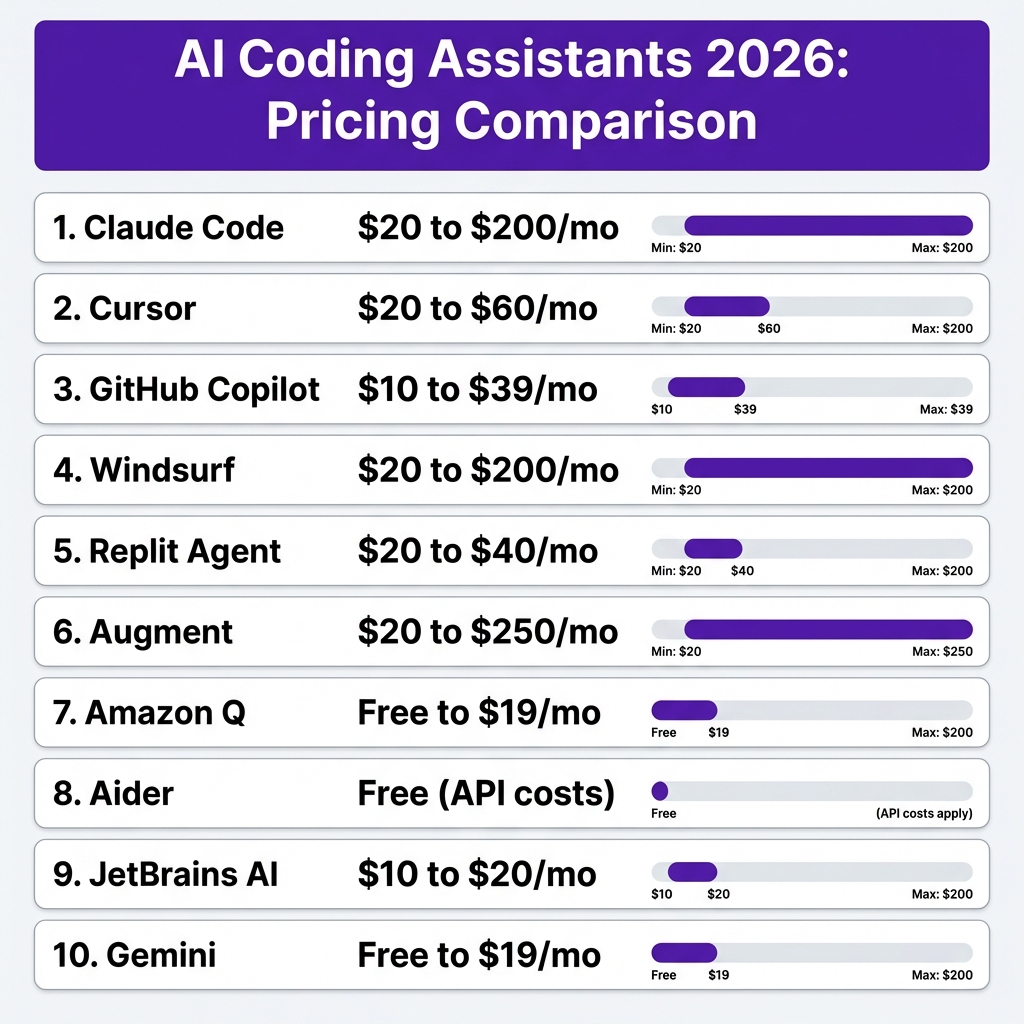
| Tool | Free Tier | Entry Paid | Mid Tier | Premium | Best For |
|---|---|---|---|---|---|
| Claude Code | None | $20/mo | $100/mo | $200/mo | Complex reasoning |
| Cursor | 2K completions | $20/mo | $40/mo | $60/mo | All-round AI IDE |
| GitHub Copilot | 2K completions | $10/mo | $19/mo | $39/mo | Value, GitHub integration |
| Windsurf | 25 credits | $20/mo | $40/mo | $200/mo | Large codebases |
| Replit Agent | Limited | $20/mo | $40/mo | Custom | Rapid prototyping |
| Augment | None | $20/mo | $60/mo | $250/mo | Context understanding |
| Amazon Q | Unlimited | $19/mo | — | — | AWS workloads |
| Aider | Free | API costs | — | — | Privacy, control |
| JetBrains AI | Limited | $10/mo | $20/mo | — | JetBrains users |
| Gemini | Generous | $19/mo | — | — | Free option seekers |
SWE-bench Performance Rankings
SWE-bench Verified is the industry-standard benchmark for real-world coding tasks. Here’s how the underlying models perform:
| Model | SWE-bench Score | Cost per Task | Provider |
|---|---|---|---|
| Gemini 3.1 Pro Preview | 78.8% | $0.78 | |
| GPT 5.4 | 78.2% | $0.80 | OpenAI |
| Claude Opus 4.6 (Thinking) | 78.2% | $1.22 | Anthropic |
| Claude Sonnet 4.6 | 77.4% | $1.30 | Anthropic |
| GPT 5.3 Codex | 78.0% | $0.46 | OpenAI |
| Gemini 3 Flash (High) | 75.8% | $0.36 | |
| Qwen3-Coder-Next | ~64% | FREE | Alibaba |
Key insight: Higher SWE-bench scores correlate with better real-world performance, but cost per task matters too. GPT 5.3 Codex delivers 78% accuracy at just $0.46 per task — excellent value.
How to Choose the Right AI Coding Assistant
Choose Claude Code if:
- You work on complex architectural decisions
- You prefer terminal-based workflows
- You need the deepest reasoning capabilities
- Budget isn’t your primary constraint
Choose Cursor if:
- You want the best all-round AI IDE experience
- You’re willing to pay $20/month for premium features
- You value community and ecosystem momentum
- You need both inline assistance and agentic capabilities
Choose GitHub Copilot if:
- You want the best value ($10/month)
- You’re already using GitHub
- You work across multiple IDEs
- You want predictable pricing without overage surprises
The Hidden Costs Nobody Talks About
Here’s what the pricing pages don’t tell you:
- Credit Multipliers: Premium models often cost 2-5x more credits than base models. That “40,000 credits” plan might only get you 8,000 Claude Opus requests.
- Overage Charges: Some tools bill you API rates after hitting limits. Heavy users can see $200+ monthly bills even on “$20” plans.
- Context Window Costs: Large codebases consume more tokens per request. What works for a small project might be 3x more expensive at scale.
- Add-on Fees: Cursor’s Bugbot ($40/user/month), extra seats, team features — the extras add up fast.
- The Real Cost of Free: Open-source tools like Aider shift costs to API calls. Typical usage runs $10-30/month — not truly free, just differently priced.
Key Takeaways
- 85% of developers now use AI coding tools — if you’re not, you’re falling behind
- GitHub Copilot at $10/month is the best value for most developers
- Claude Code leads on complex reasoning but costs $20-200/month
- Cursor offers the best IDE-native experience at $20/month
- Free tiers are genuinely usable — start with Copilot Free, Cursor Free, or Gemini Code Assist
- SWE-bench scores above 75% indicate production-ready coding accuracy
- The “best” tool depends on your workflow — terminal users love Claude, IDE users love Cursor, GitHub users love Copilot
FAQ
What’s the best free AI coding assistant?
GitHub Copilot Free (2,000 completions + 50 chats/month), Cursor Free, or Gemini Code Assist all offer genuinely usable free tiers. For completely free open-source options, try Aider with local models via Ollama.
Can AI coding assistants replace developers?
No. They’re productivity multipliers, not replacements. The best developers use AI to move faster on routine tasks while focusing their expertise on architecture, design, and complex problem-solving.
Which AI coding assistant has the highest SWE-bench score?
Gemini 3.1 Pro Preview leads at 78.8%, followed by GPT 5.4 and Claude Opus 4.6 (both at 78.2%).
Are AI coding assistants secure?
Generally yes for reputable tools, but review their data policies. Enterprise tools like Windsurf and Augment offer stronger compliance. For maximum privacy, use Aider with local models.
How much should I budget for AI coding tools?
Most developers spend $10-40/month. Heavy users on premium tiers might spend $60-200/month. Start cheap and upgrade based on actual usage.
Can I use multiple AI coding assistants?
Absolutely. Many developers use Cursor or Copilot for daily coding, Claude Code for complex tasks, and specialized tools for specific workflows.
What’s the difference between autocomplete and agentic coding?
Autocomplete suggests code as you type. Agentic coding lets the AI execute multi-step tasks autonomously — running tests, fixing errors, and iterating until the task is complete.
Conclusion
The AI coding assistant market in 2026 offers something for everyone. Whether you’re a budget-conscious beginner or an enterprise team with complex requirements, there’s a tool that fits.
My recommendation? Start with GitHub Copilot Free to learn AI-assisted coding. If you hit limits, upgrade to Copilot Pro at $10/month or try Cursor at $20/month for a more AI-native experience. For complex tasks that require deep reasoning, add Claude Code to your toolkit.
The developers who thrive in 2026 won’t be those who resist AI — they’ll be those who learn to wield it effectively.
Ready to build something? Get started with Fungies — the Merchant of Record platform that handles payments, tax compliance, and checkout for SaaS founders and digital creators.